
Skip to content
KitploitKITPLOIT
ツールブログ
提出
ツールブログ
提出

ハッキング、侵入テスト、サイバーセキュリティツールをあなたのセキュリティアーセナルに!

Kitploitはハッキング、サイバーセキュリティ、ペネトレーションテストのツールディレクトリです。最新のプロジェクトアップデートを見つけて、脆弱性の発見、システム分析、テストの自動化、セキュリティの強化を行いましょう。

··フィード·お問い合わせ·プライバシー·© 2026 Kitploit

ツールディレクトリ

カテゴリ

すべてのカテゴリを見る
Loading categories
nexmon — Broadcom/Cypress WiFiチップ向けのCベースのファームウェアパッチフレームワークで、モニターモード、フレームインジェクションなどを可能にします。 | Kitploit
ツール/GitHubGitHub/seemoo-lab/nexmon
組み込みシステムセキュリティパケットスニッフィングと分析Wi-Fi監査リバースエンジニアリング情報収集ワイヤレスセキュリティハードウェアハッキングハードウェアとIoTセキュリティファームウェア解析
GitHubseemoo-lab/nexmon

nexmon

Broadcom/Cypress WiFiチップ向けのCベースのファームウェアパッチフレームワークで、モニターモード、フレームインジェクションなどを可能にします。

2.9k5051ヶ月前Kitploit レビュー済み

人気

すべて見る →

コミュニティで最も使われているツールを見つけましょう。

すべてのツールを探索

ツールコレクションを閲覧

すべてのツールを見る →
共有
リポジトリを見る

NexMon logo

nexmon とは?

Nexmon は、Broadcom/Cypress WiFi チップ向けの C 言語ベースのファームウェアパッチフレームワークです。これを使用すると、例えば radiotap ヘッダー付きモニターモードやフレームインジェクションを有効にするなど、独自のファームウェアパッチを作成できます。

以下に、nexmon で可能なことの概要を示します。このリポジトリは主に、多くのチップでモニターモードとフレームインジェクションを有効にすることに焦点を当てています。追加機能が必要な場合は、次のプロジェクトが参考になるかもしれません:
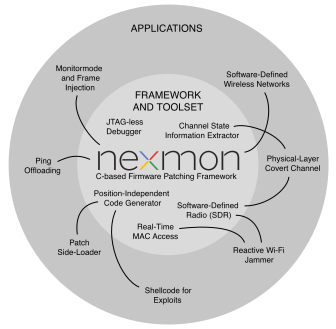
  • http://nexmon.org/jammer: 実際の Wi-Fi ジャマーで、進行中のフレーム送信に任意のジャミング信号を重ねることができます。
    • Wi-Fi チップをソフトウェア無線として使用し、ジャミング信号を生成します
    • 2.4 GHz 帯で 80 MHz 帯域幅などの非標準チャンネルを使用できます
    • 任意の送信電力を設定できます
    • D11 コアのリアルタイム MAC 実装にパッチを適用できます
  • http://nexmon.org/csi: さまざまな Wi-Fi チップ向けのチャネル状態情報抽出器
    • 80 MHz 帯域幅の最大 4x4 MIMO 送信の CSI を抽出できます
  • http://nexmon.org/debugger: JTAG アクセスなしで ARM マイクロコントローラをデバッグ
    • デバッグレジスタへの低レベルアクセスを可能にし、ブレークポイントとウォッチポイントを設定でき、シングルステップ実行も可能にします
  • http://nexmon.org/covert_channel: Wi-Fi 信号に情報を隠すコーバートチャネル
    • ジャマーよりも高度なソフトウェア無線機能
    • チャネル状態情報抽出の応用例
  • http://nexmon.org/sdr: Wi-Fi チップをソフトウェア無線として使用
    • 現時点では、2.4 GHz および 5 GHz の両方の Wi-Fi 帯域で送信のみが動作します

NexMon logo

警告

当社のソフトウェアはハードウェアを損傷し、ハードウェアの保証を無効にする可能性があります。当社のツールは自己責任で使用してください。これらの条件に同意できない場合は、nexmon を使用しないでください。

対応デバイス

現在、以下のデバイスが nexmon ファームウェアパッチでサポートされています。

1 bcm43430a1 は、以前は誤って bcm43438 とラベル付けされていました。

2 ioctl を介してフレームをインジェクションするには、LD_PRELOAD=libfakeioctl.so の代わりに LD_PRELOAD=libnexmon.so を使用してください。

3 フラッシュパッチは 8 バイト長で、8 バイト境界に整列している必要があります。

4 初の 60 GHz Wi-Fi ルーター Talon AD7200 に搭載されている 802.11ad Wi-Fi チップです。nexmon-arc を使用してファームウェアにパッチを適用し、カスタム LEDE イメージ lede-ad7200 で実行してください。

5 nexmon コードと干渉するため、リージョン 1 の実行保護 (Execute Never と呼ばれる) を無効にしました (Section で Permission fault が発生)。

6 nexutil を使用するには、SELinux を無効にするか、permissive に設定する必要があります。

7 nexmon で Pico SDK を使用するアプリケーションの例については、pico-nexmon を参照してください。

8 フラッシュパッチは 16 バイト長で、16 バイト境界に整列している必要があります。

9 ファームウェア、nexutil のインストールと SELinux ポリシーの設定に Magisk モジュールを使用します。

凡例

  • M = モニターモード
  • RT = RadioTap ヘッダー付きモニターモード
  • I = フレームインジェクション
  • FP = フラッシュパッチング
  • UC = Ucode 圧縮
  • CT = c't 記事サポート(一貫したサポートが必要な場合は、ct-artikel ブランチを使用してください)

独自のファームウェアパッチを作成する手順

bcm4330、bcm4339、bcm4358 向けのパッチを Linux(例: Ubuntu 16.04)を実行する x86 コンピュータでビルドする

  • いくつかの依存関係をインストールします: sudo apt-get install git gawk qpdf adb flex bison
  • x86_64 システムにのみ必要、i386 ライブラリをインストールします: ``` sudo dpkg --add-architecture i386 sudo apt-get update sudo apt-get install libc6:i386 libncurses5:i386 libstdc++6:i386
    root@kitploit:~
  • リポジトリをクローンします: git clone https://github.com/seemoo-lab/nexmon.git
  • リポジトリのルートディレクトリに移動します: cd nexmon
    • ビルド環境をセットアップします: source setup_env.sh
    • ビルドツールをコンパイルし、元のファームウェアファイルからucodeとflashpatchesを抽出します: make
  • 対象デバイスの patches フォルダに移動します(例: Nexus 5 の場合は bcm4339): cd patches/bcm4339/6_37_34_43/nexmon/
    • パッチ適用済みファームウェアをコンパイルします: make
    • 元のファームウェアファイルのバックアップを作成します: make backup-firmware
    • パッチ適用済みファームウェアをスマートフォンにインストールします: make install-firmware(事前にスマートフォンがマシンに接続されていることを確認してください)

モニターモードパッチの使用

  • ユーティリティから最低限 nexutil と libfakeioctl をインストールしてください。最も簡単な方法は、このアプリを使用することです: https://nexmon.org/app。ただし、*utilties* フォルダ内で make を実行してソースからビルドすることもできます(この場合、Android NDK が正しくインストールされている必要があります)。
  • ADBツールを使用してAndroidスマートフォンに接続します: adb shell
  • アクセスポイントに接続していないことを確認してください
  • nexutil を使用してモニターモードを有効にします: nexutil -m2
  • この時点でモニターモードが有効になります。airmon-ng を呼び出す必要はありません。
  • 重要: ほとんどのツールは正しく動作するために Radiotap インターフェースを必要とします。libfakeioctl はこの種のインターフェースをエミュレートするので、お気に入りのツール(例: tcpdump や airodump-ng)を呼び出す際には LD_PRELOAD を使用してこのライブラリをロードしてください: LD_PRELOAD=libfakeioctl.so tcpdump -i wlan0
  • 未検証のヒント: XDA メンバー ruleh のおかげで、ネイティブモニターモードを有効にする bcmdhd ドライバーパッチがあります。参照: https://github.com/ruleh/misc/tree/master/monitor

Nexus 5 で nexutil を UDP 経由で使用する

root権限なしでファームウェアと通信できるように、nexutil でも使用される libnexio を介してアクセス可能な UDP インターフェースを作成しました。まず、セキュリティクッキーを設定して、一般的に root 権限を持っていることをファームウェアに証明する必要があります。その後、UDP ベースの接続に使用できます。また、wlan0 インターフェースには 192.168.222.0/24 の範囲の IP アドレスが必要です。または、デフォルトの nexutil broadcast-ip を変更する必要があります:

  • wlan0 インターフェースの IP アドレスを設定します: ifconfig wlan0 192.168.222.1 netmask 255.255.255.0
  • root としてセキュリティクッキーを設定します: nexutil -x<cookie (uint)>
  • 例えばモニターモードを有効にするために UDP 接続を開始します: nexutil -X<cookie> -m1

Raspbian/Raspberry Pi OS を使用して RPI3/Zero W の bcm43430a1 または RPI3+/RPI4 の bcm434355c0 または RPI Zero 2W の bcm43436b0 向けパッチをビルドする(推奨)

注記: 現在、カーネルバージョン 4.4(非推奨)、4.9、4.14、4.19、5.4、5.10、5.15 をサポートしています。Raspbian には bcm43455c0 用のファームウェアバージョン 7.45.154 が含まれています。また、Cypress の新しいファームウェアリリース 7.45.189 もサポートしています。Raspberry Pi OS にはファームウェアバージョン 7.45.206 が含まれています。どれが最適かお試しください。

  • 次のコマンドが root として実行されていることを確認してください: sudo su

  • Raspbian のインストールをアップグレードします: apt-get update && apt-get upgrade

  • ドライバをビルドするためのカーネルヘッダーと依存パッケージをインストールします: sudo apt install raspberrypi-kernel-headers git libgmp3-dev gawk qpdf bison flex make autoconf libtool texinfo

  • リポジトリをクローンします: git clone https://github.com/seemoo-lab/nexmon.git

  • リポジトリのルートディレクトリに移動します: cd nexmon

  • 32bit Raspbian/Raspberry Pi OS の場合

    • /usr/lib/arm-linux-gnueabihf/libisl.so.10 が存在するか確認し、存在しない場合はソースからコンパイルします:
    • cd buildtools/isl-0.10, ./configure, make, make install,

モニターモードパッチの使用

  • Mame82 の以前の作業のおかげで、次のコマンドを実行して新しいモニターモードインターフェースをセットアップできます:iw phy `iw dev wlan0 info | gawk '/wiphy/ {printf "phy" $2}'` interface add mon0 type monitor
  • To activate monitor mode in the firmware, simply set the interface up: ifconfig mon0 up.
  • At this point, monitor mode is active. There is no need to call airmon-ng.
  • The interface already set the Radiotap header, therefore, tools like tcpdump or airodump-ng can be used out of the box: tcpdump -i mon0
  • Optional: To make the RPI3 load the modified driver after reboot:
    • Find the path of the default driver at reboot: modinfo brcmfmac #the first line should be the full path
    • Backup the original driver: mv "<PATH TO THE DRIVER>/brcmfmac.ko" "<PATH TO THE DRIVER>/brcmfmac.ko.orig"
    • Copy the modified driver (Kernel 4.9): cp /home/pi/nexmon/patches/bcm43430a1/7_45_41_46/nexmon/brcmfmac_kernel49/brcmfmac.ko "<PATH TO THE DRIVER>/"
    • Copy the modified driver (Kernel 4.14): cp /home/pi/nexmon/patches/bcm43430a1/7_45_41_46/nexmon/brcmfmac_4.14.y-nexmon/brcmfmac.ko "<PATH TO THE DRIVER>/"
    • Probe all modules and generate new dependency: depmod -a

How to build the utilities

To build the utilities such as nexmon or dhdutil for Android, you need to download the old NDK version 11c, extract it and export the environment variable NDK_ROOT pointing to the directory where you extracted the NDK files.

How to extract the ROM

The Wi-Fi firmware consists of a read-only part stored in the ROM of every Wi-Fi chip and another part that is loaded by the driver into the RAM. To analyze the whole firmware, one needs to extract the ROM. There are two options to do this. Either you write a firmware patch that simply copies the contents of the ROM to RAM and then you dump the RAM, or you directly dump the ROM after loading the regular firmware into the RAM. Even though, the second option is easier, it only works, if the ROM can be directly accessed by the driver, which is not always the case. Additionally, the firmware loaded into RAM can contain ROM patches that overlay the data stored in ROM. By dumping the ROM after loading the original RAM firmware, it contains flash patches. Hence, the ROM needs to be dumped again for every RAM firmware update to be consistent. As a conclusion, we prefer to dump the clean ROM after copying it to RAM.

Dumping the ROM directly

To dump the ROM directly, you need to know, where to find it and how large it is. On chips with Cortex-M3 it is usually at upper addresses such as 0x800000, while on chips with Cortex-R4 it is likely at 0x0. Run dhdutil to perform the dump:

root@kitploit:~
dhdutil membytes -r 0x0 0xA0000 > rom.bin```

## Dumping a clean ROM after copying to RAM
For the BCM4339 and BCM4358, we created `rom_extraction` projects that load a firmware patch that copies ROM to 
RAM and them dumps it using dhdutil. To dump the ROM simply execute the following in the project directory:

make dump-rom```

After ROM extraction, the rom.bin file will be copies to the corresponding firmwares subdirectory. To apply the flash patches of a specific RAM firmware version, enter its directory and execute:

root@kitploit:~
make rom.bin```


# Structure of this repository
* `buildtools`: Contains compilers and other tools to build the firmware
* `firmwares`
  * `<chip version>`
    * `<firmware version>`
      * `<firmware file>`: The original firmware that will be loaded into the RAM of the WiFi Chip
      * `definitions.mk`: Contains mainly firmware specific addresses
      * `structs.h`: Structures only valid for this firmware version
      * `Makefile`: Used to extract flashpatches and ucode
      * `flashpatches.c` (generated by Makefile): Contains flashpatches
      * `ucode.bin` (extracted by Makefile): Contains uncompressed Ucode
    * `structs.common.h`: Structures that are common between firmware versions
* `patches`
  * `<chip version>`
    * `<firmware version>`
      * `nexmon`
        * `Makefile`: Used to build the firmware
        * `patch.ld`: Linker file
        * `src`
          * `patch.c`: General patches to the firmware
          * `injection.c`: Code related to frame injection
          * `monitormode.c`: Code related to monitor mode with radiotap headers
          * `ioctl.c`: Handling of custom IOCTLs
          * ...
        * `obj` (generated by Makefile): Object files created from C files
        * `log` (generated by Makefile): Logs written during compilation
        * `gen` (generated by Makefile): Files generated during the build process
          * `nexmon.pre` (generated by gcc plugin): Extracted at-attributes and targetregion-pragmas
          * `nexmon.ld` (generated from nexmon.pre): Linker file use to place patch code at defined addresses in the firmware
          * `nexmon.mk` (generated from nexmon.pre): Make file used take code from patch.elf and place it into firmware
          * `flashpatches.ld` (generated from nexmon.pre): Linker file that places flashpatches at target locations in firmware ROM
          * `flashpatches.mk` (generated from nexmon.pre): Make file used to insert flashpatch config and data structures into firmware
          * `patch.elf` (generated from object files and linker scripts): contains the newly compiled code placed at predefined addresses
    * `common`
      * `wrapper.c`: Wrappers for functions that already exist in the firmware
      * `ucode_compression.c`: [tinflate](http://achurch.org/tinflate.c) based ucode decompression
      * `radiotap.c`: RadioTap header parser
      * `helper.c`: Helpful utility functions
    * `driver`: Patched brcmfmac driver
    * `include`: Common include files
      * `firmware_version.h`: Definitions of chip and firmware versions
      * `patcher.h`: Macros use to perform patching for existing firmware code (e.g., BPatch patches a branch instruction)
      * `capabilities.h`: Allows to indicate capabilities (such as, monitor mode and frame injection)
      * `nexioctl.h`: Defines custom IOCTL numbers

# Related projects
* [bcmon](https://bcmon.blogspot.de/): Monitor Mode and Frame Injection for the bcm4329 and bcm4330
* [monmob](https://github.com/tuter/monmob): Monitor Mode and Frame Injection for the bcm4325, bcm4329 and bcm4330
* [P4wnP1](https://github.com/mame82/P4wnP1): Highly customizable attack platform, based on Raspberry Pi Zero W and Nexmon
* [kali Nethunter OS](https://github.com/nethunteros): ROM that brings Kali Linux to smartphones with Nexmon support
* [dustcloud-nexmon](https://github.com/dgiese/dustcloud-nexmon): Nexmon for Xiaomi IoT devices (ARM based)
* [InternalBlue](https://github.com/seemoo-lab/internalblue): Bluetooth experimentation framework based on Reverse Engineering of Broadcom Bluetooth Controllers

# Interesting articles on firmware hacks
If you know more projects that use nexmon or perform similar firmware hacks, let us know and we will add a link.

* [Project Zero](https://googleprojectzero.blogspot.de/2017/09/over-air-vol-2-pt-1-exploiting-wi-fi.html): Over The Air - Vol. 2, Pt. 1: Exploiting The Wi-Fi Stack on Apple Devices
* [broadpwn](https://blog.exodusintel.com/2017/07/26/broadpwn/): Remotely Compromising Android and IOS via a Bug in Broadcom's Wi-Fi Chipsets
* [Project Zero](https://googleprojectzero.blogspot.de/2017/04/over-air-exploiting-broadcoms-wi-fi_4.html): Over The Air: Exploiting Broadcom's Wi-Fi Stack (Part 1)
* [Project Zero](https://googleprojectzero.blogspot.de/2017/04/over-air-exploiting-broadcoms-wi-fi_11.html): Over The Air: Exploiting Broadcom's Wi-Fi Stack (Part 2) 

# Read my PhD thesis
* Matthias Schulz. [**Teaching Your Wireless Card New Tricks: Smartphone Performance and Security Enhancements through Wi-Fi Firmware Modifications**](http://tuprints.ulb.tu-darmstadt.de/7243/). Dr.-Ing. thesis, Technische Universität Darmstadt, Germany, February 2018. [pdf](http://tuprints.ulb.tu-darmstadt.de/7243/7/dissertation_2018_matthias_thomas_schulz.pdf)

# Read our papers
* F. Gringoli, M. Schulz, J. Link, and M. Hollick. [**Free Your CSI: A Channel State Information Extraction Platform For Modern Wi-Fi Chipsets**](https://doi.org/10.1145/3349623.3355477). Accepted to appear in *Proceedings of the 13th Workshop on Wireless Network Testbeds, Experimental evaluation & CHaracterization (WiNTECH 2019)*, October 2019. [code](https://nexmon.org/csi)
* D. Mantz, J. Classen, M. Schulz, and M. Hollick. [**InternalBlue - Bluetooth Binary Patching and Experimentation Framework**](https://dl.acm.org/citation.cfm?id=3326089). *In Proceedings of the 17th Annual International Conference on Mobile Systems, Applications, and Services (MobiSys '19)*. June 2019.
* M. Schuß, C. A. Boano, M. Weber, M. Schulz, M. Hollick, K. Römer. [**JamLab-NG: Benchmarking Low-Power Wireless Protocols under Controlable and Repeatable Wi-Fi Interference**](https://dl.acm.org/citation.cfm?id=3324331). *Proceedings of the 2019 International Conference on Embedded Wireless Systems and Networks (EWSN 2019)*, February 2019.
* M. Schulz, D. Wegemer, and M. Hollick. [**The Nexmon Firmware Analysis and Modification Framework: Empowering Researchers to Enhance Wi-Fi Devices**](https://doi.org/10.1016/j.comcom.2018.05.015). *Elsevier Computer Communications (COMCOM) Journal*. 2018.
* M. Schulz, J. Link, F. Gringoli, and M. Hollick. [**Shadow Wi-Fi: Teaching Smart- phones to Transmit Raw Signals and to Extract Channel State Information to Implement Practical Covert Channels over Wi-Fi**](https://dl.acm.org/citation.cfm?id=3210333). Accepted to appear in *Proceedings of the 16th ACM International Conference on Mobile Systems, Applications, and Services*, MobiSys 2018, June 2018.
* D. Steinmetzer, D. Wegemer, M. Schulz, J. Widmer, M. Hollick. [**Compressive Millimeter-Wave Sector Selection in Off-the-Shelf IEEE 802.11ad Devices**](https://dl.acm.org/citation.cfm?id=3143384). *Proceedings of the 13th International Conference on emerging Networking EXperiments and Technologies*, CoNEXT 2017, December 2017.
* M. Schulz, D. Wegemer, M. Hollick. [**Nexmon: Build Your Own Wi-Fi Testbeds With Low-Level MAC and PHY-Access Using Firmware Patches on Off-the-Shelf Mobile Devices**](https://dl.acm.org/citation.cfm?id=3131476). *Proceedings of the 11th ACM International Workshop on Wireless Network Testbeds, Experimental Evaluation & Characterization (WiNTECH 2017)*, October 2017. [pdf](https://www.seemoo.tu-darmstadt.de/mschulz/wintech2017) [video](https://youtu.be/m5Zrk4n4hoE)
* M. Schulz, F. Knapp, E. Deligeorgopoulos, D. Wegemer, F. Gringoli, M. Hollick. [**DEMO: Nexmon in Action: Advanced Applications Powered by the Nexmon Firmware Patching Framework**](https://dl.acm.org/citation.cfm?id=3133333), Accepted for publication in *Proceedings of the 11th ACM International Workshop on Wireless Network Testbeds, Experimental Evaluation & Characterization (WiNTECH 2017)*, October 2017. [pdf](https://www.seemoo.tu-darmstadt.de/mschulz/wintech2017demo)
* M. Schulz, F. Gringoli, D. Steinmetzer, M. Koch and M. Hollick. [**Massive Reactive Smartphone-Based Jamming using Arbitrary Waveforms and Adaptive Power Control**](https://dl.acm.org/citation.cfm?id=3098253). Proceedings of the *10th ACM Conference on Security and Privacy in Wireless and Mobile Networks (WiSec 2017)*, July 2017. [pdf](https://www.seemoo.tu-darmstadt.de/mschulz/wisec2017) [video](https://youtu.be/S2XPBK0KdiQ)
* M. Schulz, E. Deligeorgopoulos, M. Hollick and F. Gringoli. [**DEMO: Demonstrating Reactive Smartphone-Based Jamming**](https://dl.acm.org/citation.cfm?id=3106022). Proceedings of the *10th ACM Conference on Security and Privacy in Wireless and Mobile Networks (WiSec 2017)*, July 2017. [pdf](https://www.seemoo.tu-darmstadt.de/mschulz/wisec2017demo)
* M. Schulz. [**Nexmon - Wie man die eigene WLAN-Firmware hackt**](http://heise.de/-3538660), 
c't 26/2016, S. 168, Heise Verlag, 2016.
* M. Schulz, D. Wegemer, M. Hollick. [**DEMO: Using NexMon, the C-based WiFi 
firmware modification framework**](https://dl.acm.org/citation.cfm?id=2942419), 
Proceedings of the *9th ACM Conference on Security and Privacy in Wireless and 
Mobile Networks (WiSec 2016)*, July 2016. [pdf](https://www.seemoo.tu-darmstadt.de/mschulz/wisec2016demo1)
* M. Schulz, D. Wegemer and M. Hollick. [**NexMon: A Cookbook for Firmware 
Modifications on Smartphones to Enable Monitor Mode**](http://arxiv.org/abs/1601.07077), 
CoRR, vol. abs/1601.07077, December 2015. 
[bibtex](http://dblp.uni-trier.de/rec/bibtex/journals/corr/SchulzWH16)

[Get references as bibtex file](https://nexmon.org/bib)

# Reference our project
Any use of this project which results in an academic publication or other publication which includes a bibliography should include a citation to the Nexmon project and probably one of our papers depending on the code you use. Find all references in our [bibtex file](https://github.com/seemoo-lab/nexmon/blob/HEAD/nexmon.bib). Here is the reference for the project only:

@electronic{nexmon:project, author = {Schulz, Matthias and Wegemer, Daniel and Hollick, Matthias}, title = {Nexmon: The C-based Firmware Patching Framework}, url = {https://nexmon.org}, year = {2017} }```

Contact

  • Matthias Schulz [email protected]
  • Daniel Wegemer [email protected]

Powered By

Secure Mobile Networking Lab (SEEMOO)

SEEMOO logo

Networked Infrastructureless Cooperation for Emergency Response (NICER)

NICER logo

Multi-Mechanisms Adaptation for the Future Internet (MAKI)

MAKI logo

Technische Universität Darmstadt

TU Darmstadt logo

ツールをダウンロード
WiFi チップファームウェア バージョン使用デバイスオペレーティング システムMRTIFPUCCT
bcm43305_90_100_41_staSamsung Galaxy S2Cyanogenmod 13.0XXXXO
bcm4335b06.30.171.1_staSamsung Galaxy S4LineageOS 14.1XXXXO
bcm43396_37_34_43Nexus 5Android 6 ストックXXXXXO
bcm43430a117_45_41_26Raspberry Pi 3 and Zero WRaspbian 8XXXXXO
bcm43430a117_45_41_46Raspberry Pi 3 and Zero WRaspbian StretchXXXXXO
bcm43439a077_95_49 (2271bb6 CY)Raspberry Pi Pico WPico SDKXXXX
bcm43451b17_63_43_0iPhone 6iOS 10.1.1 (14B100)XX
bcm434557_45_77_0_hwHuawei P9Android 7 ストックXXXXX
bcm434557_120_5_1_sta_C0Galaxy J7 2017?XX
bcm434557_45_77_0_hw(8-2017)Huawei P9Android 7 ストックXXXXX
bcm4345557_46_77_11_hwHuawei P9Android 8 中国版ストックXXXXX
bcm434557_45_59_16Sony Xperia Z5 CompactLineageOS 14.1XXXXX
bcm43455c07_45_154Raspberry Pi B3+/B4Raspbian Kernel 4.9/14/19XXXX
bcm43455c07_45_189Raspberry Pi B3+/B4Raspbian Kernel 4.14/19, 5.4XXXX
bcm43455c07_45_206Raspberry Pi B3+/B4Raspberry Pi OS Kernel 5.4XXXXX
bcm43455c07_45_234 (4ca95bb CY)Raspberry Pi B3+/B4/5Raspberry Pi OSXX
bcm43436b039_88_4_65Raspberry Pi Zero 2 WRaspberry Pi OS Kernel 5.10XXXXX
bcm43567_35_101_5_staNexus 6Android 7.1.2XXXXO
bcm43587_112_200_17_staNexus 6PAndroid 7 ストックXXXXO
bcm43587_112_201_3_staNexus 6PAndroid 7.1.2 ストックXXXXO
bcm435827_112_300_14_staNexus 6PAndroid 8.0.0 ストックXXXXXO
bcm43596a039_75_155_45_sta_c0Samsung Galaxy S7Android 7 ストックXOX
bcm43596a03,29_96_4_sta_c0Samsung Galaxy S7LineageOS 14.1XXXOX
bcm4375b13,5,618_38_18_staSamsung Galaxy S10root化 + SELinux無効XXXOX
bcm4375b13,5,618_41_8_9_staSamsung Galaxy S20root化 + SELinux無効XXXOX
bcm4389c15,8,920_82_42_sta (r994653)Samsung Galaxy S22 PlusAndroid 14、Magisk で root化XX
bcm4389c15,8,920_101_36_2 (r994653)Google Pixel 7 and 7 ProMagisk で root化XX
bcm4389c15,8,920_101_57 (r1035009)Google Pixel 7 and 7 ProMagisk で root化XX
bcm4398d05,8,924_671_6_9 (r1031525)Google Pixel 8Magisk で root化XX
bcm6715b0517_10_188_6401 (r808804)Asus RT-AX86U Pro純正ファームウェア 3.0.0.4_388.23565/X
qca950044-1-0_55TP-Link Talon AD7200カスタム LEDE イメージ
ln -s /usr/local/lib/libisl.so /usr/lib/arm-linux-gnueabihf/libisl.so.10
  • /usr/lib/arm-linux-gnueabihf/libmpfr.so.4 が存在するか確認し、存在しない場合はソースからコンパイルします:
  • cd buildtools/mpfr-3.1.4, autoreconf -f -i, ./configure, make, make install, ln -s /usr/local/lib/libmpfr.so /usr/lib/arm-linux-gnueabihf/libmpfr.so.4
  • 64bit Raspberry Pi OS の場合

    • sudo dpkg --add-architecture armhf
    • sudo apt-get update
    • sudo apt-get install libc6:armhf libisl23:armhf libmpfr6:armhf libmpc3:armhf libstdc++6:armhf
    • sudo ln -s /usr/lib/arm-linux-gnueabihf/libisl.so.23.0.0 /usr/lib/arm-linux-gnueabihf/libisl.so.10
    • sudo ln -s /usr/lib/arm-linux-gnueabihf/libmpfr.so.6.1.0 /usr/lib/arm-linux-gnueabihf/libmpfr.so.4
  • 次に、ファームウェアパッチをコンパイルするためのビルド環境をセットアップできます

    • ビルド環境をセットアップします: source setup_env.sh
    • ビルドツールをコンパイルし、元のファームウェアファイルからucodeとflashpatchesを抽出します: make
  • bcm43430a1/bcm43455c0/bcm43436b0 チップセットの patches フォルダに移動します: cd patches/bcm43430a1/7_45_41_46/nexmon/ / patches/bcm43455c0/<7_45_154 or 7_45_189>/nexmon/ / cd patches/bcm43436b0/9_88_4_65/nexmon/

    • パッチ適用済みファームウェアをコンパイルします: make
    • 元のファームウェアファイルのバックアップを作成します: make backup-firmware
    • パッチ適用済みファームウェアを RPI3 にインストールします: make install-firmware
  • nexutil をインストールします: リポジトリのルートディレクトリから nexutil フォルダに移動します: cd utilities/nexutil/。nexutil をコンパイルしてインストールします: make && make install。

  • オプション: WiFi インターフェースをより細かく制御するために wpa_supplicant を削除します: apt-get remove wpasupplicant
    また、省電力機能を無効にする(iw dev wlan0 set power_save off)と、ファームウェアのクラッシュを防ぐのに役立ちます。

  • 注記: 通常のアクセスポイントに接続するには、最初に nexutil -m0 を実行する必要があります

  • The new driver should be loaded by default after reboot: reboot  * Note: It is possible to connect to an access point or run your own access point in parallel to the monitor mode interface on the wlan0 interface.