 screetsec/sudomy
Sudomyは、サブドメインを収集し、自動化された偵察(recon)を実行してドメインを分析するためのサブドメイン列挙ツールで、バグハンティングやペネトレーションテストに使用されます。







Sudomy は、サブドメインの収集と、高度な自動偵察(フレームワーク)を実行するドメインの分析を行うサブドメイン列挙ツールです。このツールはOSINT(オープンソースインテリジェンス)活動にも使用できます。
アクティブメソッド
パッシブメソッド
第三者サイト/リソースを評価して選択することで、列挙プロセスを最適化できます。より短い時間でより多くの結果を得ることができます。Sudomy は、これら厳選された22の第三者サイトからデータを収集できます:
  https://censys.io
  https://developer.shodan.io
  https://dns.bufferover.run
  https://index.commoncrawl.org
  https://riddler.io
  https://api.certspotter.com
  https://api.hackertarget.com
  https://api.threatminer.org
  https://community.riskiq.com
  https://crt.sh
  https://dnsdumpster.com
  https://docs.binaryedge.io
  https://securitytrails.com
  https://graph.facebook.com
  https://otx.alienvault.com
  https://rapiddns.io
  https://spyse.com
  https://urlscan.io
  https://www.dnsdb.info
  https://www.virustotal.com
  https://threatcrowd.org
  https://web.archive.org
sudomyの動作方法または偵察フロー。最適な引数を使用してサブドメインを収集し、自動偵察によって分析する方法。
root@maland: ./sudomy -d bugcrowd.com -dP -eP -rS -cF -pS -tO -gW --httpx --dnsprobe -aI webanalyze -sS
この偵察ワークフロー Sudomy v1.1.8#dev
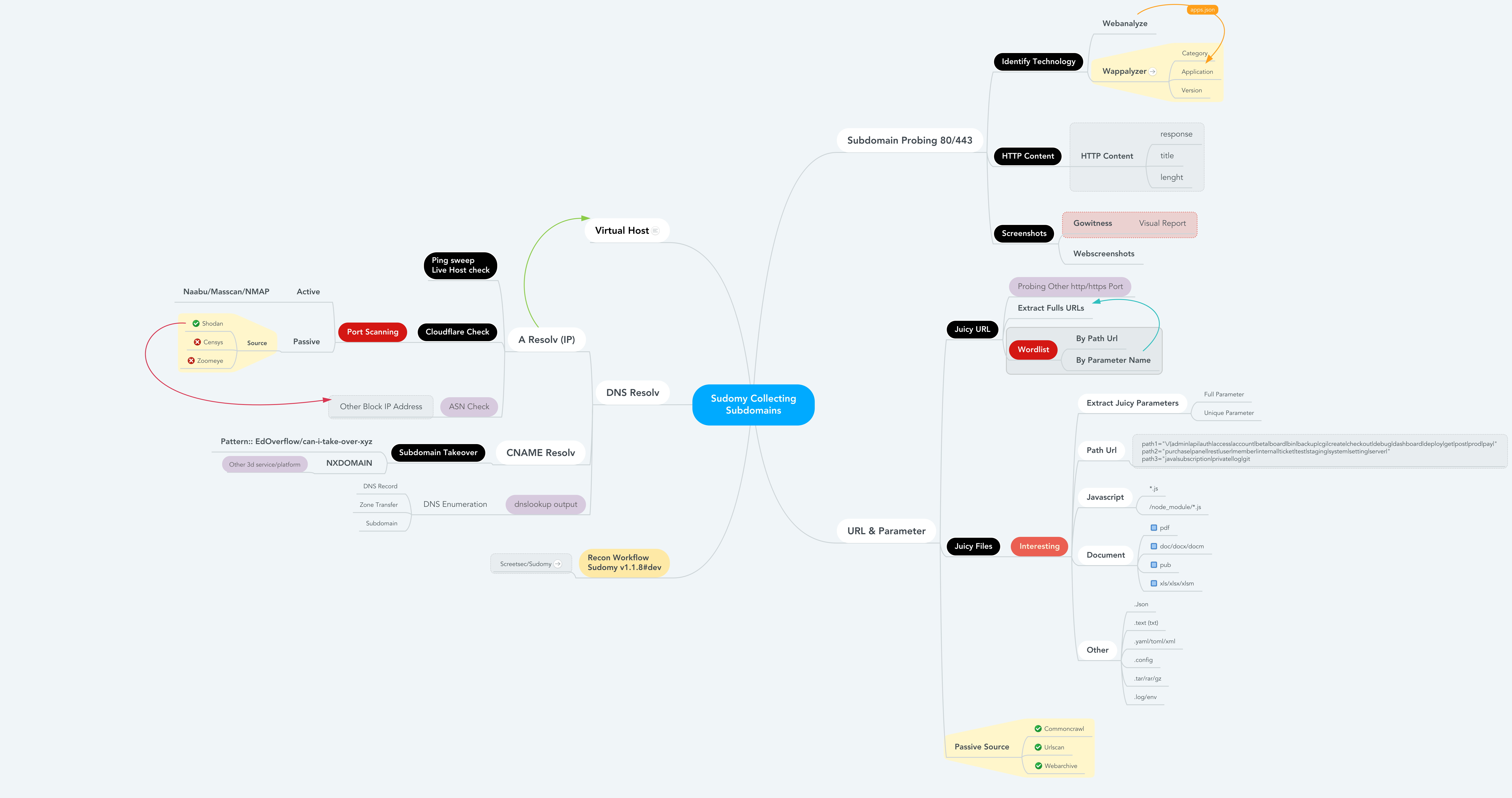
ファイル偵察とジュージーデータの詳細情報
------------------------------------------------------------------------------------------------------

- subdomain.txt             -- サブドメインリスト             < $DOMAIN (ターゲット)
- httprobe_subdomain.txt    -- サブドメインの検証	  < subdomain.txt
- webanalyzes.txt           -- テクノロジースキャンの識別   < httprobe_subdomain.txt
- httpx_status_title.txt    -- タイトル+ステータスコード+長さ    < httprobe_subdomain.txt
- dnsprobe_subdomain.txt    -- サブドメインの解決		  < subdomain.txt
- Subdomain_Resolver.txt    -- サブドメインの解決(代替)     < subdomain.txt
- cf-ipresolv.txt           -- Cloudflare スキャン        	  < ip_resolver.txt
- Live_hosts_pingsweep.txt  -- ライブホストチェック		  < ip_resolver.txt
- ip_resolver.txt           -- IP 解決リスト          	  < Subdomain_Resolver::dnsprobe
- ip_dbasn.txt		    -- ASN番号チェック		  < ip_resolver.txt
- vHost_subdomain.txt       -- バーチャルホスト(IPでグループ化) < Subdomain_Resolver.txt
- nmap_top_ports.txt        -- アクティブポートスキャン       < cf-ipresolv.txt
- ip_dbport.txt		    -- パッシブポートスキャン	  < cf-ipresolv.txt

------------------------------------------------------------------------------------------------------
- Passive_Collect_URL_Full.txt 		-- すべてのURLクロールの完全版(WebArchive、CommonCrawl、UrlScanIO)
------------------------------------------------------------------------------------------------------

- ./screenshots/report-0.html   	-- スクリーンショットレポート    	< httprobe_subdomain.txt
- ./screenshots/gowitness/gowitness.sqlite3   		-- データベーススクリーンショット    	< httprobe_subdomain.txt

------------------------------------------------------------------------------------------------------

- ./interest/interesturi-allpath.out	-- 興味深いパス(/api,/git,etc) < Passive_Collect_URL_Full.txt
- ./interest/interesturi-doc.out	-- 興味深いドキュメント (doc,pdf,xls)   < Passive_Collect_URL_Full.txt
- ./interest/interesturi-otherfile.out	-- その他のファイル (.json,.env,etc) < Passive_Collect_URL_Full.txt
- ./interest/interesturi-js.out		-- すべてのJavaScriptファイル(*.js)  	< Passive_Collect_URL_Full.txt
- ./interest/interesturi-nodemodule.out	-- /node_modules/ からのファイル    < Passive_Collect_URL_Full.txt
- ./interest/interesturi-param-full.out	-- 完全なパラメータリスト 		< Passive_Collect_URL_Full.txt
- ./interest/interesturi-paramsuniq.out -- 完全なユニークパラメータリスト 	< Passive_Collect_URL_Full.txt

-  注: urlprobeまたはhttpxを使用してジュージー/関心のあるURL/パラメータを検証し、誤検出を回避できます。
------------------------------------------------------------------------------------------------------

- ./takeover/CNAME-resolv.txt		-- CNAME リゾルバ 		< subdomain.txt
- ./takeover/TakeOver-Lookup.txt	-- DNSLookup 			< CNAME-resolv.txt
- ./takeover/TakeOver-nxdomain.txt	-- その他のサードパーティサービスプラットフォーム	< TakeOver-Lookup.txt
- ./takeover/TakeOver.txt		-- 脆弱性チェック		< CNAME-resolv.txt

------------------------------------------------------------------------------------------------------

- ./wordlist/wordlist-parameter.lst     -- パラメータワードリストの生成     < Passive_Collect_URL_Full.txt
- ./wordlist/wordlist-pathurl.lst       -- パスワードリストの生成  < Passive_Collect_URL_Full.txt

-  注: このワードリストはドメインとサブドメインの情報(パス、ファイル、クエリ文字列、パラメータ)に基づいています。
------------------------------------------------------------------------------------------------------
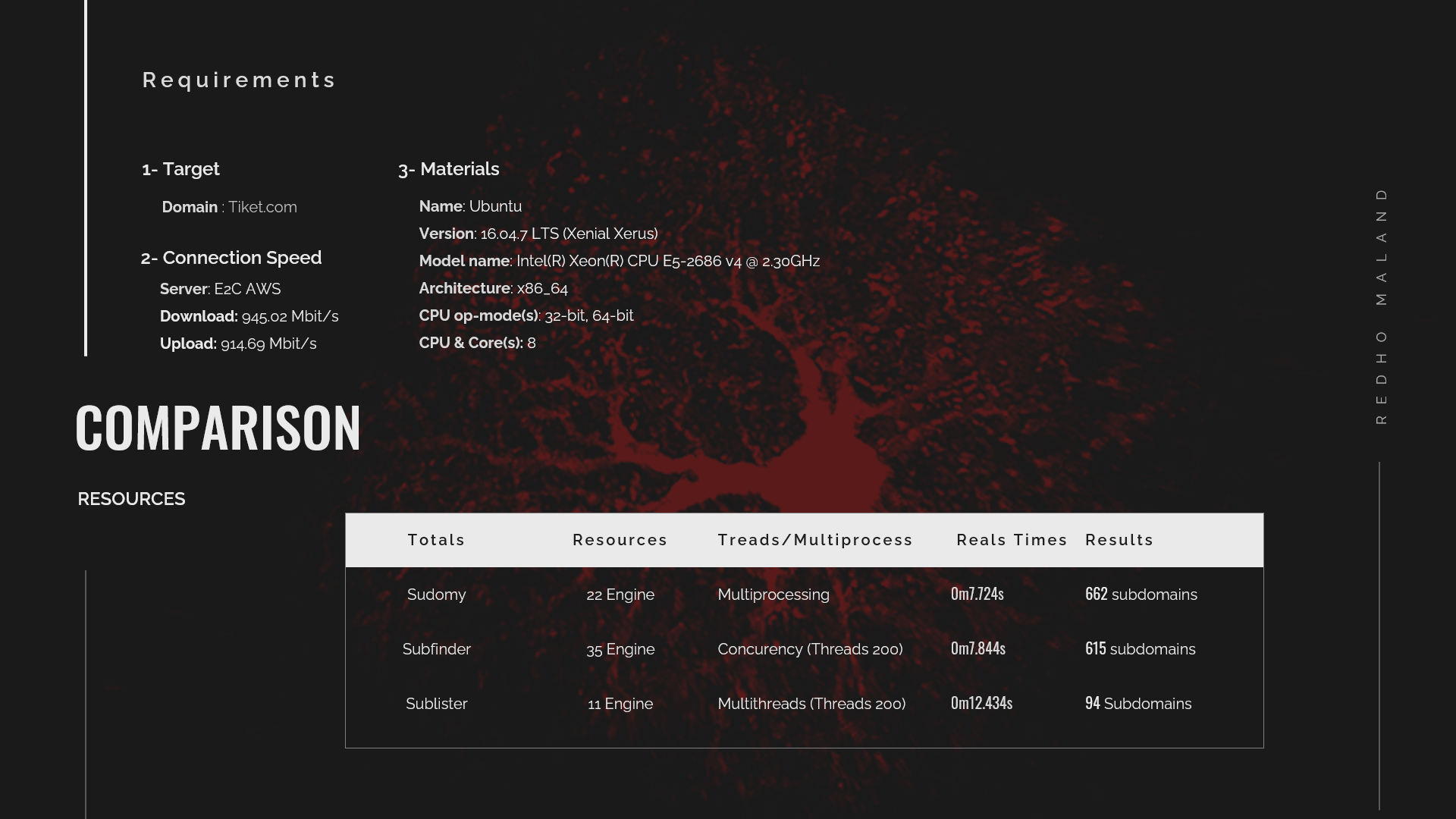
Sudomyはリソース(第三者サイト)を使用する際に、より少ないリソースを最小化します。良い第三者サイト/リソースを評価して選択することで、列挙プロセスを最適化できます。この比較で使用されるドメインは tiket.com です。
以下は、Sublist3r v1.1.0、Subfinder v2.4.5、および Sudomy v1.2.0 のパッシブDNS列挙テストの結果です。