
Skip to content
KitploitKITPLOIT
ツールブログ
提出
ツールブログ
提出

ハッキング、侵入テスト、サイバーセキュリティツールをあなたのセキュリティアーセナルに!

Kitploitはハッキング、サイバーセキュリティ、ペネトレーションテストのツールディレクトリです。最新のプロジェクトアップデートを見つけて、脆弱性の発見、システム分析、テストの自動化、セキュリティの強化を行いましょう。

··フィード·お問い合わせ·プライバシー·© 2026 Kitploit

ツールディレクトリ

カテゴリ

すべてのカテゴリを見る
Loading categories
Ropper — さまざまなファイル形式のファイルに関する情報を表示し、異なるアーキテクチャ(x86/x86_64, ARM/ARM64, MIPS, PowerPC, SPARC64)のROPチェーンを構築するためのガジェットを見つけます。逆アセンブルには、Ropperは優れたCapstone Frameworkを使用しています。 | Kitploit
ツール/GitHubGitHub/sashs/ropper
ペイロード生成エクスプロイトリバースエンジニアリングバイナリ解析バイナリエクスプロイト
GitHubsashs/ropper

Ropper

さまざまなファイル形式のファイルに関する情報を表示し、異なるアーキテクチャ(x86/x86_64, ARM/ARM64, MIPS, PowerPC, SPARC64)のROPチェーンを構築するためのガジェットを見つけます。逆アセンブルには、Ropperは優れたCapstone Frameworkを使用しています。

リポジトリを見る
2.1k2231年前Kitploit レビュー済み

人気

すべて見る →

コミュニティで最も使われているツールを見つけましょう。

すべてのツールを探索

ツールコレクションを閲覧

すべてのツールを見る →
共有
ウェブサイト

Ropper

Build Status

Ropper を使用すると、さまざまなファイル形式のバイナリファイルに関する情報を表示したり、さまざまなアーキテクチャ(x86/X86_64、ARM/ARM64、MIPS/MIPS64、PowerPC/PowerPC64、SPARC64)向けのROPチェーンを構築するためのガジェットを検索できます。逆アセンブルには、素晴らしい Capstone Framework を使用しています。

インストール

Capstone を PyPi でインストール:

root@kitploit:~
$ sudo pip install capstone

filebytes を PyPi でインストール:

root@kitploit:~
$ sudo pip install filebytes

オプション(Ropperの実行には不要、ガジェット検索のみに必要):

Keystone をインストール:

root@kitploit:~
$ sudo pip install keystone-engine

Ropper をインストールして実行

root@kitploit:~
$ python setup.py install
$ ropper

pip で Ropper をインストールすることもできます

root@kitploit:~
$ pip install ropper

お望みなら、インストールせずに Ropper を使用することもできます

root@kitploit:~
$ ./Ropper.py

filebytes をインストールしたくない場合、filebytes は ropper リポジトリのサブモジュールです。つまり、filebytes と ropper のインストールは不要です。

root@kitploit:~
$ git clone https://github.com/sashs/ropper.git
$ cd ropper
$ git submodule init
$ git submodule update
$ ./Ropper.py

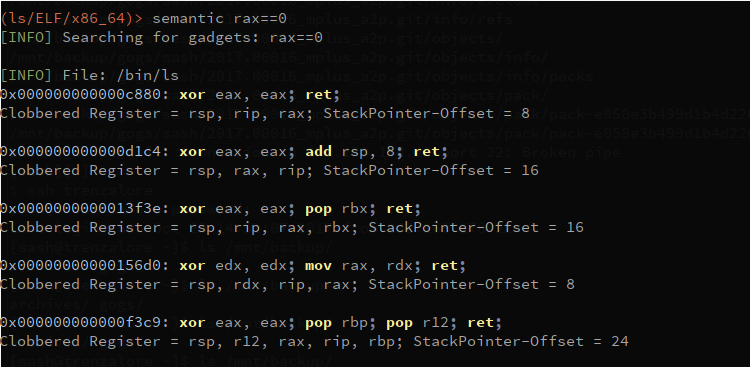
この機能はまだ開発中です! Ropper にはセマンティック検索コマンドがあり、ガジェットを検索できます。

root@kitploit:~
$ ropper --file <afile> --semantic "<any constraint>"

セマンティック検索を使用するには、以下のオプションの依存関係が必要です:

pyvex をインストール

root@kitploit:~
$ sudo pip install pyvex

z3py をインストール

root@kitploit:~
$ python scripts/mk_make.py
$ cd build
$ make
$ sudo make install

現在可能な制約

root@kitploit:~
reg == reg     -  レジスタを別のレジスタに代入
reg == number  -  数値をレジスタに代入
reg == [reg]   -  メモリをレジスタに代入
reg += number/reg/[reg]
reg -= number/reg/[reg]
reg *= number/reg/[reg]
reg /= number/reg/[reg]

制約の例

root@kitploit:~
eax==1 !ebx    - eax を 1 に設定し、ebx を破壊しないガジェットを検索
セマンティック検索

使い方

root@kitploit:~
usage: Ropper.py [-h] [--help-examples] [-v] [--console]
             [-f <file> [<file> ...]] [-r] [-a <arch>]
             [--section <section>] [--string [<string>]] [--hex]
             [--asm [<asm> [H|S|R] ...]] [--disasm <opcode>]
             [--disassemble-address <address:length>] [-i] [-e]
             [--imagebase] [-c] [-s] [-S] [--imports] [--symbols]
             [--set <option>] [--unset <option>] [-I <imagebase>] [-p]
             [-j <reg>] [--stack-pivot] [--inst-count <n bytes>]
             [--search <regex>] [--quality <quality>] [--opcode <opcode>]
             [--instructions <instructions>] [--type <type>] [--detailed]
             [--all] [--cfg-only] [--chain <generator>] [-b <badbytes>]
             [--nocolor] [--clear-cache] [--no-load] [--analyse <quality>]
             [--semantic constraint]
             [--count-of-findings <count of gadgets>] [--single]

You can use ropper to display information about binary files in different file formats
    and you can search for gadgets to build rop chains for different architectures

supported filetypes:
  ELF
  PE
  Mach-O
  Raw

supported architectures:
  x86 [x86]
  x86_64 [x86_64]
  MIPS [MIPS, MIPS64]
  ARM/Thumb [ARM, ARMTHUMB]
  ARM64 [ARM64]
  PowerPC [PPC, PPC64]
  SPARC [SPARC64]

available rop chain generators:
  execve (execve[=<cmd>], default /bin/sh) [Linux x86, x86_64]
  mprotect  (mprotect=<address>:<size>) [Linux x86, x86_64]
  virtualprotect (virtualprotect=<address iat vp>:<size>) [Windows x86]

options:
  -h, --help            show this help message and exit
  --help-examples       Print examples
  -v, --version         Print version
  --console             Starts interactive commandline
  -f <file> [<file> ...], --file <file> [<file> ...]
                        The file to load
  -r, --raw             Loads the file as raw file
  -a <arch>, --arch <arch>
                        The architecture of the loaded file
  --section <section>   The data of this section should be printed
  --string [<string>]   Looks for the string <string> in all data sections
  --hex                 Prints the selected sections in a hex format
  --asm [<asm> [H|S|R] ...]
                        A string to assemble and a format of the output
                        (H=HEX, S=STRING, R=RAW, default: H)
  --disasm <opcode>     Opcode to disassemble (e.g. ffe4, 89c8c3, ...)
  --disassemble-address <address:length>
                        Disassembles instruction at address <address>
                        (0x12345678:L3). The count of instructions to
                        disassemble can be specified (0x....:L...)
  -i, --info            Shows file header [ELF/PE/Mach-O]
  -e                    Shows EntryPoint
  --imagebase           Shows ImageBase [ELF/PE/Mach-O]
  -c, --dllcharacteristics
                        Shows DllCharacteristics [PE]
  -s, --sections        Shows file sections [ELF/PE/Mach-O]
  -S, --segments        Shows file segments [ELF/Mach-O]
  --imports             Shows imports [ELF/PE]
  --symbols             Shows symbols [ELF]
  --set <option>        Sets options. Available options: aslr nx
  --unset <option>      Unsets options. Available options: aslr nx
  -I <imagebase>        Use this imagebase for gadgets
  -p, --ppr             Searches for 'pop reg; pop reg; ret' instructions
                        [only x86/x86_64]
  -j <reg>, --jmp <reg>
                        Searches for 'jmp reg' instructions (-j reg[,reg...])
                        [only x86/x86_64]
  --stack-pivot         Prints all stack pivot gadgets
  --inst-count <n bytes>
                        Specifies the max count of instructions in a gadget
                        (default: 6)
  --search <regex>      Searches for gadgets
  --quality <quality>   The quality for gadgets which are found by search (1 =
                        best)
  --opcode <opcode>     Searches for opcodes (e.g. ffe4 or ffe? or ff??)
  --instructions <instructions>
                        Searches for instructions (e.g. "jmp esp", "pop eax;
                        ret")
  --type <type>         Sets the type of gadgets [rop, jop, sys, all]
                        (default: all)
  --detailed            Prints gadgets more detailed
  --all                 Does not remove duplicate gadgets
  --cfg-only            Filters out gadgets which fail the Microsoft CFG
                        check. Only for PE files which are compiled with CFG
                        check enabled (check DllCharachteristics) [PE]
  --chain <generator>   Generates a ropchain [generator parameter=value[
                        parameter=value]]
  -b <badbytes>, --badbytes <badbytes>
                        Set bytes which should not be contained in gadgets
  --nocolor             Disables colored output
  --clear-cache         Clears the cache
  --no-load             Don't load the gadgets automatically when starting the
                        console (--console)
  --analyse <quality>   just used for the implementation of semantic search
  --semantic constraint
                        semantic search for gadgets
  --count-of-findings <count of gadgets>
                        Max count of gadgets which will be printed with
                        semantic search (0 = undefined, default: 5)
  --single              No multiple processes are used for gadget scanning

example uses:
  [Generic]
  ./Ropper.py
  ./Ropper.py --file /bin/ls --console

  [Informations]
  ./Ropper.py --file /bin/ls --info
  ./Ropper.py --file /bin/ls --imports
  ./Ropper.py --file /bin/ls --sections
  ./Ropper.py --file /bin/ls --segments
  ./Ropper.py --file /bin/ls --set nx
  ./Ropper.py --file /bin/ls --unset nx
  ./Ropper.py --file /bin/ls --inst-count 5
  ./Ropper.py --file /bin/ls --search "sub eax" --badbytes 000a0d
  ./Ropper.py --file /bin/ls --search "sub eax" --detail
  ./Ropper.py --file /bin/ls --filter "sub eax"
  ./Ropper.py --file /bin/ls --inst-count 5 --filter "sub eax"
  ./Ropper.py --file /bin/ls --opcode ffe4
  ./Ropper.py --file /bin/ls --opcode ffe?
  ./Ropper.py --file /bin/ls --opcode ??e4
  ./Ropper.py --file /bin/ls --detailed
  ./Ropper.py --file /bin/ls --ppr --nocolor
  ./Ropper.py --file /bin/ls --jmp esp,eax
  ./Ropper.py --file /bin/ls --type jop
  ./Ropper.py --file /bin/ls --chain execve
  ./Ropper.py --file /bin/ls --chain "execve cmd=/bin/sh" --badbytes 000a0d
  ./Ropper.py --file /bin/ls --chain "mprotect address=0xbfdff000 size=0x21000"
  ./Ropper.py --file /bin/ls /lib/libc.so.6 --console

  [Assemble/Disassemble]
  ./Ropper.py --asm "jmp esp"
  ./Ropper.py --asm "mov eax, ecx; ret"
  ./Ropper.py --disasm ffe4

  [Search]
  ./Ropper.py --file /bin/ls --search <searchstring>
  ?     any character
  %     any string

  Example:

  ./Ropper.py --file /bin/ls --search "mov e?x"
  0x000067f1: mov edx, dword ptr [ebp + 0x14]; mov dword ptr [esp], edx; call eax
  0x00006d03: mov eax, esi; pop ebx; pop esi; pop edi; pop ebp; ret ;
  0x00006d6f: mov ebx, esi; mov esi, dword ptr [esp + 0x18]; add esp, 0x1c; ret ;
  0x000076f8: mov eax, dword ptr [eax]; mov byte ptr [eax + edx], 0; add esp, 0x18; pop ebx; ret ;

  ./Ropper.py --file /bin/ls --search "mov [%], edx"
  0x000067ed: mov dword ptr [esp + 4], edx; mov edx, dword ptr [ebp + 0x14]; mov dword ptr [esp], edx; call eax;
  0x00006f4e: mov dword ptr [ecx + 0x14], edx; add esp, 0x2c; pop ebx; pop esi; pop edi; pop ebp; ret ;
  0x000084b8: mov dword ptr [eax], edx; ret ;
  0x00008d9b: mov dword ptr [eax], edx; add esp, 0x18; pop ebx; ret ;

  ./Ropper.py --file /bin/ls --search "mov [%], edx" --quality 1
  0x000084b8: mov dword ptr [eax], edx; ret ;; ret ;

スクリプトで Ropper を使用する

root@kitploit:~
#!/usr/bin/env python
from ropper import RopperService

# not all options need to be given
options = {'color' : False,     # if gadgets are printed, use colored output: default: False
            'badbytes': '00',   # bad bytes which should not be in addresses or ropchains; default: ''
            'all' : False,      # Show all gadgets, this means to not remove double gadgets; default: False
            'inst_count' : 6,   # Number of instructions in a gadget; default: 6
            'type' : 'all',     # rop, jop, sys, all; default: all
            'detailed' : False} # if gadgets are printed, use detailed output; default: False

rs = RopperService(options)

##### change options ######
rs.options.color = True
rs.options.badbytes = '00'
rs.options.badbytes = ''
rs.options.all = True


##### open binaries ######
# it is possible to open multiple files
rs.addFile('test-binaries/ls-x86')
rs.addFile('ls', bytes=open('test-binaries/ls-x86','rb').read()) # other possiblity
rs.addFile('ls_raw', bytes=open('test-binaries/ls-x86','rb').read(), raw=True, arch='x86')

##### close binaries ######
rs.removeFile('ls')
rs.removeFile('ls_raw')


# Set architecture of a binary, so it is possible to look for gadgets for a different architecture
# It is useful for ARM if you want to look for ARM gadgets or Thumb gadgets
# Or if you opened a raw file
ls = 'test-binaries/ls-x86'
rs.setArchitectureFor(name=ls, arch='x86')
rs.setArchitectureFor(name=ls, arch='x86_64')
rs.setArchitectureFor(name=ls, arch='ARM')
rs.setArchitectureFor(name=ls, arch='ARMTHUMB')
rs.setArchitectureFor(name=ls, arch='ARM64')
rs.setArchitectureFor(name=ls, arch='MIPS')
rs.setArchitectureFor(name=ls, arch='MIPS64')
rs.setArchitectureFor(name=ls, arch='PPC')
rs.setArchitectureFor(name=ls, arch='PPC64')
rs.setArchitectureFor(name=ls, arch='SPARC64')
rs.setArchitectureFor(name=ls, arch='x86')


##### load gadgets ######

# load gadgets for all opened files
rs.loadGadgetsFor() 

# load gadgets for only one opened file
ls = 'test-binaries/ls-x86'
rs.loadGadgetsFor(name=ls)

# change gadget type
rs.options.type = 'jop'
rs.loadGadgetsFor() 

rs.options.type = 'rop'
rs.loadGadgetsFor() 

# change instruction count
rs.options.inst_count = 10
rs.loadGadgetsFor() 

##### print gadgets #######
rs.printGadgetsFor() # print all gadgets
rs.printGadgetsFor(name=ls)

##### Get gadgets ######
gadgets = rs.getFileFor(name=ls).gadgets


##### search pop pop ret ######
pprs = rs.searchPopPopRet(name=ls) # looks for ppr only in 'test-binaries/ls-x86'
pprs = rs.searchPopPopRet()        # looks for ppr in all opened files
for file, ppr in pprs.items():
    for p in ppr:
        print p

##### load jmp reg ######
jmp_regs = rs.searchJmpReg(name=ls, regs=['esp', 'eax']) # looks for jmp reg only in 'test-binaries/ls-x86'
jmp_regs = rs.searchJmpReg(regs=['esp', 'eax'])
jmp_regs = rs.searchJmpReg()                             # looks for jmp esp in all opened files
for file, jmp_reg in jmp_regs.items():
    for j in jmp_reg:
        print j


##### search opcode ######
ls = 'test-binaries/ls-x86'
gadgets_dict = rs.searchOpcode(opcode='ffe4', name=ls)
gadgets_dict = rs.searchOpcode(opcode='ffe?')
gadgets_dict = rs.searchOpcode(opcode='??e4')

for file, gadgets in gadgets_dict.items():
    for g in gadgets:
        print g

##### search instructions ######
ls = 'test-binaries/ls-x86'
for file, gadget in rs.search(search='mov e?x', name=ls):
    print file, gadget

for file, gadget in rs.search(search='mov [e?x%]'):
    print file, gadget    

result_dict = rs.searchdict(search='mov eax')
for file, gadgets in result_dict.items():
    print file
    for gadget in gadgets:
        print gadget

##### assemble instructions ######
hex_string = rs.asm('jmp esp')
print '"jmp esp" assembled to hex string =', hex_string
raw_bytes = rs.asm('jmp esp', format='raw')
print '"jmp esp" assembled to raw bytes =', raw_bytes
string = rs.asm('jmp esp', format='string')
print '"jmp esp" assembled to string =',string
arm_bytes = rs.asm('bx sp', arch='ARM')
print '"bx sp" assembled to hex string =', arm_bytes

##### disassemble bytes #######
arm_instructions = rs.disasm(arm_bytes, arch='ARM')
print arm_bytes, 'disassembled to "%s"' % arm_instructions

# Change the imagebase, this also change the imagebase for all loaded gadgets of this binary
rs.setImageBaseFor(name=ls, imagebase=0x0)

# reset image base
rs.setImageBaseFor(name=ls, imagebase=None)

gadgets = rs.getFileFor(name=ls).gadgets

# gadget address
print hex(gadgets[0].address)

# get instruction bytes of gadget
print bytes(gadgets[0].bytes).encode('hex')

# remove all gadgets containing bad bytes in address
rs.options.badbytes = '000a0d'  # gadgets are filtered automatically

プロジェクトページ

http://scoding.de/ropper

スクリーンショット

ロード

x86

ARM

MIPS

PPC

ROPチェーン

ヘッダー

ツールをダウンロード