
Skip to content
KitploitKITPLOIT
ツールブログ
提出
ツールブログ
提出

ハッキング、侵入テスト、サイバーセキュリティツールをあなたのセキュリティアーセナルに!

Kitploitはハッキング、サイバーセキュリティ、ペネトレーションテストのツールディレクトリです。最新のプロジェクトアップデートを見つけて、脆弱性の発見、システム分析、テストの自動化、セキュリティの強化を行いましょう。

··フィード·お問い合わせ·プライバシー·© 2026 Kitploit

ツールディレクトリ

カテゴリ

すべてのカテゴリを見る
Loading categories
pythia-sql-clairvoyance — 高度なSQLインジェクションスキャナーで、AIを活用した分析、倫理的コンプライアンスフレームワーク、プロフェッショナルなレポート機能を備えています。 | Kitploit
ツール/GitHubGitHub/rodhnin/pythia-sql-clairvoyance
脆弱性スキャナーウェブアプリケーション悪用WAFバイパスペネトレーションテストDevSecOps学習と教育クローラーAIセキュリティ
GitHubrodhnin/pythia-sql-clairvoyance

pythia-sql-clairvoyance

高度なSQLインジェクションスキャナーで、AIを活用した分析、倫理的コンプライアンスフレームワーク、プロフェッショナルなレポート機能を備えています。
リポジトリを見る
244ヶ月前未レビュー

人気

すべて見る →

コミュニティで最も使われているツールを見つけましょう。

すべてのツールを探索

ツールコレクションを閲覧

すべてのツールを見る →
共有
Pythia — SQL Clairvoyance

Version Python License Docker OWASP Ethical


プロダクション対応のSQLインジェクションスキャナー。6つの検出手法、AIによる修復アドバイス、SARIF出力、CI/CD統合を備えています。


クイックスタート  ·  ドキュメント  ·  Docker  ·  AI解析  ·  GitHubでスター

Pythia — SQL Clairvoyance ヒーロー

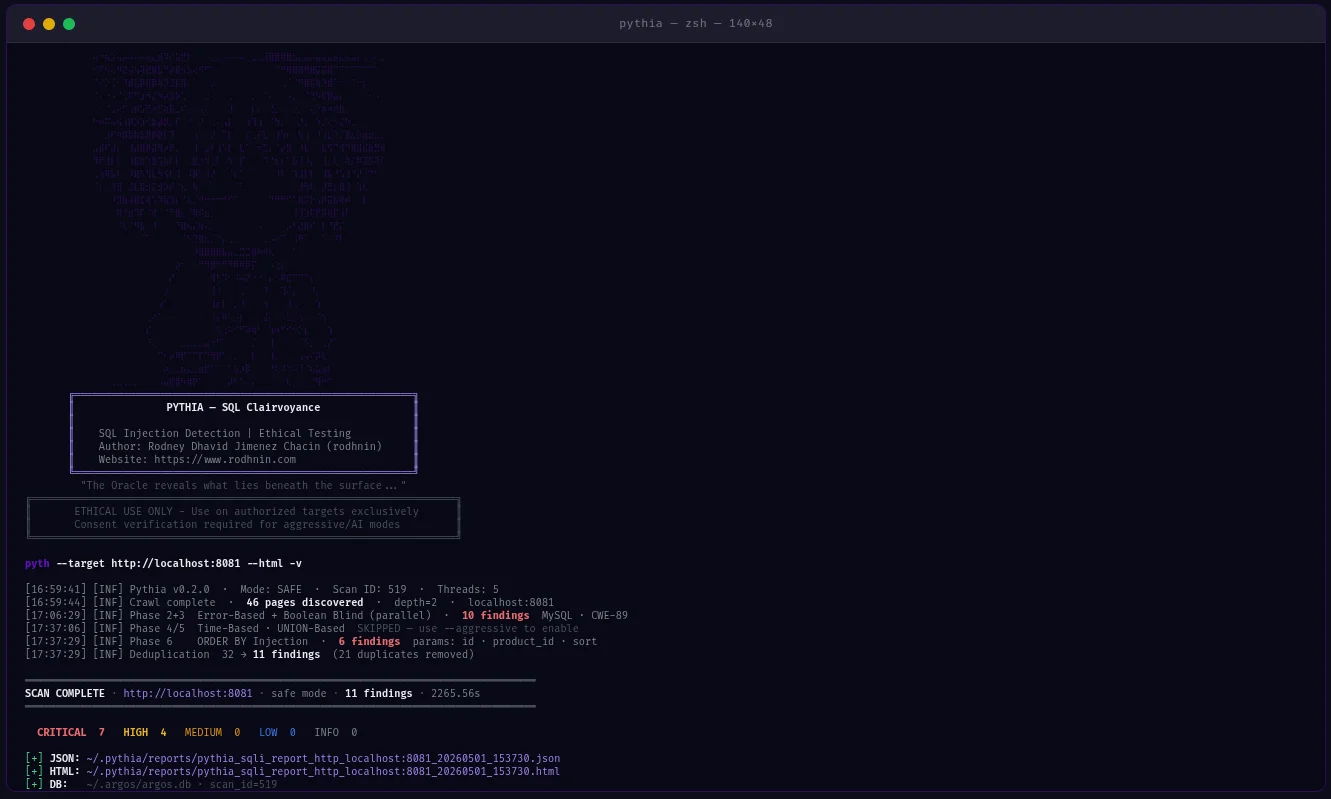
動作例

Pythia — 実際のスキャン出力
ライブスキャン · PHP脆弱性ショップ · 11件の検出 · セーフモード · 2265.56秒

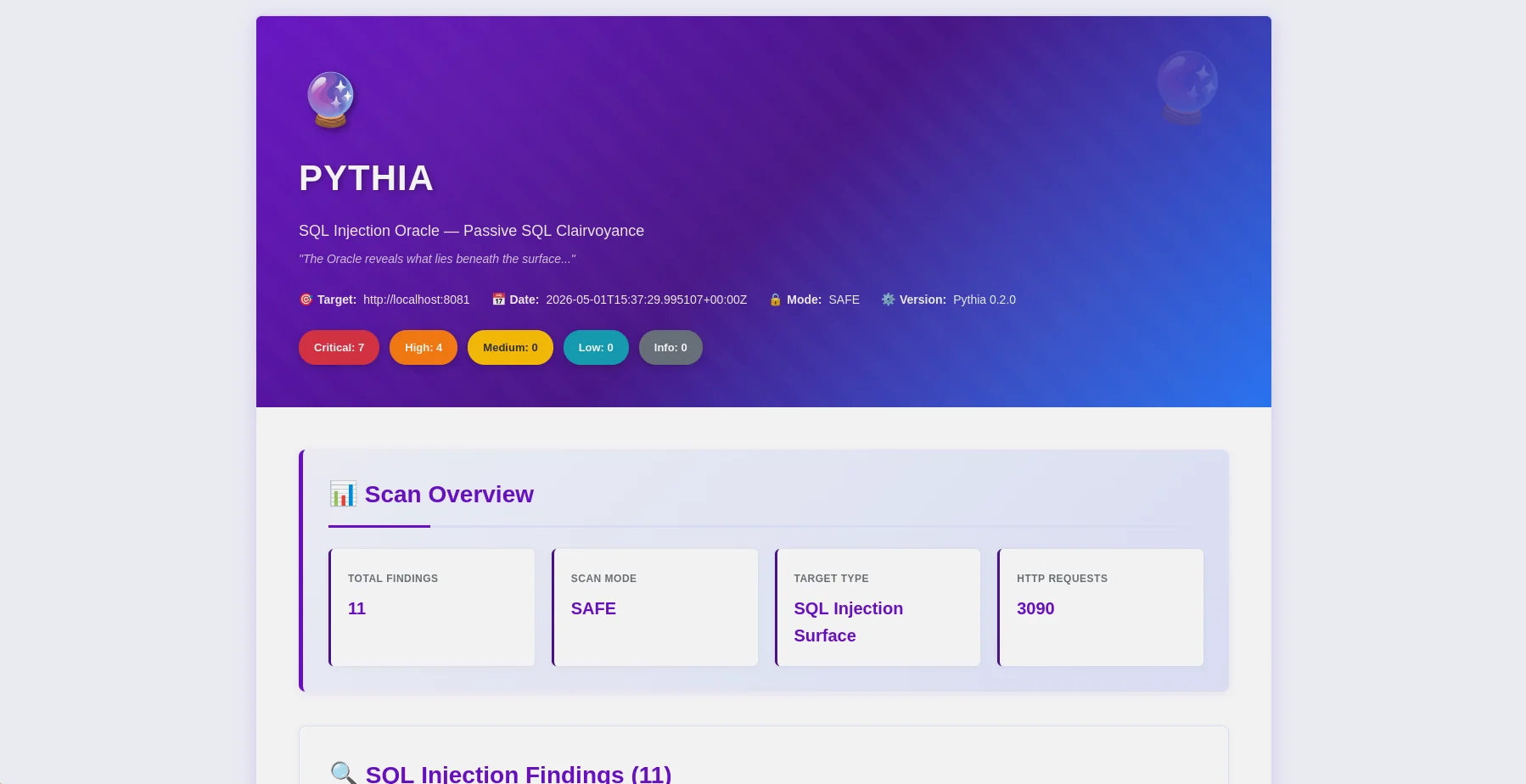
Pythia — HTMLレポート概要
HTMLレポート — 重要度バッジとOWASPマッピング付きの検出概要
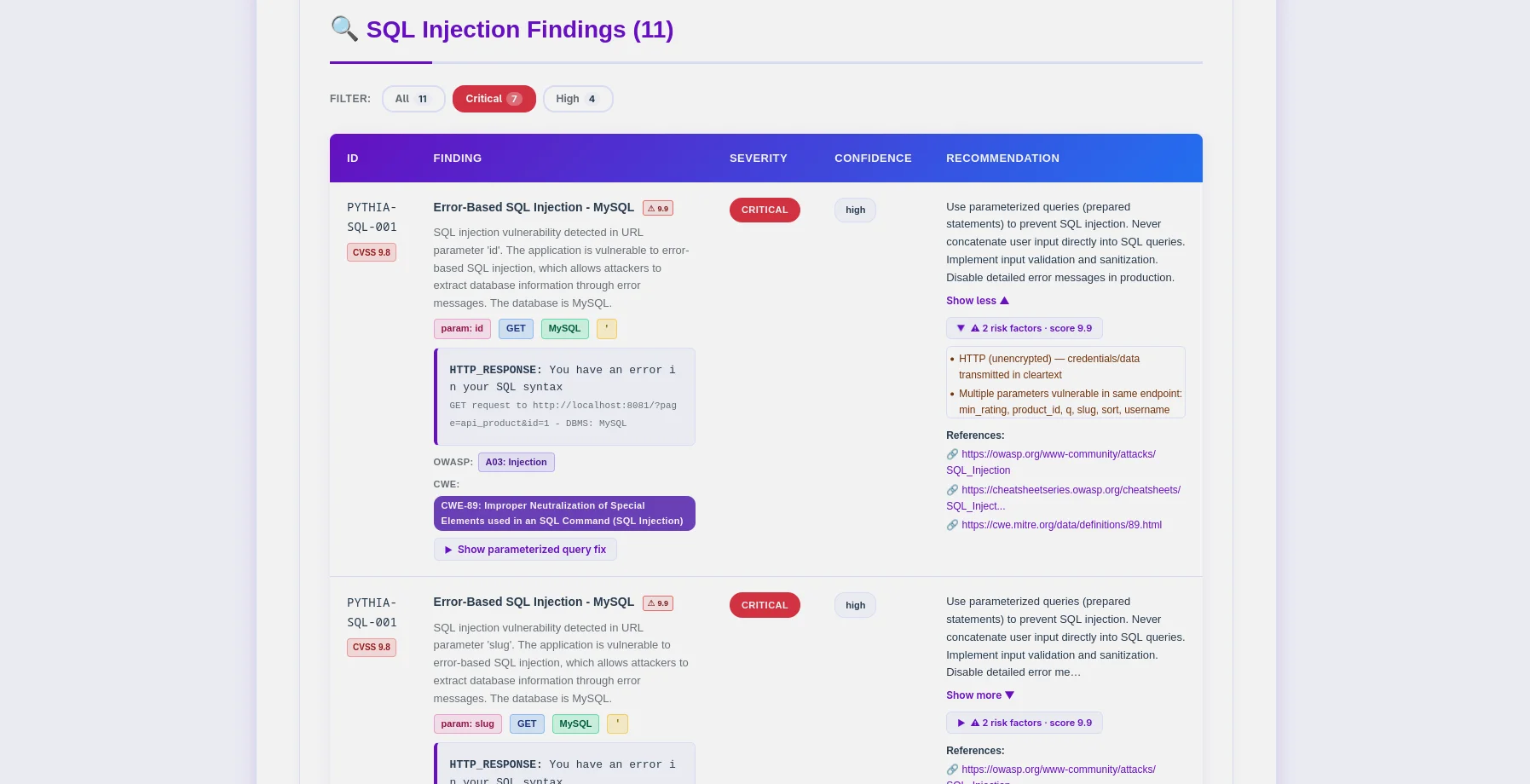
Pythia — 検出テーブル
検出テーブル — PYTHIA-SQLコード、DBMS検出、CWE-89マッピング

Pythiaとは

Pythiaはプロダクション対応のSQLインジェクション検出スキャナーであり、倫理を最優先しています。ペネトレーションテスター、セキュリティ研究者、DevSecOpsエンジニア向けに構築され、6つの検出方法でSQLインジェクションの脆弱性を特定し、CI/CDパイプラインに直接統合できます。

なぜPythiaなのか?

  • 倫理的に設計: 同意トークンシステムが不正スキャンを防止
  • マルチメソッド検出: セカンドオーダーやORDER BYインジェクションを含む6種類の検出技術
  • AI搭載: GPT、Claude、またはローカルのOllamaによるインテリジェントな修復ガイド(コード例付き)
  • CI/CD対応: --fail-on、--sarif、--diffフラグでパイプライン統合
  • プロフェッショナルレポート: フィルターバー+OWASP/CWE/CVEバッジ付きHTML、コンテキストCVSSスコアリング付きJSON
  • 永続的トラッキング: Argos Suiteと共有のSQLiteデータベース(~/.argos/argos.db)
  • 高精度: 類似性スコアリングとマルチペイロード確認による誤検知の低減

検出内容

検出手法説明必要モード
Error-Basedレスポンス内のSQLエラー (MySQL, PostgreSQL, MSSQL, Oracle, SQLite)Safe
Boolean-BlindTRUE/FALSE条件によるレスポンスの違いSafe
Time-Based BlindSLEEP/WAITFORペイロードによる応答遅延Aggressive
UNION-BasedUNION SELECTによるデータ抽出Aggressive
Second-Order保存→取得のインジェクションパターン (POST→GETチェーン)Aggressive
ORDER BY Injection数値ソートパラメータインジェクションAggressive

機能

コアSQLインジェクション検出```bash

One command, comprehensive SQLi analysis

python -m pyth --target http://example.com/products?id=1 --html

root@kitploit:~
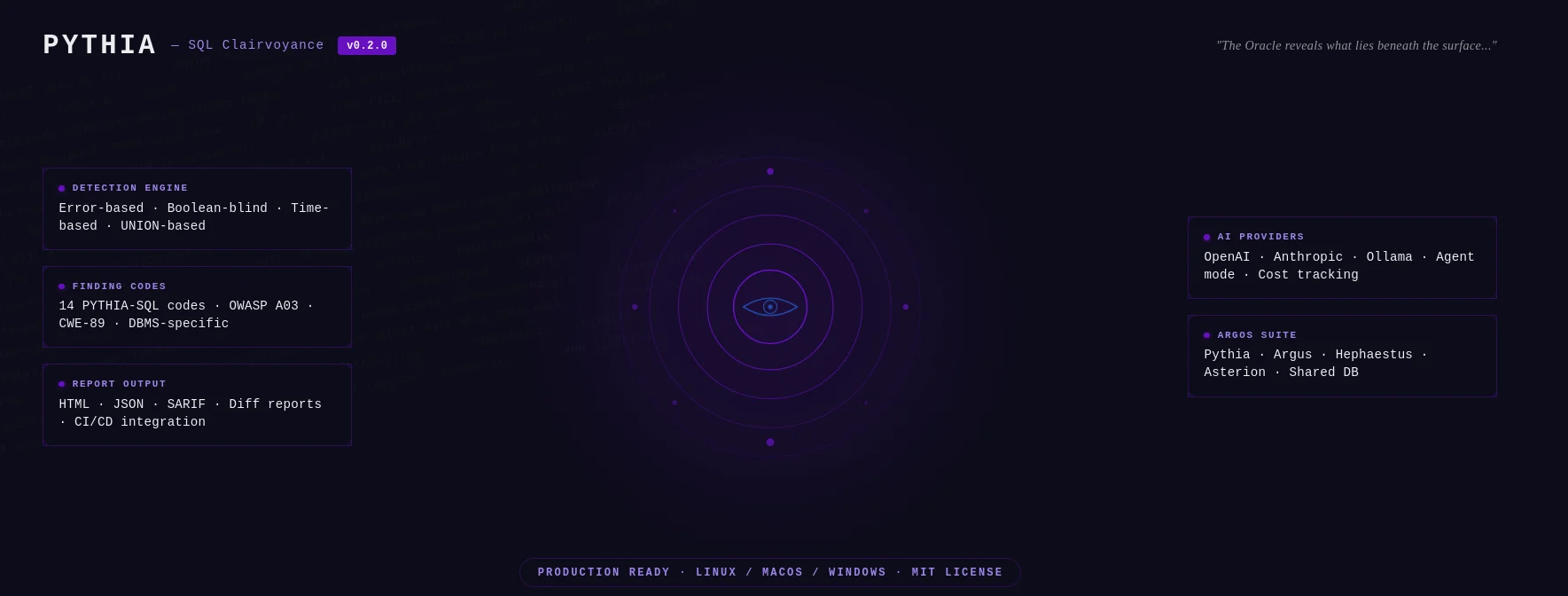
- **14 発見コード**: DBMS固有(MySQL、PostgreSQL、MSSQL、Oracle、SQLite)+ 手法固有
- **DBMS フィンガープリンティング**: 自動データベース種別とバージョン検出
- **WAF バイパス**: アグレッシブモードで170以上のバイパスペイロード(hex、URLエンコード、インラインコメント、大文字小文字のバリエーション)
- **セッション変数検出**: DVWA-highスタイルの認証パターンに対するPOST→GETチェーン
- **スマートクローラ**: BFS(幅優先探索)によるポップアップ/onclick抽出(`--js`)、サイトマップ、robots.txt
- **偽陽性の強化**: SequenceMatcher類似性スコアリング + マルチペイロード確認

### CI/CD 統合```bash
# Pipeline-friendly: exit 10 if high+ findings found
python -m pyth --target https://staging.app.com --aggressive --fail-on high
echo $?  # 0=clean, 10=findings found, 1=error

# SARIF for GitHub Security / GitLab SAST
python -m pyth --target https://app.com --aggressive --sarif > results.sarif

# Compare vs last scan — show what's new, what's fixed
python -m pyth --target https://app.com --aggressive --diff last --html

認証ヘッダー```bash

Scan authenticated endpoints (JWT, API keys, custom cookies)

python -m pyth --target https://api.example.com/v1/users
--auth-header "Authorization: Bearer eyJhbGc..."
--auth-header "X-API-Key: sk-prod-xxx"
--aggressive --html

root@kitploit:~
Pass `--auth-header` multiple times for multiple headers.

### AIを活用した分析

コマンドラインからAIプロバイダーを選択してください:

| Provider                         | 最適用途                          | 速度      | コスト        | プライバシー      |
| -------------------------------- | --------------------------------- | ---------- | ----------- | ------------ |
| **OpenAI gpt-4o-mini** (デフォルト) | 高品質・低コスト      | 高速       | ~$0.02/スキャン | 標準     |
| **Anthropic Claude**             | プライバシー重視、コード修正 | 高速       | ~$0.06/スキャン | 強化     |
| **Ollama (ローカル)**               | 完全なプライバシー                  | 低速 (CPU) | 無料        | 100%オフライン |```bash
# Standard analysis
python -m pyth --target http://example.com --use-ai --ai-tone technical --html

# Agent mode: AI queries NVD for real CVEs (no API key for NVD)
python -m pyth --target http://example.com --use-ai --ai-agent --html

# Multi-provider comparison
python -m pyth --target http://example.com --use-ai \
  --ai-compare "openai:gpt-4o-mini,anthropic:claude-3-5-haiku-20241022" --html

# With budget cap
python -m pyth --target http://example.com --use-ai --ai-budget 0.05 --html

プロフェッショナルレポート

JSONレポート (機械可読, v0.2.0 schema)```json { "tool": "pythia", "version": "0.2.0", "target": "http://localhost:8081", "mode": "aggressive", "summary": { "total": 26, "critical": 18, "high": 6, "medium": 2 }, "findings": [ { "id": "PYTHIA-SQL-001", "title": "Error-Based SQL Injection (MySQL/MariaDB)", "severity": "critical", "confidence": "high", "parameter": "id", "vector": "GET", "dbms": "MySQL 8.0.32", "cvss": 9.8, "contextual_score": 9.9, "risk_factors": ["no_ssl", "pii_detected"], "payload": "' OR '1'='1' --", "owasp": { "id": "A03", "name": "Injection" }, "cwe": { "id": "CWE-89", "name": "SQL Injection" }, "detection_method": "error-based" } ], "notes": { "scan_duration_seconds": 87.3, "requests_sent": 342, "rate_limit_applied": "5.0 req/s", "false_positive_disclaimer": "..." }, "diff": null }

root@kitploit:~
**HTML レポート** (人間に優しい)

- フィルターバー: 深刻度、OWASPカテゴリ、検出方法、DBMS
- 各検出結果に OWASP/CWE/CVE バッジ (外部参照へのリンク付き)
- CVSS 基本スコア + コンテキストスコア (色分け表示)
- ペイロード可視化付きの展開可能な証拠セクション
- AI 分析タブ (標準 / エージェント / 比較)
- 差分セクション (新規 / 修正 / 継続中の検出結果)
- Oracle テーマ (紫色 `#6a11cb`) — クライアントにそのまま提出可能

### 検出コード

全コード → **OWASP A03 Injection** / **CWE-89 SQL Injection**


| コード             | タイプ               | DBMS / ベクター            | モード       |
| ---------------- | ------------------ | ------------------------ | ---------- |
| `PYTHIA-SQL-001` | エラーベース        | MySQL / MariaDB          | セーフ       |
| `PYTHIA-SQL-002` | エラーベース        | PostgreSQL               | セーフ       |
| `PYTHIA-SQL-003` | エラーベース        | MSSQL                    | セーフ       |
| `PYTHIA-SQL-004` | エラーベース        | Oracle                   | セーフ       |
| `PYTHIA-SQL-005` | エラーベース        | SQLite                   | セーフ       |
| `PYTHIA-SQL-010` | ブーリアンブラインド | 任意の DBMS                 | セーフ       |
| `PYTHIA-SQL-011` | ブーリアンブラインド | ヘッダーインジェクション経由     | セーフ       |
| `PYTHIA-SQL-020` | タイムベース         | MySQL SLEEP()            | アグレッシブ |
| `PYTHIA-SQL-021` | タイムベース         | MSSQL WAITFOR            | アグレッシブ |
| `PYTHIA-SQL-022` | タイムベース         | PostgreSQL pg_sleep()    | アグレッシブ |
| `PYTHIA-SQL-030` | UNION ベース         | GET/POST パラメータ       | アグレッシブ |
| `PYTHIA-SQL-031` | UNION ベース         | Cookie 経由               | アグレッシブ |
| `PYTHIA-SQL-040` | セカンドオーダー     | 保存→取得パターン | アグレッシブ |
| `PYTHIA-SQL-050` | ORDER BY インジェクション | 数値ソートパラメータ   | アグレッシブ |

---

## 検証とテスト

Pythia v0.2.0 は、管理された Docker ベースの脆弱なアプリケーションを使用して**実証的に検証**されています。

### QA 結果 (2026年5月)

| ターゲット                  | モード                              | 検出結果数        | 備考                                      |
| ----------------------- | --------------------------------- | --------------- | ------------------------------------------ |
| **PHP Lab** (8081)      | `--aggressive`                    | **26 件の検出** | 全4手法 + セカンドオーダー + ORDER BY |
| **Flask Lab** (8082)    | `--js --aggressive`               | **18 件の検出** | セッション変数 + セカンドオーダー + ORDER BY      |
| **DVWA Low**            | `--no-crawl --aggressive`         | 4/4 手法  | PYTHIA-SQL-001/010/020/030                 |
| **DVWA Medium**         | `--no-crawl --aggressive`         | 4/4 手法  | POST フォーム、全手法                  |
| **DVWA High**           | `--js --max-pages 2 --aggressive` | 4/4 手法  | セッション変数 POST→GET チェーン            |
| **False Positive テスト** | `--aggressive`                    | **0 件の検出**  | 静的 URL — 誤検出なしを確認  |

**主な検証結果:**

- ✅ 全14種類の検出コードが機能
- ✅ DVWA high (セッション変数パターン) — 完全な4/4パリティ
- ✅ セカンドオーダー検出 (PYTHIA-SQL-040)
- ✅ ORDER BY インジェクション検出 (PYTHIA-SQL-050)
- ✅ 静的URLで誤検出ゼロ
- ✅ `--fail-on` 終了コード (0/10/1) が正しい
- ✅ SARIF 2.1.0 出力が検証済み
- ✅ `--diff last` 比較が動作
- ✅ `--auth-header` がすべてのリクエストにヘッダーを通過させる

---

## クイックスタート

### 前提条件

- **Python 3.11+** (3.12 推奨)
- **pip** (Python パッケージマネージャー)
- **Docker** (オプション、脆弱なラボ環境用)

### インストール

**1. リポジトリをクローン**```bash
git clone https://github.com/rodhnin/pythia-sql-clairvoyance.git
cd pythia-sql-clairvoyance

2. 仮想環境を作成してアクティブ化する```bash python3 -m venv .venv source .venv/bin/activate

root@kitploit:~
**3. 依存関係のインストール**```bash
python -m pip install --upgrade pip
python -m pip install -r requirements.txt

4. APIキーを設定する(クラウドAIを使用する場合)```bash export OPENAI_API_KEY="sk-..." export ANTHROPIC_API_KEY="sk-ant-..."

root@kitploit:~
**5. インストールの確認**```bash
python -m pyth --version
# Output: Pythia v0.2.0

最初のスキャン```bash

Basic scan (safe mode, no consent required)

python -m pyth --target "http://testphp.vulnweb.com/artists.php?artist=1"

With HTML report

python -m pyth --target "http://testphp.vulnweb.com/artists.php?artist=1" --html

Aggressive mode (requires consent)

python -m pyth --gen-consent example.com python -m pyth --verify-consent http --domain example.com --token verify-abc123 python -m pyth --target http://example.com --aggressive --html

root@kitploit:~
レポートは `~/.pythia/reports/` に保存されます。

---

## 使用ガイド

### CLIフラグリファレンス```
Scan Options:
  --target URL          Target URL to scan
  --safe                Safe mode (default): error-based + boolean-blind
  --aggressive          Aggressive mode: all 6 techniques + WAF bypass payloads

Auth:
  --cookie COOKIE       Session cookie string
  --auth-header HEADER  Custom HTTP header (pass multiple times for multiple headers)
  --auto-csrf           Automatically detect and include CSRF tokens

Crawler:
  --max-depth N         Max crawl depth (default: 2)
  --max-pages N         Max pages to crawl (default: 100)
  --no-robots           Ignore robots.txt
  --no-crawl            Skip BFS crawl, test target URL only
  --js                  JS-aware popup/onclick URL extraction

Output:
  --report-dir DIR      Output directory for reports (default: ~/.pythia/reports/)
  --html                Generate HTML report
  --db                  Save findings to database
  --diff SCAN_ID        Compare vs previous scan (use "last" for most recent)
  --sarif               Output SARIF 2.1.0 to stdout (logs redirect to stderr)
  --fail-on SEVERITY    Exit 10 if findings found at this severity or higher

CI/CD:
  --fail-on SEVERITY    Exit codes: 0=clean, 10=findings found, 1=error

Logging:
  -v / -vv / -vvv       Verbosity levels
  -q                    Quiet mode (errors only)
  --log-file FILE       Log to file
  --log-json            Structured JSON logging
  --no-color            Disable colored output

AI:
  --use-ai              Enable AI analysis
  --ai-tone TONE        Analysis tone: technical, non_technical, both
  --api-key-env VAR     Environment variable name for API key
  --ai-provider NAME    AI provider: openai, anthropic, ollama
  --ai-model MODEL      Model name (e.g. gpt-4o-mini, claude-3-5-haiku-20241022)
  --ai-stream           Stream AI output token by token
  --ai-compare LIST     Compare providers (e.g. "openai,anthropic" or "openai:gpt-4o-mini,anthropic:claude-3-5-haiku-20241022")
  --ai-agent            Agent mode: NVD CVE lookup + iterative analysis
  --ai-budget AMOUNT    Cost cap per scan in USD

Consent:
  --gen-consent DOMAIN  Generate consent token for domain
  --verify-consent METHOD  Verify consent: http or dns
  --domain DOMAIN       Domain for consent verification
  --token TOKEN         Consent token value

Advanced:
  --rate N              Request rate limit (default: 2.0 safe, 5.0 aggressive)
  --timeout N           HTTP timeout in seconds (default: 10)
  --user-agent STRING   Custom User-Agent
  --no-verify-ssl       Disable SSL verification
  --threads N           Worker threads (default: 5)
  --version             Show version and exit

基本スキャン```bash

Safe mode (default) - error-based + boolean-blind

python -m pyth --target "http://example.com/search?q=test"

Generate HTML report

python -m pyth --target "http://example.com/products?id=1" --html

Increase verbosity

python -m pyth --target "http://example.com/api/users?id=1" -vv

Skip crawler, test target URL directly

python -m pyth --target "http://example.com/api/users?id=1" --no-crawl

root@kitploit:~
### CI/CD統合```bash
# Exit 10 if high or critical findings exist (blocks pipeline)
python -m pyth \
  --target https://staging.myapp.com \
  --aggressive \
  --fail-on high

# SARIF output for GitHub Security tab
python -m pyth \
  --target https://staging.myapp.com \
  --aggressive \
  --sarif > results.sarif

# Compare vs last scan to see what changed
python -m pyth \
  --target https://staging.myapp.com \
  --aggressive \
  --diff last \
  --html

認証スキャン```bash

JWT Bearer token

python -m pyth
--target https://api.example.com/v1/products
--aggressive
--auth-header "Authorization: Bearer eyJhbGc..."
--html

Multiple headers

python -m pyth
--target https://api.example.com/v1/users
--aggressive
--auth-header "Authorization: Bearer eyJhbGc..."
--auth-header "X-API-Key: sk-prod-xxx"
--html

Session cookie (DVWA example)

python -m pyth
--target "http://localhost:8080/vulnerabilities/sqli/?id=1&Submit=Submit"
--no-crawl
--aggressive
--cookie "PHPSESSID=abc123; security=low"

root@kitploit:~
### JS対応クローリング```bash
# Extract popup/onclick URLs for complex navigation patterns
python -m pyth \
  --target http://localhost:8082 \
  --js \
  --aggressive \
  --html

# DVWA high: session-variable form (needs popup URL extraction)
python -m pyth \
  --target "http://localhost:8080/vulnerabilities/sqli/" \
  --js \
  --max-pages 2 \
  --aggressive \
  --cookie "PHPSESSID=abc123; security=high"

--js フラグは onclick 属性から正規表現抽出を使用します — Playwright の依存関係は不要です。

アグレッシブモード```bash

Step 1: Generate consent token

python -m pyth --gen-consent example.com

Output: Token: verify-a3f9b2c1d8e4...

Step 2: Place token at https://example.com/.well-known/verify-a3f9b2c1d8e4.txt

Step 3: Verify consent

python -m pyth --verify-consent http
--domain example.com
--token verify-a3f9b2c1d8e4

Step 4: Run aggressive scan (all 6 techniques + WAF bypass)

python -m pyth
--target http://example.com
--aggressive
--html -v

root@kitploit:~
---

## Docker デプロイ

Pythia は2つの Docker デプロイオプションを提供します:

1. **スキャナーイメージ**: Pythia を Docker イメージとしてビルドし、ワンショットスキャン用にします
2. **テストラボ**: 安全なテストのための脆弱なアプリケーション(DVWA、PHP、Flask)

### クイックスタート```bash
cd docker
./deploy.sh

テストラボ (脆弱なアプリケーション)

テストラボをパブリックインターネットに絶対に公開しないでください — ローカルテストのみ!```bash

Start vulnerable applications

sudo docker compose -f docker/compose.testing.yml up -d

Expected targets:

DVWA: http://localhost:8080

PHP Shop: http://localhost:8081

Flask Blog: http://localhost:8082

Scan from host

python -m pyth --target http://localhost:8081 --aggressive --html

Stop lab

sudo docker compose -f docker/compose.testing.yml down

root@kitploit:~
---

## AIを活用した分析

Pythiaは**LangChain v1.0.0**を使用し、複数のAIプロバイダをサポートしています。

### 2つの分析モード

- **技術者向け**: プリペアドステートメント、パラメータ化クエリ、入力検証コード(PHP/PDO、Python/SQLAlchemy、Node.js/pg、Java/PreparedStatement)
- **経営者向け**: ステークホルダーや管理職向けの平易なリスク評価

### プロバイダの切り替え```bash
# CLI flags (v0.2.0) — no YAML editing required
python -m pyth --target http://example.com --use-ai --ai-provider anthropic --ai-model claude-3-5-haiku-20241022 --html
python -m pyth --target http://example.com --use-ai --ai-provider ollama --ai-model llama3.2 --html

YAML設定(config/default.yaml)はフォールバックとして引き続き使用できます。CLIフラグが優先されます。

完全なAI統合ガイドについては、docs/AI_INTEGRATION.mdを参照してください。


レポートについて

レポートファイル```

~/.pythia/ ├── reports/ │ ├── pythia_sqli_report_localhost_20260318_143022.json │ └── pythia_sqli_report_localhost_20260318_143022.html ~/.argos/ ├── argos.db # Shared Argos Suite database ├── costs.json # AI cost tracking (shared) └── logs/ └── pythia.log # Scan logs

root@kitploit:~
### 重大度マッピング

- **CRITICAL (9.0-10.0)**: エラーベース、タイムベース、UNIONベース、確認済みの悪用を伴う二次注入
- **HIGH (7.0-8.9)**: ブールベース盲検(高信頼性)、ORDER BY注入
- **MEDIUM (4.0-6.9)**: ブールベース盲検(中程度の信頼性)
- **LOW (0.1-3.9)**: 決定的な証拠がない可能性のあるSQLi

### 終了コード

| コード  | 意味                                                                          |
| ------- | ----------------------------------------------------------------------------- |
| `0`     | スキャン完了、`--fail-on` しきい値で発見なし(または `--fail-on` 未使用)       |
| `1`     | 技術的エラー(接続、タイムアウト、データベース)                               |
| `10`    | `--fail-on` 重大度しきい値以上で発見あり                                         |
| `130`   | ユーザーによるキャンセル(Ctrl+C)                                             |

---

## データベース永続化

SQLiteデータベースは **Argosエコシステムと共有**(`~/.argos/argos.db`):

- **スキャン履歴**: 日付、所要時間、発見数、検出方法
- **発見リポジトリ**: 検索可能なSQLインジェクション脆弱性データベース
- **検証済みドメイン**: 有効期限付きの同意トークン追跡
- **AIコスト**: スキャンごとのコスト追跡(v0.2.0の新機能)```bash
# Query recent Pythia scans
sqlite3 ~/.argos/argos.db "SELECT * FROM scans WHERE tool='pythia' ORDER BY scan_id DESC LIMIT 10"

# Find critical SQL injections
sqlite3 ~/.argos/argos.db "SELECT * FROM findings WHERE severity='critical' AND scan_id IN (SELECT scan_id FROM scans WHERE tool='pythia')"

# View AI cost summary
sqlite3 ~/.argos/argos.db "SELECT provider, model, ROUND(SUM(cost_usd),4) FROM ai_costs WHERE tool='pythia' GROUP BY provider, model"

プロジェクト構成```

pythia-sql-clairvoyance/ ├── pyth/ │ ├── checks/ │ │ ├── crawler.py # BFS web crawler (JS-aware with --js) │ │ ├── error_based.py # PYTHIA-SQL-001..005 │ │ ├── boolean_blind.py # PYTHIA-SQL-010..011 │ │ ├── time_based.py # PYTHIA-SQL-020..022 │ │ ├── union_based.py # PYTHIA-SQL-030..031 │ │ ├── second_order.py # PYTHIA-SQL-040 │ │ ├── order_injection.py # PYTHIA-SQL-050 │ │ ├── waf_bypass.py # WAF bypass payloads (aggressive only) │ │ └── forms.py # Form analysis │ ├── core/ │ │ ├── ai.py # AI integration + AICostTracker │ │ ├── config.py # Config loader │ │ ├── consent.py # Consent token system │ │ ├── cve_lookup.py # NVD CVE API client │ │ ├── db.py # ArgosDB (shared SQLite) │ │ ├── diff.py # Diff reports │ │ ├── http_client.py # Rate-limited HTTP session │ │ ├── logging.py # Structured logging + secret redaction │ │ ├── owasp.py # OWASP/CWE mapper │ │ ├── report.py # Report generation (JSON + HTML + SARIF) │ │ └── risk_scoring.py # Contextual CVSS scoring │ ├── cli.py # CLI argument parser (35+ flags) │ ├── scanner.py # Main scan orchestrator │ └── init.py # version = "0.2.0" ├── config/ │ ├── default.yaml │ └── prompts/ # AI prompt templates ├── db/migrate.sql # Shared DB schema ├── schema/report.schema.json # JSON Schema Draft 2020-12 ├── templates/report.html.j2 # HTML template (oracle purple theme) ├── docker/ # Docker deployment + vulnerable labs └── docs/ ├── AI_INTEGRATION.md ├── CONSENT.md ├── DATABASE_GUIDE.md ├── ETHICS.md ├── REPORT_FORMAT.md ├── ROADMAP.md └── TESTING_GUIDE.md

root@kitploit:~
---

## ロードマップ

### v0.1.0 — 初期リリース (2025年11月)

**ステータス:** リリース済み

- 4つの検出方法、AIによる修復、同意システム、HTML+JSONレポート、SQLite永続化

### v0.2.0 — 完全なパリティとエンタープライズ機能 (2026年5月)

**ステータス:** リリース済み

- 6つの検出方法(二次注入 + ORDER BY を追加)
- 14のDBMS固有のファインディングコード
- CI/CD統合(`--fail-on`, `--sarif`, `--diff`)
- 認証ヘッダー、JS対応クローリング、WAFバイパスペイロード
- AI: ストリーミング、比較、エージェント(NVD CVE検索)、コスト追跡、`--ai-provider`/`--ai-model`フラグ
- すべてのファインディングにOWASP/CWE/CVSS/コンテキストリスクスコアリング
- 誤検知強化(類似度スコアリング、マルチペイロード確認)
- DVWAのハイセキュリティパリティ(セッション変数チェーン)

### v0.3.0 — Pytestスイートと開発者ツール (2026年第3四半期)

**計画中:**

- すべての14のファインディングコードをカバーする40以上のpytestテスト
- 対話型設定管理(`python -m pyth config set`)
- データベースCLI(`python -m pyth db scans list`)
- 認証スキャン中のセッション有効期限検出
- マルチサイト一括スキャン(`--targets targets.txt`)

### v0.4.0 — インテリジェンスと自動化 (2027年第1四半期)

**計画中:**

- MLベースの異常検出
- 自動化された読み取り専用の悪用(影響の証明)
- スキャン結果分析のためのAIチャットインターフェース

詳細な機能説明については、[docs/ROADMAP.md](https://github.com/rodhnin/pythia-sql-clairvoyance/blob/main/docs/ROADMAP.md) を参照してください。

---

## 倫理と法律

### 黄金律

**自分が所有している、または明示的な書面による許可を得たシステムのみをスキャンしてください。**

### 同意の強制

| モード          | テスト                           | 同意が必要 | レート制限 |
| --------------- | -------------------------------- | ---------- | ---------- |
| **セーフ**      | エラーベース、ブーリアンブラインド | いいえ     | 2.0 req/s  |
| **アグレッシブ** | 全6技術                          | はい       | 5.0 req/s  |
| **AI分析**      | 修復ガイド                       | はい       | 該当なし   |

### 法的枠組み

- 米国: Computer Fraud and Abuse Act (CFAA)
- 英国: Computer Misuse Act 1990
- EU: Directive 2013/40/EU
- 国際: さまざまなサイバー犯罪法

完全な倫理ガイドラインについては、[docs/ETHICS.md](https://github.com/rodhnin/pythia-sql-clairvoyance/blob/main/docs/ETHICS.md) を参照してください。

---

## 貢献

バグ報告、機能リクエスト、ドキュメントの改善、コードの貢献など、あらゆる貢献を歓迎します。

### 貢献方法

1. リポジトリをフォークする
2. フィーチャーブランチを作成する(`git checkout -b feature/amazing-feature`)
3. 変更を加え、テストを書く
4. 変更をコミットする
5. ブランチにプッシュし、プルリクエストを開く

### 開発環境のセットアップ```bash
git clone https://github.com/YOUR-USERNAME/pythia-sql-clairvoyance.git
cd pythia-sql-clairvoyance
python -m pip install -r requirements.txt
python -m pip install pytest black flake8 mypy
black pyth/
flake8 pyth/
pytest tests/

ドキュメント

ドキュメント説明
AI_INTEGRATION.mdAI完全設定ガイド(プロバイダー、ストリーミング、エージェント、コスト追跡)
CONSENT.md同意トークンシステムの技術詳細
DATABASE_GUIDE.mdSQLiteスキーマv1.1、クエリ、ai_costsテーブル
ETHICS.md法的枠組みと倫理ガイドライン
REPORT_FORMAT.md完全なJSONスキーマ、SARIF、差分形式
ROADMAP.md機能の歴史と開発計画
TESTING_GUIDE.mdDockerラボのセットアップとv0.2.0テストシナリオ

ライセンス

このプロジェクトはMITライセンスの下でライセンスされています。詳細はLICENSEファイルをご覧ください。


免責事項

重要: このツールは認可されたセキュリティテスト専用です。

Pythiaを使用することにより、以下を承認し同意したものとみなされます:

  1. 自分が所有するシステム、または明示的な書面による許可を得たシステムのみスキャンすること
  2. すべての該当する法律および規制を遵守すること
  3. 無断アクセスは違法であること(CFAA、コンピュータ不正使用法など)を理解すること
  4. 著者および貢献者は悪用に対する一切の責任を負わないこと

謝辞

  • OWASP — SQLインジェクションガイダンス、テストガイド
  • SQLMap — 検出方法と技術へのインスピレーション
  • PortSwigger — Web Security Academyのリソース
  • LangChain — インテリジェント分析のためのAIフレームワーク
  • Anthropic & OpenAI — 脆弱性修復のためのAIモデル
  • Ollama — プライバシー重視のスキャンのためのローカルAI推論
  • NVD/NIST — 無料公開API経由のCVEデータ

著者

Rodney Dhavid Jimenez Chacin (rodhnin)

  • ウェブサイト: rodhnin.com
  • GitHub: @rodhnin
  • プロジェクト: pythia-sql-clairvoyance

世界中の倫理的ハッカー、ペネトレーションテスター、DevSecOpsエンジニアのために構築されました

バグ報告 • 機能リクエスト • ドキュメント


Pythia v0.2.0 — 2026年5月

ツールをダウンロード