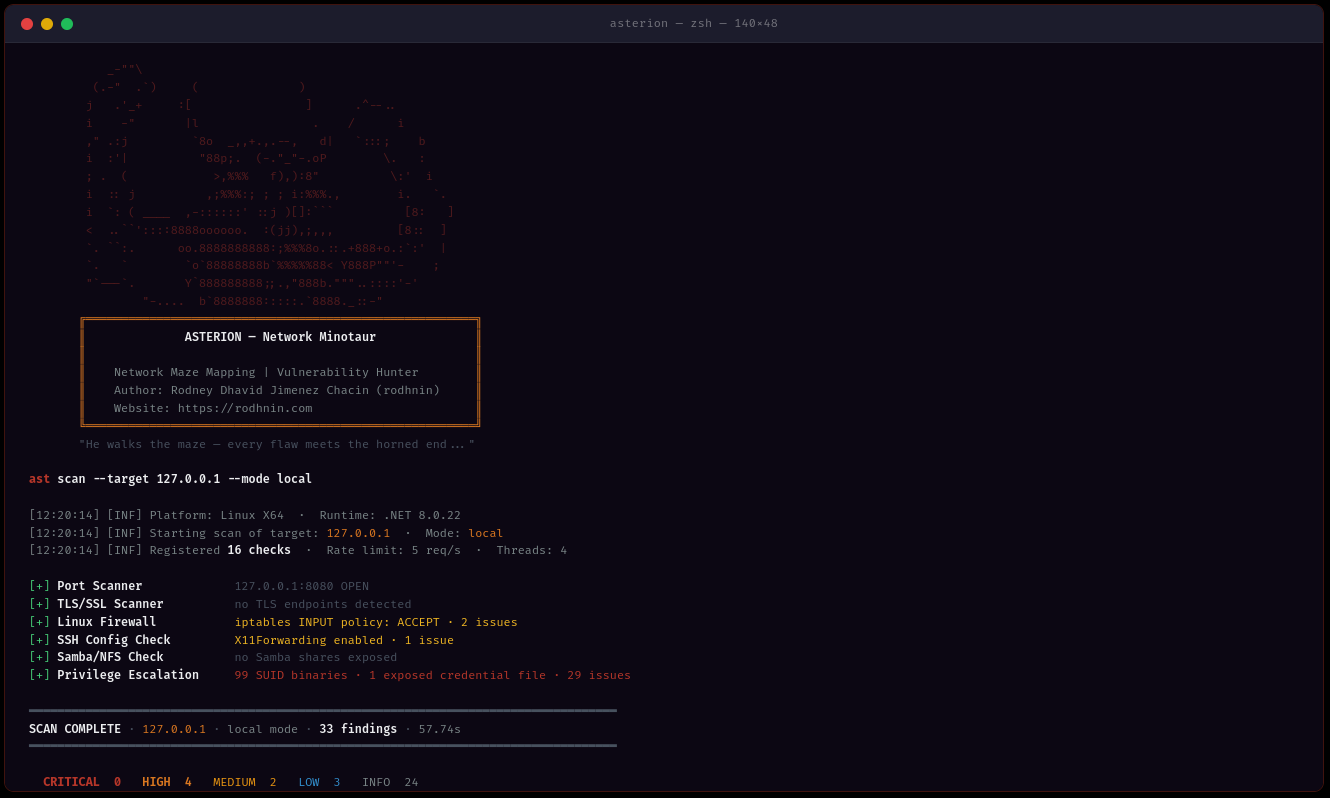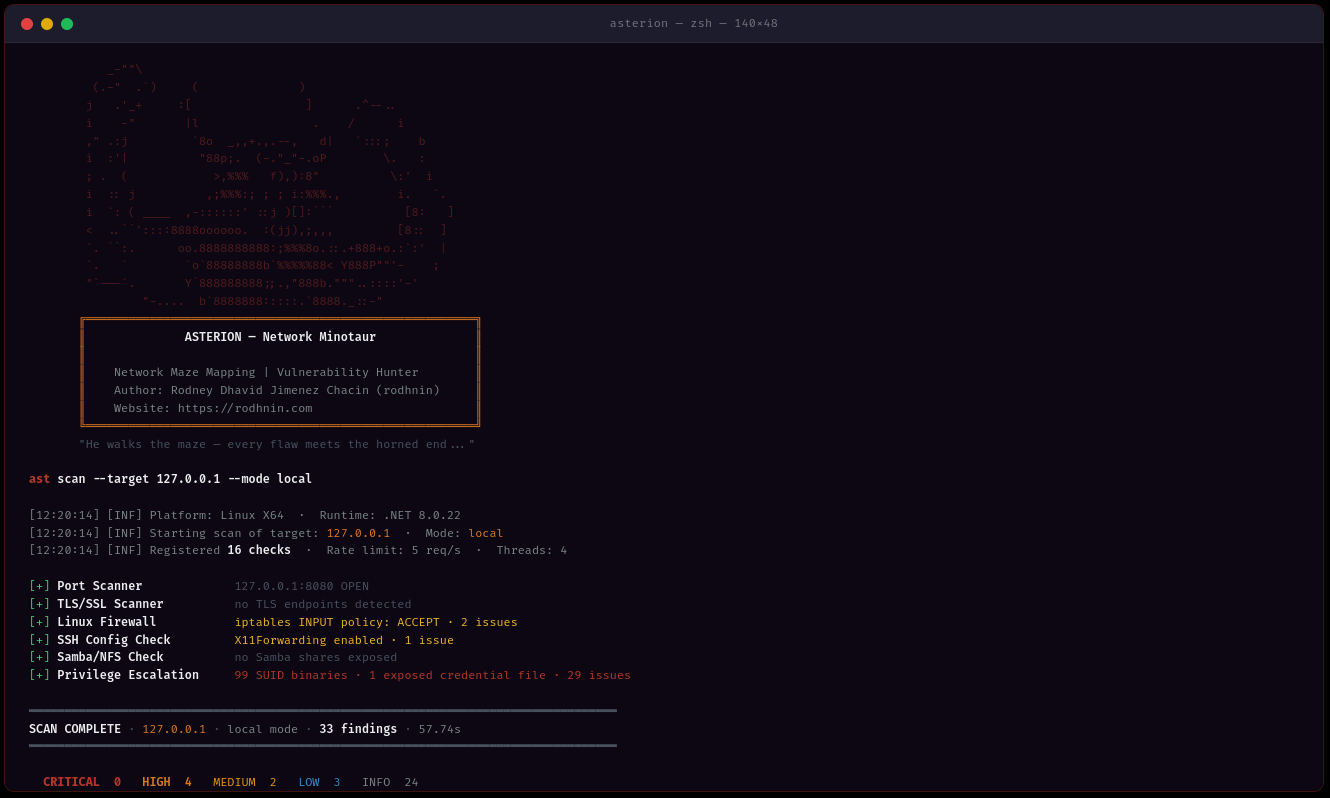

Windows Active Directory、Linuxシステム、およびネットワークインフラストラクチャをスキャンし、AI搭載のハードニングガイドとプロフェッショナルレポートを提供するネットワークおよびドメインセキュリティ監査ツール。
倫理的なネットワークセキュリティ監査ツール — SMB、RDP、LDAP、SSH、Kerberosなど50以上のチェックを備え、AI駆動のCVE分析とOWASP/CIS/NISTコンプライアンスマッピングに対応。
クイックスタート · ドキュメント · Docker · AI機能 · GitHubでスター
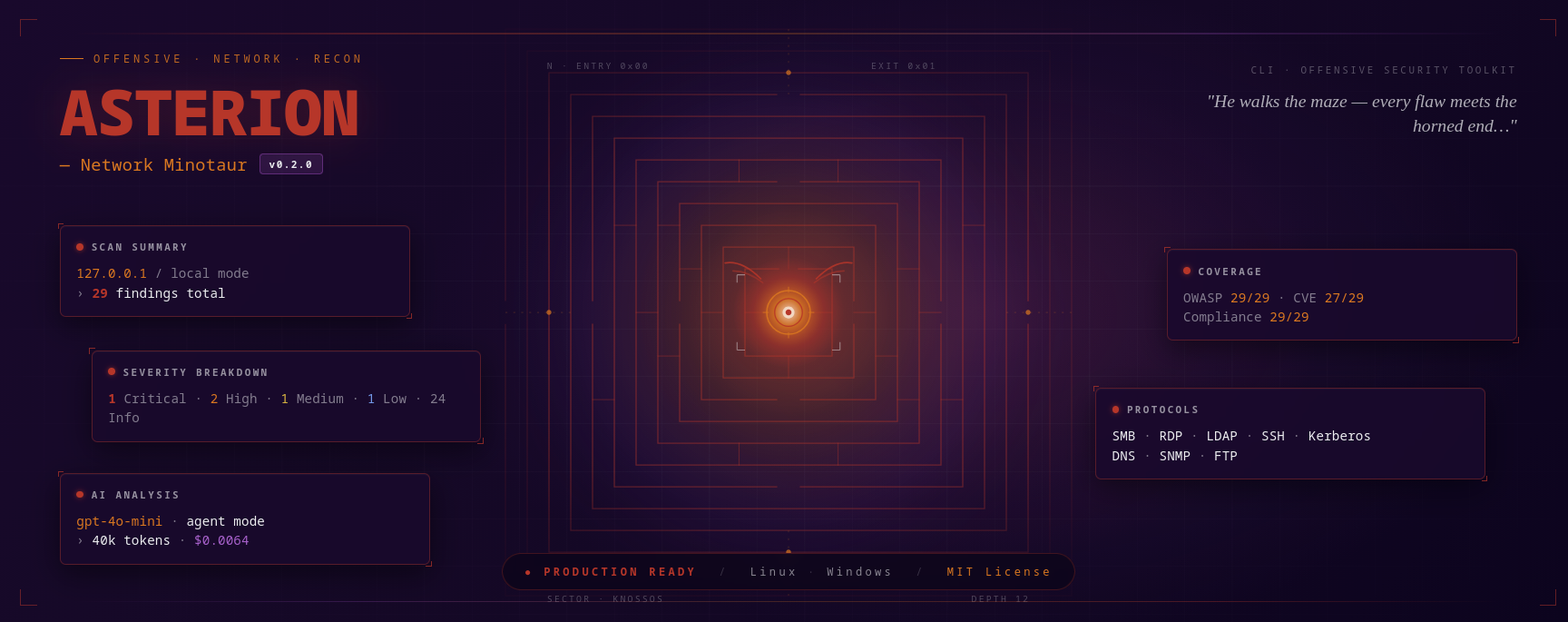
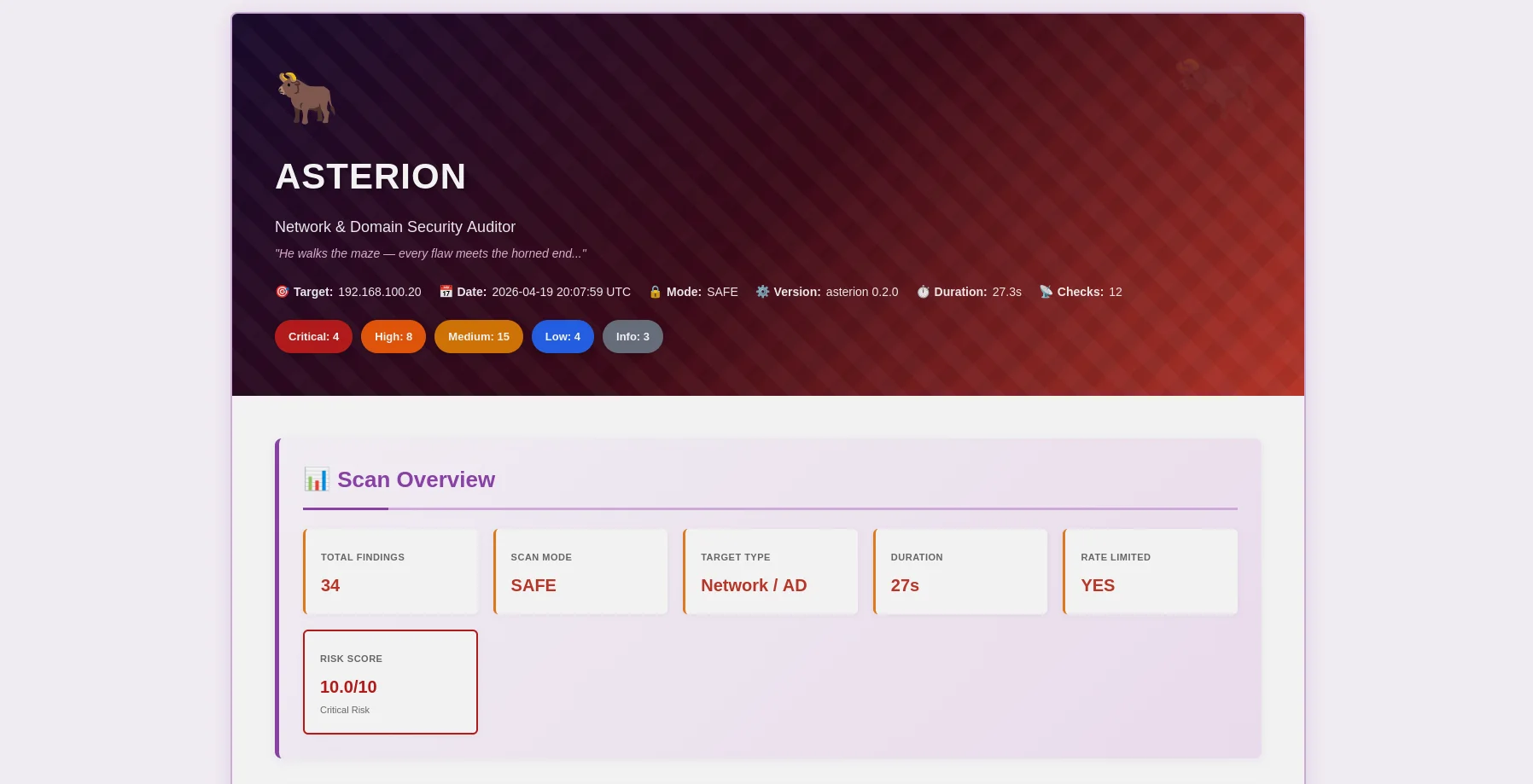
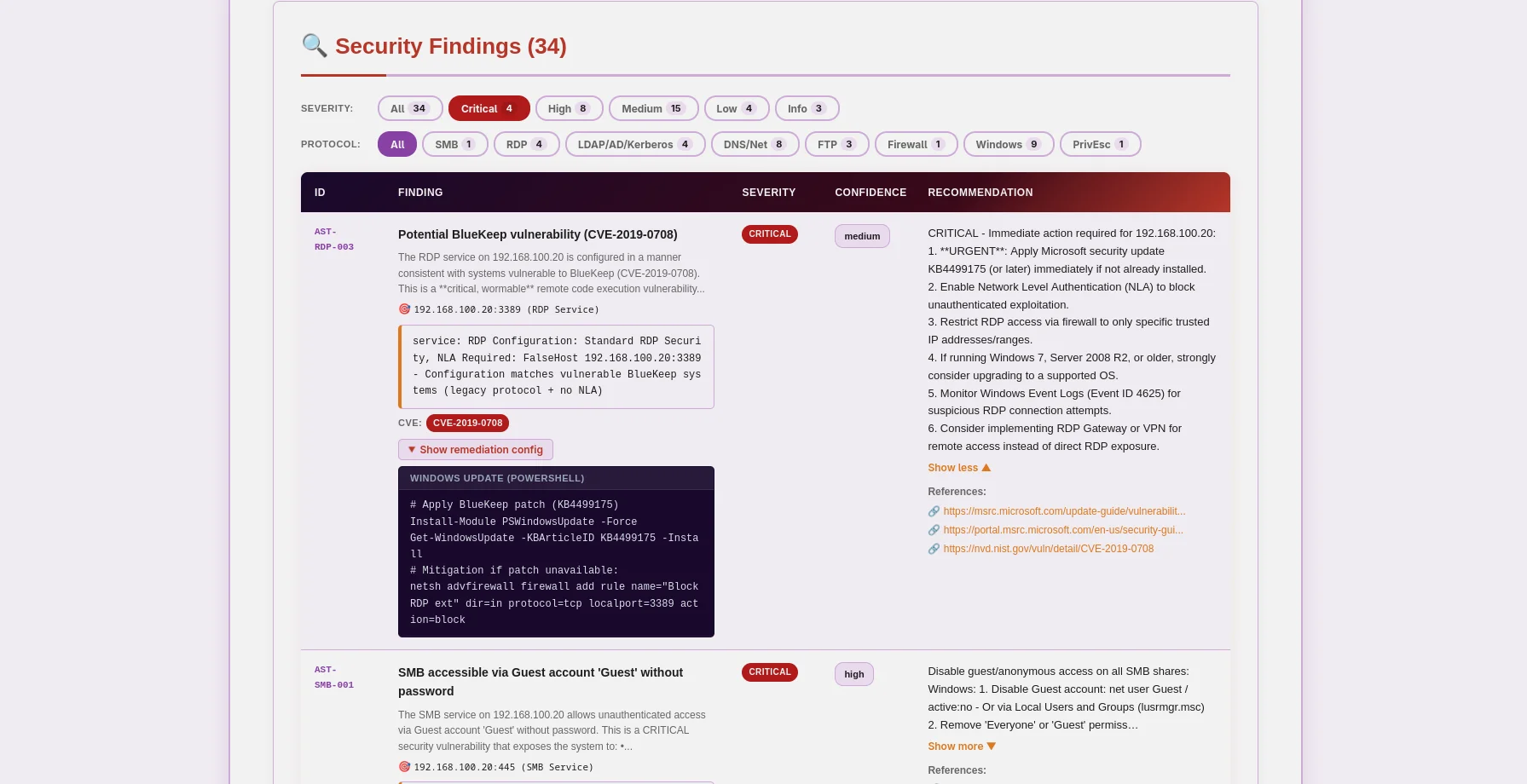
ミノタウロスをテーマにしたHTMLレポート — 重要度バッジ、展開可能な証拠、AIによる修正提案 |
JSONレポート — OWASP/CIS/NIST/PCIマッピング、CVEデータ、機械可読 |
Asterionは、倫理を最優先にした本番環境対応のネットワークおよびドメインセキュリティ監査ツールです。ペネトレーションテスター、セキュリティ研究者、エンタープライズセキュリティチーム向けに構築されており、従来の脆弱性スキャンと最先端のAI分析を組み合わせて、Windows Active Directory、Linuxシステム、ネットワークインフラストラクチャに関する実用的な洞察を提供します。
ast scan --target 10.0.0.0/24 --output html
- **マルチメソッド検出**: SMB, RDP, LDAP, Kerberos, SSH, FTP, DNS, SNMP プロトコル分析
- **マルチスレッド**: 1~20のワーカースレッドによる同時スキャン
- **スマートレート制限**: 検出を回避するための設定可能なリクエストスロットリング(1~20 req/s)
- **証拠収集**: SMB共有、LDAPクエリ、PowerShell出力を保存
### 🤖 AIを活用した分析
ニーズに合わせてAIプロバイダを選択してください:
| プロバイダ | 最適 | 速度 | コスト | プライバシー |
| -------------------- | ------------------ | --------------- | ------------- | --------------- |
| **OpenAI GPT-4** | プロダクション品質 | ⚡ 高速(40秒) | 💰 $0.30/スキャン | 🔒 標準 |
| **Anthropic Claude** | プライバシー重視 | ⚡ 高速(50秒) | 💰 $0.35/スキャン | 🔒 強化 |
| **Ollama (ローカル)** | 完全プライバシー | 🐢 低速(30分) | 💰 無料 | 🔐 100%オフライン |
**2つの分析モード:**
- **技術的**: PowerShell/GPOコマンドと設定スニペットを用いたステップバイステップの修復方法
- **エグゼクティブ**: 関係者や経営陣向けの平易な要約
### 📊 プロフェッショナルレポート
**JSONレポート**(機械可読)```json
{
"tool": "asterion",
"version": "0.2.0",
"target": "192.168.1.10",
"riskScore": 10.0,
"summary": {
"critical": 3,
"high": 8,
"medium": 16,
"low": 5,
"info": 2
},
"findings": [
{
"id": "AST-SMB-003",
"title": "SMBv1 protocol enabled (EternalBlue vector)",
"severity": "high",
"owasp": { "id": "A06", "name": "Vulnerable and Outdated Components" },
"vulnerabilities": [
{
"cve_id": "CVE-2017-0143",
"cvss_score": 9.8,
"cwe_id": "CWE-119"
}
],
"cvss": 9.8
}
],
"attackChains": [...],
"diff": { "refScanId": 41, "new": [...], "fixed": [...], "persisting": [...] }
}
HTMLレポート (人間にとって読みやすい)
Asterionはテクノロジーを通じて倫理的なハッキングを強制します。積極的なスキャンとAI分析には所有権の証明が必要です:```bash
ast consent generate --domain corp.local
ast consent verify --method http --domain corp.local --token verify-abc123
ast scan --target corp.local --mode aggressive --use-ai
### 💾 データベースの永続化
Argos Suiteと共有するSQLiteデータベースがすべてを追跡します:
- **スキャン履歴**: 日付、期間、発見件数、重要度の内訳
- **発見リポジトリ**: 全Argosツールにわたる検索可能な脆弱性データベース
- **検証済みドメイン**: 有効期限付きの同意トークンの追跡
- **傾向分析**: 経時的なスキャンの比較```bash
# Query recent scans (works for all Argos Suite tools)
sqlite3 ~/.argos/argos.db "SELECT * FROM scans WHERE tool='asterion' ORDER BY started_at DESC LIMIT 10"
# Find critical issues
sqlite3 ~/.argos/argos.db "SELECT * FROM v_critical_findings WHERE tool='asterion'"
すべてのプラットフォーム:
オプション:
git clone https://github.com/rodhnin/asterion-network-minotaur.git cd asterion-network-minotaur
chmod +x scripts/setup.py python3 scripts/setup.py
**スクリプトは次のことを行います:**
1. ✅ 前提条件を確認 (.NET、Python)
2. ✅ Python依存関係をインストール
3. ✅ 共有Argos Suiteデータベースをセットアップ
4. ✅ AsterionをReleaseモードでビルド
5. ✅ ディレクトリを作成 (~/.asterion、~/.argos)
6. ✅ ラッパースクリプト `/usr/local/bin/ast` を作成 (任意)
#### Windows (PowerShell)```powershell
# Clone repository
git clone https://github.com/rodhnin/asterion-network-minotaur.git
cd asterion-network-minotaur
# Run setup (right-click PowerShell > Run as Administrator)
.\scripts\setup.ps1
スクリプトは次の操作を行います:
自動スクリプトがシステムで動作しない場合は、次の手順に従ってください:
git clone https://github.com/rodhnin/asterion-network-minotaur.git cd asterion-network-minotaur

#### ステップ 2: 依存関係のインストール
**Linux/macOS:**```bash
pip3 install -r scripts/requirements.txt
Windows (コマンドプロンプト):```cmd pip install -r scripts\requirements.txt
#### ステップ3: データベースのセットアップ
**Linux/macOS:**```bash
python3 scripts/db_migrate.py
Windows:```cmd python scripts\db_migrate.py
#### ステップ 4: Asterion をビルドする
**すべてのプラットフォーム:**```bash
dotnet build -c Release
Linux/macOS:```bash mkdir -p ~/.asterion/reports mkdir -p ~/.asterion/consent-proofs mkdir -p ~/.argos
**Windows (PowerShell):**```powershell
New-Item -ItemType Directory -Force -Path "$env:USERPROFILE\.asterion\reports" | Out-Null
New-Item -ItemType Directory -Force -Path "$env:USERPROFILE\.asterion\consent-proofs" | Out-Null
New-Item -ItemType Directory -Force -Path "$env:USERPROFILE\.argos" | Out-Null
sudo nano /usr/local/bin/ast
#!/bin/bash exec dotnet "$(cd "$(dirname "${BASH_SOURCE[0]}")/.." && pwd)/src/Asterion/bin/Release/net8.0/Asterion.dll" "$@"
sudo chmod +x /usr/local/bin/ast
#### Step 7: APIキーの設定(任意)
単一の環境変数で、すべてのAIプロバイダー(OpenAI、Anthropic)に対応します:
**Linux/macOS:**```bash
export AI_API_KEY="sk-proj-..." # OpenAI key
# or
export AI_API_KEY="sk-ant-..." # Anthropic key
# Add to ~/.bashrc or ~/.zshrc to make permanent
Windows (PowerShell):```powershell $env:AI_API_KEY = "sk-proj-..."
[Environment]::SetEnvironmentVariable("AI_API_KEY", "sk-proj-...", [System.EnvironmentVariableTarget]::User)
#### ステップ 8: インストールの確認
**Linux/macOS (シンボリックリンクが作成された場合):**```bash
ast version
Windowsまたは直接起動:```cmd .\src\Asterion\bin\Release\net8.0\ast.exe version
dotnet .\src\Asterion\bin\Release\net8.0\Asterion.dll version
### 初めてのスキャン
#### ローカルネットワークの自動スキャン
**Asterionは自動的にローカルネットワークを検出してスキャンできます!**
**Windows (PowerShell) — セットアップ後 (推奨):**```powershell
# Test on localhost (simple)
ast scan --target localhost --output html
# Scan local subnet with AI analysis
ast scan --target 192.168.1.0/24 --output both --threads 10 --rate 5 --use-ai --ai-tone both
# Domain scan with authentication
ast scan --target corp.local --auth "CORP\admin:Password123" --use-ai
Windows (PowerShell) — PATH設定なし:```powershell
.\src\Asterion\bin\Release\net8.0\ast.exe scan --target localhost
--output html --use-ai
--ai-tone both
.\src\Asterion\bin\Release\net8.0\ast.exe scan --target 192.168.1.0/24
--output both --threads 10
--rate 5
**Linux/macOS:**```bash
# Scan localhost
ast scan --target localhost \
--output html \
--use-ai \
--ai-tone both
# Scan local subnet (e.g., 192.168.1.0/24)
ast scan --target 192.168.1.0/24 \
--output both \
--threads 10 \
--rate 5
# Scan domain
ast scan --target corp.local \
--auth "CORP\admin:Password123" \
--output html \
--use-ai
Asterionは--outputを使用して3つの出力形式をサポートしています:
| 形式 |
|---|
--ai-toneを使用してAI分析のフォーマットを制御します:
| トーン | 使用例 | 出力 |
|---|---|---|
| technical | セキュリティチーム | PowerShell/GPOコマンドによる段階的な修復手順 |
シンプルなネットワークスキャン(認証なし):```bash ast scan --target 10.0.0.0/24
**HTMLレポート付き:**```bash
ast scan --target 192.168.1.0/24 --output html
認証済みスキャン (Windowsドメイン):```bash
ast scan --target dc01.corp.local
--auth "CORP\Administrator:P@ssw0rd"
--output html
**AI分析(技術面+経営面):**```bash
ast scan --target 10.0.0.0/24 \
--use-ai \
--ai-tone both \
--output html
高速スキャン (10 threads, 10 req/s):```bash
ast scan --target 10.0.0.0/24
--threads 10
--rate 10
--output json
#### レポートの場所
**ネイティブインストール:**
- Reports: `~/.asterion/reports/`
- Database: `~/.argos/argos.db`
**Windows:**
- Reports: `%USERPROFILE%\.asterion\reports\`
- Database: `%USERPROFILE%\.argos\argos.db`
**Docker デプロイ:**
- Reports: `docker/reports/`
- Database: `docker/data/argos.db`
**🎉 成功!** レポートディレクトリ内の JSON および HTML 出力ファイルを確認してください。
---
### Docker での実行
**自動デプロイ:**```bash
cd docker
./deploy.sh # Linux/macOS
.\deploy.ps1 # Windows
手動Dockerデプロイメント:```bash
docker compose up -d
docker compose exec asterion dotnet /app/ast.dll scan
--target 192.168.1.0/24
--output html
docker compose logs -f asterion
docker compose down
---
## 📘 使用ガイド
### コマンド構造```bash
ast <command> [options]
利用可能なコマンド:
scan — セキュリティスキャンを実行consent — 同意トークンを管理version — バージョン情報を表示ast scan --target 192.168.1.0/24
ast scan --target 192.168.1.0/24 --output html
ast scan --target 10.0.0.5 --output both
#### ネットワークターゲティング```bash
# CIDR notation
ast scan --target 10.0.0.0/24
# IP range
ast scan --target 192.168.1.10-50
# Domain name
ast scan --target corp.local
# Single host
ast scan --target 192.168.1.1
ast scan --target 10.0.0.0/24 --threads 3 --rate 2
ast scan --target 10.0.0.0/24 --threads 15 --rate 15
ast scan --target 10.0.0.0/24 --ports 445,3389,22,139
#### Windows ドメイン スキャン```bash
# Network + LDAP/Kerberos/AD checks
ast scan --target dc01.corp.local \
--auth "CORP\Administrator:P@ssw0rd"
# WinRM: remote firewall, registry, services, privesc
ast scan --target 192.168.1.10 \
--winrm "CORP\admin:P@ssw0rd"
# Full Windows audit: auth + WinRM + AI + HTML
ast scan --target 192.168.1.10 \
--auth "CORP\admin:P@ssw0rd" \
--winrm "CORP\admin:P@ssw0rd" \
--use-ai --ai-tone technical -o both -v
# With NTLM hash (Pass-the-Hash)
ast scan --target 10.0.0.5 \
--auth-ntlm "admin:aad3b435b51404eeaad3b435b51404ee:8846f7eaee8fb117ad06bdd830b7586c"
# Diff against last scan (track security changes)
ast scan --target 192.168.1.10 --winrm "CORP\admin:P@ssw0rd" --diff last -o both
ast scan --target 10.0.0.25 --ssh "admin:password"
ast scan --target 10.0.0.25 --ssh "admin:password" --sudo-password "sudopass"
ast scan --target 10.0.0.25 --ssh-key "admin:~/.ssh/id_rsa"
ast scan --target internal.corp.local
--bastion "bastion.corp.local:jumpuser:~/.ssh/bastion_key"
--ssh "admin:password"
ast scan --target 10.0.0.25
--ssh "root:toor"
--use-ai --ai-tone technical -o both -v
#### AIを活用した分析```bash
# Technical remediation (default, for security teams)
ast scan --target 10.0.0.5 \
--ssh "root:pass" \
--use-ai --ai-tone technical -o html
# Executive summary (for management)
ast scan --target 10.0.0.5 \
--use-ai --ai-tone non_technical -o html
# Both formats + streaming output
ast scan --target 10.0.0.5 --use-ai --ai-tone both --ai-stream -o both
# Agent mode (NVD CVE lookup tool enabled)
ast scan --target 10.0.0.5 --ssh "root:pass" --use-ai --ai-agent -v
# Compare two models
ast scan --target 10.0.0.5 --use-ai \
--ai-compare "openai/gpt-4o-mini-2024-07-18,anthropic/claude-3-5-haiku-20241022"
# Enforce cost budget
ast scan --target 10.0.0.5 --winrm "admin:pass" --use-ai --ai-budget 0.05
ast scan --target 10.0.0.5 -v
ast scan --target 10.0.0.5 -v --timeout 20
ast scan --target 10.0.0.5 --timeout 5
### 同意トークン管理
#### 同意トークンの生成```bash
ast consent generate --domain corp.local
# Output: Token: verify-a3f9b2c1d8e4f5a6
HTTPメソッド(Webサーバーにファイルを配置):```bash
ast consent verify
--method http
--domain corp.local
--token verify-a3f9b2c1d8e4f5a6
**DNS Method** (TXTレコードを追加):```bash
# 1. Add DNS TXT record: corp.local = "asterion-verify=verify-a3f9b2c1d8e4f5a6"
# 2. Verify:
ast consent verify \
--method dns \
--domain corp.local \
--token verify-a3f9b2c1d8e4f5a6
SSH メソッド (システム上にファイルを作成):```bash
ast consent verify
--method ssh
--domain corp.local
--token verify-a3f9b2c1d8e4f5a6
--ssh "user:password"
#### アグレッシブモードを実行```bash
# After verifying consent token:
ast scan --target corp.local --mode aggressive
ast scan --target 192.168.1.0/24 --output html --threads 10 --rate 10
#### シナリオ2: 完全なドメイン監査```bash
# Complete Windows AD assessment with AI analysis
ast scan --target corp.local \
--auth "CORP\admin:P@ssw0rd" \
--use-ai \
--ai-tone both \
--output both \
--threads 8 \
--rate 8
ast scan --target 10.0.0.0/24
--threads 2
--rate 1
--timeout 20
--output json
#### シナリオ 4: ペネトレーションテスト```bash
# Generate consent first
ast consent generate --domain internal.corp
# Place token and verify
ast consent verify --method http --domain internal.corp --token <token>
# Run aggressive assessment
ast scan --target internal.corp \
--mode aggressive \
--auth "CORP\pentest:P@ssw0rd" \
--use-ai \
--output both
AsterionはLangChain 1.0.0を使用し、Pythonブリッジを介して複数のAIプロバイダーをサポートしており、セキュリティ、プライバシー、予算の要件に基づいて柔軟性を提供します。
最適な用途: 本番環境
#### Anthropic Claude
**最適: プライバシー強化**
- ⭐ 品質: 優秀 (5/5)
- ⚡ 速度: ~50–70秒
- 💰 コスト: スキャンあたり ~$0.007–0.015 (claude-3-5-haiku)
- 🔒 プライバシー: 強化 (Anthropicのプライバシー優先アプローチ)```bash
export AI_API_KEY="sk-ant-..." # Same variable, Anthropic key format
最適な用途:完全なプライバシー
ollama pull llama3.2
### プライバシーとセキュリティ
**自動サニタイズ**
AIプロバイダーにデータを送信する前に、Asterionは自動的に以下を削除します:
- ✅ 同意トークン
- ✅ ドメイン資格情報(パスワード、NTLMハッシュ)
- ✅ 個人識別情報(PII)
- ✅ 内部IPアドレス(要求された場合)
- ✅ 機密データを含むSMB共有パス
**オプトインのみ**
- AI分析には明示的な `--use-ai` フラグが必要
- 積極的なスキャンには確認済み同意トークンが必要
- どのプロバイダーがデータを閲覧するかを制御可能
**最大限のプライバシーのために**
Ollamaをローカルで使用してください。遅く、精度は劣りますが、スキャンデータがマシンから出ることはありません。
### プロバイダーの切り替え
**現在の方法(v0.2.0):** `config/defaults.yaml` を編集```yaml
ai:
langchain:
provider: "ollama" # Changed from "openai"
model: "llama3.2" # Ollama model
ollama_base_url: "http://localhost:11434"
v0.3.0で登場予定: 対話型設定メニュー(Metasploitスタイル)```bash
ast --show-options ast --set ai.provider=anthropic ast --save-profile privacy-mode
---
## 🧪 安全なテストラボ
**⚠️ 書面による許可なしに本番ネットワークをスキャンしないでください!**
当社のDockerラボを使用して安全に練習してください:
### テスト環境のセットアップ```bash
# Navigate to docker directory
cd docker
# Deploy vulnerable network lab
docker-compose -f compose.testing.yml up -d
# Wait for services to start (~60 seconds)
docker-compose -f compose.testing.yml logs -f
# Create vulnerable conditions
docker-compose -f compose.testing.yml exec windows-target powershell -c "Disable-NetFirewallProfile -All"
cd ..
ast scan --target 172.20.0.0/24 --output html
ast scan --target 172.20.0.2 --auth "LAB\admin:P@ssw0rd123" --output both
ast scan --target 172.20.0.0/24 --use-ai --output html
### クリーンアップ```bash
cd docker
docker-compose -f compose.testing.yml down -v # -v removes all data
詳細なテストシナリオについては、docs/TESTING_GUIDE.md を参照してください。
自分が所有しているか、明示的な書面による許可を得たネットワークとシステムのみをスキャンしてください。
Asterionは、悪用を防ぐために技術的制御を実装しています:
コンピュータシステムへの不正アクセスは、ほとんどの法域で違法です:
完全な倫理ガイドラインについては、docs/ETHICS.md を参照してください。
Asterionはクロスプラットフォームのデプロイメントスクリプトを提供しています:
Linux/macOS:```bash cd docker ./deploy.sh
**Windows (PowerShell):**```powershell
cd docker
.\deploy.ps1
デプロイオプション:
Linux/macOS:```bash cd docker docker compose up -d
docker compose exec asterion dotnet /app/ast.dll scan --target 10.0.0.0/24
docker compose logs -f asterion
docker compose down
**Windows (PowerShell):**```powershell
cd docker
docker compose up -d
# Execute scans (note the dotnet wrapper)
docker compose exec asterion dotnet /app/ast.dll scan --target 10.0.0.0/24
# View logs
docker compose logs -f asterion
# Stop service
docker compose down
永続データ:
./reports/ → ホストディレクトリ docker/reports/./data/argos.db → ホストディレクトリ docker/data/argos.db (Argos Suite DBと共有)./logs/asterion.log → ホストディレクトリ docker/logs/asterion.log注: Asterionは、環境変数 ASTERION_IN_DOCKER を介してDocker環境を自動検出します。
完全なDockerドキュメント(Linux/Windows)については、以下を参照してください: docker/README.md
ネイティブインストール:``` ~/.asterion/ ├── reports/ │ ├── asterion_report_10_0_0_0_24_20260419_143000.json # Machine-readable │ └── asterion_report_10_0_0_0_24_20260419_143000.html # Human-friendly (Minotaur-themed) └── consent-proofs/ └── corp_local_verify-abc123_20260419.txt
~/.argos/ ├── argos.db # Shared Argos Suite database └── logs/ └── argos.log # Shared log file
**Docker デプロイ:**```
asterion-network-minotaur/
├── docker/
│ ├── reports/
│ │ ├── asterion_report_10_0_0_0_24_20260419_143000.json
│ │ └── asterion_report_10_0_0_0_24_20260419_143000.html
│ ├── data/
│ │ └── argos.db # Shared Argos Suite database (Docker)
│ ├── logs/
│ │ └── asterion.log
│ └── workspace/
│ └── consent-proofs/
注: Docker環境は ASTERION_IN_DOCKER 環境変数によって自動検出されます。
{ "tool": "asterion", "version": "0.2.0", "target": "10.0.0.0/24", "date": "2026-04-13T14:30:00Z", "mode": "safe", "summary": { "critical": 12, "high": 8, "medium": 15, "low": 5, "info": 20 }, "findings": [ { "id": "AST-SMB-003", "title": "SMBv1 enabled (EternalBlue vulnerability)", "severity": "critical", "confidence": "high", "description": "SMBv1 is enabled on this system. This protocol is vulnerable to EternalBlue (CVE-2017-0143), a critical remote code execution vulnerability exploited by WannaCry ransomware.", "evidence": { "type": "smb", "value": "SMBv1 negotiated successfully", "context": "Port 445/tcp open, SMB signing not required" }, "recommendation": "URGENT - Disable SMBv1 immediately:\n\nPowerShell:\nDisable-WindowsOptionalFeature -Online -FeatureName SMB1Protocol -NoRestart\n\nGroup Policy:\nComputer Configuration → Administrative Templates → MS Security Guide\n→ Configure SMBv1 client driver startup = Disabled\n→ Configure SMBv1 server = Disabled\n\nVerify:\nGet-SmbServerConfiguration | Select EnableSMB1Protocol", "references": [ "https://docs.microsoft.com/en-us/windows-server/storage/file-server/troubleshoot/detect-enable-and-disable-smbv1-v2-v3", "https://nvd.nist.gov/vuln/detail/CVE-2017-0143" ], "affected_component": "SMB Server" }, { "id": "AST-LDAP-001", "title": "LDAP anonymous bind allowed", "severity": "high", "confidence": "high", "description": "LDAP server allows anonymous bind, permitting unauthenticated enumeration of domain users, groups, and configuration.", "evidence": { "type": "ldap", "value": "Anonymous bind successful to port 389/tcp", "context": "Retrieved domain base DN: DC=corp,DC=local" }, "recommendation": "Disable LDAP anonymous bind:\n\nGroup Policy:\nComputer Configuration → Policies → Windows Settings → Security Settings → Local Policies → Security Options\n→ Network access: Allow anonymous SID/Name translation = Disabled\n→ Network access: Do not allow anonymous enumeration of SAM accounts = Enabled\n→ Network access: Do not allow anonymous enumeration of SAM accounts and shares = Enabled\n\nRegistry:\nreg add "HKLM\SYSTEM\CurrentControlSet\Control\Lsa" /v RestrictAnonymous /t REG_DWORD /d 1 /f", "affected_component": "LDAP Server" }, { "id": "AST-RDP-001", "title": "RDP without Network Level Authentication (NLA)", "severity": "high", "confidence": "high", "description": "Remote Desktop Protocol (RDP) is configured without Network Level Authentication (NLA). This allows unauthenticated attackers to reach the login screen and attempt brute-force attacks.", "evidence": { "type": "rdp", "value": "RDP port 3389/tcp open, NLA not required", "context": "Encryption level: High" }, "recommendation": "Enable Network Level Authentication:\n\nPowerShell:\n(Get-WmiObject -class Win32_TSGeneralSetting -Namespace root\cimv2\terminalservices -Filter "TerminalName='RDP-tcp'").SetUserAuthenticationRequired(1)\n\nGroup Policy:\nComputer Configuration → Administrative Templates → Windows Components → Remote Desktop Services → Remote Desktop Session Host → Security\n→ Require user authentication for remote connections by using Network Level Authentication = Enabled", "affected_component": "RDP Server" } ], "notes": { "scan_duration_seconds": 67.5, "targets_scanned": 12, "rate_limit_applied": true, "scope_limitations": "Scan limited to network services. Local system checks require SSH/WinRM credentials.", "false_positive_disclaimer": "Manual verification recommended for all findings before remediation." }, "aiAnalysis": { "executiveSummary": "The network scan identified 12 critical security vulnerabilities requiring immediate attention...", "technicalRemediation": "### Critical Issues\n\n1. \n - Affected systems: 10.0.0.5, 10.0.0.10\n - Remediation: Disable SMBv1...", "generatedAt": "2026-04-19T14:35:00Z", "modelUsed": "gpt-4o-mini-2024-07-18", "provider": "openai" } }
### HTMLレポートの機能
- **📊 エグゼクティブダッシュボード**: 重要度カウントとミノタウアーブランディングを備えたサマリーカード
- **🤖 AI分析**: エグゼクティブおよび技術的なインサイトのための展開可能なセクション
- **🔍 詳細な調査結果**: PowerShell/GPO修復コマンドで重要度別に整理
- **📋 証拠**: SMB共有、LDAPクエリ、RDP設定、PowerShell出力
- **🔗 外部参照**: CVE、Microsoftドキュメント、OWASPガイドへのリンク
- **📱 モバイル対応**: すべてのデバイスで動作
- **🎨 ミノタウアーテーマ**: 赤/オレンジ/紫の配色
---
## 📁 プロジェクト構造```
asterion-network-minotaur/
│
├── src/
│ ├── Asterion/ # Main C# application
│ │ ├── Asterion.csproj # .NET project file
│ │ │
│ │ ├── Checks/ # Security check modules
│ │ │ ├── ICheck.cs # Check interface
│ │ │ ├── BaseCheck.cs # Abstract base class (350 lines)
│ │ │ ├── CheckCategory.cs # Check category enum
│ │ │ │
│ │ │ ├── CrossPlatform/ # Network service scanners (work from any OS)
│ │ │ │ ├── PortScanner.cs # TCP port scanning
│ │ │ │ ├── SmbScanner.cs # SMB/CIFS security (42KB)
│ │ │ │ ├── RdpScanner.cs # RDP configuration (24KB)
│ │ │ │ ├── LdapScanner.cs # LDAP/AD security (38KB)
│ │ │ │ ├── KerberosScanner.cs # Kerberos security (22KB)
│ │ │ │ ├── SnmpScanner.cs # SNMP vulnerabilities (21KB)
│ │ │ │ ├── DnsScanner.cs # DNS misconfigurations (14KB)
│ │ │ │ ├── FtpScanner.cs # FTP security (27KB)
│ │ │ │ ├── TlsScanner.cs # TLS/SSL certificate checks
│ │ │ │ ├── SysvolCheck.cs # SYSVOL/GPP password exposure
│ │ │ │ ├── AdAggressiveCheck.cs # AS-REP roasting, delegation, weak ACLs
│ │ │ │ └── WinRmChecks.cs # Remote Windows audit via WS-Man
│ │ │ │
│ │ │ ├── Windows/ # Local Windows system checks
│ │ │ │ ├── WinFirewallCheck.cs # Firewall configuration
│ │ │ │ ├── WinRegistryCheck.cs # Registry security
│ │ │ │ ├── AdPolicyCheck.cs # Active Directory policies
│ │ │ │ ├── WinServicesCheck.cs # Service misconfigurations
│ │ │ │ └── PrivEscCheckWin.cs # Windows privilege escalation
│ │ │ │
│ │ │ └── Linux/ # Local/remote Linux checks (via SSH)
│ │ │ ├── LinuxFirewallCheck.cs # iptables/nftables/ufw
│ │ │ ├── SshConfigCheck.cs # SSH hardening
│ │ │ ├── SambaNfsCheck.cs # Samba/NFS security
│ │ │ └── PrivEscCheckLinux.cs # SUID, sudo misconfig
│ │ │
│ │ ├── Core/ # Core infrastructure
│ │ │ ├── Orchestrator.cs # Main execution engine (1,243 lines)
│ │ │ ├── Config.cs # YAML configuration loader
│ │ │ ├── ScanOptions.cs # Scan configuration
│ │ │ ├── Database.cs # SQLite operations
│ │ │ ├── ConsentValidator.cs # Consent token verification
│ │ │ ├── SshConnectionManager.cs # SSH.NET wrapper (password/key/bastion)
│ │ │ ├── WinRmConnectionManager.cs # WS-Man HTTP/NTLM (Linux → Windows)
│ │ │ ├── AttackChainAnalyzer.cs # Multi-step attack chain correlation
│ │ │ ├── NtlmSpnego.cs # NTLM/SPNEGO auth implementation
│ │ │ ├── NtlmV2Auth.cs # NTLMv2 auth implementation
│ │ │ │
│ │ │ ├── Output/
│ │ │ │ └── ReportBuilder.cs # Report generation (risk score, labels)
│ │ │ │
│ │ │ └── Utils/
│ │ │ ├── NetworkUtils.cs # Network operations
│ │ │ ├── CidrParser.cs # CIDR/IP range parsing
│ │ │ ├── AuthenticationManager.cs # Credential handling
│ │ │ └── OsDetector.cs # Per-target OS detection (SSH/SMB/TTL)
│ │ │
│ │ ├── Models/ # Data models
│ │ │ ├── Report.cs # Main report structure
│ │ │ ├── Finding.cs # Security finding (OWASP/CVE/Compliance)
│ │ │ ├── Evidence.cs # Finding proof
│ │ │ ├── ConsentInfo.cs # Consent verification
│ │ │ └── AiAnalysis.cs # AI-generated content (cost tracking)
│ │ │
│ │ ├── Program.cs # Application entry point
│ │ └── Cli.cs # CLI argument parser (all flags)
│ │
│ └── Asterion.sln # Visual Studio solution
│
├── scripts/ # Python bridge scripts
│ ├── ai_analyzer.py # LangChain AI integration (stream/agent/compare)
│ ├── cve_lookup.py # NVD API v2 CVE enrichment
│ ├── owasp.py # OWASP Top 10 mapping (139 entries)
│ ├── compliance.py # CIS/NIST/PCI mapping (95 entries)
│ ├── db_migrate.py # Database setup
│ ├── render_html.py # HTML report generation (Jinja2)
│ ├── setup.sh # Linux/macOS installation script
│ ├── setup.ps1 # Windows PowerShell setup
│ └── requirements.txt # Python dependencies
│
├── config/ # Configuration files
│ ├── defaults.yaml # Default settings
│ └── prompts/ # AI prompt templates
│ ├── technical.txt # Technical remediation prompts
│ └── non_technical.txt # Executive summary prompts
│
├── db/
│ └── migrate.sql # Database schema (shared with Argos Suite)
│
├── docker/ # Docker deployment
│ ├── Dockerfile # Production image
│ ├── docker-compose.yml # Production deployment
│ ├── compose.testing.yml # Vulnerable lab environment
│ ├── .dockerignore
│ ├── .env.example
│ └── README.md # Docker instructions
│
├── docs/ # Documentation
│ ├── AI_INTEGRATION.md # AI setup guide
│ ├── CONSENT.md # Consent token system
│ ├── DATABASE_GUIDE.md # SQLite schema and queries
│ ├── ETHICS.md # Ethical guidelines
│ ├── NETWORK_CHECKS.md # Complete check catalog (50+ checks)
│ └── ROADMAP.md # Development roadmap
│
├── schema/
│ └── report.schema.json # Argos Suite unified schema
│
├── templates/
│ └── report.html.j2 # HTML report template (35KB, Minotaur-themed)
│
├── assets/
│ └── ascii.txt # Minotaur ASCII art banner
│
├── CHANGELOG.md # Version history
├── README_PATTERN.md # README visual branding guide
├── LICENSE # MIT License
└── README.md # This file
統計情報:
ステータス: 🎉 リリース済み
--winrm)--ssh-key, --bastion, --sudo-password)--diff last / --diff <id> — セキュリティ後退の追跡--creds-file credentials.yaml--ai-budget, コストをDBとcosts.jsonに保存--ai-stream, --ai-agent, 焦点: 使いやすさ, スケール, インタラクティブAI
--show-options, --set)ast db scans list, ast db findings search)焦点: 自動修復, ML検出, 分散スキャン
詳細な機能説明については、docs/ROADMAP.mdを参照してください。
貢献を歓迎します!次のような貢献が可能です:
git checkout -b feature/amazing-feature)git commit -m 'Add amazing feature')git push origin feature/amazing-feature)git clone https://github.com/YOUR-USERNAME/asterion-network-minotaur.git cd asterion-network-minotaur
pip install -r scripts/requirements.txt dotnet restore
dotnet build
dotnet run --project src/Asterion -- scan --target 192.168.1.1 -v
### Code Style
- **C# Formatting**: Microsoft C# コーディング規約に従う
- **Python Formatting**: [Black](https://github.com/psf/black) を使用(行長: 88)
- **XML Documentation**: すべてのパブリッククラス/メソッドに必須
- **Code Comments**: インラインコメントには `//`、XML ドキュメントには `///` を使用
### Reporting Issues
バグを見つけましたか?機能リクエストがありますか?
**Open an issue**: https://github.com/rodhnin/asterion-network-minotaur/issues
以下を含めてください:
- Asterion バージョン(`ast version`)
- .NET バージョン(`dotnet --version`)
- Python バージョン(`python --version`)
- オペレーティングシステム
- 再現手順(バグの場合)
- 期待される動作と実際の動作
---
## 📚 Documentation
包括的なドキュメントは `docs/` ディレクトリにあります:
| Document | Description |
| ------------------------------------------- | ----------------------------------------- |
| [AI_INTEGRATION.md](https://github.com/rodhnin/asterion-network-minotaur/blob/HEAD/docs/AI_INTEGRATION.md) | 完全な AI セットアップガイド(全3プロバイダ) |
| [CONSENT.md](https://github.com/rodhnin/asterion-network-minotaur/blob/HEAD/docs/CONSENT.md) | 同意トークンシステムの技術詳細 |
| [DATABASE_GUIDE.md](https://github.com/rodhnin/asterion-network-minotaur/blob/HEAD/docs/DATABASE_GUIDE.md) | SQLite スキーマ、クエリ、管理 |
| [ETHICS.md](https://github.com/rodhnin/asterion-network-minotaur/blob/HEAD/docs/ETHICS.md) | 法的枠組みと倫理ガイドライン |
| [NETWORK_CHECKS.md](https://github.com/rodhnin/asterion-network-minotaur/blob/HEAD/docs/NETWORK_CHECKS.md) | 50以上のセキュリティチェックの完全カタログ |
| [ROADMAP.md](https://github.com/rodhnin/asterion-network-minotaur/blob/HEAD/docs/ROADMAP.md) | 将来の機能と開発計画 |
### Quick Links
- **Changelog**: [CHANGELOG.md](https://github.com/rodhnin/asterion-network-minotaur/blob/HEAD/CHANGELOG.md)
- **License**: [LICENSE](https://github.com/rodhnin/asterion-network-minotaur/blob/HEAD/LICENSE)
- **ASCII Art**: [assets/ascii.txt](https://github.com/rodhnin/asterion-network-minotaur/blob/HEAD/assets/ascii.txt)
---
## 🤝 Part of Argos Suite
Asterion は **Argos セキュリティスイート**の4番目のコンポーネントです:
| Tool | Language | Target | Status |
| -------------- | ----------- | ----------------------- | ----------- |
| **Argus** | Python | WordPress | ✅ Stable |
| **Hephaestus** | Python | Servers (Linux/Windows) | ✅ Stable |
| **Pythia** | Python | SQL Injection | ✅ Stable |
| **Asterion** | C# + Python | Networks/Domains/AD | 🎉 Released |
**Shared Infrastructure:**
- SQLite database(`~/.argos/argos.db`)
- 統一 JSON レポートスキーマ
- 同意トークンシステム
- LangChain 経由の AI 解析
---
## ⚖️ License
This project is licensed under the **MIT License** - see the [LICENSE](https://github.com/rodhnin/asterion-network-minotaur/blob/HEAD/LICENSE) file for details.```
MIT License
Copyright (c) 2025-2026 Rodney Dhavid Jimenez Chacin
Permission is hereby granted, free of charge, to any person obtaining a copy
of this software and associated documentation files (the "Software"), to deal
in the Software without restriction, including without limitation the rights
to use, copy, modify, merge, publish, distribute, sublicense, and/or sell
copies of the Software, and to permit persons to whom the Software is
furnished to do so, subject to the following conditions:
The above copyright notice and this permission notice shall be included in all
copies or substantial portions of the Software.
THE SOFTWARE IS PROVIDED "AS IS", WITHOUT WARRANTY OF ANY KIND, EXPRESS OR
IMPLIED, INCLUDING BUT NOT LIMITED TO THE WARRANTIES OF MERCHANTABILITY,
FITNESS FOR A PARTICULAR PURPOSE AND NONINFRINGEMENT.
重要: このツールは認可されたセキュリティテスト用です。
Asterion を使用することにより、以下の内容を理解し同意したものとみなします。
Asterion を使用して脆弱性を発見した場合:
スキャンしないでください。 許可があるかどうかわからない場合は、おそらく許可がないものと考えてください。
Asterion は巨人の肩の上に立っています:
倫理的なハッキングを実践し推進するすべてのセキュリティ研究者に特別な感謝を捧げます。
Rodney Dhavid Jimenez Chacin (rodhnin)
ご質問、フィードバック、コラボレーションのお問い合わせは rodhnin.com までお願いします。
| チェックカテゴリ | 詳細 |
|---|
| SMB/CIFS セキュリティ | 匿名共有、SMB署名、SMBv1 (EternalBlue)、NTLMv1、書き込み可能共有 |
| RDP セキュリティ | ネットワークレベル認証 (NLA)、暗号化レベル、露出したRDP |
| LDAP/Active Directory | 匿名バインド、LDAP署名、パスワードポリシー、Kerberos事前認証 |
| Kerberos セキュリティ | AS-REPロースティング、Kerberoasting、過剰なチケット有効期限 |
| SNMP | デフォルトコミュニティ文字列、SNMPv1/v2c、書き込みアクセス |
| DNS/NetBIOS | ゾーン転送 (AXFR)、LLMNR/NetBIOSポイズニング、mDNS |
| Windows システム | ファイアウォール、レジストリ (UAC、LSA)、サービス、特権昇格 |
| Linux システム | iptables/nftables、SSH、Samba/NFS、SUIDバイナリ、sudoの設定ミス |
| コマンド |
|---|
| 出力 |
|---|
| JSON | --output json | 機械可読レポート(デフォルト) |
| HTML | --output html | Minotaurをテーマにした美しいレポート |
| 両方 | --output both | JSONとHTMLの両方を生成 |
| エグゼクティブサマリー |
| 管理職向けの平易な説明 |
| 両方 | 完全な分析 | 技術的およびエグゼクティブ形式の両方 |
| オプション | 値 | デフォルト | 説明 |
|---|
--target, -t | IP/CIDR/ドメイン | 必須 | ターゲット: 192.168.1.0/24, 10.0.0.1, corp.local, カンマ区切りリスト |
--mode, -m | safe, aggressive | safe | スキャンモード (aggressive は同意トークンが必要) |
--output, -o | json, html, both | json | 出力形式 |
--ports, -p | ポートリスト | 自動検出 | スキャンするポート (例: 22,80,443 または 8000-9000) |
--threads | 1-20 | 5 | 同時スレッド数 |
--rate | 1-20 | 5 | リクエストレート制限 (req/s) |
--timeout | 秒 | 10 | 接続タイムアウト |
--verify-ssl | フラグ | true | SSL/TLS証明書の検証 (自己署名証明書の場合は無効化) |
--verbose, -v | フラグ | false | 詳細ログを有効化 |
--diff | last / scan_id | - | 前回のスキャンと比較 (--diff last または --diff 42) |
--creds-file | YAMLファイルのパス | - | YAMLファイルからすべての認証情報を読み込み |
| オプション | 値 | 説明 |
|---|
--auth | DOMAIN\user:pass | LDAP/Kerberos/SMB/AD チェック用のドメイン認証情報 |
--auth-ntlm | user:hash | パスザハッシュ NTLM 認証 |
--kerberos | user:pass@REALM | Kerberos 認証情報 |
--winrm | DOMAIN\user:pass | WinRM によるリモート Windows チェック (ファイアウォール、レジストリ、サービス、AD) |
--ssh | user:pass | リモート Linux チェック用の SSH パスワード認証 |
--ssh-key | user:/path/key | SSH キーベース認証 |
--sudo-password | pass | Linux 特権チェック用の sudo 昇格パスワード |
--bastion | host:user:key | マルチホップ SSH 用の踏み台/要塞ホスト |
| オプション | 値 | デフォルト | 説明 |
|---|
--use-ai | フラグ | false | AI による分析を有効化 |
--ai-tone | technical, non_technical, both | technical | AI 分析の出力形式 |
--ai-provider | openai, anthropic, ollama | openai | AI プロバイダ |
--ai-model | モデル名 | gpt-4o-mini-2024-07-18 | 使用する AI モデル |
--ai-budget | USD 金額 | - | 推定コストがこの値を超えたら AI を中断 |
--ai-stream | フラグ | false | AI トークンをリアルタイムで stdout にストリーム |
--ai-agent | フラグ | false | LangChain エージェントモード (NVD CVE 検索ツール付き) |
--ai-compare | prov/model,prov/model | - | マルチモデル比較 |
| モード | チェック内容 | 同意の必要性 | レート制限 |
|---|
| Safe | 非侵入的なネットワークチェック | ❌ 不要 | 5 req/s |
| Aggressive | 深いAD/システムテスト | ✅ 必要 | 10 req/s |
| AI Analysis | 脆弱性分析 | ✅ 必要 | N/A |
--ai-compare