
情報技術の分野では、データの信頼性と完全性を確保することが極めて重要です。特に、何百万人ものユーザーとテラバイト単位のデータが関わる場合にはなおさらです。しかし、ソフトウェアシステムが複雑になるにつれて、競合状態のような問題が発生し、システムの動作に重大な影響を与え、予測不可能な結果を引き起こす可能性があります。
競合状態とは、マルチタスクプログラムにおいて、2つ以上のスレッドまたはプロセスが同期せずに共有データやリソースを同時に変更しようとしたときに発生するエラーです。操作の実行順序が、どのスレッドまたはプロセスが先に終了するかに依存するため、予期しない予測不可能な結果を招く可能性があります。競合状態の検出は、その予測不可能な性質から、ソフトウェアシステムにおいて困難な課題です。
インターネット上には古典的な競合状態に関する多数のリソースが存在しますが、本記事ではWebSocketにおいて競合状態が発生し得るかどうかを探ります。
WebSocketは、ユーザーのWebブラウザとWebサーバー間の双方向のオープンな接続を提供することで、Webアプリケーションにおけるインタラクションを大幅に改善する最先端技術です。このシームレスな接続により、常に新しいHTTPリクエストを開始することなくデータ交換が可能となり、インタラクティブなアプリケーションの作成に最適です。
概念を実証するために、本記事にはPostgreSQLデータベースと対話するWebSocketサーバーを表すJavaコードが含まれています。このサーバーはJava-WebSocketライブラリを使用してWebSocket接続を処理し、以下のタスクを実行します:
プログラムを起動した後、Javaコードはデータベースに接続し、「example」テーブルが存在するかどうかを確認します。存在しない場合は、テーブルを作成し、ランダムなデータを挿入します:
最も興味深いコードは「onMessage」関数にあります。
public static int a = 0;

@Override
public void onMessage(WebSocket conn, String message) {
    if (a == 0) {
        try {
            // some activity with db
            int rowCount = getCountFromExampleTable();

        } catch (SQLException e) {
            System.out.println("Error executing query: " + e.getMessage());
        }
        conn.send("Echo: " + message);
        a = a + 1;
        System.out.println(a);
    }
}
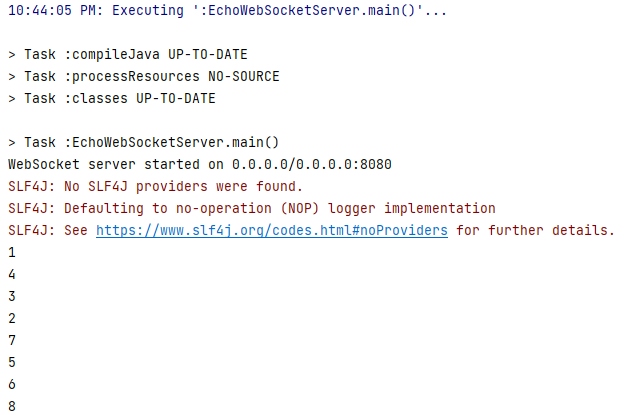
グローバル変数「a」が0で初期化されています。クライアントがサーバーに接続してメッセージを送信すると、「id == 0」かどうか、つまりこの関数がすでに実行されたかどうかを確認します。まだであれば、「example」テーブルから行数を選択する簡単なSQLコマンドが実行されます。その後、「a」が1増加し、その値が出力されます。理論的には、この関数は2回実行されるべきではありません。
クライアントに関しては、2種類のクライアントが作成されています:「WebSocketParallel_Success」
package io.redrays.ws.concept.client;

import org.java_websocket.client.WebSocketClient;
import org.java_websocket.handshake.ServerHandshake;

import java.net.URI;
import java.net.URISyntaxException;
import java.util.ArrayList;
import java.util.List;
import java.util.concurrent.ExecutorService;
import java.util.concurrent.Executors;
import java.util.concurrent.TimeUnit;

public class WebSocketParallel_Success {

    public static void main(String[] args) {
        // Define the WebSocket server URI
        String serverUri = "ws://127.0.0.1:8080";

        // Number of WebSocket clients to create
        int numClients = 100;

        // Create an ExecutorService to manage multiple WebSocket client threads
        ExecutorService executor = Executors.newFixedThreadPool(numClients);

        // Create a list to store WebSocket client instances
        List<WebSocketClient> clients = new ArrayList<>();

        // Loop to create and configure multiple WebSocket clients
        for (int i = 0; i < numClients; i++) {
            int clientId = i + 1;
            try {
                // Create a WebSocket client for each connection
                WebSocketClient webSocketClient = new WebSocketClient(new URI(serverUri)) {
                    @Override
                    public void onOpen(ServerHandshake handshakedata) {
                        // Handle WebSocket connection opened event
                        System.out.println("Client " + clientId + " connected to the WebSocket server");
                        this.send("Hello, WebSocket server! From client " + clientId);
                    }

                    @Override
                    public void onMessage(String message) {
                        // Handle incoming WebSocket messages
                        System.out.println("Client " + clientId + " received message: " + message);
                    }

                    @Override
                    public void onClose(int code, String reason, boolean remote) {
                        // Handle WebSocket connection closed event
                        System.out.println("Client " + clientId + " connection closed: " + reason);
                    }

                    @Override
                    public void onError(Exception ex) {
                        // Handle WebSocket error
                        System.out.println("Client " + clientId + " error occurred: " + ex.getMessage());
                    }
                };

                // Add the WebSocket client to the list
                clients.add(webSocketClient);

                // Connect the WebSocket client in a separate thread
                executor.submit(webSocketClient::connect);

            } catch (URISyntaxException e) {
                System.out.println("Invalid WebSocket server URI: " + e.getMessage());
            }
        }

        // Shutdown the executor after all tasks are submitted
        executor.shutdown();

        // Wait for all WebSocket client threads to complete
        try {
            executor.awaitTermination(Long.MAX_VALUE, TimeUnit.NANOSECONDS);
        } catch (InterruptedException e) {
            System.out.println("Interrupted while waiting for tasks to complete: " + e.getMessage());
        }
    }
}
および「WebSocketParallel_Failed」です。
package io.redrays.ws.concept.client;

import org.java_websocket.client.WebSocketClient;
import org.java_websocket.handshake.ServerHandshake;

import java.net.URI;
import java.net.URISyntaxException;
import java.util.concurrent.ExecutorService;
import java.util.concurrent.Executors;
import java.util.concurrent.TimeUnit;

public class WebSocketParallel_Failed {

    public static void main(String[] args) {
        String serverUri = "ws://127.0.0.1:8080"; // WebSocket server URI
        int numParallelRequests = 285; // Number of parallel WebSocket requests

        try {
            WebSocketClient webSocketClient = new WebSocketClient(new URI(serverUri)) {

                // This method is called when the WebSocket connection is successfully opened.
                @Override
                public void onOpen(ServerHandshake handshakedata) {
                    System.out.println("Connected to the WebSocket server");

                    // Create a fixed thread pool to manage parallel requests
                    ExecutorService executor = Executors.newFixedThreadPool(numParallelRequests);

                    for (int i = 0; i < numParallelRequests; i++) {
                        int messageId = i + 1;
                        executor.submit(() -> {
                            this.send("Hello, WebSocket server! Message ID: " + messageId);
                            System.out.println("Sent message with ID: " + messageId);
                        });
                    }

                    // Shutdown the executor after all tasks are submitted
                    executor.shutdown();

                    // Wait for the tasks to complete
                    try {
                        executor.awaitTermination(Long.MAX_VALUE, TimeUnit.NANOSECONDS);
                    } catch (InterruptedException e) {
                        System.out.println("Interrupted while waiting for tasks to complete: " + e.getMessage());
                    }
                }

                // This method is called when a WebSocket message is received.
                @Override
                public void onMessage(String message) {
                    System.out.println("Received message: " + message);
                }

