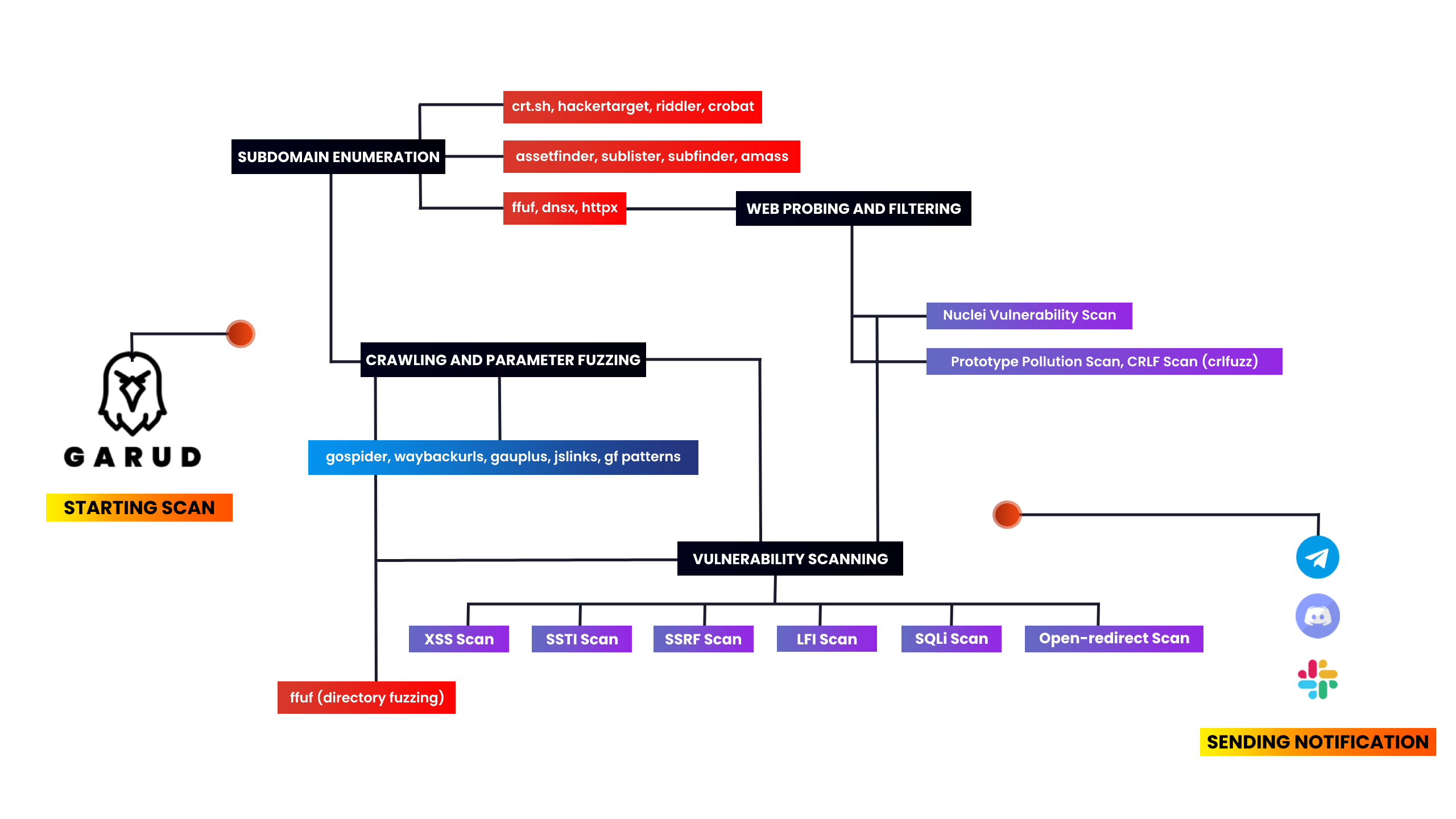









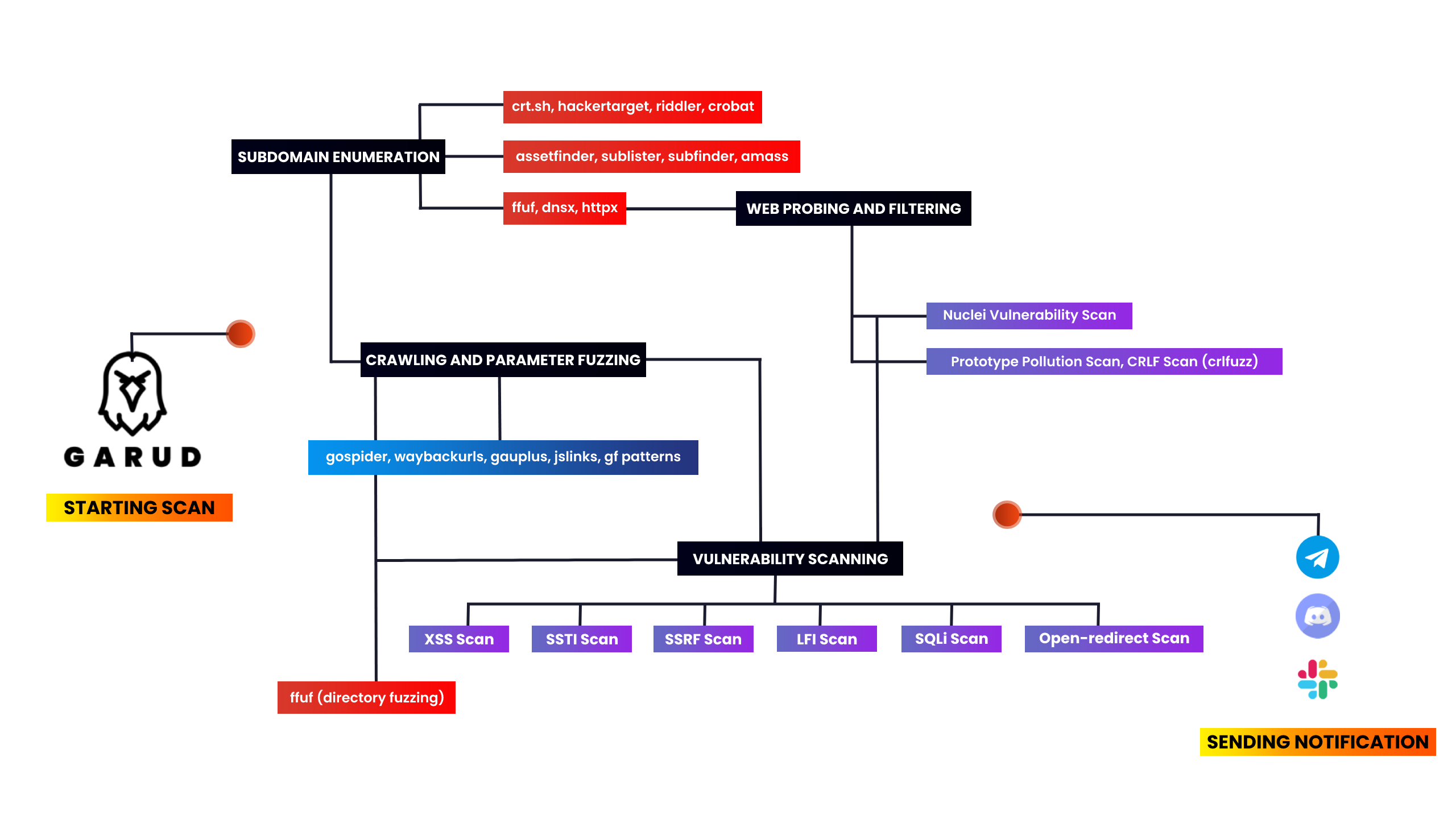
このツールは、リコンナンス作業を自動化し時間を節約するために作成しました。毎回コマンドを入力して完了を待ち、また別のコマンドを入力するのは本当に面倒だったため、バグバウンティ分野で広く使われているツールをいくつか集めました。このスクリプトでは、Assetfinder、subfinder、amass、httpx、sublister、gauplus、gfパターンを使用し、さらにdirsearch、dalfox、nuclei、kxssを使って簡単に発見できる脆弱性も探します。
このスクリプトは最初に、assetfinder、sublister、subfinder、amassを使って指定ターゲットドメインの全サブドメインを列挙し、そのリストから生きているドメインだけをフィルタリングします。次にhttpxでサブドメインのタイトルを取得し、nucleiでサブドメインテイクオーバーをスキャンします。その後、gauplusでサブドメインのパラメータを抽出し、gfパターンでXSS、SSTI、SSRF、SQLiのパラメータをフィルタリングし、低いハンギングフルーツもスキャンします。最後に、出力をtarget-xss.txtのようなテキストファイルに保存し、notifyを使ってスキャン結果の通知を送信します。
What's new in v4.0: fixed some previous issues and filter out time waste vulns(you need to find them manually) and added dorking.
必要条件: Go言語とPython 3。<br> **システム要件:** VPS(1VCPU、2GB RAM`)での実行を推奨。
使用ツール – このスクリプトを使用するには、以下のツールをインストールする必要があります
subfinder •
sublist3r •
gf patterns •
dnsx •
assetfinder •
httpx •
kxss •
nuclei •
dalfox •
anew •
notify •
aquatone •
amass •
gau •
crlfuzz •
uro •
ffuf •
naabu •
crobat •
gobuster •
gospider •
waybackurls
#Make sure you're root before installing the tool

garud:~ sudo su
garud:~ apt install git
garud:~ git clone https://github.com/R0X4R/Garud.git && cd Garud/ && chmod +x garud install.sh && mv garud /usr/bin/ && ./install.sh
注記:
install.shファイルまたはgarudの実行中に問題が発生した場合は、sed -i -e 's/\r$//' install.shを実行してください。
                █▀▀▀ █▀▀█ █▀▀█ █░░█ █▀▀▄
                █░▀█ █▄▄█ █▄▄▀ █░░█ █░░█
                ▀▀▀▀ ▀░░▀ ▀░▀▀ ░▀▀▀ ▀▀▀░

[GARUD] == A RECONNAISSANCE SUITE FOR BUG BOUNTY (@R0X4R)

Example Usage:
garud [-d target.tld] [-x exclude domains] [--json] [-s]

Flags:
   -d, --domain                 string     Add your target                         -d target.tld
   -x, --exclude                string     Exclude out of scope domains            -x /home/dommains.list

Optional Flags:
   -s, --silent                            Hide output in the terminal             Default: False
   -j, --json                              Store output in a single json file      Default: False
   -v, --version                           Print current version of Garud
Garudの使用中やインストール中のエラーを修正
garud:~ chmod +x install.sh && ./install.sh
Error: ./install.sh : /bin/bash^M : bad interpretor: No such file or directory

# fix
garud:~ sed -i -e 's/\r$//' install.sh
エラーをコピーしてGoogleで検索することもできます。それによりデバッグスキルが向上します ;)
使用例
# garud -d hackerone.com
スコープ外のドメインを除外する
# echo test.hackerone.com > ossdomain.txt
# garud -d hackerone.com -x ~/ossdomain.txt
全フラグを使用する場合
# garud -d hackerone.com -j -s -x /home/oss.txt
端末に出力を表示しない
# garud -d hackerone.com -s
出力を単一のjsonファイルに保存
# garud -d hackerone.com -s -j
# cd hackerone
# cat output.json | jq
{
  "nuclei_critical": [],
  "vuln_crlf": [],
  "dalfox": [
    "[POC][V][GET][inATTR-double(3)-URL] http://subdomain.target.tld/hpp?pp=FUZZ%22onpointerout%3Dconfirm.call%28null%2C1%29+class%3Ddalfox+",
    ----------------------snip----------------------
    "subdomains": [
      "sub.target.tld",
      "tub.target.tld",
      "subdomain.target.tld"
  ],
  "vuln_xss": [
    "[POTENTIAL XSS] - http://subdomain.target.tld/hpp/?pp=%22%3E%2F%3E%3Csvg%2Fonload%3Dconfirm%28document.domain%29%3E ",
    "[POTENTIAL XSS] - http://subdomain.target.tld:80/hpp/?pp=%22%3E%2F%3E%3Csvg%2Fonload%3Dconfirm%28document.domain%29%3E ",
    "[POTENTIAL XSS] - http://subdomain.target.tld:80/hpp/index.php?pp=%22%3E%2F%3E%3Csvg%2Fonload%3Dconfirm%28document.domain%29%3E "
  ]
}
Docker
@frost19k によって提供されました。
このイメージはBuildkitを使ってビルドする必要があります。
garud:~ git clone https://github.com/R0X4R/Garud.git
garud:~ cd Garud
garud:~ docker buildx build -t garud -f Dockerfile .
コンテナを実行するには
garud:~ docker run -t --rm \
  -v "/path/on/host":"/output" \   # ホスト側の出力フォルダを"/output"にマウント
  -v "/path/to/configs":"/Garud/.config/notify" \   # Notify設定ファイルを"/Garud/.config/notify"にマウント
  garud -d hackerone.com
Garudはコンテナ内でrootとして実行されるため、Linux名前空間を設定することを推奨します。
@slack •
@discord •
@telegram •
configure-notify
buymeacoffee.com/R0X4R | payU India | kofi.com/R0X4R |
|---|

