自動化された研究アーティファクト — 上流プロジェクトではありません。
このリポジトリは、ラヴァル大学の修士論文のために、公開されているGitHub Actionsワークフローの脆弱性の再現を目的として、自動化ハーネスによって構築された使い捨てのラボです。これは、コミット
8529a7746ce2cae946bd2346cb3792c22f86cbee(2026-02-24)時点のopenlit/openlitの逐語的なスナップショットであり、そのプロジェクト自身のライセンスに基づいて再配布されています。そのライセンスファイルは、このスナップショットに変更を加えずに含まれています。上流プロジェクトは関与しておらず、決して標的にはなりません。ここで研究されている脆弱性はすでに公開されています。このリポジトリ内のすべてのシークレットと変数は、ランダムに生成されたダミー値です — 実際の認証情報は存在しません。アクションの参照とランナーイメージは、2026-02-24時点で解決されたものに固定されています。スナップショットに加えられたすべての変更については、ハーネス出力内の
pinning.mdを参照してください。質問や異議がある場合: [email protected]

ドキュメント | クイックスタート | Python SDK | |
❤️ このプロジェクトをスポンサーする ❤️





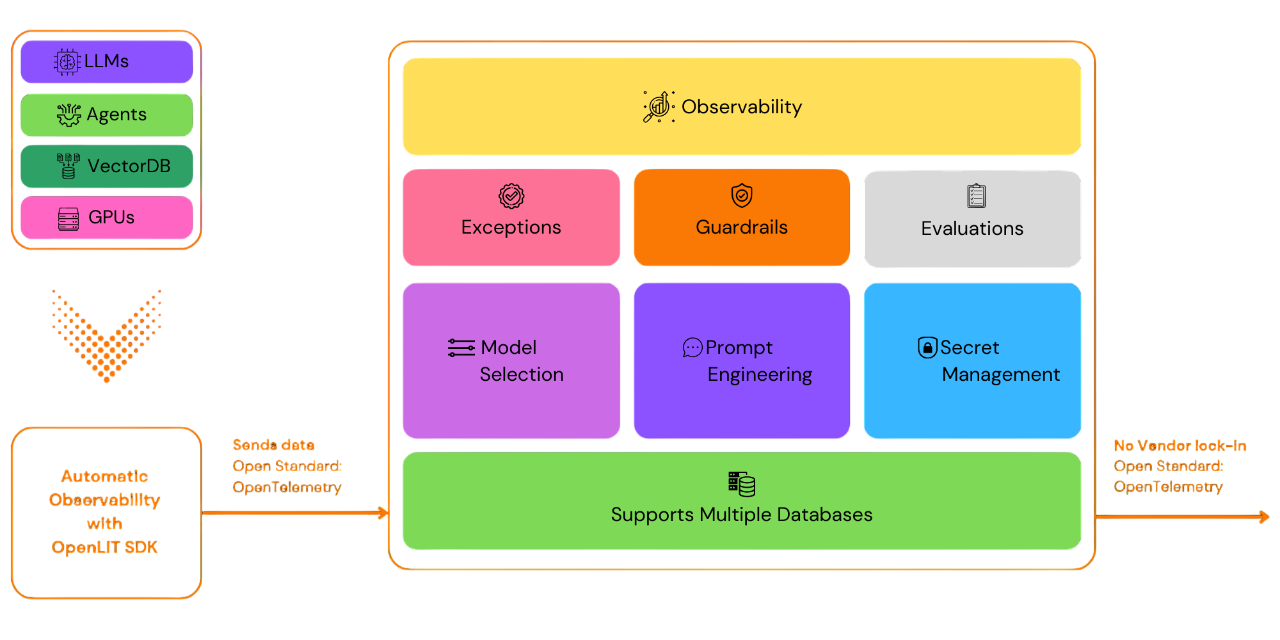
OpenLITを使用すると、特に生成AIとLLM向けのAI開発ワークフローを簡素化できます。LLMの実験、プロンプトの整理とバージョン管理、APIキーの安全な取り扱いといった必須タスクを効率化します。コードを1行追加するだけで、OpenTelemetryネイティブの可観測性を有効にでき、LLM、ベクターデータベース、GPUを含むフルスタックのモニタリングを提供します。これにより、開発者は自信を持ってAI機能やアプリケーションを構築し、テストから本番環境へスムーズに移行できます。
このプロジェクトは、OpenTelemetryコミュニティとともにセマンティックコンベンションに従い、維持しています。可観測性の最新標準に合わせて常に更新されています。
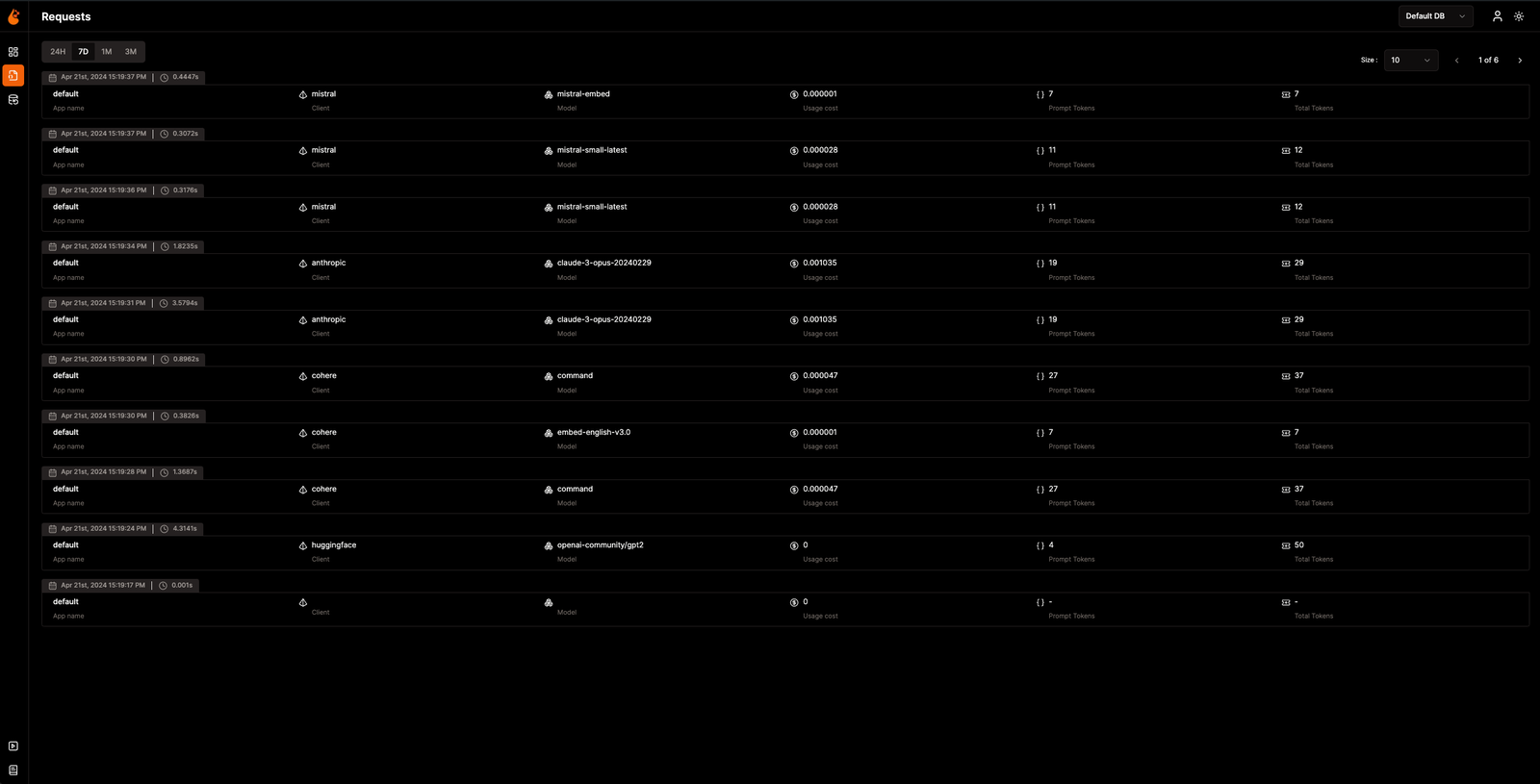
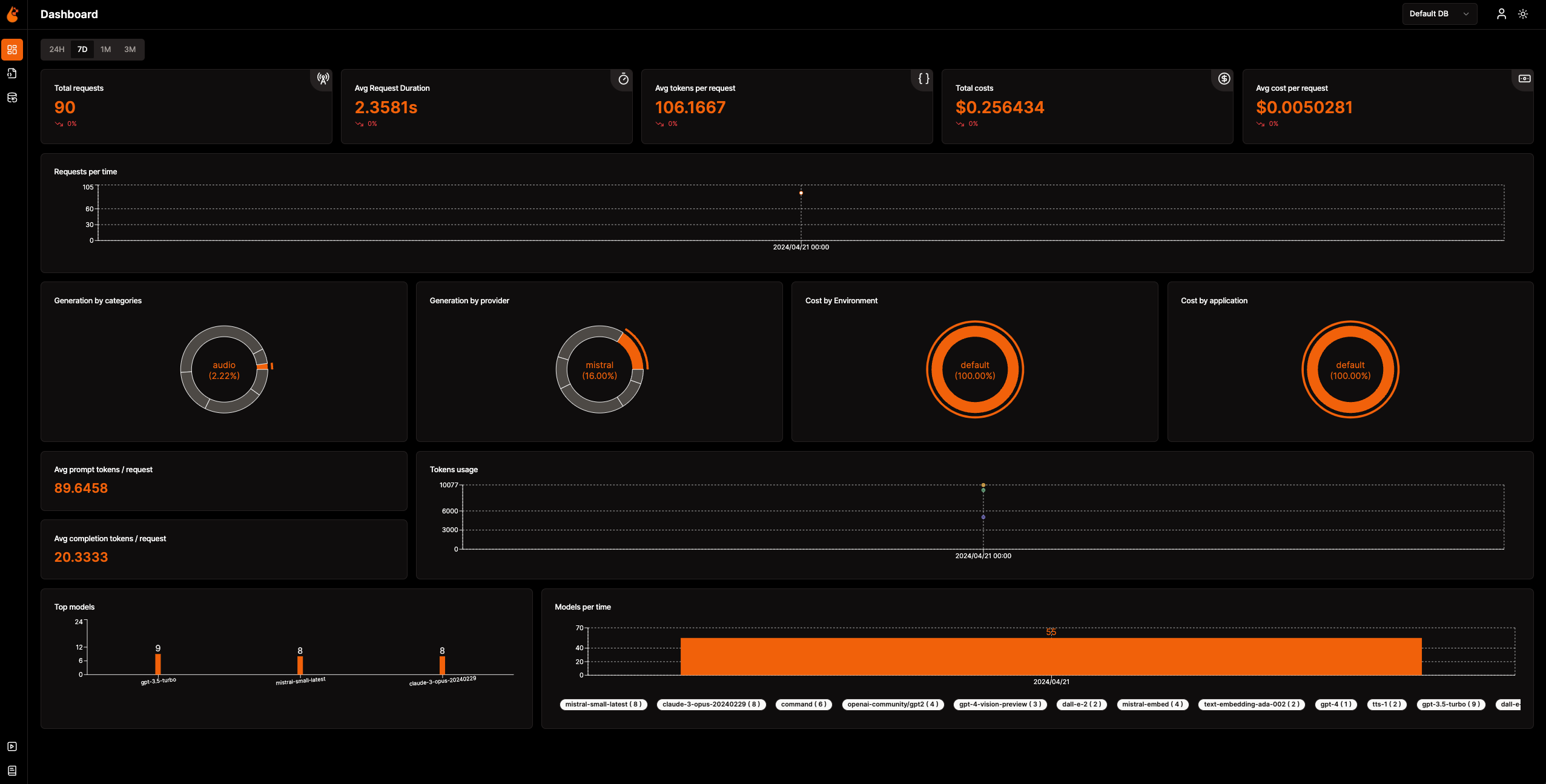
📈 分析ダッシュボード: メトリクス、コスト、ユーザーインタラクションを追跡する詳細なダッシュボードでAIアプリケーションの健全性とパフォーマンスを監視し、全体的な効率を明確に把握できます。
🔌 OpenTelemetryネイティブの可観測性SDK: 既存の可観測性ツールにトレースとメトリクスを送信するためのベンダーに依存しないSDKです。
💲 カスタムモデルとファインチューニングモデルのコスト追跡: カスタム価格ファイルを使用して特定のモデルのコスト見積もりを調整し、正確な予算管理を実現します。
🐛 例外監視ダッシュボード: 専用の監視ダッシュボードで一般的な例外やエラーを追跡し、問題を迅速に発見して解決します。
💭 プロンプト管理: Prompt Hubを使用してプロンプトを管理およびバージョン管理し、アプリケーション全体で一貫して簡単にアクセスできるようにします。
🔑 APIキーとシークレットの管理: APIキーとシークレットを中央で安全に管理し、安全でない慣行を回避します。
🎮 さまざまなLLMの実験: OpenGroundを使用して、さまざまなLLMを並べて探索、テスト、比較できます。
🚀 OpAMP管理のためのFleet Hub: セキュアなTLS通信を使用して、OpAMP(Open Agent Management Protocol)によりインフラストラクチャ全体のOpenTelemetry Collectorを中央で管理および監視します。
flowchart TB; subgraph " " direction LR; subgraph " " direction LR; OpenLIT_SDK[OpenLIT SDK] -->|Sends Traces & Metrics| OTC[OpenTelemetry Collector]; OTC -->|Stores Data| ClickHouseDB[ClickHouse]; end subgraph " " direction RL; OpenLIT_UI[OpenLIT] -->|Pulls Data| ClickHouseDB; end end
### ステップ1: OpenLITスタックのデプロイ

1. OpenLITリポジトリをGit Cloneする

   コマンドラインまたはターミナルを開いて、以下を実行します:   ```shell
   git clone [email protected]:openlit/openlit.git
Dockerを使用したセルフホスティング
以下のコマンドでOpenLITをデプロイして実行します: ```shell docker compose up -d
Kubernetes で Helm を使用してインストールする手順については、Kubernetes Helm インストールガイド を参照してください。
コマンドラインまたはターミナルを開いて、以下を実行します:```bash pip install openlit
> TypeScript SDKの使用方法については、[TypeScript SDKインストールガイド](https://github.com/openlit/openlit/tree/main/sdk/typescript#-installation)をご覧ください。

### ステップ3: アプリケーションでOpenLITを初期化する

以下のコード行を追加して、AIアプリケーションにOpenLITを統合します。```python
import openlit

openlit.init()
テレメトリデータの送信先を次のように設定します:
| 目的 | パラメータ/環境変数 | OpenLITへの送信時 |
|---|---|---|
| HTTP OTLPエンドポイントにデータを送信する | otlp_endpoint または OTEL_EXPORTER_OTLP_ENDPOINT | "http://127.0.0.1:4318" |
| テレメトリバックエンドを認証する | otlp_headers または OTEL_EXPORTER_OTLP_HEADERS | デフォルトでは不要 |
💡 情報:
otlp_endpointまたはOTEL_EXPORTER_OTLP_ENDPOINTが指定されていない場合、OpenLIT SDKはトレースを直接コンソールに出力します。これは開発フェーズ中に推奨されます。
アプリケーションコードに次の2行を追加します: ```python import openlit
openlit.init( otlp_endpoint="http://127.0.0.1:4318", )
</details>

---

<details>

---

<summary>環境変数を使用した初期化</summary>

アプリケーションコードに次の2行を追加します:  ```python
import openlit

openlit.init()
次に、環境変数を使用してOTLPエンドポイントを設定します。 ```env export OTEL_EXPORTER_OTLP_ENDPOINT = "http://127.0.0.1:4318"
</details>
---
### ステップ4: 可視化と最適化
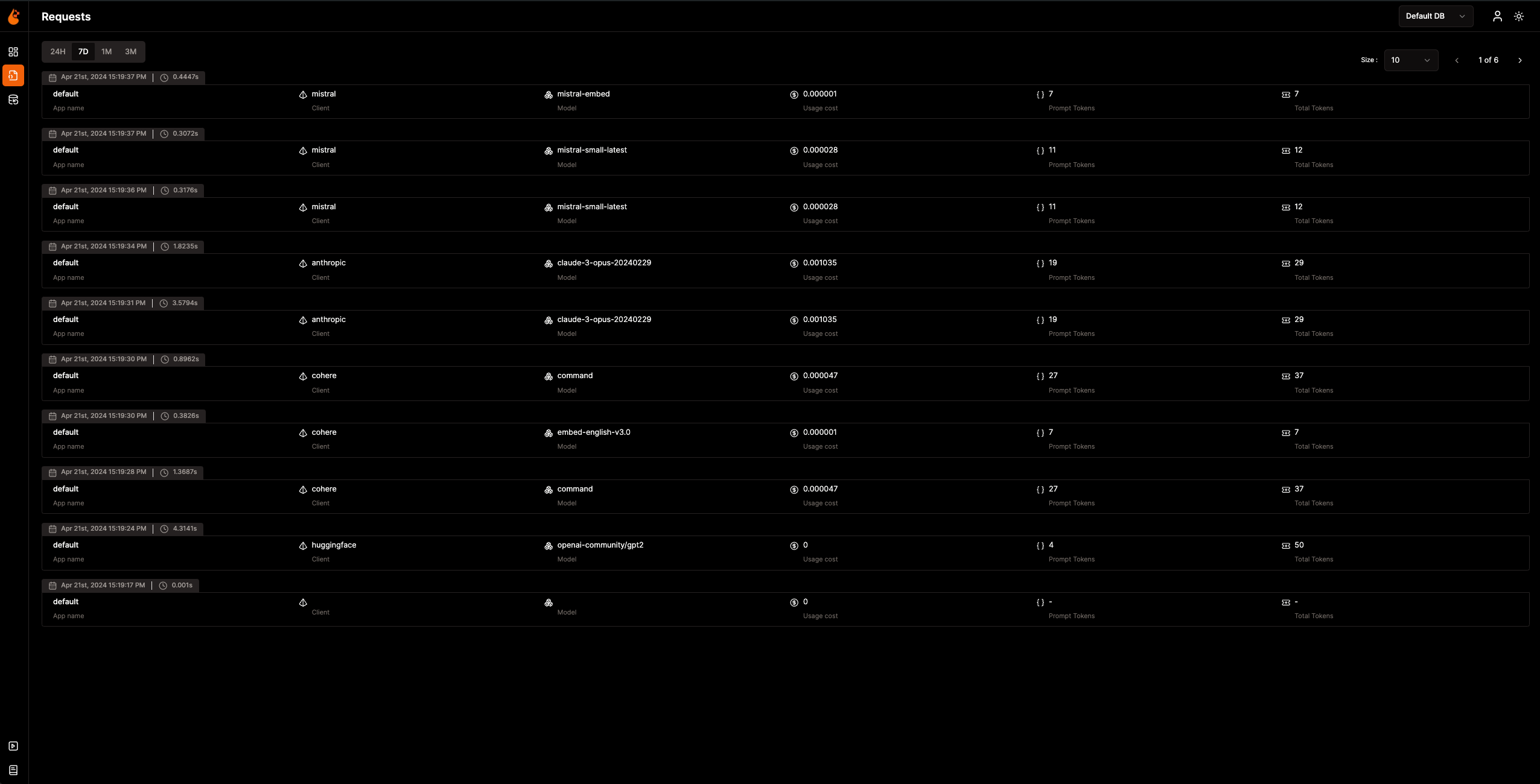
Observabilityデータが収集されOpenLITに送信されるようになったので、次のステップはこのデータを可視化・分析して、AIアプリケーションのパフォーマンスや動作に関する洞察を得て、改善すべき領域を特定することです。
ブラウザで `127.0.0.1:3000` のOpenLITにアクセスして探索を始めましょう。以下のデフォルト認証情報でログインできます:
- **メール**: `[email protected]`
- **パスワード**: `openlituser`
## 📦 対応インテグレーション
OpenLITは、**44以上のLLMプロバイダー、AIフレームワーク、ベクターデータベース**を1行のコードで自動インストルメント化します。各インテグレーションは[OpenTelemetryネイティブ](https://opentelemetry.io/)のトレースとメトリクスを生成します。カードをクリックするとインテグレーションのドキュメントを表示できます。
<sub>
<img src="https://img.shields.io/badge/Python-3776AB?logo=python&logoColor=white&style=flat-square" height="16"> Python SDK
<img src="https://img.shields.io/badge/TypeScript-3178C6?logo=typescript&logoColor=white&style=flat-square" height="16"> TypeScript SDK
</sub>
### LLMプロバイダー
<table>
<tr>
<td align="center" width="160"><a href="https://docs.openlit.io/latest/sdk/integrations/openai"><b>OpenAI</b></a><br/><img src="https://img.shields.io/badge/Python-3776AB?logo=python&logoColor=white&style=flat-square" height="18"> <img src="https://img.shields.io/badge/TypeScript-3178C6?logo=typescript&logoColor=white&style=flat-square" height="18"></td>
<td align="center" width="160"><a href="https://docs.openlit.io/latest/sdk/integrations/anthropic"><b>Anthropic</b></a><br/><img src="https://img.shields.io/badge/Python-3776AB?logo=python&logoColor=white&style=flat-square" height="18"> <img src="https://img.shields.io/badge/TypeScript-3178C6?logo=typescript&logoColor=white&style=flat-square" height="18"></td>
<td align="center" width="160"><a href="https://docs.openlit.io/latest/sdk/integrations/cohere"><b>Cohere</b></a><br/><img src="https://img.shields.io/badge/Python-3776AB?logo=python&logoColor=white&style=flat-square" height="18"> <img src="https://img.shields.io/badge/TypeScript-3178C6?logo=typescript&logoColor=white&style=flat-square" height="18"></td>
<td align="center" width="160"><a href="https://docs.openlit.io/latest/sdk/integrations/mistral"><b>Mistral AI</b></a><br/><img src="https://img.shields.io/badge/Python-3776AB?logo=python&logoColor=white&style=flat-square" height="18"> <img src="https://img.shields.io/badge/TypeScript-3178C6?logo=typescript&logoColor=white&style=flat-square" height="18"></td>
</tr>
<tr>
<td align="center" width="160"><a href="https://docs.openlit.io/latest/sdk/integrations/groq"><b>Groq</b></a><br/><img src="https://img.shields.io/badge/Python-3776AB?logo=python&logoColor=white&style=flat-square" height="18"> <img src="https://img.shields.io/badge/TypeScript-3178C6?logo=typescript&logoColor=white&style=flat-square" height="18"></td>
<td align="center" width="160"><a href="https://docs.openlit.io/latest/sdk/integrations/google-ai-studio"><b>Google AI Studio</b></a><br/><img src="https://img.shields.io/badge/Python-3776AB?logo=python&logoColor=white&style=flat-square" height="18"> <img src="https://img.shields.io/badge/TypeScript-3178C6?logo=typescript&logoColor=white&style=flat-square" height="18"></td>
<td align="center" width="160"><a href="https://docs.openlit.io/latest/sdk/integrations/together"><b>Together AI</b></a><br/><img src="https://img.shields.io/badge/Python-3776AB?logo=python&logoColor=white&style=flat-square" height="18"> <img src="https://img.shields.io/badge/TypeScript-3178C6?logo=typescript&logoColor=white&style=flat-square" height="18"></td>
<td align="center" width="160"><a href="https://docs.openlit.io/latest/sdk/integrations/ollama"><b>Ollama</b></a><br/><img src="https://img.shields.io/badge/Python-3776AB?logo=python&logoColor=white&style=flat-square" height="18"> <img src="https://img.shields.io/badge/TypeScript-3178C6?logo=typescript&logoColor=white&style=flat-square" height="18"></td>
</tr>
<tr>
<td align="center" width="160"><a href="https://docs.openlit.io/latest/sdk/integrations/bedrock"><b>AWS Bedrock</b></a><br/><img src="https://img.shields.io/badge/Python-3776AB?logo=python&logoColor=white&style=flat-square" height="18"> <img src="https://img.shields.io/badge/TypeScript-3178C6?logo=typescript&logoColor=white&style=flat-square" height="18"></td>
<td align="center" width="160"><a href="https://docs.openlit.io/latest/sdk/integrations/azure-ai-inference"><b>Azure AI Inference</b></a><br/><img src="https://img.shields.io/badge/Python-3776AB?logo=python&logoColor=white&style=flat-square" height="18"></td>
<td align="center" width="160"><a href="https://docs.openlit.io/latest/sdk/integrations/vertexai"><b>Vertex AI</b></a><br/><img src="https://img.shields.io/badge/Python-3776AB?logo=python&logoColor=white&style=flat-square" height="18"></td>
<td align="center" width="160"><a href="https://docs.openlit.io/latest/sdk/integrations/vllm"><b>vLLM</b></a><br/><img src="https://img.shields.io/badge/Python-3776AB?logo=python&logoColor=white&style=flat-square" height="18"></td>
</tr>
<tr>
<td align="center" width="160"><a href="https://docs.openlit.io/latest/sdk/integrations/reka"><b>Reka</b></a><br/><img src="https://img.shields.io/badge/Python-3776AB?logo=python&logoColor=white&style=flat-square" height="18"></td>
<td align="center" width="160"><a href="https://docs.openlit.io/latest/sdk/integrations/litellm"><b>LiteLLM</b></a><br/><img src="https://img.shields.io/badge/Python-3776AB?logo=python&logoColor=white&style=flat-square" height="18"></td>
<td align="center" width="160"><a href="https://docs.openlit.io/latest/sdk/integrations/huggingface"><b>Hugging Face</b></a><br/><img src="https://img.shields.io/badge/Python-3776AB?logo=python&logoColor=white&style=flat-square" height="18"></td>
<td align="center" width="160"><a href="https://docs.openlit.io/latest/sdk/integrations/ai21"><b>AI21</b></a><br/><img src="https://img.shields.io/badge/Python-3776AB?logo=python&logoColor=white&style=flat-square" height="18"></td>
</tr>
<tr>
<td align="center" width="160"><a href="https://docs.openlit.io/latest/sdk/integrations/gpt4all"><b>GPT4All</b></a><br/><img src="https://img.shields.io/badge/Python-3776AB?logo=python&logoColor=white&style=flat-square" height="18"></td>
<td align="center" width="160"><a href="https://docs.openlit.io/latest/sdk/integrations/premai"><b>PremAI</b></a><br/><img src="https://img.shields.io/badge/Python-3776AB?logo=python&logoColor=white&style=flat-square" height="18"></td>
<td align="center" width="160"><a href="https://docs.openlit.io/latest/sdk/integrations/sarvam"><b>Sarvam AI</b></a><br/><img src="https://img.shields.io/badge/Python-3776AB?logo=python&logoColor=white&style=flat-square" height="18"></td>
<td align="center" width="160"><a href="https://docs.openlit.io/latest/sdk/integrations/julep-ai"><b>Julep</b></a><br/><img src="https://img.shields.io/badge/Python-3776AB?logo=python&logoColor=white&style=flat-square" height="18"></td>
</tr>
<tr>
<td align="center" width="160"><a href="https://docs.openlit.io/latest/sdk/integrations/multion"><b>MultiOn</b></a><br/><img src="https://img.shields.io/badge/Python-3776AB?logo=python&logoColor=white&style=flat-square" height="18"></td>
</tr>
</table>
### AIフレームワーク
<table>
<tr>
<td align="center" width="160"><a href="https://docs.openlit.io/latest/sdk/integrations/langchain"><b>LangChain</b></a><br/><img src="https://img.shields.io/badge/Python-3776AB?logo=python&logoColor=white&style=flat-square" height="18"> <img src="https://img.shields.io/badge/TypeScript-3178C6?logo=typescript&logoColor=white&style=flat-square" height="18"></td>
<td align="center" width="160"><a href="https://docs.openlit.io/latest/sdk/integrations/llama-index"><b>LlamaIndex</b></a><br/><img src="https://img.shields.io/badge/Python-3776AB?logo=python&logoColor=white&style=flat-square" height="18"> <img src="https://img.shields.io/badge/TypeScript-3178C6?logo=typescript&logoColor=white&style=flat-square" height="18"></td>
<td align="center" width="160"><a href="https://docs.openlit.io/latest/sdk/integrations/crewai"><b>CrewAI</b></a><br/><img src="https://img.shields.io/badge/Python-3776AB?logo=python&logoColor=white&style=flat-square" height="18"></td>
<td align="center" width="160"><a href="https://docs.openlit.io/latest/sdk/integrations/pydantic"><b>Pydantic AI</b></a><br/><img src="https://img.shields.io/badge/Python-3776AB?logo=python&logoColor=white&style=flat-square" height="18"></td>
</tr>
<tr>
<td align="center" width="160"><a href="https://docs.openlit.io/latest/sdk/integrations/phidata"><b>Agno</b></a><br/><img src="https://img.shields.io/badge/Python-3776AB?logo=python&logoColor=white&style=flat-square" height="18"></td>
<td align="center" width="160"><a href="https://docs.openlit.io/latest/sdk/integrations/browser-use"><b>Browser Use</b></a><br/><img src="https://img.shields.io/badge/Python-3776AB?logo=python&logoColor=white&style=flat-square" height="18"></td>
<td align="center" width="160"><a href="https://docs.openlit.io/latest/sdk/integrations/haystack"><b>Haystack</b></a><br/><img src="https://img.shields.io/badge/Python-3776AB?logo=python&logoColor=white&style=flat-square" height="18"></td>
<td align="center" width="160"><a href="https://docs.openlit.io/latest/sdk/integrations/letta"><b>Letta</b></a><br/><img src="https://img.shields.io/badge/Python-3776AB?logo=python&logoColor=white&style=flat-square" height="18"></td>
</tr>
<tr>
<td align="center" width="160"><a href="https://docs.openlit.io/latest/sdk/integrations/mem0"><b>Mem0</b></a><br/><img src="https://img.shields.io/badge/Python-3776AB?logo=python&logoColor=white&style=flat-square" height="18"></td>
<td align="center" width="160"><a href="https://docs.openlit.io/latest/sdk/integrations/ag2"><b>AG2 (AutoGen)</b></a><br/><img src="https://img.shields.io/badge/Python-3776AB?logo=python&logoColor=white&style=flat-square" height="18"></td>
<td align="center" width="160"><a href="https://docs.openlit.io/latest/sdk/integrations/controlflow"><b>Controlflow</b></a><br/><img src="https://img.shields.io/badge/Python-3776AB?logo=python&logoColor=white&style=flat-square" height="18"></td>
<td align="center" width="160"><a href="https://docs.openlit.io/latest/sdk/integrations/crawl4ai"><b>Crawl4AI</b></a><br/><img src="https://img.shields.io/badge/Python-3776AB?logo=python&logoColor=white&style=flat-square" height="18"></td>
</tr>
<tr>
<td align="center" width="160"><a href="https://docs.openlit.io/latest/sdk/integrations/dynamiq"><b>Dynamiq</b></a><br/><img src="https://img.shields.io/badge/Python-3776AB?logo=python&logoColor=white&style=flat-square" height="18"></td>
<td align="center" width="160"><a href="https://docs.openlit.io/latest/sdk/integrations/openai-agents"><b>OpenAI Agents</b></a><br/><img src="https://img.shields.io/badge/Python-3776AB?logo=python&logoColor=white&style=flat-square" height="18"></td>
<td align="center" width="160"><a href="https://docs.openlit.io/latest/sdk/integrations/firecrawl"><b>Firecrawl</b></a><br/><img src="https://img.shields.io/badge/Python-3776AB?logo=python&logoColor=white&style=flat-square" height="18"></td>
</tr>
</table>
### ベクターデータベース
<table>
<tr>
<td align="center" width="160"><a href="https://docs.openlit.io/latest/sdk/integrations/pinecone"><b>Pinecone</b></a><br/><img src="https://img.shields.io/badge/Python-3776AB?logo=python&logoColor=white&style=flat-square" height="18"> <img src="https://img.shields.io/badge/TypeScript-3178C6?logo=typescript&logoColor=white&style=flat-square" height="18"></td>
<td align="center" width="160"><a href="https://docs.openlit.io/latest/sdk/integrations/chromadb"><b>ChromaDB</b></a><br/><img src="https://img.shields.io/badge/Python-3776AB?logo=python&logoColor=white&style=flat-square" height="18"></td>
<td align="center" width="160"><a href="https://docs.openlit.io/latest/sdk/integrations/qdrant"><b>Qdrant</b></a><br/><img src="https://img.shields.io/badge/Python-3776AB?logo=python&logoColor=white&style=flat-square" height="18"></td>
<td align="center" width="160"><a href="https://docs.openlit.io/latest/sdk/integrations/milvus"><b>Milvus</b></a><br/><img src="https://img.shields.io/badge/Python-3776AB?logo=python&logoColor=white&style=flat-square" height="18"></td>
</tr>
<tr>
<td align="center" width="160"><a href="https://docs.openlit.io/latest/sdk/integrations/astradb"><b>Astra DB</b></a><br/><img src="https://img.shields.io/badge/Python-3776AB?logo=python&logoColor=white&style=flat-square" height="18"></td>
<td align="center" width="160"><a href="https://docs.openlit.io/latest/sdk/integrations/psycopg"><b>PostgreSQL</b></a><br/><img src="https://img.shields.io/badge/Python-3776AB?logo=python&logoColor=white&style=flat-square" height="18"></td>
</tr>
</table>
### 専門ツール
<table>
<tr>
<td align="center" width="160"><a href="https://docs.openlit.io/latest/sdk/integrations/elevenlabs"><b>ElevenLabs</b></a><br/><img src="https://img.shields.io/badge/Python-3776AB?logo=python&logoColor=white&style=flat-square" height="18"></td>
<td align="center" width="160"><a href="https://docs.openlit.io/latest/sdk/integrations/assemblyai"><b>AssemblyAI</b></a><br/><img src="https://img.shields.io/badge/Python-3776AB?logo=python&logoColor=white&style=flat-square" height="18"></td>
</tr>
</table>
## 🛣️ ロードマップ
私たちはOpenLITの継続的な改善に専念しています。以下は、これまでに達成されたことと、今後予定されていることの概要です:
| 機能 | ステータス |
| --------------------------------------------------------------------------------------------------------------------------------- | ------------- |
| [トレースとメトリクスのためのOpenTelemetryネイティブObservability SDK](https://github.com/openlit/openlit/tree/text-upgrade/sdk/python) | ✅ 完了 |
| [OpenTelemetryネイティブGPUモニタリング](https://docs.openlit.io/latest/features/gpu) | ✅ 完了 |
| [例外およびエラーモニタリング](https://docs.openlit.io/latest/features/exceptions) | ✅ 完了 |
| [プロンプトの管理とバージョン管理のためのPrompt Hub](https://docs.openlit.io/latest/features/prompt-hub) | ✅ 完了 |
| [LLMのテストと比較のためのOpenGround](https://docs.openlit.io/latest/features/openground) | ✅ 完了 |
| [LLM APIキーとシークレットの一元管理のためのVault](https://docs.openlit.io/latest/features/vault) | ✅ 完了 |
| [カスタムモデルのコスト追跡](https://docs.openlit.io/latest/features/pricing) | ✅ 完了 |
| [リアルタイムガードレールの実装](https://docs.openlit.io/latest/features/guardrails) | ✅ 完了 |
| [LLMレスポンスのプログラム的評価](https://docs.openlit.io/latest/features/evaluations) | ✅ 完了 |
| [OpAMP管理のためのFleet Hub](https://docs.openlit.io/latest/openlit/observability/fleet-hub) | ✅ 完了 |
| [使用状況に基づく自動評価メトリクス](https://github.com/openlit/openlit/issues/470) | 🔜 近日公開 |
| [LLMイベントに対する人間のフィードバック](https://github.com/openlit/openlit/issues/471) | 🔜 近日公開 |
| [LLMイベントに基づくデータセット生成](https://github.com/openlit/openlit/issues/472) | 🔜 近日公開 |
| [トレースの検索]() | 🔜 近日公開 |
## 🌱 コントリビューション
大小を問わず、コントリビューションを歓迎します💚。始めるには[コントリビューションガイド](https://github.com/pvharmo2/gha-lab-6c3094af9e/blob/main/CONTRIBUTING.md)をご覧ください。
どこから始めればよいか分からない場合、参加方法はいくつかあります:
- [Slack](https://join.slack.com/t/openlit/shared_invite/zt-2etnfttwg-TjP_7BZXfYg84oAukY8QRQ)または[Discord](https://discord.gg/rjvTm6zd)コミュニティに参加して、アイデアを話し合ったり、フィードバックを共有したり、私たちのチームやより広いOpenLITコミュニティとつながりましょう。
あなたのインプットが私たちの成長と改善に役立ちます。そして、私たちはすべてのステップであなたをサポートします。
[](https://www.producthunt.com/posts/openlit?embed=true&utm_source=badge-featured&utm_medium=badge&utm_souce=badge-openlit)
<a href="https://fazier.com/launches/openlit-2" target="_blank" rel="noopener noreferrer"><img src="https://fazier.com/api/v1/public/badges/embed_image.svg?launch_id=779&badge_type=daily" width="270" alt="Example Image" class="d-inline-block mt-3 p-3 rounded img-fluid" /></a>
## 💚 コミュニティとサポート
サポート、ディスカッション、最新情報については、OpenLITコミュニティとメンテナーに接続してください:
- 🌟 気に入ったら、[GitHub](https://github.com/openlit/openlit/)でスターを付けてください。
- 🌍 [Slack](https://join.slack.com/t/openlit/shared_invite/zt-2etnfttwg-TjP_7BZXfYg84oAukY8QRQ)または[Discord](https://discord.gg/CQnXwNT3)コミュニティに参加して、ライブでのやり取りや質問をしましょう。
- 🐞 [GitHub Issues](https://github.com/openlit/openlit/issues)でバグを報告して、OpenLITの改善にご協力ください。
- 𝕏 [X](https://twitter.com/openlit_io)で最新のアップデートやニュースをフォローしてください。
## ライセンス
OpenLITは[Apache-2.0ライセンス](https://github.com/pvharmo2/gha-lab-6c3094af9e/blob/main/LICENSE)の下で利用可能です。
## 🙇♂️ 謝辞
<p>このプロジェクトは以下の支援を受けています:</p>
<p>
<a href="https://www.testmuai.com/?utm_medium=sponsor&utm_source=openlit" target="_blank">
<img src="https://assets.kitploit.com/production/public/readmes/54232/59e406ce9676e24c2e228a1804d1810579038817584ead02e904e630264533c7/3ca662f501e7be9fcc4af3ff06d2755ca0712b463591ada282d81325365618bb-display-v1.webp" style={{ verticalAlign: 'middle' }} height="80" />
</a>
<a href="https://www.digitalocean.com/">
<img src="https://opensource.nyc3.cdn.digitaloceanspaces.com/attribution/assets/SVG/DO_Logo_horizontal_blue.svg" height="80px" width="200px">
</a>
</p>