 projectdiscovery/vulnx
強力な検索、フィルタリング、分析機能を備えた、脆弱性データを探索するためのモダンなCLI。





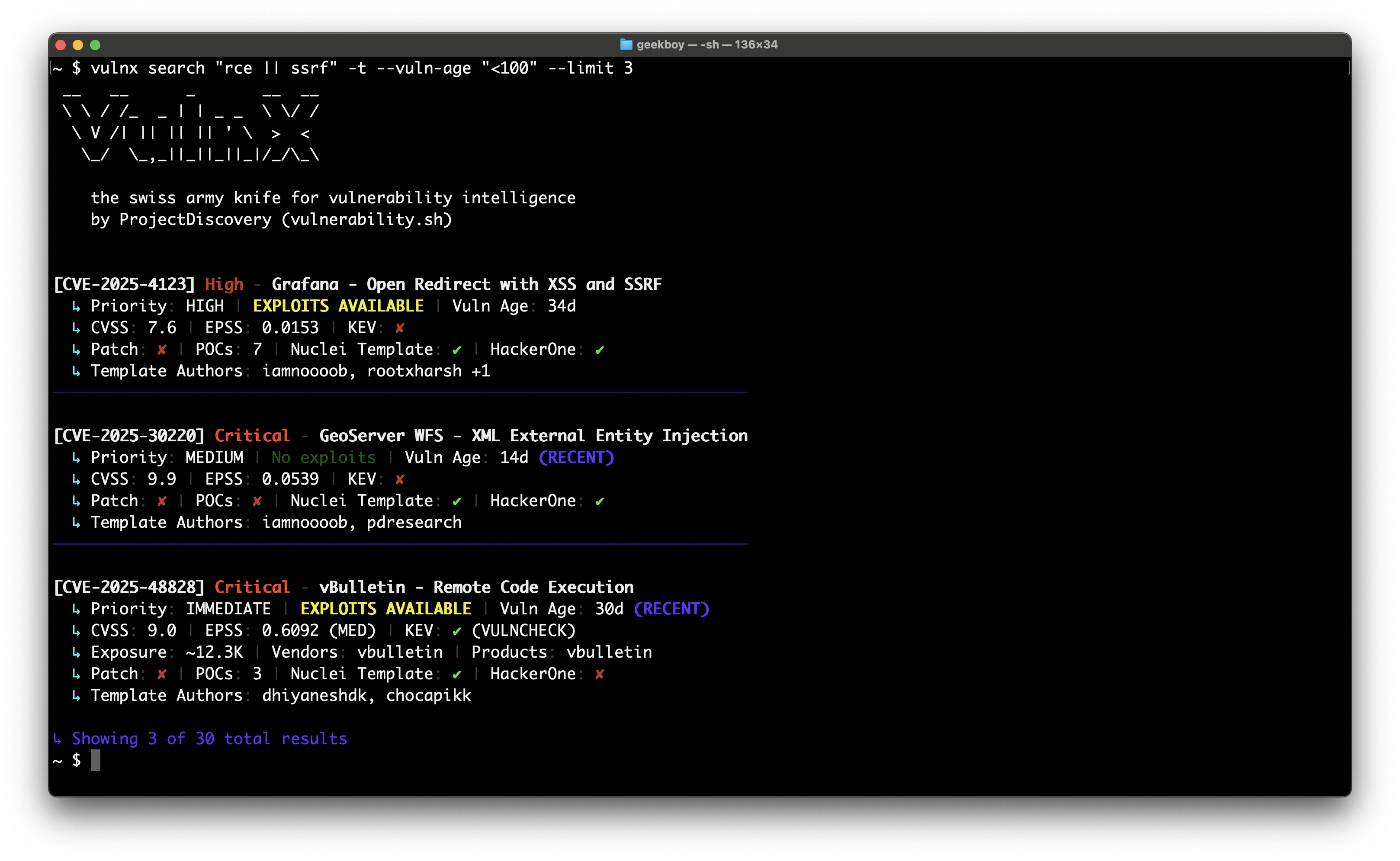
# 1. Get vulnx
go install github.com/projectdiscovery/vulnx/v2/cmd/vulnx@latest

# 2. Explore commands
vulnx --help
vulnx search --help

# 3. Start exploring vulnerabilities (no API key required)
vulnx filters                          # See all available search fields
vulnx search apache                    # Basic search (subject to rate limits)

# 4. Set up your API key (recommended to avoid rate limits)
vulnx auth                              # Get free API key at https://cloud.projectdiscovery.io

# 5. Enhanced exploration with higher limits
vulnx search apache                    # No rate limits
vulnx id CVE-2021-44228               # Faster responses
脆弱性を精密に検索:
vulnx search "severity:critical && is_remote:true"
vulnx search "apache || nginx" --limit 20
vulnx search "cvss_score:>8.0 && cve_created_at:2024"
脆弱性の詳細情報を取得:
vulnx id CVE-2021-44228
vulnx id CVE-2024-1234 --json
脆弱性のパターンを分析:
vulnx analyze --fields severity
vulnx analyze --fields affected_products.vendor
| コマンド | 目的 | 例 |
|---|---|---|
search | 高度なフィルターで脆弱性を検索 | vulnx search "apache && severity:high" |
id | 特定のCVEの詳細を取得 | vulnx id CVE-2021-44228 |
filters | 利用可能なすべての検索フィールドとフィルターを一覧表示 | vulnx filters |
analyze | フィールドごとにデータを集計 | vulnx analyze -f severity |
auth | APIアクセスを設定 | vulnx auth |
version | バージョン情報を表示し、更新を確認 | vulnx version |
update | vulnx を最新版に更新 | vulnx update |
healthcheck | 接続をテスト | vulnx healthcheck |
出力形式:
vulnx search "apache" --json              # Machine-readable JSON
vulnx search "apache" --output results.json  # Save to file
vulnx search "apache" --silent            # Quiet output
検索の制御:
vulnx search "apache" --limit 50          # Get 50 results
vulnx search "apache" --sort-desc cvss_score  # Sort by CVSS score
vulnx search "apache" --fields cve_id,severity  # Specific fields only
高度な検索:
vulnx search --term-facets severity=5,tags=10 "apache"
vulnx search --range-facets numeric:cvss_score:high:8:10 "remote"
vulnx search --highlight "apache"            # Enable search highlighting
vulnx search --facet-size 20 "nginx"         # More facet buckets
vulnx search --detailed "xss"                # Detailed output like 'id' command
検索可能な項目を探索:
vulnx filters                           # Show all available search fields
vulnx filters --json                    # Machine-readable field list
vulnx filters --output fields.json      # Save field info to file
filters コマンドは、検索可能なすべてのフィールドの詳細情報を表示します。具体的には次のとおりです:
出力例:
Field: severity
Data Type: string
Description: Vulnerability severity level (e.g., critical, high, medium, low, info)
Can Sort: Yes
Facet Possible: Yes
Search Analyzer: keyword-lower
Examples: severity:critical, severity:high
Enum Values: critical, high, medium, low, info, unknown

Total: 69 filters available
このコマンドを使用して、新しい検索の可能性を見つけ、複雑なクエリを構築する前にフィールド構文を理解してください。
高リスクな脆弱性を検索:
vulnx search "severity:critical && is_remote:true && is_kev:true"
vulnx search "cvss_score:>8.0 && cve_created_at:>=2024"  # High CVSS from 2024
vulnx search "is_kev:true && age_in_days:<90"            # Recent KEV exploits
テクノロジーで検索:
vulnx search "apache"                     # Apache vulnerabilities
vulnx search "apache || nginx"          # Multiple technologies
vulnx search "affected_products.vendor:microsoft"  # By vendor
深刻度とスコアでフィルタリング:
vulnx search "severity:high"              # High severity
vulnx search "cvss_score:>7.0"            # CVSS score above 7
vulnx search "epss_score:>0.8"            # High EPSS score
時間ベースの検索:
vulnx search "cve_created_at:>=2024"      # Published in 2024 or later
vulnx search "cve_created_at:>=2024-01-01 && cve_created_at:<2024-07-01"  # First half of 2024
vulnx search "age_in_days:<30"            # Recent vulnerabilities (last 30 days)
悪用可能な脆弱性を検索:
vulnx search "is_poc:true"                # Has proof of concept
vulnx search "is_kev:true"                # Known exploited vulns
vulnx search "is_template:true"           # Has Nuclei templates
vulnx search --detailed "log4j"          # Detailed analysis of specific vuln
| フラグ | 省略形 | 説明 | 例 |
|---|---|---|---|
--product | -p | 製品でフィルタリング | --product apache,nginx |
--vendor | ベンダーでフィルタリング | --vendor microsoft,oracle | |
--severity | -s | 深刻度でフィルタリング | --severity critical,high |
--tags | タグでフィルタリング | --tags rce,injection | |
--cvss-score | CVSSスコアでフィルタリング | --cvss-score ">8.0" | |
--epss-score | EPSSスコアでフィルタリング | --epss-score ">0.8" | |
--vuln-age | -a | 公開からの経過日数でフィルタリング | --vuln-age "<30" |
--vuln-type | 脆弱性の種類でフィルタリング | --vuln-type sql_injection | |
--kev | KEV脆弱性のみ | --kev | |
--template | -t | Nucleiテンプレートあり | --template |
--poc | 概念実証(PoC)あり | --poc | |
--hackerone | HackerOneで報告済み | --hackerone | |
--remote-exploit | リモートから悪用可能 | --remote-exploit | |
--vuln-status | 脆弱性ステータスでフィルタリング | --vuln-status confirmed |
| フラグ | 省略形 | 説明 | 例 |
|---|---|---|---|
--detailed | 'id' のような詳細出力 | --detailed | |
--highlight | 検索ハイライトを有効化 | --highlight | |
--limit | -n | 結果の件数 | --limit 50 |
--offset | ページネーションのオフセット | --offset 100 | |
--sort-asc | 昇順でソート | --sort-asc cvss_score | |
--sort-desc | 降順でソート | --sort-desc cve_created_at | |
--fields | 特定のフィールドを選択 | --fields cve_id,severity | |
--term-facets | タームファセットを計算 | --term-facets severity=5 | |
--range-facets | レンジファセットを計算 | --range-facets numeric:cvss_score:high:8:10 | |
--facet-size | ファセットのバケット数 | --facet-size 20 |
製品とベンダーのフィルタリング:
vulnx search --product apache,nginx     # Filter by products (searches both vendor and product fields)
vulnx search --vendor microsoft,oracle  # Filter by vendors only
vulnx search "NOT apache"               # Exclude products using query syntax
vulnx search "NOT affected_products.vendor:microsoft"  # Exclude vendors using query syntax
