Skip to content
KitploitKITPLOIT
ツールブログ
提出
ツールブログ
提出

ハッキング、侵入テスト、サイバーセキュリティツールをあなたのセキュリティアーセナルに!

Kitploitはハッキング、サイバーセキュリティ、ペネトレーションテストのツールディレクトリです。最新のプロジェクトアップデートを見つけて、脆弱性の発見、システム分析、テストの自動化、セキュリティの強化を行いましょう。

··フィード·お問い合わせ·プライバシー·© 2026 Kitploit

ツールディレクトリ

カテゴリ

すべてのカテゴリを見る
Loading categories
Steganography-Online-Codec-JavaScript — ステガノグラフィー対応オンラインコーデック。AES暗号化アルゴリズム(256ビットPBKDF2派生キー)を使用して、パスワードで暗号化されたメッセージを画像や写真の中に隠すことができます。 | Kitploit
ツール/GitHubGitHub/pelock/steganography-online-codec-javascript
暗号化/復号化ツールウェブセキュリティステガノグラフィー暗号化プライバシー
GitHubpelock/steganography-online-codec-javascript

Steganography-Online-Codec-JavaScript

ステガノグラフィー対応オンラインコーデック。AES暗号化アルゴリズム(256ビットPBKDF2派生キー)を使用して、パスワードで暗号化されたメッセージを画像や写真の中に隠すことができます。

リポジトリを見る

人気

すべて見る →

コミュニティで最も使われているツールを見つけましょう。

すべてのツールを探索

ツールコレクションを閲覧

すべてのツールを見る →
共有
ウェブサイト
354ヶ月前未レビュー

JavaScript & NPM向けステガノグラフィーオンラインコーデックSDK

ステガノグラフィーオンラインコーデックを使用すると、AES暗号化アルゴリズムと256ビットのPBKDF2派生キーを使用して、パスワードで暗号化されたメッセージを画像や写真内に隠すことができます。

以下で無料で使用できます:

https://www.pelock.com/products/steganography-online-codec

このSDKは、WebAPIインターフェースを通じてコーデックとそのエンコード・デコード機能へのプログラミングアクセスを提供します。

ステガノグラフィーとは何か、そしてどのように機能するのか?

ステガノグラフィーとは、一見無害な画像ファイルの中にメッセージを埋め込むことで情報を隠す技術と科学を表す用語です。

この場合、暗号化された隠しメッセージの個々のビットは、選択した画像のピクセル内のRGBカラーコンポーネントの最下位ビット(LSB)として保存されます。
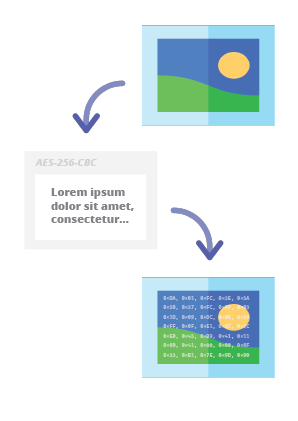
Steganography Online Codec - Hide Message in Image

当社のステガノグラフィーエンコーダーを使用すると、あらゆるテキストメッセージを安全な方法で画像内に隠し、疑念を抱かれることなく送信することができます。メッセージを読むには、有効な復号パスワードを入力する必要があります。

インストール

Web API SDKのインストールには、NPM(Node Package Manager)を使用することをお勧めします。

以下を実行します:

root@kitploit:~
npm i steganography-online-codec

または、package.jsonのdependenciesセクションに直接以下のエントリを追加します:

root@kitploit:~
  "dependencies": {
    "steganography-online-codec": "latest"
  },

インストールパッケージは https://www.npmjs.com/package/steganography-online-codec で入手できます。

他のプログラミング言語用パッケージ

インストールパッケージは、いくつかの人気のあるプログラミング言語のリポジトリにアップロードされており、そのソースコードはGitHubで公開されています:

代替使用方法

Pythonモジュールを使用したくない場合は、ファイルから直接インポートできます:

root@kitploit:~
from pelock.steganography_online_codec import *

画像ファイル内に秘密のメッセージを隠す方法

root@kitploit:~
"use strict";

/******************************************************************************
 *
 * Steganography Online Codec WebApi interface usage example.
 *
 * In this example shows how to hide an encrypted secret message in an image file.
 *
 * Version      : v1.00
 * Language     : JavaScript
 * Author       : Bartosz Wójcik (original example)
 * Project      : https://www.pelock.com/products/steganography-online-codec
 * Homepage     : https://www.pelock.com
 *
 * @link https://www.pelock.com/products/steganography-online-codec
 * @copyright Copyright (c) 2020-2025 PELock LLC
 * @license Apache-2.0
 *
/*****************************************************************************/

// include Steganography Online Codec module
import { SteganographyOnlineCodec, Errors } from 'steganography-online-codec';
// or if tested locally use:
//import { SteganographyOnlineCodec, Errors } from '../src/SteganographyOnlineCodec.mjs';

// create Steganography Online Codec class instance (we are using our activation key)
const mySteganographyOnlineCodec = new SteganographyOnlineCodec('YOUR-WEB-API-KEY');

// encode a hidden message (encrypted with your password) within an image file
(async () => {

	const inputFile = 'input_file.jpg';
	const secretMessage = 'Secret message';
	const password = 'Pa$$word';
	const outputFile = 'output_file_with_hidden_secret_message.png';

	try {
		const result = await mySteganographyOnlineCodec.encode(inputFile, secretMessage, password, outputFile);

		// result object holds the encoding results as well as other information
		console.log('Secret messaged encoded and saved to the output PNG file.');
	} catch (err) {
		console.error('Encoding failed:', err.error_message || err.message || String(err));
	}
})();

より詳細な説明と適切なエラーコードチェックを含む複雑な例

root@kitploit:~
"use strict";

/******************************************************************************
 *
 * Steganography Online Codec WebApi interface usage example.
 *
 * In this example, we will see how to hide an encrypted message in an
 * image file using our codec.
 *
 * Version      : v1.00
 * Language     : JavaScript
 * Author       : Bartosz Wójcik
 * Project      : https://www.pelock.com/products/steganography-online-codec
 * Homepage     : https://www.pelock.com
 *
 * @link https://www.pelock.com/products/steganography-online-codec
 * @copyright Copyright (c) 2020-2025 PELock LLC
 * @license Apache-2.0
 *
 /*****************************************************************************/

// include Steganography Online Codec module
import { SteganographyOnlineCodec, Errors } from 'steganography-online-codec';
// or if tested locally use:
//import { SteganographyOnlineCodec, Errors } from '../src/SteganographyOnlineCodec.mjs';


// create Steganography Online Codec class instance (we are using our activation key)
const mySteganographyOnlineCodec = new SteganographyOnlineCodec('YOUR-WEB-API-KEY');

// encode a hidden message within the source image file
(async () => {
	// full version image size limit is set to 10 MB (demo 50 kB max)
	// supported image formats are PNG, JPG, GIF, BMP, WBMP, GD2, AVIF, WEBP (mail me for more)
	const inputFilePath = 'input_file.webp';

	// full version message size is unlimited (demo 16 chars max)
	const secretMessage = 'Secret message';

	// full version password length is 128 characters max (demo 8 chars max)
	const password = 'Pa$$word';

	// where to save encoded image with the secret message
	const outputFilePath = 'output_file_with_hidden_secret_message.png';

	try {
		// encode a hidden message (encrypted with your password) within an image file
		const result = await mySteganographyOnlineCodec.encode(inputFilePath, secretMessage, password, outputFilePath);

		// result object holds the encoding results as well as other information
		const versionType = result.license && result.license.activationStatus ? 'full' : 'demo';
		console.log(`You are running in ${versionType} version`);

		console.log(`Secret messaged encoded and saved to ${outputFilePath}`);
		if (result.license && result.license.usagesCount !== undefined) {
			console.log(`Remaining number of usage credits - ${result.license.usagesCount}`);
		}
	} catch (err) {
		const errorCode = err.error;


		switch (errorCode) {
			case Errors.INVALID_INPUT:
				console.log(`Invalid input file ${inputFilePath} or file doesn't exist`);
				break;
			case Errors.MESSAGE_TOO_LONG:
				console.log('Message is too long for the provided image file, use larger file');
				break;
			case Errors.IMAGE_TOO_BIG:
				console.log(`Image file is too big, current limit is set to ${err.raw?.limits?.maxFileSize ?? 'unknown'}`);
				break;
			case Errors.LIMIT_MESSAGE:
				console.log(`Message is too long, current limit is set to ${err.raw?.limits?.maxMessageLen ?? 'unknown'}`);
				break;
			case Errors.LIMIT_PASSWORD:
				console.log(`Password is too long, current limit is set to ${err.raw?.limits?.maxPasswordLen ?? 'unknown'}`);
				break;
			case Errors.INVALID_PASSWORD:
				console.log('Invalid password');
				break;
			default:
				console.log(`An error occurred: ${err.error_message ?? `Error code ${errorCode}`}`);
		}
	}
})();

画像ファイルから暗号化された秘密のメッセージを抽出する方法

root@kitploit:~
"use strict";

/******************************************************************************
 *
 * Steganography Online Codec WebApi interface usage example.
 *
 * In this example, we will see how to extract a previously encrypted & hidden
 * secret message from an image file.
 *
 * Version      : v1.00
 * Language     : JavaScript
 * Author       : Bartosz Wójcik
 * Project      : https://www.pelock.com/products/steganography-online-codec
 * Homepage     : https://www.pelock.com
 *
 * @link https://www.pelock.com/products/steganography-online-codec
 * @copyright Copyright (c) 2020-2025 PELock LLC
 * @license Apache-2.0
 *
 /*****************************************************************************/

// include Steganography Online Codec module
import { SteganographyOnlineCodec, Errors } from 'steganography-online-codec';
// or if tested locally use:
//import { SteganographyOnlineCodec, Errors } from '../src/SteganographyOnlineCodec.mjs';

// create Steganography Online Codec class instance (we are using our activation key)
const mySteganographyOnlineCodec = new SteganographyOnlineCodec('YOUR-WEB-API-KEY');

// extract a hidden message from the previously encoded image file
(async () => {
	// full version image size limit is set to 10 MB (demo 50 kB max)
	// supported image format is PNG and only PNG!
	const inputFilePath = 'output_file_with_hidden_secret_message.png';

	// full version password length is 128 characters max (demo 8 chars max)
	const password = 'Pa$$word';

	try {
		// extract a hidden message from the image (PNG files only)
		const result = await mySteganographyOnlineCodec.decode(inputFilePath, password);

		// result object holds the decoding results as well as other information
		console.log(`You are running in ${result.license?.activationStatus ? 'full' : 'demo'} version`);

		console.log(`Secret message is "${result.message}"`);

		if (result.license && result.license.usagesCount !== undefined) {
			console.log(`Remaining number of usage credits - ${result.license.usagesCount}`);
		}
	} catch (err) {
		switch (err.error) {
			case Errors.INVALID_INPUT:
				console.log(`Invalid input file ${inputFilePath} or file doesn't exist`);
				break;
			case Errors.IMAGE_TOO_BIG:
				console.log(`Image file is too big, current limit is set to ${err.raw?.limits?.maxFileSize ?? 'unknown'}`);
				break;
			case Errors.LIMIT_MESSAGE:
				console.log(`Extracted message is too long, current limit is set to ${err.raw?.limits?.maxMessageLen ?? 'unknown'}`);
				break;
			case Errors.LIMIT_PASSWORD:
				console.log(`Password is too long, current limit is set to ${err.raw?.limits?.maxPasswordLen ?? 'unknown'}`);
				break;
			case Errors.INVALID_PASSWORD:
				console.log('Invalid password');
				break;
			default:
				console.log(`An error occurred: ${err.error_message ?? String(err)}`);
		}
	}
})();

ライセンスキーのステータスと現在の制限を確認する方法

root@kitploit:~
"use strict";

/******************************************************************************
 *
 * Steganography Online Codec WebApi interface usage example.
 *
 * In this example we will verify our activation key status.
 *
 * Version      : v1.00
 * Language     : JavaScript
 * Author       : Bartosz Wójcik
 * Project      : https://www.pelock.com/products/steganography-online-codec
 * Homepage     : https://www.pelock.com
 *
 * @link https://www.pelock.com/products/steganography-online-codec
 * @copyright Copyright (c) 2020-2025 PELock LLC
 * @license Apache-2.0
 *
 /*****************************************************************************/

// include Steganography Online Codec module
import { SteganographyOnlineCodec, Errors } from 'steganography-online-codec';
// or if tested locally use:
//import { SteganographyOnlineCodec, Errors } from '../src/SteganographyOnlineCodec.mjs';

// create Steganography Online Codec class instance (we are using our activation key)
const mySteganographyOnlineCodec = new SteganographyOnlineCodec('YOUR-WEB-API-KEY');

// login to the service
(async () => {
	try {
		const result = await mySteganographyOnlineCodec.login();

		// result object holds the information about the license & current limits
		const versionType = result.license && result.license.activationStatus ? 'full' : 'demo';
		console.log(`You are running in ${versionType} version`);

		// information about the current license
		if (result.license && result.license.activationStatus) {
			console.log(`Registered for - ${result.license.userName}`);
			const licenseType = result.license.type === 0 ? 'personal' : 'company';
			console.log(`License type - ${licenseType}`);
			console.log(`Total number of purchased usage credits - ${result.license.usagesTotal}`);
			console.log(`Remaining number of usage credits - ${result.license.usagesCount}`);
		}

		// current limits (different for DEMO and FULL versions)
		if (result.limits) {
			console.log(`Max. password length - ${result.limits.maxPasswordLen}`);
			const msgLen = result.limits.maxMessageLen === -1 ? 'unlimited' : result.limits.maxMessageLen;
			console.log(`Max. message length - ${msgLen}`);
			console.log(`Max. input image file size - ${mySteganographyOnlineCodec.convert_size(result.limits.maxFileSize)}`);
		}
	} catch (err) {
		console.error(`Login failed: ${err.error_message || String(err)}`);
	}
})();

ご質問がありますか?

Steganography Online Codec Web APIに興味がある場合、またはSDKパッケージに関する技術的な質問や不明な点がある場合は、お問い合わせください。すべてのご質問にお答えいたします。

Bartosz Wójcik

  • 私のサイトを訪問 — https://www.pelock.com
  • X — https://x.com/PELock
  • GitHub — https://github.com/PELock
ツールをダウンロード
リポジトリ言語インストールパッケージGitHub
PyPI repository for PythonPythonpip install steganography-online-codec を実行PyPIソース
NPM repository for JavaScript and TypeScriptJavaScript、TypeScriptnpm i steganography-online-codec を実行するか、package.jsonのdependenciesに"steganography-online-codec": "latest"を追加NPMソース
Rust crates.ioRustcargo add steganography-online-codec を実行するか、Cargo.tomlにsteganography-online-codec = "1"を追加(未リリース版やベンダー版ビルドには任意でgit / pathを使用)crates.ioソース