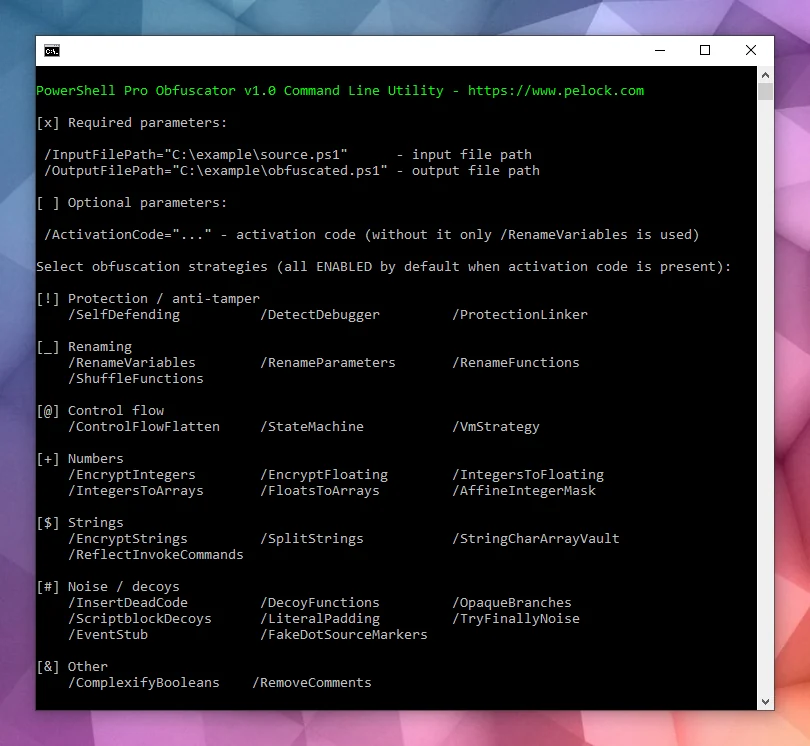

PowerShellスクリプトのソースコード難読化と仮想化を、Python用の柔軟なWeb API(pipパッケージ)で自動化します。
PowerShell Pro Obfuscator は、プロプライエタリな .ps1 スクリプトを、リネーム、ポリモーフィックな文字列・整数暗号化、制御フロー平坦化、有限状態オートマトン(FSA)、VMエンジン、自己防御型の整合性チェック、保護リンカー、アンチデバッグプローブで保護します。
ポリモーフィックな文字列暗号化、VMエンジン、有限状態オートマトン変換、自己整合性・アンチデバッグチェックにより、PowerShell .ps1 スクリプトを難読化・仮想化・保護します — GUI、CLI、オンラインツール、またはAPI経由で利用可能です。
詳細な技術情報、ダウンロード、ドキュメントは以下で入手できます:
https://www.pelock.com/products/powershell-pro-obfuscator
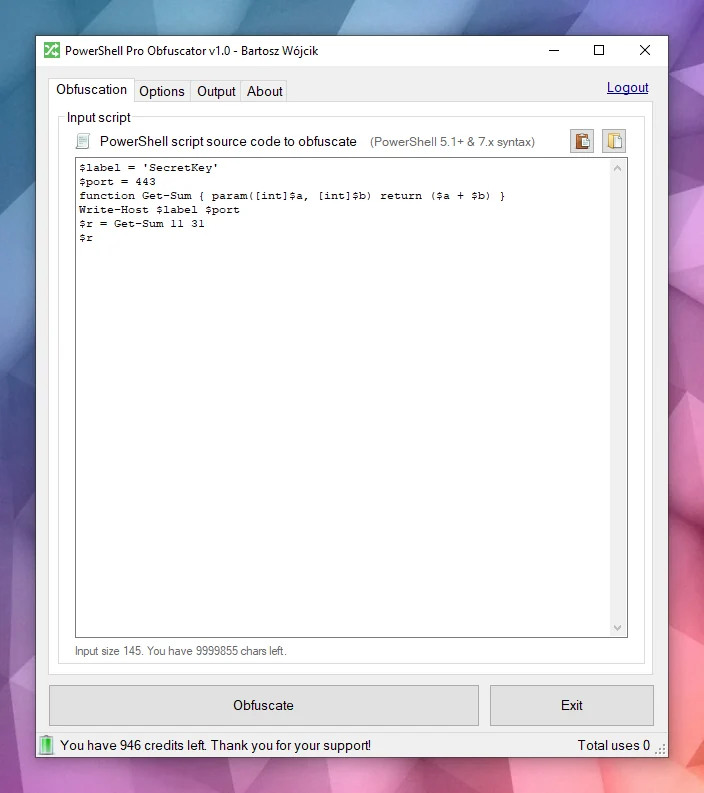
Windows と Linux で利用可能です:
複数のプログラミングAPIが利用可能です:
オンライン難読化インターフェース:
スクリプトは通常、プレーンな .ps1 ファイルとして配布されるか、モジュールに埋め込まれます。その利便性の一方で、ファイルにアクセスできる人は誰でも完全なロジックを読み、文字列から認証情報やAPIキーを探し出し、意図を隠すための追加の対策を講じない限り、アルゴリズムを盗むことができます。
PowerShell は、.NET 上に構築されたクロスプラットフォームのシェルおよびスクリプト言語です。Windows と Linux での自動化、構成管理、DevOpsパイプライン、エンドポイント管理に広く使用されています。
PowerShell Pro Obfuscator には、多くの高度な難読化・仮想化・保護戦略が搭載されています。保護とサイズ・パフォーマンスのバランスを簡単に調整できます。
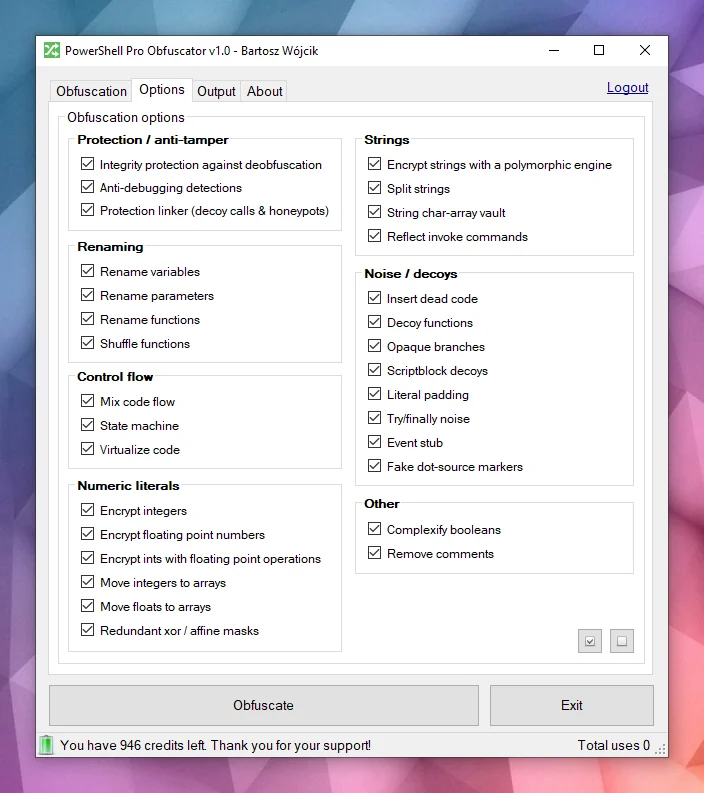
強力な難読化PowerShell Pro Obfuscator は、ポリモーフィックな文字列暗号化、整数・浮動小数点数の暗号化、デコイノイズなどの最先端の難読化戦略を使用します。その結果、テスト済みの実行時動作を維持しながら、リテラルと構造を隠蔽します。
コード仮想化選択されたステートメントは、シャッフルされたスイッチケース、デコイオペコード、難読化されたディスパッチャループを備えた、ランダムに生成されたVMエンジンのオペコードにリフトされます。解析者はプレーンなPowerShellを読む代わりに、仮想マシンを解釈する必要があります。
有限状態オートマトン(FSA)有限状態オートマトン(FSA)難読化は、線形のPowerShellステートメントブロックを、不透明なスケジューラとシャッフルされたディスパッチハンドラを備えた二重状態オートマトンに書き換えます。解析者はコードを上から下へ読む代わりに、数値状態、遷移テーブル、デコイパスを追跡して元の順序を再構築する必要があります。
アンチデバッグアンチデバッグ保護は、接続されたデバッガ、PowerShellブレークポイント、デバッグ設定とトレースモード、および関連するホストシグナルを検出するポリモーフィックなプローブを挿入します。チェックが発動すると、難読化されたスクリプトは、対話的な解析下で保護されたロジックを明かす代わりに、静かに終了します。
自己整合性チェックブートストラッププローブは、ディスク上のスクリプト形状(関数数と整合性トークン)を検証し、ファイルが難読化されたビルドと一致しなくなったときに改ざんキーを設定します。文字列復号器はそのキーを消費するため、パッチ適用されたスクリプトは平文の代わりにガベージを返します。この自己防御層は、カジュアルな逆難読化とファイル編集のコストを引き上げます。
保護リンカー後期パスでは、ハニーポットリゾルバ、ランダムな引数を持つ偽のヘルパー呼び出し、ブートストラップ完了前のみアクティブな浅いスタックのトリップワイヤを配線します。抽出されたスニペットは、静的レビューで本物に見えるノイズの多い呼び出しサーフェスを維持します。整合性チェック成功後の通常の実行は変更されません。
この例を見てください — 同じスクリプトが難読化後は一目で読みにくくなります。
function Get-Greeting {
param([string]$Name)
Write-Host "Hello World from $Name!"
}
Get-Greeting "PowerShell Pro Obfuscator"
$script:_HnJTskg = 0
$jwNTQ = 297 * 400 + 36
$x4e8bfda = [Math]::Abs($jwNTQ - 8074)
$_EvKocNn = [Math]::Max($jwNTQ, $x4e8bfda) - [Math]::Min($jwNTQ, $x4e8bfda)
[void]$_EvKocNn
$script:_jUoXkBYh = 0
function gnJjzMCN3V8P {
param([int]$slot, [int]$salt, [int]$guard)
if (-not ((Get-Variable -Name _HnJTskg -Scope Script -ErrorAction SilentlyContinue).Value)) { return '' }
@('JFE', 'm0ao', 'R8Ysw') | ForEach-Object { $_.ToUpper() } | Out-Null
if ((((($slot * 31) + $salt) -band 65535) -ne $guard)) { return '' }
$tk = (Get-Variable -Name _jUoXkBYh -Scope Script -ErrorAction SilentlyContinue).Value
$IEm39CSpDOEFp = @{ 'Ouj1' = 455; 'vjzO' = 170; 'IQNV' = 291 }
$IEm39CSpDOEFp['R5LrM'] = $IEm39CSpDOEFp['Ouj1'] + $IEm39CSpDOEFp['vjzO']
$YWxSO = ($IEm39CSpDOEFp.Values | Measure-Object -Sum).Sum
[void]$YWxSO
if ($null -eq $tk) { [long]$tk = 0 }
$v93a130f2e4 = 508
switch ($v93a130f2e4) {
524 { $_GYF7IA14Go = 'H1Vph' }
561 { $_GYF7IA14Go = 'HAWoB' }
default { $_GYF7IA14Go = $v93a130f2e4 * 2 }
}
[void]$_GYF7IA14Go
$dk = (Get-Variable -Name vb6a18ffee4 -Scope Script -ErrorAction SilentlyContinue).Value
try { $xgLN5KZyEusFo7 = [Math]::Sqrt(850) } finally { [void]$xgLN5KZyEusFo7 }
if ($null -eq $dk) { [long]$dk = 0 }
$d = @(46866, 46865)
if ((((-not 113))-and(([int](272 -ne 272) -eq 21)))-and(([Math]::Sign(-12) -eq 4))) { $w4iTzi2hooy1GW = @(711, 562, 665); $w4iTzi2hooy1GW = ($w4iTzi2hooy1GW | Measure-Object -Sum).Sum }
$r = ''
for ($s9qOSpiZzufQlVyV = 0; $s9qOSpiZzufQlVyV -lt $d.Length; $s9qOSpiZzufQlVyV++) {
[long]$v = [long]$d[$s9qOSpiZzufQlVyV]
for ($jL9gL7PEtQeIS = 2; $jL9gL7PEtQeIS -ge 0; $jL9gL7PEtQeIS--) {
for ($PsbomDHxAy = 2; $PsbomDHxAy -ge 0; $PsbomDHxAy--) {
[long]$v = [long]$v + ([long](https://github.com/pelock/powershell-pro-obfuscator-python/blob/HEAD/230))
}
}
for ($zhH33vzxjIzegl9 = 0; $zhH33vzxjIzegl9 -ge 0; $zhH33vzxjIzegl9--) {
[long]$v = [long]$v + ([long]([int]((((((236 + (-3 * $s9qOSpiZzufQlVyV) + (3 * $zhH33vzxjIzegl9))) % 256) + 256) % 256))))
[long]$v = [long]$v -bxor ([long](https://github.com/pelock/powershell-pro-obfuscator-python/blob/HEAD/53766))
}
[long]$v = [long]$v - ([long]($salt + $slot + $tk + $dk + 0))
if ([long]$v -ge 0 -and [long]$v -le 0xFFFF) { $r += [char][int][long]$v }
elseif ([long]$v -ge 0x10000 -and [long]$v -le 0x10FFFF) { $r += [System.Char]::ConvertFromUtf32([int][long]$v) }
}
return $r
}
and more...
難読化されたテキストだけを見て、元のスクリプトのコピーがなければ、元の意図を認識できるでしょうか?
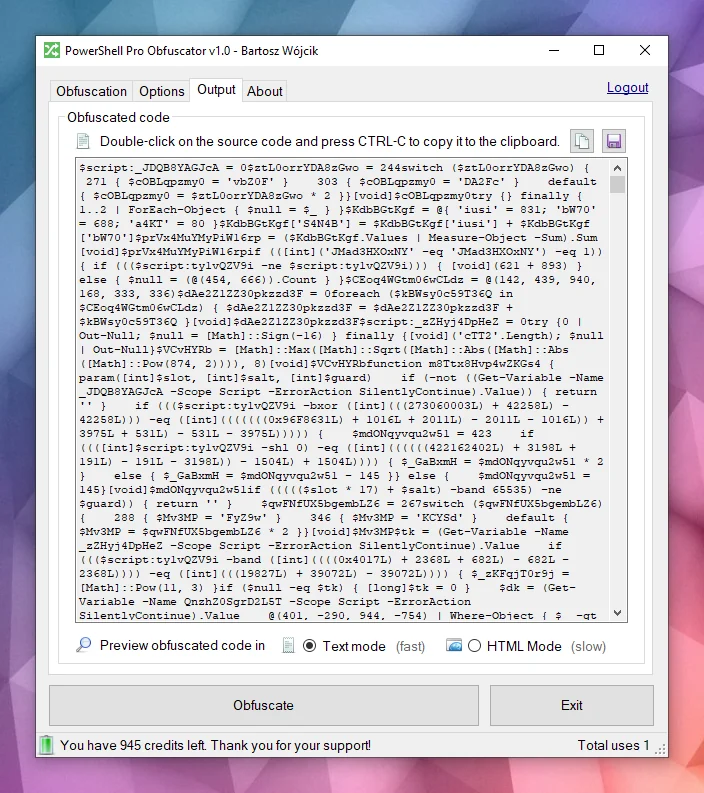
エンジンはPowerShellソースをASTツリーに解析し、選択可能な変換を適用します:識別子のリネーム、制御フロー平坦化、有限状態オートマトン(FSA)、VM仮想化、ポリモーフィックな文字列・整数暗号化、ノイズとデコイの挿入、自己防御型の整合性プローブ、保護リンカー、アンチデバッグチェック。多くの技術はこの製品に固有のものであり、一部のアイデアは当社の他の保護ツールと共有されています。
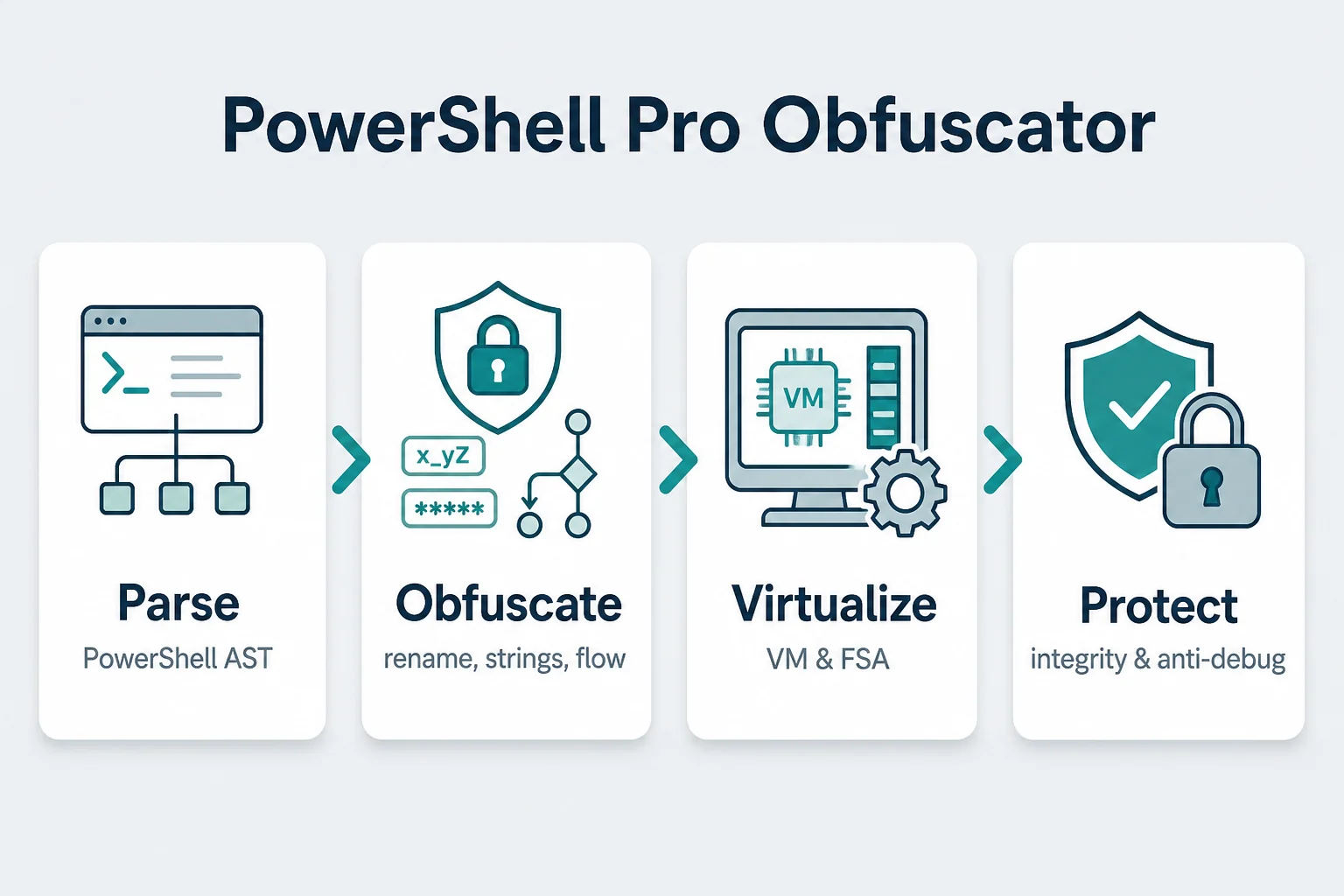
すべてのパスが完了すると、エンジンは新しい .ps1 を出力します。PowerShellの文法とホスティング環境のエッジケースがあるため、ターゲットの実行環境で出力を常にテストする必要があります。
リスクを冒さず、PowerShell Pro Obfuscator を使用してPowerShellスクリプトとアルゴリズムを難読化・仮想化・保護してください。
当社は難読化技術とコード難読化ツールの長い歴史を持っています(x86 Assembly、AutoIt、Java 難読化ツールを参照)。
当社はツールのバグ修正、研究、新しい難読化戦略の開発を積極的に行っています。
この分野における当社の専門知識とサポートを信頼していただけます。
WebApiインターフェースのインストールには、pip を使用するのが推奨されます。
実行:
pip install powershell-pro-obfuscator
または
python3 -m pip install powershell-pro-obfuscator
そして、ソースコードに次のインポートを追加します:
from powershellproobfuscator import PowerShellProObfuscator
インストールパッケージは https://pypi.org/project/powershell-pro-obfuscator/ で入手できます。
#!/usr/bin/env python
###############################################################################
#
# PowerShell Pro Obfuscator WebApi interface usage example.
#
# In this example we will obfuscate sample source with default options.
#
# Version : v1.0.0
# Language : Python
# Author : Bartosz Wójcik
# Web page : https://www.pelock.com
#
###############################################################################
#
# include PowerShell Pro Obfuscator module
#
from powershellproobfuscator import PowerShellProObfuscator
#
# if you don't want to use Python module, you can import directly from the file
#
#from pelock.powershellproobfuscator import PowerShellProObfuscator
#
# create PowerShell Pro Obfuscator class instance (we are using our activation key)
#
myPowerShellProObfuscator = PowerShellProObfuscator("ABCD-ABCD-ABCD-ABCD")
#
# source code in PowerShell format
#
scriptSourceCode = """function Get-Greeting {
param([string]$Name)
Write-Host "Hello World from $Name!"
}
Get-Greeting "PowerShell Pro Obfuscator\""""
#
# by default all obfuscation options are enabled, so we can just simply call
#
result = myPowerShellProObfuscator.obfuscate_script_source(scriptSourceCode)
#
# it's also possible to pass a PowerShell script file path instead of a string with the source e.g.
#
# result = myPowerShellProObfuscator.obfuscate_script_file("/path/to/project/script.ps1")
#
# result[] array holds the obfuscation results as well as other information
#
# result["error"] - error code
# result["output"] - obfuscated code
# result["demo"] - was it used in demo mode (invalid or empty activation key was used)
# result["credits_left"] - usage credits left after this operation
# result["credits_total"] - total number of credits for this activation code
# result["expired"] - if this was the last usage credit for the activation key it will be set to True
#
if result and "error" in result:
# display obfuscated code
if result["error"] == PowerShellProObfuscator.ERROR_SUCCESS:
# format output code for HTML display
print(result["output"])
else:
print(f'An error occurred, error code: {result["error"]}')
else:
print("Something unexpected happen while trying to obfuscate the code.")
#!/usr/bin/env python
###############################################################################
#
# PowerShell Pro Obfuscator WebApi interface usage example.
#
# In this example we will obfuscate sample source with custom options.
#
# Version : v1.0.0
# Language : Python
# Author : Bartosz Wójcik
# Web page : https://www.pelock.com
#
###############################################################################
#
# include PowerShell Pro Obfuscator module
#
from powershellproobfuscator import PowerShellProObfuscator
#
# if you don't want to use Python module, you can import directly from the file
#
#from pelock.powershellproobfuscator import PowerShellProObfuscator
#
# create PowerShell Pro Obfuscator class instance (we are using our activation key)
#
myPowerShellProObfuscator = PowerShellProObfuscator("ABCD-ABCD-ABCD-ABCD")
#
# should the source code be compressed (both input & compressed)
#
myPowerShellProObfuscator.enableCompression = False
#
# global obfuscation options
#
# you can disable a particular obfuscation strategy globally if it
# fails or you don't want to use it without modifying the source codes
#
# by default all obfuscation strategies are enabled
#
#
# protection against tampering with protected code (integrity verification)
#
myPowerShellProObfuscator.selfDefending = True
#
# protection linker (decoy call graph)
#
myPowerShellProObfuscator.protectionLinker = True
#
# rename variable names to random string values
#
myPowerShellProObfuscator.renameVariables = True
#
# rename parameter names to random string values
#
myPowerShellProObfuscator.renameParameters = True
#
# rename function names to random string values
#
myPowerShellProObfuscator.renameFunctions = True
#
# shuffle function order in the output source
#
myPowerShellProObfuscator.shuffleFunctions = True
#
# change linear code execution flow via control-flow flattening
#
myPowerShellProObfuscator.controlFlowFlatten = True
#
# rewrite statement blocks into finite-state automata (state-machine obfuscation)
#
myPowerShellProObfuscator.stateMachine = True
#
# lift selected statements into a VM engine (virtualized statements)
#
myPowerShellProObfuscator.vmStrategy = True
#
# encrypt integers
#
myPowerShellProObfuscator.encryptIntegers = True
#
# split strings into concatenated chunks
#
myPowerShellProObfuscator.splitStrings = True
#
# encrypt strings using randomly generated polymorphic encryption algorithms
#
myPowerShellProObfuscator.encryptStrings = True
#
# move integers to arrays
#
myPowerShellProObfuscator.integersToArrays = True
#
# move floats to arrays
#
myPowerShellProObfuscator.floatsToArrays = True
#
# insert dead code
#
myPowerShellProObfuscator.insertDeadCode = True
#
# replace boolean conditions with equivalent complex expressions
#
myPowerShellProObfuscator.complexifyBooleans = True
#
# represent integers via floating-point math
#
myPowerShellProObfuscator.integersToFloating = True
#
# encrypt floating point numbers
#
myPowerShellProObfuscator.encryptFloating = True
#
# insert decoy functions
#
myPowerShellProObfuscator.decoyFunctions = True
#
# insert anti-debugging detections
#
myPowerShellProObfuscator.detectDebugger = True
#
# insert fake dot-source comment markers
#
myPowerShellProObfuscator.fakeDotSourceMarkers = True
#
# insert opaque predicate branches
#
myPowerShellProObfuscator.opaqueBranches = True
#
# insert scriptblock decoys
#
myPowerShellProObfuscator.scriptblockDecoys = True
#
# insert here-string padding
#
myPowerShellProObfuscator.literalPadding = True
#
# use indirect command invocation
#
myPowerShellProObfuscator.reflectInvokeCommands = True
#
# store string fragments in char-code array vaults
#
myPowerShellProObfuscator.stringCharArrayVault = True
#
# wrap code in try/finally blocks with dead noise
#
myPowerShellProObfuscator.tryFinallyNoise = True
#
# apply redundant xor / affine integer masks
#
myPowerShellProObfuscator.affineIntegerMask = True
#
# insert dead event/timer stubs
#
myPowerShellProObfuscator.eventStub = True
#
# strip comments from the output source
#
myPowerShellProObfuscator.removeComments = True
#
# source code in PowerShell format
#
scriptSourceCode = """function Get-Greeting {
param([string]$Name)
Write-Host "Hello World from $Name!"
}
Get-Greeting "PowerShell Pro Obfuscator\""""
#
# by default all obfuscation options are enabled, so we can just simply call
#
result = myPowerShellProObfuscator.obfuscate_script_source(scriptSourceCode)
#
# it's also possible to pass a PowerShell script file path instead of a string with the source e.g.
#
# result = myPowerShellProObfuscator.obfuscate_script_file("/path/to/project/script.ps1")
#
# result[] array holds the obfuscation results as well as other information
#
# result["error"] - error code
# result["output"] - obfuscated code
# result["demo"] - was it used in demo mode (invalid or empty activation key was used)
# result["credits_left"] - usage credits left after this operation
# result["credits_total"] - total number of credits for this activation code
# result["expired"] - if this was the last usage credit for the activation key it will be set to True
#
if result and "error" in result:
# display obfuscated code
if result["error"] == PowerShellProObfuscator.ERROR_SUCCESS:
# format output code for HTML display
print(result["output"])
else:
print(f'An error occurred, error code: {result["error"]}')
else:
print("Something unexpected happen while trying to obfuscate the code.")
#!/usr/bin/env python
###############################################################################
#
# PowerShell Pro Obfuscator WebApi interface usage example.
#
# In this example we will verify our activation key status.
#
# Version : v1.0.0
# Language : Python
# Author : Bartosz Wójcik
# Web page : https://www.pelock.com
#
###############################################################################
#
# include PowerShell Pro Obfuscator module
#
from powershellproobfuscator import PowerShellProObfuscator
#
# if you don't want to use Python module, you can import directly from the file
#
#from pelock.powershellproobfuscator import PowerShellProObfuscator
#
# create PowerShell Pro Obfuscator class instance (we are using our activation key)
#
myPowerShellProObfuscator = PowerShellProObfuscator("ABCD-ABCD-ABCD-ABCD")
#
# login to the service
#
result = myPowerShellProObfuscator.login()
#
# result[] array holds the information about the license
#
# result["demo"] - is it a demo mode (invalid or empty activation key was used)
# result["credits_left"] - usage credits left after this operation
# result["credits_total"] - total number of credits for this activation code
# result["string_limit"] - max. source code size allowed (it's 1000 bytes for demo mode)
#
if result:
print(f'Demo version status - {"True" if result["demo"] else "False"}')
print(f'Usage credits left - {result["credits_left"]}')
print(f'Total usage credits - {result["credits_total"]}')
print(f'Max. source code size - {result["string_limit"]}')
else:
print("Something unexpected happen while trying to login to the service.")
PowerShell Pro Obfuscator のオンラインインターフェースは以下で利用可能です:
https://www.pelock.com/powershell-pro-obfuscator/


以下からダウンロードできます:
https://www.pelock.com/products/powershell-pro-obfuscator/download
インストールパッケージには、追加のコマンドラインインターフェースが含まれています:

PowerShell Pro Obfuscator には、Windows と Linux の自動化用のコマンドラインインターフェースが同梱されています。
ビルドサーバー、CIジョブ、またはバッチパッケージングに難読化を統合するために使用します。
Bartosz Wójcik