



Python を使用した Active Directory パスワードの高速オフライン監査。
Lil Pwny は、Active Directory から取得したユーザーパスワードの NTLM ハッシュを、Have I Been Pwned から既知の侵害済みパスワードとオフラインで照合する Python アプリケーションです。結果は JSON 形式で出力され、ユーザー名、一致したハッシュ(難読化可能)、HIBP でそのパスワードが確認された回数が含まれます。
Lil Pwny の詳細は私のブログをご覧ください。
Lil Pwny は、カスタムパスワードリストに一般的なバリエーションを追加する機能を提供します。これには以下が含まれます。
P@ssw0rd)PASSWORD、Password)password!、!password)password123!、!passwordabc、passwordpassword)
password1950、password2034)100 個の平文パスワードのカスタムリストから、49848660 のバリエーションが生成されます。
Lil Pwny は、ユーザー名のバリエーションをパスワードとして使用しているユーザーを検出します。
ユーザー名を以下の形式に変換します。
これらは NTLM ハッシュに変換され、AD ハッシュと照合されます。
このアプリケーションは Python のマルチプロセッシングを最大限に活用するように開発されており、コンシューマーレベルのハードウェアで可能な限り高速に動作することを目指しています。
マルチプロセッシングを使用するため、利用可能なコア数が多いほど Lil Pwny は高速に動作します。少数の論理コアでも非常に良好な結果が得られています。
Lil Pwny は結果を標準出力(stdout)または JSON で出力します。
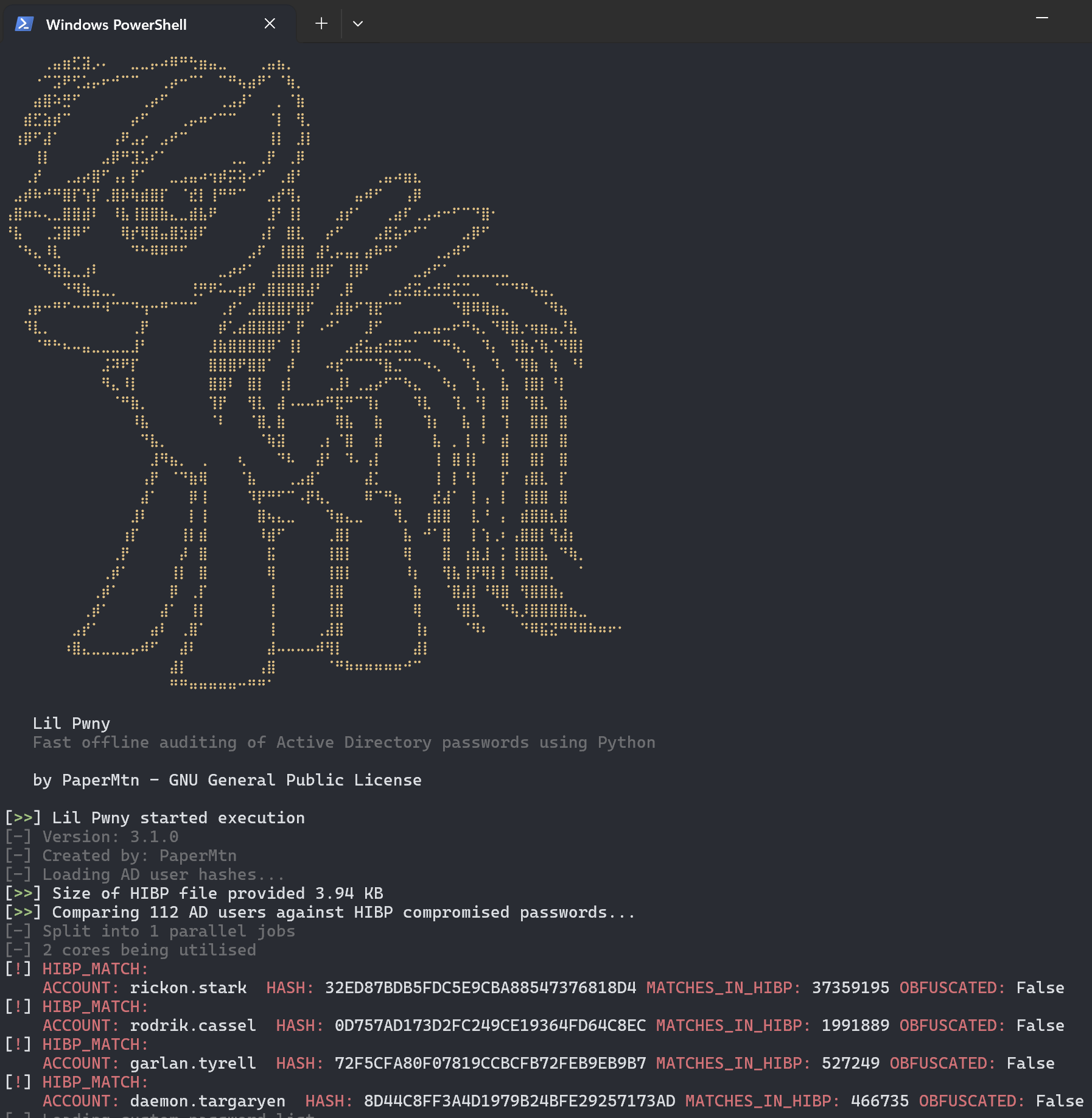
または JSON:
{"localtime": "2021-00-00 00:00:00,000", "level": "NOTIFY", "source": "Lil Pwny", "match_type": "hibp", "detection_data": {"username": "RICKON.STARK", "hash": "32ED87BDB5FDC5E9CBA88547376818D4", "matches_in_hibp": "24230577", "obfuscated": "True"}}
Lil Pwny の JSON 出力をファイルにリダイレクトできます。
lil-pwny -ad ... > lil-pwny-results.json
この JSON 形式のログは、SIEM やその他のログ分析ツールに簡単に取り込むことができ、自動解決アクションのために他のスクリプトやプラットフォームに渡すこともできます。
pip でインストール
pip install lil-pwny
lil-pwny はグローバルコマンドとしてインストールされます。以下のように使用します。
usage: lil-pwny [-h] -hibp HIBP [-v] [-c CUSTOM] [-custom-enhance CUSTOM_ENHANCE] -ad AD_HASHES [-d] [-output {file,stdout,json}] [-o] [--verbose]

Fast offline auditing of Active Directory passwords using Python

options:
  -h, --help            show this help message and exit
  -hibp HIBP, --hibp HIBP
                        The .txt file containing HIBP NTLM hashes
  -v, --version         show program's version number and exit
  -c CUSTOM, --custom CUSTOM
                        .txt file containing additional custom passwords to check for
  -custom-enhance CUSTOM_ENHANCE, --custom-enhance CUSTOM_ENHANCE
                        generate an enhanced custom password list based on the provided custom password list. Must be used with -c/--custom flag. The enhanced list will stored in memory and not
                        written to disk. Provide the minimum length of the passwords you want. Default is 8
  -ad AD_HASHES, --ad-hashes AD_HASHES
                        The .txt file containing NTLM hashes from AD users
  -d, --duplicates      Output a list of duplicate password users
  -output {file,stdout,json}, --output {file,stdout,json}
                        Where to send results
  -o, --obfuscate       Obfuscate hashes from discovered matches by hashing with a random salt
  --verbose             Turn on verbose logging
使用例:
lil-pwny -hibp ~/hibp_hashes.txt -ad ~/ad_user_hashes.txt -c ~/custom_passwords.txt -output stdout -do
ドメインコントローラーで ntdsutil を使用して AD ドメインの IFM ダンプを生成します。昇格した PowerShell ウィンドウで以下を実行します。
ntdsutil
activate instance ntds
ifm
create full **output path**
AD IFM データから NTLM ハッシュを抽出するには、PowerShell モジュール DSInternals が必要です。
インストール後、IFM データ内の SYSTEM ハイブを使用して usernme:hash 形式のハッシュを抽出し、ad_ntlm_hashes.txt ファイルに保存します。
$bootKey = Get-BootKey -SystemHivePath '.\registry\SYSTEM'
Get-ADDBAccount -All -DBPath '.\Active Directory\ntds.dit' -BootKey $bootKey | Format-Custom -View HashcatNT | Out-File ad_ntlm_hashes.txt -Encoding ASCII
ファイルは、.net ユーティリティ こちら から HIBP API を使用してダウンロードできます。
scripts ディレクトリの PowerShell スクリプトを使用すると、処理前に IFM 出力から不要なアカウントを削除できます。対象は次のとおりです。

