
Apache Tomcat サーバーの脆弱性をスキャンするPythonスクリプト。



-tt/--target オプションから読み取り。-tu/--target-url オプションから読み取り。/manager/html へのアクセス可能性のテスト。--list-cves オプションで各バージョンのCVEを一覧表示し、--show-cves-descriptions で詳細なCVE説明を表示。PyPI からインストールできるようになりました(最新バージョンは
sudo python3 -m pip install apachetomcatscanner
$ ./ApacheTomcatScanner.py -h
Apache Tomcat Scanner v3.4 - by Remi GASCOU (Podalirius)

usage: ApacheTomcatScanner.py [-h] [-v] [--debug] [-C] [--show-cves-descriptions] [-T THREADS] [-s] [--no-colors] [--only-http] [--only-https] [--export-xlsx EXPORT_XLSX] [--export-json EXPORT_JSON] [--export-sqlite EXPORT_SQLITE]
                              [-PI PROXY_IP] [-PP PROXY_PORT] [-rt REQUEST_TIMEOUT] [--tomcat-username TOMCAT_USERNAME] [--tomcat-usernames-file TOMCAT_USERNAMES_FILE] [--tomcat-password TOMCAT_PASSWORD]
                              [--tomcat-passwords-file TOMCAT_PASSWORDS_FILE] [-tf TARGETS_FILE] [-tt TARGET] [-tu TARGET_URL] [-tp TARGET_PORTS] [-ad AUTH_DOMAIN] [-ai AUTH_DC_IP] [-au AUTH_USER] [-ap AUTH_PASSWORD]
                              [-ah AUTH_HASHES] [--ldaps] [--subnets]

A python script to scan for Apache Tomcat server vulnerabilities.

options:
  -h, --help            show this help message and exit
  -v, --verbose         Verbose mode. (default: False)
  --debug               Debug mode, for huge verbosity. (default: False)
  -C, --list-cves       List CVE ids affecting each version found. (default: False)
  --show-cves-descriptions
                        Show description of found CVEs. (default: False)
  -T THREADS, --threads THREADS
                        Number of threads (default: 250)
  -s, --servers-only    If querying ActiveDirectory, only get servers and not all computer objects. (default: False)
  --no-colors           Disable colored output. (default: False)
  --only-http           Scan only with HTTP scheme. (default: False, scanning with both HTTP and HTTPs)
  --only-https          Scan only with HTTPs scheme. (default: False, scanning with both HTTP and HTTPs)

Export results:
  --export-xlsx EXPORT_XLSX
                        Output XLSX file to store the results in.
  --export-json EXPORT_JSON
                        Output JSON file to store the results in.
  --export-sqlite EXPORT_SQLITE
                        Output SQLITE3 file to store the results in.

Advanced configuration:
  -PI PROXY_IP, --proxy-ip PROXY_IP
                        Proxy IP.
  -PP PROXY_PORT, --proxy-port PROXY_PORT
                        Proxy port
  -rt REQUEST_TIMEOUT, --request-timeout REQUEST_TIMEOUT
                        Set the timeout of HTTP requests.
  --tomcat-username TOMCAT_USERNAME
                        Single tomcat username to test for login.
  --tomcat-usernames-file TOMCAT_USERNAMES_FILE
                        File containing a list of tomcat usernames to test for login
  --tomcat-password TOMCAT_PASSWORD
                        Single tomcat password to test for login.
  --tomcat-passwords-file TOMCAT_PASSWORDS_FILE
                        File containing a list of tomcat passwords to test for login

Targets:
  -tf TARGETS_FILE, --targets-file TARGETS_FILE
                        Path to file containing a line by line list of targets.
  -tt TARGET, --target TARGET
                        Target IP, FQDN or CIDR.
  -tu TARGET_URL, --target-url TARGET_URL
                        Target URL to the tomcat manager.
  -tp TARGET_PORTS, --target-ports TARGET_PORTS
                        Target ports to scan top search for Apache Tomcat servers.
  -ad AUTH_DOMAIN, --auth-domain AUTH_DOMAIN
                        Windows domain to authenticate to.
  -ai AUTH_DC_IP, --auth-dc-ip AUTH_DC_IP
                        IP of the domain controller.
  -au AUTH_USER, --auth-user AUTH_USER
                        Username of the domain account.
  -ap AUTH_PASSWORD, --auth-password AUTH_PASSWORD
                        Password of the domain account.
  -ah AUTH_HASHES, --auth-hashes AUTH_HASHES
                        LM:NT hashes to pass the hash for this user.
  --ldaps               Use LDAPS (default: False)
  --subnets             Get all subnets from the domain and use them as targets (default: False)
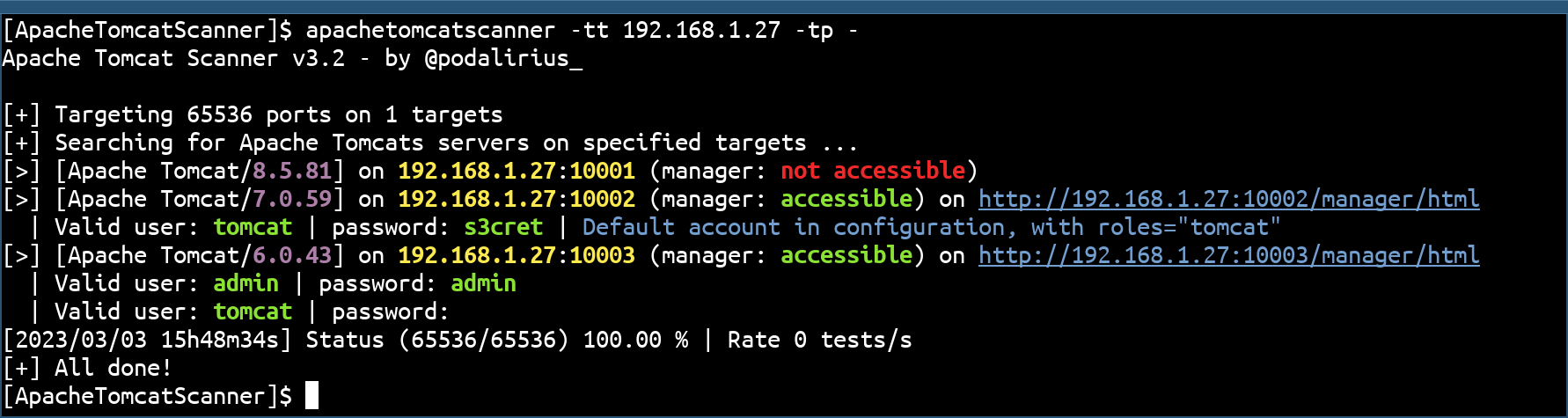
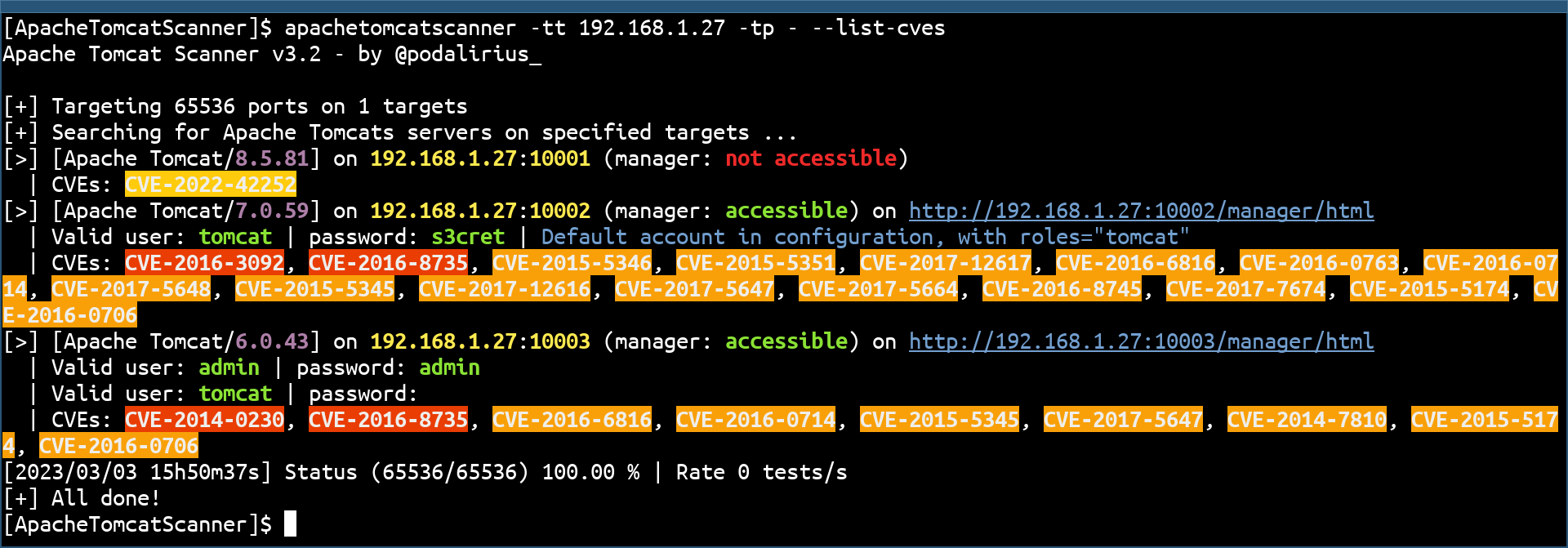
--list-cves オプションを使用して各バージョンのCVEを一覧表示することもできます。
このスキャナには、常に最新の脆弱性データを確保するための自動CVEデータベース更新チェック機能が含まれています。
スキャナを実行すると、CVEデータベースが30日以上古いかどうかを自動的にチェックします。古い場合は、次のように表示されます:
[!] CVE database is outdated (last update: 2025-11-01T13:00:00)
[*] You can update it by running: python apachetomcatscanner/data/update_db_nvd.py
[?] Would you like to update now? This may take several minutes. (y/N):
y を入力すると即座に更新、または Enter キーを押してスキップしスキャンを続行します。
更新チェックを完全にスキップするには、--no-auto-update フラグを使用します:
python ApacheTomcatScanner.py -tt target.com --list-cves --no-auto-update
いつでも手動でCVEデータベースを更新できます:
cd apachetomcatscanner/data
python update_db_nvd.py
注: 更新には公式のNVD API(レート制限あり:30秒あたり5リクエスト)を使用します。処理には数分かかる場合がありますが、いつでも中断および再開可能です。より高速な更新のために無料のNVD APIキーを取得することを検討してください:https://nvd.nist.gov/developers/request-an-api-key
プルリクエストは歓迎します。他の機能を追加したい場合は、遠慮なくイシューを開いてください。



