 nodauf/swego
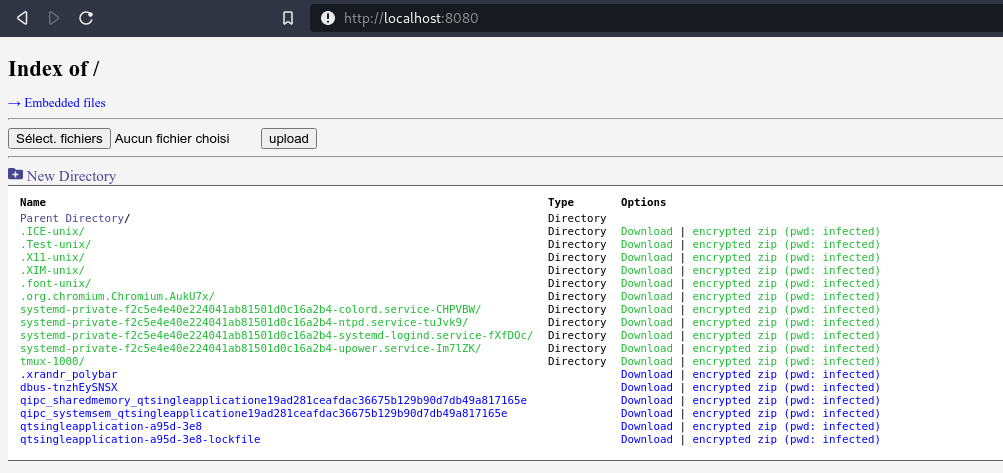
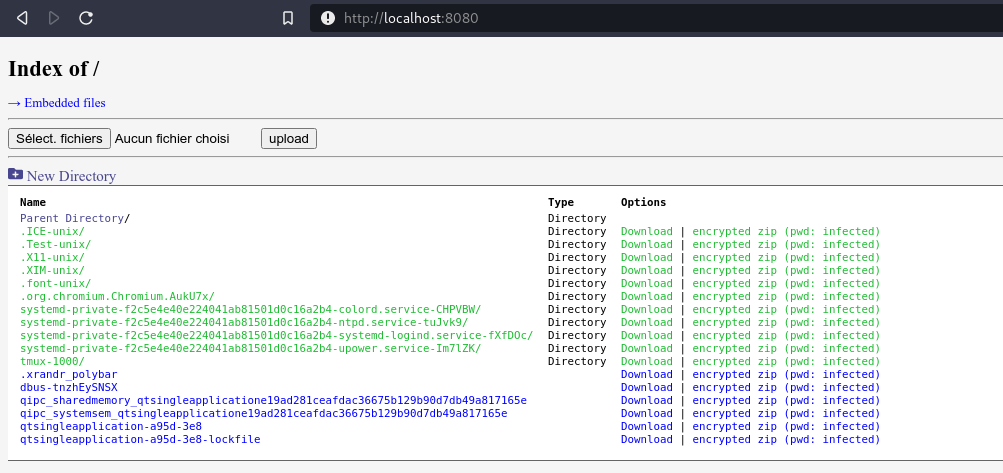
Golangで書かれたスイスアーミーナイフ的なWebサーバー。PythonのSimpleHTTPServerのようにシンプルでありながら、多くの機能を備えています。

Golang製のスイスアーミーナイフなWebサーバー。 PythonのSimpleHTTPServerのようにシンプルでありながら、多くの機能を備えています。
ビルドしたくない場合は、https://github.com/nodauf/Swego/releases でバイナリが利用可能です。
そうでない場合は、build-essential がインストールされ、GOPATH が設定されている必要があります:
git clone https://github.com/nodauf/Swego.git
cd Swego/src
make compileLinux # または make compileWindows
web サブコマンド:
$ ./webserver web --help
Start the webserver (default subcommand)

Usage:
  Swego web [flags]

Flags:
  -b, --bind int                  Bind Port (default 8080)
  -c, --certificate string        HTTPS certificate : openssl req -new -x509 -sha256 -key server.key -out server.crt -days 365
  -d, --disableListing            Disable directory listing
  -g, --gzip                      Enables gzip/zlib compression (default true)
      --ip string                 Binding IP (default "0.0.0.0")
  -k, --key string                HTTPS Key : openssl genrsa -out server.key 2048
  -o, --oneliners                 Generate oneliners to download files
  -p, --password string           Password for basic auth (default "notsecure")
      --private string            Private folder with basic auth (default "/home/florian/dev/SimpleHTTPServer-golang/src/private")
      --promptPassword            Prompt for for basic auth's password
  -r, --root string               Root folder (default "/home/florian/dev/SimpleHTTPServer-golang/src")
  -s, --searchAndReplace string   Search and replace string in embedded text files
      --tls                       Enables HTTPS
  -u, --username string           Username for basic auth (default "admin")

Global Flags:
      --config string   config file (default is $HOME/.Swego.yaml)
  -h, --help            Help message
run サブコマンド:
$ ./webserver web --help
Run an embedded binary

Usage:
  Swego run [flags]

Flags:
  -a, --args string     Arguments for the binary
  -b, --binary string   Binary to execute
  -l, --list            List embedded binaries

Global Flags:
      --config string   config file (default is $HOME/.Swego.yaml)
  -h, --help            Help message
$ ./webserver
Sharing /tmp/ on 8080 ...
Sharing /tmp/private on 8080 ...
$ openssl genrsa -out server.key 2048
Generating RSA private key, 2048 bit long modulus (2 primes)
..........................................+++++
.................................................................................................................+++++
e is 65537 (0x010001)

$ openssl req -new -x509 -sha256 -key server.key -out server.crt -days 365
You are about to be asked to enter information that will be incorporated
into your certificate request.
What you are about to enter is what is called a Distinguished Name or a DN.
There are quite a few fields but you can leave some blank
For some fields there will be a default value,
If you enter '.', the field will be left blank.
-----
Country Name (2 letter code) [AU]:
State or Province Name (full name) [Some-State]:
Locality Name (eg, city) []:
Organization Name (eg, company) [Internet Widgits Pty Ltd]:
Organizational Unit Name (eg, section) []:
Common Name (e.g. server FQDN or YOUR name) []:
Email Address []:

$ ./webserver web --tls --key server.key --certificate server.crt
Sharing /tmp/ on 8080 ...
Sharing /tmp/private on 8080 ...
$ ./webserver-linux-amd64 web --private ThePrivateFolder --username nodauf --password nodauf
Sharing /tmp/ on 8080 ...
Sharing /tmp/ThePrivateFolder on 8080 ...
$ ./webserver-linux-amd64 web --private /tmp/private --root /home/nodauf --username nodauf --password nodauf
Sharing /home/nodauf on 8080 ...
Sharing /tmp/private on 8080 ...
C:\Users\Nodauf>.\webserver.exe run
Usage:
  Swego run [flags]

Flags:
  -a, --args string     Arguments for the binary
  -b, --binary string   Binary to execute
  -l, --list            List embedded binaries

Global Flags:
      --config string   config file (default is $HOME/.Swego.yaml)
  -h, --help            Help message
C:\Users\Nodauf>.\webserver.exe run --binary mimikatz.exe --args "privilege::debug sekurlsa::logonpasswords"
....
この方法でバイナリを実行すると、AVの保護を回避するのに役立つ場合があります。バイナリに渡される引数がAVに検出される可能性があるため、可能であればバイナリのインタラクティブCLI(mimikatzなど)を使用するか、バイナリを再コンパイルして引数名を変更してください。
