




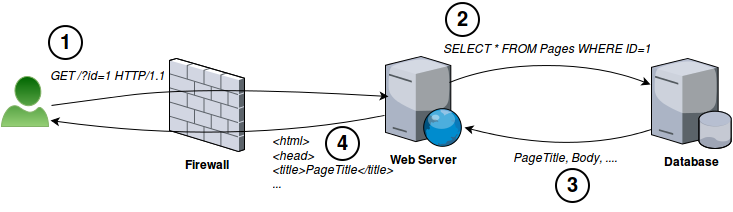
アプリケーションサーバーからの受信クエリを検査し、異常なものを拒否することでデータを保護します。
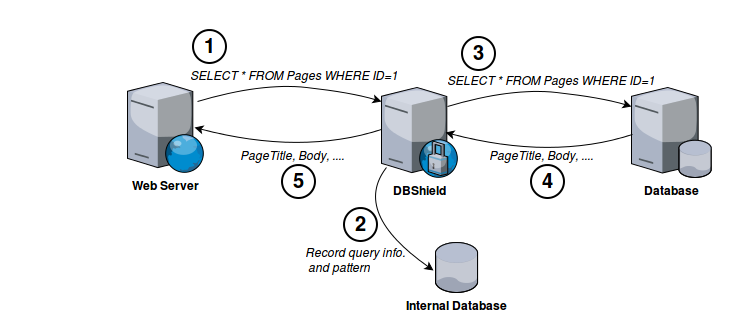
例えば、通常のWebサーバーとデータベースサーバーのやり取りは次のようになります:
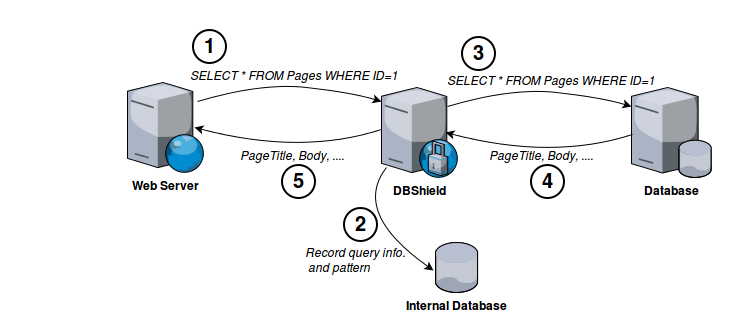
DBShieldをデータベースサーバーの前に配置することで、異常なクエリから保護できます。異常なクエリを検出するために、まずDBShieldを学習モードで実行します。学習モードではすべてのクエリを通過させますが、その情報(パターン、ユーザー名、時間、ソース)を内部データベースに記録します。
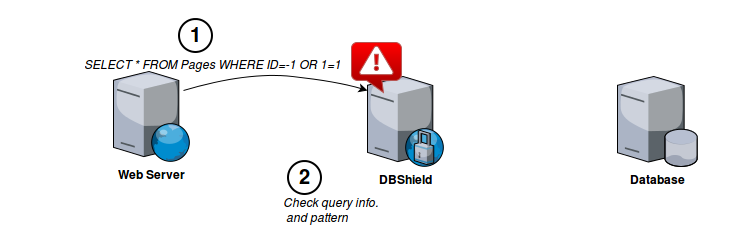
十分なパターンを収集したら、DBShieldを保護モードで実行できます。保護モードでは異常なクエリパターン、ユーザー、ソースを識別し、設定に基づいてアクションを実行します。
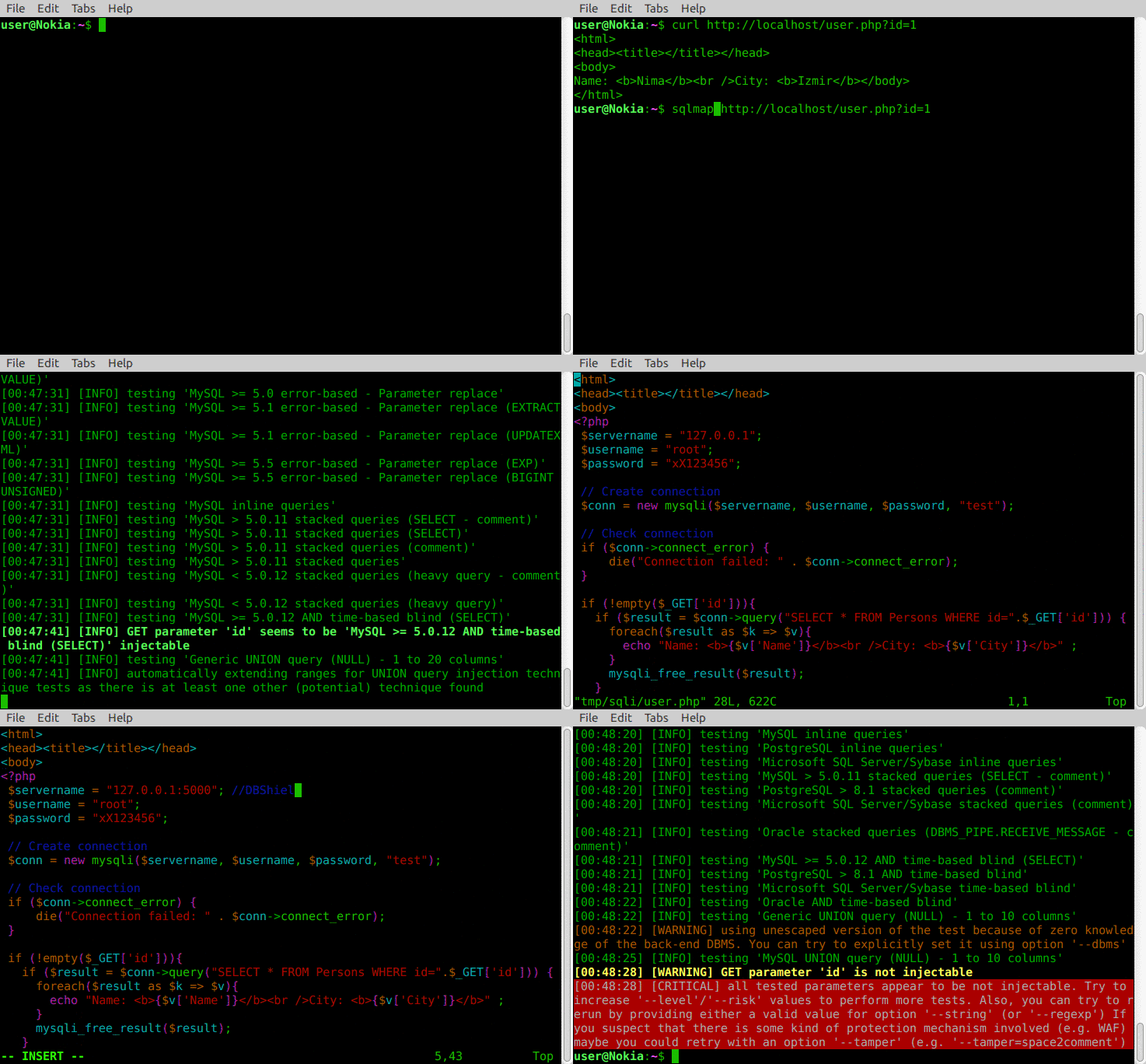
デモでは、sqlmap(自動SQLインジェクションおよびデータベース乗っ取りツール)を使用して、user.php のSQLインジェクション脆弱性を悪用します。
最初のシナリオでは、Webアプリケーションがデータベース(MySQL)に直接接続されている場合、sqlmapはSQLインジェクションの悪用に成功します。2番目のシナリオでは、user.php を変更してDBShieldがWebアプリケーションとデータベースの間に介在するようにし、インジェクション試行をドロップしてsqlmapを失敗させます。
CLI
$ go run main.go
2016/10/15 16:25:31 [INFO]  Config file: /etc/dbshield.yml
2016/10/15 16:25:31 [INFO]  Internal DB: /tmp/model/10.0.0.21_postgres.db
2016/10/15 16:25:31 [INFO]  Listening: 0.0.0.0:5000
2016/10/15 16:25:31 [INFO]  Backend: postgres (10.0.0.21:5432)
2016/10/15 16:25:31 [INFO]  Protect: true
2016/10/15 16:25:31 [INFO]  Web interface on https://127.0.0.1:8070/
2016/10/15 16:25:33 [INFO]  Connected from: 10.0.0.20:35910
2016/10/15 16:25:33 [INFO]  Connected to: 10.0.0.21:5432
2016/10/15 16:25:33 [INFO]  SSL connection
2016/10/15 16:25:34 [DEBUG] Client handshake done
2016/10/15 16:25:34 [DEBUG] Server handshake done
2016/10/15 16:25:34 [INFO]  User: postgres
2016/10/15 16:25:34 [INFO]  Database: test
2016/10/15 16:25:34 [INFO]  Query: SELECT * FROM stocks where id=-1 or 1=1
2016/10/15 16:25:34 [WARN]  Pattern not found: [53 55 51 52 55 52 50 53 55 51 53 49 115 116 111 99 107 115 53 55 51 53 50 105 100 54 49 52 53 53 55 51 55 57 53 55 52 48 52 53 55 51 55 57 54 49 53 55 51 55 57] (SELECT * FROM stocks where id=-1 or 1=1)
2016/10/15 16:25:34 [WARN]  Dropping connection
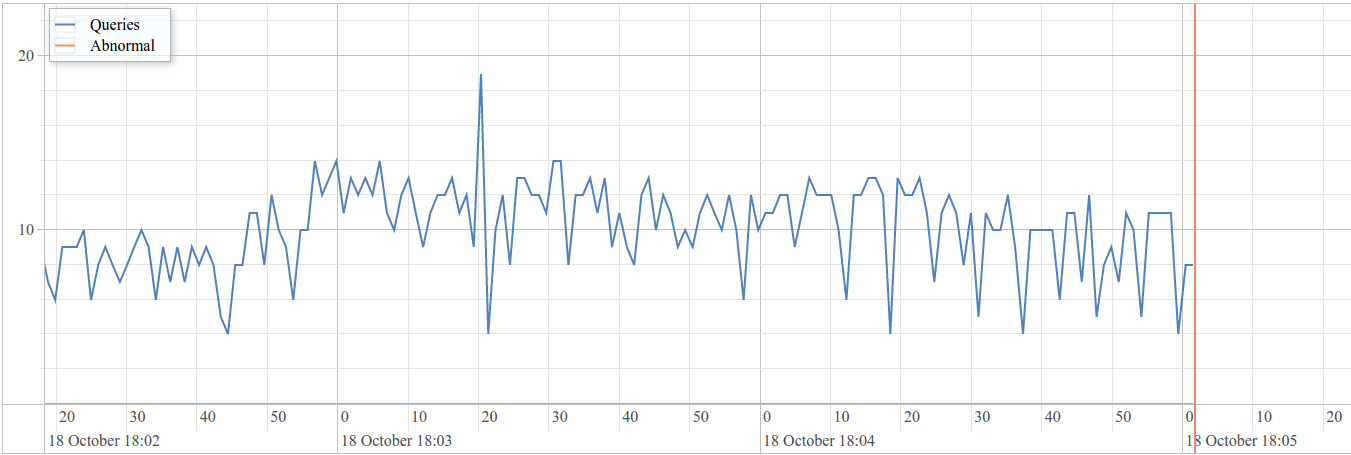
Webインターフェース
入手する
$ go get -u github.com/nim4/DBShield
その後、"-h" 引数でヘルプを表示できます:
$ $GOPATH/bin/DBShield -h
DBShield 1.0.0-beta3
Usage of DBShield:
  -a	get list of abnormal queries
  -c file
      config file (default "/etc/dbshield.yml")
  -h	show help
  -k	show parsed config and exit
  -l	get list of captured patterns
  -version
      show version
設定ファイルを使って実行:
$ $GOPATH/bin/DBShield -c config.yml
サンプル設定ファイル を参照してください。
⚠️ 警告: 本番環境ではデフォルトの証明書を使用しないでください!
| データベース | 保護 | SSL |
|---|---|---|
| DB2 |  |  |
| MariaDB | | |
| MySQL | | |
| Oracle | | |
| Postgres | | |
(優先度順)

