
Skip to content
KitploitKITPLOIT
ツールブログ
提出
ツールブログ
提出

ハッキング、侵入テスト、サイバーセキュリティツールをあなたのセキュリティアーセナルに!

Kitploitはハッキング、サイバーセキュリティ、ペネトレーションテストのツールディレクトリです。最新のプロジェクトアップデートを見つけて、脆弱性の発見、システム分析、テストの自動化、セキュリティの強化を行いましょう。

··フィード·お問い合わせ·プライバシー·© 2026 Kitploit

ツールディレクトリ

カテゴリ

すべてのカテゴリを見る
Loading categories
netlas-cookbook — このガイドの目的は非常にシンプルです - サイバーセキュリティに興味がある人なら誰でも、知識レベルに関係なく、Netlas.io を最大限に活用する方法を教えることです。 | Kitploit
ツール/GitHubGitHub/netlas-io/netlas-cookbook
OSINT (オープンソースインテリジェンス)偵察IoTセキュリティ脆弱性分析情報収集ウェブセキュリティデジタルフォレンジックペネトレーションテスト脅威インテリジェンス学習と教育厳選リソース学習パスとコース
88810561年前Kitploit レビュー済み

人気

すべて見る →

コミュニティで最も使われているツールを見つけましょう。

すべてのツールを探索

ツールコレクションを閲覧

すべてのツールを見る →
共有
GitHubnetlas-io/netlas-cookbook

netlas-cookbook

このガイドの目的は非常にシンプルです - サイバーセキュリティに興味がある人なら誰でも、知識レベルに関係なく、Netlas.io を最大限に活用する方法を教えることです。

リポジトリを見る

Netlas CookBook

GitHub stars GitHub forks


このガイドの目的は、サイバーセキュリティに興味があるすべての人(知識レベルを問わず)が、Netlas Search Toolsを最大限に活用できるようにすることです。これは長文の読み物です。できるだけ多くのシンプルなユースケースを集め、それらを自動化する方法を示しました。

⭐️ 私たちにスターを送って感謝を示してください
👁️ 更新情報を購読する

Netlasは、インターネット上で利用可能なすべてのIPアドレスとドメインに関する情報を検索・分析するために設計された検索エンジンです。Netlasには攻撃対象領域管理機能もありますが、このガイドでは主にNetlas Search Toolsと、それらを自動化で使用する方法に焦点を当てています。

目次

  • 簡単な使用例
    • IPまたはドメインに関する情報の取得
    • 非ラテンドメインの検索
    • タイトルに特定の単語を含むWebサイトの検索
  • 検索クエリ構文
    • フィルター(フィールド)
    • 論理演算子
    • 範囲指定
    • ワイルドカード
    • あいまい検索
    • 正規表現
    • その他のNetlas.io検索機能
  • APIリクエスト
    • APIキーの見つけ方
    • APIリクエストのデバッグツール
    • Netlas API JSONレスポンスの構造
    • JSON形式データを扱うためのツール
    • Netlas Pythonライブラリ
    • 有用なデータを取得するためのレスポンスキーの例
    • Netlas Pythonレスポンスのデータ型
    • Netlas CLIツール
    • Search、Download、Hostメソッドの違い
    • 追加リクエストパラメータ
    • Pythonでリクエストを行う(Netlas Pythonライブラリなし)
    • 他のプログラミング言語の例
    • JQユーティリティ
    • コード作成のためのAIツール
    • コードチェッカー
  • OSINT(オープンソースインテリジェンス)へのNetlas.ioの活用
    • WHOIS連絡先での人物のニックネームやメールアドレスの検索
    • Webページのタイトルや本文での人物のニックネームやメールアドレスの検索
    • 企業Webサイトのサブドメインでの「機密情報ファイル」の検索
    • 電話番号の言及検索
    • ファイルの言及検索(著作権を侵害する可能性のあるコンテンツを探す)
    • ドメインWHOIS情報の収集
    • <address>タグ内の場所の検索
    • メタタグ内の著者名の検索
    • HTMLドキュメントのメタタグで他にどんな興味深いものが見つかるか?
    • FTPサーバーのバナーテキストによる検索
    • SSL証明書内の連絡先情報の検索
    • WayBack Machineの代替としてのNetlasの使用
    • 関連Webサイトを検索する9つの方法
  • スクレイピング(Webページ本文からデータを抽出する)
    • Beatifulsoupパッケージ
    • Reパッケージ
    • スクレイピングのためのその他のPythonパッケージ
  • 暗号通貨調査へのNetlas.ioの活用
    • マイニングファームの検索
    • クリプトマイナーに感染したWebサイトの検索
    • 脆弱なBitcoinノードの検索
  • ペネトレーションテストへのNetlasの活用
    • サブドメイン検索
    • 特定の脆弱性を持つサイトの検索
    • 説明に特定の単語を含む脆弱性のあるサイトの検索
    • サーバーのHTTPヘッダーによる検索
    • ファビコンハッシュによる脆弱なサーバーの検索
    • タグ名による脆弱なサーバーの検索
    • 近く(または任意の場所)の脆弱なサーバーやデバイスの検索
    • ログイン/管理パネルの検索
    • 脆弱なデータベース管理パネルの検索
    • SQLインジェクションに対して脆弱なサイトの検索
  • IoT検索:9つの基本的方法
    • タイトルによる検索
    • 本文内の検索
    • ポート番号による検索
    • バナーによる検索
    • ファビコンによる検索
    • サーバーヘッダーによる検索
    • Cookieによる検索
    • タグによる検索
    • 追加検索フィルター
  • ダークネット調査へのNetlas.ioの活用
    • Tor出口ノードの検索
    • .onionサイトへのリンク収集
  • ファイル、バックアップ、ログディレクトリの検索
  • デジタルフォレンジックおよびインシデント対応へのNetlas.ioの活用
    • SMTPサーバー情報の収集
    • フィッシングに悪用される可能性のあるドメインの検索
    • ファビコン検索
    • 特定のサブネットに関連するドメインの検索
    • 悪意のあるソフトウェアが存在するサーバーの検索
  • テクノロジーとコード例の検索
  • 娯楽目的またはNetstalkingへのNetlas.ioの活用
  • よくある問題
    • エラー429 - リクエスト頻度が高すぎる
    • KeyError
    • リクエストリストの自動化
    • CSV形式でのデータ保存
    • その他の形式でのデータ保存
    • Punycodeドメインのデコード
    • 検索クエリが結果を返さない場合の対処法
    • HTTP本文からHTMLタグを除去する
  • 攻撃対象領域管理
  • 非常に大量のデータの取り扱い
  • 謝辞

簡単な使用例

Netlasにはいくつかの検索ツールが含まれています:

  • IP/Domain info →
  • Response search →
  • DNS search →
  • IP WHOIS search →
  • Domain WHOIS search →
  • Certificates search →

主にResponses search(インターネットスキャン結果)を使用しますが、すべてのツールは同じように動作します。Responses Search Toolの使い方を理解すれば、他のツールも扱えるようになります。

技術的な詳細に入る前に、いくつかの簡単な例でNetlas.ioの動作を見てみましょう。
IPまたはドメインに関する情報の取得

Domain information gathering

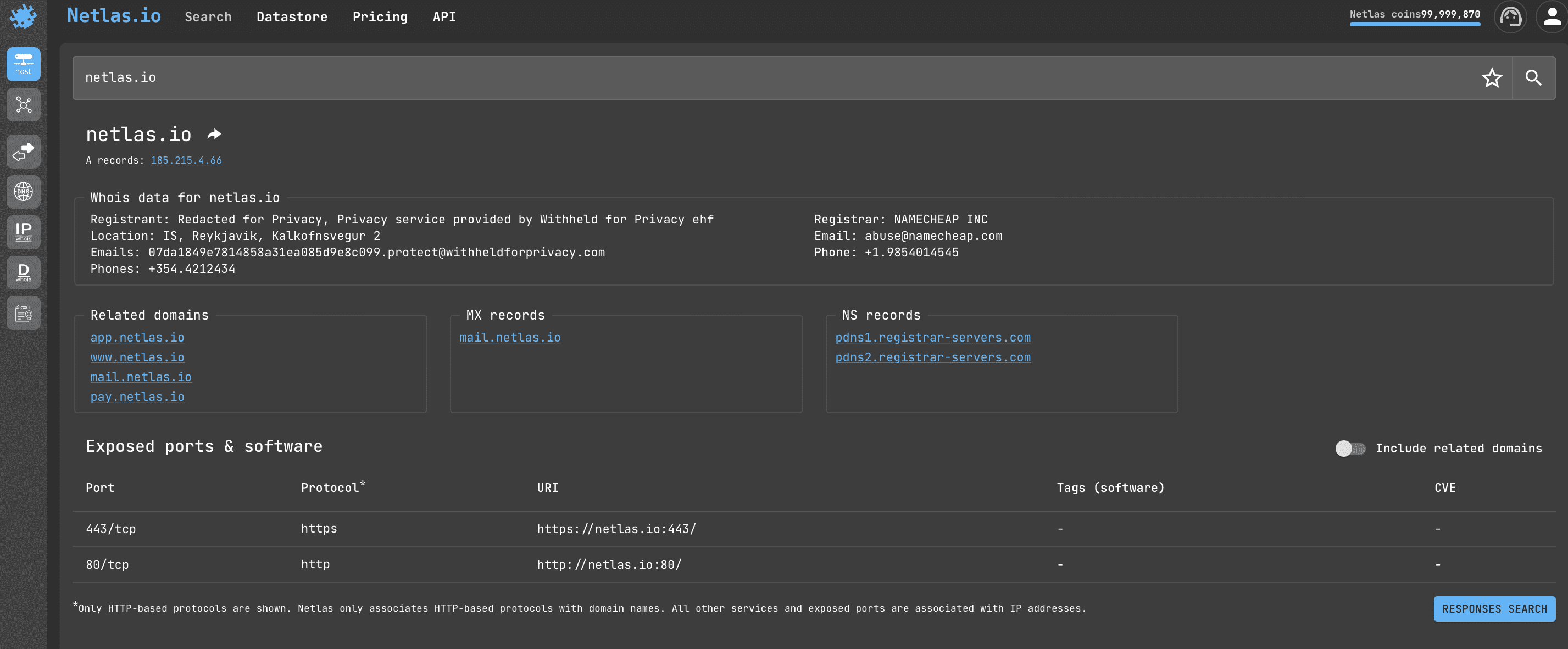
Netlas.io IP/Domain infoを開き、ドメイン名またはIPを入力します。結果として以下の情報が表示されます:
  • whoisデータ(登録者、所在地、メールアドレス、電話番号)
  • 関連ドメイン
  • MXおよびNSレコード
  • 公開ポート&ソフトウェア(場合によっては脆弱性に関する情報も表示)

非ラテンドメインの検索

Punycode convert

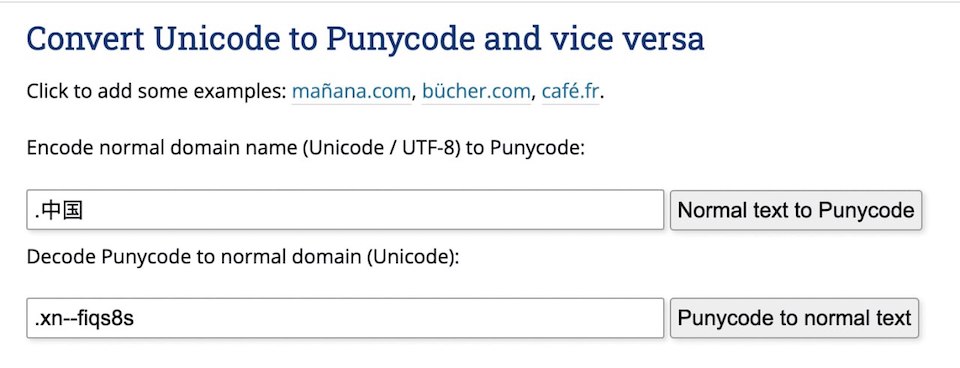
中国語など国際化ドメイン名を検索する必要がある場合は、Punycodeに変換します。例えば:``` domain:*.xn--fiqs8s

root@kitploit:~
この作業は、専用のオンラインツールを使用して行うことができます。例 - [Charset.org](https://www.charset.org/punycode)

### 特定の単語をタイトルに含むウェブサイトを検索する

![HTTPタイトルによる検索](https://assets.kitploit.com/production/public/readmes/6659/9da0445843c6567eefba0f415852126719123c24992f7b85d1e2eee96110d64e.png)

[Netlas.io レスポンス検索](https://app.netlas.io/responses/) を開き、次のように入力します:```
http.title:g*thub

Try in Netlas

これにより、HTTPタイトルに「g」で始まり「thub」で終わる単語が含まれるすべてのサーバーが見つかります。ワイルドカードの使い方の詳細は以下をご覧ください。

検索クエリの構文

それでは、Netlas.io での検索クエリの仕組みについて詳しく学びましょう。

Netlas.io は Elasticsearch をベースとしており、これは無料でオープンな分散型RESTful検索エンジンです。Netlas.io の検索方法は、他のElasticsearchベースのデータベースと非常に似ています。

フィルター(フィールド)

Search filters

Response、DNS、IP、および証明書の検索では、検索クエリにフィルター(フィールド)を使用できます。例:``` http.body:netlas

root@kitploit:~
[Netlasで試す](https://app.netlas.io/responses/?q=http.body%3Anetlas&page=1&indices=)

このクエリを使用すると、`<body>` HTMLタグ内に「netlas」という単語を含むページを見つけることができます。

各検索タイプで利用可能なフィルタの一覧は、ページの右側に表示されます。

![フィルタマッピング画像](https://assets.kitploit.com/production/public/readmes/6659/00c8d6c829ff1de74f4fbdc26df13f8db07114a5830d9f6a8d9ad0011e817045.png)

フィルタを使用すると、さまざまなパラメータに基づいてサーバを検索できます。例:

* `domain`
* `ip`
* `protocol`
* `certificate`
* `cve`
* `geolocation` (`city`, `continent`, `country`)

その他多数。

### 論理演算子

単一のクエリで複数のフィルタを使用し、論理演算子`AND`、`OR`、`NOT`を使って組み合わせることができます。例:```
http.title:netlas NOT port:443

Try in Netlas

クエリで複数の条件を組み合わせたい場合は、括弧を使用してください:``` http.title:(netlas OR shodan) NOT port:443

root@kitploit:~
[Netlasで試す](https://nt.ls/OrFOY)


### 範囲

フィールドの値として数値を使用する場合、その値を範囲の最小値と最大値(値範囲の極限)として指定できます:```
ip:[173.194.222.0 TO 173.194.222.255] 

Netlasで試す

または、値の上限または下限のみを指定します:``` host:"1.1.1.1" port:<=1000

root@kitploit:~
[Try in Netlas](https://app.netlas.io/responses/?q=host%3A%221.1.1.1%22%20port%3A%3C%3D1000&page=1&indices=)


### ワイルドカード

クエリ内の特定の文字の正確な記述がわからない場合(たとえば、ドメインのゾーンや名前のスペルが不明な場合)、アスタリスクに置き換えることができます。```
domain:google.*

Netlas で試す

クエスチョンマークも使用できます:``` domain:google.?

root@kitploit:~
[Netlasで試す](https://app.netlas.io/responses/?q=domain%3Agoogle.%3F&page=1&indices=)

`*` - 多くの記号、`?` - 1つの記号。

フィルター内でもアスタリスクを使用できます。例:```
\*.banner:database

このクエリは、すべてのバナー種別を同時に検索し、amqp.banner:、ftp.banner:、dns.banner:、telnet.banner: などの複数のフィルタを置き換えます。

ファジネス

Fuzzines

フィールドの正確な値ではなく、おおよその値で検索する必要がある場合(例えば、タイトルに Joseph と類似した名前をすべて含むページなど)、クエリに ~ を追加します。``` http.title:Joseph~

root@kitploit:~
[Try in Netlas](https://app.netlas.io/responses/?q=http.title%3AJoseph~&page=1&indices=)

### 正規表現

正規表現とは、特定のパターンに一致するソースドキュメント内のテキスト部分を検索、抽出、置換するための文字の並びです。例えば:

* 任意の電子メールアドレス:  ```text
  ([a-zA-Z0–9+._-]+@[a-zA-Z0–9._-]+\.[a-zA-Z0–9_-]+)
  • 任意の HTML タグ: ```text <.*?>
    root@kitploit:~
  • 任意の電話番号: ```text ^[+]?[(]?[0-9]{3}[)]?[-\s.]?[0-9]{3}[-\s.]?[0-9]{4,6}$
    root@kitploit:~
  • 任意のBitcoinアドレス: ```text ^[13][a-km-zA-HJ-NP-Z1-9]{25,34}$
    root@kitploit:~

正規表現の使用に関する詳細は、Netlas Cookbook(現在お読みいただいているもの)の例と、以下のリンクを参照してください。

ElasticsearchドキュメントのRegex構文マニュアル

OSINTにおける正規表現の有用性。理論とGoogle Sheetsを使った実践

その他のNetlas.io検索機能

結果のダウンロード

Download results

結果(すべてのフィールドまたは選択したフィールド)をJSONおよびCSV形式で保存し、好みの形式で表示したり、さまざまなツールで自動的に分析したりできます。

結果のグループ化

Group results

ドメイン名や地理位置情報など、異なるフィールド値で結果をグループ化して、検索時間を短縮できます。

結果の共有

Share results

検索結果へのリンクは自由に共有できます(開くのに登録は不要ですが、無料枠の50リクエストを超えた場合は制限があります)。

検索履歴

Request history

また、行ったすべてのクエリはプロフィールページ(右上のリンク)で確認できることも覚えておいてください。

APIリクエスト

Netlas.ioの最も重要な機能は、サイバーセキュリティ調査をより迅速かつ効率的に行えるようにすることです。このサービスにはAPI(アプリケーションプログラミングインターフェース)があり、さまざまなリクエストの実行を自動化できます。

これは、数行の簡単なPythonやBashスクリプトから、複雑な多機能アプリケーションまで、さまざまな形で実装できます。

Netlas APIの使用に関する詳細は、Netlas Cookbook(現在お読みいただいているもの)または公式ドキュメントをご覧ください:

API ドキュメント →

APIキーを見つけるには?

APIを使い始めるには、まさにここが最初のポイントです。購読料を支払う必要さえありません(1日50リクエストは無料です)。プロフィールページにアクセスしてください。

Profile page

APIリクエストのデバッグツール

Netlas APIを使い始めるために、スクリプトを書いたりアプリケーションを作成する必要はありません。お気に入りのAPIクライアントを使って簡単にテストできます。こちらの手順を参照してください。

Netlas API JSONレスポンスの構造

JSON API response

他のAPIと同様に、Netlas APIのレスポンスはヘッダーとJSON(JavaScript Object Notation)形式のレスポンスボディで構成されます。JSONファイルはキーと値の形式でデータを含み、ほぼすべてのプログラミング言語で分析できます。

Swaggerを使用している場合は、レスポンスボディをコピーまたはダウンロードして、任意のテキストエディタやJSONアナライザで表示できます。

JSON形式のデータを扱うツール

JSON Eveluator

Netlas APIを使ったコードを書く際に役立つちょっとしたヒントです。JSONファイルの構造をより速く理解し、特定の値を取得するためのパスを見つけるには、以下のような特別なツールを使用してください:

  • JSON Path Online Evaluator
  • JSON Path Finder

Netlas Pythonライブラリ

Netlas APIへのリクエストを自動化する最も簡単な方法は、専用に設計されたPythonライブラリ(パッケージ)を使用することです。

Netlas-Python ライブラリの GitHub リポジトリ

簡単な例で動作を確認してみましょう。Netlas Cookbookのすべてのコードサンプルはscriptsフォルダにあります。このリポジトリをクローンして、お使いのデバイスで実行できます:```shell git clone https://github.com/netlas-io/netlas-cookbook

root@kitploit:~
まだ今日までにPythonスクリプトを実行したことがなく、その方法がわからない場合は、まずNetlas CookBookリポジトリをGitpodで開くことから始められます。
GitpodはUbuntu(Linuxディストリビューション)ベースのクラウド開発環境です。以下のリンクをブラウザで開いてください(Githubアカウントでログイン):

[Run Netlas Cookbook in Gitpod](https://gitpod.io#https://github.com/netlas-io/netlas-cookbook)

![Netlas Github](https://assets.kitploit.com/production/public/readmes/6659/20c7d3841932ff04a4f4dc7b9ca2ae667e23e9d0af7b034342bd7db6d7efccfe.png)

pip(Pythonのパッケージインストーラー)を使用してNetlas Pythonライブラリをインストールします。コマンドラインで入力してください:```shell
pip install netlas

インストールを確認してください。コマンドラインで次を入力してください:```shell netlas --help

root@kitploit:~
netlas_python_example.py を実行:```shell
python3 scripts/netlas_python_example.py

もちろん、コードをコピーしてファイルに保存することもできます。最初の例のコードは次のとおりです。```python import netlas

apikey = "YOUR API KEY"

create new connection to Netlas

netlas_connection = netlas.Netlas(api_key=apikey)

retrieve data from responses by query port:7001

netlas_query = netlas_connection.query(query="port:7001")

iterate over data and print: IP address, port, path and protocol

for response in netlas_query['items']: print(f"{response['data']['ip']}:{response['data']['port']}{response['data']['path']} [{response['data']['protocol']}]")

root@kitploit:~
### 便利なデータ取得のためのレスポンスキーの例

先に述べたように、APIレスポンスのJSONパッチを見つけて必要なデータを取得するには、特別なオンラインアプリケーション(JSON-evaluators)を使用できます。さらに便利にするために、最もよく必要とされるPythonライブラリのレスポンスキーの例をいくつか挙げておきます。```python
# Main domain/ip info
response['data']['uri']
response['data']['ip']
response['data']['http']['title']
response['data']['http']['meta']
response['data']['http']['body']

# Geo info
response['data']['geo']['continent']
response['data']['geo']['country']
response['data']['geo']['city']
response['data']['geo']['location']['lat']
response['data']['geo']['location']['long']

# Whois geo info
response['data']['whois']['net']['country']
response['data']['whois']['net']['address']
response['data']['whois']['net']['city']
response['data']['whois']['net']['contacts']['emails']
response['data']['whois']['net']['contacts']['phones']

# Http status and favicon ico info
response['data']['port']
response['data']['http']['status_code']
response['data']['http']['status_line']
response['data']['http']['favicon']['image']
response['data']['http']['favicon']['path']

# Basic CVE info
response['data']['cve'][0]['name']
response['data']['cve'][0]['description']
response['data']['cve'][0]['base_score']
response['data']['cve'][0]['has_exploit']
response['data']['cve'][0]['exploit_links']

Netlas Python レスポンスデータタイプ

Python Netlas データタイプ

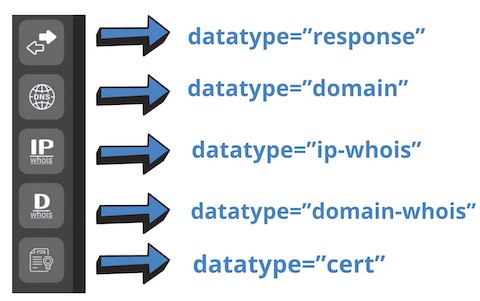
Netlas Python ライブラリを使用する際、取得したいデータのタイプを正しく指定することが非常に重要です。デフォルトでは response タイプが返され、多くの Netlas CookBook の例でこれが使用されています。

しかし、ドメインの whois 情報を取得したり、サブネット内のドメインを検索したりするような一部のタスクでは、別のデータタイプを使用する必要があります。例:```python netlas_query = netlas_connection.query(query='a:"163.114.132.0/24"',datatype="domain")

root@kitploit:~
クエリが結果を返すべきなのに返していないと思われる場合は、**datatype** パラメータの値を変更してみてください。これで解決する可能性が非常に高いです。

利用可能なデータタイプ:

- **datatype="response"** は、[Netlas Responses Search](https://app.netlas.io/responses/) で取得できる結果に対応します。
- **datatype="domain"** は、[Netlas DNS search](https://app.netlas.io/domains/) で取得できる結果に対応します。
- **datatype="domain-whois"** は、[Netlas Domain Whois Search](https://app.netlas.io/whois_domains/) で取得できる結果に対応します。
- **datatype="ip-whois"** は、[Netlas IP Whois Search](https://app.netlas.io/whois_ip/) で取得できる結果に対応します。
- **datatype="cert"** は、[Netlas Certificates Search](https://app.netlas.io/certs/) で取得できる結果に対応します。

### Netlas CLI Tools

![Netlas CLI ツール](https://assets.kitploit.com/production/public/readmes/6659/88c2402f9da5a3ece87a4459de9b967691428d60df86f828d83722c50bde9d44.png)

Netlas Python ライブラリをコマンドラインから直接使用することもできます。例:```bash
netlas search "http.title:johnsmith" -f json >results.json

このシンプルなコマンドは、ヘッダーに「johnsmith」という単語を含むすべてのサーバーを検索し、結果をJSON形式で返し、その結果をresutls.jsonファイルに保存します。

Netlas APIの他のすべての機能も同じ方法で使用できます。詳細については、ヘルプ(-hコマンド)およびNetlas Cookbook(今お読みいただいているもの)の例を参照してください。``` Usage: netlas [OPTIONS] COMMAND [ARGS]...

Options: -h, --help Show this message and exit.

Commands: count Calculate count of query results. download Download data. host Host (ip or domain) information. indices Get available data indices. profile Get user profile data. savekey Save API key to the local system. search (query) Search query. stat Get statistics for query.

root@kitploit:~
さまざまなNetlas CLI Toolsコマンドを実行する前に、設定にAPI keyを保存してください:```bash
netlas savekey YOUR_API_KEY

また、bashスクリプトとNetlas CLIツールを使用してさまざまなタスクを自動化する例を含むGitHubリポジトリもあります:

Netlas Scripts

検索、ダウンロード、ホストメソッドの比較

Netlas APIには多くのメソッドがありますが、最も一般的に使用されるのは検索(search)とダウンロード(download)です。これらは非常に似ていますが、いくつかの違いがあります。

検索メソッドは一度に1ページ(20件)の結果を読み込み、最大200ページ(20*200=4000件)まで読み込むことができます。ダウンロードメソッドはすべての結果をダウンロードします(ただし、実行により多くのリソースを必要とします)。

また、ホストメソッドは特定のドメインやIPに関する最も基本的な情報を返すだけです(データタイプ(他のメソッドと同様)を指定する必要はありません):```bash netlas host "51.159.153.170"

root@kitploit:~
### 追加リクエストパラメータ

Netlas APIでは、追加パラメータを使用してリクエストで返されるデータを柔軟に調整できます。例:

* indices - 特定のインデックス日付に対応するID。特定の日付のIDを確認するには、app.netlas.ioを開き、検索クエリ入力バーの右側にあるカレンダーをクリックし、関心のある日付を選択し、ブラウザのアドレスバーのURL内のindicesパラメータがどのように変化するかを確認します。
* start - 結果のページ番号(デフォルトは0)
* fields - 結果に含めるフィールドの名前(デフォルトでは全てのフィールド)。多数のリクエストを行う際にコードの高速化と最適化に役立ちます。

### Pythonでリクエストを作成する(Netlas Pythonライブラリを使用しない場合)

場合によっては、Netlas Pythonライブラリを使用せず、多くの開発者になじみのある標準のPythonリクエストパッケージを使用する方が簡単な場合があります。

コマンドラインで入力:```bash
python scripts/python_example.py

python_example.pyのソースコード:```python import requests

response = requests.get("https://app.netlas.io/api/domains/?q=ivanov.com&source_type=include&start=0&fields=*",{'X-API-Key': 'YOUR API KEY'})

print(response.json())

root@kitploit:~
しかし、Netlas Python Libraryは、クエリ処理における様々な問題(エラー、長時間待機など)に対応するように設計されているため、依然として推奨されます。

### 他のプログラミング言語向けの例

当社ではNetlas検索の自動化にPython Libraryの使用を推奨していますが、Netlas APIは多種多様なテクノロジースタックを持つほとんどのアプリケーションに組み込むことが可能です。重要なのは、**RESTリクエスト**を実行し、**JSON**データを解析できることです。

以下に、様々な人気プログラミング言語での例を示します。

#### NodeJS <!-- omit in toc -->

![Node JS Netlas](https://assets.kitploit.com/production/public/readmes/6659/b4dd5d1eb33fafddfe44c22062b6e7e9b4e1471123ef6410a9fc3a5a8bc34a78.png)

コマンドラインで入力してください:```bash
node scripts/node_example.js

Gitpodを使用していない場合は、デバイスにNodeJSをインストールしておく必要があります。

nodejs_example.jsのソースコード:```javascript fetch('https://app.netlas.io/api/domains/?q=ivanov.com&source_type=include&start=0&fields=*', { headers: { "X-API-Key": "YOUR_API_KEY", }, }) .then((response) => response.text()) .then((body) => { var jsonArray = JSON.parse(body); console.log(jsonArray['items'][0]); });

root@kitploit:~
#### Ruby <!-- omit in toc -->

![Ruby Netlas](https://assets.kitploit.com/production/public/readmes/6659/7237511c7ee0f39e270569af8b0ae12974684ad3087b8ea373a2df2719a03cdf.png)

コマンドラインで入力してください:```bash
ruby scripts/ruby_example.rb

Gitpod を使用していない場合は、デバイスに Ruby をインストールしておく必要があります。

ruby_example.rb のソースコード:```ruby require 'net/http' require 'uri' require 'json'

uri = URI("https://app.netlas.io/api/domains/?q=ivanov.com&source_type=include&start=0&fields=*") req = Net::HTTP::Get.new(uri) req['X-API-Key'] = "YOUR_API_KEY"

res = Net::HTTP.start(uri.hostname, uri.port, use_ssl: uri.scheme == 'https') { |http| http.request(req) }

jsonArray = JSON.parse(res.body)

puts jsonArray['items'][0]['data']['domain']

root@kitploit:~
#### Bash <!-- omit in toc -->

![Bash Netlas](https://assets.kitploit.com/production/public/readmes/6659/c2f52fa6cb554433ae4b234636cd4b06702691d45b23a7d0e0ebc951ab3c6b06.png)

コマンドラインで入力:```bash
bash scripts/bash_example.sh

bash_example.shのソースコード:``` curl -X 'GET'
'https://app.netlas.io/api/domains/?q=ivanov.com&source_type=include&start=0&fields=*'
-H 'accept: application/json'
-H 'X-API-Key: YOUR_API_KEY' | jq .items[0].data.last_updated

root@kitploit:~
### JQユーティリティ

上記の例では、JQユーティリティを使用してJSONデータからフィールドを抽出したことに注意してください。

「JSONデータのためのsedのようなもの」と呼ばれることもあります。これは、あらゆるJSONデータを扱う際に驚くほど便利なツールです。以下に構文の例を示します。

JSON配列の最初のアイテムを出力:```
.items[0] 

JSON配列のすべての項目を表示します:``` .items[]

root@kitploit:~
JSON配列の最初の項目のすべての 'data' サブ項目を表示:```
.['items'][0]['data'][]

JSON-arrayの各アイテムのすべてのサブサブアイテムを表示する:``` .items[].data.technical[]

root@kitploit:~
JQの詳細はこちらをご覧ください(データフィルタリングに特に注意することをお勧めします):[JQユーティリティドキュメント](https://jqlang.github.io/jq/)


### コード作成のためのAIツール

![You.com](https://assets.kitploit.com/production/public/readmes/6659/6d2992d2f27d7aeb930c9b970363604d510c46b2cda53cc2f87d25bb0ab757e7.png)

Netlas Cookbookの例をカスタマイズする際に問題が発生した場合は、コードの改善や作成のためにAIツールの助けを求めることをお勧めします。例:

[ChatGPT](https://chatgpt.com)  
[Code Llama](https://huggingface.co/spaces/codellama/codellama-playground)  
[You.com](https://you.com/)  

このようなサービスを利用する際は、コードを使って解決したいタスクを言葉で説明するだけで十分です。


### コードチェッカー
![Python code check](https://assets.kitploit.com/production/public/readmes/6659/6622b278b508349c7921d1208ce2267fcc77090c17189613c87f690200a07119.png)

Netlas Cookbookの例を自分の目的に合わせて作り直すと、コードがエラーで実行されない場合があります。特別なオンラインツールがそれらを見つけて修正するのに役立ちます:  

[ExtendsClass Python Tester](https://extendsclass.com/python-tester.html)
[Snyk](https://snyk.io/code-checker/python/)

コードをサードパーティサービスにコピーしたくない場合は、Pylint(静的コードアナライザ)を使用して自分のデバイスでエラーをチェックできます:

[Pylint Python Package](https://pypi.org/project/pylint/)


## OSINT(オープンソースインテリジェンス)のためのNetlas.ioの使用

![OSINT Flowchart](https://assets.kitploit.com/production/public/readmes/6659/b433d1e7a92497c03bf05b19f663f7fa8643480533b961801bfc93ad6bad4927.png)

Netlas.ioは、ドメインや企業に関するデータを収集したり、インターネット上の人物(または誰でも)の言及を見つけるのに役立ちます。 

また、Webページの古いバージョンを見つけるためにも使用できます(Wayback Machineの類似品として)。

### WHOIS連絡先での個人のニックネームまたはメールアドレスの検索

ほとんどの場合、WHOISデータにはドメインを登録する企業の連絡先情報のみが含まれています。しかし、時には関心のある人物の個人連絡先が含まれていることもあります。このクエリはそれらを見つけるのに役立ちます。  

*この方法は有料サブスクリプションが必要な場合があります。* [料金を見る](https://netlas.io/pricing/)

**検索クエリの例**  

![Whois email search example](https://assets.kitploit.com/production/public/readmes/6659/43eb2a871fe128cecbee6cb6b4164a1876053d8e12699c72a53e36c229f266f7.png)```
whois.related_nets.contacts.emails:sweetwater

Netlasで試す

APIリクエスト例

Netlas CLIツール:```bash netlas search "whois.related_nets.contacts.emails:sweetwater*" -f json

root@kitploit:~
Curl:```bash
curl -X 'GET' \
  'https://app.netlas.io/api/responses/?q=whois.related_nets.contacts.emails%3Asweetwater*&fields=' \
  -H 'accept: application/json' \
  -H 'X-API-Key: aqkd8L4MR93Tkcaz2UXDXrRleV8Vlvbv' | jq .items[].data.uri

コード例 (Netlas Python ライブラリ)

Whois email search example Python

コマンドラインで実行:```bash python scripts/osint/whois_email_search.py

root@kitploit:~
scripts/osint/whois_email_search.py のソースコード:```python
import netlas

apikey = "YOUR_API_KEY"

# create new connection to Netlas
netlas_connection = netlas.Netlas(api_key=apikey)

# retrieve data from responses by query `whois.related_nets.contacts.emails:sweetwater`
netlas_query = netlas_connection.query(query="whois.related_nets.contacts.emails:sweetwater*")


# iterate over data and print: URL, Country, Related nets data
for response in netlas_query['items']:
    print (response['data']['uri'])
    print (response['data']['geo']['country'])
    print (response['data']['whois']['related_nets'])

Webページのタイトルと本文における個人のニックネームまたはメールアドレスの検索

Netlasを使用すると、Webページの見出しやHTMLコード内の特定の単語の言及を検索できます。完全一致、あいまい一致(あいまいクエリのセクションを参照)で単語を検索したり、確信が持てない文字をアスタリスクに置き換えたりすることができます。

検索クエリの例

タイトル/本文検索の例``` http.title:sweetwater OR http.body:sweetwater

root@kitploit:~
[Netlasで試す](https://app.netlas.io/responses/?q=http.title%3Asweetwater%20OR%20http.body%3Asweetwater&page=1&indices=)

**APIリクエスト例**

Netlas CLIツール:```bash
netlas search "http.title:sweetwater OR http.body:sweetwater" -f json

Curl:```bash curl -X 'GET'
'https://app.netlas.io/api/responses/?q=whois.related_nets.contacts.emails%3Asweetwater*&fields='
-H 'accept: application/json'
-H 'X-API-Key: YOUR_API_KEY' | jq .items[].data.uri

root@kitploit:~
**コード例 (Netlas Python Library)**

![Whois email search example Python](https://assets.kitploit.com/production/public/readmes/6659/8678cf14e22a1a44cc2c44c846b86ec2ad24b1eadef130a4eade7696ff88b061.png)

コマンドラインで実行:```bash
python scripts/osint/title_body_search.py

scripts/osint/title_body_search.py のソースコード:```python import netlas

apikey = "YOUR_API_KEY"

create new connection to Netlas

netlas_connection = netlas.Netlas(api_key=apikey)

retrieve data from responses by query http.title:sweetwater OR http.body:sweetwater

netlas_query = netlas_connection.query(query="http.title:sweetwater OR http.body:sweetwater*")

iterate over data and print: IP,URL,web page title

for response in netlas_query['items']: print (response['data']['ip']) print (response['data']['uri']) print (response['data']['http']['title'])

root@kitploit:~
### 会社のWebサイトのサブドメインで「Juicy Info Files」を検索

![Juicy info files search](https://assets.kitploit.com/production/public/readmes/6659/c14d7be4acd47fb0ede930eb0ecbb06f3f362179fd4bca46747f0ce7d0caeb7d.png)

Metagoofilは、長年にわたりOSINT実践者の間で人気のツールです。これは、会社のWebサイト上のドキュメントファイル(pdf、xlsx、docxなど)をGoogleで検索し、そのメタデータを分析します。

そして、Googleにインデックスされていないものは、Netlasを使用して見つけ、コンピュータにダウンロードして、[MetaDetective](https://github.com/franckferman/MetaDetective)ツールで分析することができます。```
uri:*lidl.* AND http.body:pdf

Try in Netlas

uri:フィルタをdomain:やhost:に置き換えることもできます(これらの3つのフィルタを使用する際は、常に結果を比較することをお勧めします)。

また、探したい内容に応じて、さまざまなファイル拡張子を検索することもできます。例:``` http.body:xls http.body:xlsx http.body:doc http.body:docx http.body:ppt http.body:pptx http.body:mdb http.body:csv http.body:sql http.body:sqlite

root@kitploit:~
**APIリクエスト例**

Netlas CLIツール:```bash
netlas search "uri:*lidl.* AND http.body:pdf"

Curl:```bash curl -X 'GET'
'https://app.netlas.io/api/responses/?q=uri%3A*lidl.*%20AND%20http.body%3Apdf&source_type=include&start=0&fields=*'
-H 'accept: application/json'
-H 'X-API-Key: 'YOUR_API_KEY' | jq .items[].data.domain

root@kitploit:~
**コード例 (Netlas Python Library)**

![ジューシーな情報検索](https://assets.kitploit.com/production/public/readmes/6659/faec884f54484c0cc6dd5ef76a79b9ca2e5ef372078289e8f3c3cf2cf4af9fac.png)

コマンドラインで実行:```bash
python scripts/osint/juicyinfo_search.py

scripts/osint/juicyinfo_search.py のソースコード:```python import netlas

apikey = "YOUR_API_KEY"

create new connection to Netlas

netlas_connection = netlas.Netlas(api_key=apikey)

retrieve data from responses by query uri:*lidl.* AND http.body:pdf

netlas_query = netlas_connection.query(query='uri:lidl. AND http.body:pdf')

iterate over data and print: uri, body

for response in netlas_query['items']: print (response['data']['uri']) print (response['data']['http']['body'])

root@kitploit:~
In order to automate links to PDF documents from the web page body you can use the Python [Re](https://docs.python.org/3/library/re.html) package.


### Phone Number Mentions Search

As with nicknames and emails, you can also look for mentions of a phone number in the code of web pages or WHOIS contact information. 

We single out this task as a separate example, because searching for a phone number is complicated by the fact that it can be written in different formats.

**Search query example**  

![Phone number search example](https://assets.kitploit.com/production/public/readmes/6659/92872d57f9ac03e90323f35d9d8303364050f36aa748a26eadb8996d10ce66b9.png)```
http.body:1?234?567?89?99 OR http.body:12345678999 OR http.body:1234?5678?999

Try in Netlas

リクエストを行う際には、対象の電話番号を所有する国で受け入れられている電話番号の記録形式を考慮する必要があります。

APIリクエスト例

Netlas CLI ツール:```bash netlas search "http.body:1?234?567?89?99 OR http.body:12345678999 OR http.body:1234?5678?999" -f json

root@kitploit:~
ページ本文だけでなく、WHOISの連絡先情報でも電話番号を検索できることをお忘れなく。これは **whois.related_nets.contacts.phones:** フィルターを使用して行うことができます。

Curl:```bash
curl -X 'GET' \
  'https://app.netlas.io/api/responses/?q=http.body%3A1%3F234%3F567%3F89%3F99%20OR%20http.body%3A12345678999%20OR%20http.body%3A1234%3F5678%3F999&source_type=include&start=0&fields=*' \
  -H 'accept: application/json' \
  -H 'X-API-Key: YOUR_API_KEY' jq .items[].data.uri

コード例(Netlas Pythonライブラリ)

電話番号検索の例(Python)

コマンドラインで実行:```bash python scripts/osint/phonenumber_search.py

root@kitploit:~
scripts/osint/phonenumber_search.py のソースコード:```python
import netlas

apikey = "YOUR_API_KEY"

# create new connection to Netlas
netlas_connection = netlas.Netlas(api_key=apikey)

# retrieve data from responses by query `http.body:1?234?567?89?99 OR http.body:12345678999 OR http.body:1234?5678?999`
netlas_query = netlas_connection.query(query="http.body:1?234?567?89?99 OR http.body:12345678999 OR http.body:1234?5678?999")


# iterate over data and print: ip, url
for response in netlas_query['items']:
    print (response['data']['ip'])
    print (response['data']['uri'])

ファイル言及の検索(著作権侵害の可能性があるコンテンツを探す)

あなたがミュージシャンで、自分のトラックが投稿されているすべてのサイトを見つけたいと想像してみてください。これは、あなたの名前が言及されており、.mp3拡張子のファイルへのリンクがあるページを検索することで実現できます。

検索クエリの例

タイトル/本文検索の例``` (http.title:alla OR http.body:alla) AND http.body:*.mp3

root@kitploit:~
[Netlasで試す](https://nt.ls/HEhJj)

**APIリクエストの例**

Netlas CLI ツール:```bash
netlas search "(http.title:alla OR http.body:alla) AND http.body:*.mp3" -f json

Curl:```bash curl -X 'GET'
'https://app.netlas.io/api/responses/?q=(http.title%3Aalla%20OR%20http.body%3Aalla)%20AND%20http.body%3A*.mp3&source_type=include&start=0&fields=*'
-H 'accept: application/json'
-H 'X-API-Key: YOUR_API_KEY' | jq .items[].data.http.title

root@kitploit:~
**コード例(Netlas Pythonライブラリ)**

![File mentions search example Python](https://assets.kitploit.com/production/public/readmes/6659/919f820c21d9cda328524722b820783c3941447f3d447f9a72f5224d4cfd9ac1.png)

コマンドラインで実行:```bash
python scripts/osint/file_mentions_search.py

scripts/osint/file_mentions_search.pyのソースコード:```python import netlas

apikey = "YOUR_API_KEY"

create new connection to Netlas

netlas_connection = netlas.Netlas(api_key=apikey)

retrieve data from responses by query (http.title:alla OR http.body:alla) AND http.body:*.mp3

netlas_query = netlas_connection.query(query="(http.title:alla OR http.body:alla) AND http.body:*.mp3")

iterate over data and print: IP, URL,web page title

for response in netlas_query['items']: print (response['data']['ip']) print (response['data']['uri']) print (response['data']['http']['title'])

root@kitploit:~
### ドメインWHOIS情報収集

WHOISは、世界中の全登録ドメインに関する情報を保存する世界的な公開データベースです。

**検索クエリの例**

![タイトル/本文の検索例](https://assets.kitploit.com/production/public/readmes/6659/88c9654440e88b387d2422ac397334793daa8600d434d99d457b908e8abe154b.png)

[WHOISドメイン検索](https://app.netlas.io/whois_domains/)```
github.com

APIリクエストの例

Netlas CLI Tools:```bash netlas host github.com -f json

root@kitploit:~
Curl:```bash
curl -X 'GET' \
  'https://app.netlas.io/api/whois_domains/?q=github.com&source_type=include&start=0&fields=*' \
  -H 'accept: application/json' \
  -H 'X-API-Key: YOUR_API_KEY' |  jq .items[].data.technical.street

コード例 (Netlas Python Library)

WHOIS 例 Python

コマンドラインで実行:```bash python scripts/osint/whois_search.py

root@kitploit:~
scripts/osint/whois_search.pyのソースコード:```python
import netlas

apikey = "YOUR_API_KEY"

# create new connection to Netlas
netlas_connection = netlas.Netlas(api_key=apikey)

# retrieve data from whois for google.com domain
netlas_query = netlas_connection.query(query="google.com",datatype="whois-domain")


# iterate over data and print: owner name
for response in netlas_query['items']:
    print (response['data']['technical']['name'])  

<address> タグ内の場所の検索

<address> タグは Web ページの <head> タグ内にあり、物理的な住所を含む場合があります。このタグを使用した検索により、特定の通り、場合によっては特定の建物に関連付けられたサイトを見つけることができます。

検索クエリの例

Author meta search``` http.contacts.address:kirby

root@kitploit:~
[Try in Netlas](https://app.netlas.io/responses/?q=http.contacts.address%3Akirby&page=1&indices=)

メール検索にはhttp.contacts.email:も使用できます。

**APIリクエスト例**

Netlas CLIツール:```bash
netlas search "http.contacts.address:kirby" -f json

Curl:```bash curl -X 'GET'
'https://app.netlas.io/api/responses/?q=http.contacts.address%3Akirby&source_type=include&start=0&fields=*'
-H 'accept: application/json'
-H 'X-API-Key: 'YOUR_API_KEY' | jq .items[].data.http.contacts

root@kitploit:~
**コード例(Netlas Pythonライブラリ)**

![連絡先アドレス検索 Python](https://assets.kitploit.com/production/public/readmes/6659/aa659130f38a0287850a28fc0e37e93bd89939346049e855652cebb8ed7fcba3.png)

コマンドラインで実行:```bash
python scripts/osint/contacts_search.py

scripts/osint/contacts_search.py のソースコード:```python import netlas

apikey = "YOUR_API_KEY"

create new connection to Netlas

netlas_connection = netlas.Netlas(api_key=apikey)

retrieve data from responses by query http.contacts.address:kirby

netlas_query = netlas_connection.query(query="http.contacts.address:kirby")

iterate over data and print: URL, Contacts

for response in netlas_query['items']: print (response['data']['uri']) print (response['data']['http']['contacts'])

root@kitploit:~
### メタタグ内の著者名を検索

`<meta>` タグはウェブページの `<head>` タグ内にあり、最も重要なキーワード、説明、その他のサービス情報、著者名を含んでいます。

メタタグ(http.meta)によるニックネームや姓名の検索は、HTMLコード全体(http.body)を検索するよりも、特定の人物に関連するサイトをより迅速に見つけることができます。

**検索クエリの例**

![著者メタ検索](https://assets.kitploit.com/production/public/readmes/6659/059e767c5fa7d63af4548d77c1ac1b01c4f3a79cef1c1d91320f86f6e11a1ba9.png)```
http.meta:nazar

Netlasで試す

APIリクエストの例

Netlas CLI ツール:```bash netlas search "http.meta:nazar" -f json

root@kitploit:~
Curl:```bash
curl -X 'GET' \
  'https://app.netlas.io/api/responses/?q=http.meta%3Anazar&source_type=include&start=0&fields=*' \
  -H 'accept: application/json' \
  -H 'X-API-Key: YOUR_API_KEY' | jq .items[].data.http.meta

コード例(Netlas Pythonライブラリ)

Author meta search Python

コマンドラインで実行:```bash python scripts/osint/author_meta_search.py

root@kitploit:~
scripts/osint/author_meta_search.pyのソースコード:```python
import netlas

apikey = "YOUR_API_KEY"

# create new connection to Netlas
netlas_connection = netlas.Netlas(api_key=apikey)

# retrieve data from responses by query `http.meta:nazar`
netlas_query = netlas_connection.query(query="http.meta:nazar")


# iterate over data and print: ip, url
for response in netlas_query['items']:
    print (response['data']['uri'])
    print (response['data']['http']['title'])
    print (response['data']['http']['meta'])

HTMLドキュメントのメタタグには他にどんな興味深い情報があるか?

著者名に加えて、メタタグにはさまざまな情報が含まれる可能性があります:エンコーディング、言語、検索エンジンのロボットによるページインデックス許可、ソーシャルネットワークのリンクカード用テキスト、OpenGraphメタデータなどです。以下は調査に役立つ可能性のあるメタタグのさらなる例です:

  • <meta name="description"> - Webページの内容の説明。
  • <meta name="keywords"> - Webページの内容を説明するキーワード。
  • <meta name="generator"> - ページ内容の生成に使用されたツールの名前(CMSやホスティングプラットフォームの検索に有用)。
  • <meta name="copyright"> - Webページの内容の著作権を保有する個人または会社の名前。

FTPサーバーのバナーテキストによる検索

個人や企業に関する情報を見つけるもう一つの重要なステップは、FTPサーバーのバナーテキスト内でその言及を探すことです。見つかったサーバーのIPアドレスが、関心のある個人や企業に関連する他のサイトを見つける鍵となる可能性があります。そして非常に運が良ければ、そこに公開されているファイル(FTPサーバーがオープンな場合)に何か興味深いものを見つけるかもしれません。

検索クエリ例

タグ名によるCVE検索``` ftp.banner:"Collado"

root@kitploit:~
別のパラメータ(都市やIPアドレス範囲など)でFTPサーバーを検索する必要がある場合は、`prot7:ftp`フィルタを使用します。

[Netlasで試す](https://app.netlas.io/responses/?q=ftp.banner%3A%22Collado%22%20&page=1&indices=)

**APIリクエストの例**

Netlas CLI Tools:```bash
netlas search 'ftp.banner:"Collado"' -f json

クエリで二重引用符を使用する場合、クエリ自体は単一引用符で記述されることに注意してください。

Curl:```bash curl -X 'GET'
'https://app.netlas.io/api/responses/?q=ftp.banner%3A%22Collado%22&source_type=include&start=0&fields=*'
-H 'accept: application/json'
-H 'X-API-Key: YOUR_API_KEY' | jq .items[].data.uri

root@kitploit:~
**Code example (Netlas Python Library)**

![ファビコン ハッシュ検索 Python](https://assets.kitploit.com/production/public/readmes/6659/099cc2e0a7ca8c242476fe9e27e8c9441e0c95ce82ae143a7f66289a13c21588.png)

コマンドラインで実行:```bash
python scripts/osint/ftp_banner_search.py

scripts/osint/ftp_banner_search.py のソースコード:```python import netlas

apikey = "YOUR_API_KEY"

create new connection to Netlas

netlas_connection = netlas.Netlas(api_key=apikey)

retrieve data from responses by query ftp.banner:"Collado"

netlas_query = netlas_connection.query(query='ftp.banner:"Collado"')

iterate over data and print: IP, URL, ftp banner text

for response in netlas_query['items']: print (response['data']['ip']) print (response['data']['uri']) print (response['data']['ftp']['banner'])

root@kitploit:~
### SSL証明書の連絡先情報を検索

![証明書検索](https://assets.kitploit.com/production/public/readmes/6659/5f3d32db37a70b5a8f9f08efe11c978b950e00c2841d44f63f4e709c711e909a.png)

SSL証明書は、Webサイトを認証し、暗号化接続の使用を可能にするデジタル証明書です。これには、所有者に関する情報(連絡担当者の名前、組織名、国、場合によっては住所や郵便番号)が含まれている場合があります。この情報は、以下のフィルタ(およびその他多数)を使用して検索できます:

- `certificate.issuer.email_address`
- `certificate.issuer.given_name`
- `certificate.issuer.organization`
- `certificate.issuer.postal_code`
- `certificate.issuer.street_address`
- `certificate.issuer.surname`

それでは、証明書の住所に特定の単語が含まれているIPアドレスを検索してみましょう:```
certificate.issuer.street_address:*mcgill*

Netlasで試す

APIリクエストの例

Netlas CLI ツール:```bash netlas search "certificate.issuer.street_address:mcgill" -f json

root@kitploit:~
Curl:```bash
curl -X 'GET' \
  'https://app.netlas.io/api/responses/?q=certificate.issuer.street_address%3A*mcgill*&source_type=include&start=0&fields=*' \
  -H 'accept: application/json' \
  -H 'X-API-Key: YOUR_API_KEY' jq .items[].data.uri

コード例 (Netlas Python ライブラリ)

Certificates search Python

コマンドラインで実行:```bash python scripts/osint/certificates_search.py

root@kitploit:~
scripts/osint/certificates_search.py のソースコード:```python
import netlas

apikey = "YOUR_API_KEY"

# create new connection to Netlas
netlas_connection = netlas.Netlas(api_key=apikey)

# retrieve data from responses by query `certificate.issuer.street_address:*mcgill*`
netlas_query = netlas_connection.query(query="certificate.issuer.street_address:*mcgill*")


print (type(netlas_query))

# iterate over data and print: ip, url, cetificate issuer 
for response in netlas_query['items']:
    print (response['data']['uri'])
    print (response['data']['certificate']['issuer'])  

NetlasをWayBack Machineの代替として使用する

OSINT専門家は、削除された連絡先情報やその他の情報を見つけるために、Webサイトやソーシャルメディアプロフィールページの旧バージョンを検索する際にArchive.orgを使用してきました。

しかし、残念ながらarchive.orgはすべてのサイトのコピーを保存しておらず、頻繁に保存も行いません(一部のサイトでは年に数回、またはそれ以下)。

しかし、Netlasも2021年からサイトの旧バージョンを保存しています!

サイトを検索するために最もよく使用されるフィルターは次のとおりです:``` http.title:"github.com"

root@kitploit:~

domain:github.com

root@kitploit:~

host:github.com

root@kitploit:~
![スキャンの選択](https://assets.kitploit.com/production/public/readmes/6659/6fb8d1ed55265153faebb6ed93a9a5a184d8a6b54f0cf9fa12b92a304939f062.png)

検索クエリを入力するフィールドの右端にあるアイコンをクリックすると、スキャン日付を選択するメニューが表示されます。これを使用して、特定の日付に保存されたサイトのHTMLコードをフィルタリングできます。

![レスポンスボディのコピー](https://assets.kitploit.com/production/public/readmes/6659/b59544af96ce2c341761eb5cd6f4b36ed2e271c14957a6ecb373a2b972fbeff6.png)

サイトの外観を確認するには、「body」フィールド(レスポンスタブ)の内容をテキストエディタにコピーし、HTMLコードから \t\r\n 文字を削除します。

![HTMLビューア](https://assets.kitploit.com/production/public/readmes/6659/f1b8a6983795f5b608b8d2ec37f5069c588749655a361d70b250ca8c0df24967.png)

その後、コードをオンラインのHTMLプロモーター([Code beautify](https://codebeautify.org/htmlviewer)など)にコピーします。または、ファイルをhtml形式で保存してからブラウザで開いてください。


### 関連ウェブサイトを検索する9つの方法

![関連ウェブサイトの検索](https://assets.kitploit.com/production/public/readmes/6659/354bf2e8695fd9255ce513dba2685cc7c6595e8cb06d1c6f9e4d48bd3dcccb72.png)

個人や企業に関する情報を収集する際、何らかの形で関連する可能性のあるサイトをできるだけ多く見つけることが重要になる場合があります。Netlasでは、これを実行する少なくとも5つの方法があります。

1. 各種サービスのID(分析、広告システム、ソーシャルネットワークや出版システムとの統合用アプリケーション)。これらの重複は、同じ人物またはチームが関与していたことを示す可能性があります。いくつかの例:

Google Analytics:```
http.tracker.google_analytics:"G-X82FSVSMTV"

Google タグ マネージャー:``` http.tracker.google_analytics:"GTM-N6462KFQ"

root@kitploit:~
AddThis:```
http.body:"AT-ra-500bcd681b192302"

Facebookピクセル:``` http.tracker.facebook_pixel:317853189093681

root@kitploit:~
Yandex Metrika```
http.tracker.yandex_metrica:89723437

Amazon Publisher Servies:``` http.body:APS-XXXX

root@kitploit:~
はい、それは一部のサイトのコード内に見られます。
 
また、その他の多くの識別子も、HTMLコードの先頭(ただし、コードのあらゆる場所にあることもあります)に最も頻繁に見られます。

[Try in Netlas](https://nt.ls/BCrw9)


2. アフィリエイトプログラムのID(検索にはhttp.bodyも使用します)。それらは、他のサイトやソーシャルネットワークで公開されているアフィリエイトリンク内に見られます。これらは、次のようなURLパラメータになります(類似のものも含む):```
aff_fcid=
user_id=
partner_id=
ref_id=
  1. 組織名でDomain Whois Netlas検索を実行

Search organization in WHOIS``` "GitHub, Inc."

root@kitploit:~
[Netlasで試す](https://app.netlas.io/whois_domains/?q=%22GitHub%2C%20Inc.%22&page=1&indices=)

4. DNS Netlas検索でのメールサーバーによる検索

![DNSでのメールサーバー検索](https://assets.kitploit.com/production/public/readmes/6659/28cbe86f74bbf0959803083816d8da4819e41aed6b8cd56a58fadc479e1fab34.png)```
mx:*.parklogic.com

Netlasで試す

  1. DNS Netlas検索でネームサーバーによる検索

DNSでネームサーバーを検索``` ns:ns?.parklogic.com

root@kitploit:~
[Try in Netlas](https://app.netlas.io/domains/?q=mx%3A*.parklogic.com&page=1&indices=)

6. ファイル(主にユーザーのロゴやアバター)の言及検索 [->](https://github.com/netlas-io/netlas-cookbook#search-file-mentions-looking-for-content-that-may-be-infringing-on-copyrights)

7. サブドメイン検索 [->](https://github.com/netlas-io/netlas-cookbook#search-subdomains)

8. WhoIs 連絡先検索(Netlas 応答検索内) [->](https://github.com/netlas-io/netlas-cookbook#search-persons-nickname-or-email-in-whois-contacts)

9. ファビコン検索 [->](https://github.com/netlas-io/netlas-cookbook#favicon-search)

## スクレイピング(Web ページの本文からデータを抽出)

Netlas API は、連絡先やその他の Web サイトデータを収集するための優れたツールです。まず、迅速に実行できます。次に、プロキシを使用する必要がありません。第三に、現在利用できないサイトからもデータを収集できます。

ただし、いくつかの欠点もあります。Netlas はサイトのメインページのみをスキャンし、保護されているために一部の稀なサイトはデータベースに含まれていません。それでも、非常に役立ちます。

スクレイピングには主に 3 つのアプローチがあります。HTML タグと CSS セレクターから情報を収集する方法、正規表現を使用してデータを抽出する方法、AI スクレイピングです。最初の 2 つについて詳しく見てみましょう。

### Beatifulsoup パッケージ

[Beatifulsoup](https://pypi.org/project/beautifulsoup4/) は、HTML コードと XML ファイルを解析するための世界で最も人気のある Python パッケージの 1 つです。これを使ってページタイトル(\<title> タグではなく \<h1> タグ)を抽出してみましょう。

まず、パッケージをインストールします:```bash
pip install beautifulsoup4

そして、scripts/osint/scraping_beatifulsoup.py を実行してください:```bash python scripts/osint/scraping_beatifulsoup.py

root@kitploit:~
![Beatiful soup scraping](https://assets.kitploit.com/production/public/readmes/6659/2a56f2848aeac7180d0257067b18148c4ba13cf9dfdc3916a39a0247ee07a584.png)

scripts/osint/scraping_beatifulsoup.py のソースコード:```python
import netlas
from bs4 import BeautifulSoup

apikey = "YOUR_API_KEY"

# create new connection to Netlas
netlas_connection = netlas.Netlas(api_key=apikey)

# retrieve data from responses by query `http.body:shop`
netlas_query = netlas_connection.query(query="http.body:shop")

# iterate over data and print: URL, h1 tags from body
for response in netlas_query['items']:
    print (response['data']['uri'])
    soup = BeautifulSoup(response['data']['http']['body'], "html.parser")
    try:
        print(soup.find("h1").get_text())
    except Exception:
        print("no h1 tags")
pass

ウェブページの他の要素からも同様にデータを抽出できます:``` soup.find("h3").get_text() soup.find("id='loginform'").get_text() soup.find("class='forms'").get_text() soup.find("href='https://example.com'").get_text()

root@kitploit:~
特定の型のすべての要素を見つけるには、find_all() メソッドを使用します。

### Re パッケージ

[Re](https://docs.python.org/3/library/re.html) は、正規表現を使用してデータを検索・取得するための、Python にプリインストールされたパッケージです。Web ページから連絡先情報を抽出したり、その他多くのタスクに役立ちます。動作の例を見てみましょう。

スクリプト scripts/osint/scraping_re.py を実行してください:```bash
python scripts/osint/scraping_re.py

Re scraping

scripts/osint/scraping_re.py のソースコード:```python import netlas import re

apikey = "YOUR_API_KEY"

create new connection to Netlas

netlas_connection = netlas.Netlas(api_key=apikey)

retrieve data from responses by query http.body:shop

netlas_query = netlas_connection.query(query="http.body:shop")

iterate over data and print: URL, emails from body

for response in netlas_query['items']: print (response['data']['uri']) emails = re.findall("[a-zA-Z0-9-.]+@[a-zA-Z0-9-.]+", response['data']['http']['body']) try: print(emails) except Exception: print("no emails") pass

root@kitploit:~
同様に、リンク、電話番号、暗号通貨ウォレットアドレスなどを抽出できます。既製のパターンは正規表現ライブラリにあります:

[Regex Lib](https://regexlib.com/)
[UI Bakery Regex Library](https://uibakery.io/regex-library)
[Regex 101](https://regex101.com/)


### スクレイピングのためのその他のPythonパッケージ

Beaitiful soup と Re パッケージは、Pythonを使用してWebページからデータをスクレイピングするための多くのツールの1つです。以下にそのようなパッケージの例をいくつか示します:


* [Scrapy](https://pypi.org/project/Scrapy/): これは主にクローラー(他のページで見つかったリンクを使用してウェブサイトのページを巡回するツール)であり、さらに、ウェブページからデータを抽出するための広範な機能を備えています。
* [Selenium](https://pypi.org/project/selenium/): ブラウザ体験を自動化するツールです。JavaScriptによって生成されたコンテンツからデータを抽出することができます。
* [Lxml](https://pypi.org/project/lxml/): XMLファイルをスクレイピングおよび検証するためのツールです。
* [PDFtoText](https://pypi.org/project/pdftotext/) - PDFファイルからテキストコンテンツを抽出するためのツールです。
* [pyChatGPT](https://pypi.org/project/pyChatGPT/) - ChatGPTとの対話のための非公式パッケージ(OpenAI APIキー不要)。AIによるテキスト情報の分析が可能です。


## 暗号通貨調査のためのNetlas.ioの使用

Netlasは、暗号通貨犯罪を専門とする研究者に大きな機会を提供します。まず、ウォレットアドレスやトランザクション番号への参照を検索するために使用できます。次に、脆弱なマイニングファーム、ノード、その他の暗号インフラに関連するサーバーを検索するために使用できます。


### マイニングファームの検索

![Search mining farms](https://assets.kitploit.com/production/public/readmes/6659/77f381d83fa1d1d482941093c638ccc1620adb14365831ef7d74efa51913b2ec.png)

Antminerマイニングファームは、2013年にBitmainによって初めてリリースされ、世界で最も人気のあるマイニングファームモデルのラインの1つです。www_authenticateヘッダー内の「antMiner」という単語の存在によってそれらを見つけることができます。```
http.headers.www_authenticate:antMiner

Netlasで試す

他の種類のマイニングファームを検索することもできます。例:``` http.headers.www_authenticate:XMR-Stak-Miner

root@kitploit:~
さまざまなフィルター、単語「miner/mining」、および暗号通貨名を組み合わせて実験してみてください。

**APIリクエストの例**

Netlas CLI Tools:```bash
netlas search "http.headers.www_authenticate:antMiner"

Curl:```bash curl -X 'GET'
'https://app.netlas.io/api/responses/?q=http.headers.www_authenticate%3AantMiner&source_type=include&start=0&fields=*'
-H 'accept: application/json'
-H 'X-API-Key: 'YOUR_API_KEY' | jq .items[].data.uri

root@kitploit:~
**コード例(Netlas Python Library)**

![Maining farms search Python](https://assets.kitploit.com/production/public/readmes/6659/9b033acf5bc227191a51e0b969716bdda2540fe8a9f17373248f1494e1812164.png)

コマンドラインで実行:```bash
python scripts/crypto/mining_farms_search.py

scripts/crypto/mining_farms_search.pyのソースコード:```python import netlas

apikey = "YOUR_API_KEY"

create new connection to Netlas

netlas_connection = netlas.Netlas(api_key=apikey)

retrieve data from responses by query http.headers.www_authenticate:antMiner

netlas_query = netlas_connection.query(query='http.headers.www_authenticate:antMiner')

iterate over data and print: uri, http headers

for response in netlas_query['items']: print (response['data']['uri']) print (response['data']['http']['headers'])

root@kitploit:~
### クリプトマイナーに感染したウェブサイトを検索

![Search website injected with miners](https://assets.kitploit.com/production/public/readmes/6659/0163afad4013a8a92217f48e4bb628666a6a61822a0a14f6e6cd7ab0c29138f9.png)

Coinhiveは、ウェブサイト(主にハッキングされたもの)が訪問者のコンピュータを使用して暗号通貨を採掘できるようにするサービスですが、2019年に閉鎖されます。しかしそれでも、世界中の多くのサイトにCoinhiveへのリンクが埋め込まれています。それらを見つけてみましょう:```
http.body:coinhive.min.js domain:*

注意:サイトを特定して検索するためにdomain:*フィルタを使用していることに注意してください。すべてのデバイスを対象としているわけではありません。

同様に、他のクリプトマイナー(ユーザー側で実行される他の悪意のあるコードも含む)に感染したサイトを検索することもできます。

APIリクエストの例

Netlas CLI Tools:```bash netlas search "http.body:coinhive.min.js domain:*"

root@kitploit:~
Curl:```bash
curl -X 'GET' \
   'https://app.netlas.io/api/responses/?q=http.body%3Acoinhive.min.js%20domain%3A*&source_type=include&start=0&fields=*' \
   -H 'accept: application/json' \
   -H 'X-API-Key: 'YOUR_API_KEY' | jq .items[].data.uri

コード例(Netlas Pythonライブラリ)

Maining farms search Python

コマンドラインで実行:```bash python scripts/crypto/search_sites_injected_with_miners.py

root@kitploit:~
ソースコード:```python
import netlas

apikey = "YOUR_API_KEY"

# create new connection to Netlas
netlas_connection = netlas.Netlas(api_key=apikey)

# retrieve data from responses by query `http.body:coinhive.min.js domain:*`
netlas_query = netlas_connection.query(query='http.body:coinhive.min.js domain:*')


# iterate over data and print: uri
for response in netlas_query['items']: 
    print (response['data']['uri'])

脆弱なBitcoinノードの検索

Search bitcoin nodes

BitcoinノードはTCP接続にポート8333を使用します。したがって、"port:" 検索フィルターを使用して簡単に見つけることができます。``` port:8333 cve:*

root@kitploit:~
なお、脆弱性のあるサーバーを検索するために「cve:*」フィルタを使用しています。

**APIリクエストの例**

Netlas CLI Tools:```bash
netlas search "port:8333 cve:*"

Curl:```bash curl -X 'GET'
'https://app.netlas.io/api/responses/?q=port%3A8333%20cve%3A*&source_type=include&start=0&fields=*'
-H 'accept: application/json'
-H 'X-API-Key: 'YOUR_API_KEY' | jq .items[].data.uri

root@kitploit:~
**コード例 (Netlas Python Library)**

![ビットコインノードをPythonで検索](https://assets.kitploit.com/production/public/readmes/6659/057eebb8a7790208aeb3cea45714a5699c9c31abd83d1eb703ceee4f578986f8.png)

コマンドラインで実行:```bash
python scripts/crypto/search_bitcoin_nodes.py

ソースコードの scripts/crypto/search_bitcoin_nodes.py:```python import netlas

apikey = "YOUR_API_KEY"

create new connection to Netlas

netlas_connection = netlas.Netlas(api_key=apikey)

retrieve data from responses by query port:8333 cve:*

netlas_query = netlas_connection.query(query='port:8333 cve:*')

iterate over data and print: uri, CVE name and description

for response in netlas_query['items']: print (response['data']['uri']) print (response['data']['cve'][0]['name']) print (response['data']['cve'][0]['description'])

root@kitploit:~
## Neltas を Pentest で使用する

Netlas.io を使用すると、さまざまな種類の脆弱性を持つサイトを検索できます。脆弱性番号 (CVE-...)、サーバーにインストールされているソフトウェア名、ページヘッダー内の特定の単語、その他のパラメータで検索できます。

最も最近公開された CVE (Common Vulnerabilities and Exposures) は、以下のサイトで追跡できます。

* [CVE Details](https://www.cvedetails.com/)
* [VulDB](https://vuldb.com/)
* [OpenCVE](https://www.opencve.io/)

また、脆弱なデバイスやソフトウェアを検索するための最も関連性の高いクエリを、当社の [Twitter](https://twitter.com/Netlas_io)、[Telegram](https://t.me/netlas)、[Discord](https://nt.ls/discord) フィード、および [Netlas Dorks](https://github.com/netlas-io/netlas-dorks) Github リポジトリに定期的に投稿しています。

このセクションでは、脆弱性を持つサイトやサーバーを検索する一般的な原則について簡単に説明します。

### サブドメイン検索

検索クエリでアスタリスクを使用すると、さまざまなレベルのサブドメイン(名前が特定のトップレベルドメイン (.com) またはセカンドレベルドメイン (google.com) で終わるもの)をすべて見つけることができます。

**検索クエリの例**  

![Subdomain search example](https://assets.kitploit.com/production/public/readmes/6659/2ec8112759c93d396d8bf622ad7988833d4262aa8add2a2da46fdfe01f5aa717.png)```
domain:*.github.com OR host:*.github.com

Netlasで試す

APIリクエスト例

Netlas CLI Tools:```bash netlas search "domain:.github.com OR host:.github.com" -f json

root@kitploit:~
Curl:```bash
curl -X 'GET' \
  'https://app.netlas.io/api/responses/?q=domain%3A*.github.com%20OR%20host%3A*.github.com&source_type=include&start=0&fields=*' \
  -H 'accept: application/json' \
  -H 'X-API-Key: YOUR_API_KEY' | jq .items[].data.uri

コード例(Netlas Pythonライブラリ)

サブドメイン検索の例(Python)

コマンドラインで実行:```bash python scripts/pentest/subdomain_search.py

root@kitploit:~
scripts/pentest/subdomain_search.py のソースコード:```python
import netlas

apikey = "YOUR_API_KEY"

# create new connection to Netlas
netlas_connection = netlas.Netlas(api_key=apikey)

# retrieve data from responses by query `domain:*.github.com OR host:*.github.com`
netlas_query = netlas_connection.query(query="domain:*.github.com OR host:*.github.com")


# iterate over data and print: ip, url
for response in netlas_query['items']:
    print (response['data']['ip'])
    print (response['data']['uri'])

特定の脆弱性を持つサイトを検索する

検索クエリの例

CVE検索``` cve.name:CVE-2022-22965

root@kitploit:~
[Netlasで試す](https://app.netlas.io/responses/?q=cve.name%3ACVE-2022-22965&page=1&indices=)

**APIリクエスト例**

Netlas CLI Tools:```bash
netlas search "cve.name:CVE-2022-22965" -f json

CVE-2022-22965 - JDK 9+ 上で動作する Spring MVC または Spring WebFlux アプリケーションは、データバインディングを介したリモートコード実行 (RCE) に対して脆弱である可能性があります。詳細

Curl:```bash curl -X 'GET'
'https://app.netlas.io/api/responses/?q=http.body%3A1%3F234%3F567%3F89%3F99%20OR%20http.body%3A12345678999%20OR%20http.body%3A1234%3F5678%3F999&source_type=include&start=0&fields=*'
-H 'accept: application/json'
-H 'X-API-Key: YOUR_API_KEY' jq .items[].data.uri

root@kitploit:~
**コード例(Netlas Pythonライブラリ)**

![CVEの検索例(Python)](https://assets.kitploit.com/production/public/readmes/6659/56e2afbc833f063d53d416a1aa8145a8af62e8183d4367dfa365285078789eba.png)

コマンドラインで実行:```bash
python scripts/pentest/cve_search.py

scripts/pentest/cve_search.py のソースコード:```python import netlas

apikey = "YOUR_API_KEY"

create new connection to Netlas

netlas_connection = netlas.Netlas(api_key=apikey)

retrieve data from responses by query cve.name:CVE-2022-22965

netlas_query = netlas_connection.query(query="cve.name:CVE-2022-22965")

iterate over data and print: ip, url

for response in netlas_query['items']: print (response['data']['ip']) print (response['data']['uri'])

root@kitploit:~
### 説明に特定の単語を含む脆弱性のあるサイトを検索する

特定の種類の脆弱性を持つサーバーを調査する必要はなく、特定のグループ(Oracle WebLogic Server や WordPress サイトなど)の脆弱性のあるサーバーを確認したいだけの場合は、キーワードと cve.description: フィルターを使用して検索できます。

脆弱性に対して公開されたエクスプロイトがあるサイトを除外するには、cve.has_exploit:true を使用します。

**検索クエリの例**  

![CVE説明検索](https://assets.kitploit.com/production/public/readmes/6659/03f621bed9ea16357222f19930d309b2d8d576761726cfa1a43f3f06d0f68353.png)```
cve.description:weblogic AND cve.has_exploit:true

Netlasで試す

APIリクエストの例

Netlas CLIツール:```bash netlas search "cve.description:weblogic AND cve.has_exploit:true" -f json

root@kitploit:~
Curl:```bash
curl -X 'GET' \
  'https://app.netlas.io/api/responses/?q=cve.description%3Aweblogic%20AND%20cve.has_exploit%3Atrue&source_type=include&start=0&fields=*' \
  -H 'accept: application/json' \
  -H 'X-API-Key: YOUR_API_KEY | jq .items[].data.uri

コード例(Netlas Python Library)

CVE description search Python

コマンドラインで実行:```bash python scripts/pentest/cve_description_search.py

root@kitploit:~
scripts/pentest/cve_description_search.py のソースコード:```python
import netlas

apikey = "YOUR_API_KEY"

# create new connection to Netlas
netlas_connection = netlas.Netlas(api_key=apikey)

# retrieve data from responses by query `cve.description:weblogic AND cve.has_exploit:true`
netlas_query = netlas_connection.query(query="cve.description:weblogic AND cve.has_exploit:true")

# iterate over data and print:  url, first CVE name first CVE description
for response in netlas_query['items']:
    print (response['data']['uri'])
    print (response['data']['cve'][0]['name'])
    print (response['data']['cve'][0]['description'])

サーバーのHTTPヘッダーによる検索

この方法を使うと、特定の企業が製造したデバイスを見つけることができます。

検索クエリの例

Search by server software``` http.headers.server:"yawcam"

root@kitploit:~
YawCamウェブカメラを検索します。

[Netlasで試す](https://app.netlas.io/responses/?q=http.headers.server%3A%22yawcam%22&page=1&indices=)

**APIリクエスト例**

Netlas CLI ツール:```bash
netlas search 'http.headers.server:"yawcam"' -f json

クエリで二重引用符が使用される場合、クエリ自体は一重引用符で記述されることに注意してください。

Curl:```bash curl -X 'GET'
'https://app.netlas.io/api/responses/?q=http.headers.server%3A%22yawcam%22&source_type=include&start=0&fields=*'
-H 'accept: application/json'
-H 'X-API-Key: YOUR_API_KEY' | jq .items[].data.uri

root@kitploit:~
**コード例 (Netlas Python ライブラリ)**

![Http ヘッダー サーバー検索 Python](https://assets.kitploit.com/production/public/readmes/6659/87261dd31bfd191d1eae9fe1b9f76537ae2ebfde6c44ed40dc7b67c3fa215249.png)

コマンドラインで実行:```bash
python scripts/pentest/server_name_search.py

scripts/pentest/server_name_search.py のソースコード:```python import netlas

apikey = "YOUR_API_KEY"

create new connection to Netlas

netlas_connection = netlas.Netlas(api_key=apikey)

retrieve data from responses by query http.headers.server:"yawcam"

netlas_query = netlas_connection.query(query='http.headers.server:"yawcam"')

iterate over data and print: IP, URL, server name

for response in netlas_query['items']: print (response['data']['ip']) print (response['data']['http']['headers']['server'])

root@kitploit:~
#### デフォルトログインとパスワード <!-- omit in toc -->

サーバーヘッダーでソフトウェア名を検索する実用的な用途のひとつは、特定のベンダーのデバイスを検索することです。これは、特定の脆弱性を持つデバイスや、標準的なログイン・パスワードを持つデバイスを検索する際に必要となることがあります。

![デフォルトパスワード](https://assets.kitploit.com/production/public/readmes/6659/1aad3e67d42397a0dd3ecf3e29e16fbc964401c962ab7482ba353578112ebe8c.png)

さまざまなデバイスモデルの標準ログインとパスワードは、専用リストで見つけることができます。例:

* [Default Router Login Password For Top Router Models (2023 List)](https://www.softwaretestinghelp.com/default-router-username-and-password-list/)
* [Default Username – Password – IP Address for Security Cameras](https://www.a1securitycameras.com/blog/default-username-passwords-ip-addresses-for-surveillance-cameras/)
* [The Default Passwords of Nearly Every IP Camera](https://www.hackers-arise.com/post/the-default-passwords-of-nearly-every-ip-camera)
* [List of default passwords from Datarecovery](https://datarecovery.com/rd/default-passwords/)

標準ログインとパスワードを使用して他人のシステムにログインすることは、倫理規定に違反し、お住まいの国では違法となる可能性があることに注意してください。

### Favicon ハッシュによる脆弱なサーバーの検索

特定の脆弱性にさらされている Web サーバーを見つける方法のひとつは、特定の Web サーバーソフトウェアの favicon ico を検索することです。

**検索クエリの例**

![Favicon ハッシュによる CVE の検索](https://assets.kitploit.com/production/public/readmes/6659/b0a93463790400a640c81c171f5a361de66eb6e6674a8cd993128c08c8199ae9.png)```
http.favicon.hash_sha256:ebaaed8ab7c21856f888117edaf342f6bc10335106ed907f95787b69878d9d9e

このクエリはSecurePointのfavicon(CVE-2023-22620)を検索します。

Netlasで試す

APIリクエスト例

Netlas CLI Tools:```bash netlas search "http.favicon.hash_sha256:ebaaed8ab7c21856f888117edaf342f6bc10335106ed907f95787b69878d9d9e" -f json

root@kitploit:~
Curl:```bash
curl -X 'GET' \
   'https://app.netlas.io/api/responses/?q=http.favicon.hash_sha256%3Aebaaed8ab7c21856f888117edaf342f6bc10335106ed907f95787b69878d9d9e&source_type=include&start=0&fields=*' \
  -H 'accept: application/json' \
  -H 'X-API-Key: YOUR_API_KEY' | jq .items[].data.uri

コード例 (Netlas Python Library)

ファビコンハッシュ検索 Python

コマンドラインで実行:```bash python scripts/pentest/favicon_hash_search.py

root@kitploit:~
scripts/pentest/favicon_hash_search.py のソースコード:```python
import netlas

apikey = "YOUR_API_KEY"

# create new connection to Netlas
netlas_connection = netlas.Netlas(api_key=apikey)

# retrieve data from responses by query `http.favicon.hash_sha256:ebaaed8ab7c21856f888117edaf342f6bc10335106ed907f95787b69878d9d9e`
netlas_query = netlas_connection.query(query="http.favicon.hash_sha256:ebaaed8ab7c21856f888117edaf342f6bc10335106ed907f95787b69878d9d9e")


# iterate over data and print: IP,URL,web page title
for response in netlas_query['items']:
    print (response['data']['ip'])
    print (response['data']['uri'])
    print (response['data']['http']['title'])

脆弱なサーバーをタグ名で検索

異なるソフトウェアを実行しているサーバー間の検索を簡素化するため、Netlas は検索結果に特定のタグを自動的に付与します。

タグの例:

  • ブログ - medium, wordpress, tumblr
  • CDN - google_cloud, cloudflare, keycdn
  • CMS - ucoz, joomla, pyrocms
  • Eコマース - opencart, magento, wix

「tag.name:」フィルタを使用してタグで検索できます。また、「tag.category:」フィルタを使用してタグカテゴリで検索することもできます。利用可能なすべてのタグとカテゴリの一覧は、Netlas ホームページの検索クエリ入力ボックスの右側にあるアイコンをクリックすると表示されます。

注釈: すべての料金プランでタグの使用がサポートされているわけではありません。

検索クエリの例

タグ名でCVEを検索``` tag.name:"adobe_coldfusion"

root@kitploit:~
このクエリは Adobe ColdFusion(CVE-2023-26359)を検索します。

[Try in Netlas](https://app.netlas.io/responses/?q=tag.name%3A%22adobe_coldfusion%22&page=1&indices=)

**APIリクエスト例**

Netlas CLI Tools:```bash
netlas search 'tag.name:"adobe_coldfusion"' -f json

クエリ内で二重引用符を使用する場合、クエリ自体は一重引用符で記述されることに注意してください。

Curl:```bash curl -X 'GET'
'https://app.netlas.io/api/responses/?q=tag.name%3A%22adobe_coldfusion%22&source_type=include&start=0&fields=*'
-H 'accept: application/json'
-H 'X-API-Key: YOUR_API_KEY' | jq .items[].data.uri

root@kitploit:~
**コード例 (Netlas Python Library)**

![Favicon hash search Python](https://assets.kitploit.com/production/public/readmes/6659/df06bcb4bb2b0cd939656534bc1c2c5c94897cf699309ebf130d0fb26931c630.png)

コマンドラインで実行:```bash
python scripts/pentest/search_tag_name.py

scripts/pentest/search_tag_name.py のソースコード:```python import netlas

apikey = "YOUR_API_KEY"

create new connection to Netlas

netlas_connection = netlas.Netlas(api_key=apikey)

retrieve data from responses by query tag.name:"adobe_coldfusion"

netlas_query = netlas_connection.query(query='tag.name:"adobe_coldfusion"')

iterate over data and print: IP,URL

for response in netlas_query['items']: print (response['data']['ip']) print (response['data']['uri'])

root@kitploit:~
### 近く(または任意の場所)にある脆弱なサーバーとデバイスを検索

![CVE ロケーション検索](https://assets.kitploit.com/production/public/readmes/6659/1cc7069b697b4c21a266b05804238fe541962e7baacb2cb0c98c10128cf6b126.png)

あなたの周りに脆弱なサイトやデバイスがどれだけあるか知りたいですか?特定の地理位置情報でCVEフィールドが入力されているすべてのIPアドレスを検索するだけです。```
geo.city:London AND cve:*

Netlasで試す

他の地理位置情報フィルターも使用できます。

  • geo.continent
  • geo.country
  • geo.location

APIリクエストの例

Netlas CLI ツール:``` geo.city:London AND cve:*

root@kitploit:~
Curl:```bash
curl -X 'GET' \
  'https://app.netlas.io/api/responses/?q=geo.city%3ALondon%20AND%20cve%3A*&source_type=include&start=0&fields=*' \
   -H 'accept: application/json' \
   -H 'X-API-Key: 'YOUR_API_KEY' | jq .items[].data.domain

コード例 (Netlas Python ライブラリ)

ロケーション CVE 検索 Python

コマンドラインで実行:```bash python scripts/pentest/cve_location_search.py

root@kitploit:~
scripts/pentest/cve_location_search.py のソースコード:```python
import netlas

apikey = "YOUR_API_KEY"

# create new connection to Netlas
netlas_connection = netlas.Netlas(api_key=apikey)

# retrieve data from responses by query `geo.city:London AND cve:*`
netlas_query = netlas_connection.query(query='geo.city:London AND cve:*')


# iterate over data and print: uri, cve name, location
for response in netlas_query['items']: 
    print (response['data']['uri'])
    print (response['data']['cve'][0]['name'])
    print (response['data']['geo']['city'])

ログイン/管理パネルの検索

管理パネルの検索

多くのサイトやサーバーには、ログインやパスワードのWebページがあり、これらを利用して(デフォルトパスワードの使用、ブルートフォース、脆弱性の悪用などにより)サイトやサーバーの完全な制御を取得することができます。

これらは、uri: または http.title フィルタを使用して見つけることができます:``` uri:login.php uri:login.aspx uri:user http.title:login uri:admin http.title:login http.title:admin http.title:panel

root@kitploit:~
組み合わせは非常に多いです。脆弱性のあるサーバのパネルのみを検索するには、フィルタ `cve:*` を使用してください。

また、タグを使用してインストールされたソフトウェアでサーバをフィルタリングできることもお忘れなく。例:```
tag.1c_bitrix:*
tag.Cisco:
tag.amazon_s3:*
tag.drupal:*
tag.wordpress:*

脆弱なデータベース管理パネルの検索

Database admin panels search

脆弱なphpMyAdmin管理パネル(MySQLデータベース管理で最も人気のあるソフトウェアの1つ)を検索してみましょう:``` http.title:phpMyAdmin cve:*

root@kitploit:~
そして、他の人気のあるデータベース管理ツールの例をいくつか示します:

[Adminer](https://www.adminer.org/):```
http.title:adminer http.title:login cve:*

PostgreSQL``` http.title:(phpPgAdmin OR pgadmin) cve:*

root@kitploit:~
また、タグや特別なフィルターを使用して、異なるデータベースのソフトウェアがインストールされているサーバーを検索することもできます。```
tag.adminer:*
tag.phpMyAdmin:*
tag.elastic:*
mongodb:*
mssql:*
mysql:*
django:*

このようにして見つかったサーバーの管理パネルを探すのは、サイト管理者が標準的なリンクをより安全なものに変更することが多いため、必ずしも容易ではありません。

SQLインジェクションの脆弱性があるサイトを検索

SQLインジェクションの検索

SQLインジェクションは、URLパラメータを操作することでデータベースクエリを実行可能にする脆弱性の一種です(これは設定ミスや品質の低いコードによって発生する可能性があります)。

SQLインジェクションの脆弱性がある可能性のあるページを見つけるための最も古い手法の1つは、Google Dorksを使用して、MySQLクエリでエラーメッセージ表示が有効になっているページを検索することです。

同様の検索はNetlasでも実行できます:``` http.body:mysql_fetch_array http.body:warning

root@kitploit:~
[Try in Netlas](https://app.netlas.io/responses/?q=http.body%3Amysql_fetch_array%20http.body%3Awarning&page=1&indices=)

その他の例:```
http.body:mysql_num_rows http.body:warning
http.body:mysql_connect http.body:denied
http.body:mysql_query http.body:warning
http.body:pg_connect http.body:fatal

APIリクエスト例

Netlas CLI Tools:```bash netlas search "http.body:mysql_fetch_array http.body:warning" -f json

root@kitploit:~
Curl:```bash
curl -X 'GET' \
  'https://app.netlas.io/api/responses/?q=http.body%3Amysql_fetch_array%20http.body%3Awarning&source_type=include&start=0&fields=*' \
  -H 'accept: application/json' \
  -H 'X-API-Key: YOUR_API_KEY' jq .items[].data.uri

コード例(Netlas Pythonライブラリ)

SQLインジェクション検索 Python

コマンドラインで実行:```bash python scripts/pentest/sql_injection_search.py

root@kitploit:~
scripts/pentest/sql_injection_search.py のソースコード:```python
import netlas

apikey = "YOUR_API_KEY"
 
# create new connection to Netlas
netlas_connection = netlas.Netlas(api_key=apikey)

# search in Netlas "http.body:mysql_fetch_array http.body:warning"
netlas_query = netlas_connection.query(query="http.body:mysql_fetch_array http.body:warning")

# iterate over data and print: uri, web page body
for response in netlas_query['items']:
    print (response['data']['uri'])  
    print (response['data']['http']['body'])    

以下のフィルタを使用して、脆弱性のあるMySQLサーバを検索することもできます:

  • mysql.error_code
  • mysql.error_id
  • mysql.error_message

IoT検索:9つの基本的方法

Netlasはウェブサイトやサーバだけでなく、インターネットに接続されたすべてのデバイス(スマート家電、監視カメラ、プリンタ、ルーター、信号機、医療機器など)を検索します。

これらのデバイスを見つけるには、主に4つの方法があります。

タイトルで検索

IoT タイトル検索

最も簡単な方法は、レスポンスのHTTPタイトル内でベンダー名やデバイスタイプを単純に検索することです。

Jeedomのホームオートメーションデバイスを検索してみてください:``` http.title:Jeedom

root@kitploit:~
[Try in Netlas](https://app.netlas.io/responses/?q=http.title%3AJeedom&page=1&indices=)

またはAvigilonウェブカメラ:```
http.title:"Avigilon"

Try in Netlas

この方法には2つの欠点があります。1つ目は、不適切な結果(タイトルに関連語が含まれるだけのウェブサイト)が多数表示されることです。しかし、引用符や port: のような追加の検索フィルターを使用すると、それらは減少します。

2つ目は、多くのIoTデバイスがhttpタイトルに識別可能な情報を持っていないことです。そのため、他の検索フィルターも有用です。

ボディ内検索

Iot Body Search

同様に、http応答のボディ内でキーワードを検索することもできます。一般的なウェブサイトの少なくとも一部を除外するには、NOT domain:* フィルターを使用します。Reolinkカメラを検索してみましょう:``` http.body:(clip-status) NOT domain:*

root@kitploit:~
この例は完全に正しいわけではないので、これらのカメラはタグを使用して見つけることができます(詳細は後述)。


### ポート番号による検索

![Iot port search](https://assets.kitploit.com/production/public/readmes/6659/c7e51e69a0d102a1617d1eb5ed71fcfac72aa8289ef40e3da9097aa1f82155cc.png)

さまざまなIoTデバイスは通信に異なるポートを使用します。そして、開放ポート番号によって、そのIPアドレスが特定の種類のデバイスに属する可能性があると仮定できます(**この仮定は多くの場合正しいですが、不正確さや偶然の一致が生じる可能性があります**)。

インターネットラジオ(ポート8000)を検索してみてください:```
port:8000 http.title:radio

Netlasで試す

または、ポート7547が開いているすべてのデバイス(CWMPを介してルーターをリモート管理するために使用されます):``` port:7547

root@kitploit:~
[Try in Netlas](https://app.netlas.io/responses/?q=port%3A7547&page=1&indices=)


### バナーによる検索

![IoTバナー検索](https://assets.kitploit.com/production/public/readmes/6659/fb8cf3ee79c9baf3469693d364d38eb8c636e171d98523d0920cc1feb948cc9b.png)

Telnetプロトコルを使用するルーターを探してみましょう(port:23でフィルタリングすることもできます):```
telnet.banner:router

Netlasで試す

または、すべてのプロトコルのバナーを検索:``` *.banner:router

root@kitploit:~
[Netlasで試す](https://app.netlas.io/responses/?q=%5C*.banner%3Arouter&page=1&indices=)

### ファビコンで検索

![IoT ファビコン検索](https://assets.kitploit.com/production/public/readmes/6659/dde45b8e6a3dcaea41ff21dc27a5eee558c3a5e046963f1ebaeb67397314a03b.png)

特定のソフトウェアがインストールされたデバイスを見つける最も簡単な方法の1つは、ファビコンで検索することです。さまざまなCisco製品がどこで使用されているかを見つけてみましょう。```
http.favicon.hash_sha256:62a8461e328d5bace3780ff738d0b58f6502592c04afa564e0a8a792583a7bfb

Netlasで試す

Netlasでファビコンを検索する主な方法は3つあります:

  1. 検索結果の左側にあるアイコンをクリックします。
  2. 検索バーの右側にあるファビコン検索ボタンをクリックし、ポップアップウィンドウにファビコンのリンクを貼り付けます。
  3. 検索バーの右側にあるファビコン検索ボタンをクリックし、ファビコンファイルをアップロードします。

サーバーヘッダーによる検索

IoTヘッダー検索

httpタイトルに識別可能なデバイス情報がない場合でも、他のヘッダーに含まれていることがあります。例えば、http.server.header:``` http.headers.server:"i-Catcher Console"

root@kitploit:~
[Netlasで試す](https://app.netlas.io/responses/?q=http.headers.server%3A%22i-Catcher%20Console%22&page=1&indices=)

Netlasは数十種類のヘッダータイプにわたる検索をサポートしています。さまざまなバリアントを試してみてください。

### Cookieによる検索

![IoTクッキー検索](https://assets.kitploit.com/production/public/readmes/6659/8ca9d08b8f1b835c8fd2a0c62908e20102b439b90aeb49a718619f125daa6b61.png)

Eco JS Parking lotsを検索:```
http.headers.set_cookie:(regist_carNo=)

Try in Netlas

タグで検索

IoTタグ検索

この方法は有料サブスクリプションが必要な場合があります。 価格を見る

タグ(カテゴリ)でデバイスを検索することもできます。``` tag.category:"IoT" tag.category:"Web cameras"

root@kitploit:~
[Try in Netlas](https://app.netlas.io/responses/?q=tag.category%3A%22Web%20cameras%22&page=1&indices=)

ただし、タグは自動的に割り当てられるため、一部の該当デバイスが対応するカテゴリに含まれていない場合があることに注意してください。


### 追加の検索フィルター

特定の地理的位置にあるIoTデバイスを検索することも可能です:

- `geo.city`
- `geo.country`
- `geo.continent`

IPアドレス範囲でデバイスをフィルタリング:```
ip:[162.245.241.131 TO 162.245.241.133]

または、"新しい"脆弱性を持つデバイス:``` cve.name:2023

root@kitploit:~
More examples of queries to search for IoT devices can be found here:

[Netlas Dorks](https://github.com/netlas-io/netlas-dorks)

## Using Netlas.io for Darknet Research

Netlasの主な利点の一つは、Googleによってインデックスされていないものを検索できることです。これは一般的にDeepWebと呼ばれるものです。例えば、FTPサーバーやTelnetサーバー:```
ftp.banner:*
root@kitploit:~
telnet.banner:*

しかし、Netlasはダークネット(.onion、.i2pなど)のインデックス作成を行いません。グローバルIPアドレスのみをスキャンするためです。ただし、代替ネットワークインフラを探索し、.onionサイトへのリンクを見つけるために使用することは可能です。

Tor Exitノードの検索

Tor Exitノードは、WebトラフィックがTorネットワークを離れて宛先に転送されるポイントです。アクティブなTor EntryノードのIPアドレスの最新リストは、TorProjectのWebサイトで常に入手可能です:

Tor ProjectのExitノードリスト

Netlasを使用して、すべてのアクティブなTor Exitノードに関する情報を一度に収集する方法を見てみましょう。この例は、ドメインやIPアドレスのリストに関する情報を収集する必要がある他のすべてのタスクにも役立ちます。

scripts/darknet/tor_nodes.pyを実行:```bash python scripts/darknet/tor_nodes.py

root@kitploit:~
![Tor出口ノード情報収集](https://assets.kitploit.com/production/public/readmes/6659/c1d2c2e9542694adbe3a8f1b1332e803b4ad2e39d1ae46f4a8c32a80ef5a133f.png)

scripts/darknet/tor_nodes.py のソースコード:```python
import netlas
import urllib
import time

apikey = 'YOUR_API_KEY'

# create new connection to Netlas
netlas_connection = netlas.Netlas(api_key=apikey)

# read file with Tor Exit Nodes IPs line by line
response = urllib.request.urlopen('https://check.torproject.org/torbulkexitlist?ip=1.1.1.1')
ip_lines = response.readlines()

# save each line to ip variable
for ip in ip_lines:
     # wait one second
     time.sleep(1)
     # conver byte string to text
     ip=ip.decode("utf-8")
     # retrieve data from responses by query `ip: + tor exit node ip`
     netlas_query = netlas_connection.query(query="ip:"+ip)

    # iterate over data and print: ip, geo data, banner text

     for response in netlas_query['items']:
         print(response['data']['ip'])
         print(response['data']['geo'])
         print(response['data']['ntp']['banner'])
     pass
pass

timeパッケージとsleepメソッドの使用は、単純な例にのみ適しています。最適な解決策は、rate limit packageを使用することです。

Collecting Links to .onion Sites

前述の通り、Netlasはグローバルドメインのみをスキャンするため、.onionドメインを検索することはできません。しかし、Webページのテキスト内で.onionドメインへの参照を検索することは可能です。以下はそのための簡単なPythonスクリプト(正規表現を使用)の例です。

scripts/darknet/onion_links.py を実行してください:```bash python scripts/darknet/onion_links.py

root@kitploit:~
![Onionリンク収集](https://assets.kitploit.com/production/public/readmes/6659/979fff15ed6e8cc399cc755cb292978b22a93d11ee14e59bf7690365d3e2842b.png)

スクリプト `scripts/darknet/onion_links.py` のソースコード:```python
import netlas
import re

apikey = "YOUR_API_KEY"

# create new connection to Netlas
netlas_connection = netlas.Netlas(api_key=apikey)

# retrieve data from responses by query `http.body:*.onion AND forum`
netlas_query = netlas_connection.query(query="http.body:(*.onion AND forum)")


# iterate over data and print: URL, .onion link from body
for response in netlas_query['items']:
    print(response['data']['uri'])
    onion_links = re.findall("[a-z-1-9]*\.onion", response['data']['http']['body'])  
    try:
         print(onion_links)
    except:
         print("no onion links")
pass

同じ方法で、I2Pinのような他のネットワークのリンクを収集できます:``` http.body:*.i2p

root@kitploit:~
## ファイル、バックアップ、ログディレクトリの検索

![ディレクトリ検索](https://assets.kitploit.com/production/public/readmes/6659/27773f3dbb2ba7b3fd3be7a41262cef61c41c2a988e6ed55ce67f593c7e7a06f.png)

設定ミス(時には意図的に)によりファイルディレクトリを公開したままにしているサイトやサーバーが非常に多く存在します。以下は、それらを見つけるためのクエリの例です。

任意のファイルディレクトリを検索:```
http.title:Index http.title:of

ログファイルがあるディレクトリを検索:``` http.title:Index http.title:of http.body:logs

root@kitploit:~
データベースダンプを含むディレクトリを検索する:```
http.title:Index http.title:of http.body:sql

アーカイブされたバックアップがあるディレクトリを検索:``` http.title:Index http.title:of http.body:backup?zip

root@kitploit:~
SSHアクセス情報があるディレクトリを検索:```
http.title:Index http.title:of http.body:("ssh_config" OR "ssh_known_hosts" OR "authorized_keys" OR "id_rsa" OR "id_dsa")

他の認証情報を含むファイルがあるディレクトリを検索する:``` http.title:Index http.title:of http.body:("pass" OR "logins" OR "config" OR "password")

root@kitploit:~
ユーザーによってダウンロードされたファイルを含むディレクトリを検索:```
http.title:index http.title:of http.body:downloads

Docker設定ファイルがあるディレクトリを検索する:``` http.title:index http.title:of http.body:docker-compose

root@kitploit:~
他にも何百もの同様のリクエストが考えられます。さまざまなファイル名と拡張子を試してみてください。

## Netlas.io をデジタルフォレンジックとインシデントレスポンスに使用する

このセクションは、Netlas for OSINTセクションから分けるのが非常に難しいです。なぜなら、そこにリストされているクエリは、デジタルフォレンジックに関わる人にも役立つからです。

このセクションでは、より「技術的な」クエリについて説明します。これらは、例えばネットワークの技術的インフラに関する情報を収集したり、フィッシング攻撃を調査したりするのに役立ちます。

### SMTPサーバーの情報収集

SMTP(Simple Mail Transfer Protocol)は、電子メールの送受信を可能にする通信プロトコルです。ほとんどのメールクライアントでは、メールを表示する際に「Show Original」機能が利用可能で、これによりメールが送信されたSMTPサーバーのアドレスを確認できます。

Netlasを使用すると、SMTPサーバーに関する情報を取得できるだけでなく、他のIPやドメインに関する情報も取得でき、SMTPバナーのテキストを検索することもできます。これにより、特定のドメイン、企業、またはホスティングプロバイダーに関連するサーバーを見つけることができます。

**検索クエリの例**

![SMTP banner search](https://assets.kitploit.com/production/public/readmes/6659/e97e5c301c148f4f500d3933ada00375a24ab6bafbc05647d9c227f2b2d3cbbd.png)```
smtp.banner:fornex.cloud

Netlas CLI ツール:```bash netlas search "smtp.banner:fornex.cloud" -f json

root@kitploit:~
Curl:```bash
curl -X 'GET' \
  'https://app.netlas.io/api/responses/?q=smtp.banner%3Afornex.cloud&source_type=include&start=0&fields=*' \
  -H 'accept: application/json' \
  -H 'X-API-Key: 'YOUR_API_KEY' | jq .items[].data.smtp.banner

コード例(Netlas Python ライブラリ)

SMTPバナースキャンPython

コマンドラインで実行:```bash python scripts/dfir/smtp_banner_search.py

root@kitploit:~
scripts/dfir/smtp_banner_search.py のソースコード:```python
import netlas

apikey = "YOUR_API_KEY"

# create new connection to Netlas
netlas_connection = netlas.Netlas(api_key=apikey)

# retrieve data from responses by query `smtp.banner:fornex.cloud`
netlas_query = netlas_connection.query(query="smtp.banner:fornex.cloud")


# iterate over data and print: SMTP banner, URL, ISP
for response in netlas_query['items']:
    print (response['data']['smtp']['banner'])
    print (response['data']['uri'])
    print (response['data']['isp'])

フィッシングに悪用される可能性のあるドメインを検索

詐欺師の一般的な手口の1つは、有名企業のドメインと綴りが非常に似ているドメインを使用することです。

Netlasとあいまい検索を使用して、特定の企業に関するそのようなドメインを見つけることができます。

Domain fuzzy search

Whoisドメイン検索を開き、企業のドメイン名に続けてを入力します。例:``` domain:facebook.com

root@kitploit:~
[Netlasで試す](https://app.netlas.io/whois_domains/?q=domain%3Afacebook.com~&page=1&indices=)

![ドメインファジー検索のインポート](https://assets.kitploit.com/production/public/readmes/6659/5d4ba2bdc395a3e52bfadaf8d7bda8977e0d115e13a1a68980520ea8532ca904.png)

その後、左のアイコンをクリックし、エクスポートファイルの種類、ファイル名、およびファイルに保存したいフィールドを選択します。「ダウンロード」をクリックし、しばらく待ちます。

![ドメインファジー検索のCSV](https://assets.kitploit.com/production/public/readmes/6659/f5ed5c4c253a3e2fb994623fe48447714b7d706496edeca527a5d53de33707c4.png)

例えば、CSVファイル形式と、domain、expiration_date、statusフィールドを選択できます。このようなテーブルは、Excel、Numbers、またはGoogleドキュメントで便利に表示できます。


### ファビコン検索

![ファビコン検索](https://assets.kitploit.com/production/public/readmes/6659/1e2761528fda75b2a240460fb07d3f77f0b2872ff504bc08759befc22e470612.png)

favicon.icoの検索には主に3つの用途があります。

まず、関連する可能性のあるサイトやサブドメインを見つけることができます。Lidlショップに関連するIPを見つけてみてください:```
http.favicon.perceptual_hash:003c7e72207e3c00

Netlasで試す

また、人気のソーシャルネットワークやオンラインストアなどのデザインを利用したフィッシングサイトを見つけるためにも使用します。

第二に、さまざまなIoTデバイスの検索です。HP製品を探してみてください:``` http.favicon.perceptual_hash:0c5ec8c181f37e2c

root@kitploit:~
[Netlasで試す](https://app.netlas.io/responses/?q=http.favicon.perceptual_hash%3A0c5ec8c181f37e2c&page=1&indices=)

第三に、特定のソフトウェアが起動されているサーバーを検索します。PhpMyAdminが動作しているサーバーを探してみてください:```
http.favicon.perceptual_hash:00084e5e5fffff8d

Netlasで試す

Netlasでファビコンハッシュを検索する主な方法は3つあります:

  1. 検索結果の左側にあるアイコンをクリックする。
  2. 検索バーの右側にあるファビコン検索ボタンをクリックし、ポップアップウインドウにファビコンリンクを貼り付ける。
  3. 検索バーの右側にあるファビコン検索ボタンをクリックし、ファビコンファイルをアップロードする。

以下のフィルタを使用してファビコンを検索することもできます:

  • http.favicon.last_modified
  • http.favicon.last_updated
  • http.favicon.uri
  • http.favicon.path

特定のサブネットに関連付けられたドメインを検索する

サブネット検索

Netlasのドメイン検索では、特定のIPアドレスまたはアドレス範囲に関連付けられたドメインの完全なリストを取得できます。例えば:``` a:"163.114.132.0/24"

root@kitploit:~
[Netlas で試す](https://app.netlas.io/domains/?q=a%3A%22163.114.132.0%2F24%22&page=1&indices=)

API リクエスト例

Netlas CLI ツール:```bash
netlas search -d domain a:\"163.114.132.0/24\"

Curl:```bash curl -X 'GET'
'https://app.netlas.io/api/domains/?q=a%3A%22163.114.132.0%2F24%22&source_type=include&start=0&fields=*'
-H 'accept: application/json'
-H 'X-API-Key: 'YOUR_API_KEY' | jq .items[].data.domain

root@kitploit:~
**コード例 (Netlas Python Library)**

![サブネット検索](https://assets.kitploit.com/production/public/readmes/6659/167cec2c2ef94ede54088bfe94fef093af8bf58ea2de6df34a73212f5d3044b1.png)

コマンドラインで実行:```bash
python scripts/dfir/subnet_search.py

scripts/dfir/subnet_search.py のソースコード:```python import netlas

apikey = "YOUR_API_KEY"

create new connection to Netlas

netlas_connection = netlas.Netlas(api_key=apikey)

retrieve data from responses by query a:"163.114.132.0/24"

netlas_query = netlas_connection.query(query='a:"163.114.132.0/24"',datatype="domain")

iterate over data and print: domain

for response in netlas_query['items']: print (response['data']['domain'])

root@kitploit:~
### 悪意のあるソフトウェアを使用したサーバーの検索

![Malware search](https://assets.kitploit.com/production/public/readmes/6659/d728e7baced751038764f0895099894d154370929ac7eb11e60f80137e549f72.png)


Netlasを使用すると、さまざまなマルウェアがインストールされているサーバーを見つけることができます。これは、http.titleやhttp.body内の特定の単語、ファビコンハッシュ、SSL、その他のパラメータの有無によって見つけることができます。

以下は、GoFish(オープンソースのフィッシングフレームワーク)がインストールされているサーバーを見つけるクエリの例です。```
http.title:Gophish http.title:Login

同じ演算子を2回続けて使う(2つの単語の間にアスタリスクを挟む代わりに)という手法がここで使われていることに注意してください。これにより、より多くの検索結果が得られることがあります。

以下に、類似のリクエストの例をさらにいくつか示します:``` http.title:CALDERA http.title:login http.title:Deimos http.title:C2

root@kitploit:~
**APIリクエスト例**

Netlas CLI Tools:```bash
netlas search "http.title:Gophish http.title:Login" -f json

Curl:```bash curl -X 'GET'
'https://app.netlas.io/api/responses/?q=http.title%3AGophish%20http.title%3ALogin&source_type=include&start=0&fields=*'
-H 'accept: application/json'
-H 'X-API-Key: YOUR_API_KEY' jq .items[].data.uri

root@kitploit:~
**コード例 (Netlas Python Library)**

![マルウェア検索 Python](https://assets.kitploit.com/production/public/readmes/6659/6d97f8bdcd0897b846dfa636e667cdca0cdfe8565f0aa33634934d2f7dbd2e40.png)

コマンドラインで実行:```bash
python scripts/dfif/malware_search.py

scripts/dfir/malware_search.pyのソースコード:```python import netlas

apikey = "YOUR_API_KEY"

create new connection to Netlas

netlas_connection = netlas.Netlas(api_key=apikey)

retrieve data from whois for "http.title:Gophish http.title:Login"

netlas_query = netlas_connection.query(query="http.title:Gophish http.title:Login")

iterate over data and print: uri, title, country

for response in netlas_query['items']: print (response['data']['uri'])
print (response['data']['http']['title'])
print (response['data']['geo']['country'])

root@kitploit:~
## 技術とコード例の検索

![Netlas for web designers](https://assets.kitploit.com/production/public/readmes/6659/52b9186e6e0d5cbd123389555fc6124835065af3c45346b35003da563a76e191.png)

Netlasは、従来の検索エンジンとは異なり、ページのテキストではなくHTMLコード全体を検索できます。これにより、特定のJavaScriptライブラリを使用しているサイトを見つけることができます。これは、自分のタスクに適したコードサンプルを見つけ、時間を節約するのに役立ちます。

例えば、グラフィックを描画するために古いマイナーなライブラリを使用しているサイトを探す場合:```
http.body:kinetic.js

また、特定のテーマのサイトで異なるCSSフレームワークがどのように使用されているかを確認し、優れたデザインアイデアを借用することもできます:``` http.body:bootstrap.css http.title:travel

root@kitploit:~
また、タグを使用して特定のフレームワークやテクノロジーを使用しているサイトをフィルタリングすることもできます:```
tag.bootstrap:*
root@kitploit:~
tag.angularjs:*
root@kitploit:~
tag.wordpress:*
root@kitploit:~
tag.nextjs:*

Netlas.ioを楽しむ、またはNetstalkingに使う

Netlasは、他の多くの検索エンジンと同様に、特定の目的なしに使うこともでき、インターネットの未踏の領域を探索して面白いものを見つけることができます。

以下は、Googleでは見つけられないものを発見するのに役立つ検索クエリの例です。

Telnetサーバーのバナー(まだ生きています!)のテキストで検索:``` telnet.banner:library

root@kitploit:~
![Telnet banner](https://assets.kitploit.com/production/public/readmes/6659/bc10d408431e619a74a7d0a3ba3ebe4722c5599cf3978e1ddd4d014453ebd0df.png)

FTPサーバーのバナーテキストで検索:```
ftp.banner:*library*

書籍や文書へのリンクを検索します:``` http.body:rowlingpdf

root@kitploit:~
音楽と動画へのリンクを検索:```
http.body:*cats*mp4

torrentsファイルへのリンクを検索:``` http.body:catsmp4

root@kitploit:~
Netlas は、データベースに保存されているコンテンツを一切検閲しないことに注意してください。違法または非倫理的なものを見つけた場合は、ドメイン情報に記載されているホスティングプロバイダーに苦情を申し立てる必要があります。

## よくある問題

### エラー 429 - リクエストが多すぎる

![リクエスト制限](https://assets.kitploit.com/production/public/readmes/6659/4dc177c632607cc952ba847f1c078c80812b388c1eb51513e3d672e8563a672b.png)

アプリケーションが Netlas API に複数のリクエストを行う場合、以下のエラーが発生する可能性があります:```json
{'detail': 'Request was throttled. Expected available in 1 second.'}

この問題を解決する一つの方法として、クエリの実行に時間制限を設定できる特別なPythonライブラリ、例えば Limiter Package を使用する方法があります。

以下は、コードでの使用例です(1分間に60リクエストまでの制限)。まず、パッケージをインストールします:``` pip install ratelimit

root@kitploit:~
そして、rate_limit.pyを実行してください:```bash
python scripts/common_problems/rate_limit.py

入力:```python import netlas from ratelimit import limits

One second - one call

@limits(calls=1, period=1) def netlas_query(): apikey = "YOUR_API_KEY"

root@kitploit:~
 # create new connection to Netlas
 netlas_connection = netlas.Netlas(api_key=apikey)

 # retrieve data from responses by query `cve.description:weblogic AND cve.has_exploit:true`
 netlas_query = netlas_connection.query(query="cve.description:weblogic AND cve.has_exploit:true")

 # iterate over data and print:  url, first CVE name first CVE description
 for response in netlas_query['items']:
    print (response['data']['uri'])
    print (response['data']['cve'][0]['name'])
    print (response['data']['cve'][0]['description'])

netlas_query()

root@kitploit:~
同様のパッケージは他の主要なプログラミング言語にも存在します。なぜなら、ほとんどのAPIを扱う際にリクエスト制限を超えることは非常によくある問題だからです。

本当に1秒あたり1回以上の問い合わせを行う必要がある場合は、[セールスチーム](https://netlas.io/sales/)に連絡することができます。


### KeyError

![Key error](https://assets.kitploit.com/production/public/readmes/6659/4e039dadee067f3762033f4d612fda3f7fbbac8425af0c257a9c808338ec85bc.png)

もう一つのよくある問題は、一部のサーバーのレスポンスに特定のキーが存在しないことです。例えば、`['data']['http']['title']` はかなり頻繁に欠落しています。

キーが欠落していると、スクリプトの実行が停止します。標準的なエラーハンドリングを行うことでこれを回避できます。例えば:```python
try:
       print (response['data']['http']['title'])
    except:
        print ("no title")

リクエストリストの操作の自動化

Netlas Python または Netlas API を、Netlas.io のウェブ版でクエリを入力する代わりに使用する最大の利点は、汎用的なクエリを入力するための膨大な時間を節約できることです。例えば、非常にシンプルな Python コードを使って、長いドメインリストに関する情報を素早く収集できます。

コマンドラインで実行:```bash python scripts/common_problems/domain_list_search.py

root@kitploit:~
domain_list_search.pyのソースコード:```python
import netlas

apikey = "YOUR_API_KEY"

# create new connection to Netlas
netlas_connection = netlas.Netlas(api_key=apikey)


# read file domains.txt line by line
with open("scripts/common_problems/domains.txt") as f:
    # save each line to domain variable
    for domain in f:
         # retrieve data from responses by query `domain:domainname`
        netlas_query = netlas_connection.query(
            query=f"domain:{domain}", datatype="domain-whois"
        )


        # iterate over data and print:  ip, isp
        for response in netlas_query['items']:
            print (response['data']['ip'])
            print (response['data']['isp'])

同様に、証明書、IPアドレス、電子メール、その他必要なもののリストを操作できます。

URLから読み込んだリストからIPアドレスを検索する例は、Tor出口ノード検索にあります。

CSV形式でのデータ保存

CSVにデータを保存

デフォルトでは、Netlas PythonライブラリはDictionary型(JSONと非常に似ています)のデータを返します。データをMS ExcelやGoogle Sheetsにエクスポートしたい場合、簡単な方法の1つはCSV形式で保存することです。

以下は、CSVパッケージを使用した例です。csv_export.pyを実行してください:```bash python scripts/common_problems/csv_export.py

root@kitploit:~
## はじめに

まずデータベースを初期化します。

```shell
passpie init

データベースディレクトリ(デフォルト:~/.passpie/)にパスワードが保存されます。データベースにアクセスするには、マスターパスワードの作成が必要です。

次に認証情報を追加します。

root@kitploit:~
passpie add [email protected] -p 'mysupersecretpassword'

すべての認証情報を一覧表示します。

root@kitploit:~
passpie list

grep で出力をフィルタリングすることもできます。

root@kitploit:~
passpie list | grep myserver

特定の認証情報をコピーします(自動的にクリップボードにコピーされます)。

root@kitploit:~
passpie copy [email protected]

パスワードを変更する必要がある場合。

root@kitploit:~
passpie update [email protected]

Passpie は、シェルの自動補完もサポートしています。passpie のインストールに関する詳細は、インストールガイド をご覧ください。```python import netlas import csv

apikey = "YOUR_API_KEY"

create new connection to Netlas

netlas_connection = netlas.Netlas(api_key=apikey)

retrieve data from responses by query http.meta:nazar

netlas_query = netlas_connection.query(query="http.meta:nazar")

with open('netlas_results.csv', 'w') as csv_file: # Create CSV writer object writer = csv.writer(csv_file, delimiter =';')

root@kitploit:~
 # Create a list with data headers:
 header = ['IP', 'URL', 'Title']

 # Write headers to CSV file
 writer.writerow(header)

 # iterate over data and print: ip and url to CSV file
 for response in netlas_query['items']:

# Create a list with one line of data:
      data = [response['data']['ip'], response['data']['uri']]
# Write line to file
      writer.writerow(data)
 pass
root@kitploit:~
netlas_results.csv は Excel や任意のテキストエディタで開くことができます。

### データを他の形式で保存する

Python を使用すると、Netlas のデータに基づいて、画像やデータの可視化を挿入し、レイアウトをカスタマイズしたさまざまなドキュメントを生成できます。以下に便利なパッケージの例をいくつか示します。

[XLSXWriter](https://xlsxwriter.readthedocs.io/) - Microsoft Excel ファイルを生成します。

[PyPDF](https://pypdf.readthedocs.io/en/stable/) - PDF ファイルを生成します。

[PythonPPTX](https://python-pptx.readthedocs.io/en/latest/) - Microsoft PowerPoint プレゼンテーションを生成します。

[PythonDOCX](https://python-docx.readthedocs.io/en/latest/) - Microsoft Word ファイルを生成します。

### Punycode ドメインのデコード

![Punycodeドメインのデコード](https://assets.kitploit.com/production/public/readmes/6659/8e16f17b72bb3dd049ee85a6318b9960a9011fea47e4ef2a45e2b17ae9f43824.png)

前述のとおり、Netlas は非ラテン文字のドメイン名を元のエンコーディングで保存せず、Punycode でエンコードして保存します。これは技術的な理由によるものですが、人間の認識にとってはまったく不便です。

しかし、この問題は数行の Python コードで簡単に解決できます。

Read more

ツールをダウンロード
