
Skip to content
KitploitKITPLOIT
ツールブログ
提出
ツールブログ
提出

ハッキング、侵入テスト、サイバーセキュリティツールをあなたのセキュリティアーセナルに!

Kitploitはハッキング、サイバーセキュリティ、ペネトレーションテストのツールディレクトリです。最新のプロジェクトアップデートを見つけて、脆弱性の発見、システム分析、テストの自動化、セキュリティの強化を行いましょう。

··フィード·お問い合わせ·プライバシー·© 2026 Kitploit

ツールディレクトリ

カテゴリ

すべてのカテゴリを見る
Loading categories
idahunt — idahunt is a framework to analyze binaries with IDA Pro and hunt for things in IDA Pro | Kitploit
ツール/GitHubGitHub/nccgroup/idahunt
Embedded Systems SecurityVulnerability AnalysisReverse EngineeringScripting & AutomationMalware AnalysisBinary AnalysisFirmware Analysis
GitHubnccgroup/idahunt

idahunt

idahunt is a framework to analyze binaries with IDA Pro and hunt for things in IDA Pro

リポジトリを見る
393612年前Kitploit レビュー済み

人気

すべて見る →

コミュニティで最も使われているツールを見つけましょう。

すべてのツールを探索

ツールコレクションを閲覧

すべてのツールを見る →
共有

  • 概要
    • 要件
    • 機能
    • スクリプティング
  • 使い方
    • 実行せずにシミュレートする
    • 初期解析
    • IDA Pythonスクリプトを実行する
    • バイナリ差分
      • 要件
      • 初期解析
      • ファイルの差分
      • 関数の差分
    • フィルタ
      • アーキテクチャ検出
      • ターゲット固有
  • idahunt を使用している既知のプロジェクト

概要

idahunt は、IDA Pro でバイナリを解析し、IDA Pro 内の情報を探すためのフレームワークです。 指定されたフォルダから再帰的にすべての実行可能ファイルを解析するコマンドラインツールです。 バックグラウンドで IDA を実行するため、各ファイルを手動で開く必要はありません。 外部の IDA Python スクリプトの実行にも対応しています。

要件

  • Python3 のみ(IDA Python スクリプトは、IDA のセットアップによっては Python2/Python3 のどちらにも対応)
  • IDA Pro
  • Windows、Linux、OS X

機能

  • 同時に実行する IDA インスタンス数を指定できる
  • 複数の実行可能ファイルに対する IDB の作成を自動化
  • 複数の実行可能ファイルに対して IDA Python スクリプトを実行
  • 既存の複数の IDB を開く
  • IDA が対応する任意のバイナリ形式(raw assembly/PE/ELF/MACH-O など)をサポート
  • (任意)IDA Python ヘルパーを含める。これらを使うと、 独自の IDA Python スクリプトを簡単に作成できます。また、sark や bip などの 他の IDA Python ライブラリも利用できます(ほんの一例です)

有用な例としては、以下があります(網羅的ではありません):

  • Microsoft Patch Tuesday の更新プログラムを解析
  • 同系のマルウェアを解析
  • 同じソフトウェアの複数バージョンを解析
  • 多数のバイナリを解析(UEFI、HP iLO、Cisco IOS ルータ、Cisco ASA ファイアウォールなど)

スクリプティング

IDA Python スクリプトの機能は無限です。既存の IDA Python スクリプトを インポートすることも、独自に作成することもできます。いくつかの例:

  • デバッグ文字列に基づいて関数名を変更
  • 文字列を復号化する(例:マルウェア)
  • 複数のバージョンにわたって同じシンボルを探す(ヒューリスティックを使用)
  • ROP ガジェットを探す
  • diaphora などのツールを使って、リバースエンジニアリングした関数名/シンボルをあるバージョンから別のバージョンへ移植
  • など

使い方

  • idahunt.py: 実行可能ファイルを解析するためのメインツール
  • filters/: 入力ディレクトリ内のどのファイルを IDA で解析するかを決定する基本的なフィルタを含む
    • filters/default.py: 何もフィルタリングしないデフォルトの基本フィルタ。デフォルトで使用
    • filters/ciscoasa.py: Cisco ASA ファイアウォールイメージの解析に有用
    • filters/hpilo.py: HP iLO イメージの解析に有用
    • filters/names.py: 名前、名前の長さ、または拡張子に基づく基本フィルタ
  • script_template.py: hello world IDA Python スクリプトを含む
root@kitploit:~
C:\idahunt> C:\Python37-x64\python.exe .\idahunt.py -h
usage: idahunt.py [-h] [--inputdir INPUTDIR] [--analyse] [--open]
                  [--ida-args IDA_ARGS] [--scripts SCRIPTS [SCRIPTS ...]]
                  [--filter FILTER] [--cleanup] [--temp-cleanup] [--verbose]
                  [--max-ida MAX_IDA] [--list-only] [--version IDA_VERSION]

optional arguments:
  -h, --help            show this help message and exit
  --inputdir INPUTDIR   Input folder to search for files
  --analyse, --analyze  analyse all files i.e. create .idb for all of them
  --open                open all files into IDA (debug only)
  --ida-args IDA_ARGS   Additional arguments to pass to IDA (e.g.
                        -p<processor> -i<entry_point> -b<load_addr>)
  --scripts SCRIPTS [SCRIPTS ...]
                        List of IDA Python scripts to execute in this order
  --filter FILTER       External python script with optional arguments
                        defining a filter for the names of the files to
                        analyse. See filters/names.py for example
  --cleanup             Cleanup i.e. remove .asm files that we don't need
  --temp-cleanup        Cleanup temporary database files i.e. remove .id0,
                        .id1, .id2, .nam, .dmp files if IDA Pro crashed and
                        did not delete them
  --verbose             be more verbose to debug script
  --max-ida MAX_IDA     Maximum number of instances of IDA to run at a time
                        (default: 10)
  --list-only           List only what files would be handled without
                        executing IDA
  --version IDA_VERSION
                        Override IDA version (e.g. "7.5"). This is used to
                        find the path of IDA on Windows.

実行せずにシミュレートする

--list-only は、任意のコマンドラインと一緒に使用すると、ツールが実際に実行せずに 何を行うかを一覧表示するだけです。

root@kitploit:~
C:\idahunt>idahunt.py --inputdir C:\re --analyse --filter "filters\names.py -a 32 -v" --list-only
[idahunt] Simulating only...
[idahunt] ANALYSING FILES
[idahunt] Analysing C:\re\cves\cve-2014-4076.dll
[idahunt] Analysing C:\re\cves\cve-2014-4076.exe
[idahunt] Analysing C:\re\DownloadExecute.exe
[idahunt] Analysing C:\re\ReverseShell.exe

初期解析

ここでは初期解析を開始します。数秒で完了します:

root@kitploit:~
C:\idahunt>idahunt.py --inputdir C:\re --analyse --filter "filters\names.py -a 32 -v"
[idahunt] ANALYSING FILES
[idahunt] Analysing C:\re\cves\cve-2014-4076.dll
[idahunt] Analysing C:\re\cves\cve-2014-4076.exe
[idahunt] Analysing C:\re\DownloadExecute.exe
[idahunt] Analysing C:\re\ReverseShell.exe
[idahunt] Waiting on remaining 4 IDA instances

ここでは、初期解析で作成された一時的な .asm ファイルをクリーンアップします:

root@kitploit:~
C:\idahunt>idahunt.py --inputdir C:\re --cleanup
[idahunt] Deleting C:\re\cves\cve-2014-4076.asm
[idahunt] Deleting C:\re\DownloadExecute.asm
[idahunt] Deleting C:\re\ReverseShell.asm

生成された .idb と、IDA Pro の出力ウィンドウの内容を含む .log ファイルも確認できます。

root@kitploit:~
C:\idahunt>tree /f C:\re
Folder PATH listing
Volume serial number is XXXX-XXXX
C:\RE
│   DownloadExecute.exe
│   DownloadExecute.idb
│   DownloadExecute.log
│   ReverseShell.exe
│   ReverseShell.idb
│   ReverseShell.log
│
└───cves
        cve-2014-4076.dll
        cve-2014-4076.exe
        cve-2014-4076.idb
        cve-2014-4076.log

IDA Pythonスクリプトを実行する

ここでは、IDA Pro の出力ウィンドウに [script_template] I execute in IDA, yay! と表示する基本的な IDA Python スクリプトを実行します。

root@kitploit:~
C:\idahunt>idahunt.py --inputdir C:\re --filter "filters\names.py -a 32 -v" --scripts C:\idahunt\script_template.py
[idahunt] EXECUTE SCRIPTS
[idahunt] Executing script C:\idahunt\script_template.py for C:\re\cves\cve-2014-4076.dll
[idahunt] Executing script C:\idahunt\script_template.py for C:\re\cves\cve-2014-4076.exe
[idahunt] Executing script C:\idahunt\script_template.py for C:\re\DownloadExecute.exe
[idahunt] Executing script C:\idahunt\script_template.py for C:\re\ReverseShell.exe
[idahunt] Waiting on remaining 4 IDA instances

これは .log ファイルに保存されるため、正常に実行されたことを確認できます:

root@kitploit:~
Autoanalysis subsystem has been initialized.
Database for file 'ReverseShell.exe' has been loaded.
Compiling file 'C:\Program Files (x86)\IDA 6.95\idc\ida.idc'...
Executing function 'main'...
[script_template] I execute in IDA, yay!

バイナリ差分

idahunt は、この PR 以降、diaphora と見事に連携してバイナリ差分を実行できます。

要件

同じファイル名の異なるバージョンを持つフォルダ階層が必要です。例:

root@kitploit:~
C:\> tree C:\tests\ /F
C:\tests
├───patch
│       tm.sys
│
└───vuln
        tm.sys

初期解析

まだ完了していない場合は、IDB を作成するための初期 IDA 解析を実行する必要があります。

root@kitploit:~
C:\idahunt> python idahunt.py --inputdir C:\tests\ --analyse --verbose
[idahunt] IDA32 = C:\Program Files\IDA Core 8.1\ida.exe
[idahunt] IDA64 = C:\Program Files\IDA Core 8.1\ida64.exe
[idahunt] ANALYSING FILES
[idahunt] Analysing C:\tests\patch\tm.sys
[idahunt] C:\Program Files\IDA Core 8.1\ida64.exe -B -oC:\tests\patch\tm.i64 -LC:\tests\patch\tm.log C:\tests\patch\tm.sys
[idahunt] Analysing C:\tests\vuln\tm.sys
[idahunt] C:\Program Files\IDA Core 8.1\ida64.exe -B -oC:\tests\vuln\tm.i64 -LC:\tests\vuln\tm.log C:\tests\vuln\tm.sys
[idahunt] Executed IDA 2/2 times IDA instances
[idahunt] Took 0:00:15.03 to execute this
root@kitploit:~
C:\> tree C:\tests\ /F
C:\tests
├───patch
│       tm.i64
│       tm.log
│       tm.sys
│
└───vuln
        tm.i64
        tm.log
        tm.sys

ファイルの差分

これは diaphora を使用して、各ファイルの差分エクスポートを行い(<filename>.sqlite sqlite3 データベースを作成)、その後バージョン間の差分を実行します(<filename>.diaphora sqlite3 データベースを作成)。

root@kitploit:~
C:\idahunt> python idahunt.py --diaphora-path C:\diaphora --inputdir C:\tests --diff --filename tm.sys --verbose
[idahunt] IDA32 = C:\Program Files\IDA Core 8.1\ida.exe
[idahunt] IDA64 = C:\Program Files\IDA Core 8.1\ida64.exe
[idahunt] EXECUTE DIFF-EXPORT
[idahunt] Executing script C:\diaphora\diaphora_ida.py for C:\tests\patch\tm.sys
[idahunt] C:\Program Files\IDA Core 8.1\ida64.exe -A -SC:\diaphora\diaphora_ida.py -LC:\tests\patch\tm.log C:\tests\patch\tm.i64
[idahunt] Environment variables:
[idahunt] DIAPHORA_AUTO2=1
[idahunt] DIAPHORA_EXPORT_FILE=tm.sqlite
[idahunt] Executing script C:\diaphora\diaphora_ida.py for C:\tests\vuln\tm.sys
[idahunt] C:\Program Files\IDA Core 8.1\ida64.exe -A -SC:\diaphora\diaphora_ida.py -LC:\tests\vuln\tm.log C:\tests\vuln\tm.i64
[idahunt] Environment variables:
[idahunt] DIAPHORA_AUTO2=1
[idahunt] DIAPHORA_EXPORT_FILE=tm.sqlite
[idahunt] Executed IDA 2/2 times IDA instances
[idahunt] EXECUTE DIFF
[idahunt] Diffing patch vs vuln
[idahunt] C:\Program Files\Python39\python.exe C:\diaphora\diaphora.py C:\tests\patch\tm.sqlite C:\tests\vuln\tm.sqlite -o C:\tests\vuln\patch_vs_vuln\tm.sys.diaphora
[diaphora][Wed Dec 14 10:33:49 2022] Diffing...es
[diaphora][Wed Dec 14 10:33:49 2022] Callgraphs from both programs differ in 0.706714%
[diaphora][Wed Dec 14 10:33:49 2022] Finding best matches...
[diaphora][Wed Dec 14 10:33:49 2022] Finding with heuristic 'Perfect match, same name'
[diaphora][Wed Dec 14 10:33:50 2022] All functions matched in at least one database, finishing.
[diaphora][Wed Dec 14 10:33:50 2022] Finding partial matches
[diaphora][Wed Dec 14 10:33:50 2022] All functions matched in at least one database, finishing.
[diaphora][Wed Dec 14 10:33:50 2022] Finding with heuristic 'Small names difference'
[diaphora][Wed Dec 14 10:33:50 2022] Finding with heuristic 'Call address sequence'
[diaphora][Wed Dec 14 10:33:50 2022] Finding with heuristic 'Call address sequence'
[diaphora][Wed Dec 14 10:33:50 2022] Finding unmatched functions
[diaphora][Wed Dec 14 10:33:50 2022] Done. Took 1.110000000000582 seconds.
[diaphora][Wed Dec 14 10:33:50 2022] Diffing results saved in file 'C:\tests\vuln\patch_vs_vuln\tm.sys.diaphora'.
[idahunt] Executed Python 1/1 times
[idahunt] Took 0:00:30.07 to execute this
root@kitploit:~
C:\> tree C:\tests\ /F
C:\tests
├───patch
│       tm.i64
│       tm.log
│       tm.sqlite
│       tm.sys
│
└───vuln
    │   tm.i64
    │   tm.log
    │   tm.sqlite
    │   tm.sys
    │
    └───patch_vs_vuln
            tm.sys.diaphora
            tm.sys.txt

上記のように、<filename>.diaphora ファイルに加えて、最良のマッチのリストを含む <filename>.txt ファイルも作成されます:

root@kitploit:~
partial,00000,1c0002708,WPP_SF_DDq,1c0002708,WPP_SF_DDq,0.950,1,1,Perfect match, same name
partial,00001,1c0002770,WPP_SF_Dq,1c0002770,WPP_SF_Dq,0.940,1,1,Perfect match, same name
partial,00002,1c00027c8,WPP_SF_qq_guid_D,1c00027c8,WPP_SF_qq_guid_D,0.960,1,1,Perfect match, same name
partial,00003,1c0002844,WPP_SF_qqi,1c0002844,WPP_SF_qqi,0.950,1,1,Perfect match, same name
partial,00004,1c00028a8,WPP_SF_qqii,1c00028a8,WPP_SF_qqii,0.960,1,1,Perfect match, same name
partial,00005,1c0015500,TmRecoverResourceManagerExt,1c0015500,TmRecoverResourceManagerExt,0.860,37,36,Perfect match, same name
partial,00006,1c001a610,TmpHeuristicAbortTransaction,1c001a640,TmpHeuristicAbortTransaction,0.986,6,6,Perfect match, same name
partial,00007,1c001a6c0,TmpHeuristicAbortTransactionAfterCheckpoint,1c001a6f0,TmpHeuristicAbortTransactionAfterCheckpoint,0.992,11,11,Perfect match, same name
partial,00008,1c001ad58,TmpIsClusteredTransactionManager,1c001ad88,TmpIsClusteredTransactionManager,0.994,15,15,Perfect match, same name
partial,00009,1c001b0c0,TmpMigrateEnlistments,1c001b0f0,TmpMigrateEnlistments,0.980,10,10,Perfect match, same name

関数の差分

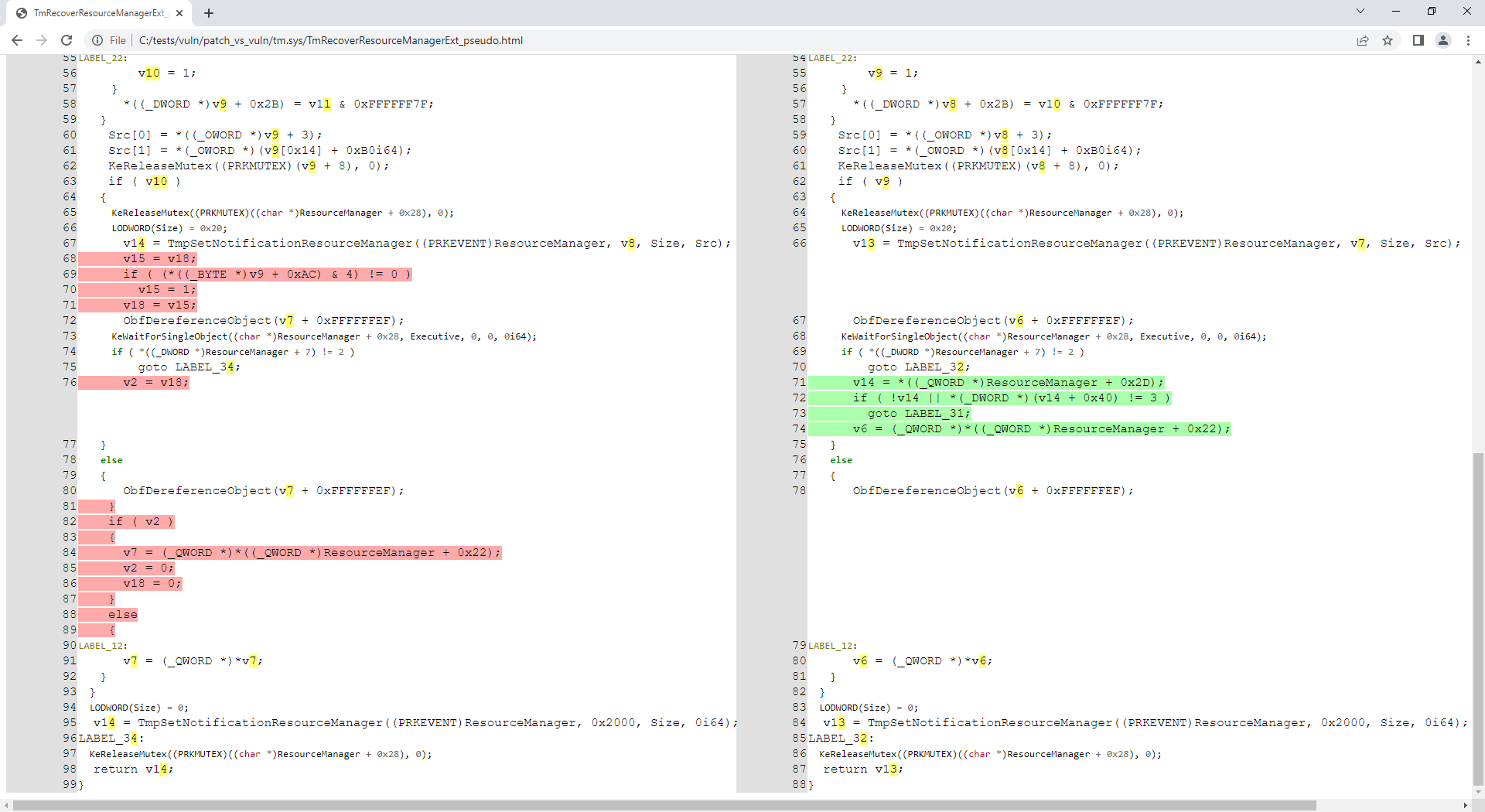
リポジトリにある tm.sys ファイルは CVE-2018-8611 に関連していることがわかっているので、パッチ適用後の関数 TmRecoverResourceManagerExt() を解析してみましょう:

root@kitploit:~
C:\idahunt> python idahunt.py --diaphora-path C:\diaphora\ --inputdir C:\tests\ --html --filename tm.sys --funcname TmRecoverResourceManagerExt --verbose
[idahunt] IDA32 = C:\Program Files\IDA Core 8.1\ida.exe
[idahunt] IDA64 = C:\Program Files\IDA Core 8.1\ida64.exe
[idahunt] EXECUTE GENERATE HTML
C:\tests\patch\tm.sqlite C:\tests\vuln\tm.sqlite
C:\tests\vuln\patch_vs_vuln\tm.sys\TmRecoverResourceManagerExt_asm.html C:\tests\vuln\patch_vs_vuln\tm.sys\TmRecoverResourceManagerExt_pseudo.html
[idahunt] Showing patch vs vuln for TmRecoverResourceManagerExt
[idahunt] C:\Program Files\IDA Core 8.1\ida64.exe -A -SC:\diaphora\diaphora_ida.py -LC:\tests\patch\tm.log C:\tests\patch\tm.i64
[idahunt] Environment variables:
[idahunt] DIAPHORA_AUTO4=1
[idahunt] DIAPHORA_DB1=C:\tests\patch\tm.sqlite
[idahunt] DIAPHORA_DB2=C:\tests\vuln\tm.sqlite
[idahunt] DIAPHORA_DIFF=C:\tests\vuln\patch_vs_vuln\tm.sys.diaphora
[idahunt] DIAPHORA_EA1=1c0015500
[idahunt] DIAPHORA_EA2=1c0015500
[idahunt] DIAPHORA_HTML_ASM=C:\tests\vuln\patch_vs_vuln\tm.sys\TmRecoverResourceManagerExt_asm.html
[idahunt] DIAPHORA_HTML_PSEUDO=C:\tests\vuln\patch_vs_vuln\tm.sys\TmRecoverResourceManagerExt_pseudo.html
[idahunt] Executed IDA 1/1 times IDA instances
[idahunt] Took 0:00:10.03 to execute this

これで、この関数のアセンブリと逆コンパイル済みコードが生成されました:

root@kitploit:~
C:\idahunt> tree C:\tests\ /F
C:\tests
├───patch
│       tm.i64
│       ...
│
└───vuln
    │   tm.i64
    │   ...
    │
    └───patch_vs_vuln
        │   tm.sys.diaphora
        │   tm.sys.txt
        │
        └───tm.sys
                TmRecoverResourceManagerExt_asm.html
                TmRecoverResourceManagerExt_pseudo.html

フィルタ

idahunt が名前内の特定パターンに一致するファイルのみを解析するようにフィルタリングできます (下の -n Download):

root@kitploit:~
C:\idahunt>idahunt.py --inputdir C:\re --filter "filters\names.py -a 32 -v -n Download" --scripts C:\idahunt\script_template.py --list-only
[idahunt] Simulating only...
[idahunt] EXECUTE SCRIPTS
[names] Skipping non-matching name Download in cve-2014-4076.dll
[names] Skipping non-matching name Download in cve-2014-4076.exe
[idahunt] Executing script C:\idahunt\script_template.py for C:\re\DownloadExecute.exe
[names] Skipping non-matching name Download in ReverseShell.exe

また、idahunt が指定した拡張子を持つファイルのみを解析するようにフィルタリングすることもできます(下の -e dll):

root@kitploit:~
C:\idahunt>idahunt.py --inputdir C:\re --filter "filters\names.py -a 32 -v -e dll" --scripts C:\idahunt\script_template.py --list-only
[idahunt] Simulating only...
[idahunt] EXECUTE SCRIPTS
[idahunt] Executing script C:\idahunt\script_template.py for C:\re\cves\cve-2014-4076.dll
[names] Skipping non-matching extension .dll in cve-2014-4076.exe
[names] Skipping non-matching extension .dll in DownloadExecute.exe
[names] Skipping non-matching extension .dll in ReverseShell.exe

アーキテクチャ検出

IDA Pro のアーキテクチャと、32ビット/64ビットの2つのアーキテクチャのバイナリを解析するための 2つの異なる実行ファイル idaq.exe と idaq64.exe が含まれているという事実により、 アーキテクチャを事前に把握しておく必要があります。これは特に HexRays デコンパイラを 使用したい場合に当てはまります。

idahunt は Windows PE ファイル内の i386、ia64、amd64 アーキテクチャを自動検出します。 他のアーキテクチャを自動検出する必要がある場合は、issue を作成するか、idahunt に追加して PR を行うことができます。

解析したいファイルのアーキテクチャを指定し忘れた場合、 基本的な filters\names.py はエラーを返します:

root@kitploit:~
C:\idahunt>idahunt.py --inputdir C:\re --filter "filters\names.py -v -e dll" --scripts C:\idahunt\script_template.py --list-only
[idahunt] Simulating only...
[idahunt] EXECUTE SCRIPTS
[names] Unknown architecture: None. You need to specify it with -a
[names] Skipping non-matching extension .dll in cve-2014-4076.exe
[names] Skipping non-matching extension .dll in DownloadExecute.exe
[names] Skipping non-matching extension .dll in ReverseShell.exe

ターゲット固有

HP iLO または Cisco ASA ファームウェアを解析するためのフィルタがあります。

idahunt を使用している既知のプロジェクト

  • asadbg
ツールをダウンロード
