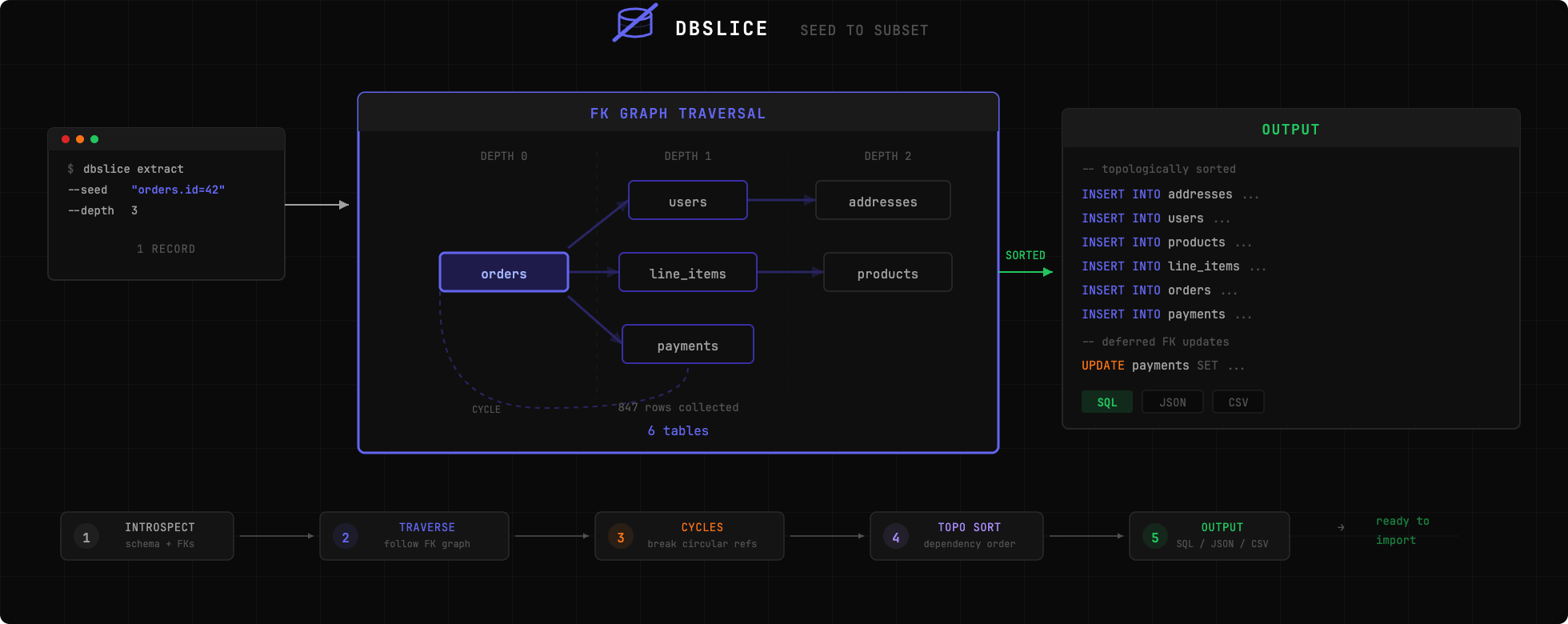




ローカル開発とデバッグのために、最小限で参照整合性を維持したデータベースサブセットを抽出します。
本番データベース全体を自分のマシンにコピーすることは現実的ではありません。しかし、バグを再現するには、その原因となった正確なデータが必要となることがよくあります。dbslice は、必要なレコードのみを抽出し、外部キー関係をたどって参照整合性を保証することで、この問題を解決します。
# Install globally
uv tool install dbslice   # or: pip install dbslice

# Extract an order and all related records
dbslice extract postgres://localhost/myapp --seed "orders.id=12345" > subset.sql

# Import into local database
psql -d localdb < subset.sql
| データベース | ステータス |
|---|---|
| PostgreSQL | 完全対応 |
| MySQL | 計画中(未実装) |
| SQLite | 計画中(未実装) |
# Install with uv (recommended)
uv add dbslice

# Try without installing
uvx dbslice --help

# Or with pip
pip install dbslice
# Extract by primary key
dbslice extract postgres://user:pass@host:5432/db --seed "orders.id=12345"

# Extract with WHERE clause
dbslice extract postgres://localhost/db --seed "orders:status='failed' AND created_at > '2024-01-01'"

# Multiple seeds
dbslice extract postgres://localhost/db \
  --seed "orders.id=100" \
  --seed "orders.id=101"
# Limit depth (default: 3)
dbslice extract postgres://... --seed "orders.id=1" --depth 2

# Direction: up (parents only), down (children only), both (default)
dbslice extract postgres://... --seed "orders.id=1" --direction up
# Auto-anonymize detected sensitive fields
dbslice extract postgres://... --seed "users.id=1" --anonymize

# Redact additional fields
dbslice extract postgres://... --seed "users.id=1" --anonymize --redact "audit_logs.ip_address"
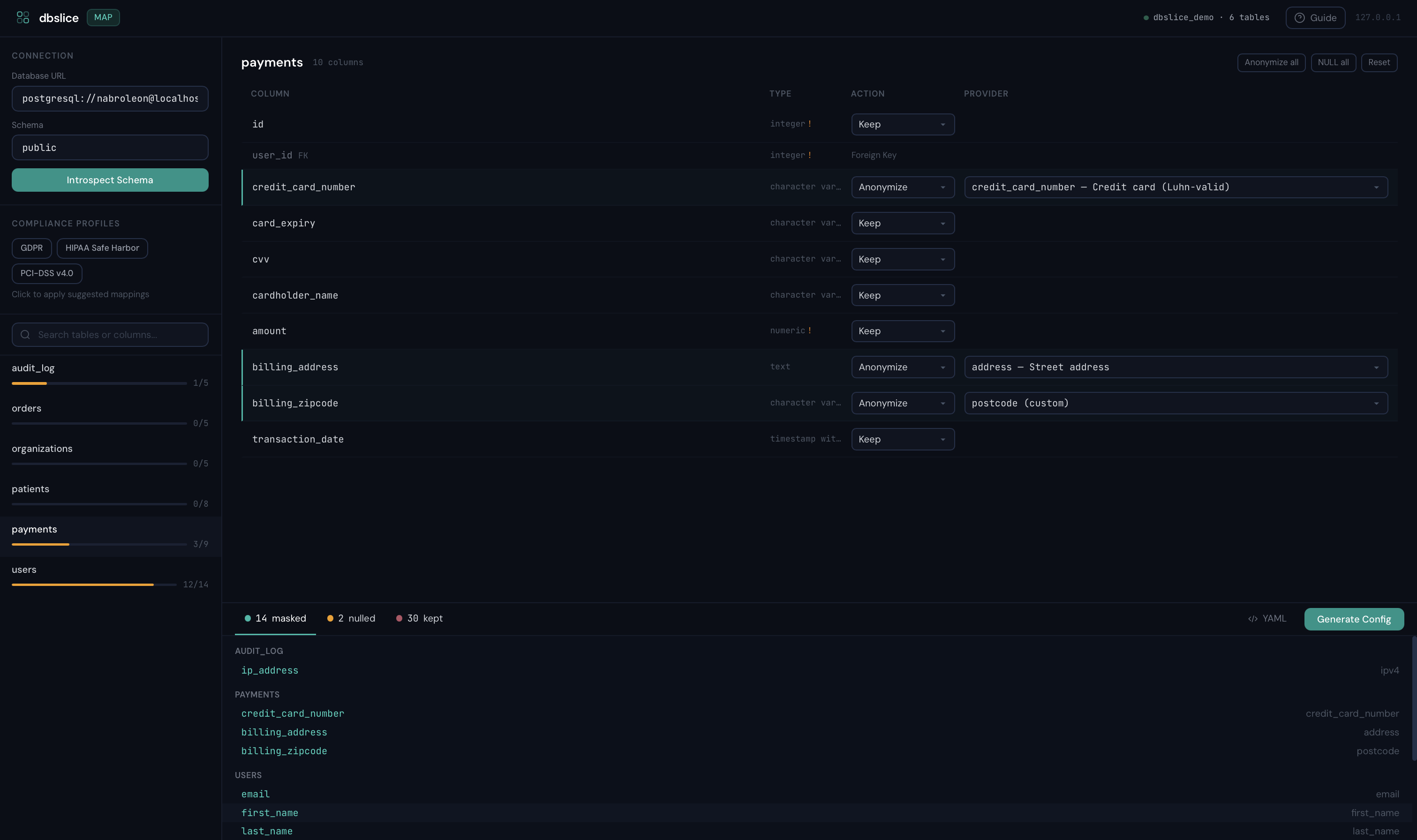
カラムを視覚的にマッピングし、コンプライアンスプロファイルを適用し、すぐに使える設定を生成 ― すべてローカルブラウザUIから行えます。
dbslice map postgres://localhost/myapp

# Custom port
dbslice map postgres://localhost/myapp --port 8888

# Also works with uvx (no install needed)
uvx dbslice map postgres://localhost/myapp
| カラムを匿名化ルールにマッピング | 設定を生成してエクスポート |
 |
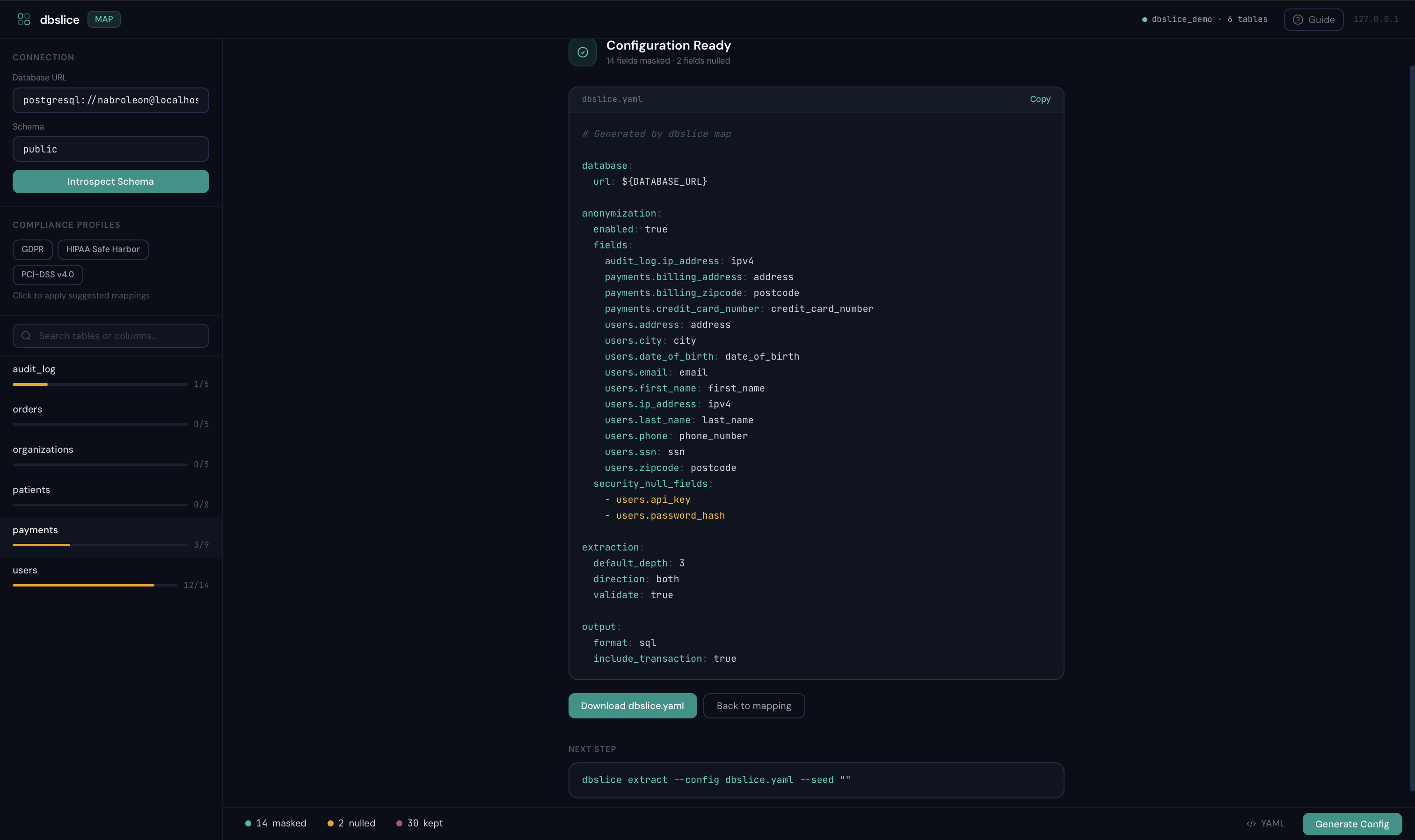 |
127.0.0.1:9473 で動作し、ワンタイムセッショントークンを使用 ― データがマシンから出ることはありません。ワンクリックでGDPR、HIPAA、PCI-DSSプロファイルを適用し、マスクされる内容を確認してからYAMLをダウンロードできます。
# HIPAA Safe Harbor — 18種類の識別子すべてを自動マスク
dbslice extract postgres://... --seed "patients.id=1" --compliance hipaa --compliance-strict

# Multiple profiles + audit manifest
dbslice extract postgres://... --seed "users.id=1" --compliance gdpr --compliance pci-dss -f subset.sql
# Produces subset.sql + subset.manifest.json
# SQL (default)
dbslice extract postgres://... --seed "orders.id=1" --output sql

# JSON fixtures
dbslice extract postgres://... --seed "orders.id=1" --output json --out-file fixtures/

# CSV
dbslice extract postgres://... --seed "orders.id=1" --output csv --out-file data/
データベーススキーマで定義されていないリレーションシップ(Django GenericForeignKey、暗黙的なリレーションシップ)の場合:
# dbslice.yaml
database:
  url: postgres://localhost:5432/myapp

virtual_foreign_keys:
  - source_table: notifications
    source_columns: [object_id]
    target_table: orders
    description: "Generic FK to orders via ContentType"

  - source_table: audit_log
    source_columns: [user_id]
    target_table: users
    description: "Implicit FK without DB constraint"
dbslice extract --config dbslice.yaml --seed "users.id=1"
dbslice inspect postgres://localhost/myapp
# Generate config from database
dbslice init postgres://localhost/myapp --out-file dbslice.yaml

# Use config
dbslice extract --config dbslice.yaml --seed "orders.id=12345"
| 機能 | dbslice | Jailer | Greenmask | slice-db |
|---|---|---|---|---|
| 言語 | Python | Java | Go | Ruby |
| 設定 | ゼロ設定 | モデルファイルが必要 | 設定が必要 | 手動YAML |
| セットアップ時間 | 数秒 | 数時間 | 中程度 | 中程度 |
| 匿名化 | 内蔵(Faker) | プラグインベース | 高度なトランスフォーマー | 未対応 |
| コンプライアンスプロファイル | GDPR、HIPAA、PCI-DSS | なし | なし | なし |
| カラムマッピングUI | 内蔵(ローカル) | なし | なし | なし |
| PII値スキャン | 2段階(マスク前/後) | なし | なし | なし |
| サブセット化 | FKトラバーサル | FKトラバーサル | 制限あり | FKトラバーサル |
| 出力形式 | SQL、JSON、CSV | SQL、XML、CSV | SQL | SQLのみ |
| サイクル処理 | 自動 | 手動設定 | N/A | 手動 |
| ストリーミング | 内蔵 | 設定可能 | 内蔵 | 未対応 |
| メンテナンス | 活発 | 活発 | 活発 | メンテナンス停止 |
dbslice は軽量でゼロ設定のPythonオプションです。インストールして1分以内に抽出を開始できます。
git clone https://github.com/nabroleonx/dbslice.git
cd dbslice
uv sync --dev
uv run pytest
MIT

