
ChatGPT API、Bard API、Llama2、Python-Nmap、DNS Recon、PCAP、JWT reconモジュールを使用し、NmapスキャンデータとDNSスキャン情報に基づいて脆弱性レポートを作成するためにGPT3モデルを利用します。また、サブドメイン列挙も広範囲に実行できます。
これは、AI を使用して脆弱性分析の正確な結果を生成する方法を示す概念実証アプリケーションであり、すでに非常に便利な ChatGPT をさらに活用することもできます。このアプリケーションは、openai-api、python-nmap、dnsresolver の各 Python モジュールを使用し、GUI 版では customtkinter と tkinter も使用して作成されています。このプロジェクトには CLI と GUI の両方のインターフェースがあり、ネットワーク脆弱性分析、DNS 列挙、サブドメイン列挙を実行できます。
cd package && pip3/pip install .
3つのパッケージのいずれかを簡単にインポートし、それに応じて変数を追加・定義してください。```python
from GVA.scanner import NetworkScanner
from GVA.dns_recon import DNSRecon
from GVA.geo import geo_ip_recon
from GVA.jwt import JWTAnalyzer
from GVA.menus import Menus
from GVA.packet_analysis import PacketAnalysis
from GVA.ai_models import NMAP_AI_MODEL
from GVA.ai_models import DNS_AI_MODEL
from GVA.ai_models import JWT_AI_MODEL
from GVA.assets import Assets
from GVA.subdomain import sub_enum
from GVA import gui
# The components defined
dns_enum = DNSRecon()
geo_ip = geo_ip_recon()
p_ai_models = NMAP_AI_MODEL()
dns_ai_models = DNS_AI_MODEL()
port_scanner = NetworkScanner()
jwt_analizer = JWTAnalyzer()
sub_recon = sub_enum()
asset_codes = Assets()
packet_analysis = PacketAnalysis()
# KEEP IT BLANK IF YOU HAVE NO CLUE THE MENU WILL ASK TO FILL IT ONCE ACTIVE
lkey = "LLAMA API KEY"
lendpoint = "LLAMA ENDPOINT"
keyset = "AI API KEY"
output_loc = "OUTPUT LOCATION FOR PCAP"
threads = 200 # Default INT 200 but can be increased.
target_ip_hostname_or_token = "TARGET IP, HOSTNAME OR TOKEN"
profile_num = "PROFILE FOR NMAP SCAN"
ai_set = "AI OF CHOICE"
akey_set = "OPENAI API KEY"
bkey_set = "BARD API KEY"
ai_set_args = "" # Keep it blank at any cost
llamakey = "LLAMA RUNPOD API KEY"
llamaendpoint = "LLAMA RUNPOD ENDPOINT"
Menus(
lamma_key=lkey,
llama_api_endpoint=lendpoint,
initial_keyset=keyset,
threads=threads,
output_loc=output_loc,
target=target_ip_hostname,
profile_num=profile_num,
ai_set=ai_set,
openai_akey_set=akey_set,
bard_key_set=bkey_set,
ai_set_args=ai_set_args,
llama_runpod_key=llamakey,
llama_endpoint=llamaendpoint
)
gui.application()
パッケージ内のpasscrackerとGUIのアップデートはまだ進行中です。
.envファイルに保存します。llama-apiオプション、または特定のllama runpodサーバーレスエンドポイントデプロイメントオプションを使用するには、runpodからserverless endpoint IDとRUNPOD API KEYを入力する必要があります。```python
GEOIP_API_KEY = ''
OPENAI_API_KEY = ''
BARD_API_KEY = ''
RUNPOD_ENDPOINT_ID = ''
RUNPOD_API_KEY = ''- 次にパッケージをインストールする```bash
pip3 install -r requirements.txt
or
pip install -r requirements.txt
python gpt_vuln.py --help
python gpt_vuln.py --r help
python gpt_vuln.py --target <IP/hostname/token> --attack dns/nmap/jwt
python gpt_vuln.py --target <IP/hostname/token> --attack nmap --profile <1-13> (Default:1)
python gpt_vuln.py --target <IP/hostname/token> --attack dns
python gpt_vuln.py --target --attack sub
python gpt_vuln.py --target --attack sub --sub_list
python gpt_vuln.py --target --attack geo
python gpt_vuln.py --target --attack pcap --output --thread NUM of threads <200:default>
python gpt_vuln.py --target --attack nmap --profile <1-5> --ai llama /llama-api /bard / openai
python gpt_vuln.py --target --attack dns --ai llama /llama-api /bard / openai
python gpt_vuln.py --target --attack jwt --ai llama /llama-api /bard / openai
python gpt_vuln.py --password_hash --wordlist_file --algorithm --parallel --complexity
python gpt_vuln.py --menu True
#### CLIインターフェースオプション```bash
________________________
| GVA Usage in progress... |
========================
\
\
^__^
(oo)\_______
(__)\ )\/\
||----w |
|| ||
┏━━━━━━━━━┳━━━━━━━━━━━━━━━━┓
┃ Options ┃ Utility ┃
┡━━━━━━━━━╇━━━━━━━━━━━━━━━━┩
│ 1 │ Nmap Enum │
│ 2 │ DNS Enum │
│ 3 │ Subdomain Enum │
│ 4 │ GEO-IP Enum │
| 5 | JWT Analysis |
| 6 | PCAP Analysis |
| 6 | Hash Cracker |
│ q │ Quit │
└─────────┴────────────────┘
Enter your choice:
CLIインターフェースにはいくつかの注意点があります。
.envファイルで定義されたものは、引数オプションと連携します。OpenAI GPT3.5と同じですが、より高速です。同じ回答を2倍の速度で生成できます。
プロファイル:
プロファイルは、nmapサブプロセスによって実行されるスキャンのタイプです。IPまたはターゲットはargparseを介して提供されます。最初に、スキャンを続行するための重要な引数をすべて含むカスタムnmapスキャンが実行されます。次に、スキャンデータはnmapによって生成された膨大なデータの山から抽出されます。「scan」オブジェクトには、「tcp」の下にサブデータのリストがあり、それぞれが開いているポートに応じてラベル付けされています。データが抽出されると、プロンプトを介してopenai APIのDavinciモデルに送信されます。プロンプトは特にJSON出力を要求し、データも特定の方法で使用されることを要求します。openai APIに送信する必要があるリクエストの構造全体は、プログラムのcompletionセクションで設計されています。```python class NetworkScanner(): profile_arguments = { 1: '-Pn -sV -T4 -O -F', 2: '-Pn -T4 -A -v', 3: '-Pn -sS -sU -T4 -A -v', 4: '-Pn -p- -T4 -A -v', 5: '-Pn -sS -sU -T4 -A -PE -PP -PY -g 53 --script=vuln', 6: '-Pn -sV -p- -A', 7: '-Pn -sS -sV -O -T4 -A', 8: '-Pn -sC', 9: '-Pn -p 1-65535 -T4 -A -v', 10: '-Pn -sU -T4', 11: '-Pn -sV --top-ports 100', 12: '-Pn -sS -sV -T4 --script=default,discovery,vuln', 13: '-Pn -F' }
def scanner(self, ip: Optional[str], profile: int, akey: Optional[str],
bkey: Optional[str], lkey, lendpoint, AI: str) -> str:
nm.scan(ip, arguments=self.profile_arguments.get(profile))
json_data = nm.analyse_nmap_xml_scan()
analyze = json_data["scan"]
try:
ai_methods = {
'openai': lambda: AIModels.GPT_AI(akey, analyze),
'bard': lambda: AIModels.BardAI(bkey, analyze),
'llama': lambda: AIModels.Llama_AI(analyze, "local", lkey, lendpoint),
'llama-api': lambda: AIModels.Llama_AI(analyze, "runpod", lkey, lendpoint)
}
if AI in ai_methods and (akey or bkey):
response = ai_methods[AI]()
else:
raise ValueError("Invalid AI type or missing keys")
except KeyboardInterrupt:
print("Bye")
quit()
return str(response)
# 正規表現
提供されたカスタムプロンプトから重要な情報のみを抽出するためにRegexを使用します。これにより、不要なデータの総量が削減されます。
AIコードは出力フォーマットを定義し、AIにいくつかの事前定義されたルールに従うように指示することで精度を向上させます。正規表現抽出コードが抽出を行い、さらにメイン関数がそれらをテーブルに整理します。
## Bard AIの使用
Bard AIを使用するには、MakerSuit Palm APIにデベロッパーアクセス用にサインアップし、そこからAPIキーを生成する必要があります。リンクや仕組みについては、この動画[MakerSuit](https://www.youtube.com/watch?v=Ce1AOchQMzA&t=128s)を参照してください。
APIを取得したら、それを`.env`ファイルに追加するだけで準備完了です。
## 旧LLama2の実装
LLama2を使用することは、オフラインで無料の最良の選択肢の一つです。現在改善中で、AIによりサイバーセキュリティの視点を取り入れるプロンプトに取り組んでいます。
**@thisserand**氏と彼の[llama2_local](https://github.com/thisserand/llama2_local)リポジトリ、そして彼のYT動画[YT_Video](https://youtu.be/WzCS8z9GqHw)に感謝しなければなりません。これらは素晴らしいリソースでした。正直なところ、llama2コードの95%は彼のもので、私はコードを拝借し、Flask API機能を追加しただけです。
オフラインおよびコードのテスト外でのAIの精度は素晴らしく、OpenAIやBardと同等の精度でしたが、コード内ではプロンプトなどの理由でいくつかの問題に直面していました。修正に努めます。
速度はシステムとお持ちのGPUおよびCPU構成に依存します。現在、`TheBloke/Llama-2-7B-Chat-GGML`モデルを使用しており、`portscanner`および`dnsrecon`ファイルで変更できます。
現時点では、llamaのコードとスキャンは別々に処理されています。いくつかのテストの結果、llamaを意図したように動作させるには少しトレーニングが必要であることがわかったため、時間がかかります。その方法についての提案があれば、このリポジトリのディスカッション[Discussions Link](https://github.com/morpheuslord/GPT_Vuln-analyzer/discussions)に追加できます。現時点では、出力はすべてのデータの分割リストではなく、AIによって発見された脆弱性や問題の説明になります。
モデル使用のプロンプトは次のようになります:```prompt
[INST] <<SYS>> {user_instruction}<</SYS>> NMAP Data to be analyzed: {user_message} [/INST]
指示は次のようになります:```prompt Do a NMAP scan analysis on the provided NMAP scan information. The NMAP output must return in a asked format accorging to the provided output format. The data must be accurate in regards towards a pentest report. The data must follow the following rules: 1) The NMAP scans must be done from a pentester point of view 2) The final output must be minimal according to the format given. 3) The final output must be kept to a minimal. 4) If a value not found in the scan just mention an empty string. 5) Analyze everything even the smallest of data. 6) Completely analyze the data provided and give a confirm answer using the output format. 7) mention all the data you found in the output format provided so that regex can be used on it. 8) avoid unnecessary explaination. 9) the critical score must be calculated based on the CVE if present or by the nature of the services open 10) the os information must contain the OS used my the target. 11) the open ports must include all the open ports listed in the data[tcp] and varifying if it by checking its states value. you should not negect even one open port. 12) the vulnerable services can be determined via speculation of the service nature or by analyzing the CVE's found. The output format: critical score: - Give info on the criticality "os information": - List out the OS information "open ports and services": - List open ports - List open ports services "vulnerable service": - Based on CVEs or nature of the ports opened list the vulnerable services "found cve": - List the CVE's found and list the main issues.
プロンプトを介して提供された指示セットとデータを使用して、llama AIがその出力を生成します。
最も使いやすい方法として、runpodのサーバーレスエンドポイントデプロイメントを作成することをお勧めします。それについては、このチュートリアルを参照してください [tutorial](https://www.youtube.com/watch?v=Ftb4vbGUr7U)。より良い使用のためにチュートリアルに従うことができます。
### Llama2 Ollama
この最新のアップデートでは、ollama Dockerイメージを使用してローカライズされたllamaシステムを実装しており、これにより出力の精度が何らかの理由で向上しています。より良い設定などが理由かもしれません。これについて詳しくは説明しませんが、GPU統合部分のコードに取り組んでおり、処理にGPUパワーを追加して効率を高める予定です。議論を開始してくれた@andr6に感謝します。この実装についてより詳しい方がいれば、自由に改善してPRを作成してください。
### Output
#### JWT Output:```
GVA Report for JWT
┏━━━━━━━━━━━━━━━━━━━━━┳━━━━━━━━━━━━━━━━━━━━━━━━━━━━━━━━━━━━━━━━━━━━━━━━━━━━━━━━━━━━━━━━━━━━━━━━━━━━━━━━━━┓
┃ Variables ┃ Results ┃
┡━━━━━━━━━━━━━━━━━━━━━╇━━━━━━━━━━━━━━━━━━━━━━━━━━━━━━━━━━━━━━━━━━━━━━━━━━━━━━━━━━━━━━━━━━━━━━━━━━━━━━━━━━┩
│ Algorithm Used │ HS256 │
│ Header │ eyJhbGciOiAiSFMyNTYiLCAidHlwIjogIkpXVCJ9 │
│ Payload │ eyJzdWIiOiAiMTIzNDU2Nzg5MCIsICJuYW1lIjogIkpvaG4gRG9lIiwgImlhdCI6IDE1MTYyMzkwMjJ9 │
│ Signature │ │
│ PossibleAttacks │ None identified │
│ VulnerableEndpoints │ Unable to determine without additional information │
└─────────────────────┴──────────────────────────────────────────────────────────────────────────────────┘
┏━━━━━━━━━━━━━━━━━━━━┳━━━━━━━━━━━━━━━━━━━━━━━━━━━━━━━━━━━━━━━━━━━━━━━━━━━━━┓ ┃ Elements ┃ Results ┃ ┡━━━━━━━━━━━━━━━━━━━━╇━━━━━━━━━━━━━━━━━━━━━━━━━━━━━━━━━━━━━━━━━━━━━━━━━━━━━┩ │ critical score │ High │ │ os information │ Microsoft Windows 11 21H2 │ │ open ports │ 80, 22, 445, 902, 912 │ │ open services │ http, ssh, microsoft-ds, vmware-auth, vmware-auth │ │ vulnerable service │ OpenSSH │ │ found cve │ CVE-2023-28531 │ └────────────────────┴─────────────────────────────────────────────────────┘
##### LLama2```table
╭───────────────────────────────────────────── The GVA LLama2 ──────────────────────────────────────────────╮
│ │
│ │
│ │
│ Based on the provided NMAP data, I have conducted a thorough analysis of the target system's open ports │
│ and services, vulnerabilities, and operating system information. Here is my findings: Critical Score: │
│ The critical score for this target system is 7 out of 10. The system has several open ports that could │
│ potentially be exploited, including port 80 (HTTP), port 135 (RPC), and port 445 (Microsoft DS). While │
│ These ports are not necessarily vulnerable, they do indicate that the system is running services that │
│ could be targeted by attackers. Additionally, the system has an outdated version of Microsoft IIS │
│ running on port 80, which could be a potential vulnerability. OS Information: The target system is │
│ running Microsoft Windows 10 1607. Open Ports and Services: The target system has the following open │
│ ports: │
│ │
│ • Port 80: HTTP (Microsoft IIS httpd) │
│ • Port 135: RPC (Microsoft Windows RPC) │
│ • Port 445: Microsoft DS │
│ • Port 8000: Splunkd httpd All of these ports are currently open and have a state of "open". │
│ Vulnerable Services: Based on the CVEs found in the NMAP data, there are several potential │
│ vulnerabilities in the target system's services. These include: │
│ • CVE-2019-1489: An elevation of privilege vulnerability in Microsoft IIS that could be exploited by │
│ an attacker to gain control of the system. This vulnerability is related to the outdated version of │
│ Microsoft IIS running on port 80. │
│ • CVE-2017-0143: A remote code execution vulnerability in Microsoft Windows RPC that could be │
│ exploited by an attacker to execute arbitrary code on the target system. This vulnerability is │
│ related to the outdated version of Microsoft Windows RPC running on port 135. │
│ • CVE-2020-1362: A remote code execution vulnerability in Microsoft DS that could be exploited by an │
│ attacker to execute arbitrary code on the target system. This vulnerability is related to the │
│ outdated version of Microsoft DS running on port 445. Found CVEs: The following C │
│ │
╰───────────────────────────────────────────────────────────────────────────────────────────────────────────╯
ターゲットは jainuniversity.ac.in```table ┏━━━━━━━━━━┳━━━━━━━━━━━━━━━━━━━━━━━━━━━━━━━━━━━━━━━━━━━━━━━━━━━━━━━━━━━━━━━━━━━━━━━━━━━━━━━━━━━━━━━━━━━━━━━━━━━━━━━━━━━━━━━━━━━┓ ┃ Elements ┃ Results ┃ ┡━━━━━━━━━━╇━━━━━━━━━━━━━━━━━━━━━━━━━━━━━━━━━━━━━━━━━━━━━━━━━━━━━━━━━━━━━━━━━━━━━━━━━━━━━━━━━━━━━━━━━━━━━━━━━━━━━━━━━━━━━━━━━━━┩ │ A │ 172.67.147.95", "104.21.41.132 │ │ AAA │ │ │ NS │ mia.ns.cloudflare.com.","paul.ns.cloudflare.com. │ │ MX │ 30 aspmx5.googlemail.com.","30 aspmx4.googlemail.com.","20 alt2.aspmx.l.google.com.","30 │ │ │ aspmx3.googlemail.com.","30 aspmx2.googlemail.com.","20 alt1.aspmx.l.google.com.","10 aspmx.l.google.com. │ │ PTR │ │ │ SOA │ mia.ns.cloudflare.com. dns.cloudflare.com. 2309618668 10000 2400 604800 3600 │ │ TXT │ atlassian-sending-domain-verification=5b358ce4-5ad3-404d-b4b4-005bf933603b","include:_spf.atlassian.net │ └──────────┴───────────────────────────────────────────────────────────────────────────────────────────────────────────────────┘
#### GEO位置情報出力:```table
┏━━━━━━━━━━━━━━━━━━━━━━━━━━━━━┳━━━━━━━━━━━━━━━━━━━━━━━━━━━━━━━━━━━━━━━━━━━━━━━━━━━━━━━━━━━━━━━━━━━━━━━━━┓
┃ Identifiers ┃ Data ┃
┡━━━━━━━━━━━━━━━━━━━━━━━━━━━━━╇━━━━━━━━━━━━━━━━━━━━━━━━━━━━━━━━━━━━━━━━━━━━━━━━━━━━━━━━━━━━━━━━━━━━━━━━━┩
│ ip │ █████████████ │
│ continent_code │ AS │
│ continent_name │ Asia │
│ country_code2 │ IN │
│ country_code3 │ IND │
│ country_name │ India │
│ country_capital │ New Delhi │
│ state_prov │ Haryana │
│ state_code │ IN-HR │
│ district │ │
│ city │ Gurugram │
│ zipcode │ 122003 │
│ latitude │ 28.44324 │
│ longitude │ 77.05501 │
│ is_eu │ False │
│ calling_code │ +91 │
│ country_tld │ .in │
│ languages │ en-IN,hi,bn,te,mr,ta,ur,gu,kn,ml,or,pa,as,bh,sat,ks,ne,sd,kok,doi,mni,… │
│ country_flag │ https://ipgeolocation.io/static/flags/in_64.png │
│ geoname_id │ 9148991 │
│ isp │ Bharti Airtel Limited │
│ connection_type │ │
│ organization │ Bharti Airtel Limited │
│ currency.code │ INR │
│ currency.name │ Indian Rupee │
│ currency.symbol │ ₹ │
│ time_zone.name │ Asia/Kolkata │
│ time_zone.offset │ 5.5 │
│ time_zone.current_time │ 2023-07-11 17:08:35.057+0530 │
│ time_zone.current_time_unix │ 1689075515.057 │
│ time_zone.is_dst │ False │
│ time_zone.dst_savings │ 0 │
└─────────────────────────────┴─────────────────────────────────────────────────────────────────────────┘
Collecting Json Data Extracting IP details... Extracting DNS details... Extracting EAPOL details... Extracting TCP STREAMS details... TCP streams can take some time.. Total Streams combination: 252 Number of workers in progress: 250 Completed GVA Report for PCAP ┏━━━━━━━━━━━━━━━━━━━━━━━━━━━━━━━━━━━━┳━━━━━━━━━━━━━━━━━━━━━━━━━━━━━━━━━━━━━━━━━━━━━━━━━━━━━━━━━━━━━━━━━━━━━━━━━━━━━━━━━━━━━━━━━━━━━━━━━━━━┓ ┃ Identifiers ┃ Data ┃ ┡━━━━━━━━━━━━━━━━━━━━━━━━━━━━━━━━━━━━╇━━━━━━━━━━━━━━━━━━━━━━━━━━━━━━━━━━━━━━━━━━━━━━━━━━━━━━━━━━━━━━━━━━━━━━━━━━━━━━━━━━━━━━━━━━━━━━━━━━━━┩ │ PacketAnalysis.Services │ ['49943', '49958', '49934', '49944', '49931', '443', '49957'] │ │ PacketAnalysis.TCP Streams │ ['1', '4', '5', '2', '0', '3'] │ │ PacketAnalysis.Sources Address │ ['█████████████', '1.1.1.1', '█████████████', '█████████████', '█████████████', '█████████████'] │ │ PacketAnalysis.Destination Address │ ['█████████████', '1.1.1.1', '█████████████', '█████████████', '█████████████', '█████████████'] │ │ PacketAnalysis.DNS Resolved │ [] │ │ PacketAnalysis.DNS Query │ ['oneclient.sfx.ms'] │ │ PacketAnalysis.DNS Response │ ['oneclient.sfx.ms.edgekey.net', 'e9659.dspg.akamaiedge.net', 'oneclient.sfx.ms'] │ │ PacketAnalysis.EAPOL Data │ [] │ │ PacketAnalysis. Total Streams Data │ 126 │ └────────────────────────────────────┴────────────────────────────────────────────────────────────────────────────────────────────────────┘
#### パスワードクラッカーの出力```
________________________
| GVA Usage in progress... |
========================
\
\
^__^
(oo)\_______
(__)\ )\/\
||----w |
|| ||
Cracking... ━━━━━━━━━━━━━━━━━━━━━━━━━━━━━━━━━━━━━━━━ 100% 0:00:00
╭────────────────────────────────────────────── The GVA Password Cracker ──────────────────────────────────────────────╮ │ │ │ │
│ Password Cracked! Password: legion │
│ │
╰───────────────────────────────────────────────────────────────────────────────────────────────────────────────────────╯
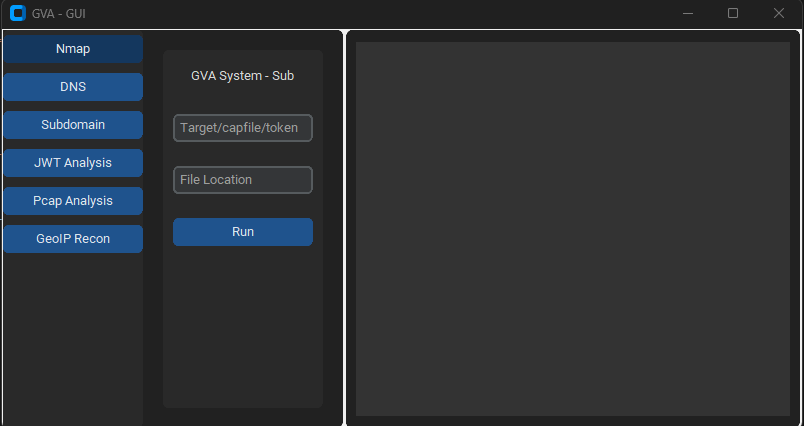
GUIはコードの実行にcustomtkinterを使用しています。インターフェースはシンプルで、覚えておくべきことは以下だけです:
### 初期ウィンドウ

### NMAPウィンドウ

### DNSウィンドウ

### GEOIPウィンドウ

### PCAPウィンドウ

### サブドメインウィンドウ

### JWTウィンドウ

| Preview | Code | Name | 動作状況 | OpenAI状況 | Bard状況 | LLama2状況 |
|---|
![]() | LIN | GNU/Linux | ✅ | ✅ | ✅ | ❌ [did not test] |
![]() | WIN | Windows | ✅ | ✅ | ✅ | ✅ |
| パラメータ | 戻りデータ | 説明 | Nmapコマンド |
|---|
p1 | json | 効果的スキャン | -Pn -sV -T4 -O -F |
p2 | json | シンプルスキャン | -Pn -T4 -A -v |
p3 | json | 低消費電力スキャン | -Pn -sS -sU -T4 -A -v |
p4 | json | 部分的高負荷スキャン | -Pn -p- -T4 -A -v |
p5 | json | 完全高負荷スキャン | -Pn -sS -sU -T4 -A -PE -PP -PY -g 53 --script=vuln |
p6 | json | 包括的サービスバージョン検出 | -Pn -sV -p- -A |
p7 | json | OS検出を含む攻撃的スキャン | -Pn -sS -sV -O -T4 -A |
p8 | json | 一般的な脆弱性のスクリプトスキャン | -Pn -sC |
p9 | json | 高負荷スキャン、全TCPポート | -Pn -p 1-65535 -T4 -A -v |
p10 | json | UDPスキャン | -Pn -sU -T4 |
p11 | json | 主要ポートのサービス・バージョン検出 | -Pn -sV --top-ports 100 |
p12 | json | NSEスクリプトによる脆弱性の攻撃的スキャン | -Pn -sS -sV -T4 --script=default,discovery,vuln |
p13 | json | 一般的なポートの高速スキャン | -Pn -F |