Skip to content
KitploitKITPLOIT
ツールブログ
提出
ツールブログ
提出

ハッキング、侵入テスト、サイバーセキュリティツールをあなたのセキュリティアーセナルに!

Kitploitはハッキング、サイバーセキュリティ、ペネトレーションテストのツールディレクトリです。最新のプロジェクトアップデートを見つけて、脆弱性の発見、システム分析、テストの自動化、セキュリティの強化を行いましょう。

··フィード·お問い合わせ·プライバシー·© 2026 Kitploit

ツールディレクトリ

カテゴリ

すべてのカテゴリを見る
Loading categories
domain-locker — 一元管理型ドメインポートフォリオマネージャー。WHOIS、DNS、SSLデータの自動取得、期限切れアラート、アップタイム監視、視覚的分析機能を搭載。Dockerによるセルフホスト対応。 | Kitploit
ツール/GitHubGitHub/lissy93/domain-locker
ウェブセキュリティ
GitHublissy93/domain-locker

domain-locker

一元管理型ドメインポートフォリオマネージャー。WHOIS、DNS、SSLデータの自動取得、期限切れアラート、アップタイム監視、視覚的分析機能を搭載。Dockerによるセルフホスト対応。

リポジトリを見るウェブサイト
1.5k1176日前Kitploit レビュー済み

人気

すべて見る →

コミュニティで最も使われているツールを見つけましょう。

すべてのツールを探索

ツールコレクションを閲覧

すべてのツールを見る →
共有

Domain Locker

あなたのすべてのドメイン名の中央ハブ
🌐domain-locker.com

目次
  • 概要
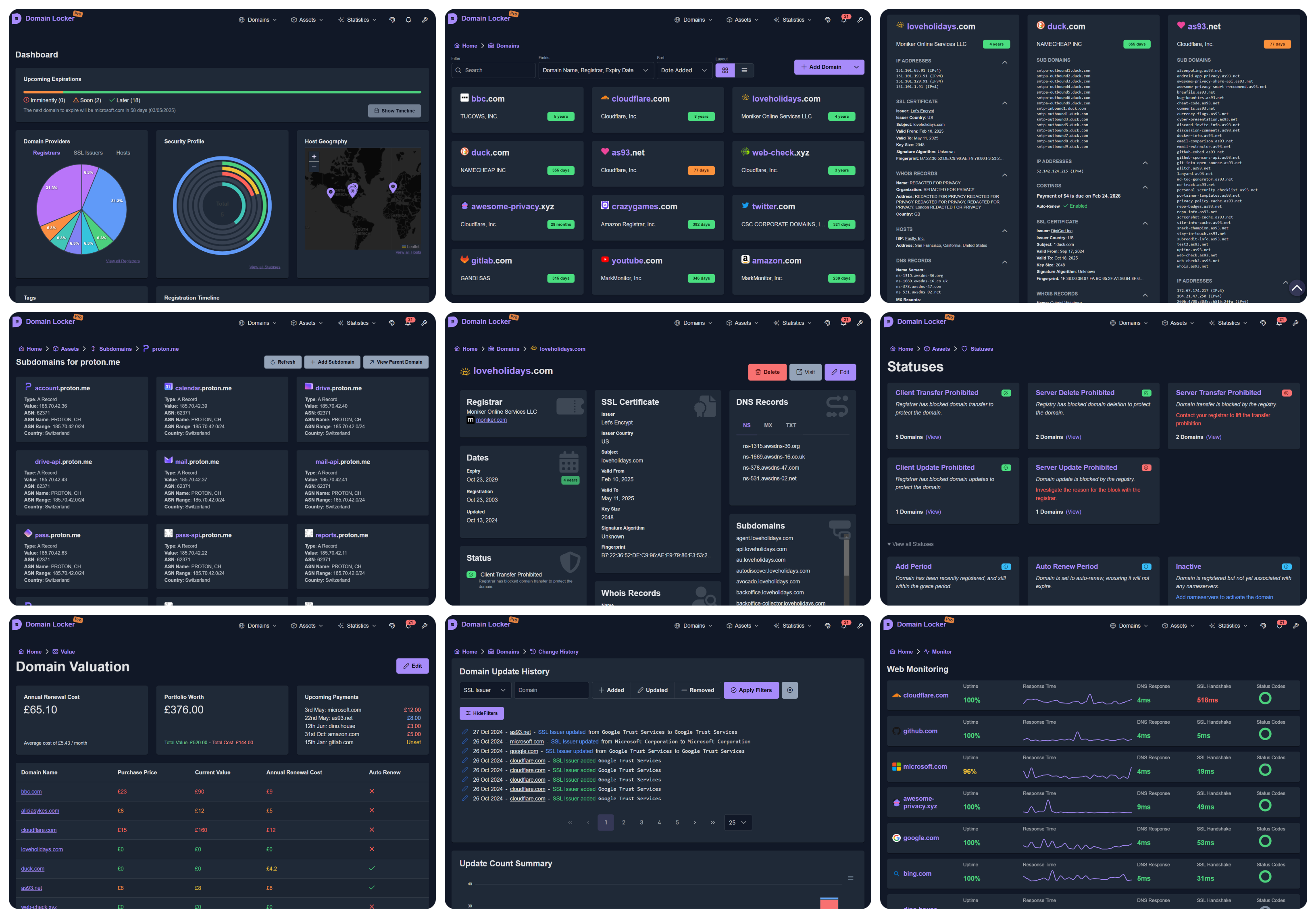
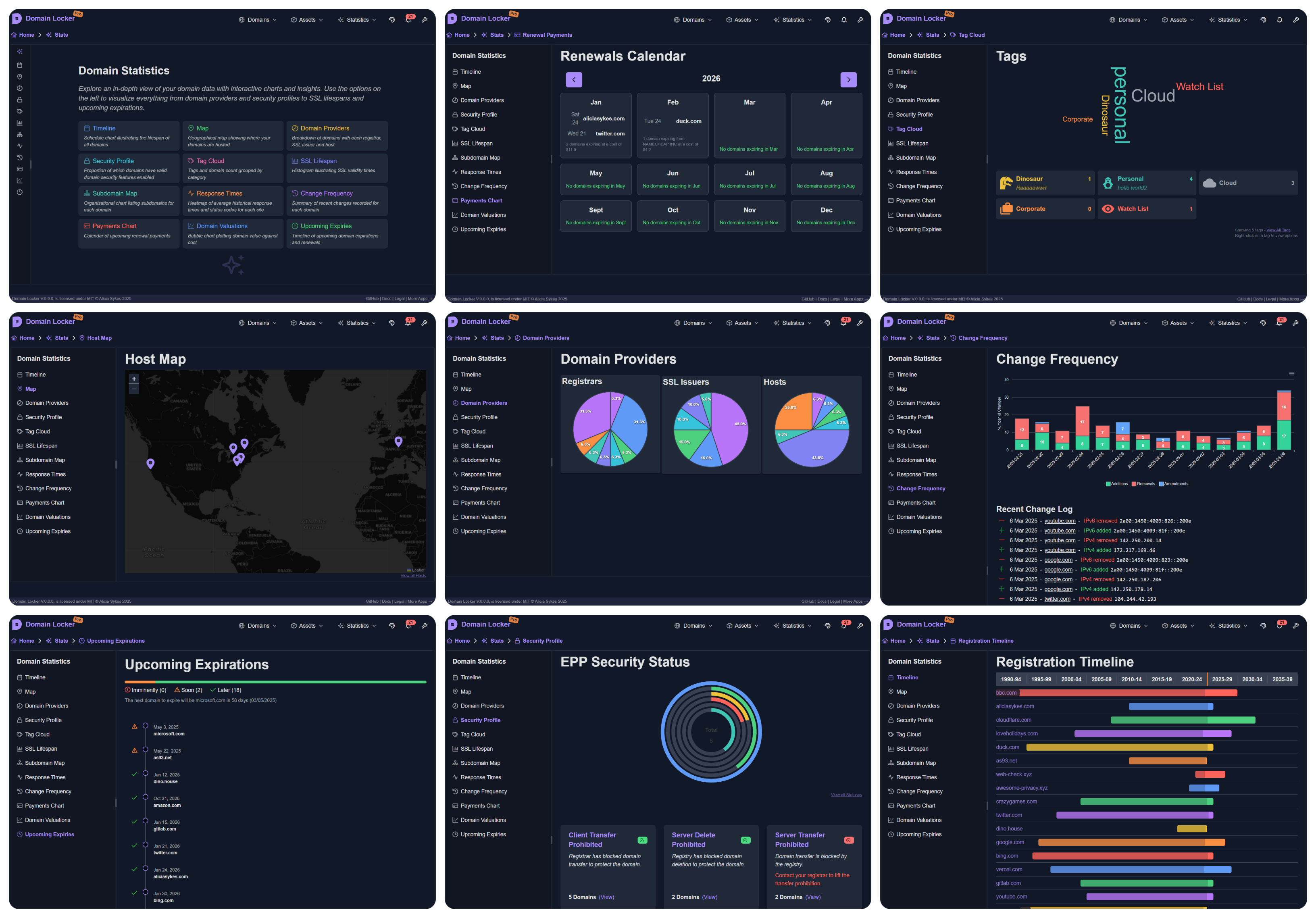
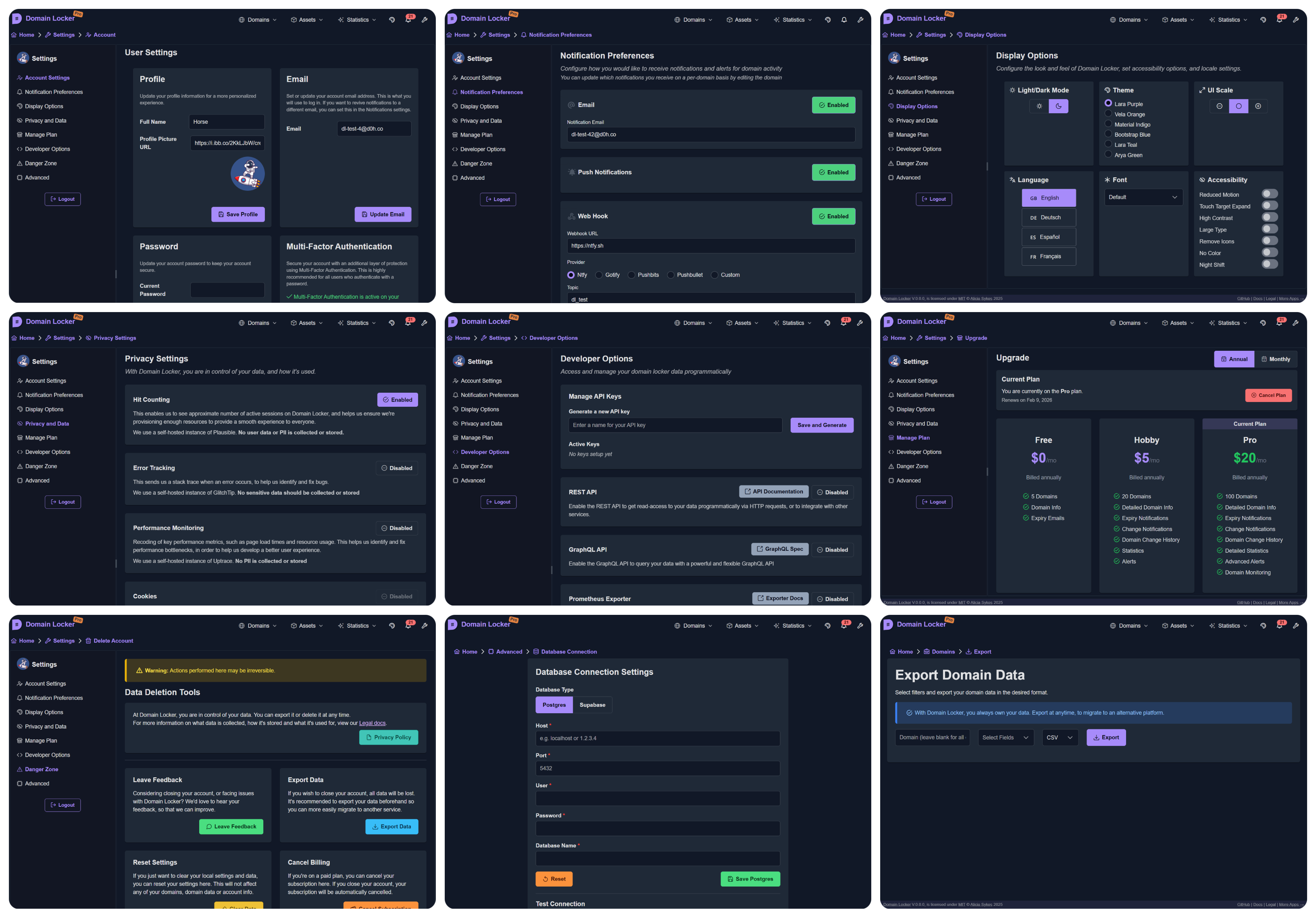
    • スクリーンショット
    • 機能
    • ライブデモ
  • はじめに
    • Domain-Locker.com
    • セルフホスティング
  • 開発
    • アプリのセットアップ
    • アーキテクチャ
  • 貢献
  • 帰属
  • ライセンス

概要

Domain Lockerの目的は、あなたのドメイン名ポートフォリオを一つの中央の場所で完全に可視化することです。

追加された各ドメインについて、分析し関連するすべてのデータを取得します。その後、ドメインを継続的に監視し、重要な変更や有効期限が近づいたときに(お好みに応じて)通知します。そのため、詳細なドメイン分析、セキュリティインサイト、変更履歴、最近のパフォーマンス、評価データなどが得られます。

Domain Lockerを使えば、ドメインを見失ったり、有効期限を逃したり、各ドメインが使用しているレジストラやプロバイダを忘れたりすることはもうありません。
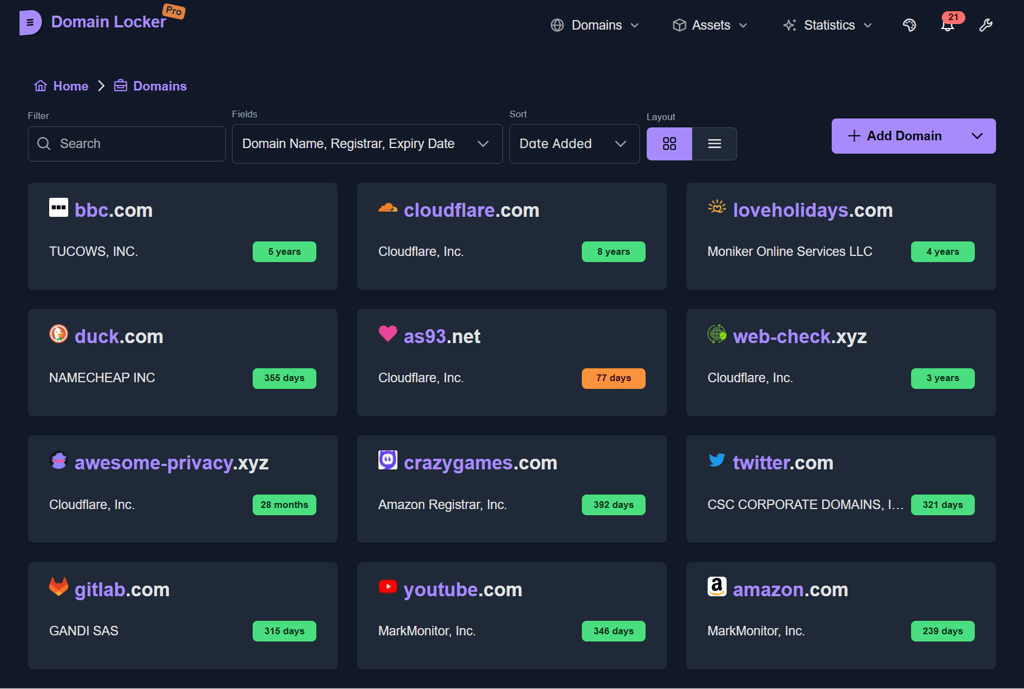
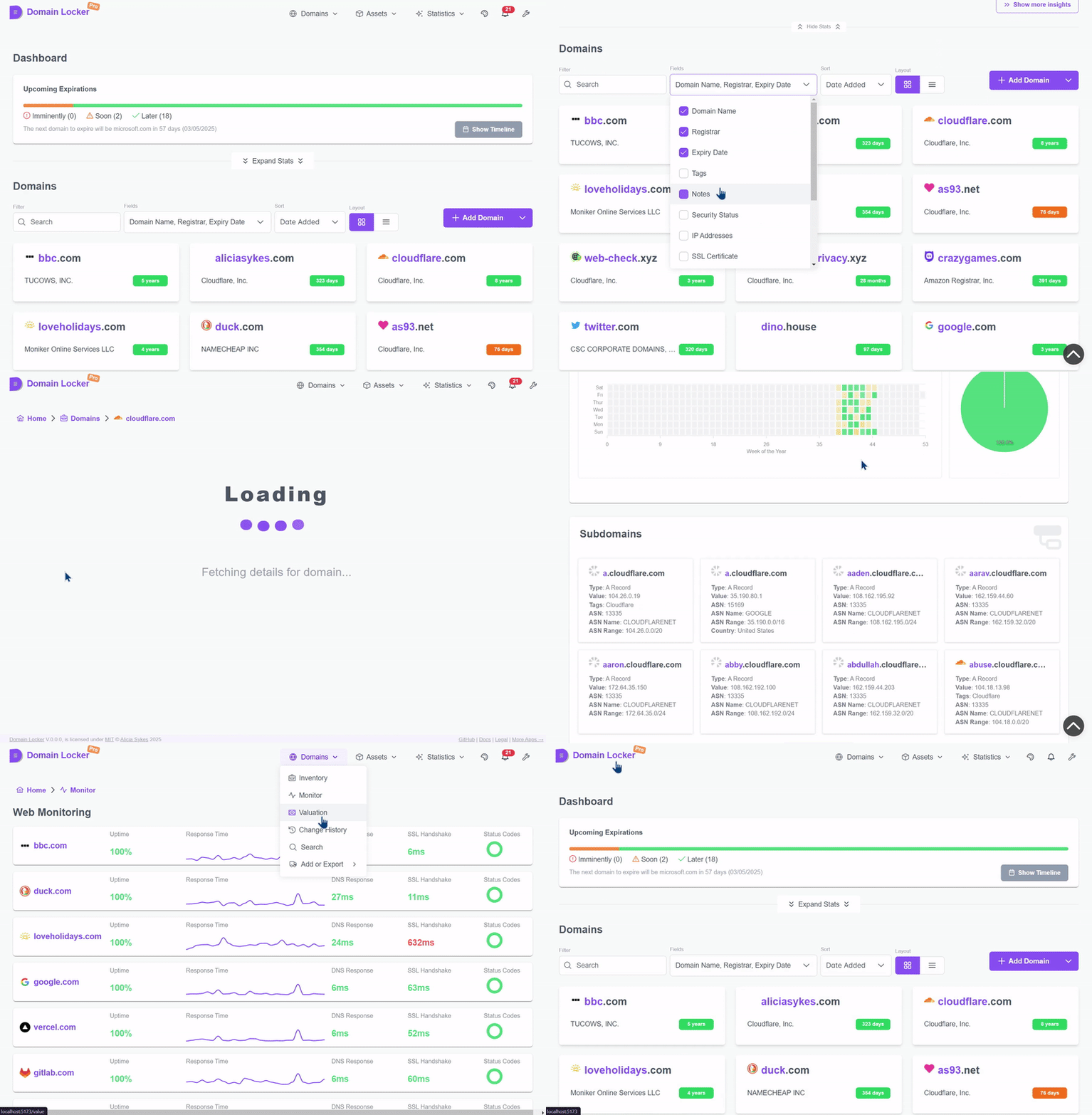
スクリーンショット

さらにスクリーンショット...

(5fpsで申し訳ありませんが、ファイルサイズを小さくしたかったのです!)

機能

  • 👁️ すべてのドメインと今後の有効期限の完全な可視化
  • 📡 自動取得データ:SSL証明書、ホスト、レジストラ、IP、サブドメイン、DNSなど
  • 🔬 各ドメインの詳細な指標と分析を表示
  • 📊 ポートフォリオ全体の視覚的な分析、内訳、傾向
  • 💬 設定可能なアラートとWebhook通知
  • 🗃️ 簡単なインポート/エクスポート、およびAPIデータアクセス
  • 📜 ドメイン設定の経時変化を追跡
  • 📈 ウェブサイトの健全性、セキュリティ、パフォーマンスを監視
  • 💹 購入価格と更新費用の記録を保持
  • 🔖 カテゴリを追加し、関連リソースをドメインにリンク
  • 🎨 多言語サポート、ダーク/ライト/カスタムテーマ
さらに機能...```mermaid %%{init: {"theme": "default"}}%% kanban 🌐 Domain Data 🛰️ Auto-fetch assets: SSL, hosts, registrars, IPs, DNS, subdomains 🔎 Detailed domain data like SSL, hosts, registrars, IPs and more 🏷️ Enrich data with tags, notes, costs, and other metadata to track 🖇️ Connection with external tools for more data 📊 Metrics 🗂️ Breakdown of domain providers: registrars, SSL, hosts 🕒 Timeline of registrations and upcoming expirations 📶 Monitor domain uptime, performance and health 💹 Record valuation, purchase prices and renewal costs 🔔 Notifications ⏱️ Get notified before your domain is due to expire 📲 Configurable alerts for monitoring changes in domain config 📬 Multiple channels: webhook, email, SMS, Slack, Telegram, WhatsApp and more 🛤️ Track change history of each domain 🛡️ Data 💽 Own your data: Export, import, delte at any time ⌨️ Programatic access via a REST or GraphQL API, or with RSS, iCal, Prometheus integrations 📈 Keep detailed change logs of all domain updates 🔐 Transparent privacy policy 🛠️ Customization 👤 SSO and 2FA supported 🎨 Custom themes, fonts, light/dark mode 🌍 Multi-language support 💻 Open-source and self-hostable ✅ Accessible, responsive, and well-documented ```

デモ

ライブデモをお試しください → demo.domain-locker.com
(ユーザー名: [email protected] パスワード: domainlocker)


はじめに

Domain Locker を使用するには、次の2つのオプションがあります:

  1. 💻 マネージドインスタンス(domain-locker.com)(無料)
  2. 🏗️ または Docker を使用した セルフホスティング (もちろん、これも無料!)

オプション1: Domain-Locker.com

当社ウェブサイトにアクセスし、Google、GitHub、またはメールアドレスでサインアップしてください。
スタータープランは無料で、セットアップは不要です。サインインしてドメインを追加するだけで、トラッキングを開始できます。

オプション2: セルフホスティング```bash

curl -fsSL https://install.domain-locker.com | bash

root@kitploit:~
Use the one-liner abover, or use the [`docker-compose.yml`](https://github.com/Lissy93/domain-locker/blob/main/docker-compose.yml)

<details>
	<summary>詳細</summary>

 
- **前提条件**:
  - Domain Locker はコンテナで実行することを想定しているため、ホストシステムに Docker が[インストール](https://docs.docker.com/engine/install/)されている必要があります。
- **コンテナ**:
  - Docker イメージは [`lissy93/domain-locker`](https://hub.docker.com/r/lissy93/domain-locker) に公開されています。
  - また、[`postgres:15-alpine`](https://hub.docker.com/_/postgres?tab=tags&name=15-alpine) コンテナなどの Postgres データベースが必要です。
- **環境変数**:
  - コンテナ起動時には、コンテナ内の `3000` をホストの `PORT`(デフォルトは `3000`)にバインドします。
  - 次に、Postgres の変数 `DL_PG_HOST`、`DL_PG_PORT`、`DL_PG_USER`、`DL_PG_PASSWORD`、`DL_PG_NAME` を指定します。
- **ボリューム**:
  - `/var/lib/postgresql/data` にボリュームをマウントして、Postgres データを永続化します
- **Cron ジョブ**
  - `/api/domain-updater` - 毎日実行し、ドメインデータを最新に保ち、通知をトリガーします
  - `/api/domain-monitor` - 15分ごとに実行し、ウェブサイトのアップタイムとパフォーマンスを監視します
  - `/api/cleanup-monitor-data` - 毎週実行し、古い監視データを集約します

- **例**:
  - すべてをまとめて、[`docker-compose.yml`](https://github.com/Lissy93/domain-locker/blob/main/docker-compose.yml) ファイルを使用できます。
  - 詳細については、[セルフホスティングドキュメント](https://domain-locker.com/about/self-hosting) を参照してください。


<details>
<summary>Docker ダイアグラム</summary>```mermaid
flowchart TB
  subgraph Volume Mounts
    direction TB
    Vpostgresdata([📦 postgres_data]) x-. /var/lib/postgresql/data .-x postgres[(🐘 PostgreSQL DB)]
    Vdbschemasql{{📄 ./db/schema.sql}} -. Mounted on Init .-> postgres
  end

  subgraph Network
    direction TB
    domainlockernetwork[/🌐 domain_locker_network/]
  end

  postgres -.- domainlockernetwork

  subgraph app[⚙️ App Container]
    SSR[HTTP Server]
    CLIENT[Client App]
    API[API Endpoints]
    SSR --> CLIENT
    SSR --> API
  end

  app -.- domainlockernetwork


オプション3: 非公式アプリ

  • ArtifactHub
  • DockerHub
  • Umbrel
  • Supabase
  • Proxmox
  • TrueNAS
  • EasyPanel (保留中)
  • Unraid (計画中)

開発

プロジェクトのセットアップ```bash

git clone [email protected]:Lissy93/domain-locker.git # Get the code cd domain-locker # Navigate into directory npm install --legacy-peer-deps # Install dependencies cp .env.example .env # Set environmental variables npm run dev # Start the dev server

root@kitploit:~
- **前提条件**
  - システムにGitとNodeがインストールされている必要があります。
- **設定**
  - サンプルの`.env.sample`ファイルには、Supabaseの開発インスタンスの公開資格情報が含まれています。
  - 別のデータベースを使用する場合は、以下の[データベース](#database)セクションを参照してPostgresで設定してください。
- **デプロイ**
  - `npm run build`でコードをビルドし、`npm start`で実行できます。
  - または、Dockerを使用して`docker build -t domain-locker .`でコンテナをビルドします。
  - 開発用Supabaseインスタンスは頻繁にワイプされるため、本番環境では使用しないでください。

---

## アプリケーションアーキテクチャ

#### 技術スタック

Domain Lockerは、アプリ、データベース、およびいくつかのAPIエンドポイントで構成されています。
- **アプリ**はAngularで構築され、Analog+Nitro、PrimeNgコンポーネント、Tailwindによるスタイリングを使用しています。
- **サーバー**は、Typescript関数を使用した一連のDenoエンドポイントです。
- **データベース**はPostgresまたはSupabaseのいずれかを使用できます。

セルフホストインスタンスはスタンドアロンでデプロイされることを想定していますが、管理バージョンは以下に示すいくつかの追加のサードパーティサービスに依存しており、[そのドキュメントはこちら](https://domain-locker.com/about/developing/third-party-docs)にあります。

<details>
<summary>理由</summary>
なぜAngularなのか?将来の自分に対する一種の悪趣味なジョークで、これをメンテナンスしなければならない自分へのものです。
</details>


<p align="center">
<img width="800" src="https://assets.kitploit.com/production/public/readmes/264/1449d16cb6a07bd766d3b86a8de608aaa4075270a0a634cd6f6af1f1a1d70c49.png" />
<br>
<span>使用されているテクノロジーとサービスのドキュメントは<a href="https://domain-locker.com/about/developing/third-party-docs">こちら</a>でご覧いただけます。</span>
</p>


#### アーキテクチャ

アーキテクチャは非常にシンプルです。
フロントエンドとAPIエンドポイントで構成されるアプリがあり、ユーザーは(アダプターを介して)データベースに対して読み取りおよび書き込みを行うことができます。次に、cronサービスが定期的にAPIエンドポイントを呼び出して、ドメインデータを最新の状態に保ち、変更を追跡し、ヘルスを監視し、特定の変更(ユーザーの設定に応じて)または期限切れが近づいた場合に通知をトリガーします。```mermaid
graph TD;
    subgraph User Interactions
        User[👤 User] -->|Enter domain| WebApp[🌐 Frontend];
        WebApp -->|Send API request| API[⚙️ Nitro API];
        API -->|Auth Check| Auth[🔐 Auth Service];
        API -->|Store domain info| Database[🗄️ PostgreSQL / Supabase];
    end

    subgraph Automated Cron Jobs
        CronService[⏳ Cron Service] -->|Trigger Updates| EdgeFunctions[⚡ Edge Functions];
        EdgeFunctions -->|Fetch WHOIS, DNS, SSL| ExternalAPIs[🌎 Analysis Services];
        EdgeFunctions -->|Store Data| Database;
        
        CronService -->|Monitor Uptime| WebsiteMonitor[📡 Uptime Monitor];
        WebsiteMonitor -->|Store Metrics| Database;

        CronService -->|Check Expirations| ExpiryChecker[📆 Expiration Check];
        ExpiryChecker -->|Update Status| Database;
        
        CronService -->|Send Notifications| NotificationService[🔔 Notification System];
        NotificationService -->|Email| Resend[📧 Resend];
        NotificationService -->|SMS| Twilio[📱 Twilio];
    end

    Database -->|Serve Data| WebApp;

データベース

すべてのドメインと関連情報を保存するためにデータベースが必要です。 Domain Locker は、データ保存のためにSupabaseと標準のPostgresの両方をサポートしています。 使用されるDBは、設定された環境変数によって異なります。

  • Supabase: Supabaseのセルフホスティングドキュメントに従い、その後dl-sb-iacを使用してスキーマをインポートし、認証、エッジファンクション、メールなどを設定します。

    • 次に設定: SUPABASE_URL と SUPABASE_ANON_KEY 環境変数
  • Postgres: Postgresインスタンスをデプロイし、その後schema.sqlを適用します。

    • DBが既に存在する場合: psql -h $DL_PG_HOST -U $DL_PG_USER -d $DL_PG_NAME -f ./db/schema.sql
    • 新規作成の場合: setup-postgres.sh を使用します(スーパーユーザーアクセスが必要です)
    • 次に設定: DL_PG_HOST, DL_PG_PORT, DL_PG_USER, DL_PG_PASSWORD, `DL_PG_NAME````mermaid classDiagram class users { uuid id text email timestamp created_at timestamp updated_at }

    class domains { uuid id uuid user_id text domain_name date expiry_date text notes timestamp created_at timestamp updated_at uuid registrar_id timestamp registration_date timestamp updated_date }

root@kitploit:~
<p align="center"><sub>スキーマは <a href="https://github.com/Lissy93/domain-locker/blob/main/db/schema.sql"<code>db/schema.sql</code></a> からダウンロードできます。</sub></p>

---

### コントリビューション

あらゆる種類のコントリビューションはいつでも歓迎しており、大変感謝しています!💗

Git に不慣れな場合、一般的なコントリビューションの流れは以下の通りです:
- リポジトリをフォークするには、[ここをクリック](https://github.com/lissy93/domain-locker/fork)
- フォークをクローンする (`git clone [email protected]:[your_username]/domain-locker.git`)
- 上記の[プロジェクトのセットアップ](#project-setup)に従って、開発モードでプロジェクトを動かせるようにしてください
- あなたの素晴らしい新機能や驚くべきバグ修正を実装してください...
- ブランチをチェックアウト (`git checkout -b feature-branch`) し、変更を `git add` して、従来のコミット形式で `git commit` し、ブランチに `git push` してください
- GitHub に戻り、`main` ブランチに対して PR を開いてください。変更内容、理由、関連する Issue へのリンクを必ず含めてください。
- その後、レビュー、フィードバック、マージを行い、リリースされれば、あなたの変更は本番環境に反映され、最新の Docker イメージでも利用可能になります。

<details>
	<summary>Git ブランチの例</summary>```mermaid
%%{init: {"theme": "default"}}%%
gitGraph
    commit id: "Initial commit"
    branch trunk
    commit id: "Feature A"
    commit id: "Feature B"
    commit id: "v1.0.0 (Tag)"
    branch demo
    checkout main
    commit id: "Feature C"
    commit id: "v1.1.0 (Tag)"
    checkout demo
    merge main id: "Merge main into demo"
    checkout main
    commit id: "Feature D"
    commit id: "v1.2.0 (Tag)"
    checkout demo
    merge main id: "Merge main into demo (v1.2.0)"
    checkout main
    branch feature-branch-1
    commit id: "Contributor Feature 1"
    checkout main
    merge feature-branch-1 id: "Merge contributor feature 1"
    commit id: "v1.3.0 (Tag)"
    checkout demo
    merge main id: "Merge main into demo (v1.3.0)"
    checkout main
    branch feature-branch-2
    commit id: "Contributor Feature 2"
    checkout main
    merge feature-branch-2 id: "Merge contributor feature 2"
    commit id: "v1.4.0 (Tag)"
    checkout demo
    merge main id: "Merge main into demo (v1.4.0)"

クレジット

コントリビューター

contributors

スポンサー

sponsors


ライセンス

Lissy93/Domain-Locker は MIT ライセンスの下で提供されています © Alicia Sykes 2025.
詳しくは、TLDR Legal > MIT をご覧ください

ライセンスを表示``` The MIT License (MIT) Copyright (c) Alicia Sykes

Permission is hereby granted, free of charge, to any person obtaining a copy of this software and associated documentation files (the "Software"), to deal in the Software without restriction, including without limitation the rights to use, copy, modify, merge, publish, distribute, sub-license, and/or sell copies of the Software, and to permit persons to whom the Software is furnished to do so, subject to the following conditions:

The above copyright notice and this permission notice shall be included install copies or substantial portions of the Software.

THE SOFTWARE IS PROVIDED "AS IS", WITHOUT WARRANTY OF ANY KIND, EXPRESS OR IMPLIED, INCLUDING BUT NOT LIMITED TO THE WARRANTIES OF MERCHANT ABILITY, FITNESS FOR A PARTICULAR PURPOSE AND NON INFRINGEMENT. IN NO EVENT SHALL THE AUTHORS OR COPYRIGHT HOLDERS BE LIABLE FOR ANY CLAIM, DAMAGES OR OTHER LIABILITY, WHETHER IN AN ACTION OF CONTRACT, TORT OR OTHERWISE, ARISING FROM, OUT OF OR IN CONNECTION WITH THE SOFTWARE OR THE USE OR OTHER DEALINGS IN THE SOFTWARE.

root@kitploit:~
</details>

<!-- ライセンス + 著作権 -->
<p  align="center">
  <i>© <a href="https://aliciasykes.com">Alicia Sykes</a> 2025</i><br>
  <i><a href="https://gist.github.com/Lissy93/143d2ee01ccc5c052a17">MITライセンス</a>の下でライセンスされています</i><br>
  <a href="https://github.com/lissy93"><img src="https://assets.kitploit.com/production/public/readmes/264/2dd6b50bb46f34f56ce0166642faf6ef16cd4102cd8a3805f1be707c9f7c0a3d.png" /></a><br>
  <sup>ご訪問ありがとうございます :)</sup>
</p>

<!-- 恐竜は最高 -->
<!-- 
                        . - ~ ~ ~ ~ - .
      ..     _      .-~                 ~-.
     //|     \ `..~                        `.
    || |      }  }                /       \  \
(\   \\ \~^..'                   |         }  \
 \`.-~  o      /       }         |        /    \
 (__          |       /          |       /      `.
  `- - ~ ~ -._|      /_ - ~ ~ ~ ^|      /- _      `.
              |     /            |     /     ~-.     ~- _
              |_____|            |_____|         ~ - . _ _~_-_
-->
ツールをダウンロード

class registrars { uuid id text name text url uuid user_id }

class tags { uuid id text name text color text description text icon uuid user_id }

class domain_tags { uuid domain_id uuid tag_id }

class notifications { uuid id uuid user_id uuid domain_id text change_type text message boolean sent boolean read timestamp created_at }

class billing { uuid id uuid user_id text current_plan timestamp next_payment_due text billing_method timestamp created_at timestamp updated_at jsonb meta }

class dns_records { uuid id uuid domain_id text record_type text record_value timestamp created_at timestamp updated_at }

class domain_costings { uuid id uuid domain_id numeric purchase_price numeric current_value numeric renewal_cost boolean auto_renew timestamp created_at timestamp updated_at }

class domain_hosts { uuid domain_id uuid host_id }

class domain_links { uuid id uuid domain_id text link_name text link_url timestamp created_at timestamp updated_at text link_description }

class domain_statuses { uuid id uuid domain_id text status_code timestamp created_at }

class domain_updates { uuid id uuid domain_id uuid user_id text change text change_type text old_value text new_value timestamp date }

class uptime { uuid id uuid domain_id timestamp checked_at boolean is_up integer response_code numeric response_time_ms numeric dns_lookup_time_ms numeric ssl_handshake_time_ms timestamp created_at }

class ssl_certificates { uuid id uuid domain_id text issuer text issuer_country text subject date valid_from date valid_to text fingerprint integer key_size text signature_algorithm timestamp created_at timestamp updated_at }

class whois_info { uuid id uuid domain_id text country text state text name text organization text street text city text postal_code }

class user_info { uuid id uuid user_id jsonb notification_channels timestamp created_at timestamp updated_at text current_plan }

class hosts { uuid id inet ip numeric lat numeric lon text isp text org text as_number text city text region text country uuid user_id }

class ip_addresses { uuid id uuid domain_id inet ip_address boolean is_ipv6 timestamp created_at timestamp updated_at }

class notification_preferences { uuid id uuid domain_id text notification_type boolean is_enabled timestamp created_at timestamp updated_at }

class sub_domains { uuid id uuid domain_id text name timestamp created_at timestamp updated_at jsonb sd_info }

users --> domains : user_id registrars --> domains : registrar_id users --> registrars : user_id users --> tags : user_id domains --> domain_tags : domain_id tags --> domain_tags : tag_id users --> notifications : user_id domains --> notifications : domain_id users --> billing : user_id domains --> dns_records : domain_id domains --> domain_costings : domain_id domains --> domain_hosts : domain_id hosts --> domain_hosts : host_id domains --> domain_links : domain_id domains --> domain_statuses : domain_id domains --> domain_updates : domain_id users --> domain_updates : user_id domains --> uptime : domain_id domains --> ssl_certificates : domain_id domains --> whois_info : domain_id users --> user_info : user_id users --> hosts : user_id domains --> ip_addresses : domain_id domains --> notification_preferences : domain_id domains --> sub_domains : domain_id