SSHサーバー&クライアントのセキュリティ監査 (バナー、鍵交換、暗号化、MAC、圧縮、互換性、セキュリティなど)
ssh-audit は、SSHサーバーおよびクライアントの設定監査を行うためのツールです。
jtesta/ssh-audit (v2.0+) は、arthepsy/ssh-audit (v1.x) からフォークした、ssh-audit の更新・保守版です。元のリポジトリが非アクティブになったためです。
usage: ssh-audit.py [-h] [-4] [-6] [-b] [-c] [-d] [-g min1:pref1:max1[,min2:pref2:max2,...] / <x-y[:step]>] [-j] [-l {info,warn,fail}] [-L] [-M custom_policy.txt] [-m] [-n] [-P "Built-In Policy Name" / custom_policy.txt] [-p N] [-T targets.txt] [-t N] [-v] [--conn-rate-test N[:max_rate]] [--dheat N[:kex[:e_len]]] [--get-hardening-guide platform] [--list-hardening-guides] [--lookup alg1[,alg2,...]] [--skip-rate-test] [--socks5 host:port] [--threads N] [host]
positional arguments: host target hostname or IPv4/IPv6 address
optional arguments: -h, --help show this help message and exit -4, --ipv4 enable IPv4 (order of precedence) -6, --ipv6 enable IPv6 (order of precedence) -b, --batch batch output -c, --client-audit starts a server on port 2222 to audit client software config (use -p to change port; use -t to change timeout) -d, --debug enable debugging output -g min1:pref1:max1[,min2:pref2:max2,...] / <x-y[:step]>, --gex-test min1:pref1:max1[,min2:pref2:max2,...] / <x-y[:step]> conducts a very customized Diffie-Hellman GEX modulus size test. Tests an array of minimum, preferred, and maximum values, or a range of values with an optional incremental step amount -j, --json enable JSON output (use -jj to enable indentation for better readability) -l {info,warn,fail}, --level {info,warn,fail} minimum output level (default: info) -L, --list-policies list all the official, built-in policies. Combine with -v to view policy change logs -M custom_policy.txt, --make-policy custom_policy.txt creates a policy based on the target server (i.e.: the target server has the ideal configuration that other servers should adhere to), and stores it in the file path specified -m, --manual print the man page (Docker, PyPI, Snap, and Windows builds only) -n, --no-colors disable colors (automatic when the NO_COLOR environment variable is set) -P "Built-In Policy Name" / custom_policy.txt, --policy "Built-In Policy Name" / custom_policy.txt run a policy test using the specified policy (use -L to see built-in policies, or specify filesystem path to custom policy created by -M) -p N, --port N the TCP port to connect to (or to listen on when -c is used) -T targets.txt, --targets targets.txt a file containing a list of target hosts (one per line, format 'HOST[:PORT]'; for UNIX socket servers, use 'unix:///path/socket'). Use -p/--port to set the default port for all hosts. Use --threads to control concurrent scans -t N, --timeout N timeout (in seconds) for connection and reading (default: 5) -v, --verbose enable verbose output --conn-rate-test N[:max_rate] perform a connection rate test (useful for collecting metrics related to susceptibility of the DHEat vuln). Testing is conducted with N concurrent sockets with an optional maximum rate of connections per second --dheat N[:kex[:e_len]] continuously perform the DHEat DoS attack (CVE-2002-20001) against the target using N concurrent sockets. Optionally, a specific key exchange algorithm can be specified instead of allowing it to be automatically chosen. Additionally, a small length of the fake e value sent to the server can be chosen for a more efficient attack (such as 4). --get-hardening-guide platform retrieves the hardening guide for the specified platform name (use --list-hardening-guides to see list of available guides). --list-hardening-guides list all official, built-in hardening guides for common systems. Their full names can then be passed to --get-hardening-guide. Add -v to this option to view hardening guide change logs and prior versions. --lookup alg1[,alg2,...] looks up an algorithm(s) without connecting to a server. --skip-rate-test skip the connection rate test during standard audits (used to safely infer whether the DHEat attack is viable) --socks5 host:port connect via a SOCKS5 proxy (implies --skip-rate-test) --threads N number of threads to use when scanning multiple targets (-T/--targets) (default: 32)
* IPv4とIPv6の両方が使用されている場合、優先順位は`-46`または`-64`のいずれかを使用して設定できます。
* バッチフラグ`-b`は、ヘッダーなし、空行なしでセクションを出力します(verboseフラグを暗黙的に有効にします)。
* verboseフラグ`-v`は、各行の先頭にセクションタイプとアルゴリズム名を付けます。
* 終了コード0は、すべてのアルゴリズムが安全と見なされる場合(標準監査)、またはポリシーチェックが合格した場合(ポリシー監査)に返されます。
基本的なサーバー監査:```
ssh-audit localhost
ssh-audit 127.0.0.1
ssh-audit 127.0.0.1:222
ssh-audit ::1
ssh-audit [::1]:222
ssh-audit unix:///run/ssh-unix-local/socket
多数のサーバーに対して標準監査を実行するには(ターゲットを servers.txt に配置し、各行に HOST[:PORT] の形式で1つずつ記述します):```
ssh-audit -T servers.txt
クライアント構成を監査するには(デフォルトではポート2222/tcpで待ち受けます。`ssh -p 2222 anything@localhost` を使用して接続します):```
ssh-audit -c
ポート4567/tcpのリスナーを使用してクライアント構成を監査するには:``` ssh-audit -c -p 4567
公式の組み込みポリシーをすべて一覧表示するには (ヒント: 結果のポリシー名を `-P`/`--policy` と共に使用します):```
ssh-audit -L
サーバーに対してポリシー監査を実行するには:``` ssh-audit -P ["policy name" | path/to/server_policy.txt] targetserver
クライアントに対してポリシー監査を実行するには:```
ssh-audit -c -P ["policy name" | path/to/client_policy.txt]
多数のサーバーに対してポリシー監査を実行するには:``` ssh-audit -T servers.txt -P ["policy name" | path/to/server_policy.txt]
ターゲットサーバーに基づいてポリシーを作成するには(手動で編集可能):```
ssh-audit -M new_policy.txt targetserver
DHEat CPU枯渇DoS攻撃 (CVE-2002-20001) を10個の同時ソケットを使用してターゲットに対して実行するには:``` ssh-audit --dheat=10 targetserver
`diffie-hellman-group-exchange-sha256`鍵交換アルゴリズムを使用してDHEat攻撃を実行するには:```
ssh-audit --dheat=10:diffie-hellman-group-exchange-sha256 targetserver
diffie-hellman-group-exchange-sha256 鍵交換アルゴリズムと、非常に小さいが非標準のパケット長を使用して DHEat 攻撃を実行する場合(これにより、毎秒送信されるバイト数は大幅に少なくなるものの、同様の CPU 枯渇が発生する可能性があります):```
ssh-audit --dheat=10:diffie-hellman-group-exchange-sha256:4 targetserver
## スクリーンショット
### サーバー標準監査の例
以下は、強化されていないOpenSSH v5.3サービスに接続したときの標準的なサーバー監査出力のスクリーンショットです:

### サーバーポリシー監査の例
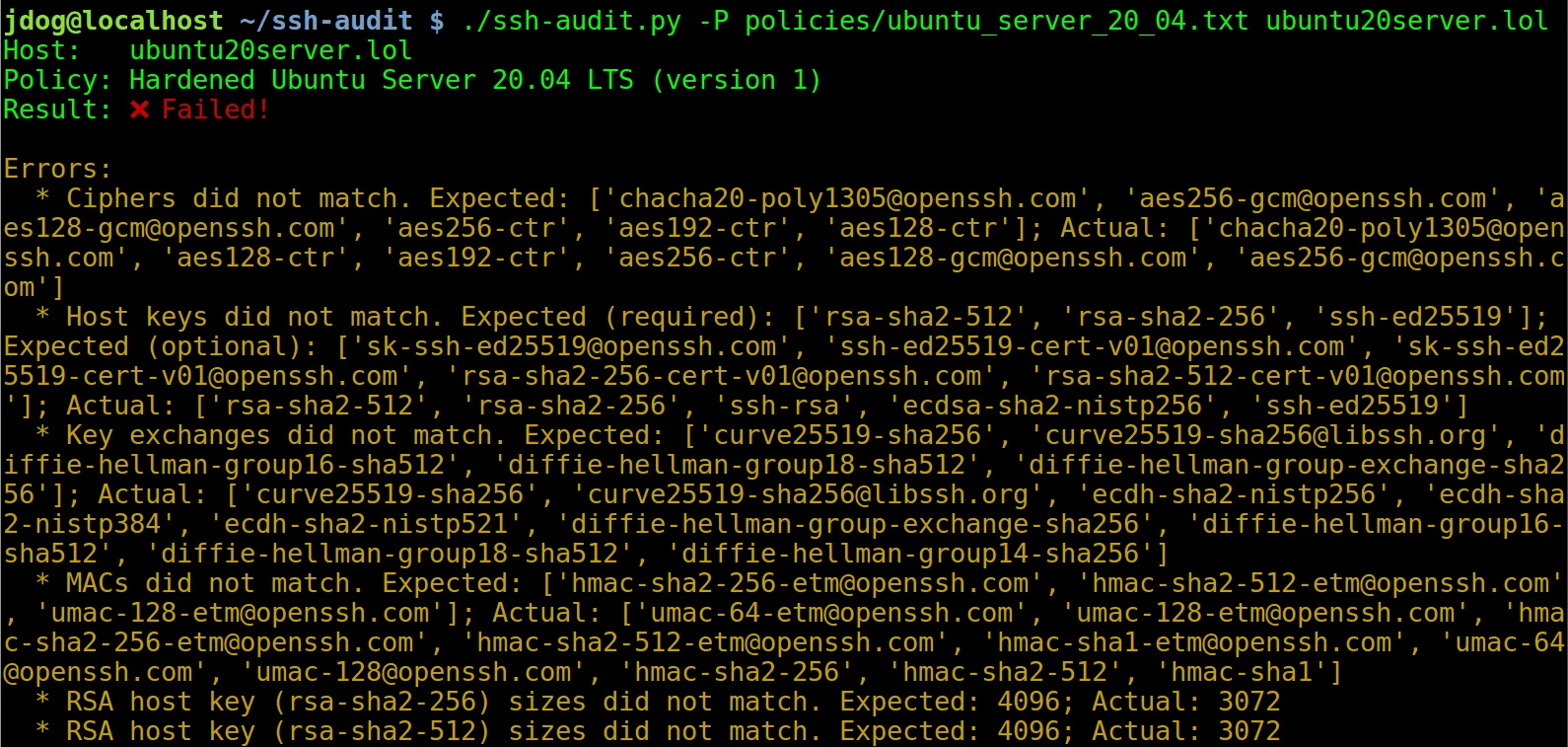
以下は、強化されていないUbuntu Server 20.04マシンに接続したときのポリシー監査出力のスクリーンショットです (ヒント: `-P`/`--policy` で使用する組み込みポリシーの名前を確認するには、`-L`/`--list-policies` を使用してください):

強化ガイド(下記参照)の手順を適用すると、出力は次のように変わります:

### クライアント標準監査の例
以下は、強化されていないOpenSSH v7.2クライアントが接続したときのクライアント監査出力のスクリーンショットです:

## 強化ガイド
サーバーおよびクライアント設定を強化するためのガイドは、ツールに組み込まれています(`--list-hardening-guides` および `--get-hardening-guide` オプションを参照してください)。 さらに、オンラインでも入手できます: [https://www.ssh-audit.com/hardening_guides.html](https://www.ssh-audit.com/hardening_guides.html)
## ビルド済みパッケージ
ビルド済みパッケージは、Windows([Releases](https://github.com/jtesta/ssh-audit/releases) ページ参照)、PyPI、Snap、Docker で利用できます:
PyPI からインストールするには:```
$ pip3 install ssh-audit
Snapパッケージをインストールするには:``` $ snap install ssh-audit
Dockerhubからインストールするには:```
$ docker pull docker.io/positronsecurity/ssh-audit
(その後、次のように実行します:docker run -it --rm -p 2222:2222 docker.io/positronsecurity/ssh-audit 10.1.1.1)
他の各種プラットフォームパッケージのステータスは以下で確認できます(Repology 経由):
利便性のため、コマンドラインツールの上に Web フロントエンドが用意されています:https://www.ssh-audit.com/。
--list-hardening-guides と --get-hardening-guide を参照)。以前は https://ssh-audit.com/hardening_guides.html でのみ利用可能でしたが、利便性のため現在は内蔵されています。部分的な貢献 oam7575。allow_hostkey_subset_and_reordering ポリシーオプションを追加しました。getopt モジュールから argparse へ移行しました。部分的な貢献 oam7575。-b)では、結果が混乱することがあるため、自動的に冗長モードを有効にしなくなりました。ユーザーは -v フラグを使用して明示的に冗長モードを有効にすることができます。unix:///path/to/socket で指定します)。-P と -T オプションを同時に実行したときのクラッシュを修正しました。--conn-rate-test 機能を修正しました。-T/--targets を使用)、-p/--port オプションがデフォルトポートとして使用されるようになりました(-p/ が指定されない場合は 22 に設定されます)。ファイル内で指定されたホストは、明示的なポート番号(例:"host1:1234")でこのデフォルトを上書きできます。例えば、 を使用する場合、 内で明示的にポート番号を含まないすべてのホストは 222 をデフォルトとします。( なし)を使用する場合、すべてのホストはデフォルトの 22 を使用します。--dheat オプションを参照;CVE-2002-20001)。ecdsa-sha2-nistp* CA 署名の解析を修正しました。さらに、標準のホスト鍵と同様に、バックドアの可能性があるものとしてフラグが立てられるようになりました。-m、--manual)が、Windows ビルドに加えて Docker、PyPI、Snap ビルドでも利用できるようになりました。python:3-slim から python:3-alpine に変更し、イメージサイズを 59% 削減しました。貢献 Daniel Thamdrup。-L -v を使用します)。allow_algorithm_subset_and_reordering ディレクティブをサポートするようになりました。これにより、ターゲットがオプションでより厳格な制御を実装できるベースラインポリシーの作成が可能になります。部分的な貢献 yannik1015。allow_larger_keys ディレクティブをサポートするようになりました。これにより、ターゲットがオプションでより厳格な制御を実装できるベースラインポリシーの作成が可能になります。部分的な貢献 。[email protected] と ssh-ed25519 をすべての証明書タイプの末尾に移動しました。additional_notes フィールドを追加しました。ecdsa-sha2-curve25519、ecdsa-sha2-nistb233、ecdsa-sha2-nistb409、ecdsa-sha2-nistk163、ecdsa-sha2-nistk233、ecdsa-sha2-nistk283、ecdsa-sha2-nistk409、ecdsa-sha2-nistp224、ecdsa-sha2-nistp192、、、。[email protected] から実験的な警告タグを削除しました。-g と --gex-test を追加しました。貢献 Adam Russell。[email protected]、[email protected]、[email protected]、[email protected]、[email protected]、、、、、、、、、、、、、、、、、、、、、、、、、、、、。-jj を使用すると JSON をインデント付きで出力するようになりました(デバッグに便利です)。-d/--debug オプションを追加しました。貢献 Adam Russell。rsa-sha2-512 と rsa-sha2-256 を含めるように更新しました。gss-gex-sha1-eipGX3TCiQSrx573bT1o1Q==、gss-group1-sha1-eipGX3TCiQSrx573bT1o1Q==、および gss-group14-sha1-eipGX3TCiQSrx573bT1o1Q==。hmac-ripemd160-96、AEAD_AES_128_GCM、および AEAD_AES_256_GCM。-m/--manual を参照)。貢献 Adam Russell。[email protected]。[email protected] および [email protected] ホスト鍵タイプの公開鍵サイズを解析するようになりました。[email protected] を失敗としてフラグ付けします。--lookup)が類似アルゴリズムを大文字小文字を区別せずに検索するようになりました。貢献 Adam Russell。[email protected]。-L/--list-policies、-M/--make-policy、-P/--policy を参照)。詳細なチュートリアルについては、https://www.positronsecurity.com/blog/2020-09-27-ssh-policy-configuration-checks-with-ssh-audit/ を参照してください。ssh-audit.1 ファイルを参照)。--lookup を参照)。貢献 Adam Russell。ssh-rsa1、[email protected]、ssh-gost2001、、、、、、、、。[email protected]、および [email protected]。des および 3des。-c / --client-audit オプションを参照)。-j / --json オプションを参照。提供: Andreas Jaggi)。gss-group1-sha1-toWM5Slw5Ew8Mqkay+al2g==、gss-gex-sha1-toWM5Slw5Ew8Mqkay+al2g==、gss-group14-sha1-、gss-group14-sha1-toWM5Slw5Ew8Mqkay+al2g==、gss-group14-sha256-toWM5Slw5Ew8Mqkay+al2g==、gss-group15-sha512-toWM5Slw5Ew8Mqkay+al2g==、diffie-hellman-group15-sha256、ecdh-sha2-1.3.132.0.10、curve448-sha512。[email protected]、[email protected]、[email protected]、diffie-hellman-group16-sha256、diffie-hellman-group17-sha512。des-cbc-ssh1、blowfish-ctr、twofish-ctr。hmac-sha2-56、hmac-sha2-224、hmac-sha2-384、hmac-sha3-256、、、、、、。--socks5 host:port で指定します)。部分的な貢献 Michał Majchrowicz。mlkem768nistp256-sha256、mlkem1024nistp384-sha384。[email protected]、mldsa-44、[email protected]、mldsa-65、mldsa-87、ssh-mldsa-44、ssh-mldsa-65、ssh-mldsa-87、ssh-mldsa44、ssh-mldsa65、ssh-mldsa87。AEAD_CAMELLIA_128_GCM、AEAD_CAMELLIA_256_GCM。--port-T targets.txt -p 222targets.txt-T targets.txt-pgrasshopper-ctr128。mlkem768x25519-sha256、sntrup761x25519-sha512。NO_COLOR 環境変数が設定されている場合、色付き出力は無効になります(https://no-color.org/ を参照)。gss-nistp384-sha384-*。[email protected]。ecdsa-sha2-nistt571ssh-dsax509v3-sign-rsa-sha256[email protected]、[email protected]、[email protected]、[email protected]、[email protected]、[email protected]、[email protected]、kexAlgoDH14SHA1、kexAlgoDH1SHA1、kexAlgoECDH256、kexAlgoECDH384、kexAlgoECDH521、sm2kep-sha2-nistp256、[email protected]、[email protected]。[email protected]、cast128-12-cbc、cast128-12-cfb、cast128-12-ecb、cast128-12-ofb、des-cfb、des-ecb、des-ofb。cbcmac-3des、cbcmac-aes、cbcmac-blowfish、cbcmac-des、cbcmac-rijndael、cbcmac-twofish、hmac-sha256-96、md5、md5-8、ripemd160、ripemd160-8、sha1、sha1-8、umac-128。nullpgp-sign-dsspgp-sign-rsaspki-sign-dssspki-sign-rsassh-rsa-sha2-256ssh-rsa-sha2-512x509v3-ecdsa-sha2-1.3.132.0.10x509v3-sign-dss-sha1x509v3-sign-rsa-sha1[email protected]、diffie-hellman_group17-sha512、[email protected]、[email protected]、ecdh-sha2-1.2.840.10045.3.1.1、ecdh-sha2-1.2.840.10045.3.1.7、ecdh-sha2-1.3.132.0.1、ecdh-sha2-1.3.132.0.16、ecdh-sha2-1.3.132.0.26、ecdh-sha2-1.3.132.0.27、ecdh-sha2-1.3.132.0.33、ecdh-sha2-1.3.132.0.34、ecdh-sha2-1.3.132.0.35、ecdh-sha2-1.3.132.0.36、ecdh-sha2-1.3.132.0.37、ecdh-sha2-1.3.132.0.38、ecdh-sha2-4MHB+NBt3AlaSRQ7MnB4cg==、ecdh-sha2-5pPrSUQtIaTjUSt5VZNBjg==、ecdh-sha2-9UzNcgwTlEnSCECZa7V1mw==、ecdh-sha2-D3FefCjYoJ/kfXgAyLddYA==、ecdh-sha2-h/SsxnLCtRBh7I9ATyeB3A==、ecdh-sha2-m/FtSAmrV4j/Wy6RVUaK7A==、ecdh-sha2-mNVwCXAoS1HGmHpLvBC94w==、ecdh-sha2-qCbG5Cn/jjsZ7nBeR7EnOA==、ecdh-sha2-qcFQaMAMGhTziMT0z+Tuzw==、ecdh-sha2-VqBg4QRPjxx1EXZdV0GdWQ==、ecdh-sha2-wiRIU8TKjMZ418sMqlqtvQ==、ecdh-sha2-zD/b3hu/71952ArpUG4OjQ==、ecmqv-sha2、gss-13.3.132.0.10-sha256-*、gss-curve25519-sha256-*、gss-curve448-sha512-*、gss-gex-sha1-*、gss-gex-sha256-*、gss-group14-sha1-*、gss-group14-sha256-*、gss-group15-sha512-*、gss-group16-sha512-*、gss-group17-sha512-*、gss-group18-sha512-*、gss-group1-sha1-*、gss-nistp256-sha256-*、gss-nistp384-sha256-*、gss-nistp521-sha512-*、[email protected]、[email protected]。3des-cfb、3des-ecb、3des-ofb、blowfish-cfb、blowfish-ecb、blowfish-ofb、[email protected]、[email protected]、[email protected]、[email protected]、[email protected]、[email protected]、cast128-cfb、cast128-ecb、cast128-ofb、[email protected]、idea-cfb、idea-ecb、idea-ofb、[email protected]、[email protected]、[email protected]、[email protected]、[email protected]、[email protected]、twofish-cfb、twofish-ecb、twofish-ofb[email protected]、[email protected]、[email protected]、[email protected]、hmac-whirlpool。ssh-gost2012-256ssh-gost2012-512spki-sign-rsassh-ed448x509v3-ecdsa-sha2-nistp256x509v3-ecdsa-sha2-nistp384x509v3-ecdsa-sha2-nistp521x509v3-rsa2048-sha256diffie-hellman-group1-sha256、kexAlgoCurve25519SHA256、Curve25519SHA256、gss-group14-sha256-、gss-group15-sha512-、gss-group16-sha512-、gss-nistp256-sha256-、gss-curve25519-sha256-。blowfish、AEAD_AES_128_GCM、AEAD_AES_256_GCM、[email protected]、[email protected]。[email protected]、hmac-sha3-224、[email protected]。### v2.2.0 (2020-03-11)ssh-rsa ホスト鍵タイプを、実用的なSHA-1衝突 のため弱いとマークしました。ecdsa-sha2-1.3.132.0.10、x509v3-sign-dss、x509v3-sign-rsa、[email protected]、x509v3-ssh-dss、x509v3-ssh-rsa、[email protected]、[email protected]、[email protected]、および [email protected]。[email protected]、[email protected]、[email protected]、[email protected]、[email protected]、[email protected]、ecdh-sha2-curve25519、ecdh-sha2-nistb233、ecdh-sha2-nistb409、ecdh-sha2-nistk163、ecdh-sha2-nistk233、ecdh-sha2-nistk283、ecdh-sha2-nistk409、ecdh-sha2-nistp192、ecdh-sha2-nistp224、ecdh-sha2-nistt571、gss-gex-sha1-、および gss-group1-sha1-。camellia128-cbc、camellia128-ctr、camellia192-cbc、camellia192-ctr、camellia256-cbc、camellia256-ctr、aes128-gcm、aes256-gcm、および chacha20-poly1305。aes128-gcm および aes256-gcm。ecdsa-sha2-1.3.132.0.10。idea-cbc、serpent128-cbc、serpent192-cbc、serpent256-cbc。[email protected]、[email protected]、hmac-ripemd、[email protected]、[email protected]、[email protected]。hmac-sha3-384hmac-sha3-512hmac-sha256hmac-sha512-t / --timeout) を追加しました。