
Skip to content
KitploitKITPLOIT
ツールブログ
提出
ツールブログ
提出

ハッキング、侵入テスト、サイバーセキュリティツールをあなたのセキュリティアーセナルに!

Kitploitはハッキング、サイバーセキュリティ、ペネトレーションテストのツールディレクトリです。最新のプロジェクトアップデートを見つけて、脆弱性の発見、システム分析、テストの自動化、セキュリティの強化を行いましょう。

··フィード·お問い合わせ·プライバシー·© 2026 Kitploit

ツールディレクトリ

カテゴリ

すべてのカテゴリを見る
Loading categories
ツール/GitHubGitHub/jpillora/chisel
IDS/IPS回避ネットワークセキュリティペネトレーションテストユーティリティとフレームワークレッドチーミング
GitHubjpillora/chisel

chisel

高速なTCP/UDPトンネルをHTTP上で提供し、SSH暗号化をサポート。リバースポート転送、SOCKS5プロキシ、クライアント認証により、安全なネットワーク経路確保とファイアウォール回避を実現します。

リポジトリを見る
16.4k1.6k12日前Kitploit レビュー済み

人気

すべて見る →

コミュニティで最も使われているツールを見つけましょう。

すべてのツールを探索

ツールコレクションを閲覧

すべてのツールを見る →
共有

Chisel

GoDoc CI

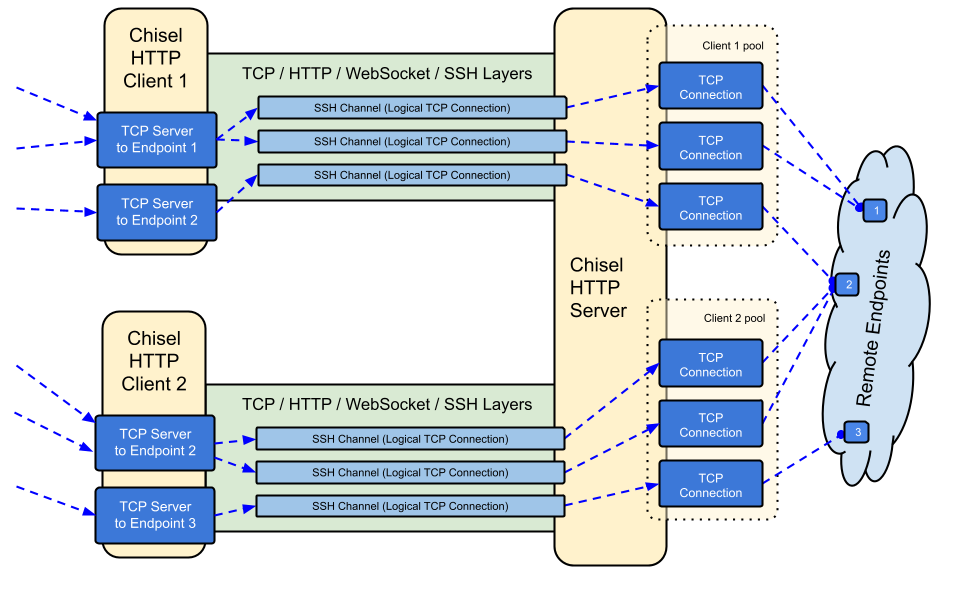
ChiselはHTTP上で転送される高速なTCP/UDPトンネルで、SSHによって保護されています。クライアントとサーバーの両方を含む単一の実行ファイルです。Go(golang)で書かれています。Chiselは主にファイアウォールを通過するために有用ですが、ネットワークへの安全なエンドポイントを提供するためにも使用できます。

overview

Table of Contents

  • Features
  • Install
  • Demo
  • Usage
  • Contributing
  • Changelog
  • License

機能

  • 使いやすい
  • 高性能*
  • SSHプロトコル(crypto/ssh経由)を使用した暗号化接続
  • 認証付き接続 ユーザー設定ファイルによるクライアント接続の認証、フィンガープリント照合によるサーバー接続の認証
  • クライアントは指数バックオフで自動再接続(--min/max-retry-intervalで調整可能); キープアライブpingがタイムアウトするため、黙って切断された接続(スリープ/復帰、NATタイムアウト、サーバー再起動)を検出して再確立します
  • クライアントは1つのTCP接続上に複数のトンネルエンドポイントを作成できます
  • クライアントはオプションでSOCKSまたはHTTP CONNECTプロキシを経由できます
  • リバースポートフォワーディング(接続はサーバーを経由してクライアントから出る)
  • サーバーはオプションでリバースプロキシを兼ねる
  • サーバーはオプションでSOCKS5接続を許可(下記ガイドを参照)
  • クライアントはオプションでリバースポートフォワードからのSOCKS5接続を許可
  • stdio経由のクライアント接続はssh -o ProxyCommandをサポートし、HTTP上でSSHを提供

インストール

バイナリ

Releases Releases

最新リリースを参照するか、curl https://i.jpillora.com/chisel! | bash ですぐにダウンロードしてインストールできます

バイナリは最新のGoリリースでビルドされており、最小OSバージョンはWindows 10 / Server 2016、macOS 12、Linuxカーネル3.2、FreeBSD 12.2です。古いシステム(例: Windows 7)の場合は、リリースv1.8.1以前を使用してください。

Docker

Docker Pulls Image Size```sh docker run --rm -it jpillora/chisel --help

root@kitploit:~
イメージはマルチアーキテクチャ対応で、Docker Hub(`jpillora/chisel`)とGitHub Container Registry(`ghcr.io/jpillora/chisel`)の両方に公開されています。

### Fedora

このパッケージはFedoraコミュニティによってメンテナンスされています。RPMの使用に関連する問題が発生した場合は、この[イシュートラッカー](https://bugzilla.redhat.com/buglist.cgi?bug_status=NEW&bug_status=ASSIGNED&classification=Fedora&component=chisel&list_id=11614537&product=Fedora&product=Fedora%20EPEL)を使用してください。```sh
sudo dnf -y install chisel

ソース```sh

$ go install github.com/jpillora/chisel@latest

root@kitploit:~
## デモ

数分で自分のデモサーバーを実行できます(旧Herokuデモは、Herokuの無料枠の廃止に伴い終了しました)。[`example/fly.toml`](https://github.com/jpillora/chisel/blob/HEAD/example/fly.toml) はこの `chisel server` を [fly.io](https://fly.io) の無料枠にデプロイします:```sh
$ chisel server --port $PORT --backend http://example.com
# listens on $PORT, proxies normal web requests to http://example.com

example/ ディレクトリから fly launch --copy-config でデプロイし、サーバーの隣で実行されている任意のサービスにトンネルを張ります。例:```sh $ chisel client https://.fly.dev 3000

connects to your chisel server,

tunnels your localhost:3000 to the server's localhost:3000

root@kitploit:~
ブラウザでアプリのURLにアクセスすると、サーバーのデフォルトバックエンドプロキシに到達し、[example.com](http://example.com) のコピーが表示されます。

## 使い方

<!-- これらのヘルプテキストを手動でレンダリングするか、
  https://github.com/jpillora/md-tmpl を使用してください
    $ md-tmpl -w README.md の場合 -->

<!--tmpl,code=plain:echo "$ chisel --help" && go run main.go --help | sed 's#0.0.0-src (go1\..*)#X.Y.Z#' -->``` plain 
$ chisel --help

  Usage: chisel [command] [--help]

  Version: X.Y.Z

  Commands:
    server - runs chisel in server mode
    client - runs chisel in client mode

  Read more:
    https://github.com/jpillora/chisel

``` plain

$ chisel server --help

Usage: chisel server [options]

Options:

root@kitploit:~
--host, Defines the HTTP listening host – the network interface
(defaults the environment variable HOST and falls back to 0.0.0.0).

--port, -p, Defines the HTTP listening port (defaults to the environment
variable PORT and falls back to port 8080).

--key, (deprecated use --keygen and --keyfile instead)
An optional string to seed the generation of a ECDSA public
and private key pair. All communications will be secured using this
key pair. Share the subsequent fingerprint with clients to enable detection
of man-in-the-middle attacks (defaults to the CHISEL_KEY environment
variable, otherwise a new key is generate each run).

--keygen, A path to write a newly generated PEM-encoded SSH private key file.
If users depend on your --key fingerprint, you may also include your --key to
output your existing key. Use - (dash) to output the generated key to stdout.

--keyfile, An optional path to a PEM-encoded SSH private key. When
this flag is set, the --key option is ignored, and the provided private key
is used to secure all communications. (defaults to the CHISEL_KEY_FILE
environment variable). Since ECDSA keys are short, you may also set keyfile
to the inline key string itself, exactly as printed by --keygen (a base64
string with a "ck-" prefix); no extra base64 encoding is needed.

--authfile, An optional path to a users.json file. This file should
be an object with users defined like:
  {
    "<user:pass>": ["<addr-regex>","<addr-regex>"]
  }
when <user> connects, their <pass> will be verified and then
each of the remote addresses will be compared against the list
of address regular expressions for a match. Patterns are NOT
anchored by default: "10.0.0.1:80" also matches
"210.0.0.1:8080", and "." matches any character. Anchor your
patterns, e.g. "^10\.0\.0\.1:80$". The empty string ""
matches every address. Addresses will
always come in the form "<remote-host>:<remote-port>" for normal remotes,
"R:<local-interface>:<local-port>" for reverse port forwarding
remotes, and "socks" for SOCKS5 proxy access. Note that SOCKS5
access previously bypassed this list; existing authfiles which
should allow SOCKS5 must add an entry matching "socks" (the
empty wildcard "" matches everything, including "socks"). This
file will be automatically reloaded on change. Reloads apply
to new connections and to new tunnels of connected clients;
established tunnels are not interrupted.

--auth, An optional string representing a single user with full
access, in the form of <user:pass>. It is equivalent to creating an
authfile with {"<user:pass>": [""]}. If unset, it will use the
environment variable AUTH.

--keepalive, An optional keepalive interval. Since the underlying
transport is HTTP, in many instances we'll be traversing through
proxies, often these proxies will close idle connections. You must
specify a time with a unit, for example '5s' or '2m'. Defaults
to '25s' (set to 0s to disable).

--backend, Specifies another HTTP server to proxy requests to when
chisel receives a normal HTTP request. Useful for hiding chisel in
plain sight. --proxy is accepted as an alias for this flag.

--socks5, Allow clients to access the internal SOCKS5 proxy. See
chisel client --help for more information.

--reverse, Allow clients to specify reverse port forwarding remotes
in addition to normal remotes.

--tls-key, Enables TLS and provides optional path to a PEM-encoded
TLS private key. When this flag is set, you must also set --tls-cert,
and you cannot set --tls-domain.

--tls-cert, Enables TLS and provides optional path to a PEM-encoded
TLS certificate. When this flag is set, you must also set --tls-key,
and you cannot set --tls-domain.

--tls-domain, Enables TLS and automatically acquires a TLS key and
certificate using LetsEncrypt. Setting --tls-domain requires port 443.
You may specify multiple --tls-domain flags to serve multiple domains.
The resulting files are cached in the "$HOME/.cache/chisel" directory.
You can modify this path by setting the CHISEL_LE_CACHE variable,
or disable caching by setting this variable to "-". You can optionally
provide a certificate notification email by setting CHISEL_LE_EMAIL.

--tls-ca, a path to a PEM encoded CA certificate bundle or a directory
holding multiple PEM encode CA certificate bundle files, which is used to 
validate client connections. The provided CA certificates will be used 
instead of the system roots. This is commonly used to implement mutual-TLS. 

--pid Generate pid file in current working directory

-v, Enable verbose logging

--help, This help text

Signals: The chisel process is listening for: a SIGINT or SIGTERM to begin a graceful shutdown (a second signal forces an immediate exit), a SIGUSR2 to print process stats, and a SIGHUP to short-circuit the client reconnect timer

Version: X.Y.Z

Read more: https://github.com/jpillora/chisel

root@kitploit:~
<!--/tmpl-->


<!--tmpl,code=plain:echo "$ chisel client --help" && go run main.go client --help | sed 's#0.0.0-src (go1\..*)#X.Y.Z#' -->``` plain 
$ chisel client --help

  Usage: chisel client [options] <server> <remote> [remote] [remote] ...

  <server> is the URL to the chisel server.

  <remote>s are remote connections tunneled through the server, each of
  which come in the form:

    <local-host>:<local-port>:<remote-host>:<remote-port>/<protocol>

    ■ local-host defaults to 0.0.0.0 (all interfaces).
    ■ local-port defaults to remote-port.
    ■ remote-port is required*.
    ■ remote-host defaults to 127.0.0.1 (server localhost).
    ■ protocol defaults to tcp.

  which shares <remote-host>:<remote-port> from the server to the client
  as <local-host>:<local-port>, or:

    R:<local-interface>:<local-port>:<remote-host>:<remote-port>/<protocol>

  which does reverse port forwarding, sharing <remote-host>:<remote-port>
  from the client to the server's <local-interface>:<local-port>.

    example remotes

      3000
      example.com:3000
      3000:google.com:80
      192.168.0.5:3000:google.com:80
      socks
      5000:socks
      R:2222:localhost:22
      R:socks
      R:5000:socks
      stdio:example.com:22
      1.1.1.1:53/udp

    When the chisel server has --socks5 enabled, remotes can
    specify "socks" in place of remote-host and remote-port.
    The default local host and port for a "socks" remote is
    127.0.0.1:1080. Connections to this remote will terminate
    at the server's internal SOCKS5 proxy. When the server also
    has --authfile set, SOCKS5 access requires an entry matching
    the token "socks" in the user's address list.

    When the chisel server has --reverse enabled, remotes can
    be prefixed with R to denote that they are reversed. That
    is, the server will listen and accept connections, and they
    will be proxied through the client which specified the remote.
    Reverse remotes specifying "R:socks" will listen on the server's
    default socks port (1080) and terminate the connection at the
    client's internal SOCKS5 proxy.

    When stdio is used as local-host, the tunnel will connect standard
    input/output of this program with the remote. This is useful when 
    combined with ssh ProxyCommand. You can use
      ssh -o ProxyCommand='chisel client chiselserver stdio:%h:%p' \
          [email protected]
    to connect to an SSH server through the tunnel.

  Options:

    --fingerprint, A *strongly recommended* fingerprint string
    to perform host-key validation against the server's public key.
    Fingerprint mismatches will close the connection.
    Fingerprints are generated by hashing the ECDSA public key using
    SHA256 and encoding the result in base64.
    Fingerprints must be 44 characters containing a trailing equals (=).
    Legacy MD5 colon fingerprints (deprecated) are still accepted,
    but only in their full 16-octet form; truncated prefixes are
    rejected.

    --auth, An optional username and password (client authentication)
    in the form: "<user>:<pass>". These credentials are compared to
    the credentials inside the server's --authfile. defaults to the
    AUTH environment variable.

    --keepalive, An optional keepalive interval. Since the underlying
    transport is HTTP, in many instances we'll be traversing through
    proxies, often these proxies will close idle connections. You must
    specify a time with a unit, for example '5s' or '2m'. Defaults
    to '25s' (set to 0s to disable).

    --max-retry-count, Maximum number of times to retry before exiting.
    Defaults to unlimited.

    --min-retry-interval, Minimum wait time before retrying after a
    disconnection. Defaults to 1 second.

    --max-retry-interval, Maximum wait time before retrying after a
    disconnection. Defaults to 5 minutes.

    --proxy, An optional HTTP CONNECT or SOCKS5 proxy which will be
    used to reach the chisel server. Authentication can be specified
    inside the URL. Credentials must be URL-encoded; for example a
    "#" in the password must be written as "%23".
    For example, http://admin:[email protected]:8081
            or: socks://admin:[email protected]:1080
    The socks://, socks5:// and socks5h:// schemes are equivalent:
    DNS is always resolved by the proxy.

    --header, Set a custom header in the form "HeaderName: HeaderContent".
    Can be used multiple times. (e.g --header "Foo: Bar" --header "Hello: World")

    --hostname, Optionally set the 'Host' header (defaults to the host
    found in the server url).

    --sni, Override the ServerName when using TLS (defaults to the 
    hostname).

    --tls-ca, An optional root certificate bundle used to verify the
    chisel server. Only valid when connecting to the server with
    "https" or "wss". By default, the operating system CAs will be used.

    --tls-skip-verify, Skip server TLS certificate verification of
    chain and host name (if TLS is used for transport connections to
    server). If set, client accepts any TLS certificate presented by
    the server and any host name in that certificate. This only affects
    transport https (wss) connection. Chisel server's public key
    may be still verified (see --fingerprint) after inner connection
    is established.

    --tls-key, a path to a PEM encoded private key used for client 
    authentication (mutual-TLS).

    --tls-cert, a path to a PEM encoded certificate matching the provided 
    private key. The certificate must have client authentication 
    enabled (mutual-TLS).

    --pid Generate pid file in current working directory

    -v, Enable verbose logging

    --help, This help text

  Signals:
    The chisel process is listening for:
      a SIGINT or SIGTERM to begin a graceful shutdown
        (a second signal forces an immediate exit),
      a SIGUSR2 to print process stats, and
      a SIGHUP to short-circuit the client reconnect timer

  Version:
    X.Y.Z

  Read more:
    https://github.com/jpillora/chisel

セキュリティ

暗号化は常に有効です。chisel サーバーを起動すると、インメモリの ECDSA 公開鍵/秘密鍵のペアが生成されます。公開鍵のフィンガープリント(base64 エンコードされた SHA256)は、サーバー起動時に表示されます。サーバーはランダムな鍵を生成する代わりに、--keyfile オプションを使用して鍵ファイルを指定することもできます。クライアントが接続すると、サーバーの公開鍵フィンガープリントも表示されます。クライアントは --fingerprint オプションを使用して特定のフィンガープリントを強制できます。レガシーな MD5 フィンガープリントも引き続き受け入れられますが、完全な 16 オクテットのコロン区切り形式である必要があります。短縮されたプレフィックスは拒否されます。詳細については、上記の --help を参照してください。

また、サーバーは認証前のインバウンド WebSocket メッセージサイズを上限で制限します(CHISEL_WS_READ_LIMIT、デフォルトは 512 KiB)。これにより、認証されていないピアが過大なメッセージでメモリを枯渇させることができなくなります。デフォルト値は x/crypto/ssh の最大転送パケットである 256 KiB を十分に上回るため、有効な SSH パケットが拒否されることはありません。制限を無効にするのは 0 だけです。負の値は安全なデフォルトにフォールバックします。

認証

--authfile オプションを使用すると、サーバーは user.json 設定ファイルを提供して、受け入れられるユーザーのリストを作成できます。クライアントは --auth オプションを使用して認証します。認証設定ファイルの例については users.json を参照してください。詳細については、上記の --help を参照してください。

authfile の動作に関する注意事項:

  • ファイルは監視され、ライブでリロードされます。エディタによる保存(vim など)の rename や kubernetes の configmap 更新も含まれます。リロードは新しい接続と、すでに接続されているクライアントの新しいトンネルに適用されます。削除されたユーザーは新しいトンネルへのアクセスを直ちに失いますが、確立済みのトンネルは中断されません。
  • アドレスパターンは正規表現であり、アンカーされていません。^ と $ でアンカーしてください(サーバーはロード時にアンカーなしのパターンについて警告します)。空文字列 "" はすべてにマッチします。
  • SOCKS5 アクセスは、トークン socks にマッチするエントリによって制御されます。破壊的変更: SOCKS5 は以前は authfile を完全にバイパスしていました。--authfile と一緒に --socks5 を実行しているサーバーは、プロキシアクセスを維持するユーザーに socks を許可する必要があります(ワイルドカード "" エントリは引き続き機能します)。
  • コロンを含まない認証文字列(user:pass)は、サーバーとクライアントの両方で致命的な起動エラーになりました。以前は認証を静かに無効にしていました。
  • --auth ユーザーは authfile のリロード後も存続し、ファイル内のユーザーとの名前の競合に勝ちます。

内部的には、これは SSH が提供する Password 認証方式を使用して行われます。crypto/ssh の詳細については、http://blog.gopheracademy.com/go-and-ssh/ を参照してください。セッションの開始/終了(ユーザー、送信元アドレス、リモートを含む)と失敗したログイン試行は、情報レベルでログに記録されます。

TLS ガイド

最もシンプルで安全なセットアップは --tls-domain です。これにより LetsEncrypt 証明書が自動的にプロビジョニングされます(ポート 443 とサーバーを指す DNS レコードが必要です)。```sh chisel server --port 443 --tls-domain chisel.example.com --auth user:pass chisel client --auth user:pass https://chisel.example.com R:2222:localhost:22

root@kitploit:~
独自の証明書(自己署名または内部CA)を使用するには、キーと証明書のペアを生成し、両側で適切なファイルを指定します:```sh
chisel server --port 443 --tls-key key.pem --tls-cert cert.pem
chisel client --tls-ca ca.pem https://chisel.example.com 3000

相互TLSの場合は、サーバー側に --tls-ca を、各クライアント側に --tls-cert/--tls-key も渡してください。TLS は chisel のトランスポートを外側から包みますが、内側の SSH 層は依然として暗号化と認証を行うため、--fingerprint の検証は TLS の有無にかかわらず機能します。

Docker を使った SOCKS5 ガイド

  1. 新しい秘密鍵をターミナルに出力する

    root@kitploit:~
    chisel server --keygen -
    # またはディスクに保存する場合: --keygen /path/to/mykey
    
  2. chisel サーバーを起動する

    root@kitploit:~
    jpillora/chisel server --keyfile '<ck-base64 文字列またはファイルパス>' -p 9312 --socks5
    
  3. chisel クライアントを接続する(サーバーのフィンガープリントを使用)

    root@kitploit:~
    chisel client --fingerprint '<サーバーの出力を参照>' <server-address>:9312 socks
    
  4. SOCKS5 クライアント(OS/ブラウザなど)の接続先を次のように指定する:

    root@kitploit:~
    <client-address>:1080
    
  5. これで、HTTP 上で暗号化かつ認証済みの SOCKS5 接続が確立されます

注: サーバーが --authfile も使用している場合、ユーザーはプロキシを利用するためにトークン socks に一致するエントリが必要です(認証 を参照)。

オースファイルを使用したリバース SOCKS

特定のクライアントを SOCKS 出口ノードとして動作させるには、そのクライアントにリバース SOCKS リスナーアドレス(R:socks はサーバーの 127.0.0.1:1080 で待ち受ける)を付与します:```json { "exituser:password": ["^R:127\.0\.0\.1:1080$"] }

root@kitploit:~
(empty response due to missing input)```sh
chisel server --reverse --authfile users.json
chisel client --auth exituser:password <server-address> R:socks
# server-side consumers point SOCKS5 clients at 127.0.0.1:1080,
# and their traffic exits via the chisel client's network

See also the step-by-step reverse tunneling example.

Running behind a CDN (Cloudflare)

chisel works through CDNs that support WebSockets. For Cloudflare: enable WebSockets, proxy (orange-cloud) the DNS record, and connect clients with https://. The CDN terminates TLS, but the inner SSH layer means --fingerprint validation still authenticates your chisel server end-to-end — the CDN cannot read or modify tunneled traffic. Keep --keepalive at its 25s default to stay under CDN idle timeouts, and note that proxies which strip Upgrade headers cannot carry chisel at all.

Tuning with environment variables

Less common knobs are environment variables, all read with a CHISEL_ prefix (e.g. CHISEL_WS_TIMEOUT=10s):

HOST、PORT、AUTH、CHISEL_KEY/CHISEL_KEY_FILEについては、上記の--helpテキストで説明されています。

Caveats

Since WebSockets support is required:

  • IaaSプロバイダーはすべてWebSocketsをサポートします(サポートしていないHTTPプロキシを前面に強制されている場合を除きます。その場合、PaaSに格下げされたと私は主張します)
  • PaaSプロバイダーのWebSocketsサポートはさまざまです
    • Herokuは完全にサポートしています
    • Openshiftは完全にサポートしていますが、接続はポート8443と8080でのみ受け付けられます
    • Google App Engineスタンダードはサポートしていません(フレキシブル環境はサポートしています)

Contributing

  • http://golang.org/doc/code.html
  • http://golang.org/doc/effective_go.html
  • github.com/jpillora/chisel/share は共有パッケージを含みます
  • github.com/jpillora/chisel/server はサーバーパッケージを含みます
  • github.com/jpillora/chisel/client はクライアントパッケージを含みます

Changelog

  • 1.0 - 初期リリース
  • 1.1 - ECDSA SSHのために単純な対称暗号化を置き換え
  • 1.2 - SOCKS5(サーバー)およびHTTP CONNECT(クライアント)サポートを追加
  • 1.3 - リバーストンネリングサポートを追加
  • 1.4 - 任意のHTTPヘッダーサポートを追加
  • 1.5 - リバースSOCKSサポートを追加(@ausによる)
  • 1.6 - クライアントのstdioサポートを追加(@BoleynSuによる)
  • 1.7 - UDPサポートを追加
  • 1.8 - scratch Dockerイメージに移行
  • 1.9 - Go 1.21にバンプ。--keyシードから--key{gen,file}によるP256キー文字列に切り替え(@cmenginnzによる)
  • 1.10 - Go 1.22にバンプ。リリースに、、を追加。不正なバージョン比較を修正。

Upgrading to 1.12

1.11.x以前からアップグレードする際に、対応が必要な変更が4つあります。

  1. SOCKS5 + --authfile(v1.11.7以降で適用):プロキシアクセスを維持する必要があるユーザーは、トークンsocksに一致するauthfileエントリが必要です(ワイルドカード""は引き続き機能します)。Authenticationを参照してください。拒否されたリクエストはサーバー側でDenied connection to socks (ACL)として記録されます。
  2. --fingerprint:切り詰められたレガシーMD5フィンガープリントは拒否されます。サーバーとクライアントが表示する完全なSHA256フィンガープリントを使用してください(完全な16オクテットのMD5コロン形式は引き続き受け付けられますが、非推奨です)。
  3. **--auth**の値は<user>:<pass>でなければなりません。コロンを含まない文字列は、認証を静かに無効化する代わりに、起動時に失敗します。
  4. 終了コード:--max-retry-count付きのchisel clientは、接続試行を使い果たすと非ゼロで終了するようになりました。$?をチェックするスクリプトやsystemdのRestart=on-failureユニットはこの動作を認識します。

License

MIT © Jaime Pillora

ツールをダウンロード
変数側デフォルト目的
WS_TIMEOUTクライアント45swebsocketハンドシェイクのタイムアウト
SSH_TIMEOUTクライアント30ssshハンドシェイクのタイムアウト
CONFIG_TIMEOUTサーバー10sクライアントの設定要求を待機する時間
SSH_WAIT両方35s新しいトンネルがアクティブな接続を待機する時間
PING_TIMEOUT両方キープアライブ間隔キープアライブping応答のタイムアウト(--keepalive 0の場合はpingなし)
DIAL_TIMEOUT出口ノード30sトンネルターゲットへのtcpダイヤルタイムアウト
WS_READ_LIMIT両方524288受信websocketメッセージの最大バイト数(0 = 制限なし、負の値 = デフォルト)
WS_BUFF_SIZE両方Goのデフォルトwebsocket読み書きバッファサイズ
UDP_MAX_SIZE両方9012udpパケットの最大バイト数
UDP_DEADLINE出口ノード15sudpフローの読み取り期限とアイドルスイープの経過時間
UDP_MAX_CONNS出口ノード100トンネルあたりの同時udpフローの最大数
SHUTDOWN_GRACEサーバー5sシャットダウン時のhttpリクエストドレイン時間
.rpm
.deb
.apk
  • 1.11 - Go 1.25.1にバンプ。すべての依存関係を更新。
  • 1.12 - (未リリース)信頼性とセキュリティの改善:
    • キープアライブpingがタイムアウトするようになり(CHISEL_PING_TIMEOUT)、スリープ/ウェイク、NATタイムアウト、サーバー再起動後、切断された接続はすぐに再接続されます。
    • authfileのリロードは、エディタでのファイル名変更やkubernetesのconfigmap交換後も維持され、接続中のクライアントにライブで適用されます(新しいトンネルに適用されます。確立済みのトンネルは中断されません)。
    • 破壊的変更: --socks5 + --authfileを使用する場合、SOCKS5アクセスにはsocksに一致するauthfileエントリが必要になります(ワイルドカード""エントリは引き続き機能します)。
    • 破壊的変更: 切り詰められたレガシーMD5フィンガープリントは拒否されます。--fingerprintは完全なSHA256形式(または完全な16オクテットのMD5コロン形式)でなければなりません。
    • 破壊的変更: コロンを含まない認証文字列(例:--auth user)は、認証を静かに無効化する代わりに、致命的な起動エラーになります。
    • TCPハーフクローズはトンネルを通じて伝播され、到達不能なターゲットは、死んだ接続を提示する代わりにトンネルを拒否します(CHISEL_DIAL_TIMEOUT、デフォルト30秒)。
    • SIGTERMでのグレースフルシャットダウンとHTTPリクエストのドレイン(CHISEL_SHUTDOWN_GRACE)。2回目のシグナルで強制終了します。
    • UDP出口ノードは、100を超える同時フローで壊れたりリークしたりしなくなりました(CHISEL_UDP_MAX_CONNS)。
    • 受信websocketメッセージは、認証前にサイズ上限が適用されます(CHISEL_WS_READ_LIMIT)。
    • サーバーは、SSHハンドシェイクとその設定要求の間にクライアントが切断しても、パニックを起こさなくなりました(#608)。
    • --max-retry-countを使い果たすとクライアントは非ゼロで終了します。新しい--min-retry-interval(デフォルト1秒)。--proxyにはsocks5://が受け入れられます。
    • go installビルドは実際のバージョンを報告します。セッションと失敗したログインはinfoレベルで記録されます。
    • リリースでは、goreleaserでビルドされたマルチアーキテクチャDockerイメージが、正しくスタンプされたバージョンとともにGHCRとDocker Hubに出荷されるようになりました。リリースは2段階です。タグ付けによりドラフトのGitHubリリースとバージョンタグ付きイメージがビルドされ、ドラフトを公開するとDockerのlatest / X / X.Yタグが更新されます。