 jonathansalwan/triton
Tritonは動的バイナリ解析ライブラリです。独自のプログラム解析ツールを構築し、リバースエンジニアリングを自動化し、ソフトウェア検証を実行したり、コードをエミュレートしたりできます。


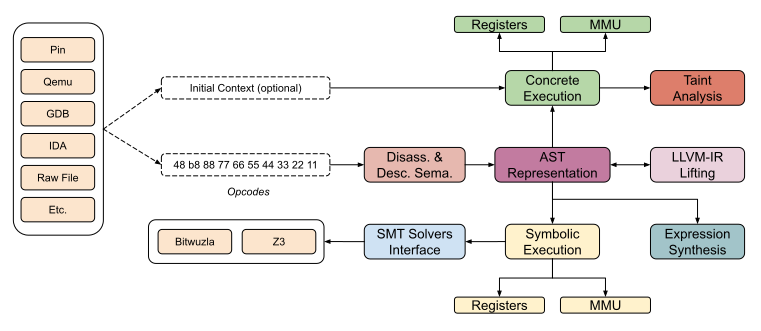
Tritonは動的バイナリ解析ライブラリです。プログラム解析ツールを構築し、リバースエンジニアリングを自動化し、ソフトウェア検証を実行したり、単にコードをエミュレートしたりするための内部コンポーネントを提供します。

Tritonは一種のパートタイムプロジェクトですので、完全に信頼できるものではない場合でも私たちを責めないでください。問題を報告したりプルリクエストを送ることは、常に荒らしよりも良いです =)。ただし、開発の進捗はTwitter @qb_tritonでフォローできます。







from triton import *
Create the Triton context with a defined architecture
ctx = TritonContext(ARCH.X86_64)
Define concrete values (optional)
ctx.setConcreteRegisterValue(ctx.registers.rip, 0x40000)
Symbolize data (optional)
ctx.symbolizeRegister(ctx.registers.rax, 'my_rax')
Execute instructions
ctx.processing(Instruction(b"\x48\x35\x34\x12\x00\x00")) # xor rax, 0x1234 ctx.processing(Instruction(b"\x48\x89\xc1")) # mov rcx, rax
Get the symbolic expression
rcx_expr = ctx.getSymbolicRegister(ctx.registers.rcx) print(rcx_expr) (define-fun ref!8 () (_ BitVec 64) ref!1) ; MOV operation - 0x40006: mov rcx, rax
Solve constraint
ctx.getModel(rcx_expr.getAst() == 0xdead) {0: my_rax:64 = 0xcc99}
0xcc99 XOR 0x1234 is indeed equal to 0xdead
hex(0xcc99 ^ 0x1234) '0xdead'
## pipを使用したインストール

Tritonは`pip`を使用してインストールできます:```console
pip install triton-library
Tritonは以下の依存関係に依存しています:```
### Linux と MacOS```console
$ git clone https://github.com/JonathanSalwan/Triton
$ cd Triton
$ mkdir build ; cd build
$ cmake ..
$ make -j3
$ sudo make install
デフォルトでは、LLVM と Bitwuzla はコンパイルされません。Triton の全機能を活用したい場合は、cmake コンパイルは次のようになります:```console $ cmake -DLLVM_INTERFACE=ON -DCMAKE_PREFIX_PATH=$(llvm-config --prefix) -DBITWUZLA_INTERFACE=ON ..
#### MacOS M1 注意:

コンパイルエラーが発生した場合など:```
Could NOT find PythonLibs (missing: PYTHON_LIBRARIES PYTHON_INCLUDE_DIRS)
お使いの特定のPythonバージョンに対して、PYTHON_EXECUTABLE、PYTHON_LIBRARIES、PYTHON_INCLUDE_DIRSを指定してみてください。```console
cmake -DCMAKE_INSTALL_PREFIX=/opt/homebrew/
-DPYTHON_EXECUTABLE=/opt/homebrew/bin/python3
-DPYTHON_LIBRARIES=/opt/homebrew/Cellar/[email protected]/3.10.8/Frameworks/Python.framework/Versions/3.10/lib/libpython3.10.dylib
-DPYTHON_INCLUDE_DIRS=/opt/homebrew/opt/[email protected]/Frameworks/Python.framework/Versions/3.10/include/python3.10/
..
この情報は、このスニペットから取得できます:```python
from sysconfig import get_paths
info = get_paths()
print(info)
Python のオートコンプリートが機能しない場合は、以下の手順に従ってください。
triton.pyi ファイルを、Triton 共有オブジェクトと同じディレクトリに配置します(例: /usr/lib/python3.13/ など)。IDE が .pyi ファイルの解析をサポートしている必要があります。
cmake を使用して libTriton の .sln ファイルを生成できます。```console
git clone https://github.com/JonathanSalwan/Triton.git cd Triton mkdir build cd build cmake -G "Visual Studio 14 2015 Win64"
-DBOOST_ROOT="C:/Users/jonathan/Works/Tools/boost_1_61_0"
-DPYTHON_INCLUDE_DIRS="C:/Python36/include"
-DPYTHON_LIBRARIES="C:/Python36/libs/python36.lib"
-DZ3_INCLUDE_DIRS="C:/Users/jonathan/Works/Tools/z3-4.6.0-x64-win/include"
-DZ3_LIBRARIES="C:/Users/jonathan/Works/Tools/z3-4.6.0-x64-win/bin/libz3.lib"
-DCAPSTONE_INCLUDE_DIRS="C:/Users/jonathan/Works/Tools/capstone-5.0.1-win64/include"
-DCAPSTONE_LIBRARIES="C:/Users/jonathan/Works/Tools/capstone-5.0.1-win64/capstone.lib" ..
Windows上でsetup.pyを使用して、triton.pydのデバッグバージョンを生成できます。```console
> git clone https://github.com/JonathanSalwan/Triton.git
> cd Triton
> $env:COMPILER_DIR="C:/deps/llvm/llvm2116r/bin"
> $env:CMAKE_PREFIX_PATH="C:/deps/llvm/llvm-project-21.1.6.src/install/lib/cmake/llvm;C:/code/cxx-common-cmake/build/install"
> python_d -m build --wheel
> python_d -m pip install (Get-ChildItem .\dist\triton_library*)
However, if you prefer to directly download the precompiled library, check out our AppVeyor's artefacts. Note that if you use AppVeyor's artefacts, you probably have to install the Visual C++ Redistributable packages for Visual Studio 2012.
vcpkgのTritonポートは、Microsoftのチームメンバーとコミュニティの貢献者によって最新の状態に保たれています。 vcpkgのURLは次のとおりです: https://github.com/Microsoft/vcpkg。vcpkg依存関係マネージャーを使用してTritonをダウンロードおよびインストールできます:```console $ git clone https://github.com/Microsoft/vcpkg.git $ cd vcpkg $ ./bootstrap-vcpkg.sh # ./bootstrap-vcpkg.bat for Windows $ ./vcpkg integrate install $ ./vcpkg install triton
バージョンが古い場合は、vcpkg リポジトリで [issue または pull request を作成](https://github.com/Microsoft/vcpkg) してください。


# 貢献者
