
Skip to content
KitploitKITPLOIT
ツールブログ
提出
ツールブログ
提出

ハッキング、侵入テスト、サイバーセキュリティツールをあなたのセキュリティアーセナルに!

Kitploitはハッキング、サイバーセキュリティ、ペネトレーションテストのツールディレクトリです。最新のプロジェクトアップデートを見つけて、脆弱性の発見、システム分析、テストの自動化、セキュリティの強化を行いましょう。

··フィード·お問い合わせ·プライバシー·© 2026 Kitploit

ツールディレクトリ

カテゴリ

すべてのカテゴリを見る
Loading categories
urx — OSINTアーカイブからURLを抽出してセキュリティインサイトを得る | Kitploit
ツール/GitHubGitHub/hahwul/urx
OSINT (オープンソースインテリジェンス)偵察情報収集ウェブセキュリティクローラー
GitHubhahwul/urx

urx

OSINTアーカイブからURLを抽出してセキュリティインサイトを得る

リポジトリを見る
190206日前Kitploit レビュー済み

人気

すべて見る →

コミュニティで最も使われているツールを見つけましょう。

すべてのツールを探索

ツールコレクションを閲覧

すべてのツールを見る →
共有
ウェブサイト
Urx ロゴ

OSINT アーカイブから URL を抽出し、セキュリティインサイトを提供します。

Urx は、Wayback Machine や Common Crawl などの OSINT アーカイブから URL を収集するために設計されたコマンドラインツールです。効率性を重視して Rust で構築されており、非同期処理を活用して複数のデータソースを高速にクエリできます。このツールは、指定されたドメインの URL 情報を収集するプロセスを簡素化し、セキュリティテストや分析など、さまざまな目的に使用できる包括的なデータセットを提供します。

機能

  • 複数のソースから並列に URL を取得 (Wayback Machine、Common Crawl、OTX、Arquivo.pt)
  • デフォルトでキー不要: Wayback、Common Crawl、OTX、Arquivo.pt、URLScan (匿名) はすべて API キーなしで動作
  • VirusTotal および URLScan プロバイダーの API キーローテーションをサポートし、レート制限を緩和
  • ファイル拡張子、パターン、または定義済みプリセット (例: "no-image" で画像を除外) で結果をフィルタリング
  • URL の正規化と重複排除: クエリパラメータの並び替え、末尾のスラッシュ削除、意味的に同一の URL を統合
  • 複数の出力形式をサポート: プレーンテキスト、JSON、CSV
  • 直接ファイル入力のサポート: WARC ファイル、URLTeam 圧縮ファイル、テキストファイルから直接 URL を読み取り
  • 結果をコンソールまたはファイルに出力、またはパイプライン統合用に stdin 経由でストリーム出力
  • URL テスト:
    • HTTP ステータスコードとパターンに基づいて URL をフィルタリングおよび検証
    • 収集した URL から追加のリンクを抽出
  • キャッシュとインクリメンタルスキャン:
    • ローカルの SQLite またはリモートの Redis キャッシュにより、ドメインの再スキャンを回避
    • インクリメンタルモードで、前回のスキャン以降の新しい URL のみを検出
    • 設定可能なキャッシュ TTL と期限切れエントリの自動クリーンアップ

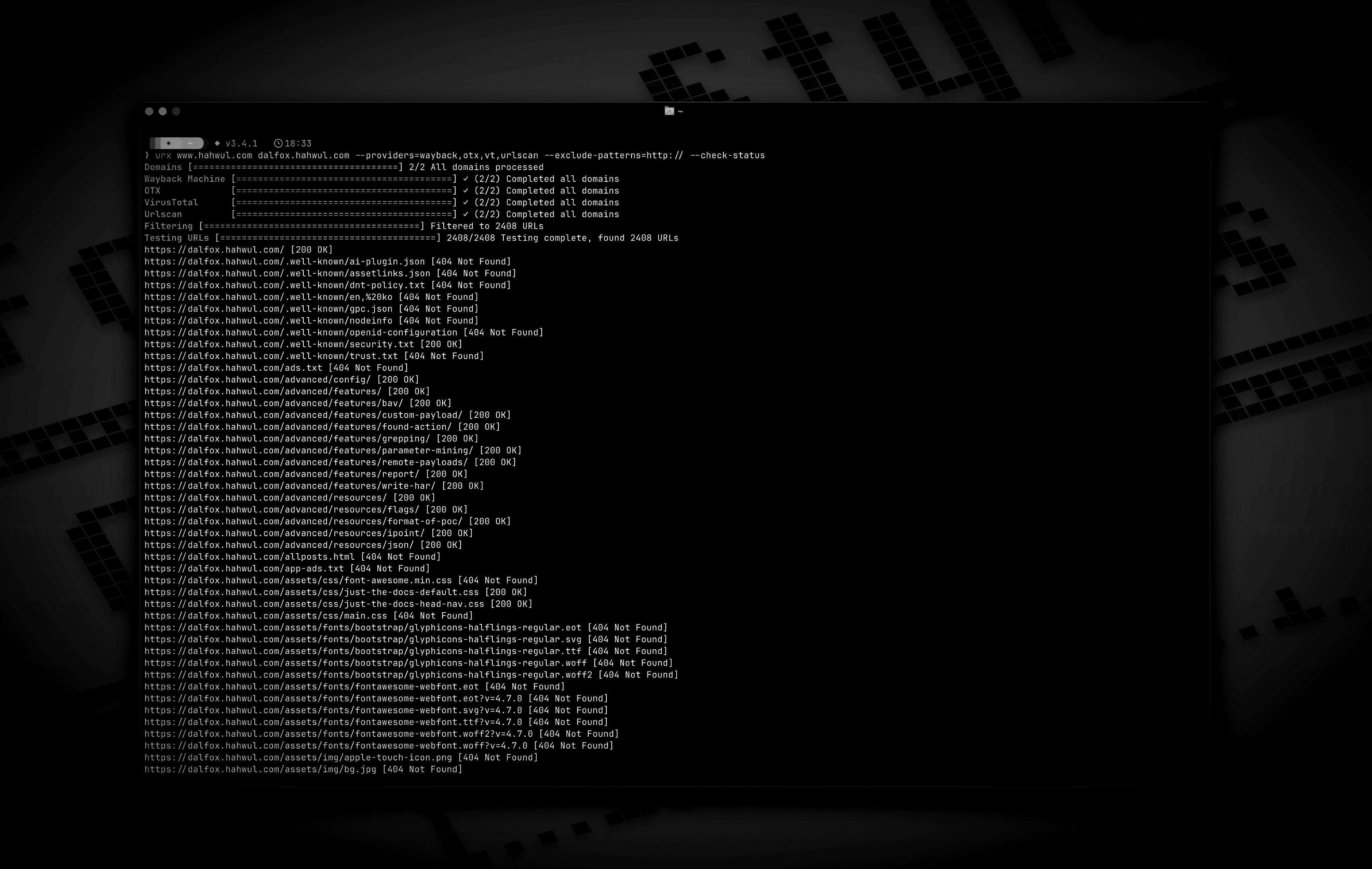
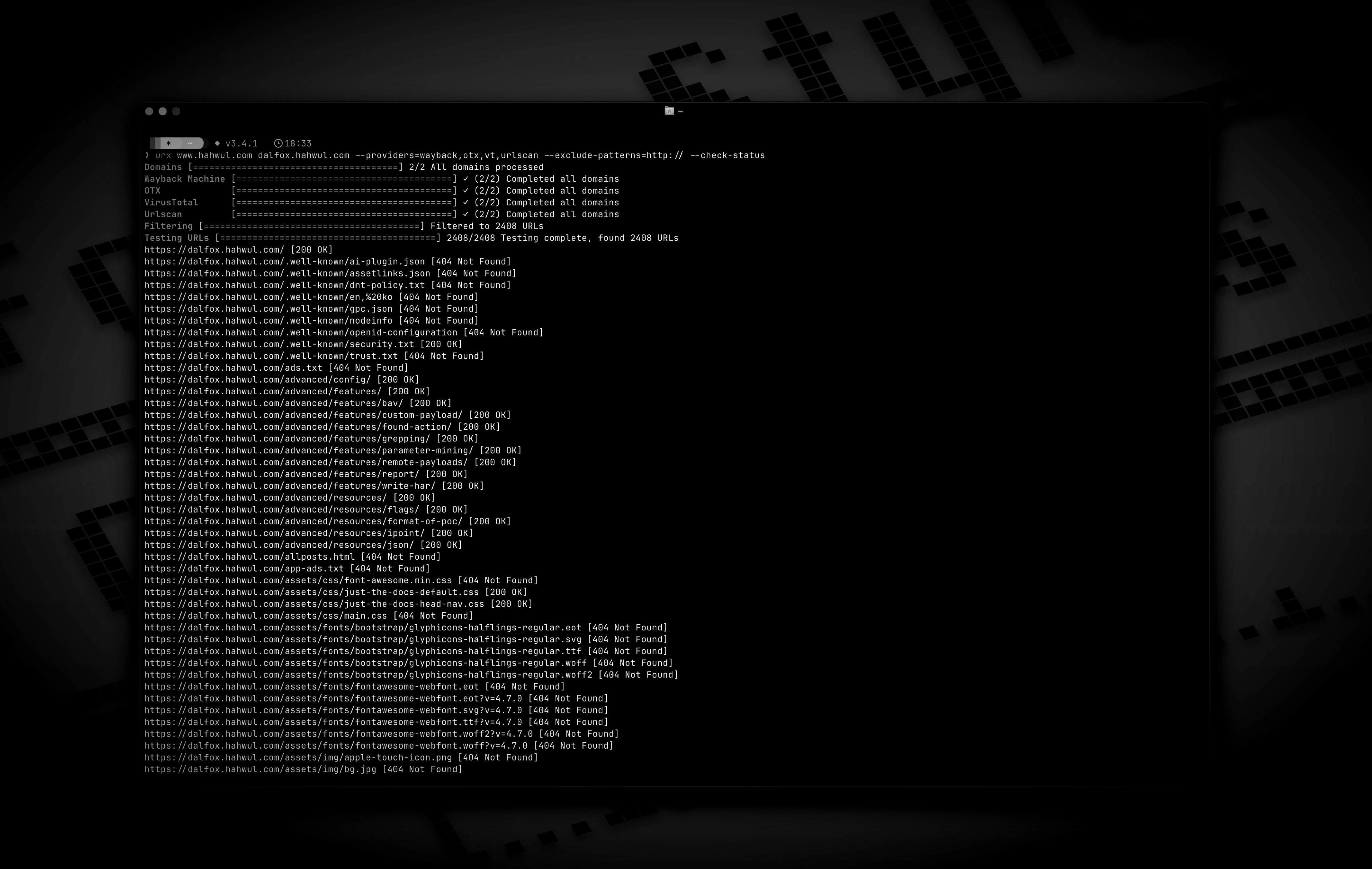
プレビュー

インストール

Cargo から

root@kitploit:~
# https://crates.io/crates/urx
cargo install urx

Homebrew から

root@kitploit:~
# https://formulae.brew.sh/formula/urx
brew install urx

ソースから

root@kitploit:~
git clone https://github.com/hahwul/urx.git
cd urx
cargo build --release

コンパイルされたバイナリは target/release/urx に配置されます。

Docker から

ghcr.io/hahwul/urx

使用法

基本的な使い方

root@kitploit:~
# 単一のドメインをスキャン
urx example.com

# 複数のドメインをスキャン
urx example.com example.org

# ファイルからドメインをスキャン
cat domains.txt | urx

オプション

root@kitploit:~
Usage: urx [OPTIONS] [DOMAINS]...

Arguments:
  [DOMAINS]...  URLを取得するドメイン

Options:
  -c, --config <CONFIG>           読み込む設定ファイル
      --provider-config <PATH>    APIキーのみを保持する別のプロバイダ設定ファイル (デフォルト: $XDG_CONFIG_HOME/urx/provider-config.toml)。CLI/env > provider-config > メイン設定。
  -h, --help                      ヘルプを表示
  -V, --version                   バージョンを表示

Input Options:
      --files <FILES>...          ファイルから直接URLを読み取ります (WARC、URLTeam圧縮、テキストファイルをサポート)
      --domain-list <PATH>        改行区切りのドメインリストファイル (繰り返し可能; 位置引数DOMAINSやstdinとマージ。`#`でコメント可)

Output Options:
  -o, --output <OUTPUT>           結果を書き込む出力ファイル
      --output-dir <PATH>         ドメインごとに1ファイルをこのディレクトリに書き込む (拡張子は--formatに従う)。--output/stdoutと共存可能。
  -f, --format <FORMAT>           出力形式 ("plain", "json", "csv" など) [default: plain]
      --merge-endpoint            同じパスを持つエンドポイントをマージし、URLパラメータを統合
      --normalize-url             より良い重複排除のためにURLを正規化 (クエリパラメータを並べ替え、末尾のスラッシュを削除)

Provider Options:
      --providers <PROVIDERS>
          使用するプロバイダ (カンマ区切り、例: "wayback,cc,otx,arquivo,vt,urlscan") [default: wayback,cc,otx]
      --exclude-providers <EXCLUDE_PROVIDERS>
          除外するプロバイダ (カンマ区切り)。--providers/--all-providersと競合した場合に優先。
      --all-providers
          サポートされているすべてのプロバイダを有効化。APIキーが必要なプロバイダは、キーが利用可能な場合のみ有効化。
      --list-providers
          サポートされているすべてのプロバイダを表示して終了。
      --subs
          検索時にサブドメインを含める
      --cc-index <CC_INDEX>
          使用するCommon Crawlインデックス。カンマ区切りで複数のインデックスを並列クエリ可能 (例: `CC-MAIN-2026-17,CC-MAIN-2025-51`)。`latest` (デフォルト) はcollinfo.jsonを介して最新を解決。 [default: latest]
      --wayback-from <DATE>
          Wayback Machineの結果をDATE (YYYY/YYYYMM/YYYYMMDD/YYYYMMDDhhmmss) 以降のスナップショットに制限
      --wayback-to <DATE>
          Wayback Machineの結果をDATE (--wayback-fromと同じ形式) 以前のスナップショットに制限
      --vt-api-key <VT_API_KEY>
          VirusTotalのAPIキー (ローテーションのために複数回使用可能。環境変数URX_VT_API_KEYにカンマ区切りキーでも設定可)
      --urlscan-api-key <URLSCAN_API_KEY>
          UrlscanのオプションAPIキー。プロバイダは匿名でも動作 (IPあたり約30 req/minでレート制限)。ローテーションのために複数回使用可能。URX_URLSCAN_API_KEY (カンマ区切りキー) でも設定可。
      --github-api-key <GITHUB_API_KEY>
          GitHub Code Searchプロバイダ用のパーソナルアクセストークン (URX_GITHUB_API_KEYも読み取り、ローテーション用にカンマ区切り)

Discovery Options:
      --exclude-robots   robots.txtの発見を除外
      --exclude-sitemap  sitemap.xmlの発見を除外

Display Options:
  -v, --verbose       冗長出力を表示
      --silent        サイレントモード (出力なし)
      --no-progress   プログレスバーを表示しない
      --show-sources  出力URLに、それを返したプロバイダを注釈として付与
      --stats         実行終了時にプロバイダごとの要約をstderrに出力

Filter Options:
  -p, --preset <PRESET>
          フィルタプリセット (例: "no-resources,no-images,no-audio,only-js,only-style")
  -e, --extensions <EXTENSIONS>
          特定の拡張子を持つURLのみを含める (カンマ区切り、例: "js,php,aspx")
      --exclude-extensions <EXCLUDE_EXTENSIONS>
          特定の拡張子を持つURLを除外 (カンマ区切り、例: "html,txt")
      --patterns <PATTERNS>
          特定のパターンを含むURLのみを含める (カンマ区切り)
      --exclude-patterns <EXCLUDE_PATTERNS>
          特定のパターンを含むURLを除外 (カンマ区切り)
      --show-only-host
          URLのホスト部分のみを表示
      --show-only-path
          URLのパス部分のみを表示
      --show-only-param
          URLのパラメータ部分のみを表示
      --min-length <MIN_LENGTH>
          含めるURLの最小長
      --max-length <MAX_LENGTH>
          含めるURLの最大長
      --strict
          厳密なホスト検証を強制 (デフォルト)

Network Options:
      --network-scope <NETWORK_SCOPE>  ネットワーク設定を適用するコンポーネントを制御 (all, providers, testers, または providers,testers) [default: all]
      --proxy <PROXY>                  HTTPリクエストにプロキシを使用 (形式: <http://proxy.example.com:8080>)
      --proxy-auth <PROXY_AUTH>        プロキシ認証資格情報 (形式: username:password)
      --insecure                       SSL証明書検証をスキップ (自己署名証明書を許可)
      --random-agent                   HTTPリクエストにランダムなUser-Agentを使用
      --timeout <TIMEOUT>              リクエストタイムアウト (秒) [default: 120]
      --retries <RETRIES>              失敗したリクエストのリトライ回数 [default: 2]
      --parallel <PARALLEL>            プロバイダごとに同時に取得する最大ドメイン数 (および同時URLテスト数); プロバイダの--rate-limitはこれらで共有される [default: 5]
      --rate-limit <RATE_LIMIT>        レート制限 (秒間リクエスト数)
      --rate-limit-by <PAIRS>          プロバイダごとのレートオーバーライド (例: `vt=1,wayback=10`); リストにないプロバイダは--rate-limitが適用される
      --max-time <MAX_TIME>            プロバイダの列挙時間のグローバル上限 (秒、0=無制限) [default: 0]

Testing Options:
      --check-status
          収集したURLのHTTPステータスコードを確認 [aliases: ----cs]
      --include-status <INCLUDE_STATUS>
          特定のHTTPステータスコードまたはパターンのURLを含める (例: --is=200,30x) [aliases: ----is]
      --exclude-status <EXCLUDE_STATUS>
          特定のHTTPステータスコードまたはパターンのURLを除外 (例: --es=404,50x,5xx) [aliases: ----es]
      --extract-links
          収集したURLから追加のリンクを抽出 (HTTPリクエストが必要)

使用例

root@kitploit:~
# Save results to a file
urx example.com -o results.txt

# Output in JSON format
urx example.com -f json -o results.json

# Filter for JavaScript files only
urx example.com -e js

# Exclude HTML and text files
urx example.com --exclude-extensions html,txt

# Filter for API endpoints
urx example.com --patterns api,v1,graphql

# Exclude specific patterns
urx example.com --exclude-patterns static,images

# Use Fileter Preset (similar to --exclude-extensions=png,jpg,.....)
urx example.com -p no-images

# Use specific providers
urx example.com --providers wayback,otx

# Add the keyless Arquivo.pt (Portuguese web archive) provider
urx example.com --providers wayback,cc,otx,arquivo

# URLScan works without a key (anonymous, rate-limited); a key just raises limits
urx example.com --providers urlscan

# Using VirusTotal and URLScan providers
# 1. Explicitly add to providers (with API keys via command line)
urx example.com --providers=vt,urlscan --vt-api-key=*** --urlscan-api-key=***

# 2. Using environment variables for API keys
URX_VT_API_KEY=*** URX_URLSCAN_API_KEY=*** urx example.com --providers=vt,urlscan

# 3. Auto-enabling: providers are automatically added when API keys are provided
urx example.com --vt-api-key=*** --urlscan-api-key=*** # No need to specify in --providers

# 4. Multiple API key rotation (to mitigate rate limits)
# Using repeated flags for multiple keys
urx example.com --vt-api-key=key1 --vt-api-key=key2 --vt-api-key=key3

# Using environment variables with comma-separated keys
URX_VT_API_KEY=key1,key2,key3 URX_URLSCAN_API_KEY=ukey1,ukey2 urx example.com

# Combining CLI flags and environment variables (CLI keys are used first)
URX_VT_API_KEY=env_key1,env_key2 urx example.com --vt-api-key=cli_key1 --vt-api-key=cli_key2

# URLs from robots.txt and sitemap.xml are included by default

# Exclude URLs from robots.txt files
urx example.com --exclude-robots

# Exclude URLs from sitemap
urx example.com --exclude-sitemap

# Include subdomains
urx example.com --subs

# Check status of collected URLs
urx example.com --check-status

# Read URLs directly from a text file
urx --files urls.txt

# Combine file input with filtering
urx --files urls.txt --patterns api,admin -f json

# Extract additional links from collected URLs
urx example.com --extract-links

# Network configuration
urx example.com --proxy http://localhost:8080 --timeout 60 --parallel 10 --insecure

# Advanced filtering
urx example.com -e js,php --patterns admin,login --exclude-patterns logout,static --min-length 20

# HTTP Status code based filtering
urx example.com --include-status 200,30x,405 --exclude-status 20x

# Disable host validation
urx example.com --strict false

# URL normalization and deduplication
# Normalize URLs by sorting query parameters and removing trailing slashes
urx example.com --normalize-url

# Combine normalization with endpoint merging for comprehensive deduplication
urx example.com --normalize-url --merge-endpoint

# URL normalization with file input
urx --files urls.txt --normalize-url

キャッシュとインクリメンタルスキャン

Urx は、繰り返しのスキャンでのパフォーマンス向上と、新しいURLのみを検出するインクリメンタルスキャンをサポートしています。

root@kitploit:~
# Enable caching with SQLite (default)
urx example.com --cache-type sqlite --cache-path ~/.urx/cache.db

# Use Redis for distributed caching
urx example.com --cache-type redis --redis-url redis://localhost:6379

# Incremental scanning - only show new URLs since last scan
urx example.com --incremental

# Set cache TTL (time-to-live) to 12 hours
urx example.com --cache-ttl 43200

# Disable caching entirely
urx example.com --no-cache

# Combine incremental scanning with filters
urx example.com --incremental -e js,php --patterns api

# Configuration file with caching settings
urx -c example/config.toml example.com

キャッシュのユースケース

root@kitploit:~
# Daily monitoring - only alert on new URLs
urx target.com --incremental --silent | notify-tool

# Efficient domain lists processing
cat domains.txt | urx --incremental --cache-ttl 3600 > new_urls.txt

# Distributed team scanning with Redis
urx example.com --cache-type redis --redis-url redis://shared-cache:6379

# Fast re-scans during development
urx test-domain.com --cache-ttl 300  # 5-minute cache for rapid iterations

他のツールとの統合

Urx は、他のセキュリティツールや偵察ツールとのパイプラインでうまく動作します:

root@kitploit:~
# Find domains, then discover URLs
echo "example.com" | urx | grep "login" > potential_targets.txt

# Combine with other tools
cat domains.txt | urx --patterns api | other-tool

インスピレーション

Urx は、AlienVault の Open Threat Exchange、Wayback Machine、Common Crawl から既知の URL を取得するツール gau (GetAllUrls) に触発されました。Urx は同様のコア機能を共有しながらも、パフォーマンス、並行処理、拡張されたフィルタリング機能に重点を置いて、Rust でゼロから構築されました。

コントリビュート

Urx はオープンソースプロジェクトであり、❤️ を込めて作られています。 このプロジェクトに貢献したい場合は、CONTRIBUTING.md を参照し、クールな内容でプルリクエストを送ってください。

ツールをダウンロード