デッドリンク(壊れたリンク)を見つける


ドキュメント • インストール • GitHub Action • コントリビューション • 変更履歴
デッドリンク(壊れたリンク)とは、Webページ内の接続できないリンクのことです。これらのリンクはSEOやセキュリティに悪影響を与える可能性があります。このツールを使えば、簡単に特定・修正できます。
v1(Ruby gem)をお探しですか? 現在は
legacy/v1ブランチに移行しており、バグ修正とセキュリティリリースのためにdeadfindergem の公開を継続しています。mainは Crystal による書き直し(v2+)をホストしています。
brew install deadfinder
# https://formulae.brew.sh/formula/deadfinder
docker run ghcr.io/hahwul/deadfinder:latest deadfinder url https://example.com
お使いのプラットフォームに合ったアーカイブを最新リリースからダウンロードし、展開して deadfinder を PATH に配置してください。
nix run github:hahwul/deadfinder
nix profile install github:hahwul/deadfinder
nix develop github:hahwul/deadfinder
Crystal >= 1.19.1 と cmake が必要です(lexbor HTMLパーサーのpostinstallによるもの。これがないと shards install が 'cmake': No such file or directory で失敗します)。
# macOS
brew install crystal cmake

# Debian / Ubuntu
sudo apt install crystal cmake
shards install
crystal build src/cli_main.cr -o deadfinder --release
# or: just build
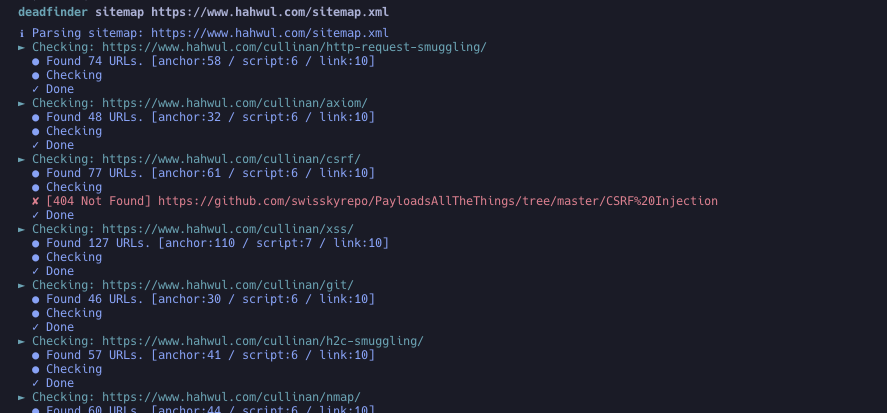
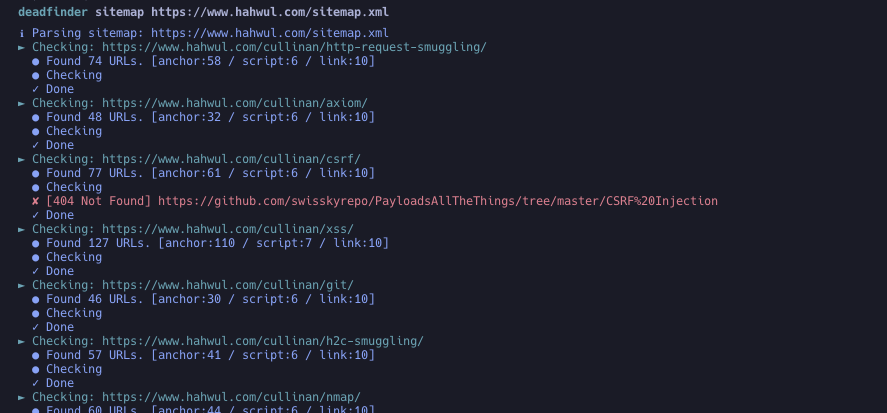
deadfinder sitemap https://www.hahwul.com/sitemap.xml
特定のリリースタグを指定してください。@latest は有効なActions参照ではありません。
steps:
- name: Run DeadFinder
  uses: hahwul/deadfinder@v2       # tracks the latest 2.x — pin a specific tag (e.g. @2.0.2) for stricter reproducibility
  id: broken-link
  with:
    command: sitemap           # url / file / sitemap / pipe
    target: https://www.hahwul.com/sitemap.xml
    # timeout: 10
    # concurrency: 50
    # silent: false
    # headers: "X-API-Key: 123444"
    # worker_headers: "User-Agent: Deadfinder Bot"
    # include30x: false
    # user_agent: "Apple"
    # proxy: "http://localhost:8070"
    # proxy_auth: "id:pw"
    # match:  ""
    # ignore: ""
    # coverage: true
    # visualize: report.png

- name: Output Handling
  run: echo '${{ steps.broken-link.outputs.output }}'
デッドリンクを見つけて、自動的にIssueとして追加したい場合は、記事「Automating Dead Link Detection」を参照してください。
Usage: deadfinder <command> [options]

Commands:
  pipe                        Scan the URLs from STDIN
  file <FILE>                 Scan the URLs from File
  url <URL>                   Scan the Single URL
  sitemap <SITEMAP-URL>       Scan the URLs from sitemap
  completion <SHELL>          Generate completion script (bash/zsh/fish)
  version                     Show version

Options:
  -r, --include30x                 Include 30x redirections as dead links
  -c, --concurrency=N              Number of concurrent workers (default: 50)
  -t, --timeout=N                  Timeout in seconds (default: 10)
  -o, --output=FILE                File to write results
  -f, --output_format=FORMAT       Output format: json, yaml, toml, csv, sarif (default: json)
  -H, --headers=HEADER             Custom HTTP headers for initial request
      --worker_headers=HEADER      Custom HTTP headers for worker requests
      --user_agent=UA              User-Agent string
  -p, --proxy=PROXY                Proxy server (HTTP and HTTPS CONNECT)
      --proxy_auth=USER:PASS       Proxy authentication
  -m, --match=PATTERN              Match URL pattern (regex)
  -i, --ignore=PATTERN             Ignore URL pattern (regex)
  -s, --silent                     Silent mode
  -v, --verbose                    Verbose mode
      --debug                      Debug mode
      --limit=N                    Limit number of URLs to scan
      --coverage                   Enable coverage tracking and reporting
      --visualize=PATH             Generate visualization PNG
# Scan the URLs from STDIN (multiple URLs)
cat urls.txt | deadfinder pipe

# Scan the URLs from a file
deadfinder file urls.txt

# Scan a single URL
deadfinder url https://www.hahwul.com

# Scan the URLs from a sitemap
deadfinder sitemap https://www.hahwul.com/sitemap.xml
deadfinder sitemap https://www.hahwul.com/sitemap.xml -o output.json
cat output.json | jq
{
  "Target URL": [
    "DeadLink URL",
    "DeadLink URL",
    "DeadLink URL"
  ]
}
--coverage を使用する場合:
deadfinder sitemap https://www.hahwul.com/sitemap.xml --coverage -o output.json
{
  "dead_links": {
    "Target URL": ["DeadLink URL 1", "DeadLink URL 2"]
  },
  "coverage": {
    "targets": {
      "Target URL": {
        "total_tested": 14,
        "dead_links": 7,
        "coverage_percentage": 50.0
      }
    },
    "summary": {
      "total_tested": 14,
      "total_dead": 7,
      "overall_coverage_percentage": 50.0
    }
  }
}
deadfinder completion bash > /etc/bash_completion.d/deadfinder
deadfinder completion zsh  > ~/.zsh/completion/_deadfinder
deadfinder completion fish > ~/.config/fish/completions/deadfinder.fish
コントリビューションを歓迎します!改善のアイデアやバグの報告がある場合は、以下の手順に従ってください:
feature/awesome-feature または bugfix/annoying-bug)。main ブランチに対してプルリクエスト(PR)を送信してください。