
Bluetoothハッキングのための情報収集ツール
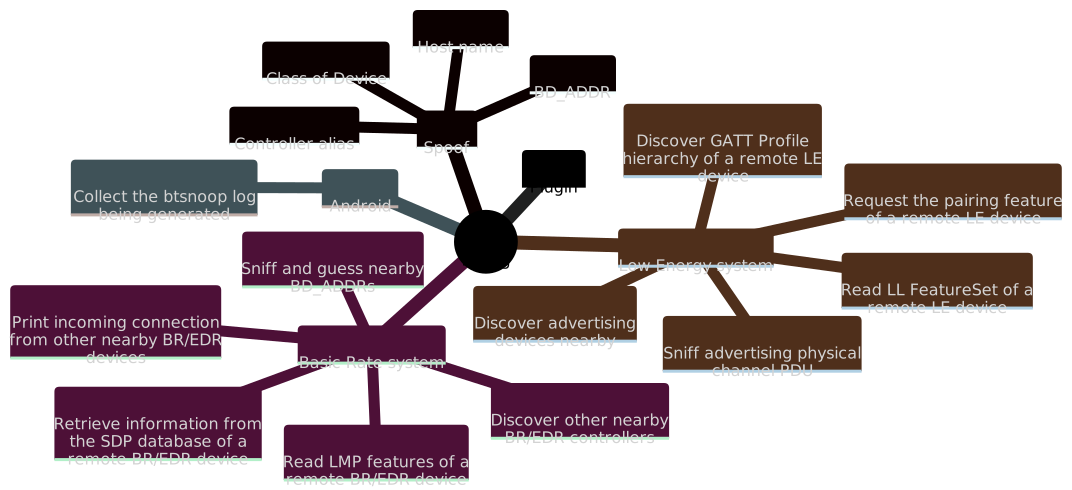
Bluing(旧称bluescan)は、主にPythonで書かれたBluetooth Intelligence Gatheringツールです。複雑なプロトコルであるBluetoothの内部構造を覗き見たり、Bluetoothデバイスをハッキングするのに役立ちます。以下が主な機能です:
Bluingは、公式のLinux BluetoothプロトコルスタックであるBlueZに一部依存しています。そのため、Linux上でのみ動作します。以下のコマンドで依存関係をインストールします:```sh
sudo apt install python3-pip python3-dev libcairo2-dev libgirepository1.0-dev
libbluetooth-dev libdbus-1-dev bluez-tools python3-cairo-dev
rfkill meson patchelf bluez ubertooth adb python-is-python3
現在、bluing は [PyPI](https://pypi.org/project/bluing/) を介して配布されており、**Python 3.10 のみをサポートしています**。以下はインストールコマンドです:```sh
sudo pip3.10 install bluing
$ bluing --helpAn intelligence gathering tool for hacking Bluetooth
Usage:
bluing [-h | --help]
bluing (-v | --version)
bluing [-i <hci>] --clean BD_ADDR
bluing --flash-micro-bit
bluing <command> [<args>...]
Arguments:
BD_ADDR Bluetooth device address
Options:
-h, --help Print this help and quit
-v, --version Print version information and quit
-i <hci> HCI device
--clean Clean cached data of a remote device
--flash-micro-bit Download the dedicated firmware to micro:bit(s)
Commands:
br Basic Rate system, includes an optional Enhanced Data Rate (EDR) extension
le Low Energy system
android Android Bluetooth stack
spoof Spoof with new local device information
plugin Manage plugins
Run `bluing <command> --help` for more information on a command.
br コマンド: Basic Rate システム$ bluing br --helpUsage:
bluing br [-h | --help]
bluing br [-i <hci>] [--inquiry-len=<n>] --inquiry
bluing br [-i <hci>] --sdp BD_ADDR
bluing br [-i <hci>] --local --sdp
bluing br [-i <hci>] --lmp-features BD_ADDR
bluing br [-i <hci>] --local --lmp-features
bluing br [-i <hci>] --stack BD_ADDR
bluing br [-i <hci>] --local --stack
bluing br [-i <hci>] [--inquiry-scan] --mon-incoming-conn
bluing br --org=<name> --timeout=<sec> --sniff-and-guess-bd-addr
Arguments:
BD_ADDR BR/EDR Bluetooth device address
Options:
-h, --help Print this help and quit
-i <hci> HCI device
--local Target a local BR/EDR device instead of a remote one
--inquiry Discover other nearby BR/EDR controllers
--inquiry-len=<n> Maximum amount of time (added to --ext-inquiry-len=<n>)
specified before the Inquiry is halted.
Time = n * 1.28 s
Time range: 1.28 to 61.44 s
Range of n: 0x01 to 0x30 [default: 8]
--ext-inquiry-len=<n> Extended_Inquiry_Length measured in number of
Baseband slots.
Interval Length = n * 0.625 ms (1 Baseband slot)
Time Range: 0 to 40.9 s
Range of n: 0x0000 to 0xFFFF [default: 0]
--sdp Retrieve information from the SDP database of a
remote BR/EDR device
--lmp-features Read LMP features of a remote BR/EDR device
--stack Determine the Bluetooth stack type of a remote BR/EDR device
--mon-incoming-conn Print incoming connection from other nearby BR/EDR devices
--inquiry-scan Enable the Inquiry Scan
--sniff-and-guess-bd-addr Sniff SAPs of BD_ADDRs over the air, then guess the
address based on the organization name. Need at
least one Ubertooth device
--org=<name> An organization name in the OUI.txt
--timeout=<sec> Timeout in second(s)
--inquiry: 近くの他の BR/EDR コントローラーを発見$ sudo bluing br --inquiry[INFO] Discovering other nearby BR/EDR Controllers on hci0 for 10.24 sec BD_ADDR: B0:C9:52:45:33:13 (GUANGDONG OPPO MOBILE TELECOMMUNICATIONS CORP.,LTD) Page scan repetition mode: 1 (R1) Reserved: 0x02 CoD: 0x5a020c Service Class: 0b1011010000 Telephony Object Transfer Capturing Networking Major Device Class: 0b00010, Phone Clock offset: 0x50D5 RSSI: -61 Extended inquiry response: Complete Local Name: old man phone Complete List of 16-bit Service Class UUIDs 0x1105 OBEXObjectPush 0x110a AudioSource 0x110c A/V_RemoteControlTarget 0x110e A/V_RemoteControl 0x1112 Headset - Audio Gateway (AG) 0x1115 PANU 0x1116 NAP 0x111f HandsfreeAudioGateway 0x112d SIM_Access 0x112f Phonebook Access - PSE 0x1200 PnPInformation 0x1132 Message Access Server Complete List of 32-bit Service Class UUIDs None Complete List of 128-bit Service Class UUIDs A49EAA15-CB06-495C-9F4F-BB80A90CDF00 00000000-0000-0000-0000-000000000000 ... ... [INFO] Requesting the names of all discovered devices... B0:C9:52:45:33:13 : old man phone ... ...
--sdp: リモート BR/EDR デバイスの SDP データベースから情報を取得$ sudo bluing br --sdp 34:13:46:23:6A:4DScanning ⠋ Number of service records: 18 Service Record 0x0000: ServiceRecordHandle (uint32) 0x0001000d 0x0001: ServiceClassIDList (sequence) 0x1105: OBEXObjectPush 0x0004: ProtocolDescriptorList (sequence) 0x0100: L2CAP 0x0003: RFCOMM channel: 0x0c 0x0008: OBEX 0x0005: BrowseGroupList (sequence) 0x1002: PublicBrowseRoot 0x0009: BluetoothProfileDescriptorList (sequence) 0x1105: OBEXObjectPush v1.2 0x0100: ServiceName (guess) (text) OBEX Object Push 0x0200: GoepL2CapPsm (guess) (uint16) 0x1023 0x0303: SupportedFormatsList (guess) (sequence) 0x01: vCard 2.1 0x02: vCard 3.0 0x03: vCal 1.0 0x04: iCal 2.0 0xff: Any type of object ... ...
--lmp-features: リモート BR/EDR デバイスの LMP 機能を読み取る$ sudo bluing br --lmp-features 6A:8D:99:33:56:AEVersion Version: Bluetooth Core Specification 5.2 (LMP) Bluetooth Core Specification 5.2 (LL) Manufacturer name: HiSilicon Technologies CO., LIMITED Subversion: 33561 LMP features 3 slot packets: True 5 slot packets: True Encryption: True Slot offset: True Timing accuracy: True Role switch: True Hold mode: False Sniff mode: True Previously used: False Power control requests: True Channel quality driven data rate (CQDDR): True ... ... Extended LMP features Page 1 Secure Simple Pairing (Host Support): True LE Supported (Host): True Simultaneous LE and BR/EDR to Same Device Capable (Host): True Secure Connections (Host Support): True Page 2 Connectionless Slave Broadcast - Master Operation: False Connectionless Slave Broadcast - Slave Operation: False Synchronization Train: False Synchronization Scan: False HCI_Inquiry_Response_Notification event: True ... ...
--mon-incoming-conn: 近くの他の BR/EDR デバイスからの受信接続を表示$ sudo bluing br --inquiry-scan --mon-incoming-conn[INFO] Inquiry_Scan_Interval: 4096, 2560.0 ms Inquiry_Scan_Window: 4096, 2560.0 ms [INFO] Inquiry Scan and Page Scan enabled A0:DE:0F:99:EF:78 incoming CoD: 0x5a020c Service Class: 0b1011010000 Telephony Object Transfer Capturing Networking Major Device Class: 0b00010, Phone link type: 0x01 - ACL ... ...
--sniff-and-guess-bd-addr: 空中の近くの BD_ADDR をスニッフィングして推測$ bluing br --org='Huawei Device Co., Ltd.' --timeout=600 --sniff-and-guess-bd-addr[INFO] Possible BD_ADDR for ??:??:99:4C:45:C3 24:A7:99:4C:45:C3 [INFO] Possible BD_ADDR for ??:??:E4:2D:69:EE BC:1A:E4:2D:69:EE D0:05:E4:2D:69:EE 30:AA:E4:2D:69:EE [INFO] Possible BD_ADDR for ??:??:15:60:81:7F 64:23:15:60:81:7F D4:74:15:60:81:7F ... ...
le コマンド: Low Energy システム$ bluing le --helpUsage:
bluing le [-h | --help]
bluing le [-i <hci>] [--scan-type=<type>] [--timeout=<sec>] [--sort=<key>] --scan
bluing le [-i <hci>] --pairing-feature [--timeout=<sec>] [--addr-type=<type>] PEER_ADDR
bluing le [-i <hci>] --ll-feature-set [--timeout=<sec>] [--addr-type=<type>] PEER_ADDR
bluing le [-i <hci>] --gatt [--io-cap=<name>] [--addr-type=<type>] PEER_ADDR
bluing le [-i <hci>] --local --gatt
bluing le [-i <hci>] --mon-incoming-conn
bluing le [--device=</dev/tty>] [--channel=<num>] --sniff-adv
Arguments:
PEER_ADDR LE Bluetooth device address
Options:
-h, --help Print this help and quit
-i <hci> HCI device
--scan Discover advertising devices nearby
--scan-type=<type> The type of scan to perform. active or passive [default: active]
--sort=<key> Sort the discovered devices by key, only support RSSI
now [default: rssi]
--ll-feature-set Read LL FeatureSet of a remote LE device
--pairing-feature Request the pairing feature of a remote LE device
--timeout=<sec> Duration of the LE scanning, but may not be precise [default: 10]
--gatt Discover GATT Profile hierarchy of a remote LE device
--io-cap=<name> Set IO capability of the agent. Available value:
DisplayOnly, DisplayYesNo, KeyboardOnly, NoInputNoOutput,
KeyboardDisplay (KeyboardOnly) [default: NoInputNoOutput]
--addr-type=<type> Type of the LE address, public or random
--sniff-adv Sniff advertising physical channel PDU. Need at least
one micro:bit (or other supported NRF51 device specified with --device)
--channel=<num> LE advertising physical channel, 37, 38 or 39 [default: 37,38,39]
--device=</dev/tty> Device to use, comma separated (e.g., /dev/ttyUSB0,/dev/ttyUSB1,/dev/ttyUSB2)
Only needed if using NRF51 devices other than micro:bit (e.g., Bluefruit)
--scan: 近くのアドバタイズデバイスを発見$ sudo bluing le --scan[WARNING] You might want to spoof your LE address before doing an active scan [INFO] LE active scanning on hci0 for 10 sec Scanning ⠴ ----------------LE Devices Scan Result---------------- Addr: 74:A3:4A:D4:78:55 (ZIMI CORPORATION) Addr type: public Connectable: True RSSI: -68 dBm General Access Profile: Flags: LE General Discoverable Mode BR/EDR Not Supported Service Data - 16-bit UUID: UUID: 0x95FE Data: 9055990701b743e34aa3740e00 Appearance: 0000 Tx Power Level: 0 dBm (pathloss 68 dBm) Complete Local Name: Mesh Mi Switch ... ...
--ll-feature-set: リモート LE デバイスの LL FeatureSet を読み取る$ sudo bluing le --ll-feature-set --addr-type=public 18:D9:8F:77:24:F1[INFO] Reading LL FeatureSet of 18:D9:8F:77:24:F1 on hci0 Reading ⠼ LE LL Features: LE Encryption: True Connection Parameters Request Procedure: False Extended Reject Indication: False Slave-initiated Features Exchange: False LE Ping: False LE Data Packet Length Extension: True LL Privacy: False Extended Scanner Filter Policies: False LE 2M PHY: False Stable Modulation Index - Transmitter: False Stable Modulation Index - Receiver: False ... ...
--pairing-feature: リモート LE デバイスのペアリング機能を要求$ sudo bluing le --pairing-feature --addr-type=public 18:D9:8F:77:24:F1[INFO] Requesting pairing feature of 18:D9:8F:77:24:F1 on hci0 Requesting ⠧ Pairing Response IO Capability: 0x03 - NoInputNoOutput OOB data flag: 0x00 - Not Present AuthReq: 0x01 Maximum Encryption Key Size: 16 Initiator Key Distribution: 0x00 EncKey: False IdKey: False SignKey: False LinkKey: False RFU: 0b0000 Responder Key Distribution: 0x01 EncKey: True IdKey: False SignKey: False LinkKey: False RFU: 0b0000
--gatt: リモート LE デバイスの GATT プロファイル階層を発見$ sudo bluing le --gatt --addr-type=public 18:D9:8F:77:24:F1----------------GATTスキャン結果---------------- サービス数: 6
サービス (0x0100 - 0x0112, 7特性) 宣言 ハンドル: 0x0100 タイプ: 2800 (プライマリサービス宣言) 値: 1812 (ヒューマンインタフェースデバイス) 権限: 読み取り (認証/許可なし)
<span style="font-weight: bold; color: #ecc179">特性</span> (2ディスクリプタ)
<span style="font-weight: bold; color: #ecc179">宣言</span>
ハンドル: 0x010d
タイプ: 2803 (特性宣言)
値:
プロパティ: <span style="font-weight: bold; color: #9fab76">読み取り、応答なし書き込み、書き込み、通知</span>
ハンドル: <span style="font-weight: bold; color: #9fab76">0x010e</span>
UUID: <span style="font-weight: bold; color: #9fab76">2A4D</span> (<span style="font-weight: bold; color: #9fab76">レポート</span>)
権限: 読み取り (認証/許可なし)
<span style="font-weight: bold; color: #ecc179">値</span>
ハンドル: 0x0302
タイプ: 4A02 (不明)
値: <span style="font-weight: bold; color: #c35956">読み取り不可</span>
権限: 上位層固有
<span style="font-weight: bold; color: #ecc179">ディスクリプタ</span>
ハンドル: <span style="font-weight: bold; color: #9fab76">0x010f</span>
タイプ: <span style="font-weight: bold; color: #9fab76">2902</span> (<span style="font-weight: bold; color: #ecc179">クライアント特性設定宣言</span>)
値: <span style="font-weight: bold; color: #9fab76">b'\x00\x00'</span>
権限: 読み取り (認証/許可なし)、書き込み (上位層が認証/許可を指定)
--sniff-adv: アドバタイジング物理チャネルPDUをスニッフィング$ sudo bluing le --sniff-adv[INFO] micro:bit /dev/ttyACM2 をチャネル37で使用 [INFO] micro:bit /dev/ttyACM1 をチャネル38で使用 [INFO] micro:bit /dev/ttyACM0 をチャネル39で使用 [INFO] micro:bit 38 < 準備完了 -> 開始 [INFO] micro:bit 37 < 準備完了 -> 開始 [INFO] micro:bit 39 < 準備完了 -> 開始 [38] [ADV_NONCONN_IND] ランダム AdvA: 28:7A:88:B2:35:0B [39] [ADV_IND] パブリック AdvA: A4:E4:72:B1:CB:8D [37] [SCAN_REQ] ランダム ScanA: 6A:90:0C:07:3E:14 ランダム AdvA: 7D:9B:A8:5A:F2:81 ... ...
android コマンド: Android Bluetooth スタック$ bluing android --help使用方法:
bluing android [-h | --help]
bluing android [-t <id>] --collect-btsnoop-log [-o <file>]
オプション:
-h, --help このヘルプを表示して終了
-t <id> 指定されたトランスポートIDを持つAndroidデバイスを使用します。
このオプションは、利用可能なデバイスが1台のみの場合は無視されます。
--collect-btsnoop-log 生成中のbtsnoopログをローカルファイルに収集します。デフォルトは./btsnoop_hci.log
-o <file> 出力を<file>に配置します [デフォルト: ./btsnoop_hci.log]
--collect-btsnoop-log: 生成中のbtsnoopログを収集$ bluing android -t 3 --collect-btsnoop-log -o btsnoop_hci.log; file btsnoop_hci.logbtsnoop_hci.log: BTSnoop バージョン 1, HCI UART (H4)
spoof コマンド: 新しいローカルデバイス情報でスプーフィング$ bluing spoof --help使用方法:
bluing spoof [-h | --help]
bluing spoof [-i <hci>] --bd-addr=<BD_ADDR>
bluing spoof [-i <hci>] --cls-of-dev=<num>
bluing spoof --host-name=<name>
bluing spoof [-i <hci>] --alias=<alias>
オプション:
-h, --help このヘルプを表示して終了
-i <hci> HCIデバイス
--bd-addr=<BD_ADDR> 新しいBD_ADDRでスプーフィング
--cls-of-dev=<num> 新しいデバイスクラスでスプーフィング
--host-name=<name> 新しいホスト名でスプーフィング
--alias=<alias> 新しいエイリアスでスプーフィング
--bd-addr=<BD_ADDR>: 新しいBD_ADDRでスプーフィングこの機能は現在 spooftooph に依存しており、Kali Linux を使用している場合は sudo apt install spooftooph を実行してインストールできます。ただし、Ubuntu でこの機能を使用する場合は、手動で spooftooph をコンパイルしてインストールする必要があります。
$ sudo bluing spoof --bd-addr=AA:BB:CC:DD:EE:FF[警告] 元のHCIデバイス番号が変更されている可能性があります [INFO] BD_ADDR変更: 11:22:33:44:55:66 -> AA:BB:CC:DD:EE:FF
--cls-of-dev=<num>: 新しいデバイスクラスでスプーフィング$ sudo bluing spoof --cls-of-dev=0x6c0100成功時は出力なし
--host-name=<name>: 新しいホスト名でスプーフィング$ sudo bluing spoof --host-name=Bluing成功時は出力なし
--alias=<alias>: 新しいコントローラエイリアスでスプーフィング$ sudo bluing spoof --alias='Bluing Alias'成功時は出力なし
plugin コマンド: プラグインの管理$ bluing plugin --help使用方法:
bluing plugin [-h | --help]
bluing plugin <command> [<args>...]
オプション:
-h, --help このヘルプを表示して終了
コマンド:
list インストール済みプラグインを一覧表示
install プラグインをインストール
uninstall プラグインをアンインストール
run プラグインを実行
bluing の多くの機能には、少なくとも1つのBluetoothアダプタへのアクセスが必要です。Linux物理マシンに付属のアダプタを使用したり、Linux仮想マシンをホストマシンのアダプタに排他的に使用したりすることも可能ですが、安定性を向上させるためには、Parani UD100-G03 などの外部USB Bluetoothアダプタを使用することをお勧めします。
Bluing は、アドバタイジング物理チャネルPDU(le --sniff-adv)をスニッフィングする際に、少なくとも1台のオリジナル micro:bit を必要とし、同時に3台使用することを推奨します。これらの micro:bit は、bluing が提供する専用ファームウェアを実行する必要があります。micro:bit を Linux に接続した後、以下のコマンドを実行してプリビルド済みファームウェアをフラッシュできます。
bluing --flash-micro-bit
micro:bit ほど便利ではありませんが、購入が容易な汎用の NRF51 アダプタもサポートされています。Adafruit Bluefruit LE Friend および BLE400 ボードのサポートが追加されています。これらを使用するには、SWD を使用してフラッシュする必要があります。本ツールはこれらのデバイスのフラッシュをサポートしていません。また、ツールはこれらのデバイスを自動的に識別できません。代わりに --devices オプションでコンピュータに接続されたポートを指定する必要があります。
近くの BD_ADDR をスニッフィングして推測する際(br --sniff-and-guess-bd-addr)、bluing は Ubertooth One を必要とします。
rfkill が hci0 を見つけられない以下は例外メッセージです。```txt Exception: Can't find the ID of hci0 in rfkill
この例外は、古いバージョンのrfkillが`-r`オプションと`-n`オプションをサポートしていないために発生する可能性があります。例:
<pre>
$ <span style="font-weight: bold; color: #9fab76">cat</span> /etc/os-release | <span style="font-weight: bold; color: #9fab76">head</span> -n 2
NAME="Ubuntu"
VERSION="16.10 (Yakkety Yak)"
$ <span style="font-weight: bold; color: #9fab76">rfkill</span> --version
rfkill 0.5-1ubuntu3 (Ubuntu)
</pre>
この場合、rfkillを新しいバージョンにアップグレードすることで問題を解決できます。例:
<pre>
$ <span style="font-weight: bold; color: #9fab76">cat</span> /etc/os-release | <span style="font-weight: bold; color: #9fab76">head</span> -n 2
PRETTY_NAME="Kali GNU/Linux Rolling"
NAME="Kali GNU/Linux"
$ <span style="font-weight: bold; color: #9fab76">rfkill</span> --version
rfkill from util-linux 2.38.1
</pre>
### 管理コマンド `scanend` の実行に失敗しました
以下はエラーメッセージです:```txt
ERROR: Failed to execute management command 'scanend' (code: 11, error: Rejected)
問題を解決するには、Bluetoothサービスを再起動してみてください:
sudo systemctl restart bluetooth.service
... ...