 feder-cr/invisible_playwright
Playwrightをアンチボットに見つからないようにするので、CAPTCHAは不要:同じAPI、アンチ検出ステルスヘッドレスFirefox、未検出のフィンガープリント、ボット検出のバイパス、PythonによるWebスクレイピングとブラウザ自動化。

<div align="center">
<picture>
<source media="(max-width: 374px) and (prefers-color-scheme: dark)" srcset="https://raw.githubusercontent.com/feder-cr/invisible_playwright/main/docs/banner-small-dark.gif">
<source media="(max-width: 374px)" srcset="https://raw.githubusercontent.com/feder-cr/invisible_playwright/main/docs/banner-small-light.gif">
<source media="(max-width: 1239px) and (prefers-color-scheme: dark)" srcset="https://raw.githubusercontent.com/feder-cr/invisible_playwright/main/docs/banner-phone-dark.gif">
<source media="(max-width: 1239px)" srcset="https://raw.githubusercontent.com/feder-cr/invisible_playwright/main/docs/banner-phone-light.gif">
<source media="(prefers-color-scheme: dark)" srcset="https://raw.githubusercontent.com/feder-cr/invisible_playwright/main/docs/banner-dark.gif">
<img alt="invisible_playwright、アンチ検出 Firefox 上の Playwright。アニメーション: Playwright からの2行の切り替え、エンジン内部に設定されたフィンガープリント、手のように動くマウス、そして合格するボットテスト。" src="https://raw.githubusercontent.com/feder-cr/invisible_playwright/main/docs/banner-light.gif" width="100%">
</picture>
<h3 align="center">Playwright はアンチボットやキャプチャに検出されます。<br>
こちらは未検出のフィンガープリントを備えたアンチ検出 Firefox 上で動作し、既存の Playwright コードと互換性があります。</h3>
</div>
## 仕組み
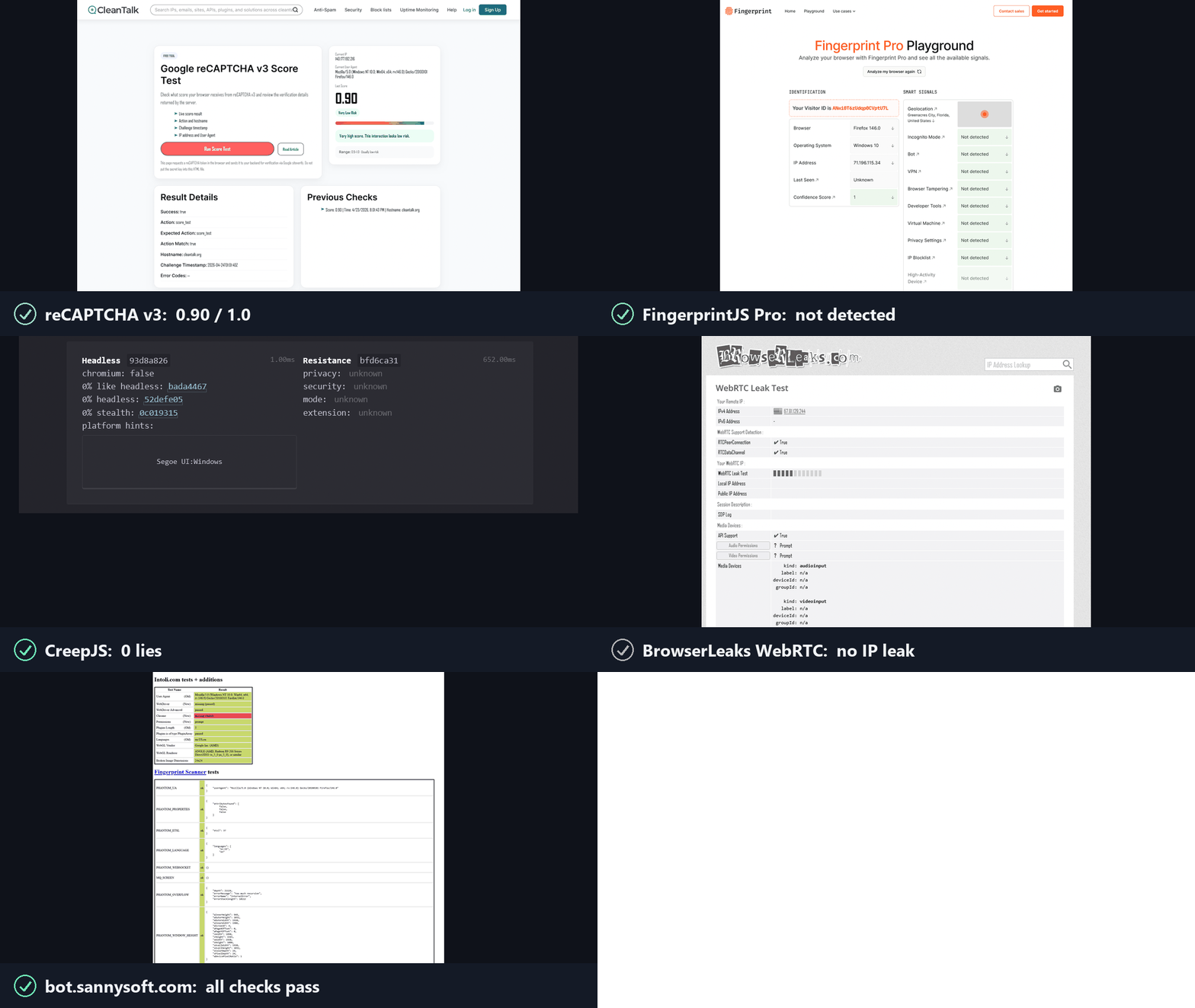
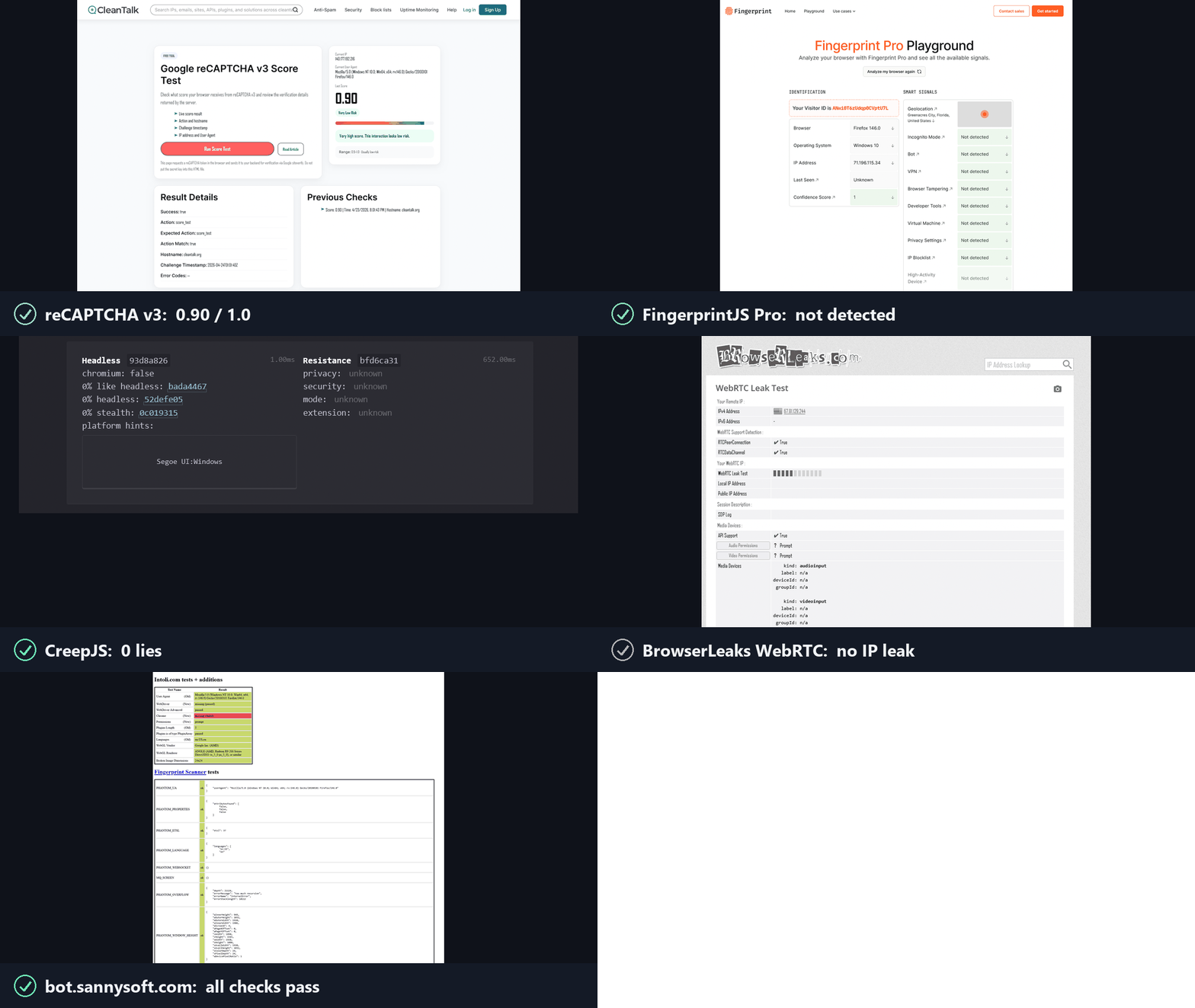
アンチボットは2つの問いを投げかけ、reCAPTCHA、hCaptcha、Cloudflare Turnstile がその回答を採点します。invisible_playwright はその両方に「はい」と答えます。
**1. これは本物のブラウザか?** はい。C++ ソースレベルでパッチを当てた Firefox です。
- ブラウザのフィンガープリントはページに注入されるのではなく、エンジン内部で設定されます: navigator、screen、GPU/WebGL、canvas、フォント、オーディオ、WebRTC、タイムゾーン、ネットワーク。ヘッドレスでもヘッド付きでも、どちらでも同じ値になります。
- JS シムも、オーバーライドも、読み取られる継ぎ目もありません。
**2. 本物の人間が使っているか?** はい。操作はドライバー内で人間らしくされます。
- すべてのクリック、ホバー、ドラッグは人間のタイミングを伴う自然なマウス経路に従い、カーソルがテレポートすることはありません。
- 各入力は本物のマウスとバイト単位で同一です: 本物の入力ソース、圧力、信頼されたイベント。
---
## インストール
Windows の場合、PowerShell で:
```powershell
powershell -ExecutionPolicy ByPass -c "irm https://astral.sh/uv/install.ps1 | iex"
$env:Path = "$env:USERPROFILE\.local\bin;$env:Path"
uv init --python ">=3.11" my-project
cd my-project
uv add invisible-playwright
uv run invisible-playwright fetch # one-time download, sha256-verified: 240 MB, about 550 MB unpacked
```
Linux:
```bash
curl -LsSf https://astral.sh/uv/install.sh | sh
source $HOME/.local/bin/env
uv init --python ">=3.11" my-project
cd my-project
uv add invisible-playwright
uv run invisible-playwright fetch # one-time download, sha256-verified: 262 MB (x86_64) / 253 MB (arm64), about 550 MB unpacked
```
対応プラットフォーム: **Windows x86_64**、**Linux x86_64 / arm64**。
次に、以下の例のいずれかを `my-project` 内の `main.py` として保存し、`uv run main.py` で実行します。
---
## 使用方法
### セッションごとのランダムフィンガープリント
**Playwright の API、同期・非同期の両方に対応し、コード変更は不要です。** 同じオブジェクト、同じ呼び出し、同じ戻り値です。一部のサーフェスは対象外です — トレーシング、HAR、CDP、API リクエストコンテキスト — これらはそれぞれ、黙って誤動作するのではなく、理由を述べた一文で拒否します。すでに Playwright を使用している場合、切り替えは 2 行です:
```diff
- from playwright.sync_api import sync_playwright
- with sync_playwright() as p:
- browser = p.firefox.launch()
+ from invisible_playwright import InvisiblePlaywright
+ with InvisiblePlaywright() as browser:
```
すべてのセッションは固有のフィンガープリント(GPU、オーディオ、フォント、画面、約200フィールド)とベジェ曲線のマウス動作を取得します。
**同期**
```python
from invisible_playwright import InvisiblePlaywright
with InvisiblePlaywright(proxy={"server": "socks5://...", "username": "u", "password": "p"}) as browser:
page = browser.new_page()
page.goto("https://example.com")
page.click("#submit") # mouse arcs to the button on a Bezier curve
```
**非同期**
```python
from invisible_playwright.async_api import InvisiblePlaywright
async with InvisiblePlaywright(proxy={"server": "socks5://...", "username": "u", "password": "p"}) as browser:
page = await browser.new_page()
await page.goto("https://example.com")
await page.click("#submit")
```
`browser` オブジェクトは `playwright.sync_api.Browser` / `playwright.async_api.Browser` です。すべての Playwright メソッドがそのまま動作します。
実行を再現するためにシードをログに記録します:
```python
sf = InvisiblePlaywright()
with sf as browser:
print("seed =", sf.seed)
# ...
```
### 再現可能なフィンガープリント
```python
with InvisiblePlaywright(seed=42) as browser:
... # same GPU, same canvas hash, same audio context, every run
```
### プロキシ
```python
proxy = {
"server": "socks5://gate.example.com:1080",
"username": "user",
"password": "pass",
}
with InvisiblePlaywright(proxy=proxy) as browser:
...
```
サポートされるスキーム: `socks5`、`socks4`、`http`、`https`。DNS はデフォルトでプロキシ経由でルーティングされ、ローカルリークは発生しません。
### タイムゾーン
ブラウザのタイムゾーンは `timezone=` に従います:
```python
# default: timezone is auto-derived from the egress IP (proxy egress if a
# proxy is set, otherwise the host's own public IP)
with InvisiblePlaywright(proxy=proxy) as browser:
...
# explicit IANA zone always wins, the only way to force a specific zone
with InvisiblePlaywright(proxy=proxy, timezone="America/New_York") as browser:
...
```
### 特定のフィンガープリントフィールドの固定
デフォルトではすべてが `seed` から生成されます。残りは seed 由来のまま、特定の値を強制するには:
```python
with InvisiblePlaywright(
seed=42,
pin={
"gpu.renderer": "ANGLE (AMD, Radeon R9 200 Series Direct3D11 vs_5_0 ps_5_0, D3D11)",
"gpu.vendor": "Google Inc. (AMD)",
"screen.width": 2560,
"screen.height": 1440,
"hardware.concurrency": 16,
},
) as browser:
...
```
GPU の pin は自由な文字列を設定するのではなく、検証済みのペルソナのいずれかを選択します。これは、約 81 個の `getParameter` 値と拡張機能のリストがレンダラー名とともに移動し、検出器がそれらをレンダラー名と照合するためです。プールに存在しない名前を指定すると例外が発生し、エラーには存在する名前の一覧が表示されます。
pin 可能なキーの完全なリスト、pin がベイジアンサンプラーとどのように相互作用するか、および一般的なパターンについては **[docs/pinning.md](https://github.com/feder-cr/invisible_playwright/blob/main/docs/pinning.md)** を参照してください。
---
## CLI
インストールされるコマンドはハイフン付きの `invisible-playwright` です。`python -m
invisible_playwright` も同様に動作し、PATH 上に何も必要としません。
```bash
invisible-playwright fetch # download the engine if missing, check every cached
# one against the seal, print the path
invisible-playwright version # wrapper, core and engine versions, and where the
# engine is cached
```
## ドキュメント、ガイド、比較
**スクリプトよりプロンプトの方がよい場合。** このページはエンジンであり、Python
ライブラリとして提供されています。コードを書かずに使う方法は2つあり、どちらも1行です。すでにお使いのMCPクライアント(Claude Code、Claude Desktop、Cursor)から
`claude mcp add stealth -- uvx aihawk` を実行する方法は
[MCPサーバーのページ](https://github.com/feder-cr/AIHawk/wiki/mcp-server)を参照してください。または、
インターフェースとモデルが含まれ、OpenRouterのキーだけが必要な
`uvx aihawk ui --openrouter-key sk-or-...` を使う方法は
[AIHawk](https://github.com/feder-cr/AIHawk)を参照してください。土台となるエンジンは同じで、2つ目は
1つ目のクライアントです。
すべての内容は
**[wiki](https://github.com/feder-cr/invisible_playwright/wiki)** でより読みやすく、検索可能な形で、
1つの平坦なリストではなく4つのセクションに整理されています:
- **[ドキュメント](https://github.com/feder-cr/invisible_playwright/blob/main/docs/documentation.md)** -
インストール、素のPlaywrightからの2行での切り替え、プロキシ/タイムゾーンの
設定、特定フィールドの固定、CLI。
- **[ガイド](https://github.com/feder-cr/invisible_playwright/blob/main/docs/guides.md)** - 検出が実際にどのように
機能するかを7つのグループで解説:ブラウザのアイデンティティ、canvas/WebGL/フォント/
オーディオ、ネットワークとWebRTC、自動化レイヤー、AIエージェント、ソースから
解説する検出器そのもの、そしてテスト。
- **[比較](https://github.com/feder-cr/invisible_playwright/blob/main/docs/comparisons.md)** -
Camoufox、Patchright、nodriver、playwright-stealthとの比較、および一般に
ChromiumよりFirefoxを選ぶ理由。
- **[統合](https://github.com/feder-cr/invisible_playwright/blob/main/docs/integrations)** -
Scrapy、Crawlee、Robot Framework、CodeceptJS、テストランナー、Playwright MCP、そして
適合しないフレームワークを名前付きで紹介。
どこから始めればよいかわからない場合は、[Playwrightを検出されないようにする3つの方法](https://github.com/feder-cr/invisible_playwright/blob/main/docs/playwright-stealth-levels.md)
が他の多くのページがリンクする地図であり、[Playwrightが1つのサイトでボットとして検出される](https://github.com/feder-cr/invisible_playwright/blob/main/docs/playwright-detected-as-bot.md)
がトラブルシューティングの順序、そして[navigator.webdriverはあなたが思うような手がかりではない](https://github.com/feder-cr/invisible_playwright/blob/main/docs/navigator-webdriver-explained.md)
がこの分野で最も有名なプロパティと、それを単独でパッチしてもほとんど何も得られない理由を説明しています。
検出器セクションは現在、商用アンチボット製品を名前で取り上げており、それぞれ
独自のドキュメントまたは確認されたリバースエンジニアリングから読み解いています:
[Cloudflare Bot Management](https://github.com/feder-cr/invisible_playwright/blob/main/docs/cloudflare-bot-management-explained.md)と
[Turnstile](https://github.com/feder-cr/invisible_playwright/blob/main/docs/cloudflare-turnstile-explained.md)、
[DataDome](https://github.com/feder-cr/invisible_playwright/blob/main/docs/datadome-explained.md)、[Kasada](https://github.com/feder-cr/invisible_playwright/blob/main/docs/kasada-explained.md)、
[Akamai Bot Manager](https://github.com/feder-cr/invisible_playwright/blob/main/docs/akamai-bot-manager-explained.md)、
[PerimeterX](https://github.com/feder-cr/invisible_playwright/blob/main/docs/perimeterx-explained.md)、[hCaptcha](https://github.com/feder-cr/invisible_playwright/blob/main/docs/hcaptcha-explained.md)、
[Imperva](https://github.com/feder-cr/invisible_playwright/blob/main/docs/imperva-incapsula-explained.md)、そして
[その他の一連](https://github.com/feder-cr/invisible_playwright/blob/main/docs/guides-detectors-explained.md)。
## 関連プロジェクト
**このプロジェクトの他の構成要素。** エンジンは3つのうち中央にあり、
その周囲の2つがほとんどの人がエンジンにたどり着く方法です:
- **[invisible_core](https://github.com/feder-cr/invisible_core)** - シードから
フィンガープリント、設定へ、さらにプロキシとジオロケーション。このパッケージはこれを固定します。
- **[AIHawk](https://github.com/feder-cr/AIHawk)** - このエンジンをMCP
サーバーとして(`uvx aihawk`、独自の
モデルを持ち込む任意のクライアント向け)、そして同じパッケージ内で、モデルを含むインターフェースを
1つのコマンドから提供します。インターフェースはサーバーのクライアントであり、ブラウザへの
プライベートな経路はありません。
**オープンソースの隣人たち。** どれが適しているかは、問題がどのレイヤーに
あるか、そしてFirefoxとChromiumのどちらが必要かによって異なります:
[Playwrightを検出されないようにする3つの方法](https://github.com/feder-cr/invisible_playwright/blob/main/docs/playwright-stealth-levels.md)は
各レイヤーが何に到達できるかを掘り下げ、[AIブラウザエージェントとステルス](https://github.com/feder-cr/invisible_playwright/blob/main/docs/ai-browser-agents-stealth.md)
はあなたの代わりにCDPよりChromiumを選ぶフレームワークを扱います。
**Firefox側では**
- **[Camoufox](https://github.com/daijro/camoufox)** - C++ もパッチしており、対象範囲がより広く、シードから導出するのではなくフィンガープリントデータベースを同梱しています。[比較](https://github.com/feder-cr/invisible_playwright/blob/main/docs/vs-camoufox.md)。
- **[LibreWolf](https://librewolf.net)** - ブラウジング用にプライバシーをデフォルト設定した Firefox であり、自動化用ではありません。
- **[arkenfox/user.js](https://github.com/arkenfox/user.js)** - 設定項目による堅牢化。設定項目で十分な場合は、それを使いましょう。
**Chromium 側では**
- **[Patchright](https://github.com/Kaliiiiiiiiii-Vinyzu/patchright)** - パッチを当てた Playwright のフォーク。その作業はバイナリではなくドライバーに施されます。[比較](https://github.com/feder-cr/invisible_playwright/blob/main/docs/vs-patchright.md)。
- **[nodriver](https://github.com/ultrafunkamsterdam/nodriver)** - `undetected-chromedriver` の後継で、CDP 経由で Chrome を操作します。[比較](https://github.com/feder-cr/invisible_playwright/blob/main/docs/vs-nodriver.md)。
- **[rebrowser-patches](https://github.com/rebrowser/rebrowser-patches)** - `Runtime.enable` の CDP リークを修正します。[比較](https://github.com/feder-cr/invisible_playwright/blob/main/docs/vs-rebrowser-patches.md)。
- **[fingerprint-suite](https://github.com/apify/fingerprint-suite)** - ベイズ推定によるフィンガープリント生成器で、その後ページに注入されます。[比較](https://github.com/feder-cr/invisible_playwright/blob/main/docs/vs-fingerprint-suite.md)。
- **[playwright-with-fingerprints](https://github.com/bablosoft/playwright-with-fingerprints)** - 有料のリモートサービスから値を取得し、Windows 専用です。[比較](https://github.com/feder-cr/invisible_playwright/blob/main/docs/vs-playwright-with-fingerprints.md)。
- **[playwright-stealth](https://github.com/Mattwmaster58/playwright_stealth)** - init スクリプトによるパッチで、そのメンテナー自身が概念実証だと述べています。[比較](https://github.com/feder-cr/invisible_playwright/blob/main/docs/vs-playwright-stealth.md)。
- **[puppeteer-extra-plugin-stealth](https://github.com/berstend/puppeteer-extra)** - この系統の元祖で、最後の実質的なコミットは2024年半ばです。[それが意味するもの](https://github.com/feder-cr/invisible_playwright/blob/main/docs/puppeteer-extra-stealth-unmaintained.md)。
- **[selenium-stealth](https://github.com/diprajpatra/selenium-stealth)** - Selenium における同じアプローチで、最後のコミットは2021年12月です。[それが意味するもの](https://github.com/feder-cr/invisible_playwright/blob/main/docs/selenium-stealth-unmaintained.md)。
- **[pyppeteer](https://github.com/pyppeteer/pyppeteer)** - 自身の README によってメンテナンスされていないとされ、`playwright-python` を指し示しています。[その推奨が意味するもの](https://github.com/feder-cr/invisible_playwright/blob/main/docs/pyppeteer-unmaintained-playwright.md)。
---
## エンジンにパッチが当てられている箇所
以下のすべてに共通する2つのルールがあります。すべての値は**ページが問い合わせる前に**ブラウザ内部で決定されるため、発見される JavaScript のシムは存在しません。そしてすべての値は**単一のプロファイル**から導出されるため、複数のサーフェスが互いに矛盾することはなく、これこそがなりすましブラウザが通常検出される原因です。ソース:
[feder-cr/firefox_antidetect_patch](https://github.com/feder-cr/firefox_antidetect_patch)。
**アイデンティティ**
- `navigator`、ユーザーエージェント、クライアントヒントはまとめて導出されるため、互いに矛盾することはありません: [Playwright は navigator.webdriver を設定するか](https://github.com/feder-cr/invisible_playwright/blob/main/docs/does-playwright-set-navigator-webdriver.md)、[クライアントヒントと Sec-Fetch](https://github.com/feder-cr/invisible_playwright/blob/main/docs/client-hints-sec-fetch.md)。
- `navigator.languages` と `Accept-Language` ヘッダーは同一の宣言であり、送信され、読み取られます: [Accept-Language と navigator.languages](https://github.com/feder-cr/invisible_playwright/blob/main/docs/accept-language-navigator-languages.md)。
- 画面のジオメトリ、`devicePixelRatio`、およびそれを露出させるメディアクエリは、ホストから読み取るのではなく宣言されます: [devicePixelRatio と Firefox の設定項目](https://github.com/feder-cr/invisible_playwright/blob/main/docs/devicepixelratio-firefox-pref.md)、[CSS メディアクエリによるフィンガープリンティング](https://github.com/feder-cr/invisible_playwright/blob/main/docs/css-media-query-fingerprinting.md)。
**レンダリング**
- Canvas の読み戻しはシードごとに決定論的で、ブロックやノイズではなく実際の形状を保ちます: [canvas fingerprint noise](https://github.com/feder-cr/invisible_playwright/blob/main/docs/canvas-fingerprint-noise.md)、[why a canvas fingerprint changes every run](https://github.com/feder-cr/invisible_playwright/blob/main/docs/canvas-fingerprint-changes-every-run.md)。
- WebGL は一貫した GPU ペルソナを報告します。ベンダー、レンダラー、パラメータ制限は個別に設定されるのではなく相互に照合されます: [WebGL renderer strings](https://github.com/feder-cr/invisible_playwright/blob/main/docs/webgl-renderer-strings.md)、[WebGL parameters are identical](https://github.com/feder-cr/invisible_playwright/blob/main/docs/webgl-parameters-are-identical.md)。
- フォントはブラウザに同梱されるため、すべてのホストで同じ書体が存在し、プラットフォームのフォントエンジンが選択することはなくなります: [bundled fonts across platforms](https://github.com/feder-cr/invisible_playwright/blob/main/docs/bundled-fonts-cross-platform.md)、[why headless browsers render different fonts](https://github.com/feder-cr/invisible_playwright/blob/main/docs/headless-fonts-differ.md)、[detecting installed fonts from JavaScript](https://github.com/feder-cr/invisible_playwright/blob/main/docs/detect-installed-fonts-javascript.md)。
- テキストメトリクスはそれらのフォントに従います: `measureText` は 1 回の呼び出しで 10 個以上の数値を返し、権限プロンプトもありません: [measureText and TextMetrics](https://github.com/feder-cr/invisible_playwright/blob/main/docs/measuretext-textmetrics-fingerprinting.md)。
- Canvas と WebGL は同じシードに対してオペレーティングシステム間で一致します: [cross-platform consistency](https://github.com/feder-cr/invisible_playwright/blob/main/docs/canvas-webgl-cross-platform-consistency.md)、[canvas differs across operating systems](https://github.com/feder-cr/invisible_playwright/blob/main/docs/canvas-differs-across-operating-systems.md)。
**オーディオとメディア**
- オーディオスタックはホストデバイスではなくプロファイルから応答します: [AudioContext fingerprinting](https://github.com/feder-cr/invisible_playwright/blob/main/docs/audiocontext-fingerprinting.md)、[sample rate and latency](https://github.com/feder-cr/invisible_playwright/blob/main/docs/audiocontext-samplerate-latency-fingerprint.md)。
- コーデックテーブルは宣言されているため、Linux ホストが Windows の問い合わせに対して Linux のサポート状況で応答することはありません: [codec fingerprinting](https://github.com/feder-cr/invisible_playwright/blob/main/docs/codec-fingerprinting.md)。
**ネットワーク**
- WebRTC はプロキシの出口を運ぶ合成候補を 1 つ提示します。実際のアドレスを漏洩したり、何も提示しない(それ自体が手がかりになる)ことはありません: [WebRTC ICE candidate spoofing](https://github.com/feder-cr/invisible_playwright/blob/main/docs/webrtc-ice-candidate-spoofing.md)、[does the WebRTC IP match the proxy exit](https://github.com/feder-cr/invisible_playwright/blob/main/docs/webrtc-ip-match-proxy-exit.md)。
- DNS はプロキシ経由で解決されます。プロキシが設定に含まれていない場合も同様です: [does a proxy leak DNS](https://github.com/feder-cr/invisible_playwright/blob/main/docs/does-a-proxy-leak-dns-doh-explained.md)、[how to check for a proxy IP leak](https://github.com/feder-cr/invisible_playwright/blob/main/docs/how-to-check-proxy-ip-leak.md)。
- タイムゾーンはオフラインで解決された出口 IP から取得されるため、出口と一致します: [timezone and proxy mismatch](https://github.com/feder-cr/invisible_playwright/blob/main/docs/timezone-proxy-mismatch.md)、[offline GeoIP timezone](https://github.com/feder-cr/invisible_playwright/blob/main/docs/offline-geoip-timezone-proxy.md)。
**自動化レイヤー**
- 入力イベントは実際の入力経路から発生するため、`isTrusted` は本当に true になります: [Playwright clicks and isTrusted](https://github.com/feder-cr/invisible_playwright/blob/main/docs/playwright-clicks-istrusted.md)。
- ポインタは人間の経路とタイミングに従い、実際のデバイスが生成しうるケイデンスで動きます: [human mouse movement](https://github.com/feder-cr/invisible_playwright/blob/main/docs/human-mouse-movement.md)、[mouse dynamics as behavioural biometrics](https://github.com/feder-cr/invisible_playwright/blob/main/docs/mouse-dynamics-behavioural-biometrics.md)。
- デバッガーサーフェスは、自動化されたブラウザを見破る手がかりとなるタイミングの問い合わせに応答しません: [debugger timing detection](https://github.com/feder-cr/invisible_playwright/blob/main/docs/debugger-timing-detection.md)。
- クローズドモードのシャドウルートに到達可能です。これは標準の Playwright ではどちらのエンジンでもできませんが、ページ側からは依然として `null` と読み取られます: [closed shadow roots](https://github.com/feder-cr/invisible_playwright/blob/main/docs/closed-shadow-root-playwright.md)。
---
## ライセンス
MIT - [LICENSE](https://github.com/feder-cr/invisible_playwright/blob/main/LICENSE) を参照してください。パッチ適用済みの Firefox バイナリは MPL-2.0(Firefox 上流ライセンス)の下で配布されています。そのバイナリを生成する mozilla-central に対する C++ パッチは [feder-cr/firefox_antidetect_patch](https://github.com/feder-cr/firefox_antidetect_patch) にあります。
---
## 免責事項
このプロジェクトは教育目的のみを対象としています。現状のまま提供され、いかなる保証もありません。その使用方法について一切の責任を負いません。自己の責任において、またお住まいの法域の法律を遵守して使用してください。
---
<p align="center">
<a href="https://it.linkedin.com/in/federico-elia-5199951b6">Federico Elia</a> によって開発
<a href="https://it.linkedin.com/in/federico-elia-5199951b6"><img src="https://raw.githubusercontent.com/feder-cr/invisible_playwright/main/docs/badges/linkedin.svg" alt="LinkedIn"></a>
</p>
<p align="center">
<a href="https://github.com/feder-cr/invisible_playwright/actions/workflows/tests.yml"><img src="https://github.com/feder-cr/invisible_playwright/actions/workflows/tests.yml/badge.svg" alt="tests"></a>
<a href="https://github.com/feder-cr/invisible_playwright/blob/main/LICENSE"><img src="https://raw.githubusercontent.com/feder-cr/invisible_playwright/main/docs/badges/license.svg" alt="License: MIT"></a>
<a href="https://www.python.org/downloads/"><img src="https://raw.githubusercontent.com/feder-cr/invisible_playwright/main/docs/badges/python.svg" alt="Python 3.11+"></a>
<a href="https://github.com/feder-cr/firefox_antidetect_patch/releases"><img src="https://raw.githubusercontent.com/feder-cr/invisible_playwright/main/docs/badges/firefox.svg" alt="Firefox 151.0"></a>
<img src="https://raw.githubusercontent.com/feder-cr/invisible_playwright/badges/docs/badges/launches.svg" alt="browser launches">
<a href="https://github.com/feder-cr/invisible_playwright/stargazers"><img src="https://raw.githubusercontent.com/feder-cr/invisible_playwright/badges/docs/badges/stars.svg" alt="GitHub stars"></a>
</p>