Clawdbot/Moltbot インストールのセキュリティ強化。公開されたゲートウェイを検出・修正します。
公開された Clawdbot/Moltbot ゲートウェイを検出・修正
問題 • 機能 • クイックスタート • Docker • CLI • 修正内容 • 開発
900以上の Clawdbot/Moltbot インスタンスが現在インターネット上に露出しています(Shodan で確認可能、ポート18789)。認証は一切なく、誰でも次のことが可能です:
これはバグではなく、設定ミスです。gateway.bind を 0.0.0.0 に変更したり、Docker で -p 18789:18789 を適切な認証なしに使用したユーザーが完全に露出しています。
ClawdGuard がこれを修正します。
cargo install clawdguard
# 実行
clawdguard
# リポジトリをクローン
git clone https://github.com/fadidevv/clawdguard.git
cd clawdguard
# ビルド(初回は約2分)
cargo build --release
# 実行
./target/release/clawdguard
# リポジトリをクローン
git clone https://github.com/fadidevv/clawdguard.git
cd clawdguard
# イメージをビルド(初回は約3〜5分)
docker build --no-cache -t clawdguard .
# 実行(設定ディレクトリをマウント)
docker run -v ~/.moltbot:/root/.moltbot clawdguard
# またはレガシー Clawdbot:
docker run -v ~/.clawdbot:/root/.clawdbot clawdguard
clawdguard
以上です!ClawdGuard は以下のことを行います:
ClawdGuard は安全なトークンを生成します。必ず保存してください!
╭────────────────────────────────────────────────────────────────────╮
│ ⚠️ 重要:新しいゲートウェイトークンを保存してください! │
│ │
│ clwd_a8f2k9x3m1p7v4q2b6n8... │
│ │
│ これは Control UI や CLI から接続する際に必要です。 │
╰────────────────────────────────────────────────────────────────────╯
Rust がインストールされていない方向けの完全な Docker ドキュメント。
# 1. リポジトリをクローン
git clone https://github.com/fadidevv/clawdguard.git
cd clawdguard
# 2. イメージをビルド(初回は約3〜5分)
docker build --no-cache -t clawdguard .
# 3. スキャンを実行(設定ディレクトリをマウント)
# Moltbot(新しい方):
docker run -v ~/.moltbot:/root/.moltbot clawdguard
# Clawdbot(レガシー):
docker run -v ~/.clawdbot:/root/.clawdbot clawdguard
# 詳細モード
docker run -v ~/.moltbot:/root/.moltbot clawdguard --verbose
# スキャンのみ(修正なし)
docker run -v ~/.moltbot:/root/.moltbot clawdguard --scan-only
# 自動モード(確認なし)
docker run -v ~/.moltbot:/root/.moltbot clawdguard --auto
# ヘルプ表示
docker run clawdguard --help
docker-compose を使ったシンプルな構文:
# docker-compose で実行
docker-compose run clawdguard
# 詳細モード
docker-compose run clawdguard --verbose
# スキャンのみ
docker-compose run clawdguard --scan-only
# 自動モード
docker-compose run clawdguard --auto
| マウント | 目的 |
|---|---|
~/.moltbot:/root/.moltbot | Moltbot 設定ディレクトリ(新しい方) |
~/.clawdbot:/root/.clawdbot | Clawdbot 設定ディレクトリ(レガシー) |
./results:/app/results | 結果をローカルに保存 |
# エイリアスを作成(設定ディレクトリを使用)
alias clawdguard='docker run -v ~/.moltbot:/root/.moltbot clawdguard'
# またはレガシー Clawdbot:
alias clawdguard='docker run -v ~/.clawdbot:/root/.clawdbot clawdguard'
# その後は次のように実行:
clawdguard
clawdguard --scan-only
clawdguard --verbose
clawdguard [オプション]
オプション:
--scan-only 問題をスキャンのみ、修正は適用しない
--auto 確認なしですべての修正を適用
--backup-dir <DIR> バックアップファイルのカスタムディレクトリ
--skip-firewall ファイアウォールルールの追加をスキップ
--skip-restart ゲートウェイサービスの再起動をスキップ
--token <TOKEN> 生成する代わりに特定のトークンを使用
-v, --verbose 詳細出力を表示
--json 結果を JSON で出力(スクリプト用)
-h, --help ヘルプを表示
-V, --version バージョンを表示
# 基本的な使い方 - スキャン、修正、検証
clawdguard
# スキャンのみ(何も修正しない)
clawdguard --scan-only
# すべて自動で修正(確認なし)
clawdguard --auto
# 自分でトークンを指定
clawdguard --token "my-secure-token-here"
# トラブルシューティング用の詳細出力
clawdguard --verbose
# スクリプト用の JSON 出力
clawdguard --json
# オプションの組み合わせ
clawdguard --auto --skip-firewall --verbose
# カスタムバックアップディレクトリ
clawdguard --backup-dir /tmp/backups
ClawdGuard は0〜10のリスクスコアを計算します:
| スコア | レベル | 意味 |
|---|---|---|
| 0-3 | 🟢 低 | 軽微な問題、またはすでに安全 |
| 4-6 | 🟡 中 | セキュリティ上の懸念あり |
| 7-10 | 🔴 重大 | インターネットに露出、すぐに修正が必要 |
リスクスコアの計算:
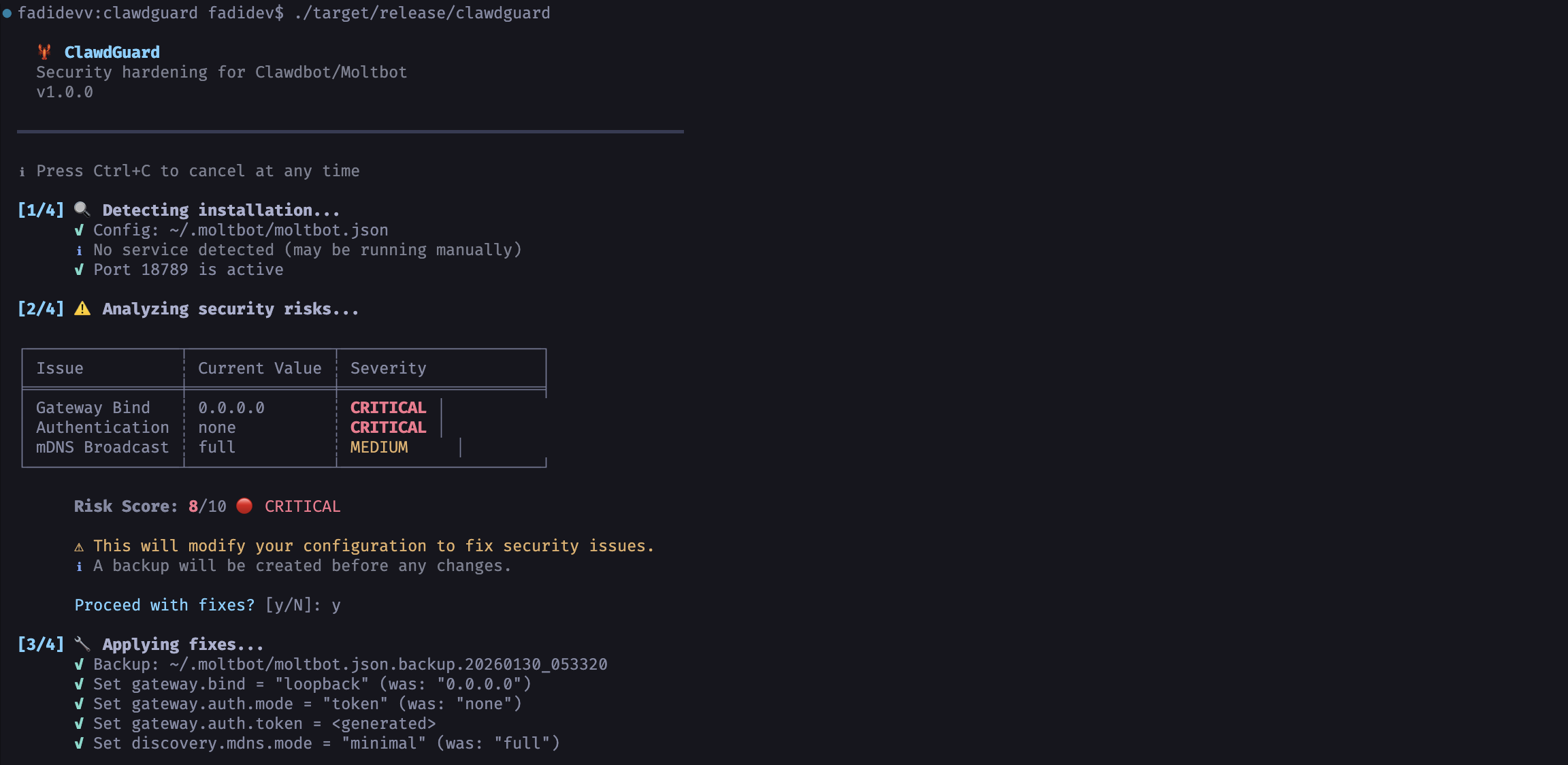
🦞 ClawdGuard
Clawdbot/Moltbot のセキュリティ強化
v1.0.0
━━━━━━━━━━━━━━━━━━━━━━━━━━━━━━━━━━━━━━━━━━━━━━━━━━━━━━━━━━━━━━━━━━━━━━
ℹ いつでも Ctrl+C でキャンセルできます
[1/4] 🔍 インストールを検出中...
✓ 設定: ~/.clawdbot/clawdbot.json
✓ サービス: bot.molt.gateway (実行中、PID 1234)
✓ ポート 18789 がアクティブ
[2/4] ⚠️ セキュリティリスクを分析中...
╭──────────────────┬─────────────────────────┬──────────╮
│ 問題 │ 現在の値 │ 深刻度 │
├──────────────────┼─────────────────────────┼──────────┤
│ ゲートウェイバインド │ 0.0.0.0 │ 重大 │
│ 認証 │ none │ 重大 │
│ mDNS ブロードキャスト │ full │ 中 │
╰──────────────────┴─────────────────────────┴──────────╯
リスクスコア: 9/10 🔴 重大
⚠ セキュリティ問題を修正するために設定を変更します。
ℹ 変更前にバックアップが作成されます。
修正を続行しますか? [y/N]: y
[3/4] 🔧 修正を適用中...
✓ バックアップ: ~/.clawdbot/clawdbot.json.backup.20260128_143022
✓ gateway.bind = "loopback" に設定 (以前: "0.0.0.0")
✓ gateway.auth.mode = "token" に設定 (以前: "none")
✓ gateway.auth.token = <生成済み>
✓ ファイルパーミッションを修正 (600)
生成されたトークン: clwd_a8f2k9x3m1p7v4q2b6n8...
[4/4] ✅ 修正を検証中...
✓ ゲートウェイサービスを再起動
✓ ポート 18789 が外部から到達不能に
✓ ゲートウェイが localhost で応答
✓ 認証が必要になりました
━━━━━━━━━━━━━━━━━━━━━━━━━━━━━━━━━━━━━━━━━━━━━━━━━━━━━━━━━━━━━━━━━━━━━━
╭────────────────────────────────────────────────────────────────────╮
│ │
│ 🎉 成功!Clawdbot/Moltbot は安全になりました。 │
│ │
╰────────────────────────────────────────────────────────────────────╯
clawdguard --json
{"status": "fixed", "token": "clwd_a8f2k9x3m1p7v4q2b6n8...", "backup": "~/.clawdbot/clawdbot.json.backup.20260128_143022"}
スキャン中はいつでも Ctrl+C を押して安全に停止できます。
[2/4] ⚠️ セキュリティリスクを分析中...
^C
⚠ 中断しました!終了します...
確認するまでは変更は行われないため、中断は常に安全です。
# シェルプロファイルに追加 (~/.bashrc, ~/.zshrc など)
export CLAWDBOT_GATEWAY_TOKEN="clwd_your_token_here"
リモートアクセスが必要な場合は、以下の安全な方法のいずれかを使用してください:
| 方法 | コマンド |
|---|---|
| Tailscale(推奨) | tailscale serve --bg 18789 |
| SSH トンネル | ssh -L 18789:localhost:18789 your-server |
| Cloudflare トンネル | cloudflared tunnel --url http://localhost:18789 |
gateway.bind を 0.0.0.0 に戻したり、ポートを直接公開したりしないでください。
確認事項:
~/.moltbot/ または ~/.clawdbot/ が作成されます)~/.moltbot/moltbot.json または ~/.clawdbot/clawdbot.json に存在すること手動で試す:
clawdbot gateway restart
# または
moltbot gateway restart
clwd_ プレフィックスを含む)を保存していること設定ディレクトリが読み取り可能であることを確認:
# Moltbot(新しい方)
chmod 755 ~/.moltbot
chmod 644 ~/.moltbot/moltbot.json
# Clawdbot(レガシー)
chmod 755 ~/.clawdbot
chmod 644 ~/.clawdbot/clawdbot.json
| プラットフォーム | ステータス | サービス管理 |
|---|---|---|
| macOS | ✅ 完全 | launchd |
| Linux | ✅ 完全 | systemd(ユーザー) |
| Windows | ⚠️ WSL2 | WSL2 内で実行 |
┌─────────────────────────────────────────────────────────────────┐
│ ClawdGuard v1.0 │
├─────────────────────────────────────────────────────────────────┤
│ │
│ ┌──────────┐ ┌──────────┐ ┌──────────┐ ┌──────────┐ │
│ │ 検出 │ → │ 分析 │ → │ 修正 │ → │ 検証 │ │
│ └──────────┘ └──────────┘ └──────────┘ └──────────┘ │
│ │ │ │ │ │
│ ▼ ▼ ▼ ▼ │
│ 設定を検索 リスクを確認 設定を修正 安全性を確認 │
│ サービスを検索 危険度をスコア化 トークンを生成 ポートをテスト │
│ プロセスを検索 問題を一覧 パーミッションを修正 サービスを再起動 │
│ │
└─────────────────────────────────────────────────────────────────┘
clawdguard/
├── Cargo.toml # 依存関係
├── Dockerfile # Docker ビルド
├── docker-compose.yml # Docker compose
├── .dockerignore
├── README.md
├── LICENSE
├── .gitignore
├── assets/
│ └── screenshot.png # README 用スクリーンショット
├── src/
│ ├── main.rs # CLI エントリポイント
│ ├── lib.rs # ライブラリルート
│ ├── detect/ # インストール検出
│ │ ├── mod.rs
│ │ ├── config.rs # 設定ファイル検出
│ │ ├── process.rs # プロセス検出
│ │ └── service.rs # サービス検出 (launchd/systemd)
│ ├── analyze/ # セキュリティ分析
│ │ ├── mod.rs
│ │ ├── config_risk.rs
│ │ ├── network.rs # ポート露出チェック
│ │ └── permissions.rs
│ ├── patch/ # 設定修正
│ │ ├── mod.rs
│ │ ├── config.rs
│ │ ├── firewall.rs
│ │ └── token.rs # 安全なトークン生成
│ ├── verify/ # 修正検証
│ │ ├── mod.rs
│ │ ├── port_check.rs
│ │ └── service.rs
│ └── output/
│ ├── mod.rs
│ └── printer.rs # カラフルな CLI 出力
└── tests/
└── integration.rs
オプションA: ネイティブ(Rust)
curl --proto '=https' --tlsv1.2 -sSf https://sh.rustup.rs | sh)オプションB: Docker
ネイティブ:
# リポジトリをクローン
git clone https://github.com/fadidevv/clawdguard.git
cd clawdguard
# デバッグビルド(コンパイル高速)
cargo build
# リリースビルド(最適化)
cargo build --release
Docker:
# リポジトリをクローン
git clone https://github.com/fadidevv/clawdguard.git
cd clawdguard
# イメージをビルド
docker build --no-cache -t clawdguard .
# すべてのテストを実行
cargo test
# 出力付きで実行
cargo test -- --nocapture
# コードをフォーマット
cargo fmt
# リンターを実行
cargo clippy
# ビルドせずにチェック
cargo check
コントリビューション歓迎!以下の手順でお願いします:
git checkout -b feature/improvement)cargo test)cargo clippy)cargo fmt)git commit -m '改善を追加')git push origin feature/improvement)コントリビューションのアイデア:
このツールはセキュリティ目的でのみ使用してください。
作成者はこのツールの誤用について責任を負いません。
MIT ライセンス - 詳細は LICENSE を参照。
安全に!🦞🔐
| リスク | 影響 |
|---|
| API キーへのアクセス | OpenAI、Anthropic などの認証情報を盗む |
| コマンド実行 | マシン上で任意のシェルコマンドを実行 |
| ブラウザ制御 | ブラウジングセッションを乗っ取る |
| メール読み取り | Gmail、カレンダー、連絡先にアクセス |
| チャット読み取り | すべての会話履歴を閲覧 |
| ボットの乗っ取り | あなたの代わりにメッセージを送信 |
| コマンド | 説明 |
|---|
docker build --no-cache -t clawdguard . | イメージをビルド |
docker run clawdguard --help | ヘルプ表示 |
docker run -v ... clawdguard | スキャン実行 |
docker run -v ... clawdguard --scan-only | スキャンのみ |
docker run -v ... clawdguard --auto | 自動修正 |
docker run -v ... clawdguard --verbose | 詳細モード |
docker-compose run clawdguard | compose で実行 |
| 設定 | 修正前(安全でない) | 修正後(安全) |
|---|
gateway.bind | "0.0.0.0" / "lan" / "all" | "loopback" |
gateway.auth.mode | "none" / 欠落 | "token" |
gateway.auth.token | 欠落 | 生成された安全なトークン |
discovery.mdns.mode | "full" | "minimal" |
| ファイルパーミッション | 644 / 755 | 600 |