 epi052/feroxfuzz
Rustで構造認識型のブラックボックスHTTPファザーを構築。カスタムWeb / APIテスト向けに、合成可能なミューテーター、スケジューラー、オブザーバー、デサイダー、プロセッサーを備えています。







落ち着いて、これは別のコマンドラインツールではなく、ライブラリです! 😁
より具体的には、FeroxFuzzは構造認識型HTTPファジングライブラリです。
FeroxFuzzを書いた主な目的は、feroxbusterから中核部分をいくつか取り出し、他の人々にとっても一般的に役立つ場所に移すことでした。そうすることで、RustでWebツールや単発のWebファザーを書きたい人は誰でも、最小限の労力で書けるようになることを願っています。
FeroxFuzzの全体的な設計はLibAFLから派生しています。FeroxFuzzは、LibAFL: A Framework to Build Modular and Reusable Fuzzers (pre-print)に記載されているコンポーネントのほとんどを実装しています。FeroxFuzzが逸脱する場合、それは通常、asyncコードのサポートによるものです。
LibAFLと同様に、FeroxFuzzは構成可能なファジングライブラリです。ただし、LibAFLとは異なり、FeroxFuzzは専らブラックボックスHTTPファジングに焦点を当てています。
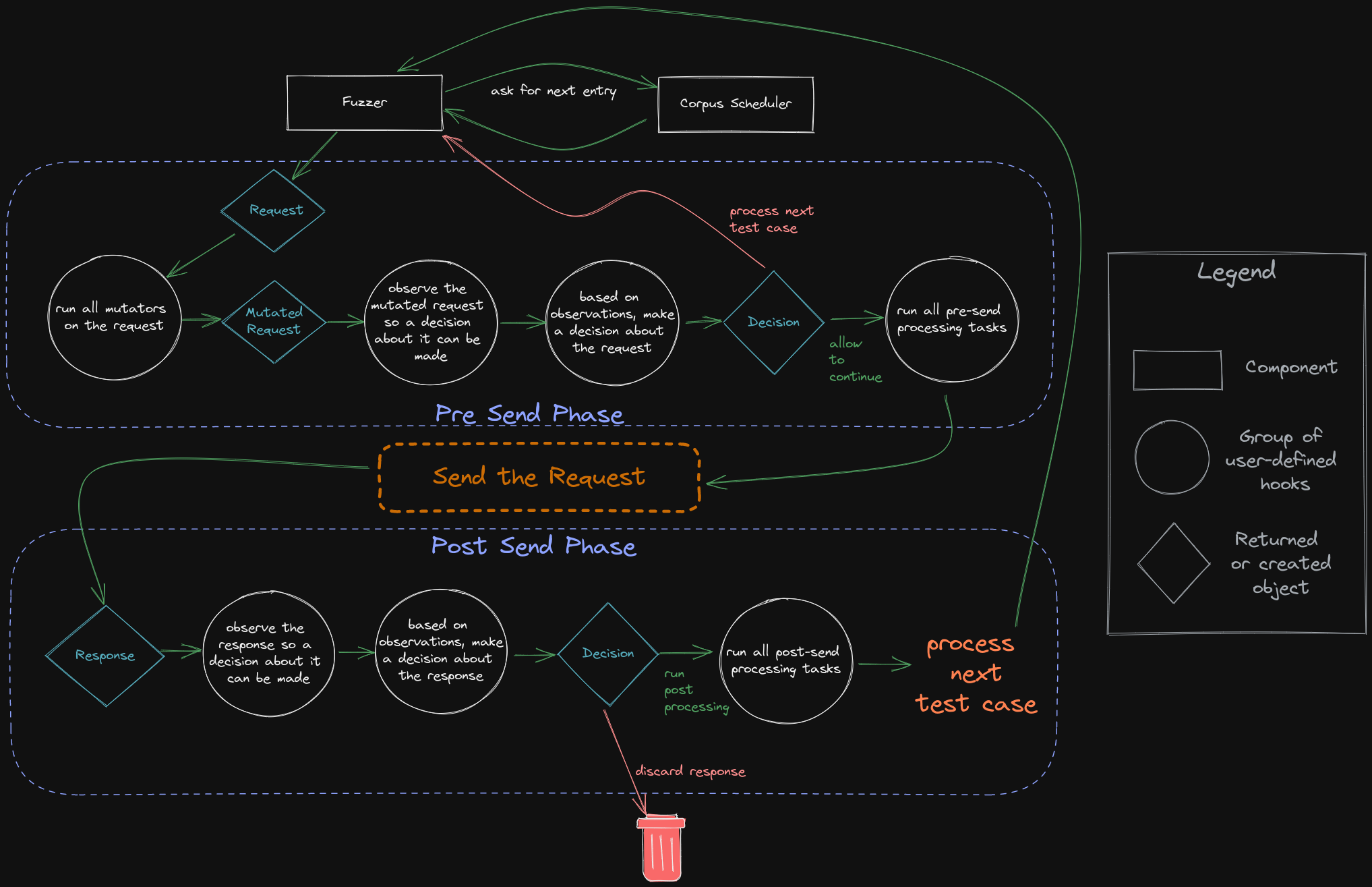
以下は、FeroxFuzzで採用されているさまざまなコンポーネント、フック、および制御フローを視覚的に示したものです。
FeroxFuzzは非常に高性能で、新しいferoxbusterのために計画していたすべてのニーズを満たすように作られました。ただし、新しいバージョンのferoxbusterの作業が始まると、FeroxFuzzのAPIは少なくとも少しは変更されると思われます。
APIが固まるまで、破壊的な変更は 発生する可能性があります 発生します。
最も簡単な始め方は、プロジェクトのCargo.tomlにFeroxFuzzを含めることです。
[dependencies]
feroxfuzz = { version = "1.0.0-rc.13" }
examples/フォルダに加えて、APIドキュメントにはコンポーネントの詳細なドキュメントと使用例が含まれています。
以下の例(examples/async-simple.rs)は、FeroxFuzzを使用してファザーを書くための必要最低限を示しています。
ソースを使用する場合、例はferoxfuzz/ディレクトリから次のコマンドで実行できます:
注: マシンのポート8000でWebサーバーが実行されていない限り、
Request::from_urlに渡されるターゲットを変更する必要があります。
cargo run --example async-simple
#[tokio::main]
async fn main() -> Result<(), Box<dyn std::error::Error>> {
    // create a new corpus from the given list of words
    let words = Wordlist::from_file("./examples/words")?
        .name("words")
        .build();

    // pass the corpus to the state object, which will be shared between all of the fuzzers and processors
    let mut state = SharedState::with_corpus(words);

    // bring-your-own client, this example uses the reqwest library
    let req_client = reqwest::Client::builder().build()?;

    // with some client that can handle the actual http request/response stuff
    // we can build a feroxfuzz client, specifically an asynchronous client in this
    // instance.
    //
    // feroxfuzz provides both a blocking and an asynchronous client implementation
    // using reqwest.
    let client = AsyncClient::with_client(req_client);

    // ReplaceKeyword mutators operate similar to how ffuf/wfuzz work, in that they'll
    // put the current corpus item wherever the keyword is found, as long as its found
    // in data marked fuzzable (see ShouldFuzz directives below)
    let mutator = ReplaceKeyword::new(&"FUZZ", "words");

    // fuzz directives control which parts of the request should be fuzzed
    // anything not marked fuzzable is considered to be static and won't be mutated
    //
    // ShouldFuzz directives map to the various components of an HTTP request
    let request = Request::from_url(
        "http://localhost:8000/?admin=FUZZ",
        Some(&[ShouldFuzz::URLParameterValues]),
    )?;

    // a `StatusCodeDecider` provides a way to inspect each response's status code and decide upon some Action
    // based on the result of whatever comparison function (closure) is passed to the StatusCodeDecider's
    // constructor
    //
    // in plain english, the `StatusCodeDecider` below will check to see if the request's http response code
    // received is equal to 200/OK. If the response code is 200, then the decider will recommend the `Keep`
    // action be performed. If the response code is anything other than 200, then the recommendation will
    // be to `Discard` the response.
    //
    // `Keep`ing the response means that the response will be allowed to continue on for further processing
    // later in the fuzz loop.
    let decider = StatusCodeDecider::new(200, |status, observed, _state| {
        if status == observed {
            Action::Keep
        } else {
            Action::Discard
        }
    });

    // a `ResponseObserver` is responsible for gathering information from each response and providing
    // that information to later fuzzing components, like Processors. It knows things like the response's
    // status code, content length, the time it took to receive the response, and a bunch of other stuff.
    let response_observer: ResponseObserver<AsyncResponse> = ResponseObserver::new();

    // a `ResponseProcessor` provides access to the fuzzer's instance of `ResponseObserver`
    // as well as the `Action` returned from calling `Deciders` (like the `StatusCodeDecider` above).
    // Those two objects may be used to produce side-effects, such as printing, logging, calling out to
    // some other service, or whatever else you can think of.
    let response_printer = ResponseProcessor::new(
        |response_observer: &ResponseObserver<AsyncResponse>, action, _state| {
            if let Some(Action::Keep) = action {
                println!(
                    "[{}] {} - {} - {:?}",
                    response_observer.status_code(),
                    response_observer.content_length(),
                    response_observer.url(),
                    response_observer.elapsed()
                );
            }
        },
    );

    // `Scheduler`s manage how the fuzzer gets entries from the corpus. The `OrderedScheduler` provides
    // in-order access of the associated `Corpus` (`Wordlist` in this example's case)
    let scheduler = OrderedScheduler::new(state.clone())?;

    // the macro calls below are essentially boilerplate. Whatever observers, deciders, mutators,
    // and processors you want to use, you simply pass them to the appropriate macro call and
    // eventually to the Fuzzer constructor.
    let deciders = build_deciders!(decider);
    let mutators = build_mutators!(mutator);
    let observers = build_observers!(response_observer);
    let processors = build_processors!(response_printer);

    let threads = 40;  // number of threads to use for the fuzzing process
