 dutchosintguy/tiktok-scraper
認証なしでユーザープロフィール、ハッシュタグ、トレンドからTikTokの動画投稿とメタデータをスクレイピングしてダウンロードします。JSON、CSV、ZIPアーカイブを出力します。

TikTok から有用な情報をスクレイピングしてダウンロードします。
ログインやパスワードは不要です。
これは公式 API サポートなどではありません。これは TikTok Web API を使用してメディアをスクレイピングする単なるスクレイパーです。
注記:
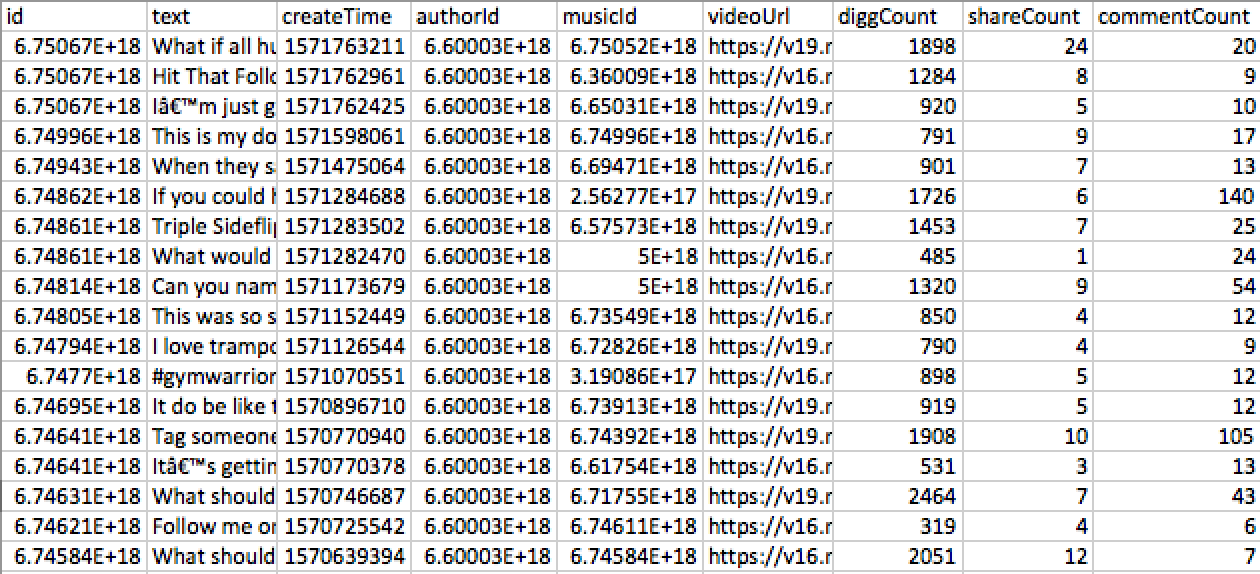
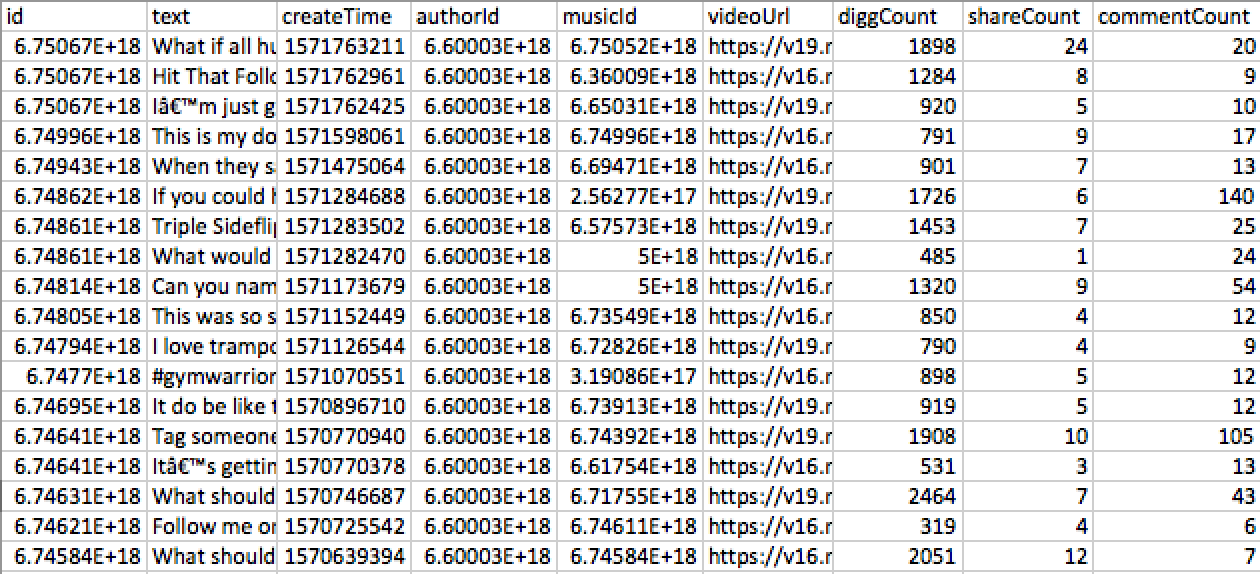
投稿 - JSON/CSV 出力:
    id: '6748606789551410438',
    text:'TEXT',
    createTime: '1571282470',
    authorId: '123123',
    musicId: '123123',
    videoUrl: 'VIDEO_URL',
    diggCount: 485,
    shareCount: 1,
    commentCount: 24
考えられるエラー
tiktok-scraper の実行には Node.js v8.6.0+ が必要です。
NPM からインストール
$ npm i -g tiktok-scraper
YARN からインストール
$ yarn global add tiktok-scraper
$ tiktok-scraper --help

Usage: tiktok-scraper <command> [options]

Commands:
  tiktok-scraper user [id]     Scrape videos from username. Enter only username
  tiktok-scraper hashtag [id]  Scrape videos from hashtag. Enter hashtag without #
  tiktok-scraper trend         Scrape posts from current trends

Options:
  --help, -h              help                                         [boolean]
  --version               Show version number                          [boolean]
  --number, -n            Number of posts to scrape. If you will set 0 then all
                          posts will be scraped                    [default: 20]
  --proxy, -p             Set proxy                                [default: ""]
  --timeout               If you will receive 'rate limit' error , you can try
                          to set timeout. Timeout is in mls: 1000 mls = 1 second
                                                                    [default: 0]
  --download, -d          Download and archive all scraped videos to a ZIP file
                                                      [boolean] [default: false]
  --filepath              Directory to save all output files.
                [default: "/Users/jackass/Documents/lang/NodeJs/tiktok-scraper"]
  --filetype, --type, -t  Type of output file where post information will be
                          saved. 'all' - save information about all posts to a
                          'json' and 'csv'
                                [choices: "csv", "json", "all"] [default: "csv"]

Examples:
  tiktok-scraper user USERNAME -d -n 100
  tiktok-scraper hashtag HASHTAG_NAME -d -n 100
  tiktok-scraper trend -d -n 100
例 1: ユーザー {USERNAME} から 300 件の動画投稿をスクレイピング。投稿情報を CSV ファイルに保存(デフォルト)
$ tiktok-scraper user USERNAME -n 300

Output:
CSV path: /{CURRENT_PATH}/user_1552945544582.csv
例 2: ハッシュタグ {HASHTAG_NAME} から 100 件の投稿をスクレイピングし、ZIP アーカイブにダウンロードして保存。投稿情報を JSON と CSV ファイルに保存(--filetype all)
$ tiktok-scraper hashtag HASHTAG_NAME -n 100 -d -t all

Output:
ZIP path: /{CURRENT_PATH}/hashtag_1552945659138.zip
JSON path: /{CURRENT_PATH}/hashtag_1552945659138.json
CSV path: /{CURRENT_PATH}/hashtag_1552945659138.csv
例 3: トレンドセクションから 50 件の投稿をスクレイピングし、ZIP にダウンロードして情報を csv ファイルに保存
$ tiktok-scraper trend -n 50 -d -t csv

Output:
ZIP path: /{CURRENT_PATH}/trend_1552945659138.zip
CSV path: /{CURRENT_PATH}/tend_1552945659138.csv
見やすくするため、投稿ダウンロード時に進捗がターミナルに表示されます。
Downloading 6750670497744309509 [==============================] 100%
Downloading 6749962264020782342 [==============================] 100%
Downloading 6749433991113264390 [==============================] 100%
Downloading 6750671571968429318 [==============================] 100%
Downloading 6750668198011505926 [==============================] 100%
Downloading 6748611221903117574 [==============================] 100%
Downloading 6748606789551410438 [==============================] 100%
Downloading 6748139550251535621 [==============================] 100%
Downloading 6748616311166799110 [==============================] 100%
Downloading 6748048372625689861 [==============================] 100%
const TikTokScraper = require('tiktok-scraper');

let options = {
    number: 100,
};

(async () => {
    try{
        let posts = await TikTokScraper.user({USERNAME}, options);
        console.log(posts)
    } catch(error){
        console.log(error)
    }
})()
Promise は現在の結果を返します
{
    collector:[ARRAY_OF_DATA]
    //If {filetype} and {download} options are enbabled then:
    zip: '/{CURRENT_PATH}/user_1552963581094.zip',
    json: '/{CURRENT_PATH}/user_1552963581094.json',
    csv: '/{CURRENT_PATH}/user_1552963581094.csv'
}
const TikTokScraper = require('tiktok-scraper');
let options = {
    count: 100,
    event: true, // Enable event emitter, you won't be able to use promises
};

let posts = TikTokScraper.user({USERNAME}, options);

posts.on('data', (json) => {
  //data in JSON format
})

posts.on('done', () => {
  //completed
})
posts.on('error', (error) => {
  //error message
})
関数
.user(id, options) //特定のユーザーから投稿をスクレイピング
.hashtag(id, options) //ハッシュタグセクションから投稿をスクレイピング
.trend('', options) //トレンドセクションから投稿をスクレイピング
オプション
let options = {
    // スクレイピングする投稿数: {int default: 20}
    number: 50,

    // プロキシを設定、例: 127.0.0.1:8080: {string default: ''}
    proxy: '',

    // イベントエミッターを有効または無効にする。true の場合、イベントを通じてデータを受け取れます: {boolean default: false}
    event: false,

    // リクエスト間のタイムアウト。'rate limit' エラーが発生した場合、このオプションが役立つことがあります: {int default: 0}
    timeout: 0


    // 投稿をダウンロードするかどうか。true の場合、{filepath} に ZIP アーカイブが作成されます: {boolean default: false}
    download: false,

    // 非同期にダウンロードする投稿数。{download:true} の場合のみ: {int default: 5}
    asyncDownload: 5,

    // すべてのファイルが保存されるファイルパス: {string default: 'CURRENT_DIR'}
    filepath: `CURRENT_DIR`,
};
MIT
フリーソフトウェア
