
Skip to content
KitploitKITPLOIT
ツールブログ
提出
ツールブログ
提出

ハッキング、侵入テスト、サイバーセキュリティツールをあなたのセキュリティアーセナルに!

Kitploitはハッキング、サイバーセキュリティ、ペネトレーションテストのツールディレクトリです。最新のプロジェクトアップデートを見つけて、脆弱性の発見、システム分析、テストの自動化、セキュリティの強化を行いましょう。

··フィード·お問い合わせ·プライバシー·© 2026 Kitploit

ツールディレクトリ

カテゴリ

すべてのカテゴリを見る
Loading categories
popeye — 👀 Kubernetesクラスタリソースサニタイザ | Kitploit
ツール/GitHubGitHub/derailed/popeye
コンテナセキュリティ構成監査クラウドセキュリティ設定ミス
GitHubderailed/popeye

popeye

👀 Kubernetesクラスタリソースサニタイザ

リポジトリを見るウェブサイト
6.3k3441年前Kitploit レビュー済み

人気

すべて見る →

コミュニティで最も使われているツールを見つけましょう。

すべてのツールを探索

ツールコレクションを閲覧

すべてのツールを見る →
共有

Popeye: Kubernetes ライブクラスターリンター

Popeye は、ライブの Kubernetes クラスターをスキャンし、デプロイされたリソースや設定に関する潜在的な問題を報告するユーティリティです。 Kubernetes の状況が拡大するにつれ、クラスターを調整する多数のマニフェストやポリシーを人間が追跡することは課題になりつつあります。 Popeye は、ディスク上にあるものではなく、デプロイされているものに基づいてクラスターをスキャンします。クラスターを lint することで、設定ミス、古いリソースを検出し、ベストプラクティスが適用されていることを確認して、将来の頭痛を防ぐのに役立ちます。 これは、実際の Kubernetes クラスターを運用する際に直面する認知的過負荷を軽減することを目的としています。 さらに、クラスターがメトリクスサーバーを採用している場合、リソースの過剰/不足割り当てを報告し、容量不足に陥る可能性がある場合に警告を試みます。

Popeye は読み取り専用ツールであり、いかなる方法でも Kubernetes リソースを変更しません。


Go Report Card codebeat badge release license Docker Repository on Quay GitHub stars Releases


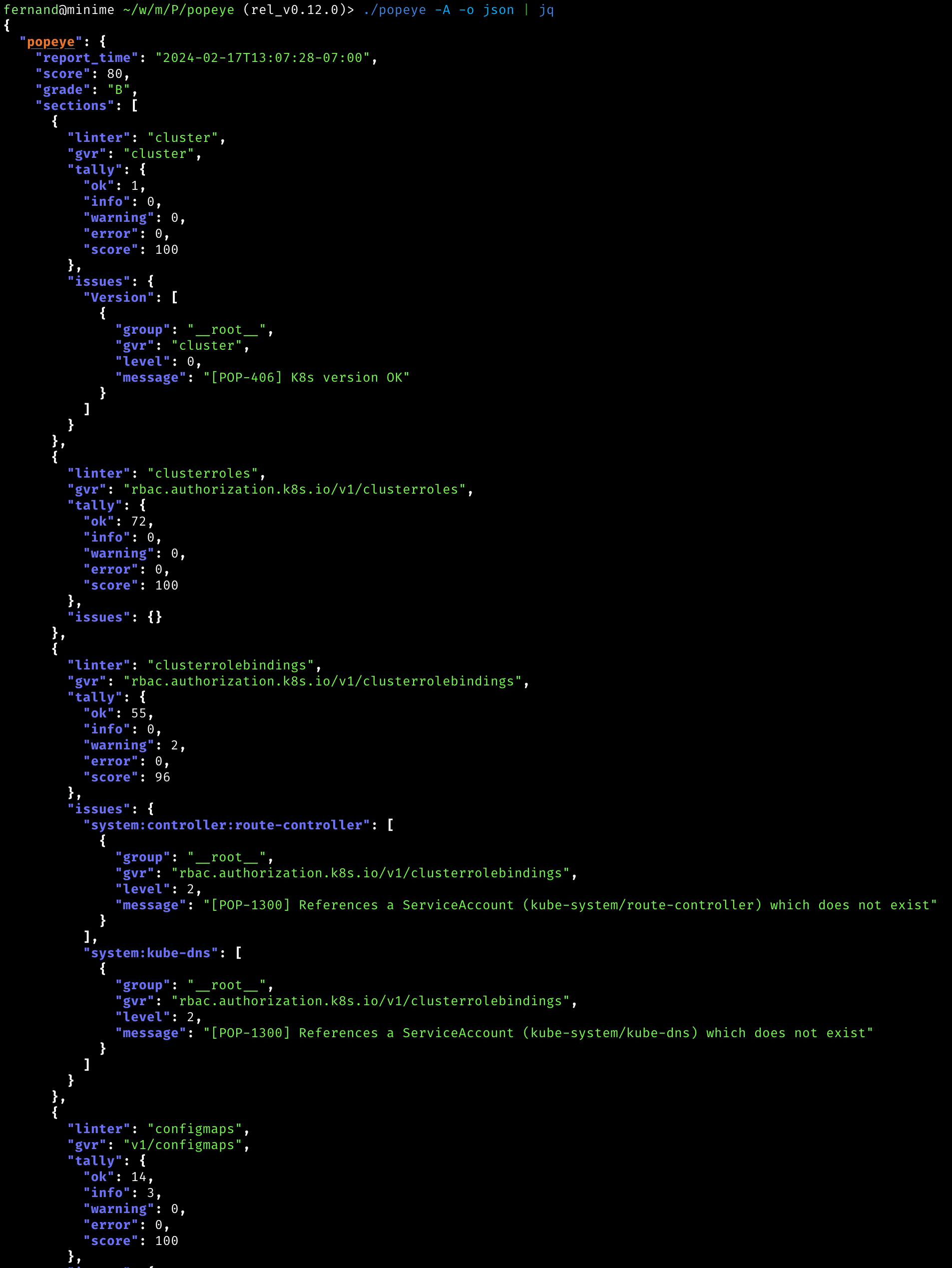
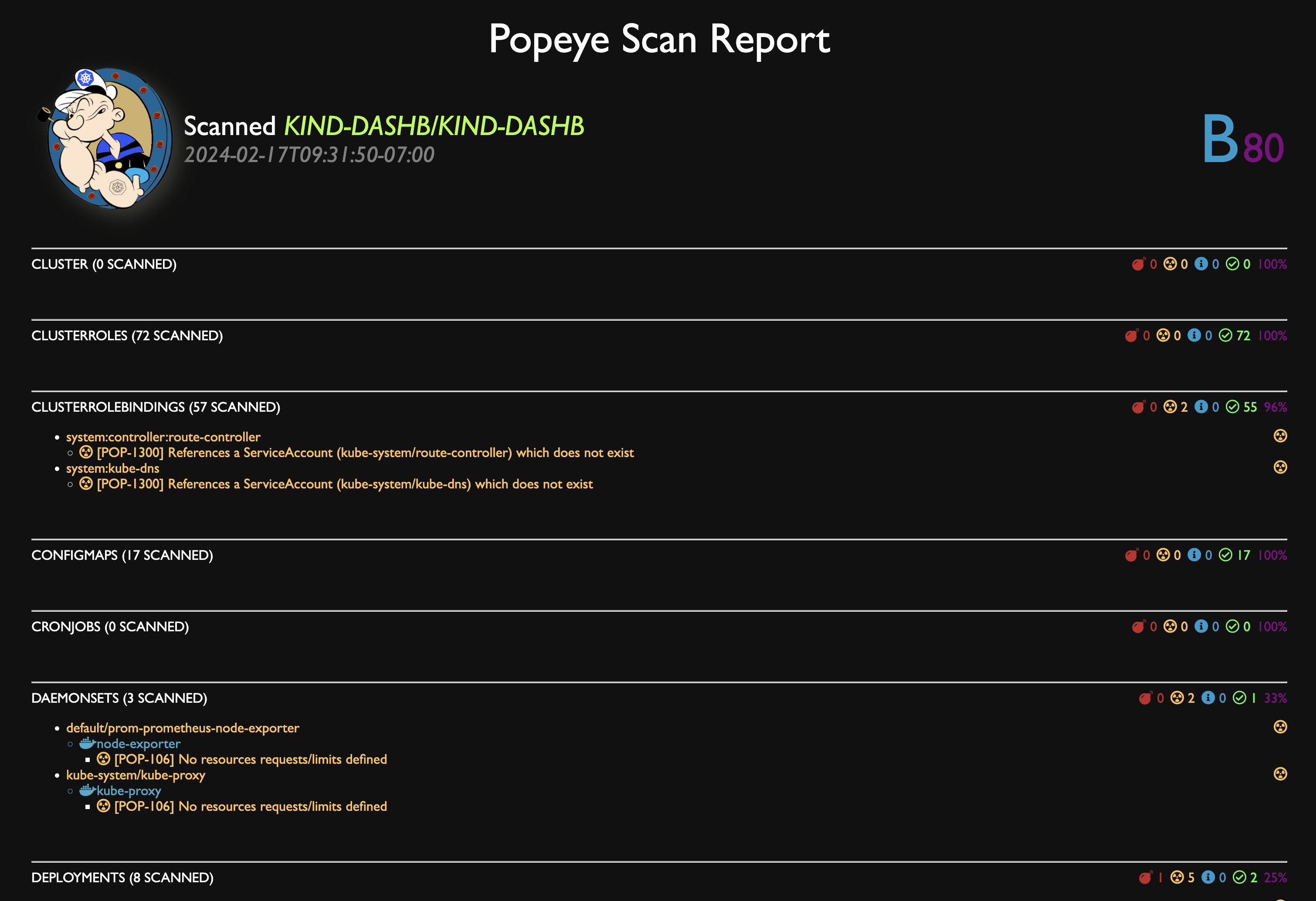
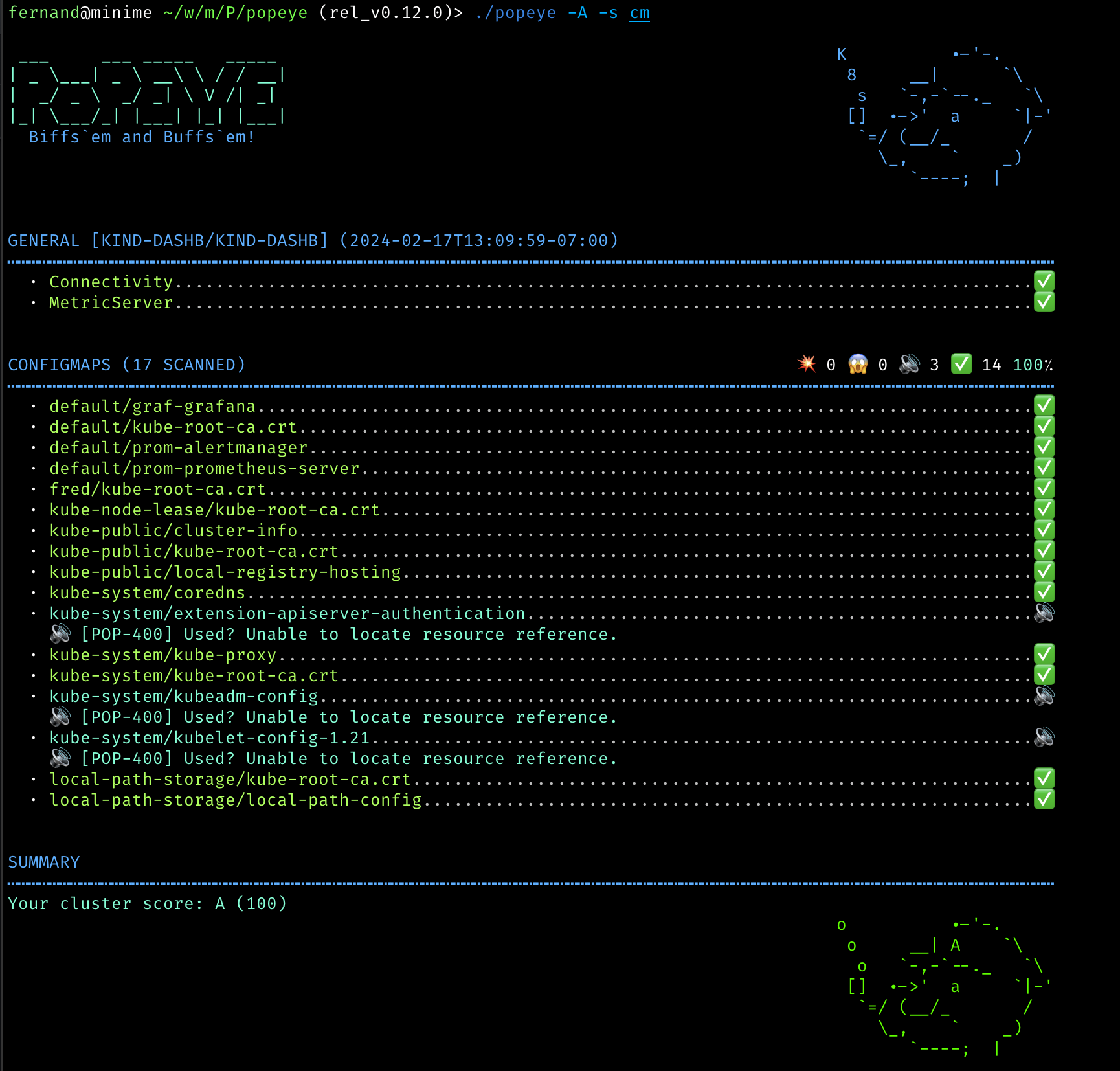
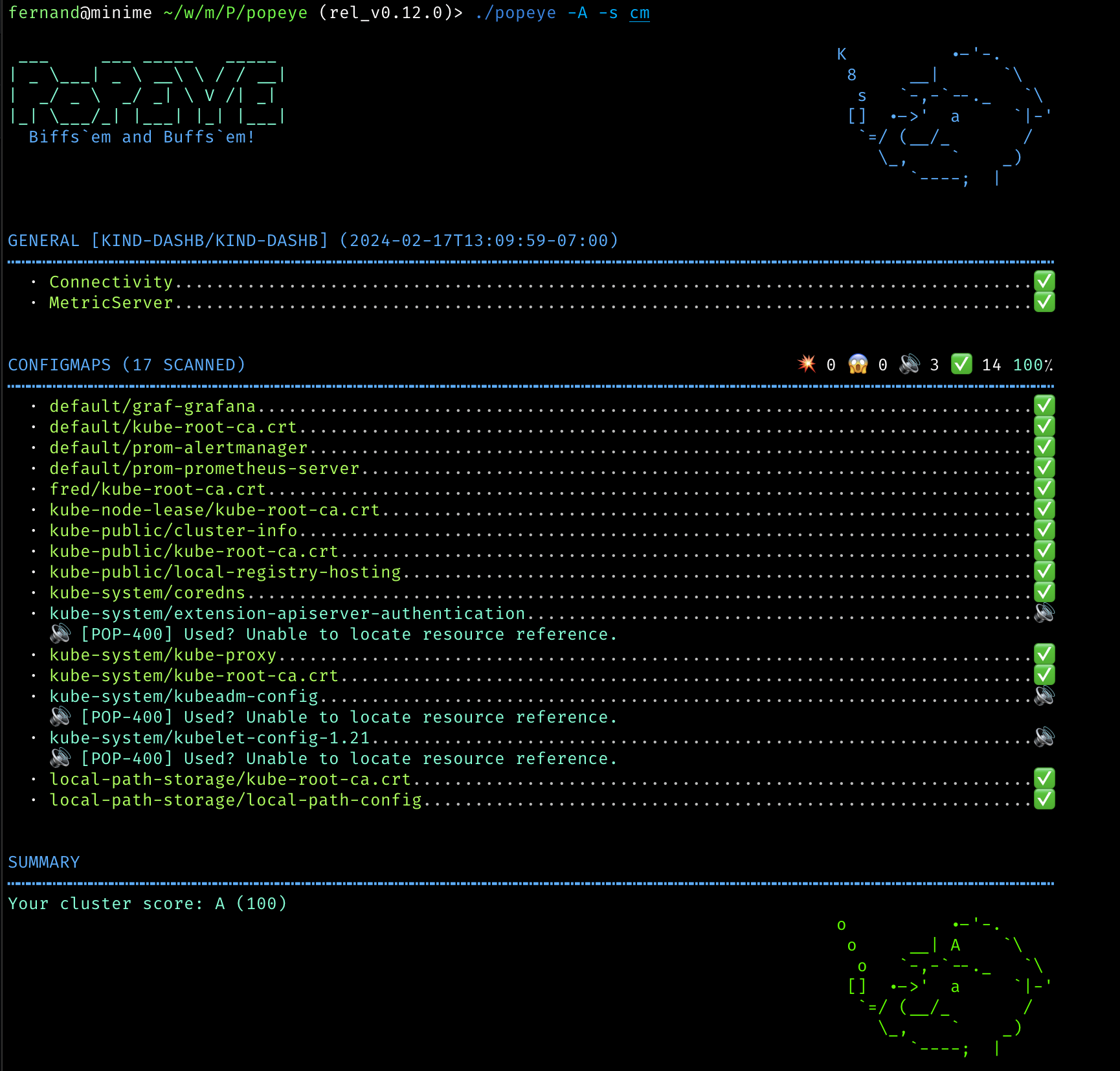
スクリーンショット

コンソール

JSON

HTML

スキャンレポートを HTML に出力できます。

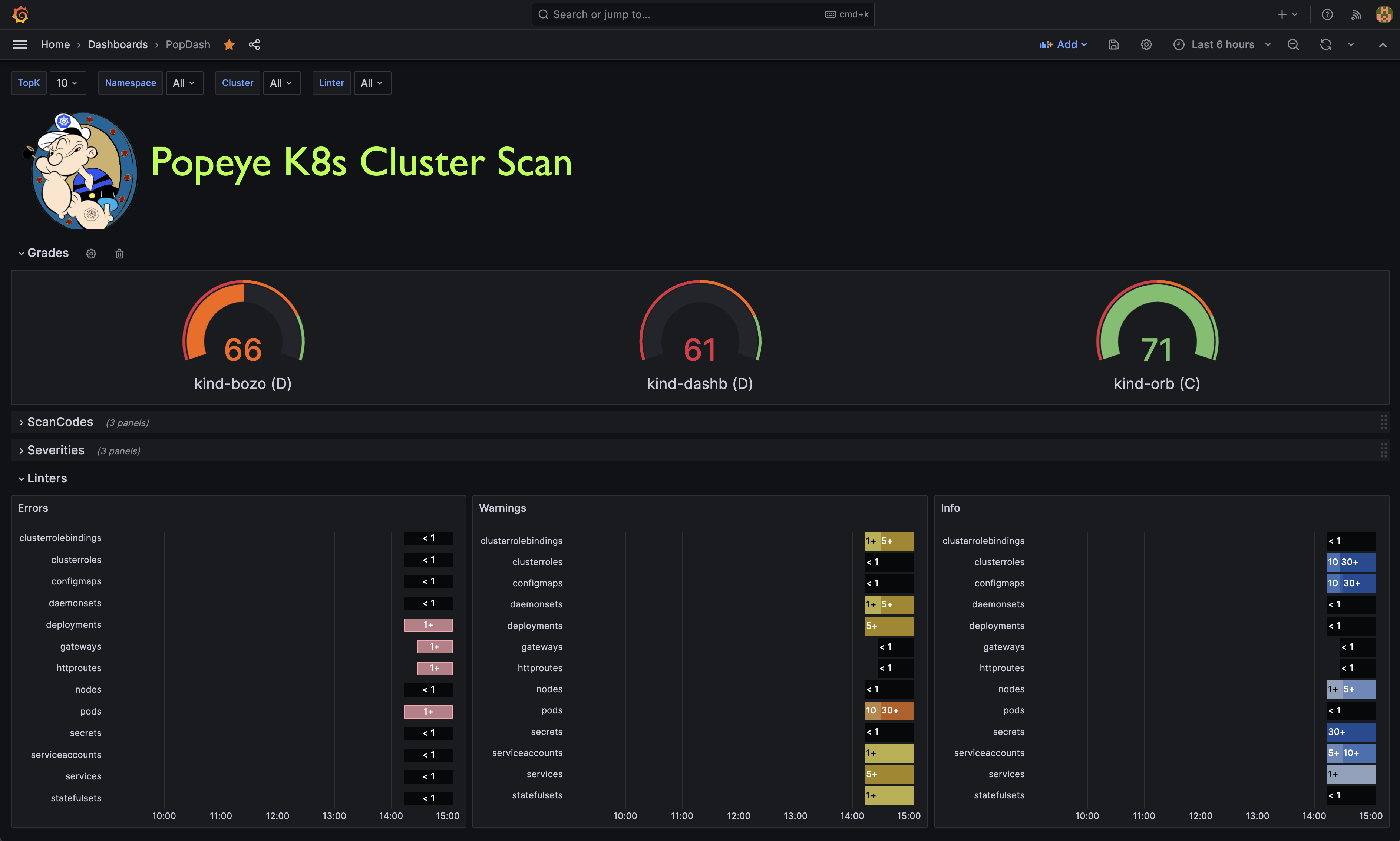
Grafana ダッシュボード

Popeye は Prometheus メトリクスを公開します。 このリポジトリには、すぐに使い始められるサンプルの Popeye ダッシュボードを用意しています。

インストール

Popeye は Linux、OSX、Windows プラットフォームで利用可能です。

  • Linux、Windows、Mac 用のバイナリは、リリース ページで tarball として入手できます。

  • OSX/Unit で Homebrew/LinuxBrew を使用する場合 ```shell brew install derailed/popeye/popeye

    root@kitploit:~
  • go install の使用

    root@kitploit:~
    go install github.com/derailed/popeye@latest
    
  • ソースからのビルド Popeye は go 1.21+ でビルドされました。ソースから Popeye をビルドするには、以下が必要です:

    1. リポジトリをクローンする

    2. go.mod ファイルに次のコマンドを追加する

      root@kitploit:~
      replace (
        github.com/derailed/popeye => MY_POPEYE_CLONED_GIT_REPO
      )
      
    3. 実行可能ファイルをビルドして実行する

      root@kitploit:~
      go run main.go
      

    せっかちな人のためのクイックレシピ: ```shell

    Clone outside of GOPATH

    git clone https://github.com/derailed/popeye cd popeye

    Build and install

    make build

    Run

    popeye

    root@kitploit:~

事前チェック

  • Popeye は256色ターミナルモードを使用します。`Nix システムでは、TERM が適切に設定されていることを確認してください。

    root@kitploit:~
    export TERM=xterm-256color
    

コマンドライン

Popeye は、自由に使用することも、spinach yaml 設定ファイルを使用してリンターを調整することもできます。Popeye 設定ファイルの詳細は以下をご覧ください。```shell

Dump version info and logs location

popeye version

Popeye a cluster using your current kubeconfig environment.

NOTE! This will run Popeye in the context namespace if set or like kubectl will use the default namespace

popeye

Run Popeye in the fred namespace

popeye -n fred

Run Popeye in all namespaces

popeye -A

Run Popeye uses a spinach config file of course! aka spinachyaml!

popeye -f spinach.yaml

Popeye a cluster using a kubeconfig context.

popeye --context olive

Run Popeye with specific linters and log to the console

popeye -n ns1 -s pod,svc --logs none

Run Popeye for a given namespace in a given log file and debug logs

popeye -n ns1 --logs /tmp/fred.log -v4

Stuck?

popeye help

root@kitploit:~
---

## Linters

Popeye は、ベストプラクティスと潜在的な問題についてクラスターをスキャンします。現在、Popeye は特定のキュレーションされた Kubernetes リソースのセットのみをチェックします。今後さらに追加される予定です!Kubernetes コミュニティの皆さんが Popeye をさらに良くするために協力してくれることを期待しています。

リンターの目的は、ポートの不一致、使用されていないリソース、メトリクスの使用率、プローブ、コンテナイメージ、RBAC ルール、ベアリソースなど、誤った設定を検出することです。

Popeye は別の静的解析ツールではありません。実際のクラスター上で実行され、Kubernetes リソースを検査し、リソースをそのままの状態でリントします!

以下は、利用可能なリンターの一部のリストです。


|    | Resource                | Linters                                                                 | Aliases    |
|----|-------------------------|-------------------------------------------------------------------------|------------|
| 🛀 | Node                    |                                                                         | no         |
|    |                         | 状態(NotReady、メモリ/ディスク不足、ネットワーク、PID など)          |            |
|    |                         | ノードのテイントを参照する Pod の耐性                                   |            |
|    |                         | CPU/メモリ使用率メトリクス、制限(デフォルト 80% CPU/メモリ)を超えるとトリップ |            |
| 🛀 | Namespace               |                                                                         | ns         |
|    |                         | 非アクティブ                                                            |            |
|    |                         | デッドネームスペース                                                    |            |
| 🛀 | Pod                     |                                                                         | po         |
|    |                         | Pod の状態                                                              |            |
|    |                         | コンテナの状態                                                          |            |
|    |                         | ServiceAccount の有無                                                   |            |
|    |                         | 設定された CPU/メモリ制限(デフォルト 80% CPU/メモリ)を超えるコンテナの CPU/メモリ |            |
|    |                         | タグなしのコンテナイメージ                                              |            |
|    |                         | `latest` タグを使用しているコンテナイメージ                             |            |
|    |                         | リソース要求/制限の有無                                                 |            |
|    |                         | 生存プローブ/準備プローブの有無                                         |            |
|    |                         | 名前付きポートとその参照                                                |            |
| 🛀 | Service                 |                                                                         | svc        |
|    |                         | Endpoints の有無                                                        |            |
|    |                         | 一致する Pod のラベル                                                   |            |
|    |                         | 名前付きポートとその参照                                                |            |
| 🛀 | ServiceAccount          |                                                                         | sa         |
|    |                         | 未使用、潜在的に未使用の SA を検出                                      |            |
| 🛀 | Secrets                 |                                                                         | sec        |
|    |                         | 未使用、潜在的に未使用のシークレットまたは関連キーを検出                |            |
| 🛀 | ConfigMap               |                                                                         | cm         |
|    |                         | 未使用、潜在的に未使用の CM または関連キーを検出                        |            |
| 🛀 | Deployment              |                                                                         | dp, deploy |
|    |                         | 未使用、Pod テンプレートの検証、リソース使用率                           |            |
| 🛀 | StatefulSet             |                                                                         | sts        |
|    |                         | 未使用、Pod テンプレートの検証、リソース使用率                           |            |
| 🛀 | DaemonSet               |                                                                         | ds         |
|    |                         | 未使用、Pod テンプレートの検証、リソース使用率                           |            |
| 🛀 | PersistentVolume        |                                                                         | pv         |
|    |                         | 未使用、ボリュームのバインド状態またはボリュームエラーのチェック        |            |
| 🛀 | PersistentVolumeClaim   |                                                                         | pvc        |
|    |                         | 未使用、バインド状態またはボリュームマウントエラーのチェック            |            |
| 🛀 | HorizontalPodAutoscaler |                                                                         | hpa        |
|    |                         | 未使用、使用率、最大バーストチェック                                    |            |
| 🛀 | PodDisruptionBudget     |                                                                         |            |
|    |                         | 未使用、minAvailable 設定のチェック                                     | pdb        |
| 🛀 | ClusterRole             |                                                                         |            |
|    |                         | 未使用                                                                  | cr         |
| 🛀 | ClusterRoleBinding      |                                                                         |            |
|    |                         | 未使用                                                                  | crb        |
| 🛀 | Role                    |                                                                         |            |
|    |                         | 未使用                                                                  | ro         |
| 🛀 | RoleBinding             |                                                                         |            |
|    |                         | 未使用                                                                  | rb         |
| 🛀 | Ingress                 |                                                                         |            |
|    |                         | 有効性                                                                  | ing        |
| 🛀 | NetworkPolicy           |                                                                         |            |
|    |                         | 有効性、古さ、ガード                                                   | np         |
| 🛀 | PodSecurityPolicy       |                                                                         |            |
|    |                         | 有効性                                                                  | psp        |
| 🛀 | Cronjob                 |                                                                         |            |
|    |                         | 有効性、一時停止、実行                                                  | cj         |
| 🛀 | Job                     |                                                                         |            |
|    |                         | Pod チェック                                                            | job        |
| 🛀 | GatewayClass            |                                                                         |            |
|    |                         | 有効性、未使用                                                          | gwc        |
| 🛀 | Gateway                 |                                                                         |            |
|    |                         | 有効性、未使用                                                          | gw         |
| 🛀 | HTTPRoute               |                                                                         |            |
|    |                         | 有効性、未使用                                                          | gwr        |

コードの完全なリストは [こちら](https://github.com/derailed/popeye/blob/HEAD/docs/codes.md) をご覧ください。

---

## スキャン結果の保存

Popeye のレポートをファイルに保存するには、コマンドに `--save` フラグを指定します。デフォルトでは一時ディレクトリが作成され、スキャンレポートがそこに保存されます。一時ディレクトリのパスは標準出力に表示されます。レポートの出力ディレクトリを指定したい場合は、環境変数 `POPEYE_REPORT_DIR` を使用できます。最終的なパスは `<POPEYE_REPORT_DIR>/<cluster>/<context>` になります。デフォルトでは、出力ファイルの名前は次の形式に従います: `lint_<cluster-name>_<time-UnixNano>.<output-extension>` (例: `lint-mycluster-1594019782530851873.html`)。レポートの出力ファイル名も指定したい場合は、`--output-file` フラグに希望のファイル名をパラメータとして指定できます。

レポートを作業ディレクトリに保存する例:```shell
POPEYE_REPORT_DIR=$(pwd) popeye --save

ワーキングディレクトリにHTML形式でレポートを "report.html" という名前で保存する例 :```shell POPEYE_REPORT_DIR=$(pwd) popeye --save --out html --output-file report.html

root@kitploit:~
### S3オブジェクトストアに保存する

または、`--s3-bucket` フラグを指定することで、生成されたレポートをAWS S3またはMinioオブジェクトストアにアップロードできます。
パラメータには、レポートを保存するS3バケットの名前を指定する必要があります。
レポートをバケットのサブディレクトリに保存するには、バケットパラメータを `bucket/path/to/report` のように指定します。

S3にレポートを保存する例:```shell
# AWS S3
# NOTE: You must provide env vars for AWS_ACCESS_KEY_ID and AWS_SECRET_ACCESS_KEY
# This will create bucket my-popeye if not present and upload a popeye json report to /fred/scan.json
popeye --s3-bucket s3://my-popeye/fred --s3-region us-west-2 --out json --save --output-file scan.json

# Minio Object Store
# NOTE: You must provide env vars for AWS_ACCESS_KEY_ID and AWS_SECRET_ACCESS_KEY and a minio server URI
# This will create bucket my-popeye if not present and upload a popeye json report to /fred/scan.json
popeye --s3-bucket minio://my-popeye/fred --s3-region us-east --s3-endpoint localhost:9000 --out json --save --output-file scan.json

Docker サポート

また、Quayの公式Dockerリポジトリから直接実行して、コンテナでPopeyeを実行することもできます。 Dockerコンテナを実行したときのデフォルトのコマンドはpopeyeです。そのため、サポートされているCLIフラグを使用してスキャンをカスタマイズできます。 クラスタにアクセスするには、-vを使用してローカルのkubeconfigディレクトリをコンテナにマッピングします :```shell docker run --rm -it -v $HOME/.kube:/root/.kube quay.io/derailed/popeye --context foo -n bar

root@kitploit:~
上記のdockerコマンドを`--rm`付きで実行すると、Popeyeが終了した時点でコンテナが削除されます。
`--save`を使用した場合、コンテナ内の/tmpに出力が書き込まれ、popeye終了時にコンテナが削除されるため、出力を失うことになります;(;
これを回避するには、/tmpをコンテナの/tmpにマッピングします。

> 注: `POPEYE_REPORT_DIR`環境変数を設定することで、デフォルトの出力ディレクトリの場所を上書きできます。```shell
docker run --rm -it \
  -v $HOME/.kube:/root/.kube \
  -e POPEYE_REPORT_DIR=/tmp/popeye \
  -v /tmp:/tmp \
  quay.io/derailed/popeye --context foo -n bar --save --output-file my_report.txt

# Docker has exited, and the container has been deleted, but the file
# is in your /tmp directory because you mapped it into the container
cat /tmp/popeye/my_report.txt
<snip>

出力フォーマット

Popeyeはさまざまな形式でリンターレポートを生成できます。 -o cliオプションを使用して、好みの形式を選べます。


プロムクイーン!

Popeyeはスキャンから直接Prometheusメトリクスを公開できます。 prometheus pushgatewayと認証情報へのアクセスが必要です。

注意!これらはユーザーのフィードバックと使用状況に基づいて変更される可能性があります!!

メトリクスを公開するには、追加のcli引数が必要です。```shell

Run popeye using console output and push prom metrics.

popeye --push-gtwy-url http://localhost:9091

Run popeye using a saved html output and push prom metrics.

NOTE! When scan are dump to disk, popeye_cluster_score metric below includes

an additional label to track the persisted artifact so you can aggregate with the scan

Don't think it's the correct approach as this changes the metric cardinality on every push.

Hence open for suggestions here??

popeye -o html --save --push-gtwy-url http://localhost:9091

root@kitploit:~
### PopProm メトリクス

以下の Popeye prometheus メトリクスが公開されています:

* `popeye_severity_total` [gauge] は重要度に基づいた様々なカウントを追跡します。
* `popeye_code_total` [gauge] は Popeye のリンターコード別のカウントを追跡します。
* `popeye_linter_tally_total` [gauge] はリンターごとのカウントを追跡します。
* `popeye_report_errors_total` [gauge] はスキャンエラーの合計を追跡します。
* `popeye_cluster_score` [gauge] はスキャンレポートのスコアを追跡します。

### PopGraf

このリポジトリには、開始に役立つサンプルの [Grafana](https://grafana.com) ダッシュボードが含まれています。

> 注意! 作業中です。UX/grafana/promql のスキルをお持ちの方は、ぜひご協力ください。

---

## SpinachYAML

`-f` オプションで spinach YAML 設定ファイルを指定すると、リンターをさらに設定できます。このファイルでは、コンテナの使用率しきい値や特定のリンター設定、さらにリンターから除外するリソースやコードを指定できます。

> 注意! このファイルは Popeye の成長に合わせて変更されます。

`excludes` キーの下で、特定のリソースまたはリンターコードをスキップするように設定できます。
Popeye のリンターは、k8s リソース名にちなんで名付けられています。
例えば、PodDisruptionBudget リンターは `poddisruptionbudgets` という名前で、`policy/v1/poddisruptionbudgets` をスキャンします。

> 注意! リンターは複数形のリソース `kind` 形式を使用し、すべて小文字で綴られます。

spinach ファイルでは、リソースの完全修飾名 (FQN) がリソース名を識別するために使用されます。つまり、`namespace/resource_name` です。
例えば、名前空間 `blee` 内のポッド `fred-1234` の FQN は `blee/fred-1234` となります。これにより、`fred/p1` と `blee/p1` を区別できます。
クラスタ全体のリソースの場合、FQN は名前と同等です。
除外ルールは、単純な文字列一致または正規表現のいずれかです。後者の場合、正規表現は `rx:` プレフィックスで指定する必要があります。

> 注意! 正規表現には注意してください。*緩い* 正規表現ルールを使用すると、予想よりも多くのリソースがレポートから除外される可能性があります。
> クラスターのリソースが変更されると、これにより最適ではないスキャンが発生する可能性があります。
> したがって、時々 Popeye を `全開` で実行して、クラスターで発生した可能性のある新しい問題を確実に把握することをお勧めします…

以下は、このリリース時点でのサンプル spinach ファイルです。
このリポジトリの `spinach` ディレクトリには、より充実した eks および aks ベースの spinach ファイルがあります。
(ちなみに: プロジェクトに新しく参加された方にとっては、クラスター固有の spinach ファイルの PR を追加することで貢献する素晴らしい方法かもしれません…)```yaml
# spinach.yaml

# A Popeye sample configuration file
popeye:
  # Checks resources against reported metrics usage.
  # If over/under these thresholds a linter warning will be issued.
  # Your cluster must run a metrics-server for these to take place!
  allocations:
    cpu:
      underPercUtilization: 200 # Checks if cpu is under allocated by more than 200% at current load.
      overPercUtilization: 50   # Checks if cpu is over allocated by more than 50% at current load.
    memory:
      underPercUtilization: 200 # Checks if mem is under allocated by more than 200% at current load.
      overPercUtilization: 50   # Checks if mem is over allocated by more than 50% usage at current load.

  # Excludes excludes certain resources from Popeye scans
  excludes:
    # [NEW!] Global exclude resources and codes globally of any linters.
    global:
      fqns: [rx:^kube-] # => excludes all resources in kube-system, kube-public, etc..
      # [NEW!] Exclude resources for all linters matching these labels
      labels:
        app: [bozo, bono] #=> exclude any resources with labels matching either app=bozo or app=bono
      # [NEW!] Exclude resources for all linters matching these annotations
      annotations:
        fred: [blee, duh] # => exclude any resources with annotations matching either fred=blee or fred=duh
      # [NEW!] Exclude scan codes globally via straight codes or regex!
      codes: ["300", "206", "rx:^41"] # => exclude issue codes 300, 206, 410, 415 (Note: regex match!)

    # [NEW!] Configure individual resource linters
    linters:
      # Configure the namespaces linter for v1/namespaces
      namespaces:
        # [NEW!] Exclude these codes for all namespace resources straight up or via regex.
        codes: ["100", "rx:^22"] # => exclude codes 100, 220, 225, ...
        # [NEW!] Excludes specific namespaces from the scan
        instances:
          - fqns: [kube-public, kube-system] # => skip ns kube-pulbic and kube-system
          - fqns: [blee-ns]
            codes: [106] # => skip code 106 for namespace blee-ns

      # Skip secrets in namespace bozo.
      secrets:
        instances:
          - fqns: [rx:^bozo]

      # Configure the pods linter for v1/pods.
      pods:
        instances:
          # [NEW!] exclude all pods matching these labels.
          - labels:
              app: [fred,blee] # Exclude codes 102, 105 for any pods with labels app=fred or app=blee
            codes: [102, 105]

  resources:
    # Configure node resources.
    node:
      # Limits set a cpu/mem threshold in % ie if cpu|mem > limit a lint warning is triggered.
      limits:
        # CPU checks if current CPU utilization on a node is greater than 90%.
        cpu:    90
        # Memory checks if current Memory utilization on a node is greater than 80%.
        memory: 80

    # Configure pod resources
    pod:
      # Restarts check the restarts count and triggers a lint warning if above threshold.
      restarts: 3
      # Check container resource utilization in percent.
      # Issues a lint warning if about these threshold.
      limits:
        cpu:    80
        memory: 75


  # [New!] overrides code severity
  overrides:
    # Code specifies a custom severity level ie critical=3, warn=2, info=1
    - code: 206
      severity: 1

  # Configure a list of allowed registries to pull images from.
  # Any resources not using the following registries will be flagged!
  registries:
    - quay.io
    - docker.io

クラスタ内

Popeye はコンテナ化されており、Kubernetes クラスタ内でワンオフまたは CronJob として直接実行できます。

以下はサンプル設定です。必要に応じて変更してください。これに関するマニフェストはこのリポジトリの k8s ディレクトリにあります。```shell kubectl apply -f k8s/popeye

root@kitploit:~
Please provide the Markdown content to translate.```yaml
---
apiVersion: v1
kind: Namespace
metadata:
  name:      popeye
---
apiVersion: batch/v1
kind: CronJob
metadata:
  name:      popeye
  namespace: popeye
spec:
  schedule: "* */1 * * *" # Fire off Popeye once an hour
  concurrencyPolicy: Forbid
  jobTemplate:
    spec:
      template:
        spec:
          serviceAccountName: popeye
          restartPolicy: Never
          containers:
            - name: popeye
              image: derailed/popeye:vX.Y.Z
              imagePullPolicy: IfNotPresent
              args:
                - -o
                - yaml
                - --force-exit-zero
              resources:
                limits:
                  cpu:    500m
                  memory: 100Mi

--force-exit-zero を設定する必要があります。設定しない場合、Pod はエラー状態になります。

注意!Popeye はlintエラーを検出すると、ゼロ以外の終了コードで終了します。

Popeye、君のRBACを確保!

Popeye が仕事をするためには、サインインしたユーザーが上記のリソースを取得/一覧表示するのに十分なRBACの権限を持っている必要があります。

PopeyeのRBACルールのサンプル(これらは変更される可能性があります。)

注意!ご自身のクラスターポリシーに合わせて確認し、調整してください。```yaml


Popeye ServiceAccount.

apiVersion: v1 kind: ServiceAccount metadata: name: popeye namespace: popeye


Popeye needs get/list access on the following Kubernetes resources.

apiVersion: rbac.authorization.k8s.io/v1 kind: ClusterRole metadata: name: popeye rules:

  • apiGroups: [""] resources:
    • configmaps
    • endpoints
    • namespaces
    • nodes
    • persistentvolumes
    • persistentvolumeclaims
    • pods
    • secrets
    • serviceaccounts
    • services verbs: ["get", "list"]
  • apiGroups: ["apps"] resources:
    • daemonsets
    • deployments
    • statefulsets
    • replicasets verbs: ["get", "list"]
  • apiGroups: ["networking.k8s.io"] resources:
    • ingresses
    • networkpolicies verbs: ["get", "list"]
  • apiGroups: ["batch.k8s.io"] resources:
    • cronjobs
    • jobs verbs: ["get", "list"]
  • apiGroups: ["gateway.networking.k8s.io"] resources:
    • gateway-classes
    • gateways
    • httproutes verbs: ["get", "list"]
  • apiGroups: ["autoscaling"] resources:
    • horizontalpodautoscalers verbs: ["get", "list"]
  • apiGroups: ["policy"] resources:
    • poddisruptionbudgets
    • podsecuritypolicies verbs: ["get", "list"]
  • apiGroups: ["rbac.authorization.k8s.io"] resources:
    • clusterroles
    • clusterrolebindings
    • roles
    • rolebindings verbs: ["get", "list"]
  • apiGroups: ["metrics.k8s.io"] resources:
    • pods
    • nodes verbs: ["get", "list"]

Binds Popeye to this ClusterRole.

apiVersion: rbac.authorization.k8s.io/v1 kind: ClusterRoleBinding metadata: name: popeye subjects:

  • kind: ServiceAccount name: popeye namespace: popeye roleRef: kind: ClusterRole name: popeye apiGroup: rbac.authorization.k8s.io
root@kitploit:~
---

## レポートの形態

lintレポートは、スキャンされた各リソースグループとその潜在的な問題を出力します。
レポートは、リンターの重大度レベルに応じて色/絵文字でコード化されています:

| レベル | アイコン | ジュラシック | 色       | 説明               |
|--------|----------|--------------|----------|--------------------|
| OK     | ✅       | OK           | 緑       | ハッピー!         |
| 情報   | 🔊       | I            | 青緑     | 参考情報           |
| 警告   | 😱       | W            | 黄色     | 潜在的な問題       |
| エラー | 💥       | E            | 赤       | アクションが必要   |

スキャンされた各Kubernetesリソースの見出し部分は、上記の各カテゴリの概要カウントを提供します。

サマリーセクションは、指定されたクラスターでのリンターパスに基づく**Popeyeスコア**を提供します。

---

## 既知の問題

この初期リリースは不安定です。Popeyeは以下の場合にほぼ確実に爆発します…

* 古いバージョンのKubernetesを実行している場合。PopeyeはKubernetes 1.25.Xで最適に動作します。
* クラスターを管理するのに十分なRBACの権限がない場合(RBACセクションを参照)

---

## 免責事項

これは進行中の作業です!Kubernetesコミュニティで十分な関心があれば、皆様の推奨や貢献に応じて機能強化を行います。
また、この取り組みを気に入っていただけましたら、その旨もお知らせください!

---

## ATTA ガールズ/ボーイズ!

Popeyeは多くのオープンソースプロジェクトやライブラリの上に成り立っています。このプロジェクトを現実のものにするために夜間や週末に働くすべてのOSSコントリビューターに心からの感謝を捧げます。

### 連絡先情報

1. **メール**:   [email protected]
2. **Twitter**: [@kitesurfer](https://twitter.com/kitesurfer?lang=en)

---

<img src="https://raw.githubusercontent.com/derailed/popeye/master/assets/imhotep_logo.png" width="32" height="auto"/>  &nbsp;© 2025 Imhotep Software LLC.
全素材は [Apache v2.0](http://www.apache.org/licenses/LICENSE-2.0) の下でライセンスされています。
ツールをダウンロード
フォーマット説明デフォルトクレジット
standardアイコンとカラー表示の完全版出力はい
jurassic1979年のようにアイコンもカラーもなし
yamlYAML形式
htmlHTML形式
jsonJSON形式
junitJavaに懐かしさを感じる方向け
prometheusPrometheusメトリクスとしてレポートをダンプdardanel
scoreクラスタのリンタースコア値(0-100)を返すkabute