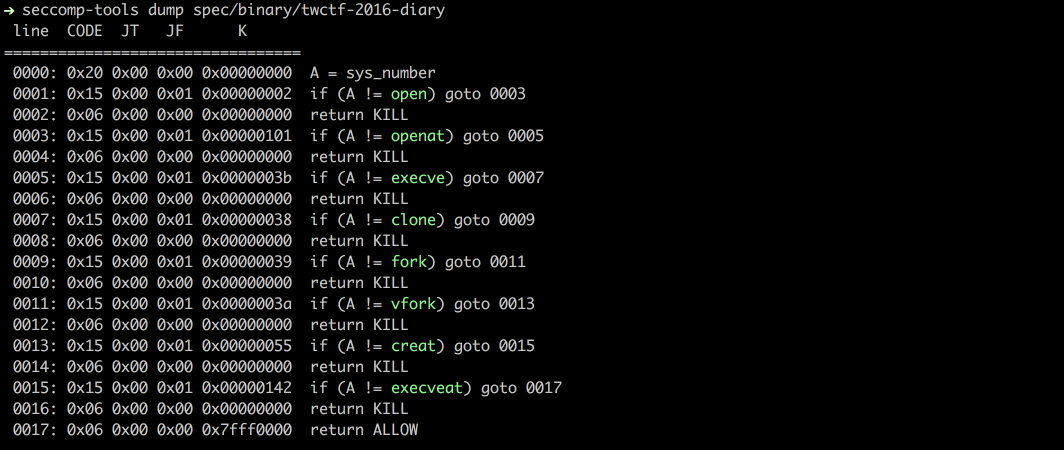
 david942j/seccomp-tools
seccomp分析のための強力なツールを提供します

[](https://rubygems.org/gems/seccomp-tools)
[](https://badge.fury.io/rb/seccomp-tools)
[](https://github.com/david942j/seccomp-tools/actions)
[](https://qlty.sh/gh/david942j/projects/seccomp-tools)
[](https://qlty.sh/gh/david942j/projects/seccomp-tools)
[](https://inch-ci.org/github/david942j/seccomp-tools)
[](https://www.rubydoc.info/github/david942j/seccomp-tools/)
[](http://choosealicense.com/licenses/mit/)
# Seccomp Tools
seccomp 解析のための強力なツール群です。
このプロジェクトは主に(ただし排他的ではなく)CTF pwn チャレンジにおける seccomp サンドボックスの解析を目的としています。
一部の機能は CTF 特有のものですが、実世界の seccomp フィルタの解析にも同様に役立ちます。
## 機能
* Dump - 実行ファイルから seccomp BPF を自動的にダンプします。
* Disasm - seccomp BPF を人間が読みやすい形式に変換します。
- 簡易的な逆コンパイルに対応。
- 可能な限りシステムコール名と引数を表示。
- カラフル!
* Asm - seccomp ルールの記述をコードを書くのと同じくらい簡単にします。
* Emu - seccomp ルールをエミュレートします。
* Explain - フィルタをアクション別のポリシーとして要約します(どのシステムコールが許可/拒否されるか、そしてその条件)。
* Audit - フィルタの弱点や脱出経路(arch/x32 ガードの欠落、危険なシステムコールなど)をスキャンします。
* マルチアーキテクチャ対応。
## インストール
RubyGems.org で入手できます!```
$ gem install seccomp-tools
```
コンパイルに失敗した場合は、次を試してください:```
sudo apt install gcc ruby-dev make
```
then seccomp-tools を再度インストールします。
## コマンドラインインターフェース
### seccomp-tools```bash
$ seccomp-tools --help
# Usage: seccomp-tools [--version] [--help] <command> [<options>]
#
# List of commands:
#
# asm Seccomp bpf assembler.
# audit Assess a seccomp filter for weaknesses and escape routes.
# completion Print a shell completion script.
# disasm Disassemble seccomp bpf.
# dump Automatically dump seccomp bpf from executable(s).
# emu Emulate seccomp rules.
# explain Summarize a seccomp filter as a per-action policy.
#
# See 'seccomp-tools <command> --help' to read about a specific subcommand.
$ seccomp-tools dump --help
# dump - Automatically dump seccomp bpf from executable(s).
# NOTE: This command is only available on Linux.
#
# Usage: seccomp-tools dump [EXEC] [options]
# -c, --sh-exec <command> Executes the given command (via sh) and dumps its seccomp.
# Use this to pass arguments or pipe things to the executable.
# e.g. use `-c "./bin > /dev/null"` to keep the program output out of the result.
# Takes precedence over the positional argument.
# -l, --limit LIMIT Dump only the first LIMIT installed filters.
# Only meaningful when the input is an executable or --pid. Default: 1
# An executable is killed once it reaches LIMIT.
# -p, --pid PID Dump the seccomp filters installed on an existing process.
# You must have CAP_SYS_ADMIN (e.g. be root) to use this option.
# -t, --timeout SEC Timeout (seconds) for the execution. Default: no timeout
# This option is ignored when --pid is given.
# -f, --format FORMAT Output format. FORMAT can only be one of <disasm|raw|inspect>.
# Default: disasm
# -o, --output FILE Write output to FILE instead of stdout.
# If multiple seccomp syscalls have been invoked (see --limit),
# results are written to FILE, FILE_1, FILE_2, etc.
# For example, with "--output out.bpf" the output files are out.bpf, out_1.bpf, ...
```
### dump
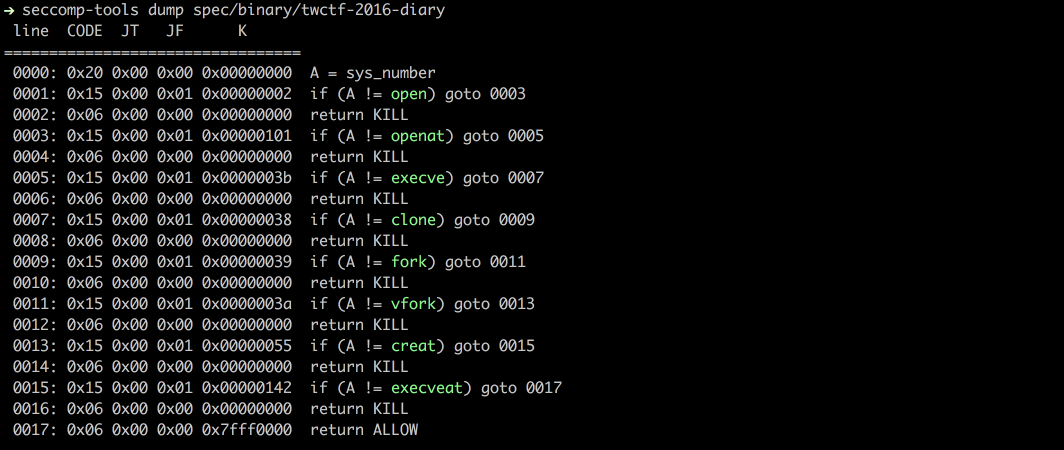
`ptrace` システムコールを使用して、実行可能ファイルから seccomp BPF をダンプします。
注: 対象の実行可能ファイルは実際に実行されるため、信頼できないバイナリを扱う際は注意してください。```bash
$ file spec/binary/twctf-2016-diary
# spec/binary/twctf-2016-diary: ELF 64-bit LSB executable, x86-64, version 1 (SYSV), dynamically linked, interpreter /lib64/ld-linux-x86-64.so.2, for GNU/Linux 2.6.24, BuildID[sha1]=3648e29153ac0259a0b7c3e25537a5334f50107f, not stripped
$ seccomp-tools dump spec/binary/twctf-2016-diary
# line CODE JT JF K
# =================================
# 0000: 0x20 0x00 0x00 0x00000000 A = sys_number
# 0001: 0x15 0x00 0x01 0x00000002 if (A != open) goto 0003
# 0002: 0x06 0x00 0x00 0x00000000 return KILL
# 0003: 0x15 0x00 0x01 0x00000101 if (A != openat) goto 0005
# 0004: 0x06 0x00 0x00 0x00000000 return KILL
# 0005: 0x15 0x00 0x01 0x0000003b if (A != execve) goto 0007
# 0006: 0x06 0x00 0x00 0x00000000 return KILL
# 0007: 0x15 0x00 0x01 0x00000038 if (A != clone) goto 0009
# 0008: 0x06 0x00 0x00 0x00000000 return KILL
# 0009: 0x15 0x00 0x01 0x00000039 if (A != fork) goto 0011
# 0010: 0x06 0x00 0x00 0x00000000 return KILL
# 0011: 0x15 0x00 0x01 0x0000003a if (A != vfork) goto 0013
# 0012: 0x06 0x00 0x00 0x00000000 return KILL
# 0013: 0x15 0x00 0x01 0x00000055 if (A != creat) goto 0015
# 0014: 0x06 0x00 0x00 0x00000000 return KILL
# 0015: 0x15 0x00 0x01 0x00000142 if (A != execveat) goto 0017
# 0016: 0x06 0x00 0x00 0x00000000 return KILL
# 0017: 0x06 0x00 0x00 0x7fff0000 return ALLOW
$ seccomp-tools dump spec/binary/twctf-2016-diary -f inspect
# "\x20\x00\x00\x00\x00\x00\x00\x00\x15\x00\x00\x01\x02\x00\x00\x00\x06\x00\x00\x00\x00\x00\x00\x00\x15\x00\x00\x01\x01\x01\x00\x00\x06\x00\x00\x00\x00\x00\x00\x00\x15\x00\x00\x01\x3B\x00\x00\x00\x06\x00\x00\x00\x00\x00\x00\x00\x15\x00\x00\x01\x38\x00\x00\x00\x06\x00\x00\x00\x00\x00\x00\x00\x15\x00\x00\x01\x39\x00\x00\x00\x06\x00\x00\x00\x00\x00\x00\x00\x15\x00\x00\x01\x3A\x00\x00\x00\x06\x00\x00\x00\x00\x00\x00\x00\x15\x00\x00\x01\x55\x00\x00\x00\x06\x00\x00\x00\x00\x00\x00\x00\x15\x00\x00\x01\x42\x01\x00\x00\x06\x00\x00\x00\x00\x00\x00\x00\x06\x00\x00\x00\x00\x00\xFF\x7F"
$ seccomp-tools dump spec/binary/twctf-2016-diary -f raw | xxd
# 00000000: 2000 0000 0000 0000 1500 0001 0200 0000 ...............
# 00000010: 0600 0000 0000 0000 1500 0001 0101 0000 ................
# 00000020: 0600 0000 0000 0000 1500 0001 3b00 0000 ............;...
# 00000030: 0600 0000 0000 0000 1500 0001 3800 0000 ............8...
# 00000040: 0600 0000 0000 0000 1500 0001 3900 0000 ............9...
# 00000050: 0600 0000 0000 0000 1500 0001 3a00 0000 ............:...
# 00000060: 0600 0000 0000 0000 1500 0001 5500 0000 ............U...
# 00000070: 0600 0000 0000 0000 1500 0001 4201 0000 ............B...
# 00000080: 0600 0000 0000 0000 0600 0000 0000 ff7f ................
```
### disasm
生のseccomp BPFを読み取り可能な形式に逆アセンブルします。```bash
$ xxd spec/data/twctf-2016-diary.bpf | head -n 3
# 00000000: 2000 0000 0000 0000 1500 0001 0200 0000 ...............
# 00000010: 0600 0000 0000 0000 1500 0001 0101 0000 ................
# 00000020: 0600 0000 0000 0000 1500 0001 3b00 0000 ............;...
$ seccomp-tools disasm spec/data/twctf-2016-diary.bpf
# line CODE JT JF K
# =================================
# 0000: 0x20 0x00 0x00 0x00000000 A = sys_number
# 0001: 0x15 0x00 0x01 0x00000002 if (A != open) goto 0003
# 0002: 0x06 0x00 0x00 0x00000000 return KILL
# 0003: 0x15 0x00 0x01 0x00000101 if (A != openat) goto 0005
# 0004: 0x06 0x00 0x00 0x00000000 return KILL
# 0005: 0x15 0x00 0x01 0x0000003b if (A != execve) goto 0007
# 0006: 0x06 0x00 0x00 0x00000000 return KILL
# 0007: 0x15 0x00 0x01 0x00000038 if (A != clone) goto 0009
# 0008: 0x06 0x00 0x00 0x00000000 return KILL
# 0009: 0x15 0x00 0x01 0x00000039 if (A != fork) goto 0011
# 0010: 0x06 0x00 0x00 0x00000000 return KILL
# 0011: 0x15 0x00 0x01 0x0000003a if (A != vfork) goto 0013
# 0012: 0x06 0x00 0x00 0x00000000 return KILL
# 0013: 0x15 0x00 0x01 0x00000055 if (A != creat) goto 0015
# 0014: 0x06 0x00 0x00 0x00000000 return KILL
# 0015: 0x15 0x00 0x01 0x00000142 if (A != execveat) goto 0017
# 0016: 0x06 0x00 0x00 0x00000000 return KILL
# 0017: 0x06 0x00 0x00 0x7fff0000 return ALLOW
```
### asm
seccompルールを生のバイト列にアセンブルします。
独自のseccompルールを記述したい場合に便利です。
ジャンプラベルとシステムコール名をサポートしています。以下の例を参照してください。```bash
$ seccomp-tools asm
# asm - Seccomp bpf assembler.
#
# Usage: seccomp-tools asm IN_FILE [options]
# -o, --output FILE Write output to FILE instead of stdout.
# -f, --format FORMAT Output format. FORMAT can only be one of <inspect|raw|c_array|c_source|assembly>.
# Default: inspect
# -a, --arch ARCH Specify architecture.
# Supported architectures are <aarch64|amd64|i386|riscv64|s390x>.
# Default: auto-detected from the host machine.
# Set it when the filter targets an architecture other than the host.
# Input file for asm
$ cat spec/data/libseccomp.asm
# # check if arch is X86_64
# A = arch
# A == ARCH_X86_64 ? next : dead
# A = sys_number
# A >= 0x40000000 ? dead : next
# A == write ? ok : next
# A == close ? ok : next
# A == dup ? ok : next
# A == exit ? ok : next
# return ERRNO(5)
# ok:
# return ALLOW
# dead:
# return KILL
$ seccomp-tools asm spec/data/libseccomp.asm
# " \x00\x00\x00\x04\x00\x00\x00\x15\x00\x00\b>\x00\x00\xC0 \x00\x00\x00\x00\x00\x00\x005\x00\x06\x00\x00\x00\x00@\x15\x00\x04\x00\x01\x00\x00\x00\x15\x00\x03\x00\x03\x00\x00\x00\x15\x00\x02\x00 \x00\x00\x00\x15\x00\x01\x00<\x00\x00\x00\x06\x00\x00\x00\x05\x00\x05\x00\x06\x00\x00\x00\x00\x00\xFF\x7F\x06\x00\x00\x00\x00\x00\x00\x00"
$ seccomp-tools asm spec/data/libseccomp.asm -f c_source
# #include <linux/seccomp.h>
# #include <stdio.h>
# #include <stdlib.h>
# #include <sys/prctl.h>
#
# static void install_seccomp() {
# static unsigned char filter[] = {32,0,0,0,4,0,0,0,21,0,0,8,62,0,0,192,32,0,0,0,0,0,0,0,53,0,6,0,0,0,0,64,21,0,4,0,1,0,0,0,21,0,3,0,3,0,0,0,21,0,2,0,32,0,0,0,21,0,1,0,60,0,0,0,6,0,0,0,5,0,5,0,6,0,0,0,0,0,255,127,6,0,0,0,0,0,0,0};
# struct prog {
# unsigned short len;
# unsigned char *filter;
# } rule = {
# .len = sizeof(filter) >> 3,
# .filter = filter
# };
# if(prctl(PR_SET_NO_NEW_PRIVS, 1, 0, 0, 0) < 0) { perror("prctl(PR_SET_NO_NEW_PRIVS)"); exit(2); }
# if(prctl(PR_SET_SECCOMP, SECCOMP_MODE_FILTER, &rule) < 0) { perror("prctl(PR_SET_SECCOMP)"); exit(2); }
# }
$ seccomp-tools asm spec/data/libseccomp.asm -f assembly
# install_seccomp:
# push rbp
# mov rbp, rsp
# push 38
# pop rdi
# push 0x1
# pop rsi
# xor eax, eax
# mov al, 0x9d
# syscall
# push 22
# pop rdi
# lea rdx, [rip + _filter]
# push rdx /* .filter */
# push _filter_end - _filter >> 3 /* .len */
# mov rdx, rsp
# push 0x2
# pop rsi
# xor eax, eax
# mov al, 0x9d
# syscall
# leave
# ret
# _filter:
# .ascii "\040\000\000\000\004\000\000\000\025\000\000\010\076\000\000\300\040\000\000\000\000\000\000\000\065\000\006\000\000\000\000\100\025\000\004\000\001\000\000\000\025\000\003\000\003\000\000\000\025\000\002\000\040\000\000\000\025\000\001\000\074\000\000\000\006\000\000\000\005\000\005\000\006\000\000\000\000\000\377\177\006\000\000\000\000\000\000\000"
# _filter_end:
# let's asm then disasm!
$ seccomp-tools asm spec/data/libseccomp.asm -f raw | seccomp-tools disasm -
# line CODE JT JF K
# =================================
# 0000: 0x20 0x00 0x00 0x00000004 A = arch
# 0001: 0x15 0x00 0x08 0xc000003e if (A != ARCH_X86_64) goto 0010
# 0002: 0x20 0x00 0x00 0x00000000 A = sys_number
# 0003: 0x35 0x06 0x00 0x40000000 if (A >= 0x40000000) goto 0010
# 0004: 0x15 0x04 0x00 0x00000001 if (A == write) goto 0009
# 0005: 0x15 0x03 0x00 0x00000003 if (A == close) goto 0009
# 0006: 0x15 0x02 0x00 0x00000020 if (A == dup) goto 0009
# 0007: 0x15 0x01 0x00 0x0000003c if (A == exit) goto 0009
# 0008: 0x06 0x00 0x00 0x00050005 return ERRNO(5)
# 0009: 0x06 0x00 0x00 0x7fff0000 return ALLOW
# 0010: 0x06 0x00 0x00 0x00000000 return KILL
```
v1.6.0(未リリース)以降、`asm` はyaccベースのパーサーに切り替わり、より柔軟で直感的な構文が可能になりました!```bash
$ cat spec/data/example.asm
# # An example of supported assembly syntax
# if (A == X)
# goto next # 'next' is a reserved label, means the next statement ("A = args[0]" in this example)
# else
# goto err_label # custom defined label
# A = args[0]
# if (
# A # put a comment here is also valid
# == 0x123
# ) goto disallow
# if (! (A & 0x1337)) # support bang in if-conditions
# goto 0 # equivalent to 'goto next'
# else goto 2 # goto $ + 2, 'mem[0] = A' in this example
# A = sys_number
# A = instruction_pointer >> 32
# mem[0] = A
# A = data[4] # equivalent to 'A = arch'
# err_label: return ERRNO(1337)
# disallow:
# return KILL
$ seccomp-tools asm spec/data/example.asm -f raw | seccomp-tools disasm -
# line CODE JT JF K
# =================================
# 0000: 0x1d 0x00 0x07 0x00000000 if (A != X) goto 0008
# 0001: 0x20 0x00 0x00 0x00000010 A = args[0]
# 0002: 0x15 0x06 0x00 0x00000123 if (A == 0x123) goto 0009
# 0003: 0x45 0x02 0x00 0x00001337 if (A & 0x1337) goto 0006
# 0004: 0x20 0x00 0x00 0x00000000 A = sys_number
# 0005: 0x20 0x00 0x00 0x0000000c A = instruction_pointer >> 32
# 0006: 0x02 0x00 0x00 0x00000000 mem[0] = A
# 0007: 0x20 0x00 0x00 0x00000004 A = arch
# 0008: 0x06 0x00 0x00 0x00050539 return ERRNO(1337)
# 0009: 0x06 0x00 0x00 0x00000000 return KILL
```
`seccomp-tools disasm <file> --asm-able` の出力は `asm` の有効な入力です:```bash
$ seccomp-tools disasm spec/data/x32.bpf --asm-able
# 0000: A = arch
# 0001: if (A != ARCH_X86_64) goto 0011
# 0002: A = sys_number
# 0003: if (A < 0x40000000) goto 0011
# 0004: if (A == x32_read) goto 0011
# 0005: if (A == x32_write) goto 0011
# 0006: if (A == x32_iopl) goto 0011
# 0007: if (A != x32_mmap) goto 0011
# 0008: A = args[0]
# 0009: if (A == 0x0) goto 0011
# 0010: return ERRNO(5)
# 0011: return ALLOW
# disasm then asm then disasm!
$ seccomp-tools disasm spec/data/x32.bpf --asm-able | seccomp-tools asm - -f raw | seccomp-tools disasm -
# line CODE JT JF K
# =================================
# 0000: 0x20 0x00 0x00 0x00000004 A = arch
# 0001: 0x15 0x00 0x09 0xc000003e if (A != ARCH_X86_64) goto 0011
# 0002: 0x20 0x00 0x00 0x00000000 A = sys_number
# 0003: 0x35 0x00 0x07 0x40000000 if (A < 0x40000000) goto 0011
# 0004: 0x15 0x06 0x00 0x40000000 if (A == x32_read) goto 0011
# 0005: 0x15 0x05 0x00 0x40000001 if (A == x32_write) goto 0011
# 0006: 0x15 0x04 0x00 0x400000ac if (A == x32_iopl) goto 0011
# 0007: 0x15 0x00 0x03 0x40000009 if (A != x32_mmap) goto 0011
# 0008: 0x20 0x00 0x00 0x00000010 A = addr # x32_mmap(addr, len, prot, flags, fd, pgoff)
# 0009: 0x15 0x01 0x00 0x00000000 if (A == 0x0) goto 0011
# 0010: 0x06 0x00 0x00 0x00050005 return ERRNO(5)
# 0011: 0x06 0x00 0x00 0x7fff0000 return ALLOW
```
### Emu
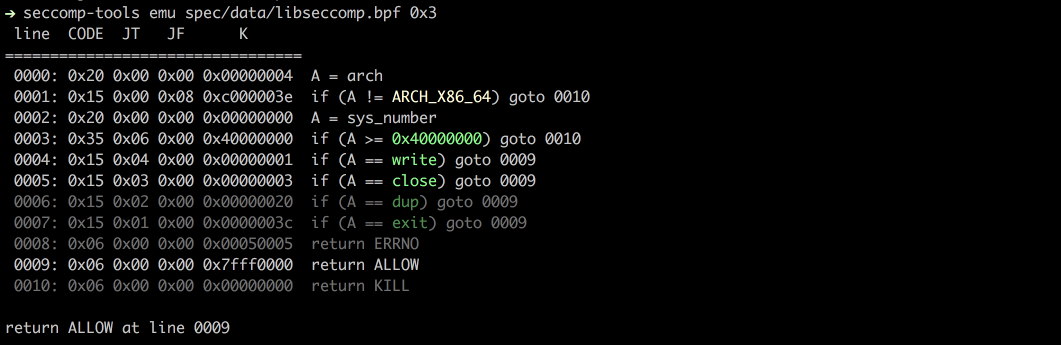
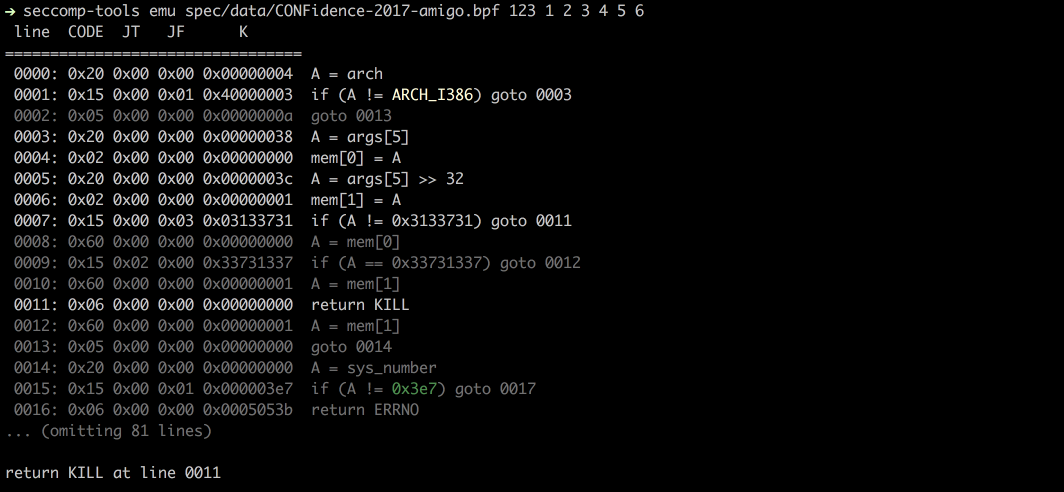
`sys_nr`、`arg0`、`arg1` などを指定して seccomp をエミュレートします。```bash
$ seccomp-tools emu --help
# emu - Emulate seccomp rules.
#
# Usage: seccomp-tools emu [options] BPF_FILE [sys_nr [arg0 [arg1 ... arg5]]]
# -a, --arch ARCH Specify architecture.
# Supported architectures are <aarch64|amd64|i386|riscv64|s390x>.
# Default: auto-detected from the host machine.
# Set it when the filter targets an architecture other than the host.
# -q, --[no-]quiet Run quietly, only show emulation result.
# -i, --ip=VAL Set instruction pointer.
$ seccomp-tools emu spec/data/libseccomp.bpf write 0x3
# line CODE JT JF K
# =================================
# 0000: 0x20 0x00 0x00 0x00000004 A = arch
# 0001: 0x15 0x00 0x08 0xc000003e if (A != ARCH_X86_64) goto 0010
# 0002: 0x20 0x00 0x00 0x00000000 A = sys_number
# 0003: 0x35 0x06 0x00 0x40000000 if (A >= 0x40000000) goto 0010
# 0004: 0x15 0x04 0x00 0x00000001 if (A == write) goto 0009
# 0005: 0x15 0x03 0x00 0x00000003 if (A == close) goto 0009
# 0006: 0x15 0x02 0x00 0x00000020 if (A == dup) goto 0009
# 0007: 0x15 0x01 0x00 0x0000003c if (A == exit) goto 0009
# 0008: 0x06 0x00 0x00 0x00050005 return ERRNO(5)
# 0009: 0x06 0x00 0x00 0x7fff0000 return ALLOW
# 0010: 0x06 0x00 0x00 0x00000000 return KILL
#
# return ALLOW at line 0009
```
### 説明
フィルタ全体をアクションごとのポリシーとして要約します。どのシステムコールが `ALLOW`、`KILL`、`ERRNO` などで終わるか、そしてどのような引数制約の下にあるかを示します。入力には、ダンプされたBPFファイル、実行可能ファイル(そのseccompは `dump` と同様に最初にダンプされます)、または `--pid` による実行中のプロセスを使用できます。```bash
$ seccomp-tools explain --help
# explain - Summarize a seccomp filter as a per-action policy.
#
# Usage: seccomp-tools explain [options] [BPF_FILE|EXEC]
# -c, --sh-exec <command> Executes the given command (via sh) and explains its seccomp.
# Use this to pass arguments or pipe things to the executable.
# e.g. use `-c "./bin > /dev/null"` to keep the program output out of the result.
# Takes precedence over the positional argument.
# -l, --limit LIMIT Explain only the first LIMIT installed filters.
# Only meaningful when the input is an executable or --pid. Default: 1
# An executable is killed once it reaches LIMIT.
# -p, --pid PID Explain the seccomp filters installed on an existing process.
# You must have CAP_SYS_ADMIN (e.g. be root) to use this option.
# -t, --timeout SEC Timeout (seconds) for the execution. Default: no timeout
# This option is ignored when --pid is given.
# -a, --arch ARCH Specify architecture.
# Supported architectures are <aarch64|amd64|i386|riscv64|s390x>.
# Default: auto-detected from the host machine.
# Set it when the filter targets an architecture other than the host.
# With an executable or --pid the architecture is auto-detected instead.
$ seccomp-tools explain spec/data/libseccomp.bpf -a amd64
# Seccomp policy for spec/data/libseccomp.bpf
#
# Architecture: amd64
#
# ALLOW:
# write, close, dup, exit
#
# ERRNO(5):
# <default> (any other syscall)
#
# KILL:
# sys_number >= 0x40000000 (x32 ABI)
#
# Other architectures: KILL
```
0CTF/TCTF 2023の「Nothing is True」フィルタという、より複雑な例です。これは32ビット/64ビットで別々の許可リストを持ち、`open`、`mmap`、`execve`に対する引数チェックを行います。```bash
$ seccomp-tools explain spec/data/tctf-2023-nothing-is-true.bpf -a amd64
# Seccomp policy for spec/data/tctf-2023-nothing-is-true.bpf
#
# Architecture: i386
#
# ALLOW:
# exit, read, write, brk, mmap, munmap, exit_group
#
# KILL:
# <default> (any other syscall)
#
# Architecture: amd64
#
# ALLOW:
# close, munmap, brk, exit, exit_group
# open when filename == 0x31337 && flags == 0x0
# mmap when prot == 0x2
# execve when filename == 0x7ffea12f7d0e
#
# KILL:
# sys_number >= 0x40000000 (x32 ABI)
# <default> (any other syscall)
#
# Other architectures: KILL
```
### 監査
フィルタを、弱点や可能性のある回避経路についてスキャンします。アーキテクチャまたはx32ガードの欠落、寛容な(拒否リスト方式の)デフォルト、同等のシステムコールのギャップ(例: `execve` はブロックされているが `execveat` はブロックされていない)、オープン/リード/ライトのチェーン、または `ALLOW` として到達可能な危険なシステムコールなどが対象となり、それぞれを重大度とともに報告します。これはサポートされているすべてのアーキテクチャで実行され(amd64のx32のようなアーキテクチャ固有の癖は、存在する場合にのみ適用されます)、`explain` と同じ入力(BPFファイル、実行可能ファイル、または `--pid`)を受け取ります。```bash
$ seccomp-tools audit --help
# audit - Assess a seccomp filter for weaknesses and escape routes.
#
# Usage: seccomp-tools audit [options] [BPF_FILE|EXEC]
# -c, --sh-exec <command> Executes the given command (via sh) and audits its seccomp.
# Use this to pass arguments or pipe things to the executable.
# e.g. use `-c "./bin > /dev/null"` to keep the program output out of the result.
# Takes precedence over the positional argument.
# -l, --limit LIMIT Audit only the first LIMIT installed filters.
# Only meaningful when the input is an executable or --pid. Default: 1
# An executable is killed once it reaches LIMIT.
# -p, --pid PID Audit the seccomp filters installed on an existing process.
# You must have CAP_SYS_ADMIN (e.g. be root) to use this option.
# -t, --timeout SEC Timeout (seconds) for the execution. Default: no timeout
# This option is ignored when --pid is given.
# -a, --arch ARCH Specify architecture.
# Supported architectures are <aarch64|amd64|i386|riscv64|s390x>.
# Default: auto-detected from the host machine.
# Set it when the filter targets an architecture other than the host.
# With an executable or --pid the architecture is auto-detected instead.
# -f, --format FORMAT Output format, one of <human|json>.
# Default: human
```
監査対象の拒否リストに複数のエスケープ経路がある場合(TokyoWesterns CTF 2016「diary」フィルター):```bash
$ seccomp-tools audit spec/data/twctf-2016-diary.bpf -a amd64
# Seccomp audit of spec/data/twctf-2016-diary.bpf
# Architectures: amd64
#
# [HIGH] Architecture is never validated
# The filter checks syscall numbers without ever comparing data[4] (arch). Numbers mean different syscalls under
# another AUDIT_ARCH, so the checks can be dodged by invoking through a different ABI (e.g. i386 numbering on amd64).
# fix: Compare data[4] against your AUDIT_ARCH_* and KILL every architecture you do not explicitly handle.
#
# [HIGH] io_uring_setup is allowed (amd64)
# io_uring_setup reaches ALLOW - reads/writes/opens as ring operations, bypassing filters on those syscalls.
# fix: Block io_uring_setup unless the program genuinely needs it.
#
# [HIGH] process_vm_readv is allowed (amd64)
# process_vm_readv reaches ALLOW - read another process's memory.
# fix: Block process_vm_readv unless the program genuinely needs it.
#
# [HIGH] process_vm_writev is allowed (amd64)
# process_vm_writev reaches ALLOW - write another process's memory.
# fix: Block process_vm_writev unless the program genuinely needs it.
#
# [HIGH] ptrace is allowed (amd64)
# ptrace reaches ALLOW - inspect/inject into other processes.
# fix: Block ptrace unless the program genuinely needs it.
#
# [HIGH] A file can be opened and its contents copied out (amd64)
# openat2, read and write all reach ALLOW, so the contents of an arbitrary file (e.g. the flag) can be copied straight
# back out.
# fix: Deny the open-family syscalls unless the program genuinely needs arbitrary files.
#
# [HIGH] Default action is ALLOW (denylist) (amd64)
# Any syscall the filter does not explicitly block is allowed; a denylist is bypassable by any syscall the author
# overlooked.
# fix: Use an allowlist: default to KILL/ERRNO and permit only the needed syscalls.
#
# [HIGH] open/openat blocked but openat2 allowed (amd64)
# open, openat denied, but the equivalent openat2 reaches ALLOW - same capability, different syscall number.
# fix: Deny every equivalent in the group: also block openat2.
#
# [HIGH] x32 ABI is not guarded (amd64)
# Syscalls blocked by their native number are reachable via their x32 number (nr | 0x40000000): open, clone, fork,
# vfork, execve, creat, openat, execveat.
# fix: After the arch check, KILL when sys_number >= 0x40000000 (or jset 0x40000000).
#
# [MEDIUM] connect is allowed (amd64)
# connect reaches ALLOW - network access (exfiltration).
# fix: Block connect unless the program genuinely needs it.
#
# [MEDIUM] socket is allowed (amd64)
# socket reaches ALLOW - network access (exfiltration).
# fix: Block socket unless the program genuinely needs it.
#
# [MEDIUM] fork/vfork/clone blocked but clone3 allowed (amd64)
# fork, vfork, clone denied, but the equivalent clone3 reaches ALLOW - same capability, different syscall number.
# fix: Deny every equivalent in the group: also block clone3.
```
`--format json` をCIやツールで使用してください:```bash
$ seccomp-tools audit spec/data/gctf-2019-quals-caas.bpf -a amd64 -f json
# {
# "stacked_filters": 1,
# "reports": [
# {
# "source": "spec/data/gctf-2019-quals-caas.bpf",
# "arches": [
# "amd64"
# ],
# "truncated": false,
# "findings": [
# {
# "id": "dangerous-allow",
# "severity": "medium",
# "title": "connect is allowed",
# "detail": "connect reaches ALLOW - network access (exfiltration).",
# "arch": "amd64",
# "syscalls": [
# "connect"
# ],
# "condition": null,
# "remediation": "Block connect unless the program genuinely needs it."
# },
# {
# "id": "dangerous-allow",
# "severity": "medium",
# "title": "socket is allowed",
# "detail": "socket reaches ALLOW - network access (exfiltration).",
# "arch": "amd64",
# "syscalls": [
# "socket"
# ],
# "condition": "family == 0x2 && type == 0x1 && protocol == 0x0",
# "remediation": "Block socket unless the program genuinely needs it."
# }
# ]
# }
# ]
# }
```
## Shell Completion
`seccomp-tools completion <bash|zsh|fish>` は、指定したシェル用の補完スクリプトを出力します。シェルの起動ファイルから読み込んでください:```bash
# bash (~/.bashrc)
eval "$(seccomp-tools completion bash)"
# zsh (~/.zshrc, after `compinit`)
eval "$(seccomp-tools completion zsh)"
# fish (~/.config/fish/config.fish)
seccomp-tools completion fish | source
```
毎回評価する起動コストを避けるため、シェルが補完を読み込むディレクトリにスクリプトを書き込んでください。例: `seccomp-tools completion zsh > "${fpath[1]}/_seccomp-tools"`。
## スクリーンショット
### Dump
### Emu
## 対応アーキテクチャ
- [x] x86_64
- [x] x32
- [x] x86
- [x] arm64 (@saagarjha)
- [x] s390x (@iii-i)
- [x] riscv64
追加のアーキテクチャ対応のプルリクエストは歓迎します!
## 開発
Ruby環境の管理には[rbenv](https://github.com/rbenv/rbenv)の使用をお勧めします。
### セットアップ
- bundlerをインストール
- `$ gem install bundler`
- ソースをクローン
- `$ git clone https://github.com/david942j/seccomp-tools && cd seccomp-tools`
- 依存関係をインストール
- `$ bundle install`
### テストを実行
`$ bundle exec rake`
## あなたの助けが必要です
提案や機能リクエストはいつでも歓迎します!
お気軽にissueを立てるか、プルリクエストを送ってください。
また、このプロジェクトが気に入ったら、[スター](https://github.com/david942j/seccomp-tools/stargazers)を付けていただけると嬉しいです :grimacing:





