
 cddmp/enum4linux-ng
enum4linux(Windows/Samba列挙ツール)の次世代バージョンで、JSON/YAMLエクスポートなどの追加機能を備えています。セキュリティ専門家やCTFプレイヤー向け。

enum4linuxの次世代バージョン


enum4linux-ng.pyは、Mark Lowe氏(元Portcullis Labs、現在Cisco CX Security Labs)のenum4linux.plを書き直したもので、WindowsおよびSambaシステムから情報を列挙するためのツールです。セキュリティ専門家やCTFプレイヤーを対象としています。このツールは主にSambaツールのnmblookup、net、rpcclient、smbclientのラッパーです。
自己学習のために作成し、enum4linux.plの問題を解決することを目的としています。元のツールと同じ機能を持っていますが、一部の処理は異なります。元のツールとは異なり、Sambaツールのすべての出力を解析し、すべての調査結果をYAMLまたはJSONファイルとしてエクスポートできます。これにより、他のツールが調査結果をインポートしてさらに処理できるようにするという考えです。将来的には新機能の追加が計画されています。
元のenum4linuxと比較していくつかの実装が異なります。重要な違いは以下の通りです:
-Gmで有効にできます。-A)には含まれませんが、-Rで有効にできます。-aではなく-A)。旧Portcullis Labs(現Cisco CX Security Labs)の方々に感謝とクレジットを捧げます:
さらに、以下の方々にも感謝とクレジットを捧げます:
皆さんのコードを読むのはとても楽しかったです!:)
最後に、コードの貢献、問題の報告、ツール改善のための有益な提案を提供してくださった多くの方々に感謝します。
ツールを使用する場合:違法な目的には使用しないでください。
実行例は次のようになります:
enum4linux-ng.py -As <target> -oY out
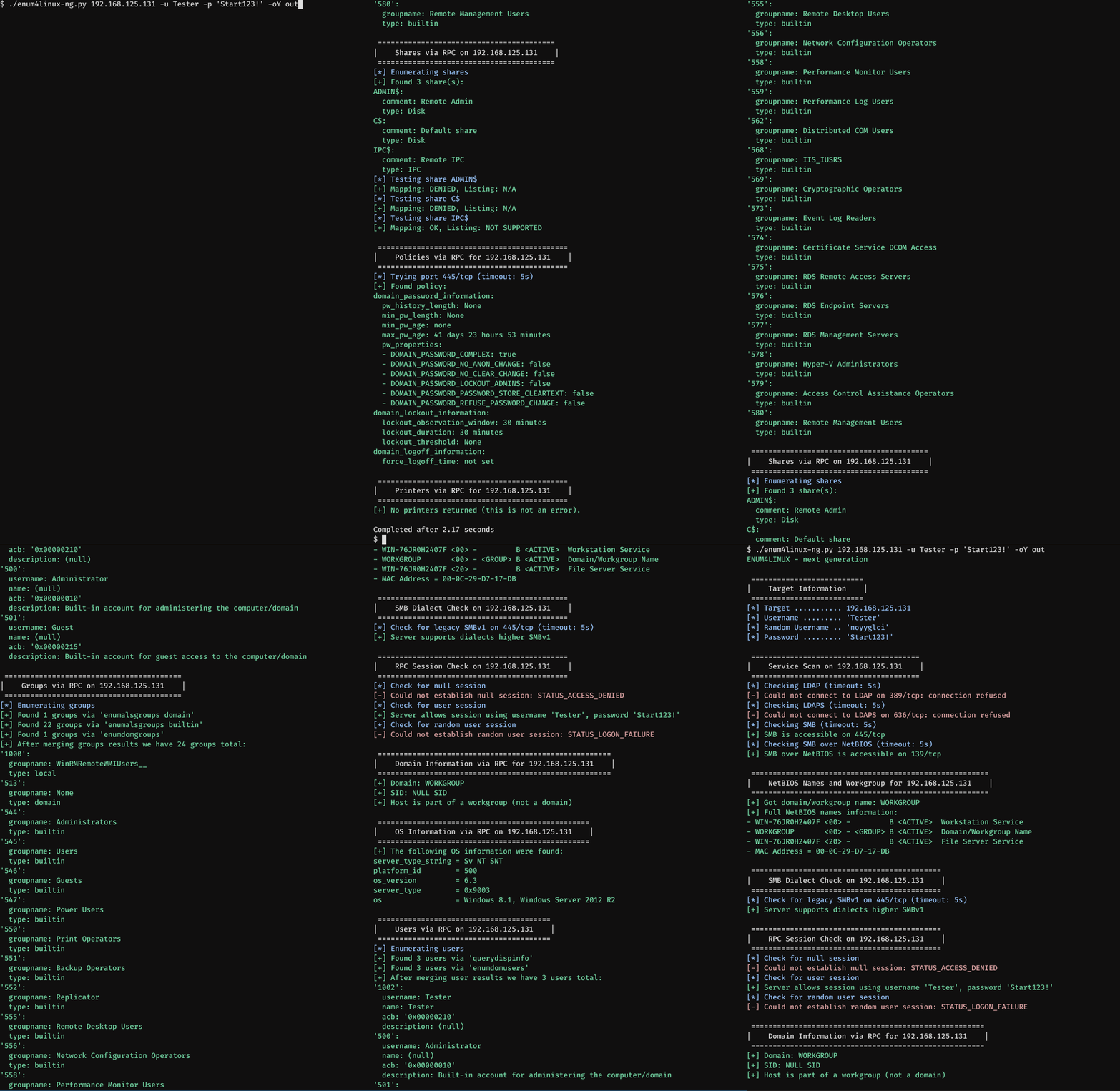
これはWindows Server 2012 R2標準インストールに対する実行例です。以下のコマンドを使用しています:
enum4linux-ng.py 192.168.125.131 -u Tester -p 'Start123!' -oY out
パスワード 'Start123!' を持つユーザー 'Tester' が作成されました。ファイアウォールアクセスは許可されています。列挙が完了したら、結果がより明確になるようにスクロールアップします。他の列挙オプションが指定されていないため、ツールは -A を想定し、これはenum4linuxの -a オプションと同様に動作します。ユーザーとパスワードが渡されます。-oY オプションは、列挙されたすべてのデータをYAMLファイルとして out.yaml にエクスポートします。ツールは自動的に、リモートホストでLDAPが実行されていないことを最初に検出します。そのため、通常はデフォルトの列挙に含まれるLDAPチェックはスキップされます。
2番目のデモはMetasploitable 2に対する実行を示します。以下のコマンドを使用しています:
enum4linux-ng.py 192.168.125.145 -A -C
今回は -A と -C オプションを使用しています。1つ目はenum4linuxの -a オプションと同様に動作し、2つ目はサービスの列挙を有効にします。今回は資格情報は提供されていません。ツールは自動的にSMBv1を使用する必要があることを検出します。YAMLまたはJSONファイルは書き込まれません。再び結果がより明確になるようにスクロールアップします。

usage: enum4linux-ng.py [-h] [-A] [-As] [-U] [-G] [-Gm] [-S] [-C] [-P] [-O] [-L] [-I] [-R [BULK_SIZE]] [-N] [-w DOMAIN] [-u USER]
                        [-p PW | -K TICKET_FILE | -H NTHASH] [--local-auth] [-d] [-k USERS] [-r RANGES] [-s SHARES_FILE] [-t TIMEOUT] [-v] [--keep]
                        [-oJ OUT_JSON_FILE | -oY OUT_YAML_FILE | -oA OUT_FILE]
                        host

This tool is a rewrite of Mark Lowe's enum4linux.pl, a tool for enumerating information from Windows and Samba systems. It is mainly a wrapper around the Samba
tools nmblookup, net, rpcclient and smbclient. Other than the original tool it allows to export enumeration results as YAML or JSON file, so that it can be
further processed with other tools. The tool tries to do a 'smart' enumeration. It first checks whether SMB or LDAP is accessible on the target. Depending on the
result of this check, it will dynamically skip checks (e.g. LDAP checks if LDAP is not running). If SMB is accessible, it will always check whether a session can
be set up or not. If no session can be set up, the tool will stop enumeration. The enumeration process can be interupted with CTRL+C. If the options -oJ or -oY
are provided, the tool will write out the current enumeration state to the JSON or YAML file, once it receives SIGINT triggered by CTRL+C. The tool was made for
security professionals and CTF players. Illegal use is prohibited.

positional arguments:
  host

options:
  -h, --help         show this help message and exit
  -A                 Do all simple enumeration including nmblookup (-U -G -S -P -O -N -I -L). This option is enabled if you don't provide any other option.
  -As                Do all simple short enumeration without NetBIOS names lookup (-U -G -S -P -O -I -L)
  -U                 Get users via RPC
  -G                 Get groups via RPC
  -Gm                Get groups with group members via RPC
  -S                 Get shares via RPC
  -C                 Get services via RPC
  -P                 Get password policy information via RPC
  -O                 Get OS information via RPC
  -L                 Get additional domain info via LDAP/LDAPS (for DCs only)
  -I                 Get printer information via RPC
  -R [BULK_SIZE]     Enumerate users via RID cycling. Optionally, specifies lookup request size.
  -N                 Do an NetBIOS names lookup (similar to nbtstat) and try to retrieve workgroup from output
  -w DOMAIN          Specify workgroup/domain manually (usually found automatically)
  -u USER            Specify username to use (default "")
  -p PW              Specify password to use (default "")
  -K TICKET_FILE     Try to authenticate with Kerberos, only useful in Active Directory environment (Note: DNS must be setup correctly for this option to work)
  -H NTHASH          Try to authenticate with hash
  --local-auth       Authenticate locally to target
  -d                 Get detailed information for users and groups, applies to -U, -G and -R
  -k USERS           User(s) that exists on remote system (default: administrator,guest,krbtgt,domain admins,root,bin,none). Used to get sid with "lookupsids"
  -r RANGES          RID ranges to enumerate (default: 500-550,1000-1050)
  -s SHARES_FILE     Brute force guessing for shares
  -t TIMEOUT         Sets connection timeout in seconds (default: 10s)
  -v                 Verbose, show full samba tools commands being run (net, rpcclient, etc.)
  --keep             Don't delete the Samba configuration file created during tool run after enumeration (useful with -v)
  -oJ OUT_JSON_FILE  Writes output to JSON file (extension is added automatically)
  -oY OUT_YAML_FILE  Writes output to YAML file (extension is added automatically)
  -oA OUT_FILE       Writes output to YAML and JSON file (extensions are added automatically)
ツールをインストールするには複数の方法があります。お使いのLinuxディストリビューションにパッケージとして含まれている場合もあれば、手動インストールが必要な場合もあります。
apt install enum4linux-ng
pacman -S enum4linux-ng
(NixOS 20.9でテスト済み)
nix-env -iA nixos.enum4linux-ng
お使いのLinuxディストリビューションがパッケージを提供していない場合は、以下の手動インストール方法を使用できます。
このツールはSambaクライアントツールを使用します:
これらはすべてのLinuxディストリビューションで利用可能のはずです。パッケージは通常 smbclient、samba-client または類似の名前です。
さらに、以下のPythonパッケージが必要です:
YAMLの高速処理(オプション)には以下もインストールしてください(ほとんどのLinuxディストリビューションではPyYamlの依存関係として提供されます):
特定のLinuxディストリビューションのインストール例を以下に示します。または、ディストリビューションに依存しない方法(Python pip、Python仮想環境、Docker)も可能です。
以下のすべてのディストリビューション例では、LibYAMLは対応するPyYamlパッケージの依存関係として自動的にインストールされます。
pacman -S smbclient python-ldap3 python-yaml impacket
(Fedora Workstation 31でテスト済み)
dnf install samba-common-tools samba-client python3-ldap3 python3-pyyaml python3-impacket
(Ubuntu 18.04以下の場合はDockerまたはPython仮想環境を使用してください)
apt install smbclient python3-ldap3 python3-yaml python3-impacket
ディストリビューションに応じて pip3 または pip が必要です:
pip install pyyaml ldap3 impacket
代替:
