 blacklanternsecurity/manspider
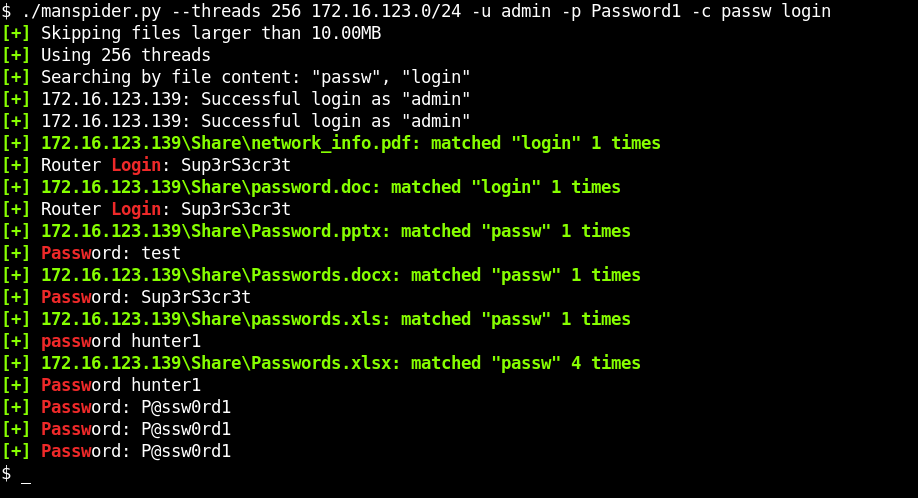
ネットワーク全体をクロールし、SMB共有上にある juicy なファイルを探します。ファイル名またはファイル内容を検索 - 正規表現対応!

Manspider 2.0が登場! 大幅な改良が加わりました:
--modified-after と --modified-before で更新日時によるファイル検索
PDFDOCXXLSXPPTX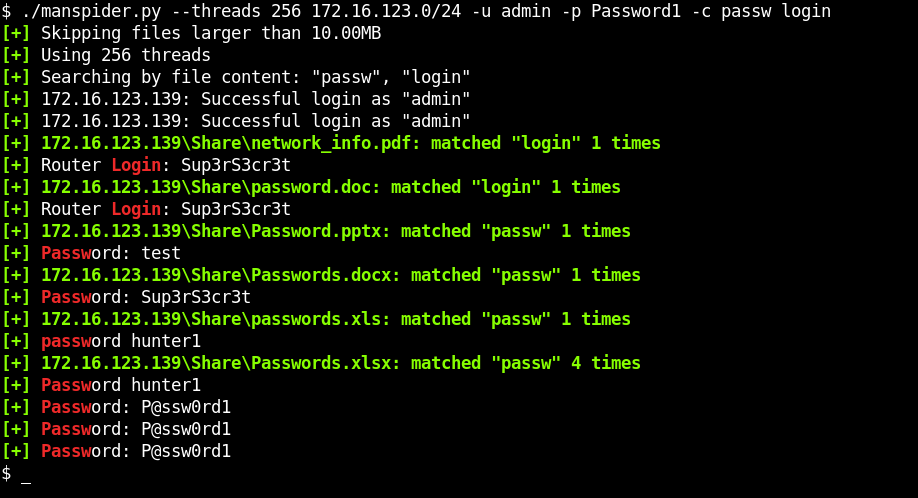
# Run directly without installing
uvx --from git+https://github.com/blacklanternsecurity/MANSPIDER manspider --help
# Install globally
uv tool install git+https://github.com/blacklanternsecurity/MANSPIDER

# Run
manspider --help
pipx install git+https://github.com/blacklanternsecurity/MANSPIDER
Manspiderは、さまざまなファイル形式からのテキスト抽出にKreuzbergを使用しています。一部の形式では追加のシステム依存関係が必要です:
# For OCR text extraction from images (PNG, JPEG, etc.)
sudo apt install tesseract-ocr

# For legacy Microsoft Office format support (.doc, .xls)
# Kreuzberg uses LibreOffice for conversion
sudo apt install libreoffice
これらの依存関係がない場合: ManspiderはPDF、DOCX、XLSX、PPTX、テキストファイルでは動作しますが、画像OCRとレガシーOffice形式はスキップします。
docker run --rm -v ./manspider:/root/.manspider blacklanternsecurity/manspider --help
また、manspider.sh というヘルパースクリプトも用意されており、manspiderの loot および logs ディレクトリのボリュームを自動的にマウントするため、より便利に実行できます:
./manspider.sh --help
注:一致したファイルは自動的に $HOME/.manspider/loot にダウンロードされます!(-n で無効化)
$ manspider 192.168.0.0/24 -f passw user admin account network login logon cred -d evilcorp -u bob -p Passw0rd
$ manspider share.evilcorp.local -f passw -e xlsx csv -d evilcorp -u bob -p Passw0rd
$ manspider share.evilcorp.local -c passw -e xlsx csv docx pdf -d evilcorp -u bob -p Passw0rd
$ manspider share.evilcorp.local -e bat com vbs ps1 psd1 psm1 pem key rsa pub reg pfx cfg conf config vmdk vhd vdi dit -d evilcorp -u bob -p Passw0rd
この例では、財務関連と思われるディレクトリ名を対象に、5つ以上の連続した数字を含むファイル名(例:000202006.EFT)を検索します。
$ manspider share.evilcorp.local --dirnames bank financ payable payment reconcil remit voucher vendor eft swift -f '[0-9]{5,}' -d evilcorp -u bob -p Passw0rd
$ manspider share.evilcorp.local -e ppk rsa pem ssh rsa -o -f id_rsa id_dsa id_ed25519 -d evilcorp -u bob -p Passw0rd
$ manspider share.evilcorp.local -e '' -c 'BEGIN .{1,10} PRIVATE KEY' -d evilcorp -u bob -p Passw0rd
# .kdbx - KeePass Password Database (KeePass, KeePassXC)
# .kdb - KeePass Classic Database (KeePass 1.x)
# .1pif - 1Password Interchange Format (1Password)
# .agilekeychain - Agile Keychain Format (1Password, deprecated)
# .opvault - OPVault Format (1Password)
# .lpd - LastPass Data File (LastPass)
# .dashlane - Dashlane Data File (Dashlane)
# .psafe3 - Password Safe Database (Password Safe)
# .enpass - Enpass Password Manager Data File (Enpass)
# .bwdb - Bitwarden Database (Bitwarden)
# .msecure - mSecure Password Manager Data File (mSecure)
# .stickypass - Sticky Password Data File (Sticky Password)
# .pwm - Password Memory Data File (Password Memory)
# .rdb - RoboForm Data File (RoboForm)
# .safe - SafeInCloud Password Manager Data File (SafeInCloud)
# .zps - Zoho Vault Encrypted Data File (Zoho Vault)
# .pmvault - SplashID Safe Data File (SplashID Safe)
# .mywallet - MyWallet Password Manager Data File (MyWallet)
# .jpass - JPass Password Manager Data File (JPass)
# .pwmdb - Universal Password Manager Database (Universal Password Manager)
$ manspider share.evilcorp.local -e kdbx kdb 1pif agilekeychain opvault lpd dashlane psafe3 enpass bwdb msecure stickypass pwm rdb safe zps pmvault mywallet jpass pwmdb -d evilcorp -u bob -p Passw0rd
$ manspider share.evilcorp.local -e pfx p12 pkcs12 pem key crt cer csr jks keystore key keys der -d evilcorp -u bob -p Passw0rd
$ manspider share.evilcorp.local -e docx xlsx pdf --modified-after 2026-01-01 -d evilcorp -u bob -p Passw0rd
Manspiderは複数のインスタンスを同時に実行できます。これは、すでに実行中のインスタンスがあるときに、ダウンロード済みのファイルを検索したい場合(grep -R に類似)に便利です。これを行うには、ターゲットとしてキーワード loot を指定します。これにより、$HOME/.manspider/loot 内のダウンロード済みファイルが検索されます。
適切なデフォルト設定により、単一のターゲットにスタックするなどの望ましくない状況を防ぎます。これらはすべて上書き可能です:
-m で上書き)-s で上書き)-t で上書き)C$、IPC$、ADMIN$、PRINT$(--exclude-sharenames で上書き)Manspiderは以下のターゲットの任意の組み合わせを受け付けます:
例えば、以下のいずれかまたはすべてを指定できます:
192.168.1.250share.evilcorp.local192.168.1.0/24smb_hosts.txtloot(ダウンロード済みファイルを検索)/mnt/share(ディレクトリを再帰的に検索)
usage: manspider [-h] [-u USERNAME] [-p PASSWORD] [-d DOMAIN] [-l LOOT_DIR] [-m MAXDEPTH] [-H HASH] [-k] [-aesKey HEX] [-dc-ip IP] [-t THREADS] [-f REGEX [REGEX ...]] [-e EXT [EXT ...]]
                 [--exclude-extensions EXT [EXT ...]] [-c REGEX [REGEX ...]] [--sharenames SHARE [SHARE ...]] [--exclude-sharenames [SHARE ...]] [--dirnames DIR [DIR ...]]
                 [--exclude-dirnames DIR [DIR ...]] [-q] [-n] [-mfail INT] [-o] [-s SIZE] [-v]
                 targets [targets ...]

Scan for juicy data on SMB shares. Matching files and logs are stored in $HOME/.manspider. All filters are case-insensitive.

positional arguments:
  targets               IPs, Hostnames, CIDR ranges, or files containing targets to spider (NOTE: local searching also supported, specify directory name or keyword "loot" to search
                        downloaded files)
